Turn on BUICK ENCLAVE 2018 Owner's Guide
[x] Cancel search | Manufacturer: BUICK, Model Year: 2018, Model line: ENCLAVE, Model: BUICK ENCLAVE 2018Pages: 393, PDF Size: 5.68 MB
Page 35 of 393
Buick Enclave Owner Manual (GMNA-Localizing-U.S./Canada/Mexico-
10999311) - 2018 - crc - 11/20/17
34 Keys, Doors, and Windows
The Driver Information Center
(DIC) displays READY FOR
REMOTE #2, 3, 4, ETC.
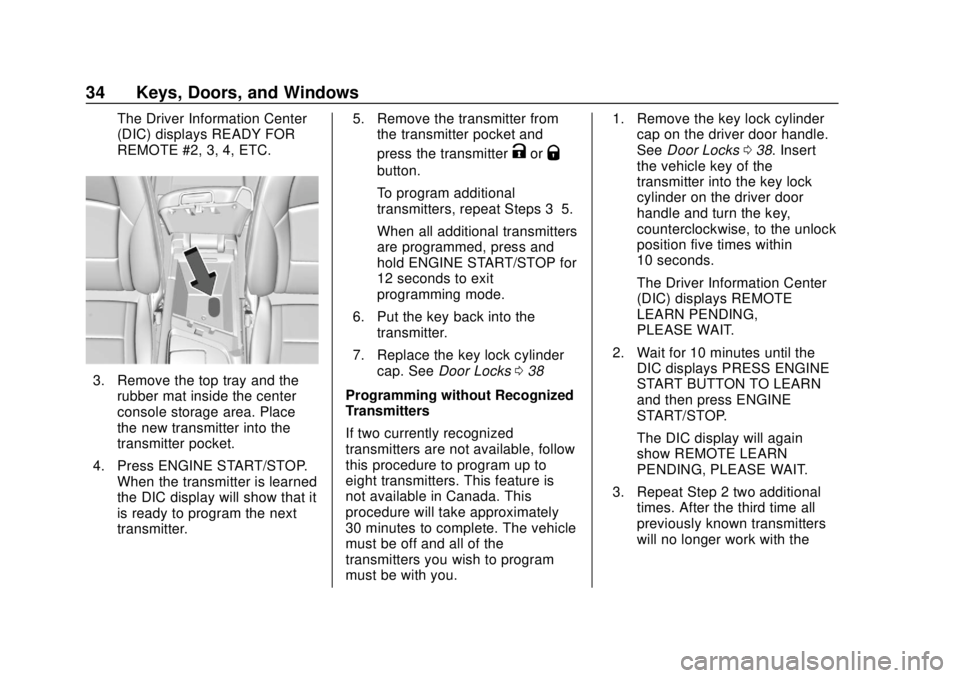
3. Remove the top tray and therubber mat inside the center
console storage area. Place
the new transmitter into the
transmitter pocket.
4. Press ENGINE START/STOP. When the transmitter is learned
the DIC display will show that it
is ready to program the next
transmitter. 5. Remove the transmitter from
the transmitter pocket and
press the transmitter
KorQ
button.
To program additional
transmitters, repeat Steps 3–5.
When all additional transmitters
are programmed, press and
hold ENGINE START/STOP for
12 seconds to exit
programming mode.
6. Put the key back into the transmitter.
7. Replace the key lock cylinder cap. See Door Locks 038
Programming without Recognized
Transmitters
If two currently recognized
transmitters are not available, follow
this procedure to program up to
eight transmitters. This feature is
not available in Canada. This
procedure will take approximately
30 minutes to complete. The vehicle
must be off and all of the
transmitters you wish to program
must be with you. 1. Remove the key lock cylinder
cap on the driver door handle.
See Door Locks 038. Insert
the vehicle key of the
transmitter into the key lock
cylinder on the driver door
handle and turn the key,
counterclockwise, to the unlock
position five times within
10 seconds.
The Driver Information Center
(DIC) displays REMOTE
LEARN PENDING,
PLEASE WAIT.
2. Wait for 10 minutes until the DIC displays PRESS ENGINE
START BUTTON TO LEARN
and then press ENGINE
START/STOP.
The DIC display will again
show REMOTE LEARN
PENDING, PLEASE WAIT.
3. Repeat Step 2 two additional times. After the third time all
previously known transmitters
will no longer work with the
Page 38 of 393
Buick Enclave Owner Manual (GMNA-Localizing-U.S./Canada/Mexico-
10999311) - 2018 - crc - 11/20/17
Keys, Doors, and Windows 37
Starting the Engine Using
Remote Start
To start the vehicle:1. Press and release
Qon the
RKE transmitter.
2. Immediately after completing Step 1, press and hold
/until
the lamps flash. If the vehicle's
lights cannot be seen, press
and hold
/for at least
four seconds.
When the vehicle starts, the park
lamps will turn on and remain on as
long as the engine is running. The
doors will be locked and the climate
control system will operate
automatically if the vehicle has the
automatic system, or at the same
setting as when the vehicle was last
turned off.
The heated seats turn on during
colder outside temperatures and
shut off when the ignition is turned
on. See Heated and Ventilated
Front Seats 068. The rear window defogger and
heated mirrors, if equipped, turn on
during colder outside temperatures
and turn off when the ignition is
turned on.
After entering the vehicle during a
remote start, press the brake and
ENGINE START/STOP with the
transmitter in the vehicle to drive the
vehicle.
If the vehicle is left running, it
automatically shuts off after
10 minutes unless a time extension
has been done.
Extending Engine Run Time
To extend the engine run time by
10 minutes, repeat Steps 1 and 2
while the engine is still running. An
extension can be requested
30 seconds after starting. The
engine run time can only be
extended if it is the first remote start
since the vehicle has been driven.
Remote start can be extended
one time.
If the remote start procedure is used
again while the engine is still
running, 10 minutes will be added
on for a total of 20 minutes.
For example, if
Qand then/are
pressed again while the engine is
still running, 10 minutes will be
added on for a total of 20 minutes.
A maximum of two remote starts or
remote start with an extension are
allowed between ignition cycles.
After the vehicle's engine has been
started two times using the remote
start button or a start with an
extension, the ignition must be
turned on and then back off before
the remote start procedure can be
used again.
Canceling a Remote Start
To manually shut off a remote start:
. Press and hold
/until the
lamps turn off.
. Turn on the hazard warning
flashers.
. Turn the ignition switch on and
then off.
Page 39 of 393
Buick Enclave Owner Manual (GMNA-Localizing-U.S./Canada/Mexico-
10999311) - 2018 - crc - 11/20/17
38 Keys, Doors, and Windows
Conditions in Which the
Remote Start Will Not Work
The vehicle cannot be started using
the remote start feature if:
.The transmitter is in the vehicle.
. The hood is not closed.
. The hazard warning flashers
are on.
. There is an emission control
system malfunction.
. Two remote vehicle starts or a
start with an extension have
already been used.
. The vehicle is not in P (Park).
The engine turns off during a remote
start if the coolant temperature gets
too high or if the oil pressure
gets low.
Door Locks
{Warning
Unlocked doors can be
dangerous. . Passengers, especially
children, can easily open
the doors and fall out of a
moving vehicle. The doors
can be unlocked and
opened while the vehicle is
moving. The chance of
being thrown out of the
vehicle in a crash is
increased if the doors are
not locked. So, all
passengers should wear
seat belts properly and the
doors should be locked
whenever the vehicle is
driven.
. Young children who get into
unlocked vehicles may be
unable to get out. A child
can be overcome by
extreme heat and can suffer
(Continued)
Warning (Continued)
permanent injuries or even
death from heat stroke.
Always lock the vehicle
whenever leaving it.
. Outsiders can easily enter
through an unlocked door
when you slow down or stop
the vehicle. Locking the
doors can help prevent this
from happening.
To lock/unlock the doors from the
outside:
. Press
QorKon the Remote
Keyless Entry (RKE) transmitter.
See Remote Keyless Entry
(RKE) System Operation 030.
. Use the key in the driver door.
The key lock cylinder is covered
with a cap.
To lock/unlock the doors from the
inside:
. Press
QorKon the power door
lock switch.
Page 40 of 393
Buick Enclave Owner Manual (GMNA-Localizing-U.S./Canada/Mexico-
10999311) - 2018 - crc - 11/20/17
Keys, Doors, and Windows 39
.Push down on the door lock
knob to lock a door.
. Pull the door handle once to
unlock it. Pull the door handle
again to unlatch it.
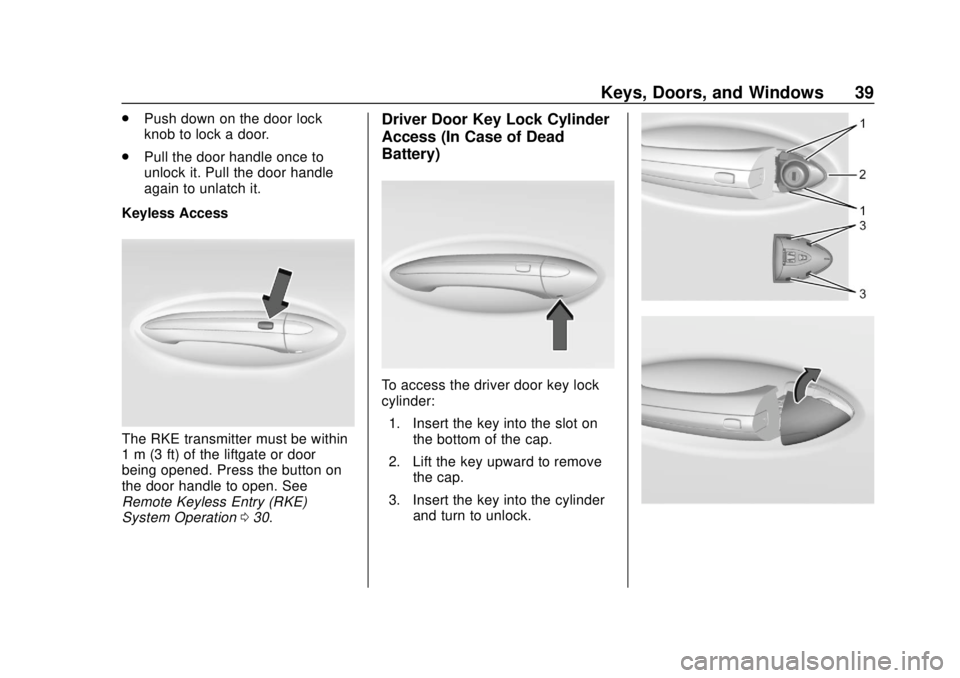
Keyless Access
The RKE transmitter must be within
1 m (3 ft) of the liftgate or door
being opened. Press the button on
the door handle to open. See
Remote Keyless Entry (RKE)
System Operation 030.
Driver Door Key Lock Cylinder
Access (In Case of Dead
Battery)
To access the driver door key lock
cylinder:
1. Insert the key into the slot on the bottom of the cap.
2. Lift the key upward to remove the cap.
3. Insert the key into the cylinder and turn to unlock.
Page 41 of 393
Buick Enclave Owner Manual (GMNA-Localizing-U.S./Canada/Mexico-
10999311) - 2018 - crc - 11/20/17
40 Keys, Doors, and Windows
To replace the cap:1. Position the bottom edge of the cap under the lower edge of
the metal piece (2). The
tabs (3) attach to the metal
piece (2) at the positions (1).
2. Rotate the cap upward and install into place.
3. Check that the cap is secure.
Free-Turning Locks
The door key lock cylinder turns
freely when either the wrong key is
used, or the correct key is not fully
inserted. The free-turning door lock
feature prevents the lock from being
forced open. To reset the lock, turn
it to the vertical position with the
correct key fully inserted. Remove
the key and insert it again. If this
does not reset the lock, turn the key
halfway around in the cylinder and
repeat the reset procedure.
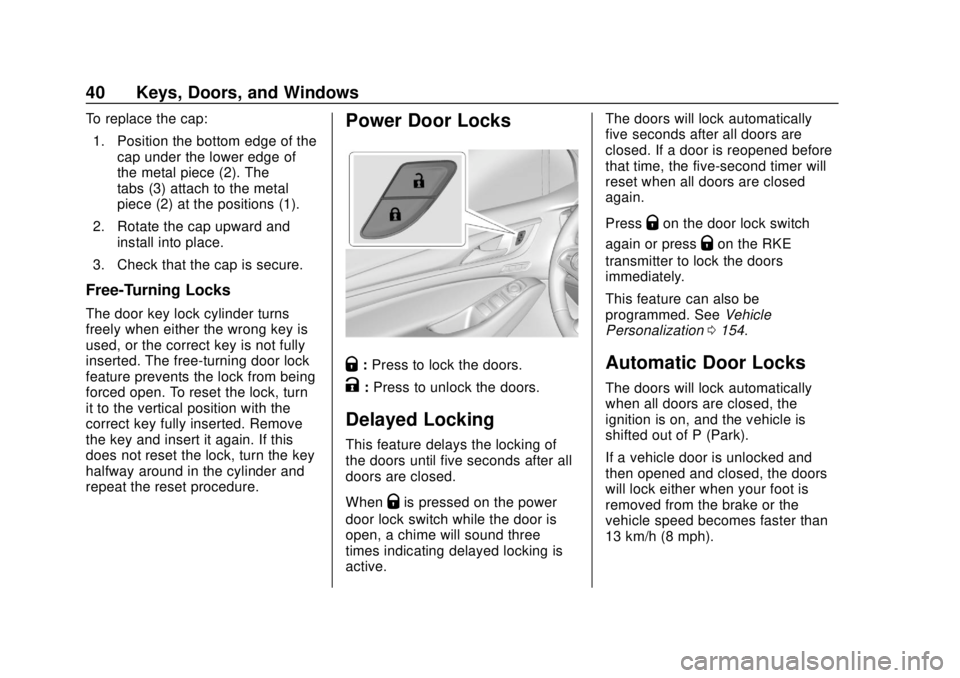
Power Door Locks
Q: Press to lock the doors.
K:Press to unlock the doors.
Delayed Locking
This feature delays the locking of
the doors until five seconds after all
doors are closed.
When
Qis pressed on the power
door lock switch while the door is
open, a chime will sound three
times indicating delayed locking is
active. The doors will lock automatically
five seconds after all doors are
closed. If a door is reopened before
that time, the five-second timer will
reset when all doors are closed
again.
Press
Qon the door lock switch
again or press
Qon the RKE
transmitter to lock the doors
immediately.
This feature can also be
programmed. See Vehicle
Personalization 0154.
Automatic Door Locks
The doors will lock automatically
when all doors are closed, the
ignition is on, and the vehicle is
shifted out of P (Park).
If a vehicle door is unlocked and
then opened and closed, the doors
will lock either when your foot is
removed from the brake or the
vehicle speed becomes faster than
13 km/h (8 mph).
Page 42 of 393

Buick Enclave Owner Manual (GMNA-Localizing-U.S./Canada/Mexico-
10999311) - 2018 - crc - 11/20/17
Keys, Doors, and Windows 41
To unlock the doors:
.Press
Kon the power door lock
switch.
. Shift into P (Park).
Automatic door locking cannot be
disabled. Automatic door unlocking
can be programmed. See Vehicle
Personalization 0154.
Lockout Protection
If the ignition is on or in ACC/
ACCESSORY and the power door
lock switch is pressed with the
driver door open, all the doors will
lock and only the driver door will
unlock.
If the vehicle is off and locking is
requested while a door is open,
when all doors are closed the
vehicle will check for RKE
transmitters inside. If an RKE
transmitter is detected and the
number of RKE transmitters inside
has not reduced, the driver door will
unlock and the horn will chirp three
times. Lockout Protection can be manually
overridden with the driver door open
by pressing and holding
Qon the
power door lock switch.
Unlocked Door Anti-Lockout
If Unlocked Door Anti-Lockout has
been turned on and the vehicle is
off, the driver door is open, and
locking is requested, all the doors
will lock and the driver door will
remain open. Press the button again
to lock the driver door. The
Unlocked Door Anti-Lockout feature
can be turned on or off. See Vehicle
Personalization 0154.
Safety Locks
The rear door safety locks prevent
passengers from opening the rear
doors from inside the vehicle.
Manual Safety Locks
If equipped, the safety lock is on the
inside edge of the rear doors. To
use the safety lock:
1. Move the lever down to the lock position.
2. Close the door.
3. Do the same for the other rear door.
To open a rear door when the safety
lock is on:
1. Unlock the door by activating the inside handle, by pressing
the power door lock switch,
Page 46 of 393
Buick Enclave Owner Manual (GMNA-Localizing-U.S./Canada/Mexico-
10999311) - 2018 - crc - 11/20/17
Keys, Doors, and Windows 45
sensor, the liftgate will reverse
direction and open fully. The liftgate
will remain open until it is activated
again or closed manually.
Setting the 3/4 Mode
To change the position the liftgate
stops at when opening:1. Select MAX or 3/4 mode and power open the liftgate.
2. Stop the liftgate movement at the desired height by pressing
any liftgate switch. Manually
adjust the liftgate position if
needed.
3. Press and hold
lto the left
of the latch at the bottom of the
liftgate until the turn signals
flash and a beep sounds. This
indicates the setting has been
recorded.
The liftgate cannot be set below a
minimum programmable height.
If there is no light flash or sound,
then the height adjustment may be
too low.
Manual Operation
Select OFF to manually operate the
liftgate.
Caution
Attempting to move the liftgate
too quickly and with excessive
force may result in damage to the
vehicle.
Operate the liftgate manually with a
smooth motion and moderate
speed. The system includes a
feature which limits the manual
closing speed to protect the
components.
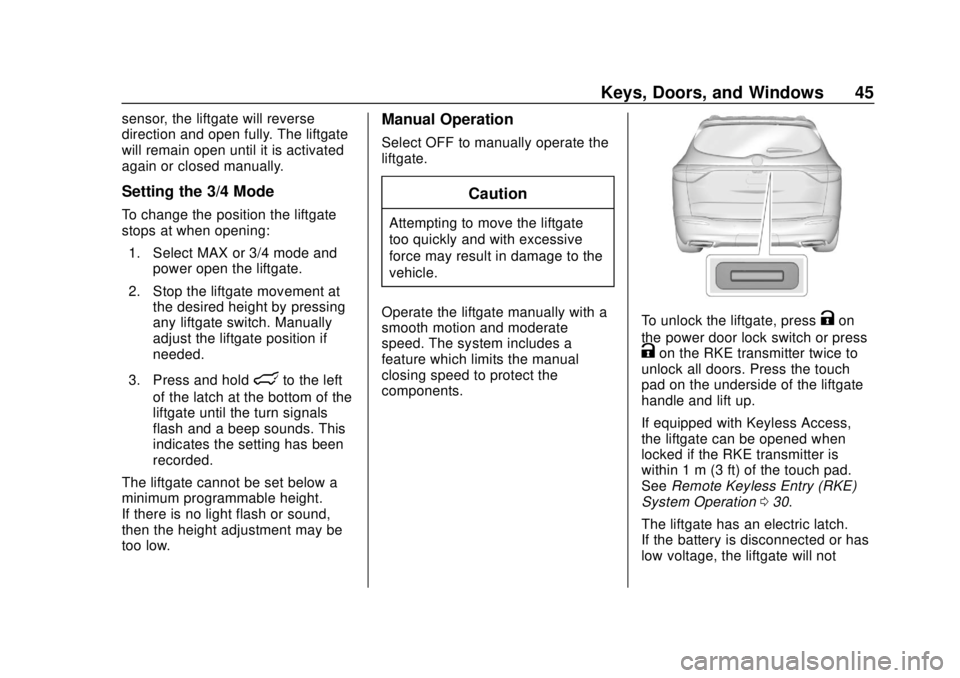
To unlock the liftgate, pressKon
the power door lock switch or press
Kon the RKE transmitter twice to
unlock all doors. Press the touch
pad on the underside of the liftgate
handle and lift up.
If equipped with Keyless Access,
the liftgate can be opened when
locked if the RKE transmitter is
within 1 m (3 ft) of the touch pad.
See Remote Keyless Entry (RKE)
System Operation 030.
The liftgate has an electric latch.
If the battery is disconnected or has
low voltage, the liftgate will not
Page 47 of 393
Buick Enclave Owner Manual (GMNA-Localizing-U.S./Canada/Mexico-
10999311) - 2018 - crc - 11/20/17
46 Keys, Doors, and Windows
open. The liftgate will resume
operation when the battery is
reconnected and charged.
Hands-Free Operation
The liftgate may be operated with a
kicking motion under the left side of
the rear bumper. The RKE
transmitter must be within 1 m (3 ft).
The hands-free feature will not work
while the liftgate is moving. To stop
the liftgate while in motion use one
of the liftgate switches.
The hands-free feature can be
customized. SeeVehicle
Personalization 0154. Choose from
the following:
On-Open and Close : The kicking
motion is activated to both open and
close the liftgate.
On-Open Only : The kicking motion
is activated to only open the liftgate.
Off : The feature is disabled.
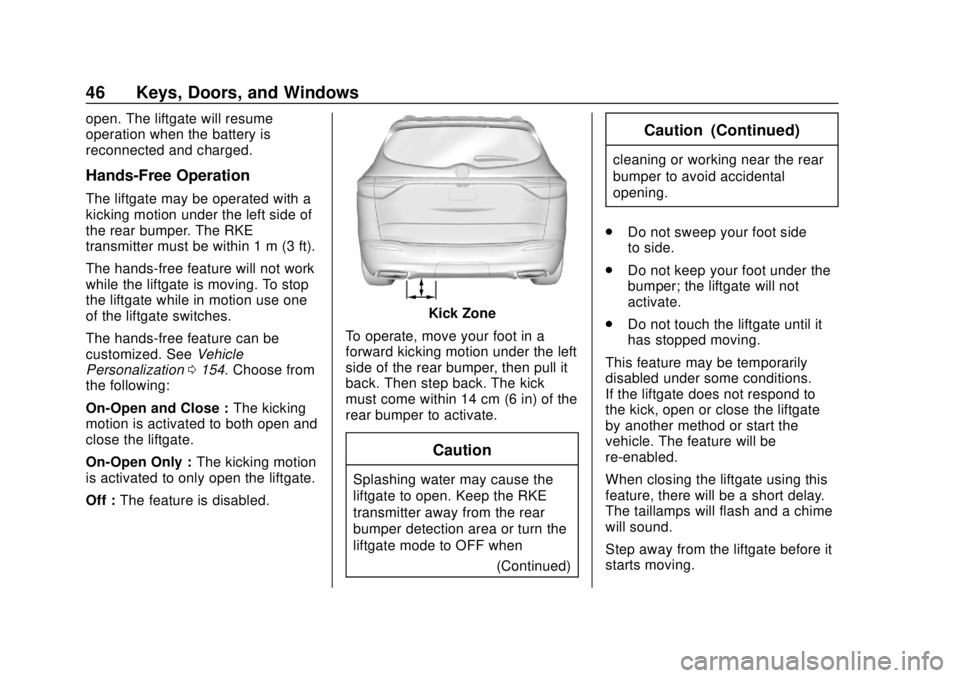
Kick Zone
To operate, move your foot in a
forward kicking motion under the left
side of the rear bumper, then pull it
back. Then step back. The kick
must come within 14 cm (6 in) of the
rear bumper to activate.
Caution
Splashing water may cause the
liftgate to open. Keep the RKE
transmitter away from the rear
bumper detection area or turn the
liftgate mode to OFF when (Continued)
Caution (Continued)
cleaning or working near the rear
bumper to avoid accidental
opening.
. Do not sweep your foot side
to side.
. Do not keep your foot under the
bumper; the liftgate will not
activate.
. Do not touch the liftgate until it
has stopped moving.
This feature may be temporarily
disabled under some conditions.
If the liftgate does not respond to
the kick, open or close the liftgate
by another method or start the
vehicle. The feature will be
re-enabled.
When closing the liftgate using this
feature, there will be a short delay.
The taillamps will flash and a chime
will sound.
Step away from the liftgate before it
starts moving.
Page 48 of 393
Buick Enclave Owner Manual (GMNA-Localizing-U.S./Canada/Mexico-
10999311) - 2018 - crc - 11/20/17
Keys, Doors, and Windows 47
Projected Logo
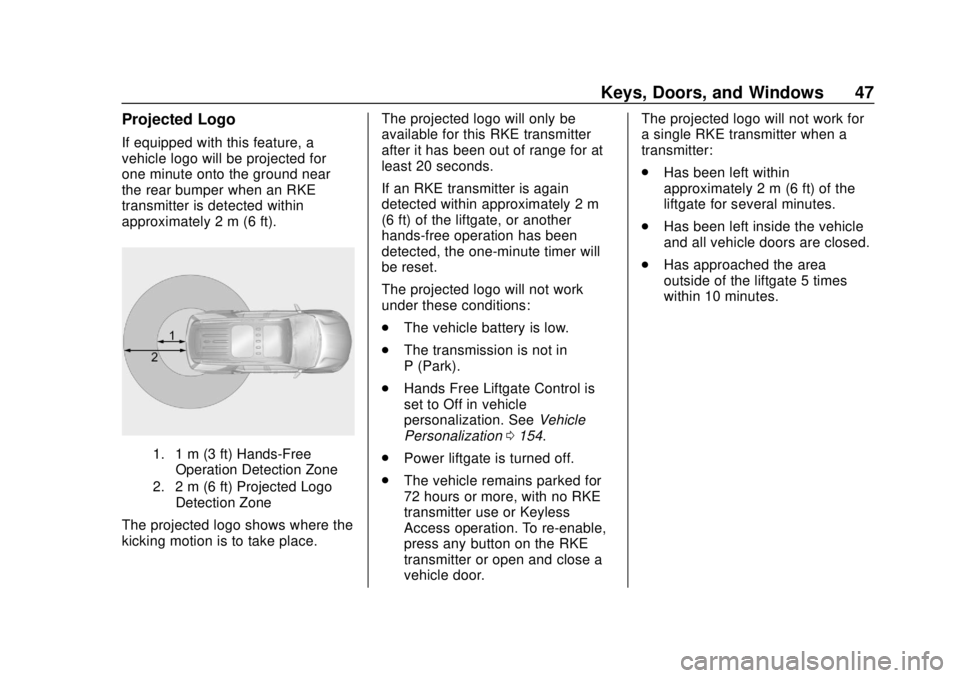
If equipped with this feature, a
vehicle logo will be projected for
one minute onto the ground near
the rear bumper when an RKE
transmitter is detected within
approximately 2 m (6 ft).
1. 1 m (3 ft) Hands-FreeOperation Detection Zone
2. 2 m (6 ft) Projected Logo Detection Zone
The projected logo shows where the
kicking motion is to take place. The projected logo will only be
available for this RKE transmitter
after it has been out of range for at
least 20 seconds.
If an RKE transmitter is again
detected within approximately 2 m
(6 ft) of the liftgate, or another
hands-free operation has been
detected, the one-minute timer will
be reset.
The projected logo will not work
under these conditions:
.
The vehicle battery is low.
. The transmission is not in
P (Park).
. Hands Free Liftgate Control is
set to Off in vehicle
personalization. See Vehicle
Personalization 0154.
. Power liftgate is turned off.
. The vehicle remains parked for
72 hours or more, with no RKE
transmitter use or Keyless
Access operation. To re-enable,
press any button on the RKE
transmitter or open and close a
vehicle door. The projected logo will not work for
a single RKE transmitter when a
transmitter:
.
Has been left within
approximately 2 m (6 ft) of the
liftgate for several minutes.
. Has been left inside the vehicle
and all vehicle doors are closed.
. Has approached the area
outside of the liftgate 5 times
within 10 minutes.
Page 49 of 393
Buick Enclave Owner Manual (GMNA-Localizing-U.S./Canada/Mexico-
10999311) - 2018 - crc - 11/20/17
48 Keys, Doors, and Windows
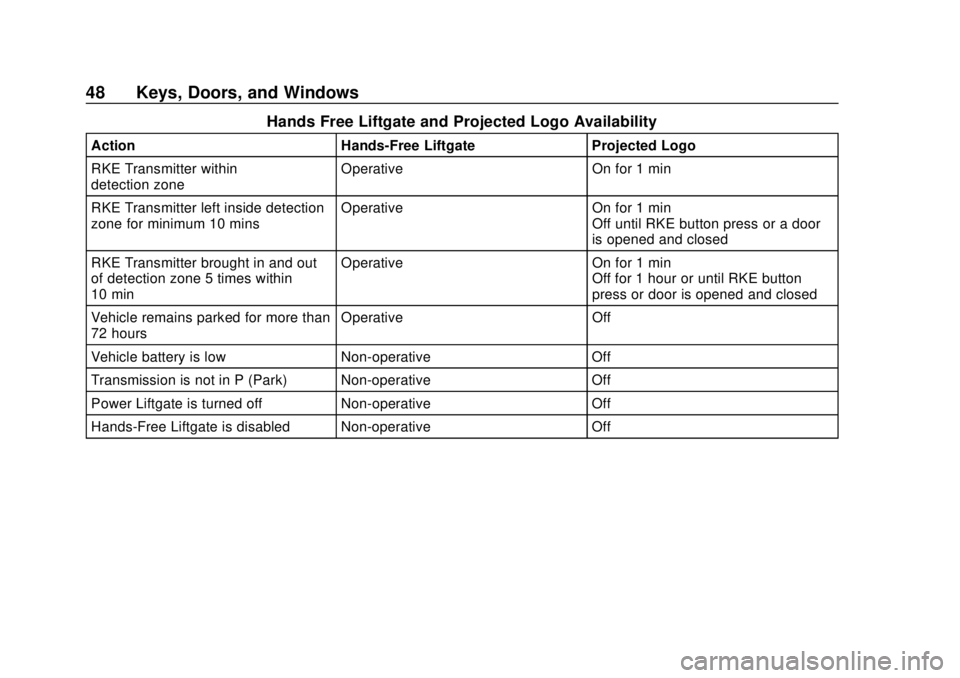
Hands Free Liftgate and Projected Logo Availability
ActionHands-Free Liftgate Projected Logo
RKE Transmitter within
detection zone Operative
On for 1 min
RKE Transmitter left inside detection
zone for minimum 10 mins Operative
On for 1 min
Off until RKE button press or a door
is opened and closed
RKE Transmitter brought in and out
of detection zone 5 times within
10 min Operative
On for 1 min
Off for 1 hour or until RKE button
press or door is opened and closed
Vehicle remains parked for more than
72 hours Operative
Off
Vehicle battery is low Non-operative Off
Transmission is not in P (Park) Non-operative Off
Power Liftgate is turned off Non-operative Off
Hands-Free Liftgate is disabled Non-operative Off