ignition positions BUICK ENCLAVE 2018 Owner's Manual
[x] Cancel search | Manufacturer: BUICK, Model Year: 2018, Model line: ENCLAVE, Model: BUICK ENCLAVE 2018Pages: 393, PDF Size: 5.68 MB
Page 8 of 393

Buick Enclave Owner Manual (GMNA-Localizing-U.S./Canada/Mexico-
10999311) - 2018 - crc - 11/20/17
In Brief 7
1.Air Vents 0182.
2. Turn Signal Lever. See Turn
and Lane-Change Signals
0 170.
IntelliBeam
®System Button (If
Equipped). See Exterior Lamp
Controls 0166.
3. Manual Mode 0215 (If
Equipped).
4. Instrument Cluster 0132.
Driver Information Center (DIC)
Display.
See Driver Information Center
(DIC) (Base Level) 0148 or
Driver Information Center (DIC)
(Uplevel) 0150.
5. Windshield Wiper/Washer
0124.
6. Traction Control/Electronic
Stability Control 0220.
All Wheel Drive Button (If
Equipped). See Driver Mode
Control 0222. Sport Mode Button (If
Equipped) or Tow/Haul Mode
Button (If Equipped). See
Driver Mode Control
0222.
7. Light Sensor. See Automatic
Headlamp System 0169.
8. Hazard Warning Flashers
0170.
Assistance Systems for
Parking or Backing 0235 (If
Equipped).
Lane Keep Assist (LKA) 0247
(If Equipped).
9. Infotainment 0175.
10. Dual Automatic Climate Control
System 0176.
Heated and Ventilated Front
Seats 068 (If Equipped).
11. Wireless Charging 0129 (If
Equipped).
12. Shift Lever. See Automatic
Transmission 0210.
13. ENGINE START/STOP Button. SeeIgnition Positions 0200.
14. Steering Wheel Controls 0123. 15.
Horn 0124.
16. Steering Wheel Adjustment
0123 (Out of View).
17. Cruise Control 0224.
Adaptive Cruise Control 0226
(If Equipped).
Heated Steering Wheel 0123
(If Equipped).
Forward Collision Alert (FCA)
System 0239 (If Equipped).
18. Hood Release. See Hood
0 266.
19. Data Link Connector (DLC) (Out of View). See Malfunction
Indicator Lamp (Check Engine
Light) 0140.
20. Exterior Lamp Controls 0166.
21. Instrument Panel Illumination
Control 0171.
22. Electric Parking Brake 0218.
Page 12 of 393
Buick Enclave Owner Manual (GMNA-Localizing-U.S./Canada/Mexico-
10999311) - 2018 - crc - 11/20/17
In Brief 11
Seat Adjustment
{Warning
You can lose control of the
vehicle if you try to adjust a driver
seat while the vehicle is moving.
Adjust the driver seat only when
the vehicle is not moving.
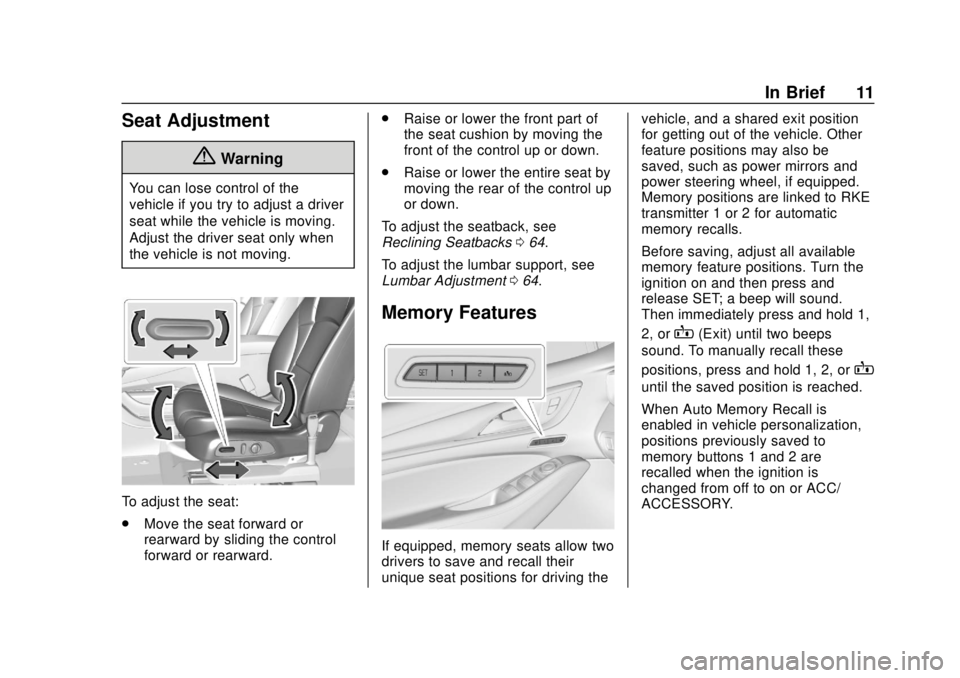
To adjust the seat:
.Move the seat forward or
rearward by sliding the control
forward or rearward. .
Raise or lower the front part of
the seat cushion by moving the
front of the control up or down.
. Raise or lower the entire seat by
moving the rear of the control up
or down.
To adjust the seatback, see
Reclining Seatbacks 064.
To adjust the lumbar support, see
Lumbar Adjustment 064.
Memory Features
If equipped, memory seats allow two
drivers to save and recall their
unique seat positions for driving the vehicle, and a shared exit position
for getting out of the vehicle. Other
feature positions may also be
saved, such as power mirrors and
power steering wheel, if equipped.
Memory positions are linked to RKE
transmitter 1 or 2 for automatic
memory recalls.
Before saving, adjust all available
memory feature positions. Turn the
ignition on and then press and
release SET; a beep will sound.
Then immediately press and hold 1,
2, or
B(Exit) until two beeps
sound. To manually recall these
positions, press and hold 1, 2, or
B
until the saved position is reached.
When Auto Memory Recall is
enabled in vehicle personalization,
positions previously saved to
memory buttons 1 and 2 are
recalled when the ignition is
changed from off to on or ACC/
ACCESSORY.
Page 19 of 393
Buick Enclave Owner Manual (GMNA-Localizing-U.S./Canada/Mexico-
10999311) - 2018 - crc - 11/20/17
18 In Brief
Exterior Lighting
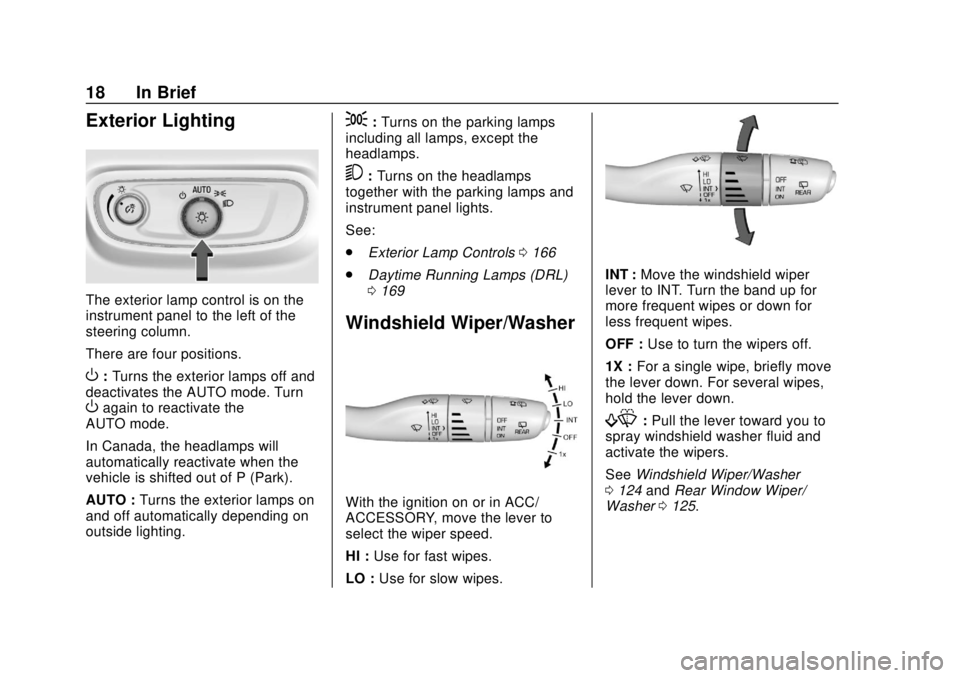
The exterior lamp control is on the
instrument panel to the left of the
steering column.
There are four positions.
O:Turns the exterior lamps off and
deactivates the AUTO mode. Turn
Oagain to reactivate the
AUTO mode.
In Canada, the headlamps will
automatically reactivate when the
vehicle is shifted out of P (Park).
AUTO : Turns the exterior lamps on
and off automatically depending on
outside lighting.
;: Turns on the parking lamps
including all lamps, except the
headlamps.
5: Turns on the headlamps
together with the parking lamps and
instrument panel lights.
See:
. Exterior Lamp Controls 0166
. Daytime Running Lamps (DRL)
0169
Windshield Wiper/Washer
With the ignition on or in ACC/
ACCESSORY, move the lever to
select the wiper speed.
HI : Use for fast wipes.
LO : Use for slow wipes.
INT : Move the windshield wiper
lever to INT. Turn the band up for
more frequent wipes or down for
less frequent wipes.
OFF : Use to turn the wipers off.
1X : For a single wipe, briefly move
the lever down. For several wipes,
hold the lever down.
f: Pull the lever toward you to
spray windshield washer fluid and
activate the wipers.
See Windshield Wiper/Washer
0 124 andRear Window Wiper/
Washer 0125.
Page 26 of 393
Buick Enclave Owner Manual (GMNA-Localizing-U.S./Canada/Mexico-
10999311) - 2018 - crc - 11/20/17
In Brief 25
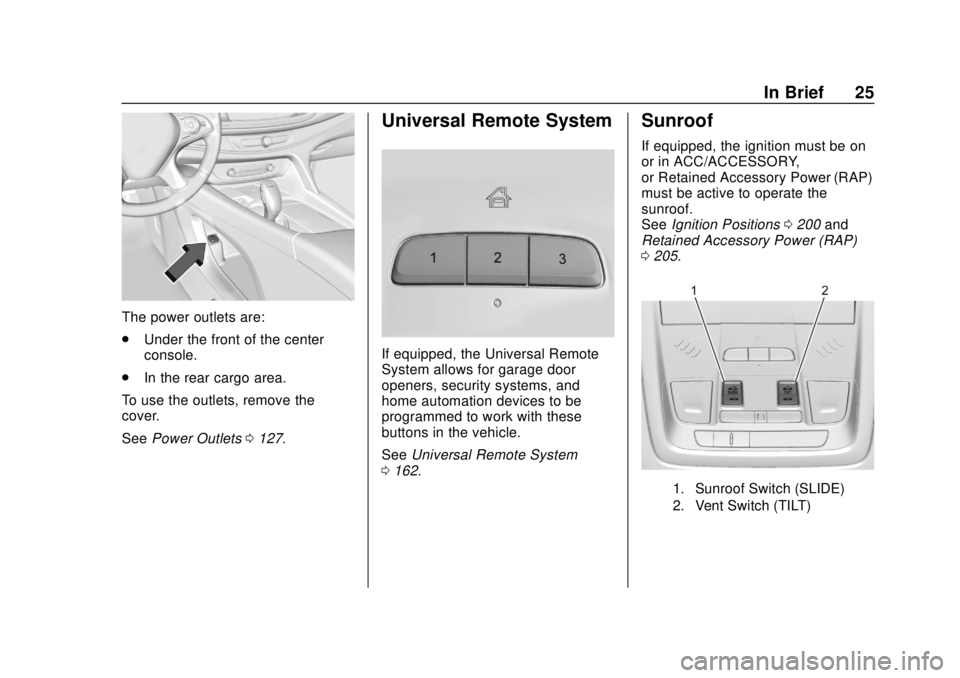
The power outlets are:
.Under the front of the center
console.
. In the rear cargo area.
To use the outlets, remove the
cover.
See Power Outlets 0127.
Universal Remote System
If equipped, the Universal Remote
System allows for garage door
openers, security systems, and
home automation devices to be
programmed to work with these
buttons in the vehicle.
See Universal Remote System
0 162.
Sunroof
If equipped, the ignition must be on
or in ACC/ACCESSORY,
or Retained Accessory Power (RAP)
must be active to operate the
sunroof.
See Ignition Positions 0200 and
Retained Accessory Power (RAP)
0 205.
1. Sunroof Switch (SLIDE)
2. Vent Switch (TILT)
Page 41 of 393
Buick Enclave Owner Manual (GMNA-Localizing-U.S./Canada/Mexico-
10999311) - 2018 - crc - 11/20/17
40 Keys, Doors, and Windows
To replace the cap:1. Position the bottom edge of the cap under the lower edge of
the metal piece (2). The
tabs (3) attach to the metal
piece (2) at the positions (1).
2. Rotate the cap upward and install into place.
3. Check that the cap is secure.
Free-Turning Locks
The door key lock cylinder turns
freely when either the wrong key is
used, or the correct key is not fully
inserted. The free-turning door lock
feature prevents the lock from being
forced open. To reset the lock, turn
it to the vertical position with the
correct key fully inserted. Remove
the key and insert it again. If this
does not reset the lock, turn the key
halfway around in the cylinder and
repeat the reset procedure.
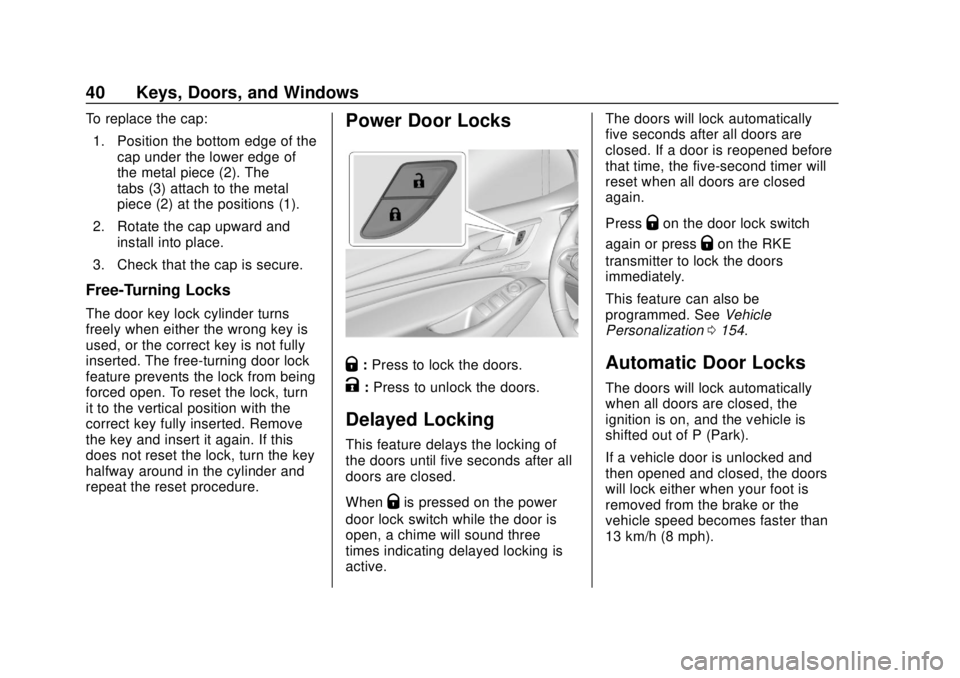
Power Door Locks
Q: Press to lock the doors.
K:Press to unlock the doors.
Delayed Locking
This feature delays the locking of
the doors until five seconds after all
doors are closed.
When
Qis pressed on the power
door lock switch while the door is
open, a chime will sound three
times indicating delayed locking is
active. The doors will lock automatically
five seconds after all doors are
closed. If a door is reopened before
that time, the five-second timer will
reset when all doors are closed
again.
Press
Qon the door lock switch
again or press
Qon the RKE
transmitter to lock the doors
immediately.
This feature can also be
programmed. See Vehicle
Personalization 0154.
Automatic Door Locks
The doors will lock automatically
when all doors are closed, the
ignition is on, and the vehicle is
shifted out of P (Park).
If a vehicle door is unlocked and
then opened and closed, the doors
will lock either when your foot is
removed from the brake or the
vehicle speed becomes faster than
13 km/h (8 mph).
Page 59 of 393

Buick Enclave Owner Manual (GMNA-Localizing-U.S./Canada/Mexico-
10999311) - 2018 - crc - 11/20/17
58 Keys, Doors, and Windows
Roof
Sunroof
If equipped, the ignition must be on
or in ACC/ACCESSORY,
or Retained Accessory Power (RAP)
must be active to operate the
sunroof.
SeeIgnition Positions 0200 and
Retained Accessory Power (RAP)
0 205.
1. Sunroof Switch (SLIDE)
2. Vent Switch (TILT)
Slide Switch
Express-Open/Express-Close :
Press and release
D(1) to
express-open the sunroof. The
sunshade will not open
automatically. Press and release
g(1) to express-close the
sunroof.
Open/Close (Manual Mode) : Fully
press
D(1) to open the sunroof.
The sunshade will not automatically
open with the sunroof. Release to
stop at the desired position. Fully
press
g(1) to close the sunroof.
Release to stop at the desired
position.
Tilt Switch
Vent Feature : Press
E(2) to vent
the sunroof. Press again and hold to
open the sunroof. Release to stop at
the desired position. The sunshade
will not open automatically. Press
g(2) to express-close the
sunroof. Press again to stop the
movement. The front sunshade can only be
opened and closed manually. The
sunshade can be opened by
pushing up on the handle, and
closed by pulling forward on the
handle until it latches.
If equipped, the rear sunshade can
only be opened or closed manually.
To open, press the latch button (if
equipped) on the handle while
pushing up to unlatch it. The
sunshade will retract to the open
position. To close the sunshade, pull
the handle forward until it latches.
Do not try to close the sunshade
while the sunroof is fully opened or
in the vent position.
The sunroof cannot be opened or
closed if the vehicle has an
electrical failure.
Automatic Reversal System
The sunroof has an automatic
reversal system that is only active
when the sunroof is operated in
express-close mode.
Page 66 of 393
Buick Enclave Owner Manual (GMNA-Localizing-U.S./Canada/Mexico-
10999311) - 2018 - crc - 11/20/17
Seats and Restraints 65
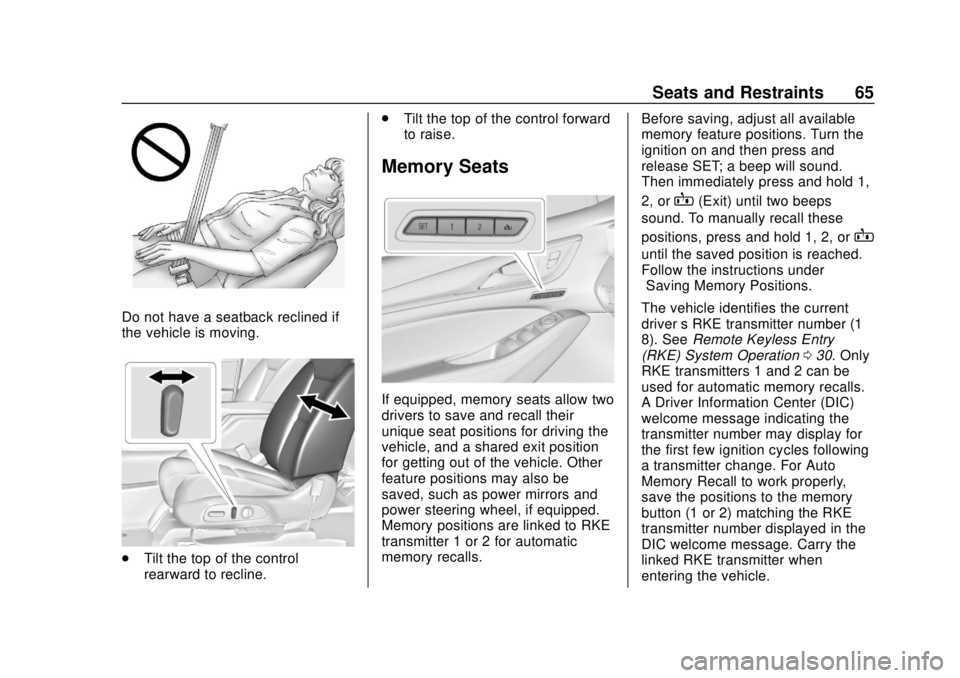
Do not have a seatback reclined if
the vehicle is moving.
.Tilt the top of the control
rearward to recline. .
Tilt the top of the control forward
to raise.
Memory Seats
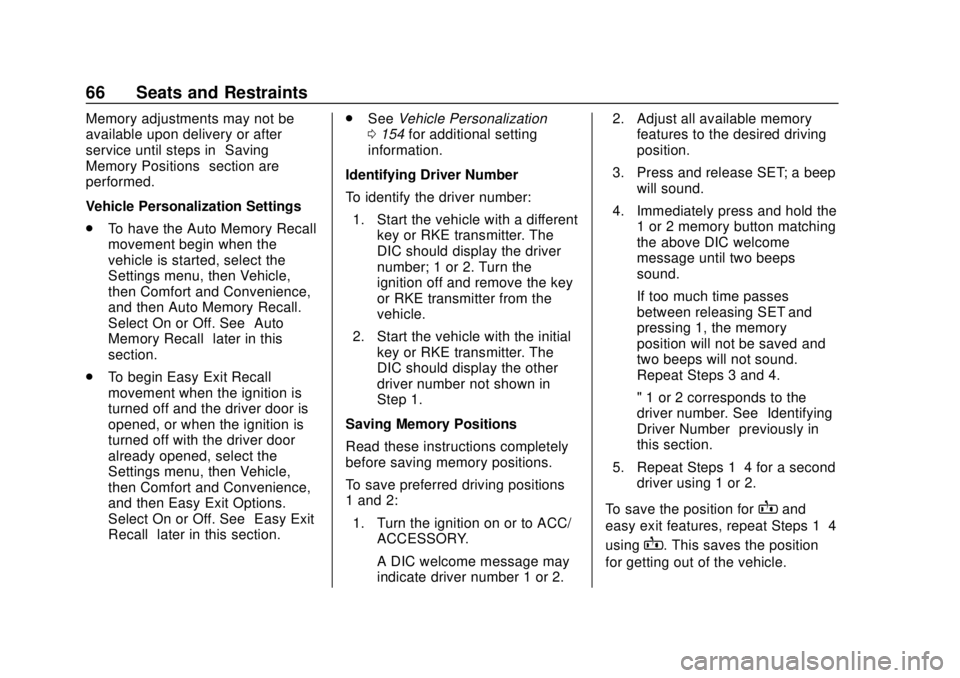
If equipped, memory seats allow two
drivers to save and recall their
unique seat positions for driving the
vehicle, and a shared exit position
for getting out of the vehicle. Other
feature positions may also be
saved, such as power mirrors and
power steering wheel, if equipped.
Memory positions are linked to RKE
transmitter 1 or 2 for automatic
memory recalls. Before saving, adjust all available
memory feature positions. Turn the
ignition on and then press and
release SET; a beep will sound.
Then immediately press and hold 1,
2, or
B(Exit) until two beeps
sound. To manually recall these
positions, press and hold 1, 2, or
B
until the saved position is reached.
Follow the instructions under
“Saving Memory Positions.”
The vehicle identifies the current
driver ’s RKE transmitter number (1–
8). See Remote Keyless Entry
(RKE) System Operation 030. Only
RKE transmitters 1 and 2 can be
used for automatic memory recalls.
A Driver Information Center (DIC)
welcome message indicating the
transmitter number may display for
the first few ignition cycles following
a transmitter change. For Auto
Memory Recall to work properly,
save the positions to the memory
button (1 or 2) matching the RKE
transmitter number displayed in the
DIC welcome message. Carry the
linked RKE transmitter when
entering the vehicle.
Page 67 of 393
Buick Enclave Owner Manual (GMNA-Localizing-U.S./Canada/Mexico-
10999311) - 2018 - crc - 11/20/17
66 Seats and Restraints
Memory adjustments may not be
available upon delivery or after
service until steps in“Saving
Memory Positions” section are
performed.
Vehicle Personalization Settings
. To have the Auto Memory Recall
movement begin when the
vehicle is started, select the
Settings menu, then Vehicle,
then Comfort and Convenience,
and then Auto Memory Recall.
Select On or Off. See “Auto
Memory Recall” later in this
section.
. To begin Easy Exit Recall
movement when the ignition is
turned off and the driver door is
opened, or when the ignition is
turned off with the driver door
already opened, select the
Settings menu, then Vehicle,
then Comfort and Convenience,
and then Easy Exit Options.
Select On or Off. See “Easy Exit
Recall” later in this section. .
See Vehicle Personalization
0 154 for additional setting
information.
Identifying Driver Number
To identify the driver number: 1. Start the vehicle with a different key or RKE transmitter. The
DIC should display the driver
number; 1 or 2. Turn the
ignition off and remove the key
or RKE transmitter from the
vehicle.
2. Start the vehicle with the initial key or RKE transmitter. The
DIC should display the other
driver number not shown in
Step 1.
Saving Memory Positions
Read these instructions completely
before saving memory positions.
To save preferred driving positions
1 and 2: 1. Turn the ignition on or to ACC/ ACCESSORY.
A DIC welcome message may
indicate driver number 1 or 2. 2. Adjust all available memory
features to the desired driving
position.
3. Press and release SET; a beep will sound.
4. Immediately press and hold the 1 or 2 memory button matching
the above DIC welcome
message until two beeps
sound.
If too much time passes
between releasing SET and
pressing 1, the memory
position will not be saved and
two beeps will not sound.
Repeat Steps 3 and 4.
•1 or 2 corresponds to the
driver number. See “Identifying
Driver Number” previously in
this section.
5. Repeat Steps 1–4 for a second driver using 1 or 2.
To save the position for
Band
easy exit features, repeat Steps 1–4
using
B. This saves the position
for getting out of the vehicle.
Page 68 of 393
Buick Enclave Owner Manual (GMNA-Localizing-U.S./Canada/Mexico-
10999311) - 2018 - crc - 11/20/17
Seats and Restraints 67
Save preferred memory feature
positions to both 1 and 2 if you are
the only driver.
Manually Recalling Memory
Positions
Press and hold 1, 2, or
Bto recall
the previously saved memory
positions.
To stop Manual Memory Recall
movement, release 1, 2, or
Bor
press any of the following controls:
. Power seat
. Memory SET, 1, 2, or
B
.Power mirror, with the driver or
passenger side mirror selected
. Power steering wheel
Auto Memory Recall
The vehicle identifies the number of
the current driver ’s RKE transmitter
(1–8). See Remote Keyless Entry
(RKE) System Operation 030. If the
RKE transmitter is 1 or 2, and Auto
Memory Recall is programmed on in
vehicle personalization, the
positions saved to the same memory button number 1 or 2 are
automatically recalled when the
ignition is turned on, or turned from
off to ACC/ACCESSORY. RKE
transmitters 3–8 will not provide
automatic memory recalls.
To turn Auto Memory Recall on or
off, see "Vehicle Personalization
Settings" previously in this section
and
Vehicle Personalization 0154.
The shift lever must be in P (Park)
to start Auto Memory Recall. Auto
Memory Recall will complete if the
vehicle is shifted out of P (Park)
prior to reaching the saved memory
position.
To stop Auto Memory Recall
movement, turn the ignition off or
press any of the following controls:
. Power seat
. Memory SET, 1, 2, or
B
.Power mirror, with the driver or
passenger side mirror selected
. Power steering wheel,
if equipped If the saved memory seat position
does not automatically recall or
recalls to the wrong positions, the
driver
’s RKE transmitter number (1
or 2) may not match the memory
button number that positions were
saved to. Try saving the position to
the other memory button or try the
other RKE transmitter.
Easy Exit Recall
Easy Exit Recall is not linked to an
RKE transmitter. The position saved
to
Bis used for all drivers. To turn
Easy Exit Recall on or off, see
"Vehicle Personalization Settings"
previously in this section and
Vehicle Personalization 0154.
If turned on, the position saved to
Bis automatically recalled when
one of the following occurs:
. The vehicle is turned off and the
driver door is opened within a
short time.
. The vehicle is turned off with the
driver door open.
Page 141 of 393
Buick Enclave Owner Manual (GMNA-Localizing-U.S./Canada/Mexico-
10999311) - 2018 - crc - 11/20/17
140 Instruments and Controls
When this light comes on, the Driver
Information Center (DIC) also
displays a message.
If a short distance must be driven
with the light on, be sure to turn off
all accessories, such as the radio
and air conditioner.
Malfunction Indicator
Lamp (Check Engine
Light)
This light is part of the vehicle’s
emission control on-board
diagnostic system. If this light is on
while the engine is running, a
malfunction has been detected and
the vehicle may require service. The
light should come on to show that it
is working when the ignition is in
Service Mode. SeeIgnition
Positions 0200.
Malfunctions are often indicated by
the system before any problem is
noticeable. Being aware of the light
and seeking service promptly when
it comes on may prevent damage.
Caution
If the vehicle is driven continually
with this light on, the emission
control system may not work as
well, the fuel economy may be
lower, and the vehicle may not
run smoothly. This could lead to
costly repairs that might not be
covered by the vehicle warranty.
Caution
Modifications to the engine,
transmission, exhaust, intake,
or fuel system, or the use of
replacement tires that do not
meet the original tire
specifications, can cause this light
to come on. This could lead to
(Continued)
Caution (Continued)
costly repairs not covered by the
vehicle warranty. This could also
affect the vehicle’s ability to pass
an Emissions Inspection/
Maintenance test. See
Accessories and Modifications
0265.
If the light is flashing : A
malfunction has been detected that
could damage the emission control
system and increase vehicle
emissions. Diagnosis and service
may be required.
To help prevent damage, reduce
vehicle speed and avoid hard
accelerations and uphill grades.
If towing a trailer, reduce the
amount of cargo being hauled as
soon as possible.
If the light continues to flash, find a
safe place to park. Turn the vehicle
off and wait at least 10 seconds
before restarting the engine. If the
light is still flashing, follow the