Seat BUICK ENCLAVE 2019 Owners Manual
[x] Cancel search | Manufacturer: BUICK, Model Year: 2019, Model line: ENCLAVE, Model: BUICK ENCLAVE 2019Pages: 398, PDF Size: 5.91 MB
Page 176 of 398
Buick Enclave Owner Manual (GMNA-Localizing-U.S./Canada/Mexico-
12146155) - 2019 - crc - 9/10/18
Lighting 175
Exit Lighting
Some exterior lamps and interior
lights come on at night, or in areas
with limited lighting, when the driver
door is opened after the ignition is
turned off. The dome lamp comes
on after the ignition is turned off.
The exterior lamps and dome lamp
remain on for a set amount of time,
then automatically turn off.
The exterior lamps turn off
immediately by turning the exterior
lamp control off.
This feature can be changed. See
Vehicle Personalization0156.
Battery Load
Management
The vehicle has Electric Power
Management (EPM) that estimates
the battery's temperature and state
of charge. It then adjusts the voltage
for best performance and extended
life of the battery.
When the battery's state of charge
is low, the voltage is raised slightly
to quickly bring the charge back up. When the state of charge is high,
the voltage is lowered slightly to
prevent overcharging. If the vehicle
has a voltmeter gauge or a voltage
display on the Driver Information
Center (DIC), you may see the
voltage move up or down. This is
normal. If there is a problem, an
alert will be displayed.
The battery can be discharged at
idle if the electrical loads are very
high. This is true for all vehicles.
This is because the generator
(alternator) may not be spinning fast
enough at idle to produce all of the
power needed for very high
electrical loads.
A high electrical load occurs when
several of the following are on, such
as: headlamps, high beams, rear
window defogger, climate control fan
at high speed, heated seats, engine
cooling fans, trailer loads, and loads
plugged into accessory power
outlets.
EPM works to prevent excessive
discharge of the battery. It does this
by balancing the generator's output
and the vehicle's electrical needs.It can increase engine idle speed to
generate more power whenever
needed. It can temporarily reduce
the power demands of some
accessories.
Normally, these actions occur in
steps or levels, without being
noticeable. In rare cases at the
highest levels of corrective action,
this action may be noticeable to the
driver. If so, a DIC battery voltage
and charging message displays. It is
recommended that the driver reduce
the electrical loads as much as
possible.
See
Driver Information Center (DIC)
(Base Level) 0149 orDriver
Information Center (DIC) (Uplevel)
0 152.Battery Power Protection
This feature helps prevent the
battery from being drained, if the
interior courtesy lamps or reading
lamps are accidentally left on. If any
of these lamps are left on, they
automatically turn off after
Page 179 of 398

Buick Enclave Owner Manual (GMNA-Localizing-U.S./Canada/Mexico-
12146155) - 2019 - crc - 9/10/18
178 Climate Controls
Climate Controls
Climate Control Systems
Dual Automatic ClimateControl System . . . . . . . . . . . . . 178
Rear Climate Control System . . . . . . . . . . . . . . . . . . . . . . 182
Air Vents
Air Vents . . . . . . . . . . . . . . . . . . . . . 184
Maintenance
Passenger Compartment AirFilter . . . . . . . . . . . . . . . . . . . . . . . . 185
Service . . . . . . . . . . . . . . . . . . . . . . . 185
Climate Control Systems
Dual Automatic Climate Control System
The climate control buttons on the center stack and on the climate control
display are used to adjust the heating, cooling, and ventilation.
Center Stack Climate Controls
1. Driver and Passenger Temperature Displays
2. Driver and Passenger Temperature Controls
3. Driver and Passenger Heated and Ventilated Seats (If
Equipped) 4. Fan Controls
5. CLIMATE (Climate Control
Display)
6. MAX Defrost
7. Recirculation
Page 183 of 398
Buick Enclave Owner Manual (GMNA-Localizing-U.S./Canada/Mexico-
12146155) - 2019 - crc - 9/10/18
182 Climate Controls
Caution
Do not try to clear frost or other
material from the inside of the
front windshield and rear window
with a razor blade or anything
else that is sharp. This may
damage the rear window
defogger grid and affect the
radio's ability to pick up stations
clearly. The repairs would not be
covered by the vehicle warranty.
Heated and Ventilated Seats
MorL:If equipped, pressMorLto heat the driver or passenger seat.
Cor{:If equipped, pressCor{to ventilate the driver or
passenger seat. See Heated and
Ventilated Seats 012.
Remote Start Climate Control
Operation : The climate control
system may run when the vehicle is
started remotely. If the vehicle has
heated or ventilated seats, they may come on during a remote start.
See
Remote Vehicle Start 036 and
Heated and Ventilated Seats 012.
Sensors
The solar sensor, on top of the
instrument panel near the
windshield, monitors the solar heat.
The climate control system uses the
sensor information to adjust the
temperature, fan speed,
recirculation, and air delivery mode
for best comfort.
Do not cover the sensor; otherwise
the automatic climate control system
may not work properly.
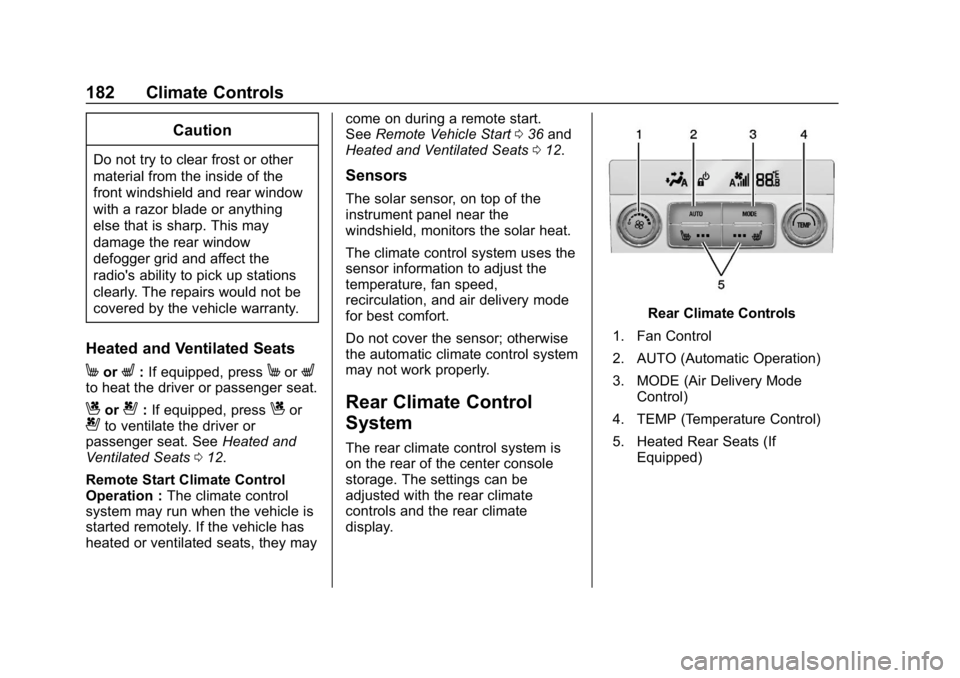
Rear Climate Control
System
The rear climate control system is
on the rear of the center console
storage. The settings can be
adjusted with the rear climate
controls and the rear climate
display.
Rear Climate Controls
1. Fan Control
2. AUTO (Automatic Operation)
3. MODE (Air Delivery Mode Control)
4. TEMP (Temperature Control)
5. Heated Rear Seats (If Equipped)
Page 184 of 398

Buick Enclave Owner Manual (GMNA-Localizing-U.S./Canada/Mexico-
12146155) - 2019 - crc - 9/10/18
Climate Controls 183
Rear Climate Display
1. Outside Temperature Display
2. Sync (Synchronized Temperatures)
3. Front Climate Control Display
4. REAR
O(On/Off)
5. Rear Auto (Automatic Operation)
6. Rear Control Lockout
7. Fan Control
8. Air Delivery Mode Control
9. Rear Climate Temperature Control REAR
O:
Touch REAROto turn
the rear climate control on or off.
Sync : Touch Sync on the rear
climate display to match the rear
climate control temperature to the
front climate control driver
temperature. The Sync button will
be lit. Adjust the rear climate control
temperature to change the linked
temperature. The Sync button
turns off.
Rear Control Lockout : Touch
Rear Control Lockout on the rear
climate display to lock or unlock
control of the rear climate control
system from the front seat. When
locked,
Qwill show on the rear
climate display. The rear climate
control system cannot be adjusted
from the second row seats.
Automatic Operation
AUTO : Touch AUTO or touch Rear
AUTO on the rear climate display to
automatically control air delivery
and fan speed. A is indicated in the
display on the rear of the center
console storage when automatic operation is active. If any of the
climate control settings are manually
adjusted, this cancels full automatic
operation.
The display on the rear of the center
console storage only indicates
climate control functions when the
system is in rear independent mode.
When Sync is active the display is
not shown.
Manual Operation
9:
Turn the knob clockwise or
counterclockwise or press and hold
SorTon the rear climate display
to increase or decrease the fan
speed.
TEMP : Turn the knob clockwise or
counterclockwise or press and hold
the rear climate display temperature
controls to adjust the rear
passenger temperature. If Sync is
lit, the rear climate temperature is
linked to the driver temperature
setting.
Page 185 of 398
Buick Enclave Owner Manual (GMNA-Localizing-U.S./Canada/Mexico-
12146155) - 2019 - crc - 9/10/18
184 Climate Controls
Y/6or MODE :Touch one or both
modes on the rear climate display or
press MODE on the rear climate
controls to change the direction of
the airflow in the rear seating area.
Press MODE again to deselect.
Active modes will be highlighted.
MorL: If equipped, pressMorLto heat the left or right outboard
seat. See Heated Rear Seats 073.
Air Vents
Use the slider switch on the air
outlets to change the direction of the
airflow, or to open and close off the
airflow.
There are also outlets overhead in
the rear passenger area; adjust as
needed.
Keep all outlets open whenever
possible for best system
performance.
Operation Tips
.
Clear away any ice, snow,
or leaves from the air inlets at
the base of the windshield that
can block the flow of air into the
vehicle.
. Clear snow off the hood to
improve visibility and help
decrease moisture drawn into
the vehicle. .
Use of non-GM approved hood
deflectors can adversely affect
the performance of the system.
. Keep the path under all seats
clear of objects to help circulate
the air inside the vehicle more
effectively.
. If fogging reoccurs while in vent
or bi-level modes with mild
temperature throughout the
vehicle, turn on the air
conditioner to reduce windshield
fogging.
Page 188 of 398
Buick Enclave Owner Manual (GMNA-Localizing-U.S./Canada/Mexico-
12146155) - 2019 - crc - 9/10/18
Driving and Operating 187
Trailer Towing
General TowingInformation . . . . . . . . . . . . . . . . . . 254
Driving Characteristics and Towing Tips . . . . . . . . . . . . . . . . . 254
Trailer Towing . . . . . . . . . . . . . . . . 258
Towing Equipment . . . . . . . . . . . . 261
Trailer Sway Control (TSC) . . . 265
Conversions and Add-Ons
Add-On Electrical
Equipment . . . . . . . . . . . . . . . . . . 266
Driving Information
Distracted Driving
Distraction comes in many forms
and can take your focus from the
task of driving. Exercise good
judgment and do not let other
activities divert your attention away
from the road. Many local
governments have enacted laws
regarding driver distraction. Become
familiar with the local laws in
your area.
To avoid distracted driving, keep
your eyes on the road, keep your
hands on the steering wheel, and
focus your attention on driving.
. Do not use a phone in
demanding driving situations.
Use a hands-free method to
place or receive necessary
phone calls.
. Watch the road. Do not read,
take notes, or look up
information on phones or other
electronic devices. .
Designate a front seat
passenger to handle potential
distractions.
. Become familiar with vehicle
features before driving, such as
programming favorite radio
stations and adjusting climate
control and seat settings.
Program all trip information into
any navigation device prior to
driving.
. Wait until the vehicle is parked
to retrieve items that have fallen
to the floor.
. Stop or park the vehicle to tend
to children.
. Keep pets in an appropriate
carrier or restraint.
. Avoid stressful conversations
while driving, whether with a
passenger or on a cell phone.
Page 189 of 398

Buick Enclave Owner Manual (GMNA-Localizing-U.S./Canada/Mexico-
12146155) - 2019 - crc - 9/10/18
188 Driving and Operating
{Warning
Taking your eyes off the road too
long or too often could cause a
crash resulting in injury or death.
Focus your attention on driving.
Refer to the infotainment manual for
more information on using that
system and the navigation system,
if equipped, including pairing and
using a cell phone.
Defensive Driving
Defensive driving means “always
expect the unexpected.” The first
step in driving defensively is to wear
the seat belt. See Seat Belts076.
. Assume that other road users
(pedestrians, bicyclists, and
other drivers) are going to be
careless and make mistakes.
Anticipate what they might do
and be ready.
. Allow enough following distance
between you and the driver in
front of you. .
Focus on the task of driving.
Drunk Driving
Death and injury associated with
drinking and driving is a global
tragedy.
{Warning
Drinking and then driving is very
dangerous. Your reflexes,
perceptions, attentiveness, and
judgment can be affected by even
a small amount of alcohol. You
can have a serious —or even
fatal —collision if you drive after
drinking.
Do not drink and drive or ride with
a driver who has been drinking.
Ride home in a cab; or if you are
with a group, designate a driver
who will not drink.
Control of a Vehicle
Braking, steering, and accelerating
are important factors in helping to
control a vehicle while driving.
Braking
Braking action involves perception
time and reaction time. Deciding to
push the brake pedal is perception
time. Actually doing it is
reaction time.
Average driver reaction time is
about three-quarters of a second. In
that time, a vehicle moving at
100 km/h (60 mph) travels 20 m
(66 ft), which could be a lot of
distance in an emergency.
Helpful braking tips to keep in mind
include:
. Keep enough distance between
you and the vehicle in front
of you.
. Avoid needless heavy braking.
. Keep pace with traffic.
If the engine ever stops while the
vehicle is being driven, brake
normally but do not pump the
brakes. Doing so could make the
pedal harder to push down. If the
engine stops, there will be some
power brake assist but it will be
used when the brake is applied.
Page 191 of 398

Buick Enclave Owner Manual (GMNA-Localizing-U.S./Canada/Mexico-
12146155) - 2019 - crc - 9/10/18
190 Driving and Operating
3. Turn the steering wheel to gostraight down the roadway.
Loss of Control
Skidding
There are three types of skids that
correspond to the vehicle's three
control systems:
.Braking Skid —wheels are not
rolling.
. Steering or Cornering Skid —
too much speed or steering in a
curve causes tires to slip and
lose cornering force.
. Acceleration Skid —too much
throttle causes the driving
wheels to spin.
Defensive drivers avoid most skids
by taking reasonable care suited to
existing conditions, and by not
overdriving those conditions. But
skids are always possible.
If the vehicle starts to slide, follow
these suggestions: .
Ease your foot off the
accelerator pedal and steer the
way you want the vehicle to go.
The vehicle may straighten out.
Be ready for a second skid if it
occurs.
. Slow down and adjust your
driving according to weather
conditions. Stopping distance
can be longer and vehicle
control can be affected when
traction is reduced by water,
snow, ice, gravel, or other
material on the road. Learn to
recognize warning clues —such
as enough water, ice, or packed
snow on the road to make a
mirrored surface —and slow
down when you have any doubt.
. Try to avoid sudden steering,
acceleration, or braking,
including reducing vehicle speed
by shifting to a lower gear. Any
sudden changes could cause
the tires to slide.
Remember: Antilock brakes help
avoid only the braking skid.
Off-Road Driving
All-wheel-drive vehicles can be
used for off-road driving. Vehicles
without all-wheel drive and vehicles
not equipped with All Terrain (AT) or
On-Off Road (OOR) tires must not
be driven off-road except on a level,
solid surface. To contact the tire
manufacturer for more information
about the original equipment tires,
see the warranty manual.
Controlling the vehicle is the key to
successful off-road driving. One of
the best ways to control the vehicle
is to control the speed.
{Warning
When driving off-road, bouncing
and quick changes in direction
can easily throw you out of
position. This could cause you to
lose control and crash. You and
your passengers should always
wear seat belts.
Page 200 of 398

Buick Enclave Owner Manual (GMNA-Localizing-U.S./Canada/Mexico-
12146155) - 2019 - crc - 9/10/18
Driving and Operating 199
Tire and Loading Information
Label
Example Label
A vehicle-specific Tire and
Loading Information label is
attached to the center pillar
(B-pillar). The tire and loading
information label shows the
number of occupant seating
positions (1), and the maximum
vehicle capacity weight (2) in
kilograms and pounds.
The Tire and Loading
Information label also shows the
size of the original equipmenttires (3) and the recommended
cold tire inflation pressures (4).
For more information on tires
and inflation see
Tires0299
and Tire Pressure 0306.
There is also important loading
information on the vehicle
Certification/Tire label. It may
show the Gross Vehicle Weight
Rating (GVWR) and the Gross
Axle Weight Rating (GAWR) for
the front and rear axle. See
“Certification/Tire Label” later in
this section.“Steps for Determining Correct
Load Limit–
1.
Locate the statement "The
combined weight of
occupants and cargo should
never exceed XXX kg or
XXX lbs." on your vehicle’s
placard.
2.Determine the combined
weight of the driver and
passengers that will be
riding in your vehicle.
3.Subtract the combined
weight of the driver and
passengers from XXX kg or
XXX lbs.
4.The resulting figure equals
the available amount of
cargo and luggage load
capacity. For example, if the
"XXX" amount equals
1400 lbs. and there will be
five 150 lb passengers in
your vehicle, the amount of
available cargo and luggage
load capacity is 650 lbs.
(1400-750 (5 x 150) =
650 lbs.)
5.Determine the combined
weight of luggage and cargo
being loaded on the vehicle.
That weight may not safely
exceed the available cargo
and luggage load capacity
calculated in Step 4.
6.If your vehicle will be towing
a trailer, load from your
trailer will be transferred to
Page 201 of 398

Buick Enclave Owner Manual (GMNA-Localizing-U.S./Canada/Mexico-
12146155) - 2019 - crc - 9/10/18
200 Driving and Operating
your vehicle. Consult this
manual to determine how
this reduces the available
cargo and luggage load
capacity of your vehicle.”
See Trailer Towing 0258 for
important information on towing
a trailer, towing safety rules and
trailering tips.
Example 1
1.Vehicle Capacity Weight
for Example 1 = 453 kg
(1,000 lbs).
2.Subtract Occupant
Weight @ 68 kg (150 lbs)
× 2 = 136 kg (300 lbs).
3.Available Occupant and
Cargo Weight = 317 kg
(700 lbs).
Example 2
1.Vehicle Capacity Weight
for Example 2 = 453 kg
(1,000 lbs).
2.Subtract Occupant
Weight @ 68 kg (150 lbs)
× 5 = 340 kg (750 lbs).
3.Available Cargo Weight
= 113 kg (250 lbs).
Example 3
1.Vehicle Capacity Weight
for Example 3 = 453 kg
(1,000 lbs).
2.Subtract Occupant
Weight @ 91 kg
(200 lbs) × 5 = 453 kg
(1,000 lbs).
3.Available Cargo Weight
= 0 kg (0 lbs).
Refer to the vehicle's tire and
loading information label for
specific information about the
vehicle's capacity weight and
seating positions. The combined