Forward collision alert BUICK ENCLAVE 2019 User Guide
[x] Cancel search | Manufacturer: BUICK, Model Year: 2019, Model line: ENCLAVE, Model: BUICK ENCLAVE 2019Pages: 398, PDF Size: 5.91 MB
Page 241 of 398
Buick Enclave Owner Manual (GMNA-Localizing-U.S./Canada/Mexico-
12146155) - 2019 - crc - 9/10/18
240 Driving and Operating
When an object is first detected in
the rear, one beep will be heard
from the rear, or both sides of the
Safety Alert Seat will pulse two
times. When an object is very close
(<0.6 m (2 ft) in the vehicle rear,
or <0.3 m (1 ft) in the vehicle front),
five beeps will sound from the front
or rear depending on object
location, or both sides of the Safety
Alert Seat will pulse five times.
Beeps for FPA are higher pitched
than for RPA.
Rear Cross Traffic Alert (RCTA)
If equipped, when the vehicle is
shifted into R (Reverse), RCTA
displays a red warning triangle with
a left or right pointing arrow on the
infotainment display to warn of
traffic coming from the left or right.
This system detects objects coming
from up to 20 m (65 ft) from the left
or right side of the vehicle. When an
object is detected, either three
beeps sound from the left or right,
or three Safety Alert Seat pulses
occur on the left or right side,
depending on the direction of the
detected vehicle.Use caution while backing up when
towing a trailer, as the RCTA
detection zones that extend out
from the back of the vehicle do not
move further back when a trailer is
towed.
Turning the Features On or Off
PressXon the center stack to
turn on or off the Front and Rear
Park Assist and the Rear Cross
Traffic Alert (RCTA). The indicator
light in the button comes on when
the features are on and turns off
when the features have been
disabled.
Turn off Park Assist and RCTA
when towing a trailer.
To turn off the RPA symbols or
guidance lines (on some models)
see “Rear Camera” underVehicle
Personalization 0156.
RCTA can be turned off through
“Collision/Detection Systems” under
Vehicle Personalization 0156
Assistance Systems for
Driving
If equipped, when driving the
vehicle in a forward gear, Forward
Collision Alert (FCA), Lane
Departure Warning (LDW), Lane
Keep Assist (LKA), Side Blind Zone
Alert (SBZA), Lane Change Alert
(LCA), Forward Automatic Braking
(FAB), and/or the Front Pedestrian
Braking (FPB) System can help to
avoid a crash or reduce crash
damage.
Forward Collision Alert
(FCA) System
If equipped, the FCA system may
help to avoid or reduce the harm
caused by front-end crashes. When
approaching a vehicle ahead too
quickly, FCA provides a red flashing
alert on the windshield and rapidly
beeps or pulses the driver seat.
FCA also lights an amber visual
alert if following another vehicle
much too closely.
Page 244 of 398
Buick Enclave Owner Manual (GMNA-Localizing-U.S./Canada/Mexico-
12146155) - 2019 - crc - 9/10/18
Driving and Operating 243
Cleaning the System
If the FCA system does not seem to
operate properly, this may correct
the issue:
.Clean the outside of the
windshield in front of the
rearview mirror.
. Clean the entire front of the
vehicle.
. Clean the headlamps.
Forward Automatic
Braking (FAB)
If the vehicle has Forward Collision
Alert (FCA), it also has FAB, which
includes Intelligent Brake
Assist (IBA). When the system
detects a vehicle ahead in your path
that is traveling in the same
direction that you may be about to
crash into, it can provide a boost to
braking or automatically brake the
vehicle. This can help avoid or
lessen the severity of crashes when
driving in a forward gear. Depending
on the situation, the vehicle may
automatically brake moderately or hard. This forward automatic
braking can only occur if a vehicle is
detected. This is shown by the FCA
vehicle ahead indicator being lit.
See
Forward Collision Alert (FCA)
System 0240.
The system works when driving in a
forward gear between 8 km/h
(5 mph) and 80 km/h (50 mph),
or on vehicles with Adaptive Cruise
Control (ACC), above 4 km/h
(2 mph). It can detect vehicles up to
approximately 60 m (197 ft).
{Warning
FAB is an emergency crash
preparation feature and is not
designed to avoid crashes. Do
not rely on FAB to brake the
vehicle. FAB will not brake
outside of its operating speed
range and only responds to
detected vehicles.
FAB may not: . Detect a vehicle ahead on
winding or hilly roads.
(Continued)
Warning (Continued)
.Detect all vehicles,
especially vehicles with a
trailer, tractors, muddy
vehicles, etc.
. Detect a vehicle when
weather limits visibility, such
as in fog, rain, or snow.
. Detect a vehicle ahead if it
is partially blocked by
pedestrians or other objects.
Complete attention is always
required while driving, and you
should be ready to take action
and apply the brakes and/or steer
the vehicle to avoid crashes.
FAB may slow the vehicle to a
complete stop to try to avoid a
potential crash. If this happens, FAB
may engage the Electric Parking
Brake (EPB) to hold the vehicle at a
stop. Release the EPB or firmly
press the accelerator pedal.
Page 245 of 398

Buick Enclave Owner Manual (GMNA-Localizing-U.S./Canada/Mexico-
12146155) - 2019 - crc - 9/10/18
244 Driving and Operating
{Warning
FAB may automatically brake the
vehicle suddenly in situations
where it is unexpected and
undesired. It could respond to a
turning vehicle ahead, guardrails,
signs, and other non-moving
objects. To override FAB, firmly
press the accelerator pedal, if it is
safe to do so.
Intelligent Brake Assist (IBA)
IBA may activate when the brake
pedal is applied quickly by providing
a boost to braking based on the
speed of approach and distance to
a vehicle ahead.
Minor brake pedal pulsations or
pedal movement during this time is
normal and the brake pedal should
continue to be applied as needed.
IBA will automatically disengage
only when the brake pedal is
released.
{Warning
IBA may increase vehicle braking
in situations when it may not be
necessary. You could block the
flow of traffic. If this occurs, take
your foot off the brake pedal and
then apply the brakes as needed.
FAB and IBA can be disabled
through vehicle personalization. See
“Collision/Detection Systems” under
Vehicle Personalization 0156.
{Warning
Using FAB or IBA while towing a
trailer could cause you to lose
control of the vehicle and crash.
Turn the system to Alert, or if the
vehicle has ACC to Off, when
towing a trailer.
A system unavailable message may
display if:
. The front of the vehicle or
windshield is not clean. .
Heavy rain or snow is interfering
with object detection.
. There is a problem with the
StabiliTrak/Electronic Stability
Control (ESC) system.
The FAB system does not need
service.
Front Pedestrian Braking
(FPB) System
If equipped, the FPB system may
help avoid or reduce the harm
caused by front-end crashes with
nearby pedestrians when driving in
a forward gear. FPB displays an
amber indicator,
~, when a nearby
pedestrian is detected directly
ahead. When approaching a
detected pedestrian too quickly,
FPB provides a red flashing alert on
the windshield and rapidly beeps or
pulses the driver seat. FPB can
provide a boost to braking or
automatically brake the vehicle. This
system includes Intelligent Brake
Assist (IBA), and the Forward
Automatic Braking (FAB) system
Page 246 of 398
Buick Enclave Owner Manual (GMNA-Localizing-U.S./Canada/Mexico-
12146155) - 2019 - crc - 9/10/18
Driving and Operating 245
may also respond to pedestrians.
SeeForward Automatic Braking
(FAB) 0243.
The FPB system can detect and
alert to pedestrians in a forward
gear at speeds between 8 km/h
(5 mph) and 80 km/h (50 mph).
During daytime driving, the system
detects pedestrians up to a distance
of approximately 40 m (131 ft).
During nighttime driving, system
performance is very limited.
{Warning
FPB does not provide an alert or
automatically brake the vehicle,
unless it detects a pedestrian.
FPB may not detect pedestrians,
including children: . When the pedestrian is not
directly ahead, fully visible,
or standing upright, or when
part of a group.
(Continued)
Warning (Continued)
.Due to poor visibility,
including nighttime
conditions, fog, rain,
or snow.
. If the FPB sensor is blocked
by dirt, snow, or ice.
. If the headlamps or
windshield are not cleaned
or in proper condition.
Be ready to take action and apply
the brakes. For more information,
see Defensive Driving 0188.
Keep the windshield, headlamps,
and FPB sensor clean and in
good repair.
FPB can be set to Off, Alert, or Alert
and Brake through vehicle
personalization. See “Collision/
Detection Systems” underVehicle
Personalization 0156.
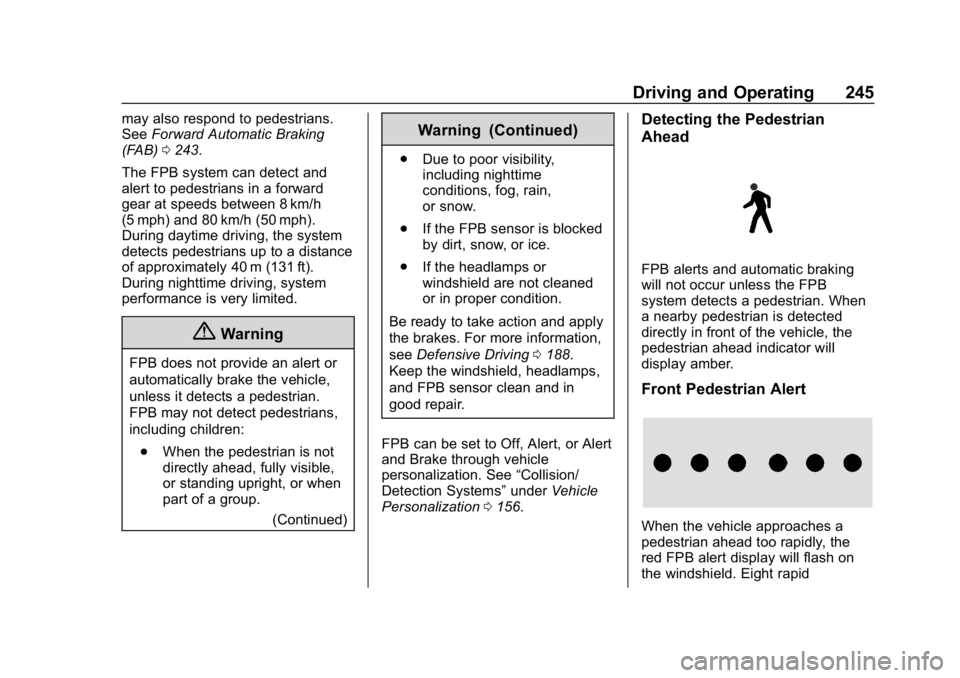
Detecting the Pedestrian
Ahead
FPB alerts and automatic braking
will not occur unless the FPB
system detects a pedestrian. When
a nearby pedestrian is detected
directly in front of the vehicle, the
pedestrian ahead indicator will
display amber.
Front Pedestrian Alert
When the vehicle approaches a
pedestrian ahead too rapidly, the
red FPB alert display will flash on
the windshield. Eight rapid
Page 247 of 398
Buick Enclave Owner Manual (GMNA-Localizing-U.S./Canada/Mexico-
12146155) - 2019 - crc - 9/10/18
246 Driving and Operating
high-pitched beeps will sound from
the front, or both sides of the Safety
Alert Seat will pulse five times.
When this Pedestrian Alert occurs,
the brake system may prepare for
driver braking to occur more rapidly
which can cause a brief, mild
deceleration. Continue to apply the
brake pedal as needed. Cruise
control may be disengaged when
the Front Pedestrian Alert occurs.
Automatic Braking
If FPB detects it is about to crash
into a pedestrian directly ahead, and
the brakes have not been applied,
FPB may automatically brake
moderately or brake hard. This can
help to avoid some very low speed
pedestrian crashes or reduce
pedestrian injury. FPB can
automatically brake to detected
pedestrians between 8 km/h (5 mph)
and 80 km/h (50 mph). Automatic
braking levels may be reduced
under certain conditions, such as
higher speeds.If this happens, Automatic Braking
may engage the Electric Parking
Brake (EPB) to hold the vehicle at a
stop. Release the EPB. A firm press
of the accelerator pedal will also
release Automatic Braking and
the EPB.
{Warning
FPB may alert or automatically
brake the vehicle suddenly in
situations where it is unexpected
and undesired. It could falsely
alert or brake for objects similar in
shape or size to pedestrians,
including shadows. This is normal
operation and the vehicle does
not need service. To override
Automatic Braking, firmly press
the accelerator pedal, if it is safe
to do so.
Automatic Braking can be disabled
through vehicle personalization. See
“Front Pedestrian Detection” in
“Collision/Detection Systems” under
Vehicle Personalization 0156.
{Warning
Using the Front Pedestrian
Braking system while towing a
trailer could cause you to lose
control of the vehicle and crash.
Turn the system to Alert or Off
when towing a trailer.
Cleaning the System
If FPB does not seem to operate
properly, cleaning the outside of the
windshield in front of the rearview
mirror may correct the issue.
Side Blind Zone
Alert (SBZA)
If equipped, the SBZA system is a
lane-changing aid that assists
drivers with avoiding crashes that
occur with moving vehicles in the
side blind zone (or spot) areas.
When the vehicle is in a forward
gear, the left or right side mirror
display will light up if a moving
vehicle is detected in that blind
zone. If the turn signal is activated
Page 249 of 398

Buick Enclave Owner Manual (GMNA-Localizing-U.S./Canada/Mexico-
12146155) - 2019 - crc - 9/10/18
248 Driving and Operating
Left Outside
Mirror DisplayRight Outside
Mirror Display
When the vehicle is started, both
outside mirror LCA displays will
briefly come on to indicate the
system is operating. When the
vehicle is in a forward gear, the left
or right outside mirror display will
light up if a moving vehicle is
detected in the next lane over in that
blind zone or rapidly approaching
that zone. If the turn signal is
activated in the same direction as a
detected vehicle, this display will
flash as an extra warning not to
change lanes.
LCA can be disabled. When you
disable LCA, Side Blind Zone Alert
is also disabled. See “Collision/
Detection Systems” underVehicle
Personalization 0156. If LCA is
disabled by the driver, the LCA
mirror displays will not light up.
When the System Does Not
Seem to Work Properly
The LCA system requires some
driving for the system to calibrate to
maximum performance. This
calibration may occur more quickly if
the vehicle is driving on a straight
highway road with traffic and
roadside objects (e.g., guardrails,
barriers).
LCA displays may not come on
when passing a vehicle quickly, for
a stopped vehicle, or when towing a
trailer. The LCA detection zones
that extend back from the side of
the vehicle do not move further back
when a trailer is towed. Use caution
while changing lanes when towing a
trailer. LCA may alert to objects
attached to the vehicle, such as a
trailer, bicycle, or object extending
out to either side of the vehicle.
Attached objects may also interfere
with the detection of vehicles. This
is normal system operation; the
vehicle does not need service.
LCA may not always alert the driver
to vehicles in the next lane over,
especially in wet conditions or when driving on sharp curves. The system
does not need to be serviced. The
system may light up due to
guardrails, signs, trees, shrubs, and
other non-moving objects. This is
normal system operation; the
vehicle does not need service.
LCA may not operate when the LCA
sensors in the left or right corners of
the rear bumper are covered with
mud, dirt, snow, ice, or slush, or in
heavy rainstorms. For cleaning
instructions, see "Washing the
Vehicle" under
Exterior Care0334.
If the DIC still displays the system
unavailable message after cleaning
both sides of the vehicle toward the
rear corners of the vehicle, see your
dealer.
If the LCA displays do not light up
when moving vehicles are in the
side blind zone or are rapidly
approaching this zone and the
system is clean, the system may
need service. Take the vehicle to
your dealer.
Page 390 of 398

Buick Enclave Owner Manual (GMNA-Localizing-U.S./Canada/Mexico-
12146155) - 2019 - crc - 9/10/18
Index 389
E
Electric Parking Brake . . . . . . . . . . 219
Electric Parking Brake Light . . . . 144
Electrical Equipment,Add-On . . . . . . . . . . . . . . . . . . . . . . . 266
Electrical System Engine Compartment FuseBlock . . . . . . . . . . . . . . . . . . . . . . . . 291
Fuses and Circuit Breakers . . . 291
Instrument Panel Fuse Block . . . . . . . . . . . . . . . . . . . . . . . . 294
Overload . . . . . . . . . . . . . . . . . . . . . 290
Rear Compartment Fuse Block . . . . . . . . . . . . . . . . . . . . . . . . 296
Emergency OnStar . . . . . . . . . . . . . . . . . . . . . . . 375
Engine Air Cleaner/Filter . . . . . . . . . . . . . 276
Check Light (MalfunctionIndicator) . . . . . . . . . . . . . . . . . . . . 141
Compartment Overview . . . . . . . 271
Coolant Temperature Gauge . . . . . . . . . . . . . . . . . . . . . . 138
Cooling System . . . . . . . . . . . . . . . 277
Drive Belt Routing . . . . . . . . . . . . 359
Exhaust . . . . . . . . . . . . . . . . . . . . . . .211
Heater . . . . . . . . . . . . . . . . . . . . . . . . 206
Oil Life System . . . . . . . . . . . . . . . 274 Engine (cont'd)
Oil Pressure Light . . . . . . . . . . . . 147
Overheating . . . . . . . . . . . . . . . . . . 280
Power Messages . . . . . . . . . . . . . 155
Running While Parked . . . . . . . . 212
Starting . . . . . . . . . . . . . . . . . . . . . . . 204
Engine Oil Temperature Gauge . . . . . . . . . . 137
Entry Lighting . . . . . . . . . . . . . . . . . . . 174
Equipment, Towing . . . . . . . . . . . . . 261
Event Data Recorders . . . . . . . . . . 372
Exit Lighting . . . . . . . . . . . . . . . . . . . . 175
Extended Parking . . . . . . . . . . . . . . . 210
Extender, Seat Belt . . . . . . . . . . . . . . 81
Exterior Lamp Controls . . . . . . . . . 168
Exterior Lamps Off Reminder . . . 170
Exterior Lighting Battery Saver . . . . . . . . . . . . . . . . . . . . . . . . . 176
F
Features
Memory . . . . . . . . . . . . . . . . . . . . . . . . . 11
Filter, Engine Air Cleaner . . . . . . . . . . . 276
Flash-to-Pass . . . . . . . . . . . . . . . . . . . 170
Flashers, Hazard Warning . . . . . . 172
Flat Tire . . . . . . . . . . . . . . . . . . . . . . . . 320 Changing . . . . . . . . . . . . . . . . . . . . . 321 Floor Mats . . . . . . . . . . . . . . . . . . . . . . 342
Fluid
Automatic Transmission . . . . . . 275
Brakes . . . . . . . . . . . . . . . . . . . . . . . . 283
Washer . . . . . . . . . . . . . . . . . . . . . . . 281
Folding Mirrors . . . . . . . . . . . . . . . . . . 52
Forward Automatic Braking . . . . . 243
Forward Collision Alert (FCA) System . . . . . . . . . . . . . . . . . 240
Frequency Statement Radio . . . . . . . . . . . . . . . . . . . . . . . . . 370
Front Pedestrian Braking (FPB) System . . . . . . . . . . . . . . . . . 244
Front Seats Heated and Ventilated . . . . . . . . . . 68
Fuel
Additives . . . . . . . . . . . . . . . . . . . . . 252
Economy Driving . . . . . . . . . . . . . . . 27
Filling a Portable FuelContainer . . . . . . . . . . . . . . . . . . . 253
Filling the Tank . . . . . . . . . . . . . . . 252
Foreign Countries . . . . . . . . . . . . 252
Gauge . . . . . . . . . . . . . . . . . . . . . . . . 136
Low Fuel Warning Light . . . . . . . 148
Prohibited Fuels . . . . . . . . . . . . . . 251
Recommended . . . . . . . . . . . . . . . 251
Top Tier . . . . . . . . . . . . . . . . . . . . . . 251
Page 395 of 398

Buick Enclave Owner Manual (GMNA-Localizing-U.S./Canada/Mexico-
12146155) - 2019 - crc - 9/10/18
394 Index
Seat Belts (cont'd)How to Wear Seat Belts
Properly . . . . . . . . . . . . . . . . . . . . . . . 77
Lap-Shoulder Belt . . . . . . . . . . . . . . 79
Reminders . . . . . . . . . . . . . . . . . . . . 139
Replacing after a Crash . . . . . . . . 82
Use During Pregnancy . . . . . . . . . . 81
Seats Head Restraints . . . . . . . . . . . . . . . . 62
Heated and Ventilated Front . . . . 68
Heated, Rear . . . . . . . . . . . . . . . . . . . 73
Lumbar Adjustment, Front . . . . . . 64
Memory . . . . . . . . . . . . . . . . . . . . . . . . . 65
Power Adjustment, Front . . . . . . . 64
Rear . . . . . . . . . . . . . . . . . . . . . . . . . . . . 70
Reclining Seatbacks . . . . . . . . . . . . 64
Third Row Seat . . . . . . . . . . . . . . . . . 73
Securing Child
Restraints . . . . . . . . . . . . . . . . 111, 113
Security Light . . . . . . . . . . . . . . . . . . . . . . . . . . 148
OnStar . . . . . . . . . . . . . . . . . . . . . . . 376
Vehicle . . . . . . . . . . . . . . . . . . . . . . . . . 50
Vehicle Alarm . . . . . . . . . . . . . . . . . . . 50
Service . . . . . . . . . . . . . . . . . . . . . . . . . 185 Accessories andModifications . . . . . . . . . . . . . . . . 269
Doing Your Own Work . . . . . . . . 269 Service (cont'd)
Maintenance Records . . . . . . . . 356
Maintenance, General
Information . . . . . . . . . . . . . . . . . . 344
Parts Identification Label . . . . . 357
Scheduling Appointments . . . . . 366
Service Electric Parking Brake Light . . . . . . . . . . . . . . . . . . . . 144
Services
Special Application . . . . . . . . . . . 351
Servicing the Airbag . . . . . . . . . . . . . 94
Shifting Into Park . . . . . . . . . . . . . . . . . . . . . . 207
Out of Park . . . . . . . . . . . . . . . . . . . 208
Side Blind Zone Alert (SBZA) . . . 246
Signals, Turn and Lane-Change . . . . . . . . . . . . . . . . . 172
Spare Tire
Compact . . . . . . . . . . . . . . . . . . . . . . 327
Special Application Services . . . . 351
Specifications and Capacities . . . . . . . . . . . . . . . . . . . . . 358
Speedometer . . . . . . . . . . . . . . . . . . . 135
Sport Mode Light . . . . . . . . . . . . . . . 145
StabiliTrak
OFF Light . . . . . . . . . . . . . . . . . . . . . 146
Start Assist, Hill . . . . . . . . . . . . . . . . . 221
Start Vehicle, Remote . . . . . . . . . . . 36 Starter Switch Check . . . . . . . . . . . 285
Starting the Engine . . . . . . . . . . . . . 204
Steering . . . . . . . . . . . . . . . . . . . . . . . . 189
Heated Wheel . . . . . . . . . . . . . . . . 123
Wheel Adjustment . . . . . . . . . . . . 123
Wheel Controls . . . . . . . . . . . . . . . 123
Stop/Start System . . . . . . . . . . . . . . 205
Storage Areas
Cargo Management System . . .118
Center Console . . . . . . . . . . . . . . . .118
Glove Box . . . . . . . . . . . . . . . . . . . . .117
Roof Rack System . . . . . . . . . . . . 120
Sunglasses . . . . . . . . . . . . . . . . . . . .118
Storage Compartments . . . . . . . . . 117
Struts Gas . . . . . . . . . . . . . . . . . . . . . . . . . . . 287
Stuck Vehicle . . . . . . . . . . . . . . . . . . . 198
Sun Visors . . . . . . . . . . . . . . . . . . . . . . . 58
Sunglass Storage . . . . . . . . . . . . . . . 118
Sunroof . . . . . . . . . . . . . . . . . . . . . . . . . . 59
Symbols . . . . . . . . . . . . . . . . . . . . . . . . . . 3
System Forward CollisionAlert (FCA) . . . . . . . . . . . . . . . . . . 240
Infotainment . . . . . . . . . . . . . 177, 373
Roof Rack . . . . . . . . . . . . . . . . . . . . 120
Systems Driver Assistance . . . . . . . . . . . . . 235