ignition BUICK ENCLAVE 2019 Owner's Manual
[x] Cancel search | Manufacturer: BUICK, Model Year: 2019, Model line: ENCLAVE, Model: BUICK ENCLAVE 2019Pages: 398, PDF Size: 5.91 MB
Page 8 of 398

Buick Enclave Owner Manual (GMNA-Localizing-U.S./Canada/Mexico-
12146155) - 2019 - crc - 9/10/18
In Brief 7
1.Air Vents 0184.
2. Turn Signal Lever. See Turn
and Lane-Change Signals
0 172.
IntelliBeam System Button (If
Equipped). See Exterior Lamp
Controls 0168.
3. Manual Mode 0217.
4. Instrument Cluster 0132.
Driver Information Center (DIC)
Display.
See Driver Information Center
(DIC) (Base Level) 0149 or
Driver Information Center (DIC)
(Uplevel) 0152.
5. Windshield Wiper/Washer
0124.
6. Traction Control/Electronic
Stability Control 0222.
All-Wheel Drive Button (If
Equipped). See Driver Mode
Control 0223.
Sport Mode Button (If
Equipped) or Tow/Haul Mode
Button (If Equipped). See
Driver Mode Control 0223. 7. Light Sensor. See
Automatic
Headlamp System 0171.
8. Hazard Warning Flashers
0172.
Assistance Systems for
Parking or Backing 0237 (If
Equipped).
Lane Keep Assist (LKA) 0249
(If Equipped).
9. Infotainment 0177.
10. Dual Automatic Climate Control
System 0178.
Heated and Ventilated Front
Seats 068 (If Equipped).
11. Wireless Charging 0129 (If
Equipped).
12. Shift Lever. See Automatic
Transmission 0212.
13. ENGINE START/STOP Button. SeeIgnition Positions 0202.
14. Steering Wheel Controls 0123.
15. Horn 0124.
16. Steering Wheel Adjustment
0123 (Out of View). 17.
Cruise Control 0225.
Adaptive Cruise Control 0227
(If Equipped).
Heated Steering Wheel 0123
(If Equipped).
Forward Collision Alert (FCA)
System 0240 (If Equipped).
18. Hood Release. See Hood
0 270.
19. Data Link Connector (DLC) (Out of View). See Malfunction
Indicator Lamp (Check Engine
Light) 0141.
20. Exterior Lamp Controls 0168.
21. Instrument Panel Illumination
Control 0173.
22. Electric Parking Brake 0219.
Page 12 of 398
Buick Enclave Owner Manual (GMNA-Localizing-U.S./Canada/Mexico-
12146155) - 2019 - crc - 9/10/18
In Brief 11
Windows
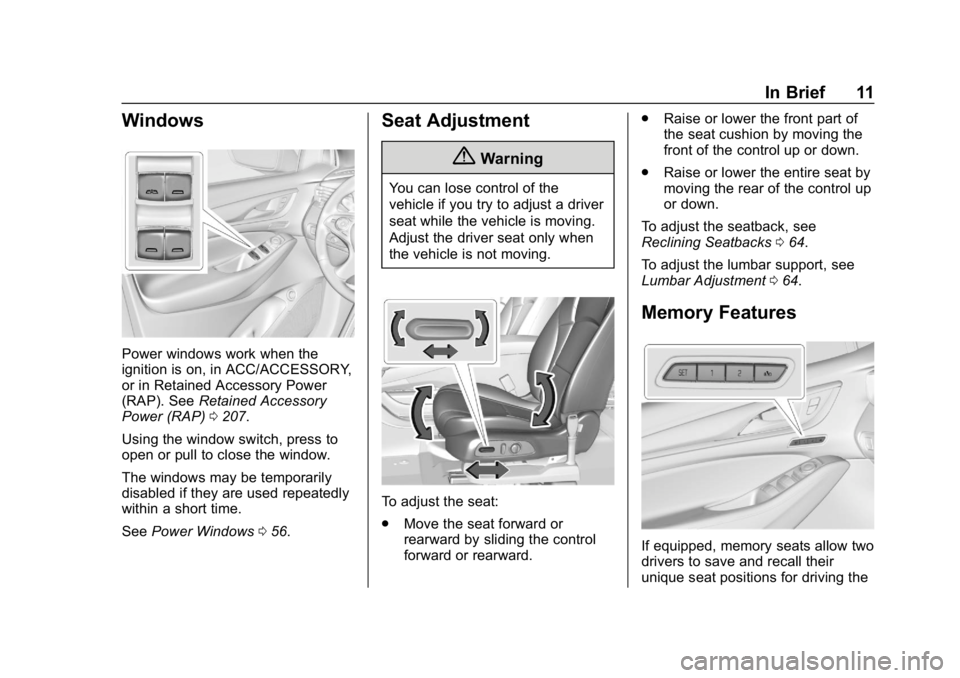
Power windows work when the
ignition is on, in ACC/ACCESSORY,
or in Retained Accessory Power
(RAP). SeeRetained Accessory
Power (RAP) 0207.
Using the window switch, press to
open or pull to close the window.
The windows may be temporarily
disabled if they are used repeatedly
within a short time.
See Power Windows 056.
Seat Adjustment
{Warning
You can lose control of the
vehicle if you try to adjust a driver
seat while the vehicle is moving.
Adjust the driver seat only when
the vehicle is not moving.
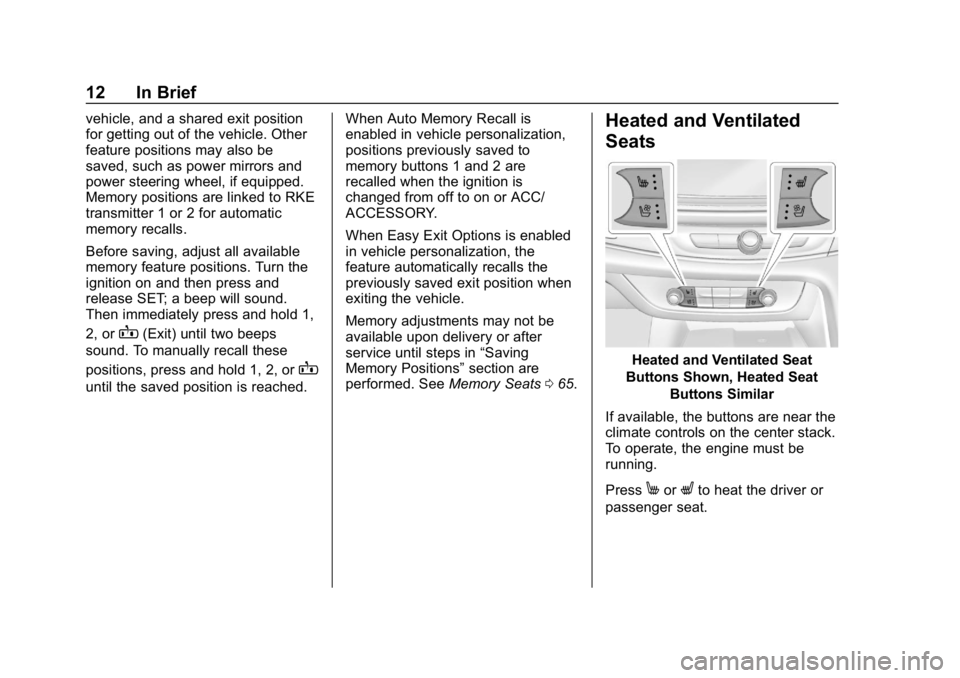
To adjust the seat:
.
Move the seat forward or
rearward by sliding the control
forward or rearward. .
Raise or lower the front part of
the seat cushion by moving the
front of the control up or down.
. Raise or lower the entire seat by
moving the rear of the control up
or down.
To adjust the seatback, see
Reclining Seatbacks 064.
To adjust the lumbar support, see
Lumbar Adjustment 064.
Memory Features
If equipped, memory seats allow two
drivers to save and recall their
unique seat positions for driving the
Page 13 of 398
Buick Enclave Owner Manual (GMNA-Localizing-U.S./Canada/Mexico-
12146155) - 2019 - crc - 9/10/18
12 In Brief
vehicle, and a shared exit position
for getting out of the vehicle. Other
feature positions may also be
saved, such as power mirrors and
power steering wheel, if equipped.
Memory positions are linked to RKE
transmitter 1 or 2 for automatic
memory recalls.
Before saving, adjust all available
memory feature positions. Turn the
ignition on and then press and
release SET; a beep will sound.
Then immediately press and hold 1,
2, or
B(Exit) until two beeps
sound. To manually recall these
positions, press and hold 1, 2, or
B
until the saved position is reached. When Auto Memory Recall is
enabled in vehicle personalization,
positions previously saved to
memory buttons 1 and 2 are
recalled when the ignition is
changed from off to on or ACC/
ACCESSORY.
When Easy Exit Options is enabled
in vehicle personalization, the
feature automatically recalls the
previously saved exit position when
exiting the vehicle.
Memory adjustments may not be
available upon delivery or after
service until steps in
“Saving
Memory Positions” section are
performed. See Memory Seats065.
Heated and Ventilated
Seats
Heated and Ventilated Seat
Buttons Shown, Heated Seat Buttons Similar
If available, the buttons are near the
climate controls on the center stack.
To operate, the engine must be
running.
Press
MorLto heat the driver or
passenger seat.
Page 18 of 398
Buick Enclave Owner Manual (GMNA-Localizing-U.S./Canada/Mexico-
12146155) - 2019 - crc - 9/10/18
In Brief 17
;:Turns on the parking lamps
including all lamps, except the
headlamps.
5: Turns on the headlamps
together with the parking lamps and
instrument panel lights.
See:
. Exterior Lamp Controls 0168
. Daytime Running Lamps (DRL)
0171
Windshield Wiper/Washer
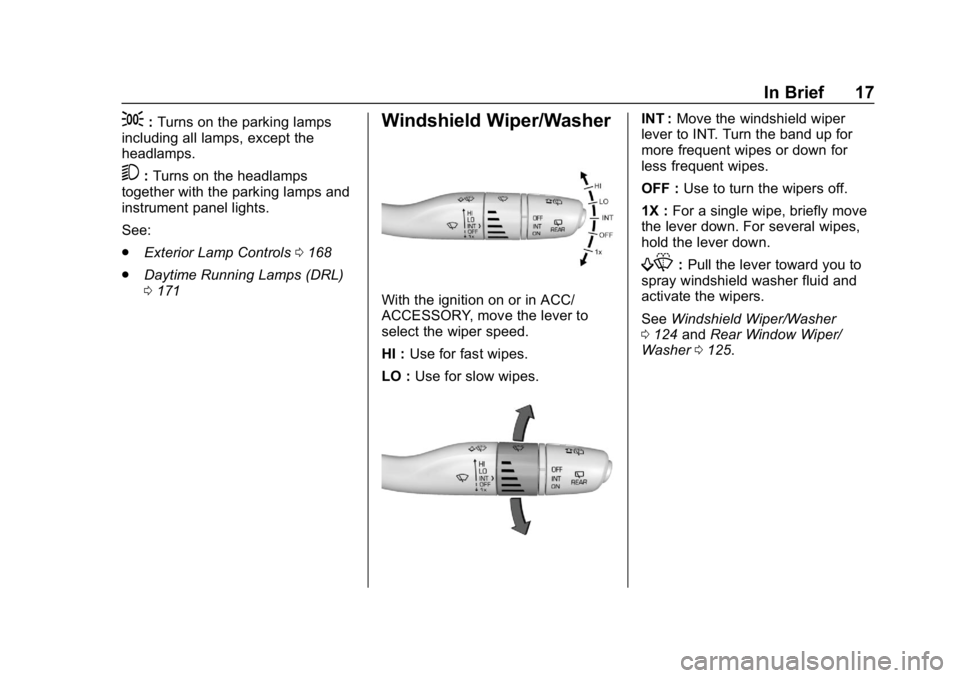
With the ignition on or in ACC/
ACCESSORY, move the lever to
select the wiper speed.
HI : Use for fast wipes.
LO : Use for slow wipes.
INT : Move the windshield wiper
lever to INT. Turn the band up for
more frequent wipes or down for
less frequent wipes.
OFF : Use to turn the wipers off.
1X : For a single wipe, briefly move
the lever down. For several wipes,
hold the lever down.
f: Pull the lever toward you to
spray windshield washer fluid and
activate the wipers.
See Windshield Wiper/Washer
0 124 andRear Window Wiper/
Washer 0125.
Page 20 of 398
Buick Enclave Owner Manual (GMNA-Localizing-U.S./Canada/Mexico-
12146155) - 2019 - crc - 9/10/18
In Brief 19
SeeDual Automatic Climate Control
System 0178. For more information
about the rear climate controls, see
Rear Climate Control System 0182.
Transmission
Electronic Precision Shift
This vehicle is equipped with an
electronic transmission. It is
designed to prevent shifting out of
P (Park), unless the ignition is on,
the brake pedal is applied, and the
shift lock release button is pressed.
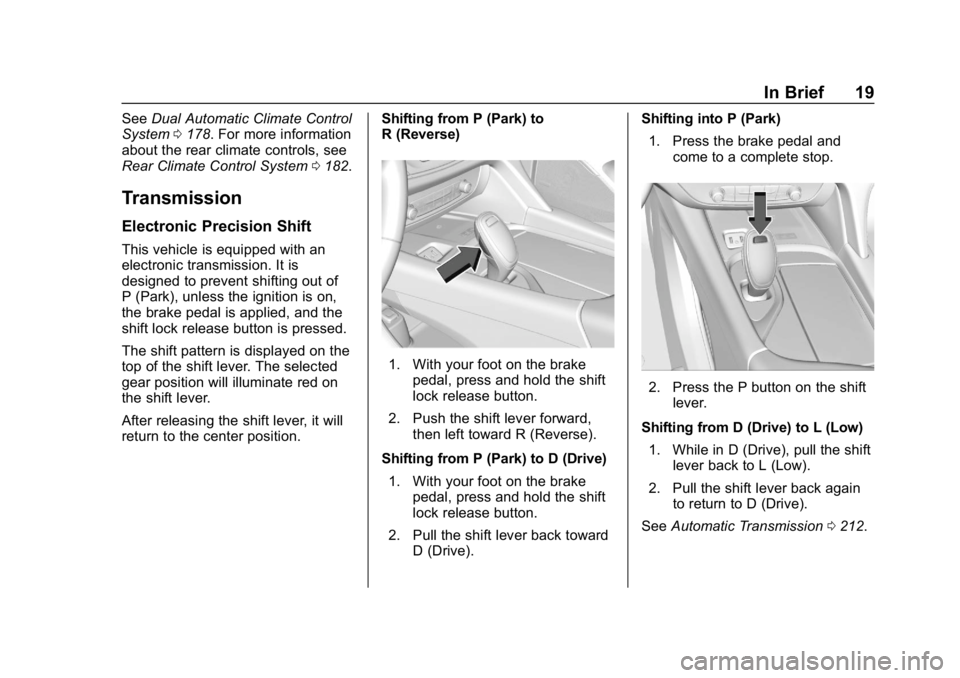
The shift pattern is displayed on the
top of the shift lever. The selected
gear position will illuminate red on
the shift lever.
After releasing the shift lever, it will
return to the center position. Shifting from P (Park) to
R (Reverse)
1. With your foot on the brake
pedal, press and hold the shift
lock release button.
2. Push the shift lever forward, then left toward R (Reverse).
Shifting from P (Park) to D (Drive) 1. With your foot on the brake pedal, press and hold the shift
lock release button.
2. Pull the shift lever back toward D (Drive). Shifting into P (Park)
1. Press the brake pedal and come to a complete stop.
2. Press the P button on the shiftlever.
Shifting from D (Drive) to L (Low) 1. While in D (Drive), pull the shift lever back to L (Low).
2. Pull the shift lever back again to return to D (Drive).
See Automatic Transmission 0212.
Page 25 of 398
Buick Enclave Owner Manual (GMNA-Localizing-U.S./Canada/Mexico-
12146155) - 2019 - crc - 9/10/18
24 In Brief
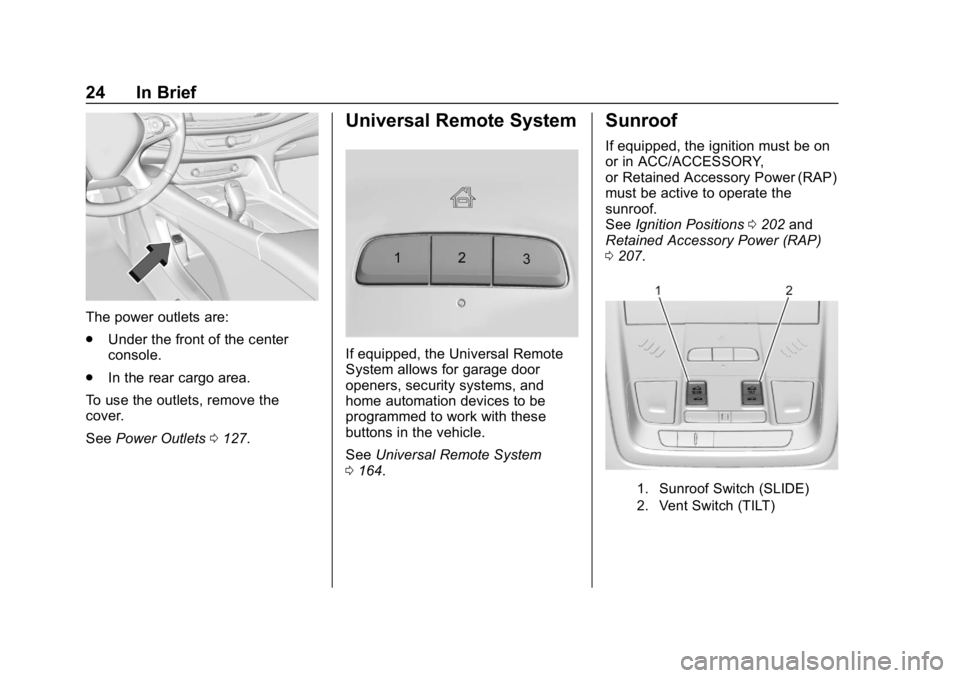
The power outlets are:
.Under the front of the center
console.
. In the rear cargo area.
To use the outlets, remove the
cover.
See Power Outlets 0127.
Universal Remote System
If equipped, the Universal Remote
System allows for garage door
openers, security systems, and
home automation devices to be
programmed to work with these
buttons in the vehicle.
See Universal Remote System
0 164.
Sunroof
If equipped, the ignition must be on
or in ACC/ACCESSORY,
or Retained Accessory Power (RAP)
must be active to operate the
sunroof.
See Ignition Positions 0202 and
Retained Accessory Power (RAP)
0 207.
1. Sunroof Switch (SLIDE)
2. Vent Switch (TILT)
Page 38 of 398
Buick Enclave Owner Manual (GMNA-Localizing-U.S./Canada/Mexico-
12146155) - 2019 - crc - 9/10/18
Keys, Doors, and Windows 37
Starting the Engine Using
Remote Start
To start the vehicle:1. Press and release
Qon the
RKE transmitter.
2. Immediately after completing Step 1, press and hold
/until
the lamps flash. If the vehicle's
lights cannot be seen, press
and hold
/for at least
four seconds.
When the vehicle starts, the park
lamps will turn on and remain on as
long as the engine is running. The
doors will be locked and the climate
control system will operate
automatically if the vehicle has the
automatic system, or at the same
setting as when the vehicle was last
turned off.
With an automatic climate control
system and if equipped with heated
seats, the heated seats turn on
during colder outside temperatures
and shut off when the ignition is
turned on. See Heated and
Ventilated Front Seats 068. If equipped with an auto heated
steering wheel, it may come on
during a remote start. See
Heated
Steering Wheel 0123.
The rear window defogger and
heated mirrors, if equipped, turn on
during colder outside temperatures
and turn off when the ignition is
turned on.
After entering the vehicle during a
remote start, press the brake and
ENGINE START/STOP with the
transmitter in the vehicle to drive the
vehicle.
If the vehicle is left running, it
automatically shuts off after
15 minutes unless a time extension
has been done.
Extending Engine Run Time
To extend the engine run time by
15 minutes, repeat Steps 1 and 2
while the engine is still running. An
extension can be requested
30 seconds after starting. The
engine run time can only be
extended if it is the first remote start since the vehicle has been driven.
Remote start can be extended
one time.
If the remote start procedure is used
again while the engine is still
running, 15 minutes will be added
on for a total of 30 minutes.
For example, if
Qand then/are
pressed again while the engine is
still running, 15 minutes will be
added on for a total of 30 minutes.
A maximum of two remote starts or
remote start with an extension are
allowed between ignition cycles.
After the vehicle's engine has been
started two times using the remote
start button or a start with an
extension, the ignition must be
turned on and then back off before
the remote start procedure can be
used again.
Canceling a Remote Start
To manually shut off a remote start:
. Press and hold
/until the
lamps turn off.
Page 39 of 398
Buick Enclave Owner Manual (GMNA-Localizing-U.S./Canada/Mexico-
12146155) - 2019 - crc - 9/10/18
38 Keys, Doors, and Windows
.Turn on the hazard warning
flashers.
. Turn the ignition switch on and
then off.
Conditions in Which the
Remote Start Will Not Work
The vehicle cannot be started using
the remote start feature if the key is
in the ignition, the hood is open,
or there is an emission control
system malfunction.
The engine turns off during a remote
start if the coolant temperature gets
too high or if the oil pressure
gets low.
Door Locks
{Warning
Unlocked doors can be
dangerous.
. Passengers, especially
children, can easily open
the doors and fall out of a
(Continued)
Warning (Continued)
moving vehicle. The doors
can be unlocked and
opened while the vehicle is
moving. The chance of
being thrown out of the
vehicle in a crash is
increased if the doors are
not locked. So, all
passengers should wear
seat belts properly and the
doors should be locked
whenever the vehicle is
driven.
. Young children who get into
unlocked vehicles may be
unable to get out. A child
can be overcome by
extreme heat and can suffer
permanent injuries or even
death from heat stroke.
Always lock the vehicle
whenever leaving it.
. Outsiders can easily enter
through an unlocked door
when you slow down or stop
(Continued)
Warning (Continued)
the vehicle. Locking the
doors can help prevent this
from happening.
To lock/unlock the doors from the
outside:
. Press
QorKon the Remote
Keyless Entry (RKE) transmitter.
See Remote Keyless Entry
(RKE) System Operation 029.
. Use the key in the driver door.
The key lock cylinder is covered
with a cap.
To lock/unlock the doors from the
inside:
. Press
QorKon the power door
lock switch.
. Push down on the door lock
knob to lock a door.
. Pull the door handle once to
unlock it. Pull the door handle
again to unlatch it.
Page 41 of 398
Buick Enclave Owner Manual (GMNA-Localizing-U.S./Canada/Mexico-
12146155) - 2019 - crc - 9/10/18
40 Keys, Doors, and Windows
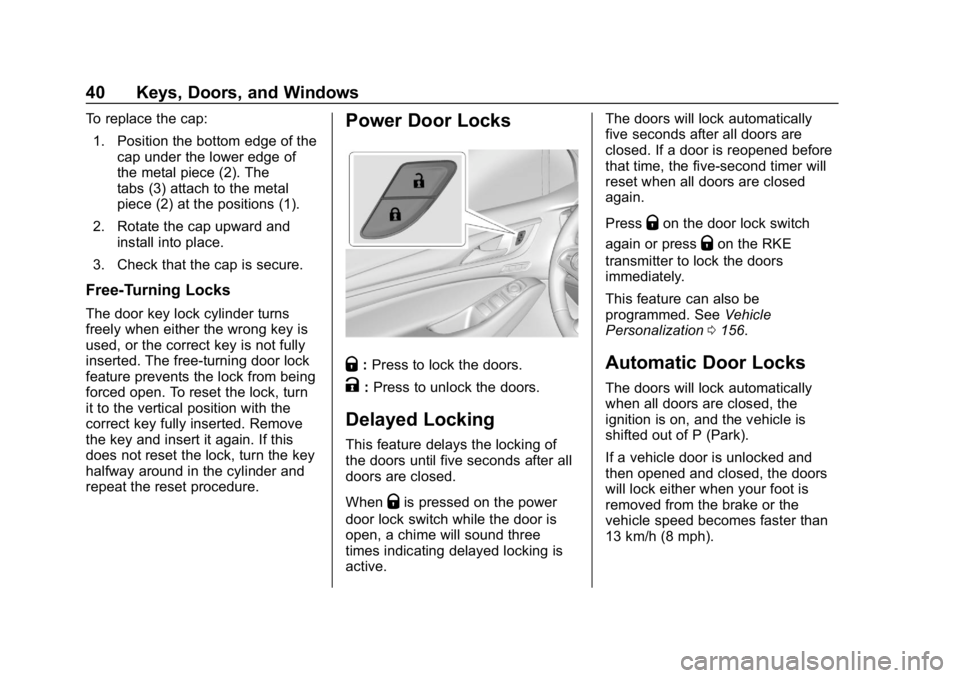
To replace the cap:1. Position the bottom edge of the cap under the lower edge of
the metal piece (2). The
tabs (3) attach to the metal
piece (2) at the positions (1).
2. Rotate the cap upward and install into place.
3. Check that the cap is secure.
Free-Turning Locks
The door key lock cylinder turns
freely when either the wrong key is
used, or the correct key is not fully
inserted. The free-turning door lock
feature prevents the lock from being
forced open. To reset the lock, turn
it to the vertical position with the
correct key fully inserted. Remove
the key and insert it again. If this
does not reset the lock, turn the key
halfway around in the cylinder and
repeat the reset procedure.
Power Door Locks
Q: Press to lock the doors.
K:Press to unlock the doors.
Delayed Locking
This feature delays the locking of
the doors until five seconds after all
doors are closed.
When
Qis pressed on the power
door lock switch while the door is
open, a chime will sound three
times indicating delayed locking is
active. The doors will lock automatically
five seconds after all doors are
closed. If a door is reopened before
that time, the five-second timer will
reset when all doors are closed
again.
Press
Qon the door lock switch
again or press
Qon the RKE
transmitter to lock the doors
immediately.
This feature can also be
programmed. See Vehicle
Personalization 0156.
Automatic Door Locks
The doors will lock automatically
when all doors are closed, the
ignition is on, and the vehicle is
shifted out of P (Park).
If a vehicle door is unlocked and
then opened and closed, the doors
will lock either when your foot is
removed from the brake or the
vehicle speed becomes faster than
13 km/h (8 mph).
Page 42 of 398
Buick Enclave Owner Manual (GMNA-Localizing-U.S./Canada/Mexico-
12146155) - 2019 - crc - 9/10/18
Keys, Doors, and Windows 41
To unlock the doors:
.Press
Kon the power door lock
switch.
. Shift into P (Park).
Automatic door locking cannot be
disabled. Automatic door unlocking
can be programmed. See Vehicle
Personalization 0156.
Lockout Protection
If the ignition is on or in ACC/
ACCESSORY and the power door
lock switch is pressed with the
driver door open, all the doors will
lock and only the driver door will
unlock.
If the vehicle is off and locking is
requested while a door is open,
when all doors are closed the
vehicle will check for RKE
transmitters inside. If an RKE
transmitter is detected and the
number of RKE transmitters inside
has not reduced, the driver door will
unlock and the horn will chirp three
times. Lockout Protection can be manually
overridden with the driver door open
by pressing and holding
Qon the
power door lock switch.
Unlocked Door Anti-Lockout
If Unlocked Door Anti-Lockout has
been turned on and the vehicle is
off, the driver door is open, and
locking is requested, all the doors
will lock and the driver door will
remain open. Press the button again
to lock the driver door. The
Unlocked Door Anti-Lockout feature
can be turned on or off. See Vehicle
Personalization 0156.
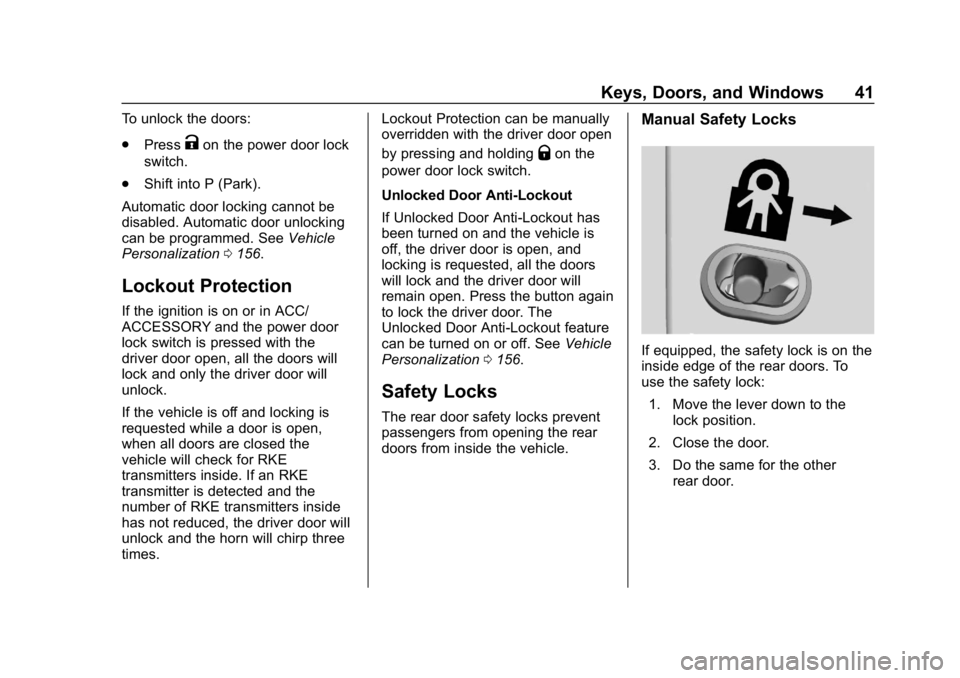
Safety Locks
The rear door safety locks prevent
passengers from opening the rear
doors from inside the vehicle.
Manual Safety Locks
If equipped, the safety lock is on the
inside edge of the rear doors. To
use the safety lock:
1. Move the lever down to the lock position.
2. Close the door.
3. Do the same for the other rear door.