center console BUICK ENCLAVE 2020 User Guide
[x] Cancel search | Manufacturer: BUICK, Model Year: 2020, Model line: ENCLAVE, Model: BUICK ENCLAVE 2020Pages: 381, PDF Size: 7.08 MB
Page 108 of 381
Buick Enclave Owner Manual (GMNA-Localizing-U.S./Canada/Mexico-
13527524) - 2020 - CRC - 4/10/19
Instruments and Controls 107Power Outlet 110V/120V
Alternating Current If equipped with this power outlet it
can be used to plug in electrical
equipment that uses a maximum
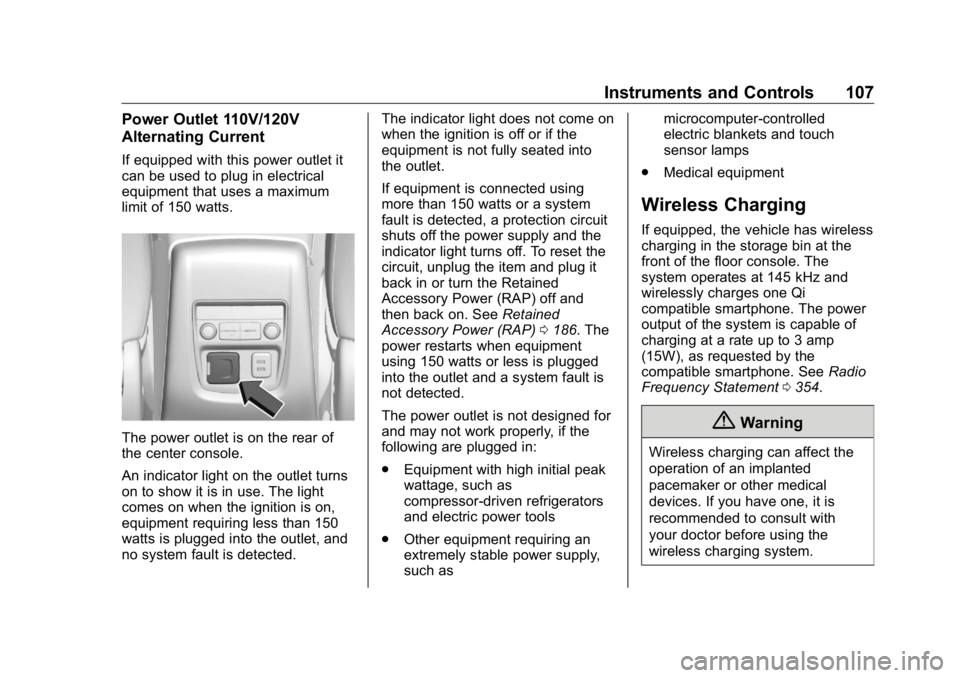
limit of 150 watts.
The power outlet is on the rear of
the center console.
An indicator light on the outlet turns
on to show it is in use. The light
comes on when the ignition is on,
equipment requiring less than 150
watts is plugged into the outlet, and
no system fault is detected. The indicator light does not come on
when the ignition is off or if the
equipment is not fully seated into
the outlet.
If equipment is connected using
more than 150 watts or a system
fault is detected, a protection circuit
shuts off the power supply and the
indicator light turns off. To reset the
circuit, unplug the item and plug it
back in or turn the Retained
Accessory Power (RAP) off and
then back on. See Retained
Accessory Power (RAP) 0 186 . The
power restarts when equipment
using 150 watts or less is plugged
into the outlet and a system fault is
not detected.
The power outlet is not designed for
and may not work properly, if the
following are plugged in:
.
Equipment with high initial peak
wattage, such as
compressor-driven refrigerators
and electric power tools
.
Other equipment requiring an
extremely stable power supply,
such as microcomputer-controlled
electric blankets and touch
sensor lamps
.
Medical equipment
Wireless Charging If equipped, the vehicle has wireless
charging in the storage bin at the
front of the floor console. The
system operates at 145 kHz and
wirelessly charges one Qi
compatible smartphone. The power
output of the system is capable of
charging at a rate up to 3 amp
(15W), as requested by the
compatible smartphone. See Radio
Frequency Statement 0 354 .
{ Warning
Wireless charging can affect the
operation of an implanted
pacemaker or other medical
devices. If you have one, it is
recommended to consult with
your doctor before using the
wireless charging system.
Page 122 of 381

Buick Enclave Owner Manual (GMNA-Localizing-U.S./Canada/Mexico-
13527524) - 2020 - CRC - 4/10/19
Instruments and Controls 121
The airbag readiness light comes on
for several seconds when the
vehicle is started. If the light does
not come on then, have it fixed
immediately.
{ WarningIf the airbag readiness light stays
on after the vehicle is started or
comes on while driving, it means
the airbag system might not be
working properly. The airbags in
the vehicle might not inflate in a
crash, or they could even inflate
without a crash. To help avoid
injury, have the vehicle serviced
right away.
If there is a problem with the airbag
system, a Driver Information Center
(DIC) message may also come on. Passenger Airbag Status
Indicator The vehicle has a passenger
sensing system. See Passenger
Sensing System 0 68 for important
safety information. The overhead
console has a passenger airbag
status indicator.
When the vehicle is started, the
passenger airbag status indicator
will light ON and OFF, and the
symbols for on and off, for several
seconds as a system check. Then,
after several more seconds, the
status indicator will light either ON
or OFF, and either the on or off
symbol, to let you know the status of
the front outboard passenger frontal
airbag. If the word ON, and the on symbol,
are lit on the passenger airbag
status indicator, it means that the
front outboard passenger frontal
airbag is allowed to inflate.
If the word OFF, and the off symbol,
are lit on the passenger airbag
status indicator, it means that the
passenger sensing system has
turned off the front outboard
passenger frontal airbag.
If, after several seconds, both status
indicator lights remain on, or if there
are no lights at all, there may be a
problem with the lights or the
passenger sensing system. See
your dealer for service.
{ Warning
If the airbag readiness light ever
comes on and stays on, it means
that something may be wrong
with the airbag system. To help
avoid injury to yourself or others,
have the vehicle serviced right
(Continued)
Page 153 of 381

Buick Enclave Owner Manual (GMNA-Localizing-U.S./Canada/Mexico-
13527524) - 2020 - CRC - 4/10/19
152 Lighting
Front Reading Lamps
The front reading lamps are in the
overhead console.
Press the lamp lenses to turn the
front reading lamps on or off. Rear Reading Lamps
The rear reading lamps are over the
rear seats.
Press the lamp lens to turn the rear
passenger reading lamps on or off. Lighting Features Entry Lighting Some exterior lamps and most of
the interior lights turn on briefly at
night, or in areas of limited lighting
when
K is pressed on the Remote
Keyless Entry (RKE) transmitter.
See Remote Keyless Entry (RKE)
System Operation 0 8 . When the
driver door is opened, all control
lights, Driver Information Center
(DIC) lights, and door pocket lights
turn on. After about 30 seconds the
exterior lamps turn off, then the
remaining interior lights dim to off.
Entry lighting can be disabled
manually by turning the ignition on
or to ACC/ACCESSORY, or by
pressing
Q on the RKE transmitter.
This feature can be changed. See
“ Vehicle Locator Lights ” under
Vehicle Personalization 0 137 .
Page 161 of 381
Buick Enclave Owner Manual (GMNA-Localizing-U.S./Canada/Mexico-
13527524) - 2020 - CRC - 4/10/19
160 Climate Controls temperature is about 4 °C (40 °F)
and below. The auto rear defogger
turns off automatically after about
10 minutes, or after five minutes if
the outside temperature is not
as cold.
The upper gridlines on the rear
window are antenna lines and are
not intended to heat when the
defogger is activated.
The heated outside mirrors turn on
when the rear window defogger
button is on and help to clear fog or
frost from the surface of the mirror.
See Heated Mirrors 0 31 .
Caution
Do not try to clear frost or other
material from the inside of the
front windshield and rear window
with a razor blade or anything
else that is sharp. This may
damage the rear window
defogger grid and affect the
radio's ability to pick up stations
clearly. The repairs would not be
covered by the vehicle warranty. Heated and Ventilated Seats
M or
L : If equipped, press
M or
Lto heat the driver or passenger seat.
C or
{ : If equipped, press
C or
{ to ventilate the driver or
passenger seat. See Heated and
Ventilated Front Seats 0 46 .
Remote Start Climate Control
Operation : The climate control
system may run when the vehicle is
started remotely. If the vehicle has
heated or ventilated seats, they may
come on during a remote start. See
Remote Vehicle Start 0 15 and
Heated and Ventilated Front Seats
0 46 .
Sensors The solar sensor, on top of the
instrument panel near the
windshield, monitors the solar heat.
The climate control system uses the
sensor information to adjust the
temperature, fan speed,
recirculation, and air delivery mode
for best comfort. Do not cover the sensor; otherwise
the automatic climate control system
may not work properly.
Rear Climate Control
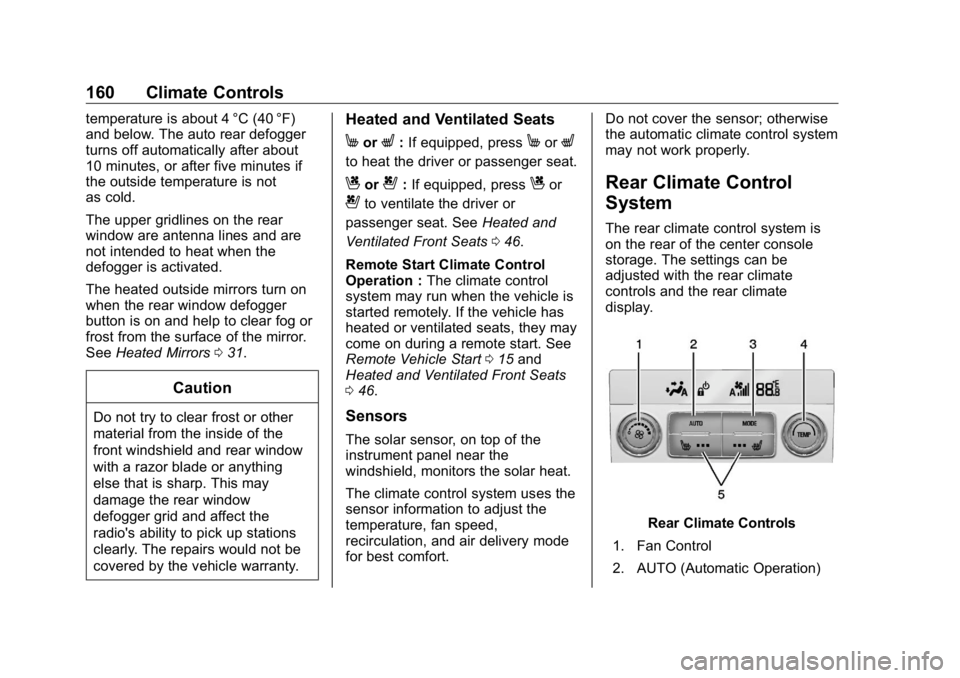
System The rear climate control system is
on the rear of the center console
storage. The settings can be
adjusted with the rear climate
controls and the rear climate
display.
Rear Climate Controls
1. Fan Control
2. AUTO (Automatic Operation)
Page 162 of 381

Buick Enclave Owner Manual (GMNA-Localizing-U.S./Canada/Mexico-
13527524) - 2020 - CRC - 4/10/19
Climate Controls 1613. MODE (Air Delivery Mode
Control)
4. TEMP (Temperature Control)
5. Heated Rear Seats (If
Equipped)
Rear Climate Display
1. Rear Climate Temperature
Control
2. Fan Control
3. Outside Temperature Display
4. Sync (Synchronized
Temperatures)
5. Rear Control Lockout
6. Air Delivery Mode Control 7. Auto (Automatic Operation)
8. On/Off (Power)
Sync : Touch Sync on the rear
climate display to match the rear
climate control temperature to the
front climate control driver
temperature. The Sync button will
be lit. Adjust the rear climate control
temperature to change the linked
temperature. The Sync button
turns off.
Rear Control Lockout : Touch
Qon the rear climate display to lock or
unlock control of the rear climate
control system from the front seat.
When locked the rear climate
control system cannot be adjusted
from the second row seats.
Automatic Operation
AUTO : Touch AUTO on the rear
climate display to automatically
control air delivery and fan speed. A
is indicated in the display on the
rear of the center console storage
when automatic operation is active. If any of the climate control settings
are manually adjusted, this cancels
full automatic operation.
The display on the rear of the center
console storage only indicates
climate control functions when the
system is in rear independent mode.
When Sync is active the display is
not shown.
Manual Operation
9 : Turn the knob clockwise or
counterclockwise or press and hold
S or
T on the rear climate display
to increase or decrease the fan
speed.
TEMP : Turn the knob clockwise or
counterclockwise or press and hold
the rear climate display temperature
controls to adjust the rear
passenger temperature. If Sync is
lit, the rear climate temperature is
linked to the driver temperature
setting.
Page 189 of 381

Buick Enclave Owner Manual (GMNA-Localizing-U.S./Canada/Mexico-
13527524) - 2020 - CRC - 4/10/19
188 Driving and Operating 5. The P indicator will turn white
and the gear indicator on the
shift lever will turn red when
the vehicle is no longer in
P (Park).
6. After releasing the shift lever, it
will return to the center
position.
If the vehicle cannot shift from
P (Park), a Driver Information
Center (DIC) message will be
displayed. See your dealer for
service.
Manual Park Release
{ WarningThe transmission will be placed in
N (Neutral) when the manual park
release is pulled. The vehicle can
roll and you or others could be
injured. Ensure the vehicle is on
level ground. CautionThe manual park release is not
intended to be used for towing.
Damage may result from using
the manual park release in this
way. The repairs would not be
covered by the vehicle warranty.
This vehicle includes a manual park
release that can be accessed (if
equipped with an access panel,
otherwise see your dealer) and
used to shift the vehicle into
N (Neutral) when the engine is not
running.
Pulling the manual park release
while the vehicle is on or turning the
ignition on while the manual park
release is pulled, will result in a
Service Transmission message
being displayed.
To place the vehicle in N (Neutral)
using the manual park release: 1. Ensure the vehicle is on level
ground and set the parking
brake. Release the brake
pedal.
2. Turn the vehicle off.
3. Use a flat-bladed tool to
remove the fastener located in
the lower front corner of the
interior trim panel on the center
console to the right of the
accelerator pedal.
4. Use a flat-bladed tool to pry off
the panel.
Page 221 of 381
Buick Enclave Owner Manual (GMNA-Localizing-U.S./Canada/Mexico-
13527524) - 2020 - CRC - 4/10/19
220 Driving and Operating
{ WarningThe Park Assist system does not
detect children, pedestrians,
bicyclists, animals, or objects
below the bumper or that are too
close or too far from the vehicle.
It is not available at speeds
greater than 8 km/h (5 mph). To
prevent injury, death, or vehicle
damage, even with Park Assist,
always check the area around the
vehicle and check all mirrors
before backing.
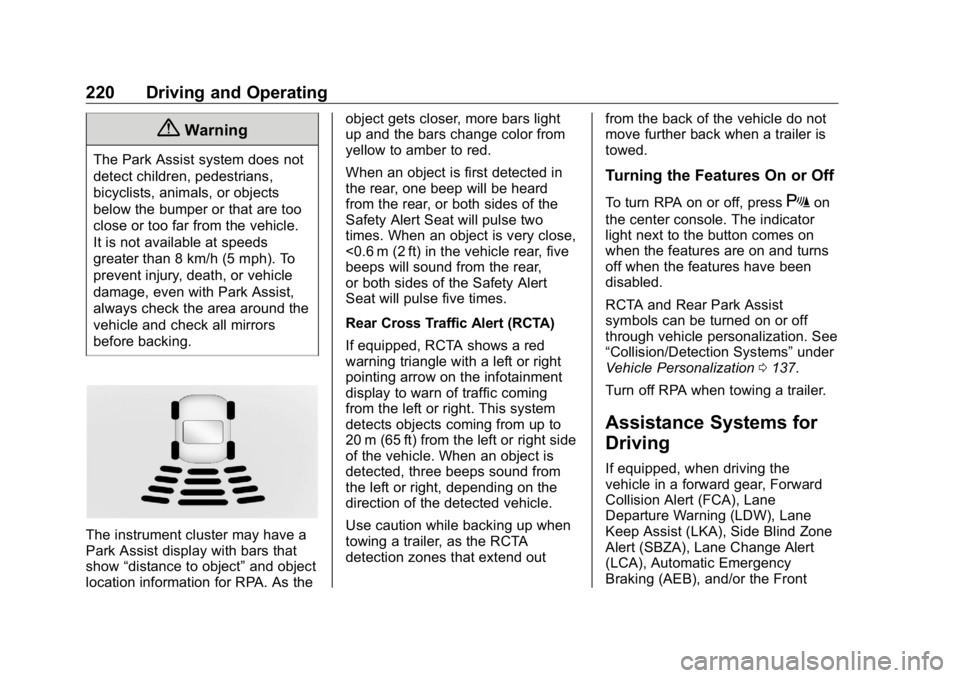
The instrument cluster may have a
Park Assist display with bars that
show “ distance to object ” and object
location information for RPA. As the object gets closer, more bars light
up and the bars change color from
yellow to amber to red.
When an object is first detected in
the rear, one beep will be heard
from the rear, or both sides of the
Safety Alert Seat will pulse two
times. When an object is very close,
<0.6 m (2 ft) in the vehicle rear, five
beeps will sound from the rear,
or both sides of the Safety Alert
Seat will pulse five times.
Rear Cross Traffic Alert (RCTA)
If equipped, RCTA shows a red
warning triangle with a left or right
pointing arrow on the infotainment
display to warn of traffic coming
from the left or right. This system
detects objects coming from up to
20 m (65 ft) from the left or right side
of the vehicle. When an object is
detected, three beeps sound from
the left or right, depending on the
direction of the detected vehicle.
Use caution while backing up when
towing a trailer, as the RCTA
detection zones that extend out from the back of the vehicle do not
move further back when a trailer is
towed.
Turning the Features On or Off To turn RPA on or off, press
X on
the center console. The indicator
light next to the button comes on
when the features are on and turns
off when the features have been
disabled.
RCTA and Rear Park Assist
symbols can be turned on or off
through vehicle personalization. See
“ Collision/Detection Systems ” under
Vehicle Personalization 0 137 .
Turn off RPA when towing a trailer.
Assistance Systems for
Driving If equipped, when driving the
vehicle in a forward gear, Forward
Collision Alert (FCA), Lane
Departure Warning (LDW), Lane
Keep Assist (LKA), Side Blind Zone
Alert (SBZA), Lane Change Alert
(LCA), Automatic Emergency
Braking (AEB), and/or the Front
Page 278 of 381

Buick Enclave Owner Manual (GMNA-Localizing-U.S./Canada/Mexico-
13527524) - 2020 - CRC - 4/10/19
Vehicle Care 277
Instrument Panel Fuse
Block
The instrument panel fuse block is
inside the center console on the
passenger side of the vehicle.
Remove the fuse access door by
pulling the door at the opening.
To remove a fuse, use the fuse
puller in the engine compartment
fuse block.
The vehicle may not be equipped
with all of the fuses, relays, and
features shown. Fuses Usage
F1 Body control module 6
F2 Diagnostic link
F3 Electric steering
column lock
F4 Rear USB port
F5 –
F6 Heating, ventilation,
and air conditioning
F7 Body control module 3
F8 –
F9 Right front
heated seat
F10 Airbag
F11 Electronic precision
shift
F12 Amplifier
F13 Body control module 7
F14 Left front heated seat
F15 –
F16 Sunroof
Page 371 of 381

Buick Enclave Owner Manual (GMNA-Localizing-U.S./Canada/Mexico-
13527524) - 2020 - CRC - 4/10/19
370 Index Assistance Systems for
Parking and Backing . . . . . . . . . . 216
Auto Stop
Stop/Start System . . . . . . . . . . . . 184
Automatic
Dimming Mirrors . . . . . . . . . . . . . . . . 31
Door Locks . . . . . . . . . . . . . . . . . . . . . 19
Emergency Braking (AEB) . . . . 223
Headlamp System . . . . . . . . . . . . 149
Transmission . . . . . . . . . . . . . . . . . 191
Transmission Fluid . . . . . . . . . . . 256
Automatic Transmission
Manual Mode . . . . . . . . . . . . . . . . . 196
B Battery
Exterior Lighting Battery
Saver . . . . . . . . . . . . . . . . . . . . . . . 154
Load Management . . . . . . . . . . . . 153
Power Protection . . . . . . . . . . . . . 153
Battery - North America . . . . 266, 311
Blade Replacement, Wiper . . . . . 268
Brake
Parking, Electric . . . . . . . . . . . . . . 198
System Warning Light . . . . . . . . 124
Brakes . . . . . . . . . . . . . . . . . . . . . . . . . . 264
Antilock . . . . . . . . . . . . . . . . . . . . . . . 197
Assist . . . . . . . . . . . . . . . . . . . . . . . . . 199 Brakes (cont'd)
Fluid . . . . . . . . . . . . . . . . . . . . . . . . . . 265
Braking . . . . . . . . . . . . . . . . . . . . . . . . . 167
Automatic
Emergency (AEB) . . . . . . . . . . . 223
Braking System
Front Pedestrian (FPB) . . . . . . . 224
Break-In, New Vehicle . . . . . . . . . . 181
Bulb Replacement
Headlamp Aiming . . . . . . . . . . . . . 271
Headlamps . . . . . . . . . . . . . . . . . . . 271
License Plate Lamps . . . . . . . . . 271
Buying New Tires . . . . . . . . . . . . . . . 297
C Calibration . . . . . . . . . . . . . . . . . . . . . . 105
California
Perchlorate Materials
Requirements . . . . . . . . . . . . . . . 249
California
Proposition
65 Warning . . . . . . . . . .248, 266, 311,
Back Cover
Canadian Vehicle Owners . . . . . . . . 2
Capacities and
Specifications . . . . . . . . . . . . . . . . . 341
Carbon Monoxide
Engine Exhaust . . . . . . . . . . . . . . . 190 Carbon Monoxide (cont'd)
Liftgate . . . . . . . . . . . . . . . . . . . . . . . . . 21
Winter Driving . . . . . . . . . . . . . . . . 175
Cargo
Management System . . . . . . . . . . . 97
Caution, Danger, and Warning . . . . 2
Center Console Storage . . . . . . . . . 97
Chains, Tire . . . . . . . . . . . . . . . . . . . . 301
Charging
Wireless . . . . . . . . . . . . . . . . . . . . . . 107
Charging System Light . . . . . . . . . 122
Check
Engine Light (Malfunction
Indicator) . . . . . . . . . . . . . . . . . . . . 122
Child Restraints
Infants and Young Children . . . . . 76
Lower Anchors and Tethers
for Children . . . . . . . . . . . . . . . . . . . 81
Older Children . . . . . . . . . . . . . . . . . . 74
Securing . . . . . . . . . . . . . . . . . . . . 91, 93
Systems . . . . . . . . . . . . . . . . . . . . . . . . 78
Circuit Breakers . . . . . . . . . . . . . . . . 273
Cleaning
Exterior Care . . . . . . . . . . . . . . . . . 317
Interior Care . . . . . . . . . . . . . . . . . . 321
Climate Control Systems
Dual Automatic . . . . . . . . . . . . . . . 156
Rear . . . . . . . . . . . . . . . . . . . . . . . . . . 160
Page 378 of 381

Buick Enclave Owner Manual (GMNA-Localizing-U.S./Canada/Mexico-
13527524) - 2020 - CRC - 4/10/19
Index 377Seat Belts (cont'd)
Care . . . . . . . . . . . . . . . . . . . . . . . . . . . . 60
Extender . . . . . . . . . . . . . . . . . . . . . . . . 60
How to Wear Seat Belts
Properly . . . . . . . . . . . . . . . . . . . . . . . 55
Lap-Shoulder Belt . . . . . . . . . . . . . . 57
Reminders . . . . . . . . . . . . . . . . . . . . 120
Replacing after a Crash . . . . . . . . 61
Use During Pregnancy . . . . . . . . . . 59
Seats
Head Restraints . . . . . . . . . . . . . . . . 40
Heated and Ventilated Front . . . . 46
Heated, Rear . . . . . . . . . . . . . . . . . . . 51
Lumbar Adjustment, Front . . . . . . 42
Memory . . . . . . . . . . . . . . . . . . . . . . . . . 43
Power Adjustment, Front . . . . . . . 42
Rear . . . . . . . . . . . . . . . . . . . . . . . . . . . . 48
Reclining Seatbacks . . . . . . . . . . . . 43
Third Row Seat . . . . . . . . . . . . . . . . . 51
Securing Child Restraints . . . . 91, 93
Security
Light . . . . . . . . . . . . . . . . . . . . . . . . . . 129
OnStar . . . . . . . . . . . . . . . . . . . . . . . 360
Vehicle . . . . . . . . . . . . . . . . . . . . . . . . . 28
Vehicle Alarm . . . . . . . . . . . . . . . . . . . 28
Service . . . . . . . . . . . . . . . . . . . . . . . . . 163
Accessories and
Modifications . . . . . . . . . . . . . . . . 249 Service (cont'd)
Doing Your Own Work . . . . . . . . 249
Maintenance Records . . . . . . . . 339
Maintenance, General
Information . . . . . . . . . . . . . . . . . . 326
Parts Identification . . . . . . . . . . . . 340
Scheduling Appointments . . . . . 349
Service Electric Parking
Brake Light . . . . . . . . . . . . . . . . . . . . 125
Services
Special Application . . . . . . . . . . . 333
Servicing the Airbag . . . . . . . . . . . . . 72
Shifting
Into Park . . . . . . . . . . . . . . . . . . . . . . 186
Out of Park . . . . . . . . . . . . . . . . . . . 187
Side Blind Zone Alert (SBZA) . . . 226
Signals, Turn and
Lane-Change . . . . . . . . . . . . . . . . . 150
Spare Tire
Compact . . . . . . . . . . . . . . . . . . . . . . 309
Special Application Services . . . . 333
Specifications and
Capacities . . . . . . . . . . . . . . . . . . . . . 341
Speedometer . . . . . . . . . . . . . . . . . . . 116
Sport Mode Light . . . . . . . . . . . . . . . 125
StabiliTrak
OFF Light . . . . . . . . . . . . . . . . . . . . . 127
Start Assist, Hill . . . . . . . . . . . . . . . . . 200 Start Vehicle, Remote . . . . . . . . . . . 15
Starter Switch Check . . . . . . . . . . . 267
Starting the Engine . . . . . . . . . . . . . 183
Steering . . . . . . . . . . . . . . . . . . . . . . . . 167
Heated Wheel . . . . . . . . . . . . . . . . 102
Wheel Adjustment . . . . . . . . . . . . 102
Wheel Controls . . . . . . . . . . . . . . . 102
Stop/Start System . . . . . . . . . . . . . . 184
Storage Areas
Cargo Management System . . . . 97
Center Console . . . . . . . . . . . . . . . . . 97
Glove Box . . . . . . . . . . . . . . . . . . . . . . 96
Roof Rack System . . . . . . . . . . . . . . 99
Sunglasses . . . . . . . . . . . . . . . . . . . . . 97
Storage Compartments . . . . . . . . . . 96
Struts
Gas . . . . . . . . . . . . . . . . . . . . . . . . . . . 269
Stuck Vehicle . . . . . . . . . . . . . . . . . . . 176
Sun Visors . . . . . . . . . . . . . . . . . . . . . . . 36
Sunglass Storage . . . . . . . . . . . . . . . . 97
Sunroof . . . . . . . . . . . . . . . . . . . . . . . . . . 37
Symbols . . . . . . . . . . . . . . . . . . . . . . . . . . 3
System
Engine Air Filter Life . . . . . . . . . . 257
Forward Collision
Alert (FCA) . . . . . . . . . . . . . . . . . . 221
Infotainment . . . . . . . . . . . . . 155, 357
Roof Rack . . . . . . . . . . . . . . . . . . . . . . 99