lane assist BUICK ENCLAVE 2020 Owners Manual
[x] Cancel search | Manufacturer: BUICK, Model Year: 2020, Model line: ENCLAVE, Model: BUICK ENCLAVE 2020Pages: 381, PDF Size: 7.08 MB
Page 5 of 381
Buick Enclave Owner Manual (GMNA-Localizing-U.S./Canada/Mexico-
13527524) - 2020 - CRC - 4/10/19
4 Introduction
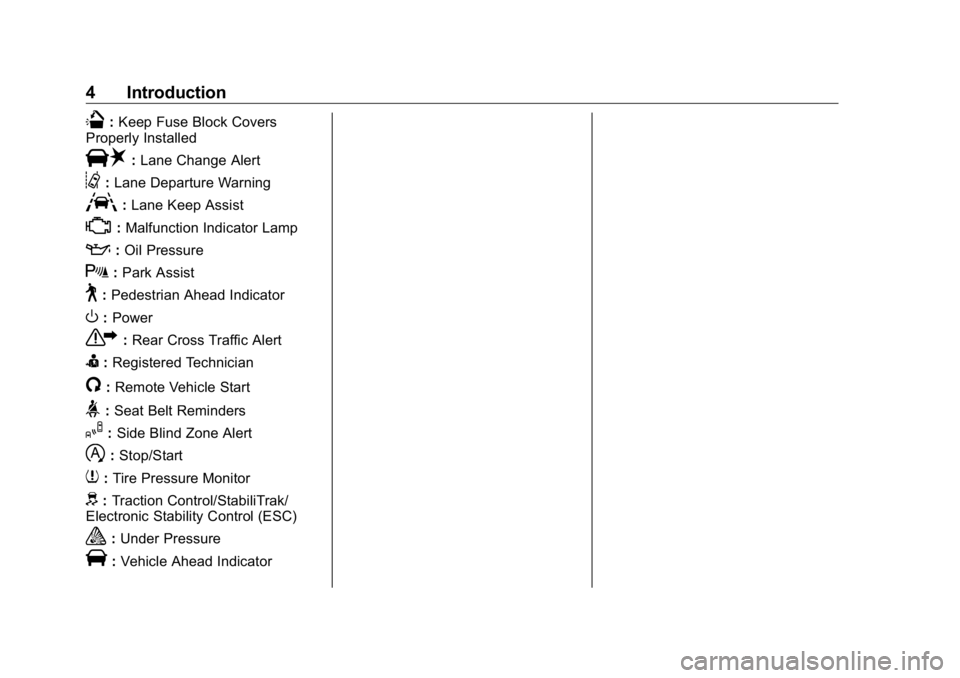
Q : Keep Fuse Block Covers
Properly Installed
| : Lane Change Alert
@ : Lane Departure Warning
A : Lane Keep Assist
* : Malfunction Indicator Lamp
: : Oil Pressure
X : Park Assist
~ : Pedestrian Ahead Indicator
O : Power
7 : Rear Cross Traffic Alert
I : Registered Technician
/ : Remote Vehicle Start
> : Seat Belt Reminders
I : Side Blind Zone Alert
h : Stop/Start
7 : Tire Pressure Monitor
d : Traction Control/StabiliTrak/
Electronic Stability Control (ESC)
a : Under Pressure
V : Vehicle Ahead Indicator
Page 7 of 381

Buick Enclave Owner Manual (GMNA-Localizing-U.S./Canada/Mexico-
13527524) - 2020 - CRC - 4/10/19
6 Introduction 1. Air Vents 0 162 .
2. Turn Signal Lever. See Turn
and Lane-Change Signals
0 150 .
IntelliBeam System Button (If
Equipped). See Exterior Lamp
Controls 0 146 .
3. Manual Mode 0 196 .
4. Instrument Cluster (Base
Level) 0 111 or
Instrument Cluster (Uplevel)
0 114 .
Driver Information Center (DIC)
Display. See Driver Information
Center (DIC) (Base Level)
0 130 or
Driver Information Center (DIC)
(Uplevel) 0 133 .
5. Windshield Wiper/Washer
0 103 .
6. Traction Control/Electronic
Stability Control 0 200 .
All-Wheel Drive Button (If
Equipped). See Driver Mode
Control 0 202 . Sport Mode Button (If
Equipped) or Tow/Haul Mode
Button (If Equipped). See
Driver Mode Control 0 202 .
7. Light Sensor. See Automatic
Headlamp System 0 149 .
8. Hazard Warning Flashers
0 150 .
Assistance Systems for
Parking or Backing 0 216 (If
Equipped).
Lane Keep Assist (LKA) 0 229
(If Equipped).
9. Infotainment 0 155 .
10. Dual Automatic Climate Control
System 0 156 .
Heated and Ventilated Front
Seats 0 46 (If Equipped).
11. Wireless Charging 0 107 (If
Equipped).
12. Shift Lever. See Automatic
Transmission 0 191 .
13. ENGINE START/STOP Button.
See Ignition Positions 0 181 .
14. Steering Wheel Controls 0 102 . 15. Horn 0 103 .
16. Steering Wheel Adjustment
0 102 (Out of View).
17. Cruise Control 0 203 .
Adaptive Cruise Control 0 206
(If Equipped).
Heated Steering Wheel 0 102
(If Equipped).
Forward Collision Alert (FCA)
System 0 221 (If Equipped).
18. Hood Release. See Hood
0 250 .
19. Data Link Connector (DLC)
(Out of View). See Malfunction
Indicator Lamp (Check Engine
Light) 0 122 .
20. Exterior Lamp Controls 0 146 .
21. Instrument Panel Illumination
Control 0 151 .
22. Electric Parking Brake 0 198 .
Page 102 of 381
Buick Enclave Owner Manual (GMNA-Localizing-U.S./Canada/Mexico-
13527524) - 2020 - CRC - 4/10/19
Instruments and Controls 101
Instruments and
Controls Controls Steering Wheel Adjustment . . . 102
Steering Wheel Controls . . . . . . 102
Heated Steering Wheel . . . . . . . 102
Horn . . . . . . . . . . . . . . . . . . . . . . . . . . 103
Windshield Wiper/Washer . . . . 103
Rear Window Wiper/
Washer . . . . . . . . . . . . . . . . . . . . . 104
Compass . . . . . . . . . . . . . . . . . . . . . 105
Clock . . . . . . . . . . . . . . . . . . . . . . . . . 106
Power Outlets . . . . . . . . . . . . . . . . 106
Wireless Charging . . . . . . . . . . . . 107
Warning Lights, Gauges, and
Indicators Warning Lights, Gauges, and
Indicators . . . . . . . . . . . . . . . . . . . 110
Instrument Cluster (Base
Level) . . . . . . . . . . . . . . . . . . . . . . . 111
Instrument Cluster
(Uplevel) . . . . . . . . . . . . . . . . . . . . 114
Speedometer . . . . . . . . . . . . . . . . . 116
Odometer . . . . . . . . . . . . . . . . . . . . . 116
Trip Odometer . . . . . . . . . . . . . . . . 116
Tachometer . . . . . . . . . . . . . . . . . . . 116 Fuel Gauge . . . . . . . . . . . . . . . . . . . 117
Engine Oil Temperature
Gauge . . . . . . . . . . . . . . . . . . . . . . 118
Engine Coolant Temperature
Gauge . . . . . . . . . . . . . . . . . . . . . . 118
Voltmeter Gauge . . . . . . . . . . . . . . 119
Seat Belt Reminders . . . . . . . . . 120
Airbag Readiness Light . . . . . . . 120
Passenger Airbag Status
Indicator . . . . . . . . . . . . . . . . . . . . 121
Charging System Light . . . . . . . 122
Malfunction Indicator Lamp
(Check Engine Light) . . . . . . . . 122
Brake System Warning
Light . . . . . . . . . . . . . . . . . . . . . . . . 124
Electric Parking Brake
Light . . . . . . . . . . . . . . . . . . . . . . . . 124
Service Electric Parking Brake
Light . . . . . . . . . . . . . . . . . . . . . . . . 125
Antilock Brake System (ABS)
Warning Light . . . . . . . . . . . . . . . 125
Sport Mode Light . . . . . . . . . . . . . 125
Tow/Haul Mode Light . . . . . . . . . 125
Lane Keep Assist (LKA)
Light . . . . . . . . . . . . . . . . . . . . . . . . 126
Vehicle Ahead Indicator . . . . . . 126
Pedestrian Ahead Indicator . . . 126
Traction Off Light . . . . . . . . . . . . . 127
StabiliTrak OFF Light . . . . . . . . . 127 Traction Control System (TCS)/
StabiliTrak Light . . . . . . . . . . . . . 127
Tire Pressure Light . . . . . . . . . . . 128
Engine Oil Pressure Light . . . . 128
Low Fuel Warning Light . . . . . . 129
Security Light . . . . . . . . . . . . . . . . . 129
High-Beam On Light . . . . . . . . . . 129
Lamps On Reminder . . . . . . . . . 129
Cruise Control Light . . . . . . . . . . 130
Door Ajar Light . . . . . . . . . . . . . . . 130
Information Displays Driver Information Center (DIC)
(Base Level) . . . . . . . . . . . . . . . . 130
Driver Information Center (DIC)
(Uplevel) . . . . . . . . . . . . . . . . . . . . 133
Vehicle Messages Vehicle Messages . . . . . . . . . . . . 136
Engine Power Messages . . . . . 136
Vehicle Speed Messages . . . . . 137
Vehicle Personalization Vehicle Personalization . . . . . . . 137
Universal Remote System Universal Remote System . . . . 142
Universal Remote System
Programming . . . . . . . . . . . . . . . 142
Universal Remote System
Operation . . . . . . . . . . . . . . . . . . . 144
Page 127 of 381
Buick Enclave Owner Manual (GMNA-Localizing-U.S./Canada/Mexico-
13527524) - 2020 - CRC - 4/10/19
126 Instruments and Controls For vehicles with the Tow/Haul
Mode feature, this light comes on
when the Tow/Haul Mode has been
activated.
See Tow/Haul Mode 0 196 .
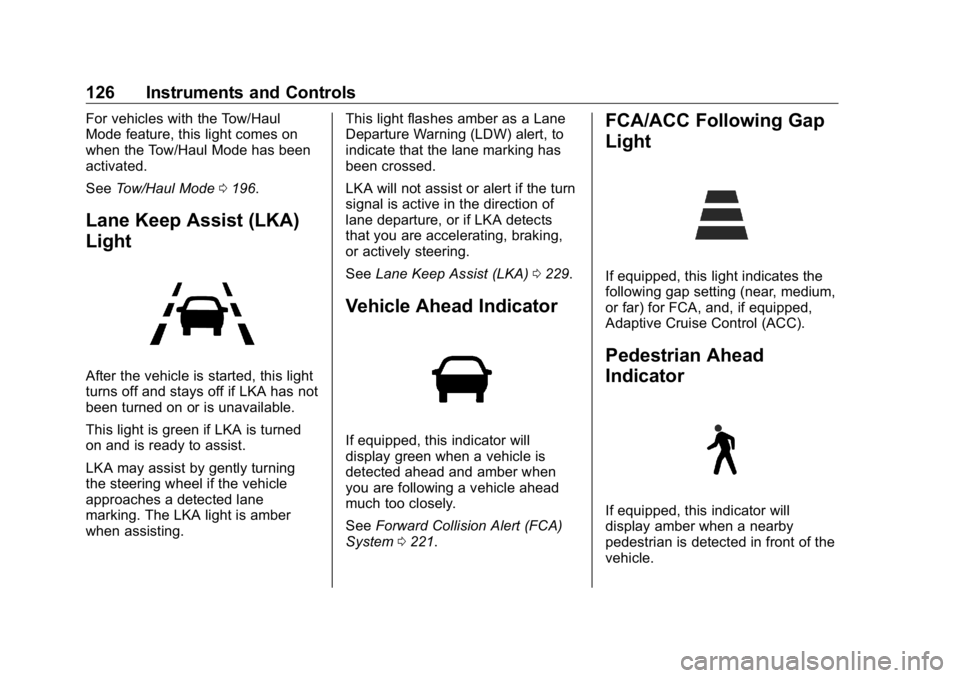
Lane Keep Assist (LKA)
Light
After the vehicle is started, this light
turns off and stays off if LKA has not
been turned on or is unavailable.
This light is green if LKA is turned
on and is ready to assist.
LKA may assist by gently turning
the steering wheel if the vehicle
approaches a detected lane
marking. The LKA light is amber
when assisting. This light flashes amber as a Lane
Departure Warning (LDW) alert, to
indicate that the lane marking has
been crossed.
LKA will not assist or alert if the turn
signal is active in the direction of
lane departure, or if LKA detects
that you are accelerating, braking,
or actively steering.
See Lane Keep Assist (LKA) 0 229 .
Vehicle Ahead Indicator
If equipped, this indicator will
display green when a vehicle is
detected ahead and amber when
you are following a vehicle ahead
much too closely.
See Forward Collision Alert (FCA)
System 0 221 . FCA/ACC Following Gap
Light
If equipped, this light indicates the
following gap setting (near, medium,
or far) for FCA, and, if equipped,
Adaptive Cruise Control (ACC).
Pedestrian Ahead
Indicator
If equipped, this indicator will
display amber when a nearby
pedestrian is detected in front of the
vehicle.
Page 140 of 381

Buick Enclave Owner Manual (GMNA-Localizing-U.S./Canada/Mexico-
13527524) - 2020 - CRC - 4/10/19
Instruments and Controls 139Rear Cross Traffic Alert
This setting specifies if an alert will
display when the vehicle detects
approaching rear cross traffic when
in R (Reverse). See Assistance
Systems for Parking or Backing
0 216 .
Touch Off or On.
Adaptive Cruise Go Notifier
This setting determines if an alert
will appear when Adaptive Cruise
Control brings the vehicle to a
complete stop and the vehicle
ahead of you starts moving again.
See Adaptive Cruise Control 0 206 .
Touch Off or On.
Lane Change Alert
This setting specifies if an alert will
display on the outside mirror to help
you avoid crashing into a vehicle in
your blind spot, or rapidly
approaching your blind spot, during
a lane change maneuver. See Lane
Change Alert (LCA) 0 227 . When Lane Change Alert is
disabled, Side Blind Zone Alert is
also disabled.
Touch Off or On.
Comfort and Convenience Touch and the following may
display:
.
Chime Volume
.
Hands Free Liftgate Control
.
Reverse Tilt Mirror
.
Remote Mirror Folding
.
Auto Wipe in Reverse Gear
Chime Volume
This setting determines the chime
volume level.
Touch the controls on the
infotainment display to adjust the
volume.
Hands Free Liftgate Control
The liftgate may be operated with a
kicking motion under the left corner
of the rear bumper. See Liftgate
0 21 . Select Off, On-Open and Close,
or On-Open Only.
Reverse Tilt Mirror
When on, both the driver and
passenger, driver, or passenger
outside mirrors will tilt downward
when the vehicle is shifted to
R (Reverse) to improve visibility of
the ground near the rear wheels.
They will return to their previous
driving position when the vehicle is
shifted out of R (Reverse) or the
engine is turned off. See Reverse
Tilt Mirrors 0 31 .
Touch Off, On - Driver and
Passenger, On - Driver, or On -
Passenger.
Remote Mirror Folding
When on, the outside mirrors will
automatically fold or unfold when
the Remote Keyless Entry (RKE)
transmitter
Q or
K button is
pressed and held. See Folding
Mirrors 0 30 .
Touch Off or On.
Page 165 of 381
Buick Enclave Owner Manual (GMNA-Localizing-U.S./Canada/Mexico-
13527524) - 2020 - CRC - 4/10/19
164 Driving and Operating
Driving and
Operating Driving Information Driving for Better Fuel
Economy . . . . . . . . . . . . . . . . . . . . 165
Distracted Driving . . . . . . . . . . . . 165
Defensive Driving . . . . . . . . . . . . . 166
Drunk Driving . . . . . . . . . . . . . . . . . 166
Control of a Vehicle . . . . . . . . . . . 167
Braking . . . . . . . . . . . . . . . . . . . . . . . 167
Steering . . . . . . . . . . . . . . . . . . . . . . 167
Off-Road Recovery . . . . . . . . . . . 168
Loss of Control . . . . . . . . . . . . . . . 168
Off-Road Driving . . . . . . . . . . . . . 169
Driving on Wet Roads . . . . . . . . 173
Hill and Mountain Roads . . . . . 174
Winter Driving . . . . . . . . . . . . . . . . 175
If the Vehicle Is Stuck . . . . . . . . 176
Vehicle Load Limits . . . . . . . . . . . 177
Starting and Operating New Vehicle Break-In . . . . . . . . . 181
Ignition Positions . . . . . . . . . . . . . 181
Starting the Engine . . . . . . . . . . . 183
Stop/Start System . . . . . . . . . . . . 184
Engine Heater . . . . . . . . . . . . . . . . 185 Retained Accessory
Power (RAP) . . . . . . . . . . . . . . . . 186
Shifting Into Park . . . . . . . . . . . . . 186
Shifting out of Park . . . . . . . . . . . 187
Parking over Things
That Burn . . . . . . . . . . . . . . . . . . . 189
Extended Parking . . . . . . . . . . . . 189
Engine Exhaust Engine Exhaust . . . . . . . . . . . . . . 190
Running the Vehicle While
Parked . . . . . . . . . . . . . . . . . . . . . . 191
Automatic Transmission Automatic Transmission . . . . . . 191
Manual Mode . . . . . . . . . . . . . . . . . 196
Tow/Haul Mode . . . . . . . . . . . . . . . 196
Drive Systems All-Wheel Drive . . . . . . . . . . . . . . . 197
Brakes Antilock Brake
System (ABS) . . . . . . . . . . . . . . . 197
Electric Parking Brake . . . . . . . . 198
Brake Assist . . . . . . . . . . . . . . . . . . 199
Hill Start Assist (HSA) . . . . . . . . 200
Ride Control Systems
Traction Control/Electronic
Stability Control . . . . . . . . . . . . . 200
Driver Mode Control . . . . . . . . . . 202 Cruise Control Cruise Control . . . . . . . . . . . . . . . . 203
Adaptive Cruise Control . . . . . . 206
Driver Assistance Systems Driver Assistance Systems . . . 214
Assistance Systems for
Parking or Backing . . . . . . . . . . 216
Assistance Systems for
Driving . . . . . . . . . . . . . . . . . . . . . . 220
Forward Collision Alert (FCA)
System . . . . . . . . . . . . . . . . . . . . . . 221
Automatic Emergency
Braking (AEB) . . . . . . . . . . . . . . . 223
Front Pedestrian Braking
(FPB) System . . . . . . . . . . . . . . . 224
Side Blind Zone
Alert (SBZA) . . . . . . . . . . . . . . . . 226
Lane Change Alert (LCA) . . . . . 227
Lane Keep Assist (LKA) . . . . . . 229
Fuel Top Tier Fuel . . . . . . . . . . . . . . . . . 231
Recommended Fuel . . . . . . . . . . 231
Prohibited Fuels . . . . . . . . . . . . . . 231
Fuels in Foreign Countries . . . 232
Fuel Additives . . . . . . . . . . . . . . . . 232
Filling the Tank . . . . . . . . . . . . . . . 232
Filling a Portable Fuel
Container . . . . . . . . . . . . . . . . . . . 234
Page 168 of 381

Buick Enclave Owner Manual (GMNA-Localizing-U.S./Canada/Mexico-
13527524) - 2020 - CRC - 4/10/19
Driving and Operating 167
Control of a Vehicle Braking, steering, and accelerating
are important factors in helping to
control a vehicle while driving.
Braking Braking action involves perception
time and reaction time. Deciding to
push the brake pedal is perception
time. Actually doing it is
reaction time.
Average driver reaction time is
about three-quarters of a second. In
that time, a vehicle moving at
100 km/h (60 mph) travels 20 m
(66 ft), which could be a lot of
distance in an emergency.
Helpful braking tips to keep in mind
include:
.
Keep enough distance between
you and the vehicle in front
of you.
.
Avoid needless heavy braking.
.
Keep pace with traffic. If the engine ever stops while the
vehicle is being driven, brake
normally but do not pump the
brakes. Doing so could make the
pedal harder to push down. If the
engine stops, there will be some
power brake assist but it will be
used when the brake is applied.
Once the power assist is used up, it
can take longer to stop and the
brake pedal will be harder to push.
Steering Electric Power Steering
CautionTo avoid damage to the steering
system, do not drive over curbs,
parking barriers, or similar objects
at speeds greater than 3 km/h
(1 mph). Use care when driving
over other objects such as lane
dividers and speed bumps.
Damage caused by misuse of the
vehicle is not covered by the
vehicle warranty. The vehicle has electric power
steering. It does not have power
steering fluid. Regular maintenance
is not required.
If power steering assist is lost due
to a system malfunction, the vehicle
can be steered, but may require
increased effort.
If the steering assist is used for an
extended period of time while the
vehicle is not moving, power assist
may be reduced.
Page 176 of 381
Buick Enclave Owner Manual (GMNA-Localizing-U.S./Canada/Mexico-
13527524) - 2020 - CRC - 4/10/19
Driving and Operating 175
{ WarningCoasting downhill in N (Neutral)
or with the ignition off is
dangerous. This can cause
overheating of the brakes and
loss of steering assist. Always
have the engine running and the
vehicle in gear.
.
Drive at speeds that keep the
vehicle in its own lane. Do not
swing wide or cross the
center line.
.
Be alert on top of hills;
something could be in your lane
(e.g., stalled car, crash).
.
Pay attention to special road
signs (e.g., falling rocks area,
winding roads, long grades,
passing or no-passing zones)
and take appropriate action.
.
Select All-Wheel Drive (AWD)
Mode. See Driver Mode Control
0 202 and
All-Wheel Drive 0 197 . Winter Driving Driving on Snow or Ice Snow or ice between the tires and
the road creates less traction or
grip, so drive carefully. Wet ice can
occur at about 0 °C (32 °F) when
freezing rain begins to fall. Avoid
driving on wet ice or in freezing rain
until roads can be treated.
For Slippery Road Driving:
.
Accelerate gently. Accelerating
too quickly causes the wheels to
spin and makes the surface
under the tires slick.
.
Turn on Traction Control. See
Traction Control/Electronic
Stability Control 0 200 .
.
The Antilock Brake System
(ABS) improves vehicle stability
during hard stops, but the
brakes should be applied sooner
than when on dry pavement.
See Antilock Brake System
(ABS) 0 197 . .
Allow greater following distance
and watch for slippery spots. Icy
patches can occur on otherwise
clear roads in shaded areas.
The surface of a curve or an
overpass can remain icy when
the surrounding roads are clear.
Avoid sudden steering
maneuvers and braking while
on ice.
.
Turn off cruise control.
.
Select All-Wheel Drive (AWD)
Mode for vehicles equipped with
AWD. Select Snow/Ice Mode for
FWD only vehicles. See Driver
Mode Control 0 202 and
All-Wheel Drive 0 197 .
Blizzard Conditions Stop the vehicle in a safe place and
signal for help. Stay with the vehicle
unless there is help nearby.
If possible, use Roadside
Assistance. See Roadside
Assistance Program 0 348 . To get
help and keep everyone in the
vehicle safe:
.
Turn on the hazard warning
flashers.
Page 215 of 381

Buick Enclave Owner Manual (GMNA-Localizing-U.S./Canada/Mexico-
13527524) - 2020 - CRC - 4/10/19
214 Driving and Operating Do not use ACC when driving on
steep hills or when towing a trailer.
ACC will not detect a vehicle in the
lane while driving on steep hills. The
driver will often need to take over
acceleration and braking on steep
hills, especially when towing a
trailer. If the brakes are applied, the
ACC disengages.
Disengaging ACC
There are three ways to
disengage ACC:
.
Step lightly on the brake pedal.
.
Press
* .
.
Press
5 .
Erasing Speed Memory
The cruise control set speed is
erased from memory if
5 is pressed
or if the ignition is turned off. Cleaning the Sensing System
The radar sensor on the front of the
vehicle can become blocked by
snow, ice, dirt, or mud. This area
needs to be cleaned for ACC to
operate properly.
If ACC will not operate, regular
cruise control may be available. See
“ Switching Between ACC and
Regular Cruise Control ” previously
in this section. Always consider
driving conditions before using
either cruise control system.
For cleaning instructions, see
“ Washing the Vehicle ” under
Exterior Care 0 317 .
System operation may also be
limited under snow, heavy rain,
or road spray conditions. Driver Assistance
Systems This vehicle may have features that
work together to help avoid crashes
or reduce crash damage while
driving, backing, and parking. Read
this entire section before using
these systems.
{ WarningDo not rely on the Driver
Assistance Systems. These
systems do not replace the need
for paying attention and driving
safely. You may not hear or feel
alerts or warnings provided by
these systems. Failure to use
proper care when driving may
result in injury, death, or vehicle
damage. See Defensive Driving
0 166 .
(Continued)
Page 218 of 381
Buick Enclave Owner Manual (GMNA-Localizing-U.S./Canada/Mexico-
13527524) - 2020 - CRC - 4/10/19
Driving and Operating 217Displayed images may be farther or
closer than they appear. The area
displayed is limited and objects that
are close to either corner of the
bumper or under the bumper do not
display.
A warning triangle may display to
show that RPA has detected an
object. This triangle changes from
amber to red and increases in size
the closer the object.
Hitch Guidance
If equipped, this feature displays a
single, centered guideline on the
camera display to assist with
aligning a vehicle ’ s hitch ball with a
trailer coupler. Select the trailer
guidance line button, then align the
trailer guidance line over the trailer
coupler. Continuously steer the
vehicle to keep the guidance line
centered on the coupler when
backing. RVC Park Assist overlays
will not display when the trailer
guidance line is active. Hitch
Guidance is only available in
Standard View. To check the trailer when in a
forward gear above 12 km/h
(8 mph), touch CAMERA on the
infotainment display to view the rear
camera. Touch X to exit the view or
it will be removed automatically after
eight seconds.
{ WarningUse Hitch Guidance only to help
back the vehicle to a trailer hitch
or, when traveling above 12 km/h
(8 mph), to briefly check the
status of your trailer. Do not use
for any other purpose, such as
making lane change decisions.
Before making a lane change,
always check the mirrors and
glance over your shoulder.
Improper use could result in
serious injury to you or others.
Surround Vision
If equipped, Surround Vision shows
an image of the area surrounding
the vehicle, along with the front or
rear camera views on the infotainment display. The front
camera is in the grille or near the
front emblem, the side cameras are
on the bottom of the outside mirrors,
and the rear camera is above the
license plate.
The Surround Vision system can be
accessed by selecting CAMERA in
the infotainment display or when the
vehicle is shifted into R (Reverse).
To return to the previous screen
sooner, press any button on the
infotainment system, shift into
P (Park), or reach a vehicle speed
of approximately 12 km/h (8 mph).
{ WarningThe Surround Vision cameras
have blind spots and will not
display all objects near the
corners of the vehicle. Folding
outside mirrors that are out of
position may not display surround
view correctly. Always check
around the vehicle when parking
or backing.