center console BUICK ENCLAVE 2021 User Guide
[x] Cancel search | Manufacturer: BUICK, Model Year: 2021, Model line: ENCLAVE, Model: BUICK ENCLAVE 2021Pages: 369, PDF Size: 11.58 MB
Page 91 of 369

Buick Enclave Owner Manual (GMNA-Localizing-U.S./Canada/Mexico-
14637843) - 2021 - CRC - 12/9/20
90 Instruments and Controls
Compass
The vehicle may have a compass display on
the Driver Information Center (DIC). The
compass receives its heading and other
information from the Global Positioning
System (GPS) antenna, StabiliTrak/Electronic
Stability Control (ESC), and vehicle speed
information.
The compass system is designed to operate
for a certain number of miles or degrees of
turn before needing a signal from the GPS
satellites. When the compass display shows
CAL, drive the vehicle for a short distance in
an open area where it can receive a GPS
signal. The compass system will
automatically determine when a GPS signal
is restored and provide a heading again.
Clock
Set the time and date using the
infotainment system. See "Time / Date"
underSettings 0165.
Power Outlets
Power Outlets 12-Volt Direct Current
The vehicle has two 12-volt outlets that can
be used to plug in electrical equipment, such
as a cell phone or MP3 player.
The power outlets are located:
.Under the front of the center console.
.In the rear cargo area.
Lift the cover to access the outlet and
replace when not in use.
{Warning
Power is always supplied to the rear
cargo power outlet. Do not leave
electrical equipment plugged in when the
vehicle is not in use because the vehicle
could catch fire and cause injury or
death.
Caution
Leaving electrical equipment plugged in
for an extended period of time while the
ignition is off will drain the battery.
Always unplug electrical equipment when
not in use and do not plug in equipment
that exceeds the maximum 15 amp
rating.
Certain accessory plugs may not be
compatible with the accessory power outlet
and could overload vehicle and adapter
fuses. If a problem is experienced, see your
dealer.
When adding electrical equipment, be sure
to follow the proper installation instructions
included with the equipment. See Add-On
Electrical Equipment 0256.
Caution
Hanging heavy equipment from the
power outlet can cause damage not
covered by the vehicle warranty. The
power outlets are designed for accessory
power plugs only, such as cell phone
charge cords.
Page 92 of 369
Buick Enclave Owner Manual (GMNA-Localizing-U.S./Canada/Mexico-
14637843) - 2021 - CRC - 12/9/20
Instruments and Controls 91
Power Outlet 110V/120V Alternating
Current
If equipped with this power outlet it can be
used to plug in electrical equipment that
uses a maximum limit of 150 watts.
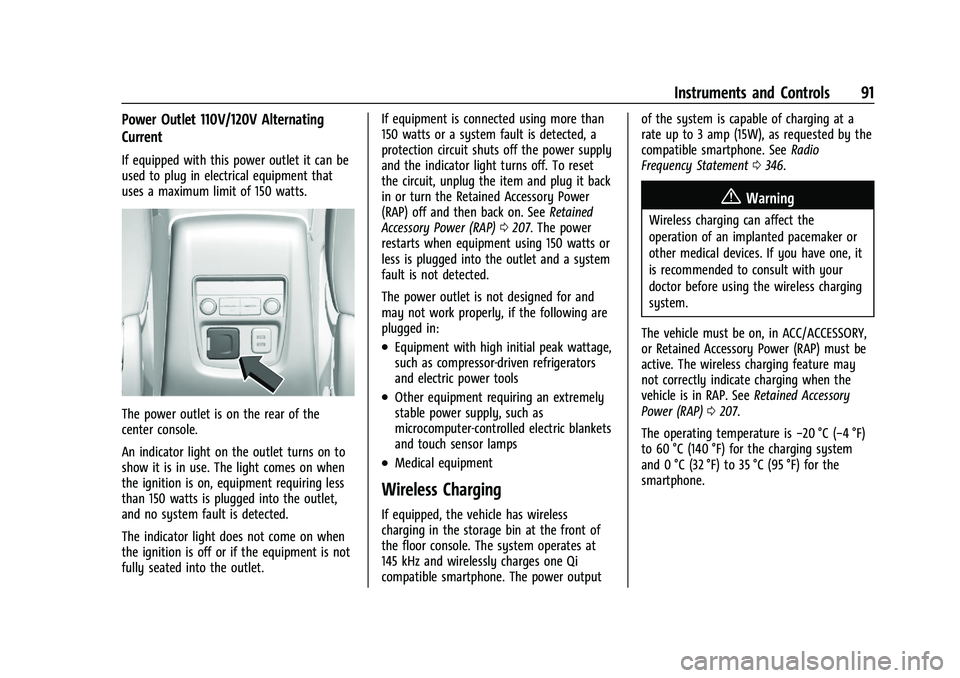
The power outlet is on the rear of the
center console.
An indicator light on the outlet turns on to
show it is in use. The light comes on when
the ignition is on, equipment requiring less
than 150 watts is plugged into the outlet,
and no system fault is detected.
The indicator light does not come on when
the ignition is off or if the equipment is not
fully seated into the outlet.If equipment is connected using more than
150 watts or a system fault is detected, a
protection circuit shuts off the power supply
and the indicator light turns off. To reset
the circuit, unplug the item and plug it back
in or turn the Retained Accessory Power
(RAP) off and then back on. See
Retained
Accessory Power (RAP) 0207. The power
restarts when equipment using 150 watts or
less is plugged into the outlet and a system
fault is not detected.
The power outlet is not designed for and
may not work properly, if the following are
plugged in:
.Equipment with high initial peak wattage,
such as compressor-driven refrigerators
and electric power tools
.Other equipment requiring an extremely
stable power supply, such as
microcomputer-controlled electric blankets
and touch sensor lamps
.Medical equipment
Wireless Charging
If equipped, the vehicle has wireless
charging in the storage bin at the front of
the floor console. The system operates at
145 kHz and wirelessly charges one Qi
compatible smartphone. The power output of the system is capable of charging at a
rate up to 3 amp (15W), as requested by the
compatible smartphone. See
Radio
Frequency Statement 0346.
{Warning
Wireless charging can affect the
operation of an implanted pacemaker or
other medical devices. If you have one, it
is recommended to consult with your
doctor before using the wireless charging
system.
The vehicle must be on, in ACC/ACCESSORY,
or Retained Accessory Power (RAP) must be
active. The wireless charging feature may
not correctly indicate charging when the
vehicle is in RAP. See Retained Accessory
Power (RAP) 0207.
The operating temperature is −20 °C (−4 °F)
to 60 °C (140 °F) for the charging system
and 0 °C (32 °F) to 35 °C (95 °F) for the
smartphone.
Page 102 of 369

Buick Enclave Owner Manual (GMNA-Localizing-U.S./Canada/Mexico-
14637843) - 2021 - CRC - 12/9/20
Instruments and Controls 101
the airbag modules, the wiring, and the
crash sensing and diagnostic module. For
more information on the airbag system, see
Airbag System052.
The airbag readiness light comes on for
several seconds when the vehicle is started.
If the light does not come on then, have it
fixed immediately.
{Warning
If the airbag readiness light stays on
after the vehicle is started or comes on
while driving, it means the airbag system
might not be working properly. The
airbags in the vehicle might not inflate in
a crash, or they could even inflate
without a crash. To help avoid injury,
have the vehicle serviced right away.
If there is a problem with the airbag
system, a Driver Information Center (DIC)
message may also come on.
Passenger Airbag Status Indicator
The vehicle has a passenger sensing system.
See Passenger Sensing System 057 for
important safety information. The overhead
console has a passenger airbag status
indicator.
When the vehicle is started, the passenger
airbag status indicator will light ON and OFF,
and the symbols for on and off, for several
seconds as a system check. Then, after
several more seconds, the status indicator
will light either ON or OFF, and either the
on or off symbol, to let you know the
status of the front outboard passenger
frontal airbag.
If the word ON, and the on symbol, are lit
on the passenger airbag status indicator, it
means that the front outboard passenger
frontal airbag is allowed to inflate. If the word OFF, and the off symbol, are lit
on the passenger airbag status indicator, it
means that the passenger sensing system
has turned off the front outboard passenger
frontal airbag.
If, after several seconds, both status
indicator lights remain on, or if there are no
lights at all, there may be a problem with
the lights or the passenger sensing system.
See your dealer for service.
{Warning
If the airbag readiness light ever comes
on and stays on, it means that
something may be wrong with the airbag
system. To help avoid injury to yourself
or others, have the vehicle serviced right
away. See
Airbag Readiness Light 0100
for more information, including important
safety information.
Page 139 of 369
Buick Enclave Owner Manual (GMNA-Localizing-U.S./Canada/Mexico-
14637843) - 2021 - CRC - 12/9/20
138 Infotainment System
by model and require a complete working
electrical system, cell reception, and GPS
signal. An active connected plan is required.
Reference the SiriusXM user guide for use
and subscription information.
Radio Reception
Unplug electronic devices from the accessory
power outlets if there is interference or
static in the radio.
FM
FM signals only reach about 16 to 65 km (10
to 40 mi). Although the radio has a built-in
electronic circuit that automatically works to
reduce interference, some static can occur,
especially around tall buildings or hills,
causing the sound to fade in and out.
AM
The range for most AM stations is greater
than for FM, especially at night. The longer
range can cause station frequencies to
interfere with each other. Static can also
occur when things like storms and power
lines interfere with radio reception. When
this happens, try reducing the treble on the
radio.
SiriusXM Satellite Radio Service
If equipped, SiriusXM Satellite Radio Service
provides digital radio reception. Tall
buildings or hills can interfere with satellite
radio signals, causing the sound to fade in
and out. In addition, traveling or standing
under heavy foliage, bridges, garages,
or tunnels may cause loss of the SiriusXM
signal for a period of time. Some cellular
services may interfere with SXM reception
causing loss of signal.
Mobile Device Usage
Mobile device usage, such as making or
receiving calls, charging, or just having the
mobile device on may cause static
interference in the radio. Unplug the mobile
device or turn it off if this happens.
Multi-Band Antenna
The roof antenna may be used for radio,
navigation, and OnStar, depending on the
equipped options. Keep clear of obstructions
for clear reception. If the vehicle has a
sunroof, and it is open, reception can also
be affected.
Audio Players
Avoiding Untrusted Media Devices
When using media devices such as SD cards,
USB devices, and mobile devices, consider
the source. Untrusted media devices could
contain files that affect system operation or
performance. Avoid use if the content or
origin cannot be trusted.
USB Port
Audio stored on a USB device may be
listened to.
This vehicle is equipped with two USB ports
in the center console. These ports are for
data and charging. There may also be two
USB ports for charging only at the rear of
the center console.
Caution
To avoid vehicle damage, unplug all
accessories and disconnect all accessory
cables from the vehicle when not in use.
Accessory cables left plugged into the
vehicle, unconnected to a device, could be
damaged or cause an electrical short if
(Continued)
Page 142 of 369
Buick Enclave Owner Manual (GMNA-Localizing-U.S./Canada/Mexico-
14637843) - 2021 - CRC - 12/9/20
Infotainment System 141
Storing and Recalling Media Favorites
To store media favorites, touch the Browse
menu to display a list of media types.
Touch one of the following Browse options
to save a favorite:
Playlists :Touch
Hnext to any playlist to
store the playlist as a favorite. Touch a
saved favorite to recall a favorite playlist.
The first song in the playlist begins to play.
Artists : Touch
Hnext to any artist to
store the artist as a favorite. Touch a saved
favorite to recall a favorite artist. The first
song in the artist list begins to play.
Songs : Touch
Hnext to any song to store
the song as a favorite. Touch a saved
favorite to recall a favorite song.
Albums : Touch
Hnext to any album to
store the album as a favorite. Touch a saved
favorite to recall a favorite album. The first
song in the album list begins to play.
Genres : Touch
Hnext to any genre to
store the genre as a favorite. Touch a saved
favorite to recall a favorite genre. The first
song of the genre begins to play. Podcasts :
Touch
Hnext to any podcast to
store the podcast as a favorite. Touch a
saved favorite to recall a favorite podcast.
The podcast begins to play.
Audiobooks : Touch
Hnext to any
audiobook to store the audiobook as a
favorite. Touch a saved favorite to recall a
favorite audiobook. The first chapter in the
audiobook begins to play.
Media Playback and Mute
USB playback will be paused if the system is
muted. If the steering wheel mute control is
pressed again, playback will resume.
If the source is changed while in mute,
playback resumes and audio will unmute.
Auxiliary Jack
This vehicle has an auxiliary input jack in
the center console. Possible auxiliary audio
sources include:
.Laptop computer
.Audio music player
This jack is not an audio output. Do not
plug headphones into the auxiliary input
jack. Set up an auxiliary device while the
vehicle is in P (Park). Connect a 3.5 mm (1/8 in) cable from the
auxiliary device to the auxiliary input jack.
When a device is connected, the system can
play audio from the device over the vehicle
speakers.
If an auxiliary device has already been
connected, but a different source is currently
active, touch More and then touch AUX to
make the source active.
Shuffle and Browse are not available in the
AUX source menu.
Bluetooth Audio
Music may be played from a paired
Bluetooth device. See
Bluetooth (Pairing and
Using a Phone) 0161 or
Bluetooth (Overview) 0160 for help pairing
a device.
Volume and song selection may be
controlled by using the infotainment
controls or the mobile device. If Bluetooth is
selected and no volume is present, check the
volume setting on the infotainment system.
Music can be launched by touching
Bluetooth from the recent sources list on
the left of the display or by touching the
More option and then touching the
Bluetooth device.
Page 188 of 369

Buick Enclave Owner Manual (GMNA-Localizing-U.S./Canada/Mexico-
14637843) - 2021 - CRC - 12/9/20
Climate Controls 187
Rear Climate Control System
The rear climate control system is on the
rear of the center console storage. The
settings can be adjusted with the rear
climate controls and the rear climate
display.
Rear Climate Controls
1. Fan Control
2. AUTO (Automatic Operation)
3. MODE (Air Delivery Mode Control)
4. TEMP (Temperature Control)
5. Heated Rear Seats (If Equipped)
Rear Climate Display
1. Rear Climate Temperature Control
2. Fan Control
3. Outside Temperature Display
4. Sync (Synchronized Temperatures)
5. Rear Control Lockout
6. Air Delivery Mode Control
7. Auto (Automatic Operation)
8. On/Off (Power)
Sync : Touch Sync on the rear climate
display to match the rear climate control
temperature to the front climate control
driver temperature. The Sync button will be lit. Adjust the rear climate control
temperature to change the linked
temperature. The Sync button turns off.
Rear Control Lockout :
Touch
Qon the rear
climate display to lock or unlock control of
the rear climate control system from the
front seat. When locked the rear climate
control system cannot be adjusted from the
second row seats.
Automatic Operation
AUTO : Touch AUTO on the rear climate
display to automatically control air delivery
and fan speed. A is indicated in the display
on the rear of the center console storage
when automatic operation is active. If any
of the climate control settings are manually
adjusted, this cancels full automatic
operation.
The display on the rear of the center
console storage only indicates climate
control functions when the system is in rear
independent mode. When Sync is active the
display is not shown.
Page 236 of 369

Buick Enclave Owner Manual (GMNA-Localizing-U.S./Canada/Mexico-
14637843) - 2021 - CRC - 12/9/20
Driving and Operating 235
Turning the Features On or Off
To turn RPA on or off, pressXon the
center console. The indicator light next to
the button comes on when the features are
on and turns off when the features have
been disabled.
RCTA and Rear Park Assist symbols can be
turned on or off through vehicle
personalization. See “Collision/Detection
Systems” underVehicle Personalization
0 114.
Turn off RPA when towing a trailer.
Assistance Systems for Driving
If equipped, when driving the vehicle in a
forward gear, Forward Collision Alert (FCA),
Lane Departure Warning (LDW), Lane Keep
Assist (LKA), Side Blind Zone Alert (SBZA),
Lane Change Alert (LCA), Automatic
Emergency Braking (AEB), and/or the Front
Pedestrian Braking (FPB) System can help to
avoid a crash or reduce crash damage.
Forward Collision Alert (FCA)
System
If equipped, the FCA system may help to
avoid or reduce the harm caused by
front-end crashes. When approaching a vehicle ahead too quickly, FCA provides a
red flashing alert on the windshield and
rapidly beeps or pulses the driver seat. FCA
also lights an amber visual alert if following
another vehicle much too closely.
FCA detects vehicles within a distance of
approximately 60 m (197 ft) and operates at
speeds above 8 km/h (5 mph). If the vehicle
has Adaptive Cruise Control (ACC), it can
detect vehicles to distances of approximately
110 m (360 ft) and operates at all speeds.
See
Adaptive Cruise Control (Advanced)
0 221.
{Warning
FCA is a warning system and does not
apply the brakes. When approaching a
slower-moving or stopped vehicle ahead
too rapidly, or when following a vehicle
too closely, FCA may not provide a
warning with enough time to help avoid
a crash. It also may not provide any
warning at all. FCA does not warn of
pedestrians, animals, signs, guardrails,
bridges, construction barrels, or other
objects. Be ready to take action and
apply the brakes. See Defensive Driving
0 191. FCA can be disabled through vehicle
personalization. See
“Collision/Detection
Systems” underVehicle Personalization
0 114.
Detecting the Vehicle Ahead
FCA warnings will not occur unless the FCA
system detects a vehicle ahead. When a
vehicle is detected, the vehicle ahead
indicator will display green. Vehicles may
not be detected on curves, highway exit
ramps, or hills, due to poor visibility; or if a
vehicle ahead is partially blocked by
pedestrians or other objects. FCA will not
detect another vehicle ahead until it is
completely in the driving lane.
{Warning
FCA does not provide a warning to help
avoid a crash, unless it detects a vehicle.
FCA may not detect a vehicle ahead if
the FCA sensor is blocked by dirt, snow,
(Continued)
Page 282 of 369

Buick Enclave Owner Manual (GMNA-Localizing-U.S./Canada/Mexico-
14637843) - 2021 - CRC - 12/9/20
Vehicle Care 281
FusesUsage
F66 Engine control module powertrain 2
F67 Engine control module–odd
F68 –
F69 –
F70 –
F71 –
F72 –
F73 –
F74 –
F75 –
F76 –
F77 –
Relays Usage
K1 Starter 1
K2 Run/Crank
K3 Vacuum pump
K4 –
K5 Air conditioning Relays
Usage
K6 –
K7 Engine control module
K8 Folding seats
K9 –
K10 Starter 2
Instrument Panel Fuse Block
The instrument panel fuse block is inside the
center console on the passenger side of the
vehicle.
Remove the fuse access door by pulling the
door at the opening. To remove a fuse, use the fuse puller in the
engine compartment fuse block.
The vehicle may not be equipped with all of
the fuses, relays, and features shown.
Page 286 of 369

Buick Enclave Owner Manual (GMNA-Localizing-U.S./Canada/Mexico-
14637843) - 2021 - CRC - 12/9/20
Vehicle Care 285
FusesUsage
F56 Universal remote system/Overhead
console
F57 Hands free closure release
Circuit Breakers Usage CB1 –
CB2 –
CB3 Rear auxiliary power outlet
Relays Usage
K1 –
K2 –
Wheels and Tires
Tires
Every new GM vehicle has high-quality
tires made by a leading tire
manufacturer. See the warranty manual
for information regarding the tire warranty and where to get service. For
additional information refer to the tire
manufacturer.
{Warning
.Poorly maintained and improperly
used tires are dangerous.
.Overloading the tires can cause
overheating as a result of too
much flexing. There could be a
blowout and a serious crash. See
Vehicle Load Limits
0200.
.Underinflated tires pose the same
danger as overloaded tires. The
resulting crash could cause serious
injury. Check all tires frequently to
maintain the recommended
pressure. Tire pressure should be
checked when the tires are cold.
.Overinflated tires are more likely
to be cut, punctured, or broken by
a sudden impact —such as when
hitting a pothole. Keep tires at the
recommended pressure.
(Continued)
Warning (Continued)
.Worn or old tires can cause a
crash. If the tread is badly worn,
replace them.
.Replace any tires that have been
damaged by impacts with
potholes, curbs, etc.
.Improperly repaired tires can cause
a crash. Only your dealer or an
authorized tire service center
should repair, replace, dismount,
and mount the tires.
.Do not spin the tires in excess of
56 km/h (35 mph) on slippery
surfaces such as snow, mud, ice,
etc. Excessive spinning may cause
the tires to explode.
See Tire Pressure for High-Speed
Operation 0292 for inflation pressure
adjustment for high-speed driving.
Page 359 of 369

Buick Enclave Owner Manual (GMNA-Localizing-U.S./Canada/Mexico-
14637843) - 2021 - CRC - 12/9/20
358 Index
Auto StopStop/Start System . . . . . . . . . . . . . . . . . . . . . 206
Automatic Dimming Mirrors . . . . . . . . . . . . . . . . . . . . . . . 28
Door Locks . . . . . . . . . . . . . . . . . . . . . . . . . . . . . . . 17
Emergency Braking (AEB) . . . . . . . . . . . . . . 237
Headlamp System . . . . . . . . . . . . . . . . . . . . . 124
Transmission . . . . . . . . . . . . . . . . . . . . . . . . . . . 210
Transmission Fluid . . . . . . . . . . . . . . . . . . . . . 264
Automatic Transmission Manual Mode . . . . . . . . . . . . . . . . . . . . . . . . . 213
Auxiliary Jack . . . . . . . . . . . . . . . . . . . . . . . . . . . . . 141
Avoiding Untrusted Media Devices . . . . . . . .138
B
Battery Exterior Lighting Battery Saver . . . . . . . . 128
Load Management . . . . . . . . . . . . . . . . . . . . . . 127
Power Protection . . . . . . . . . . . . . . . . . . . . . . 128
Battery - North America . . . . . . . . . . . . 272, 309
Blade Replacement, Wiper . . . . . . . . . . . . . . . 273
Bluetooth Overview . . . . . . . . . . . . . . . . . . . . . . . . . . 160, 161
Bluetooth Audio . . . . . . . . . . . . . . . . . . . . . . . . . . 141
Brake Parking, Electric . . . . . . . . . . . . . . . . . . . . . . . . 215
System Warning Light . . . . . . . . . . . . . . . . . 103
Brakes . . . . . . . . . . . . . . . . . . . . . . . . . . . . . . . . . . . 270 Brakes (cont'd)
Antilock . . . . . . . . . . . . . . . . . . . . . . . . . . . . . . . . 215
Assist . . . . . . . . . . . . . . . . . . . . . . . . . . . . . . . . . . 216
Fluid . . . . . . . . . . . . . . . . . . . . . . . . . . . . . . . . . . . . 271
Braking . . . . . . . . . . . . . . . . . . . . . . . . . . . . . . . . . . 192 Automatic Emergency (AEB) . . . . . . . . . . . 237
Braking System
Front Pedestrian (FPB) . . . . . . . . . . . . . . . . . 238
Break-In, New Vehicle . . . . . . . . . . . . . . . . . . . . 203
Bulb Replacement Headlamp Aiming . . . . . . . . . . . . . . . . . . . . . . 276
Headlamps . . . . . . . . . . . . . . . . . . . . . . . . . . . . 276
License Plate Lamps . . . . . . . . . . . . . . . . . . . 276
Buying New Tires . . . . . . . . . . . . . . . . . . . . . . . . 299C
Calibration . . . . . . . . . . . . . . . . . . . . . . . . . . . . . . . . 90
California Perchlorate Materials Requirements . . . 258
California Proposition 65 Warning . . . . . . . . . . . . . . . . . . 258, 272, 309, Back Cover
Canadian Vehicle Owners . . . . . . . . . . . . . . . . . . . 1
Capacities and Specifications . . . . . . . . . . . . . 335
Carbon Monoxide Engine Exhaust . . . . . . . . . . . . . . . . . . . . . . . . 209
Liftgate . . . . . . . . . . . . . . . . . . . . . . . . . . . . . . . . . 18
Winter Driving . . . . . . . . . . . . . . . . . . . . . . . . . 198 Cargo
Management System . . . . . . . . . . . . . . . . . . . 83
Caution, Danger, and Warning . . . . . . . . . . . . . .2
Center Console Storage . . . . . . . . . . . . . . . . . . . 83
Chains, Tire . . . . . . . . . . . . . . . . . . . . . . . . . . . . . . 302
Charging Wireless . . . . . . . . . . . . . . . . . . . . . . . . . . . . . . . . 91
Charging System Light . . . . . . . . . . . . . . . . . . . 102
Check Engine Light (MalfunctionIndicator) . . . . . . . . . . . . . . . . . . . . . . . . . . . . 102
Child Restraints Infants and Young Children . . . . . . . . . . . . . 64
Lower Anchors and Tethers forChildren . . . . . . . . . . . . . . . . . . . . . . . . . . . . . . . 69
Older Children . . . . . . . . . . . . . . . . . . . . . . . . . . 62
Securing . . . . . . . . . . . . . . . . . . . . . . . . . . . . . 77, 79
Systems . . . . . . . . . . . . . . . . . . . . . . . . . . . . . . . . 66
Circuit Breakers . . . . . . . . . . . . . . . . . . . . . . . . . . 277
Cleaning Exterior Care . . . . . . . . . . . . . . . . . . . . . . . . . . . 314
Interior Care . . . . . . . . . . . . . . . . . . . . . . . . . . . 318
Climate Control Systems Dual Automatic . . . . . . . . . . . . . . . . . . . . . . . . 183
Rear . . . . . . . . . . . . . . . . . . . . . . . . . . . . . . . . . . . 187
Clock . . . . . . . . . . . . . . . . . . . . . . . . . . . . . . . . . . . . . 90
Cluster, Instrument . . . . . . . . . . . . . . . . . . . 94, 96
Collision Damage Repair . . . . . . . . . . . . . . . . . 343