instrument cluster BUICK ENCORE 2015 Owner's Manual
[x] Cancel search | Manufacturer: BUICK, Model Year: 2015, Model line: ENCORE, Model: BUICK ENCORE 2015Pages: 341, PDF Size: 4.37 MB
Page 10 of 341
Black plate (3,1)Buick Encore Owner Manual (GMNA-Localizing-U.S./Canada/Mexico-
7707490) - 2015 - crc - 2/4/15
In Brief 1-3
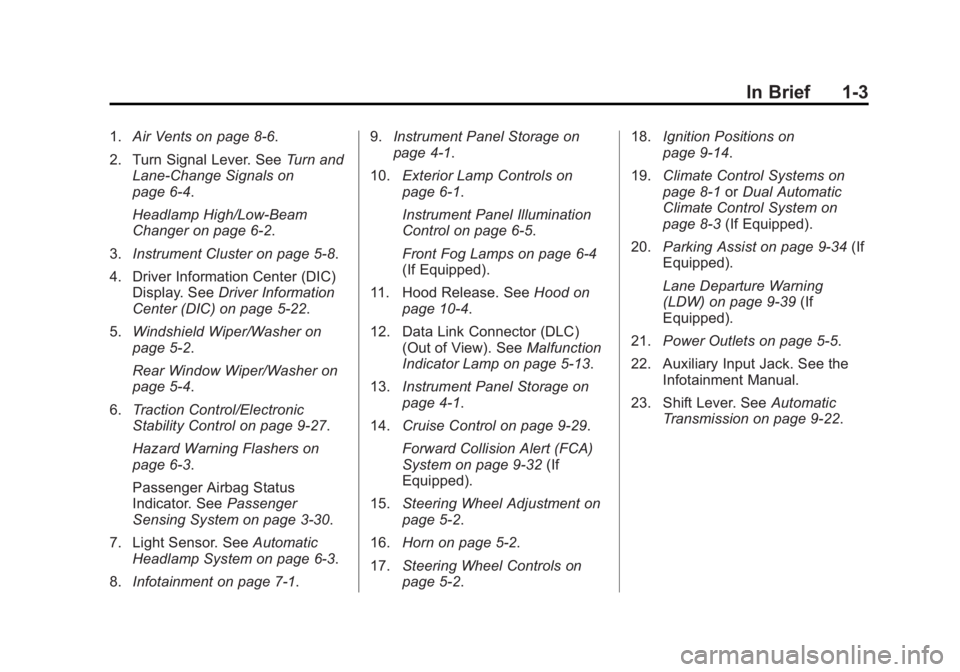
1.Air Vents on page 8-6.
2. Turn Signal Lever. See Turn and
Lane-Change Signals on
page 6-4.
Headlamp High/Low-Beam
Changer on page 6-2.
3. Instrument Cluster on page 5-8.
4. Driver Information Center (DIC) Display. See Driver Information
Center (DIC) on page 5-22.
5. Windshield Wiper/Washer on
page 5-2.
Rear Window Wiper/Washer on
page 5-4.
6. Traction Control/Electronic
Stability Control on page 9-27.
Hazard Warning Flashers on
page 6-3.
Passenger Airbag Status
Indicator. See Passenger
Sensing System on page 3-30.
7. Light Sensor. See Automatic
Headlamp System on page 6-3.
8. Infotainment on page 7-1. 9.
Instrument Panel Storage on
page 4-1.
10. Exterior Lamp Controls on
page 6-1.
Instrument Panel Illumination
Control on page 6-5.
Front Fog Lamps on page 6-4
(If Equipped).
11. Hood Release. See Hood on
page 10-4.
12. Data Link Connector (DLC) (Out of View). See Malfunction
Indicator Lamp on page 5-13.
13. Instrument Panel Storage on
page 4-1.
14. Cruise Control on page 9-29.
Forward Collision Alert (FCA)
System on page 9-32 (If
Equipped).
15. Steering Wheel Adjustment on
page 5-2.
16. Horn on page 5-2.
17. Steering Wheel Controls on
page 5-2. 18.
Ignition Positions on
page 9-14.
19. Climate Control Systems on
page 8-1 orDual Automatic
Climate Control System on
page 8-3 (If Equipped).
20. Parking Assist on page 9-34 (If
Equipped).
Lane Departure Warning
(LDW) on page 9-39 (If
Equipped).
21. Power Outlets on page 5-5.
22. Auxiliary Input Jack. See the Infotainment Manual.
23. Shift Lever. See Automatic
Transmission on page 9-22.
Page 22 of 341
Black plate (15,1)Buick Encore Owner Manual (GMNA-Localizing-U.S./Canada/Mexico-
7707490) - 2015 - crc - 2/4/15
In Brief 1-15
2. Press the + (plus) end of thebutton on the top of the shift
lever to upshift, or press the −
(minus) end of the button to
downshift.
See Manual Mode on page 9-24.Vehicle Features
Infotainment System
See the infotainment manual for
information on the radio, audio
players, phone, navigation system,
and voice or speech recognition.
It also includes information on
settings.
Steering Wheel Controls
The infotainment system can be
operated by using the steering
wheel controls. See "Steering
Wheel Controls" in the infotainment
manual.
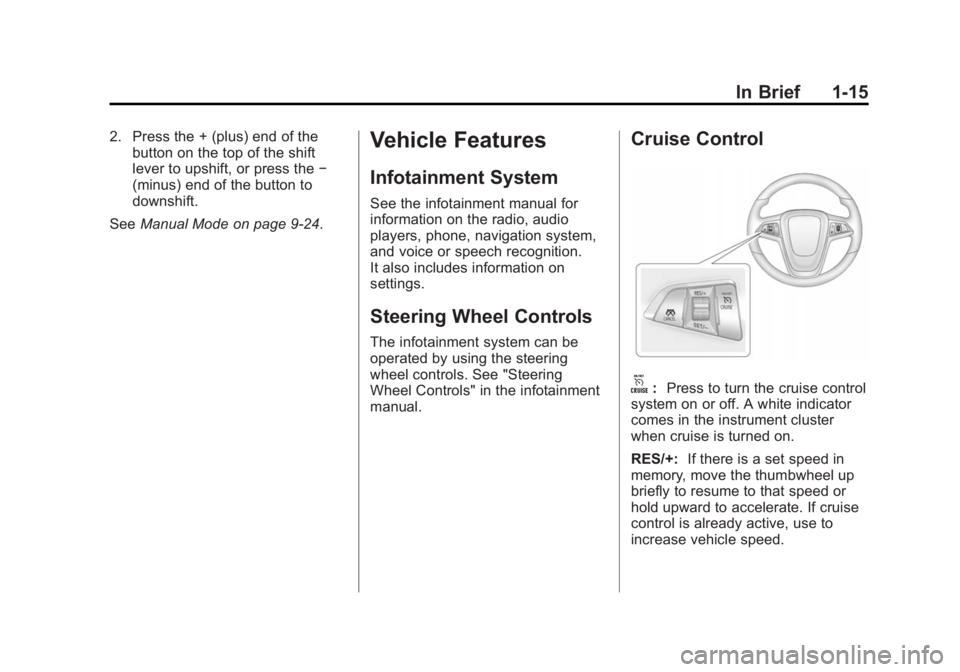
Cruise Control
o:Press to turn the cruise control
system on or off. A white indicator
comes in the instrument cluster
when cruise is turned on.
RES/+: If there is a set speed in
memory, move the thumbwheel up
briefly to resume to that speed or
hold upward to accelerate. If cruise
control is already active, use to
increase vehicle speed.
Page 23 of 341

Black plate (16,1)Buick Encore Owner Manual (GMNA-Localizing-U.S./Canada/Mexico-
7707490) - 2015 - crc - 2/4/15
1-16 In Brief
SET/−:Move the thumbwheel down
briefly to set the speed and activate
cruise control. If cruise control is
already active, use to decrease
speed.
n: Press to disengage cruise
control without erasing the set
speed from memory.
See Cruise Control on page 9-29.
Driver Information
Center (DIC)
The DIC display is in the instrument
cluster. It shows the status of many
vehicle systems. The controls for
the DIC are on the turn signal lever.
1.SET/CLR: Press to set or clear
the menu item displayed. 2.
w x:
Turn the band to scroll
through the menu items.
3. MENU: Press to display the DIC
menus. This button is also used
to return to or exit the last
screen displayed on the DIC.
See Driver Information Center (DIC)
on page 5-22.
Forward Collision Alert
(FCA) System
If equipped, FCA may help avoid or
reduce the harm caused by
front-end crashes. FCA provides a
green indicator,
V, when a vehicle
is detected ahead. When
approaching a vehicle ahead too
quickly, FCA provides a visual alert
and rapidly beeps.
See Forward Collision Alert (FCA)
System on page 9-32.
Lane Departure
Warning (LDW)
If equipped, LDW may help avoid
unintentional lane departures at
speeds of 56 km/h (35 mph) or
greater. LDW uses a camera sensor
to detect the lane markings. The
LDW light,
@, is green if a lane
marking is detected. If the vehicle
departs the lane without using a turn
signal in that direction, the light will
change to amber and flash. In
addition, beeps will sound.
See Lane Departure Warning (LDW)
on page 9-39.
Side Blind Zone
Alert (SBZA)
If equipped, SBZA will detect
moving vehicles in the next lane
over in the vehicle's side blind zone
area. When this happens, the SBZA
display will light up in the
corresponding outside side mirror
and will flash if the turn signal is on.
Page 25 of 341
Black plate (18,1)Buick Encore Owner Manual (GMNA-Localizing-U.S./Canada/Mexico-
7707490) - 2015 - crc - 2/4/15
1-18 In Brief
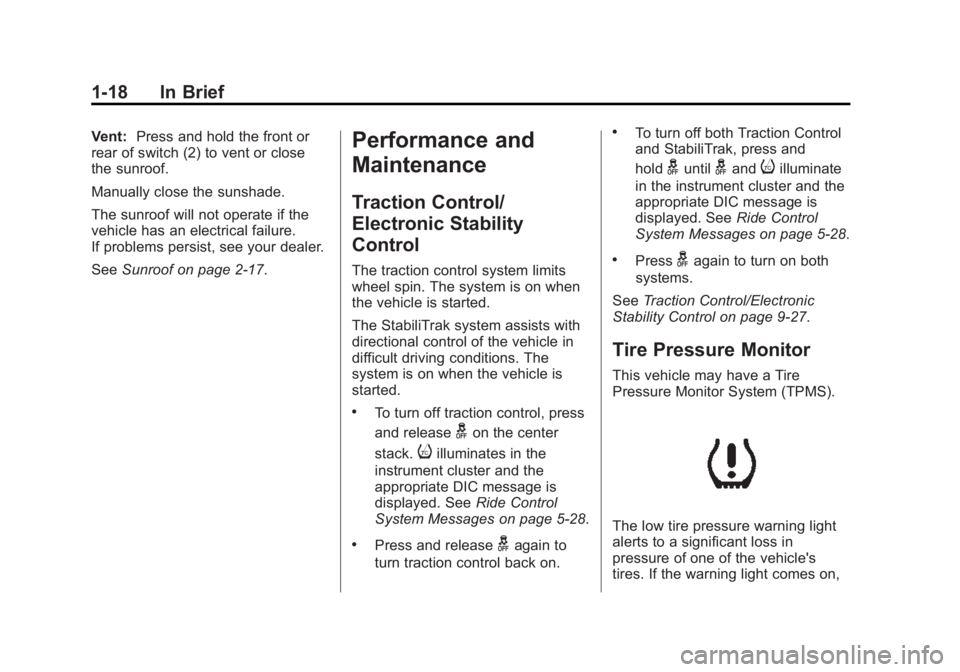
Vent:Press and hold the front or
rear of switch (2) to vent or close
the sunroof.
Manually close the sunshade.
The sunroof will not operate if the
vehicle has an electrical failure.
If problems persist, see your dealer.
See Sunroof on page 2-17.Performance and
Maintenance
Traction Control/
Electronic Stability
Control
The traction control system limits
wheel spin. The system is on when
the vehicle is started.
The StabiliTrak system assists with
directional control of the vehicle in
difficult driving conditions. The
system is on when the vehicle is
started.
.To turn off traction control, press
and release
gon the center
stack.
iilluminates in the
instrument cluster and the
appropriate DIC message is
displayed. See Ride Control
System Messages on page 5-28.
.Press and releasegagain to
turn traction control back on.
.To turn off both Traction Control
and StabiliTrak, press and
hold
guntilgandiilluminate
in the instrument cluster and the
appropriate DIC message is
displayed. See Ride Control
System Messages on page 5-28.
.Pressgagain to turn on both
systems.
See Traction Control/Electronic
Stability Control on page 9-27.
Tire Pressure Monitor
This vehicle may have a Tire
Pressure Monitor System (TPMS).
The low tire pressure warning light
alerts to a significant loss in
pressure of one of the vehicle's
tires. If the warning light comes on,
Page 39 of 341

Black plate (12,1)Buick Encore Owner Manual (GMNA-Localizing-U.S./Canada/Mexico-
7707490) - 2015 - crc - 2/4/15
2-12 Keys, Doors, and Windows
Disarming the Alarm System
To disarm the alarm system or turn
off the alarm if it has been activated:
.PressKon the RKE transmitter.
.Start the vehicle.
Avoid setting off the alarm by
accident by locking the vehicle after
all occupants have left the vehicle
and all doors are closed.
To avoid setting off the alarm by
accident:
.Lock the vehicle after all
occupants have exited.
.Always unlock the vehicle with
the RKE transmitter.
Unlocking the driver door with the
key will not disarm the system or
turn off the alarm.
How to Detect a Tamper
Condition
IfKis pressed and the horn chirps
and the lights flash three times, an
attempted break-in has occurred
while the system was armed.
Immobilizer
See Radio Frequency Statement on
page 13-12.
Immobilizer Operation
This vehicle has a passive
theft-deterrent system.
The system does not have to be
manually armed or disarmed.
The vehicle is automatically
immobilized when the key is
removed from the ignition.
The system is automatically
disarmed when the vehicle is
started with the correct key. The key
uses a transponder that matches an
immobilizer control unit in the
vehicle and automatically disarms the system. Only an authorized key
starts the vehicle. The vehicle may
not start if the key is damaged.
The security light in the instrument
cluster comes on if there is a
problem with arming or disarming
the theft-deterrent system.
When trying to start the vehicle, the
security light comes on briefly when
the ignition is turned on.
If the engine does not start and the
security light stays on, there is a
problem with the system. Turn the
ignition off and try again.
If the engine still does not start, and
the key appears to be undamaged
or the light continues to stay on, try
another ignition key. If the engine
does not start with the other key, the
vehicle needs service. If the vehicle
Page 70 of 341
Black plate (25,1)Buick Encore Owner Manual (GMNA-Localizing-U.S./Canada/Mexico-
7707490) - 2015 - crc - 2/4/15
Seats and Restraints 3-25
There is an airbag readiness light
on the instrument cluster which
shows the airbag symbol. The
system checks the airbag electrical
system for malfunctions. The light
tells you if there is an electrical
problem. SeeAirbag Readiness
Light on page 5-12 for more
information.
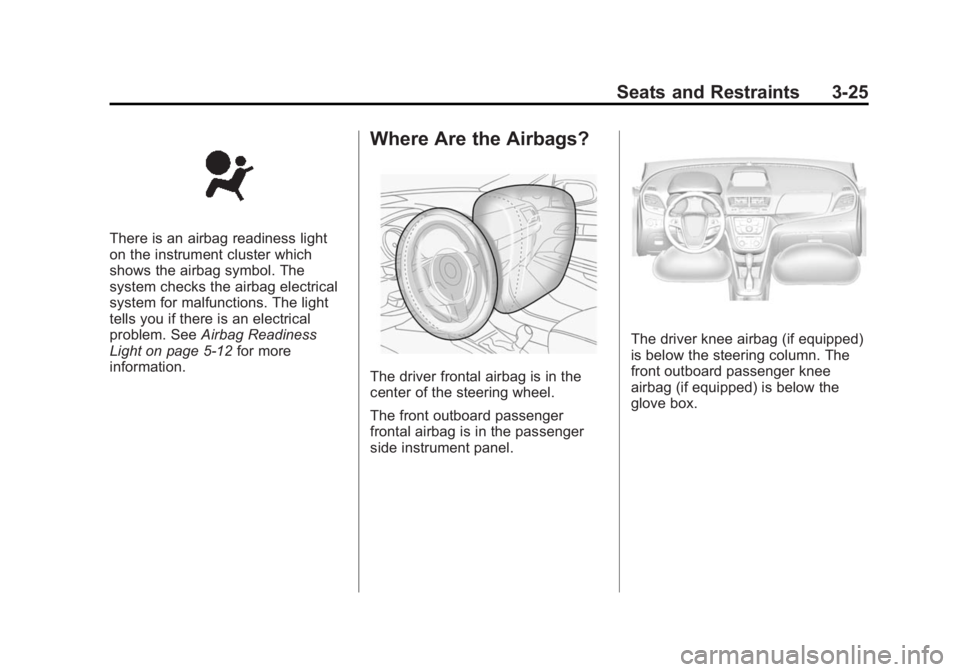
Where Are the Airbags?
The driver frontal airbag is in the
center of the steering wheel.
The front outboard passenger
frontal airbag is in the passenger
side instrument panel.
The driver knee airbag (if equipped)
is below the steering column. The
front outboard passenger knee
airbag (if equipped) is below the
glove box.
Page 108 of 341
Black plate (1,1)Buick Encore Owner Manual (GMNA-Localizing-U.S./Canada/Mexico-
7707490) - 2015 - crc - 2/4/15
Instruments and Controls 5-1
Instruments and
Controls
Controls
Steering Wheel Adjustment . . . 5-2
Steering Wheel Controls . . . . . . 5-2
Heated Steering Wheel . . . . . . . 5-2
Horn . . . . . . . . . . . . . . . . . . . . . . . . . . 5-2
Windshield Wiper/Washer . . . . . 5-2
Rear Window Wiper/Washer . . . . . . . . . . . . . . . . . . . . . . 5-4
Compass . . . . . . . . . . . . . . . . . . . . . 5-4
Clock . . . . . . . . . . . . . . . . . . . . . . . . . 5-5
Power Outlets . . . . . . . . . . . . . . . . . 5-5
Warning Lights, Gauges, and
Indicators
Warning Lights, Gauges, and Indicators . . . . . . . . . . . . . . . . . . . . 5-7
Instrument Cluster . . . . . . . . . . . . 5-8
Speedometer . . . . . . . . . . . . . . . . . 5-9
Odometer . . . . . . . . . . . . . . . . . . . . . 5-9
Trip Odometer . . . . . . . . . . . . . . . . . 5-9
Tachometer . . . . . . . . . . . . . . . . . . . 5-9
Fuel Gauge . . . . . . . . . . . . . . . . . . . 5-9 Engine Coolant Temperature
Gauge . . . . . . . . . . . . . . . . . . . . . . 5-10
Safety Belt Reminders . . . . . . . 5-11
Airbag Readiness Light . . . . . . 5-12
Passenger Airbag Status Indicator . . . . . . . . . . . . . . . . . . . . 5-12
Charging System Light . . . . . . 5-13
Malfunction Indicator Lamp . . . . . . . . . . . . . 5-13
Brake System Warning Light . . . . . . . . . . . . . . . . . . . . . . . 5-16
Antilock Brake System (ABS) Warning Light . . . . . . . . . . . . . . 5-17
Power Steering Warning Light . . . . . . . . . . . . . . . . . . . . . . . 5-17
Lane Departure Warning (LDW) Light . . . . . . . . . . . . . . . . 5-17
Vehicle Ahead Indicator . . . . . . 5-18
Traction Off Light . . . . . . . . . . . . 5-18
StabiliTrak®OFF Light . . . . . . . 5-18
Traction Control System (TCS)/StabiliTrak
®Light . . . . 5-19
Tire Pressure Light . . . . . . . . . . 5-19
Engine Oil Pressure Light . . . . 5-19
Low Fuel Warning Light . . . . . . 5-20
Immobilizer Light . . . . . . . . . . . . 5-20
High-Beam On Light . . . . . . . . . 5-21 Front Fog Lamp Light . . . . . . . . 5-21
Lamps On Reminder . . . . . . . . . 5-21
Cruise Control Light . . . . . . . . . 5-21
Information Displays
Driver Information
Center (DIC) . . . . . . . . . . . . . . . 5-22
Vehicle Messages
Vehicle Messages . . . . . . . . . . . 5-25
Battery Voltage and ChargingMessages . . . . . . . . . . . . . . . . . . 5-25
Brake System Messages . . . . 5-25
Door Ajar Messages . . . . . . . . . 5-26
Engine Cooling System Messages . . . . . . . . . . . . . . . . . . 5-26
Engine Oil Messages . . . . . . . . 5-26
Engine Power Messages . . . . 5-26
Fuel System Messages . . . . . . 5-27
Object Detection System Messages . . . . . . . . . . . . . . . . . . 5-27
Ride Control System Messages . . . . . . . . . . . . . . . . . . 5-28
Tire Messages . . . . . . . . . . . . . . . 5-29
Transmission Messages . . . . . 5-29
Vehicle Personalization
Vehicle Personalization . . . . . . 5-30
Page 115 of 341

Black plate (8,1)Buick Encore Owner Manual (GMNA-Localizing-U.S./Canada/Mexico-
7707490) - 2015 - crc - 2/4/15
5-8 Instruments and Controls
Instrument Cluster
English Shown, Metric Similar
Page 118 of 341

Black plate (11,1)Buick Encore Owner Manual (GMNA-Localizing-U.S./Canada/Mexico-
7707490) - 2015 - crc - 2/4/15
Instruments and Controls 5-11
English
This gauge shows the engine
coolant temperature.
If the indicator needle moves to the
hot side of the gauge toward the
shaded area, the engine is too hot.
If the vehicle has been operated
under normal driving conditions, pull
off the road, stop the vehicle, and
turn off the engine as soon as
possible.
Safety Belt Reminders
Driver Safety Belt Reminder
Light
There is a driver safety belt
reminder light on the instrument
cluster.
When the vehicle is started, this
light flashes and a chime may come
on to remind the driver to fasten
their safety belt. Then the light stays
on solid until the belt is buckled.
This cycle may continue several
times if the driver remains or
becomes unbuckled while the
vehicle is moving.
If the driver safety belt is buckled,
neither the light nor the chime
comes on.
Passenger Safety Belt
Reminder Light
The vehicle may also have a
passenger safety belt reminder light.
When the vehicle is started, this
light flashes and a chime may come
on to remind passengers to fasten
their safety belt. Then the light stays
on solid until the belt is buckled.
This cycle continues several times if
the front passenger remains or
becomes unbuckled while the
vehicle is moving.
If the front passenger safety belt is
buckled, neither the chime nor the
light comes on.
The front passenger safety belt
reminder light and chime may turn
on if an object is put on the seat
Page 129 of 341

Black plate (22,1)Buick Encore Owner Manual (GMNA-Localizing-U.S./Canada/Mexico-
7707490) - 2015 - crc - 2/4/15
5-22 Instruments and Controls
Information Displays
Driver Information
Center (DIC)
The Driver Information Center (DIC)
displays information about the
vehicle. It also displays warning
messages if a system problem is
detected. SeeVehicle Messages on
page 5-25. All messages appear in
the DIC display in the center of the
instrument cluster.
The vehicle may also have features
that can be customized through the
controls on the radio. See Vehicle
Personalization on page 5-30.
DIC Operation and Displays
The DIC has different displays
which can be accessed by using the
DIC buttons on the turn signal lever.
The DIC displays trip, fuel, and
vehicle system information, and
warning messages if a system
problem is detected. The bottom of the DIC display
shows the position of the shift lever
and the odometer. It may also show
the direction the vehicle is driving.
In cold weather the DIC display may
change slowly. This is normal and
will move more quickly as the
vehicle's interior temperature rises.
DIC Buttons
1.
SET/CLR (Set/Clear): Press to
set or clear the menu item when
it is displayed.
2.
w/x(Band): Turn the band
to scroll through the menu items.
A small marker will move across
the bottom of the page as you
scroll through the items. This
shows where each page is in
the menu. 3.
MENU: Press to get to the Trip/
Fuel Menu and the Vehicle
Information Menu. This button is
also used to return to or exit the
last screen displayed on
the DIC.
Trip/Fuel Menu Items
Press MENU on the turn signal
lever until the Trip/Fuel Menu is
displayed. Use
w/xto scroll
through the following menu items:
.Digital Speedometer
.Trip 1
.Trip 2
.Fuel Range
.Fuel Economy
.Average Vehicle Speed
.Timer
.Navigation