airbag off BUICK ENCORE 2021 User Guide
[x] Cancel search | Manufacturer: BUICK, Model Year: 2021, Model line: ENCORE, Model: BUICK ENCORE 2021Pages: 313, PDF Size: 11.21 MB
Page 67 of 313

Buick Encore Owner Manual (GMNA-Localizing-U.S./Canada-14607636) -
2021 - CRC - 8/18/20
66 Seats and Restraints
move it side to side and back and forth.
When the child restraint is properly
installed, there should be no more than
2.5 cm (1 in) of movement.
If the airbag or airbags are off, the OFF
indicator in the passenger airbag status
indicator will come on and stay on when
the vehicle is started.
If a child restraint has been installed and
the ON indicator is lit, see “If the On
Indicator Is Lit for a Child Restraint” under
Passenger Sensing System 044.
To remove the child restraint, unbuckle the
vehicle seat belt and let it return to the
stowed position.
Page 72 of 313
Buick Encore Owner Manual (GMNA-Localizing-U.S./Canada-14607636) -
2021 - CRC - 8/18/20
Instruments and Controls 71
Instruments and Controls
Controls
Steering Wheel Adjustment . . . . . . . . . . . . . 71
Steering Wheel Controls . . . . . . . . . . . . . . . . 72
Horn . . . . . . . . . . . . . . . . . . . . . . . . . . . . . . . . . . . . 72
Windshield Wiper/Washer . . . . . . . . . . . . . . 72
Rear Window Wiper/Washer . . . . . . . . . . . 73
Compass . . . . . . . . . . . . . . . . . . . . . . . . . . . . . . . . 74
Clock . . . . . . . . . . . . . . . . . . . . . . . . . . . . . . . . . . . 75
Power Outlets . . . . . . . . . . . . . . . . . . . . . . . . . . 75
Warning Lights, Gauges, and Indicators
Warning Lights, Gauges, andIndicators . . . . . . . . . . . . . . . . . . . . . . . . . . . . . 75
Instrument Cluster . . . . . . . . . . . . . . . . . . . . . 76
Speedometer . . . . . . . . . . . . . . . . . . . . . . . . . . . 77
Odometer . . . . . . . . . . . . . . . . . . . . . . . . . . . . . . 77
Trip Odometer . . . . . . . . . . . . . . . . . . . . . . . . . . 77
Tachometer . . . . . . . . . . . . . . . . . . . . . . . . . . . . . 77
Fuel Gauge . . . . . . . . . . . . . . . . . . . . . . . . . . . . . 77
Engine Coolant Temperature Gauge . . . . 78
Seat Belt Reminders . . . . . . . . . . . . . . . . . . . . 79
Airbag Readiness Light . . . . . . . . . . . . . . . . . 79
Passenger Airbag Status Indicator . . . . . . 80
Charging System Light . . . . . . . . . . . . . . . . . 80
Malfunction Indicator Lamp (Check Engine Light) . . . . . . . . . . . . . . . . . . . . . . . . . . 81
Brake System Warning Light . . . . . . . . . . . 82 Antilock Brake System (ABS) Warning
Light . . . . . . . . . . . . . . . . . . . . . . . . . . . . . . . . . . 83
Lane Departure Warning (LDW) Light . . . 83
Vehicle Ahead Indicator . . . . . . . . . . . . . . . . 83
Traction Off Light . . . . . . . . . . . . . . . . . . . . . . 83
StabiliTrak OFF Light . . . . . . . . . . . . . . . . . . . 84
Traction Control System (TCS)/StabiliTrak Light . . . . . . . . . . . . . . . . . . . . . . . . . . . . . . . . . 84
Tire Pressure Light . . . . . . . . . . . . . . . . . . . . . 84
Engine Oil Pressure Light . . . . . . . . . . . . . . . 85
Low Fuel Warning Light . . . . . . . . . . . . . . . . 85
Immobilizer Light . . . . . . . . . . . . . . . . . . . . . . . 85
High-Beam On Light . . . . . . . . . . . . . . . . . . . . 86
Lamps On Reminder . . . . . . . . . . . . . . . . . . . . 86
Cruise Control Light . . . . . . . . . . . . . . . . . . . . 86
Door Ajar Light . . . . . . . . . . . . . . . . . . . . . . . . . 86
Information Displays
Driver Information Center (DIC) . . . . . . . . 86
Vehicle Messages
Vehicle Messages . . . . . . . . . . . . . . . . . . . . . . 88
Engine Power Messages . . . . . . . . . . . . . . . . 89
Vehicle Speed Messages . . . . . . . . . . . . . . . . 89
Vehicle Personalization
Vehicle Personalization (8 Inch Screen) . . . . . . . . . . . . . . . . . . . . . . . . . . . . . . . 89
Vehicle Personalization (7 Inch Screen) . . . . . . . . . . . . . . . . . . . . . . . . . . . . . . . 94
Controls
Steering Wheel Adjustment
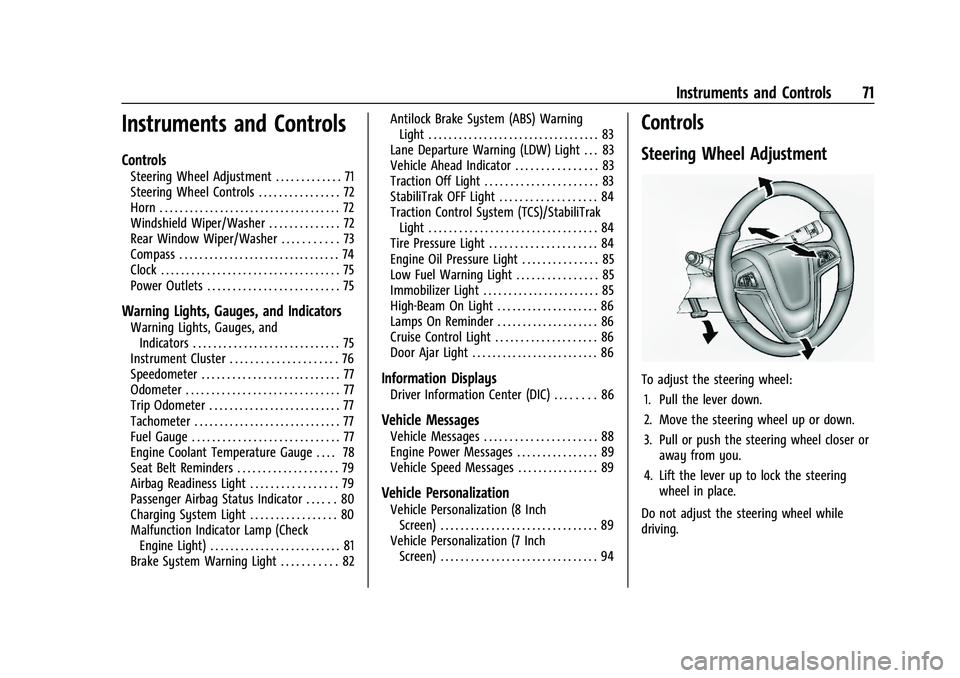
To adjust the steering wheel:
1. Pull the lever down.
2. Move the steering wheel up or down.
3. Pull or push the steering wheel closer or away from you.
4. Lift the lever up to lock the steering wheel in place.
Do not adjust the steering wheel while
driving.
Page 80 of 313

Buick Encore Owner Manual (GMNA-Localizing-U.S./Canada-14607636) -
2021 - CRC - 8/18/20
Instruments and Controls 79
Seat Belt Reminders
Driver Seat Belt Reminder Light
There is a driver seat belt reminder light on
the instrument cluster.
When the vehicle is started, this light
flashes and a chime may come on to remind
the driver to fasten the seat belt. Then the
light stays on solid until the belt is buckled.
This cycle may continue several times if the
driver remains or becomes unbuckled while
the vehicle is moving.
If the driver seat belt is buckled, neither the
chime nor the light comes on.
Front Passenger Seat Belt Reminder
Light
The vehicle may have a front passenger seat
belt reminder light near the passenger
airbag status indicator.
When the vehicle is started, this light
flashes and a chime may come on to remind
in front of passenger to fasten the seat belt.
Then the light stays on solid until the belt is
buckled. This cycle may continue several
times if the passenger remains or becomes
unbuckled while the vehicle is moving.
If the passenger seat belt is buckled, neither
the chime nor the light comes on.
The front passenger seat belt reminder light
and chime may turn on if an object is put
on the seat such as a briefcase, handbag,
grocery bag, laptop, or other electronic
device. To turn off the reminder light and/or
chime, remove the object from the seat or
buckle the seat belt.
Airbag Readiness Light
This light shows if there is an electrical
problem with the airbag system. It is
located in the instrument cluster. The
system check includes the airbag sensor(s),
the passenger sensing system (if equipped),the pretensioners, the airbag modules, the
wiring, and the crash sensing and diagnostic
module. For more information on the airbag
system, see
Airbag System 038.
The airbag readiness light comes on for
several seconds when the vehicle is started.
If the light does not come on then, have it
fixed immediately.
{Warning
If the airbag readiness light stays on
after the vehicle is started or comes on
while driving, it means the airbag system
might not be working properly. The
airbags in the vehicle might not inflate in
a crash, or they could even inflate
without a crash. To help avoid injury,
have the vehicle serviced right away.
If there is a problem with the airbag
system, a Driver Information Center (DIC)
message may also come on.
Page 81 of 313
Buick Encore Owner Manual (GMNA-Localizing-U.S./Canada-14607636) -
2021 - CRC - 8/18/20
80 Instruments and Controls
Passenger Airbag Status Indicator
The vehicle has a passenger sensing system.
SeePassenger Sensing System 044 for
important safety information. The
instrument panel has a passenger airbag
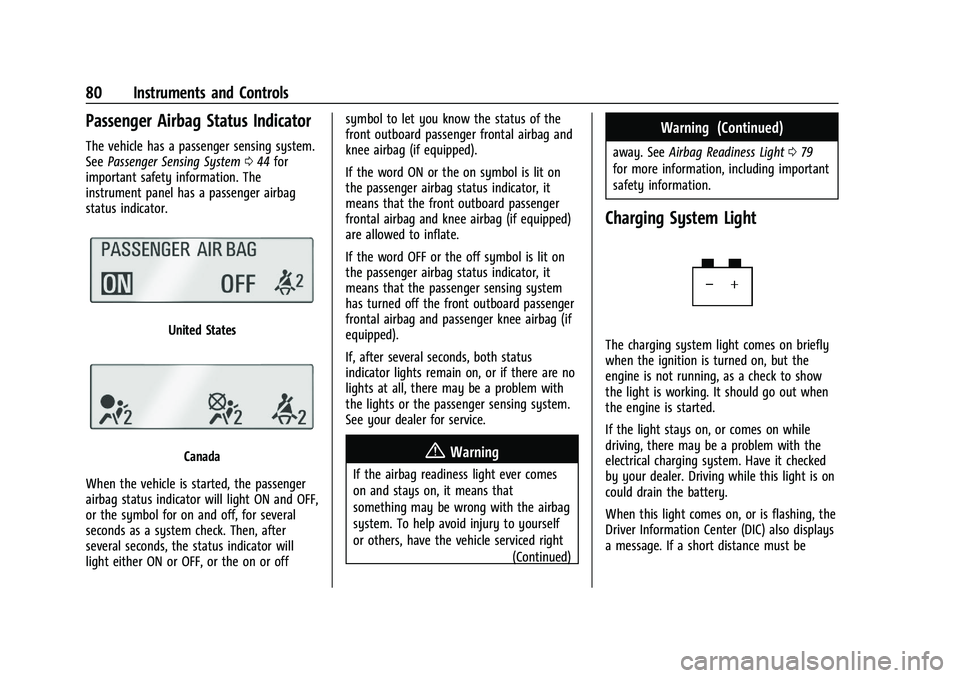
status indicator.
United States
Canada
When the vehicle is started, the passenger
airbag status indicator will light ON and OFF,
or the symbol for on and off, for several
seconds as a system check. Then, after
several seconds, the status indicator will
light either ON or OFF, or the on or off symbol to let you know the status of the
front outboard passenger frontal airbag and
knee airbag (if equipped).
If the word ON or the on symbol is lit on
the passenger airbag status indicator, it
means that the front outboard passenger
frontal airbag and knee airbag (if equipped)
are allowed to inflate.
If the word OFF or the off symbol is lit on
the passenger airbag status indicator, it
means that the passenger sensing system
has turned off the front outboard passenger
frontal airbag and passenger knee airbag (if
equipped).
If, after several seconds, both status
indicator lights remain on, or if there are no
lights at all, there may be a problem with
the lights or the passenger sensing system.
See your dealer for service.{Warning
If the airbag readiness light ever comes
on and stays on, it means that
something may be wrong with the airbag
system. To help avoid injury to yourself
or others, have the vehicle serviced right
(Continued)
Warning (Continued)
away. SeeAirbag Readiness Light 079
for more information, including important
safety information.
Charging System Light
The charging system light comes on briefly
when the ignition is turned on, but the
engine is not running, as a check to show
the light is working. It should go out when
the engine is started.
If the light stays on, or comes on while
driving, there may be a problem with the
electrical charging system. Have it checked
by your dealer. Driving while this light is on
could drain the battery.
When this light comes on, or is flashing, the
Driver Information Center (DIC) also displays
a message. If a short distance must be
Page 90 of 313
Buick Encore Owner Manual (GMNA-Localizing-U.S./Canada-14607636) -
2021 - CRC - 8/18/20
Instruments and Controls 89
Follow the instructions given in the
messages. The system displays messages
regarding the following topics:
.Service Messages
.Fluid Levels
.Vehicle Security
.Brakes
.Ride Control Systems
.Driver Assistance Systems
.Cruise Control
.Lighting and Bulb Replacement
.Wiper/Washer Systems
.Doors and Windows
.Seat Belts
.Airbag Systems
.Engine and Transmission
.Tire Pressure
.Battery
Engine Power Messages
ENGINE POWER IS REDUCED
This message displays when the vehicle's
propulsion power is reduced. A reduction in
propulsion power can affect the vehicle's
ability to accelerate. If this message is on,
but there is no observed reduction inperformance, proceed to your destination.
Under certain conditions the performance
may be reduced the next time the vehicle is
driven. The vehicle may be driven while this
message is on, but maximum acceleration
and speed may be reduced. Anytime this
message stays on, or displays repeatedly,
the vehicle should be taken to your dealer
for service as soon as possible.
Under certain operating conditions,
propulsion will be disabled. Try restarting
after the ignition has been off for
30 seconds.
Vehicle Speed Messages
SPEED LIMITED TO XXX KM/H (MPH)
This message shows that the vehicle speed
has been limited to the speed displayed. The
limited speed is a protection for various
propulsion and vehicle systems, such as
lubrication, brakes, thermal, suspension,
Teen Driver if equipped, or tires.
Vehicle Personalization
Vehicle Personalization (8 Inch
Screen)
Use the audio system controls to access the
personalization menus for customizing
vehicle features.
To see if your vehicle has the 8 inch screen,
see
Overview (8 Inch Screen) 0105.
The following are all possible personalization
features. Depending on the vehicle, some
may not be available.
To access the personalization menus: 1. Touch SETTINGS on the Home Page of the infotainment display.
2. Touch the desired feature to display a list of available options.
3. Touch to select the desired feature setting.
4. Press BACK on the center stack or touch
Son the infotainment display to return
to the previous menu or exit.
Page 175 of 313
Buick Encore Owner Manual (GMNA-Localizing-U.S./Canada-14607636) -
2021 - CRC - 8/18/20
174 Driving and Operating
Ignition Positions
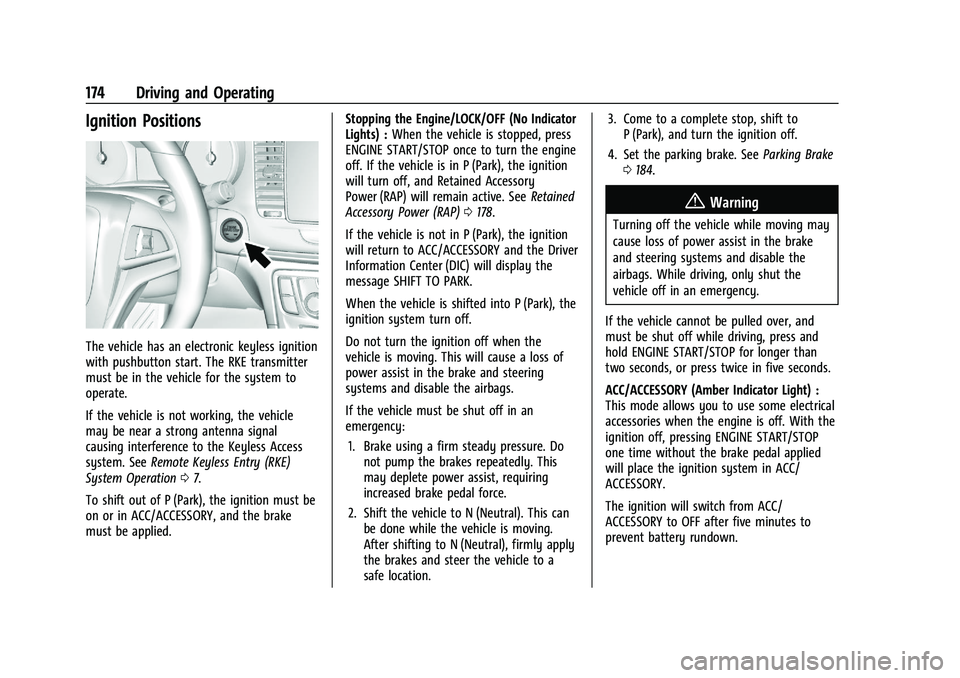
The vehicle has an electronic keyless ignition
with pushbutton start. The RKE transmitter
must be in the vehicle for the system to
operate.
If the vehicle is not working, the vehicle
may be near a strong antenna signal
causing interference to the Keyless Access
system. SeeRemote Keyless Entry (RKE)
System Operation 07.
To shift out of P (Park), the ignition must be
on or in ACC/ACCESSORY, and the brake
must be applied. Stopping the Engine/LOCK/OFF (No Indicator
Lights) :
When the vehicle is stopped, press
ENGINE START/STOP once to turn the engine
off. If the vehicle is in P (Park), the ignition
will turn off, and Retained Accessory
Power (RAP) will remain active. See Retained
Accessory Power (RAP) 0178.
If the vehicle is not in P (Park), the ignition
will return to ACC/ACCESSORY and the Driver
Information Center (DIC) will display the
message SHIFT TO PARK.
When the vehicle is shifted into P (Park), the
ignition system turn off.
Do not turn the ignition off when the
vehicle is moving. This will cause a loss of
power assist in the brake and steering
systems and disable the airbags.
If the vehicle must be shut off in an
emergency: 1. Brake using a firm steady pressure. Do not pump the brakes repeatedly. This
may deplete power assist, requiring
increased brake pedal force.
2. Shift the vehicle to N (Neutral). This can be done while the vehicle is moving.
After shifting to N (Neutral), firmly apply
the brakes and steer the vehicle to a
safe location. 3. Come to a complete stop, shift to
P (Park), and turn the ignition off.
4. Set the parking brake. See Parking Brake
0 184.
{Warning
Turning off the vehicle while moving may
cause loss of power assist in the brake
and steering systems and disable the
airbags. While driving, only shut the
vehicle off in an emergency.
If the vehicle cannot be pulled over, and
must be shut off while driving, press and
hold ENGINE START/STOP for longer than
two seconds, or press twice in five seconds.
ACC/ACCESSORY (Amber Indicator Light) :
This mode allows you to use some electrical
accessories when the engine is off. With the
ignition off, pressing ENGINE START/STOP
one time without the brake pedal applied
will place the ignition system in ACC/
ACCESSORY.
The ignition will switch from ACC/
ACCESSORY to OFF after five minutes to
prevent battery rundown.
Page 204 of 313
Buick Encore Owner Manual (GMNA-Localizing-U.S./Canada-14607636) -
2021 - CRC - 8/18/20
Vehicle Care 203
Also, seeAdding Equipment to the
Airbag-Equipped Vehicle 047.
Vehicle Checks
Doing Your Own Service Work
{Warning
It can be dangerous to work on your
vehicle if you do not have the proper
knowledge, service manual, tools,
or parts. Always follow owner’s manual
procedures and consult the service
manual for your vehicle before doing any
service work.
If doing some of your own service work, use
the proper service manual. It tells you much
more about how to service the vehicle than
this manual can. To order the proper service
manual, see Publication Ordering
Information 0289.
This vehicle has an airbag system. Before
attempting to do your own service work,
see Servicing the Airbag-Equipped Vehicle
0 47. If equipped with remote vehicle start, open
the hood before performing any service
work to prevent remote starting the vehicle
accidentally. See
Remote Vehicle Start 013.
Keep a record with all parts receipts and list
the mileage and the date of any service
work performed. See Maintenance Records
0 278.Caution
Even small amounts of contamination can
cause damage to vehicle systems. Do not
allow contaminants to contact the fluids,
reservoir caps, or dipsticks.
Hood
{Warning
Turn the vehicle off before opening the
hood. If the engine is running with the
hood open, you or others could be
injured.
{Warning
Components under the hood can get hot
from running the engine. To help avoid
the risk of burning unprotected skin,
never touch these components until they
have cooled, and always use a glove or
towel to avoid direct skin contact.
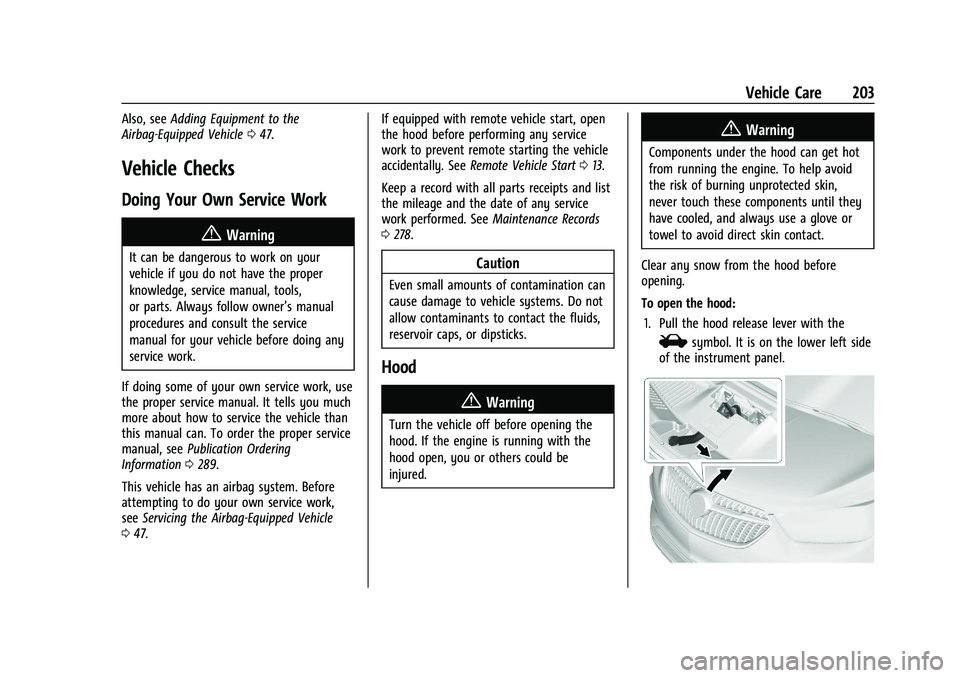
Clear any snow from the hood before
opening.
To open the hood: 1. Pull the hood release lever with the
isymbol. It is on the lower left side
of the instrument panel.
Page 290 of 313

Buick Encore Owner Manual (GMNA-Localizing-U.S./Canada-14607636) -
2021 - CRC - 8/18/20
Customer Information 289
If the vehicle is leased, the leasing company
may require you to have insurance that
ensures repairs with Genuine GM Original
Equipment Manufacturer (OEM) parts or
Genuine Manufacturer replacement parts.
Read the lease carefully, as you may be
charged at the end of the lease for poor
quality repairs.
If a Crash Occurs
If there has been an injury, call emergency
services for help. Do not leave the scene of
a crash until all matters have been taken
care of. Move the vehicle only if its position
puts you in danger, or you are instructed to
move it by a police officer.
Give only the necessary information to
police and other parties involved in the
crash.
For emergency towing seeRoadside
Assistance Program 0285.
Gather the following information:
.Driver name, address, and telephone
number
.Driver license number
.Owner name, address, and telephone
number
.Vehicle license plate number
.Vehicle make, model, and model year
.Vehicle Identification Number (VIN)
.Insurance company and policy number
.General description of the damage to the
other vehicle
Choose a reputable repair facility that uses
quality replacement parts. See “Collision
Parts” earlier in this section.
If the airbag has inflated, see What Will You
See after an Airbag Inflates? 042.
Managing the Vehicle Damage Repair
Process
In the event that the vehicle requires
damage repairs, GM recommends that you
take an active role in its repair. If you have
a pre-determined repair facility of choice,
take the vehicle there, or have it towed
there. Specify to the facility that any
required replacement collision parts be
original equipment parts, either new
Genuine GM parts or recycled original GM
parts. Remember, recycled parts will not be
covered by the GM vehicle warranty.
Insurance pays the bill for the repair, but
you must live with the repair. Depending on
your policy limits, your insurance company
may initially value the repair using aftermarket parts. Discuss this with the
repair professional, and insist on Genuine
GM parts. Remember, if the vehicle is
leased, you may be obligated to have the
vehicle repaired with Genuine GM parts,
even if your insurance coverage does not
pay the full cost.
If another party's insurance company is
paying for the repairs, you are not obligated
to accept a repair valuation based on that
insurance company's collision policy repair
limits, as you have no contractual limits
with that company. In such cases, you can
have control of the repair and parts choices
as long as the cost stays within reasonable
limits.
Publication Ordering Information
Service Manuals
Service manuals have the diagnosis and
repair information on the engine,
transmission, axle, suspension, brakes,
electrical system, steering system, body, etc.