fuel BUICK ENCORE 2021 User Guide
[x] Cancel search | Manufacturer: BUICK, Model Year: 2021, Model line: ENCORE, Model: BUICK ENCORE 2021Pages: 313, PDF Size: 11.21 MB
Page 83 of 313
Buick Encore Owner Manual (GMNA-Localizing-U.S./Canada-14607636) -
2021 - CRC - 8/18/20
82 Instruments and Controls
.If equipped with capped fuel fill: A loose
or missing fuel cap may cause the light
to come on. SeeFilling the Tank (Capless
Fuel Fill) 0197 or
Filling the Tank (Capped Fuel Fill) 0198.
A few driving trips with the cap properly
installed may turn the light off.
.Poor fuel quality can cause inefficient
engine operation and poor drivability,
which may go away once the engine is
warmed up. If this occurs, change the fuel
brand. It may require at least one full
tank of the proper fuel to turn the light
off. See Recommended Fuel 0196.
If the light remains on, see your dealer.
Emissions Inspection and Maintenance
Programs
If the vehicle requires an Emissions
Inspection/Maintenance test, the test
equipment will likely connect to the
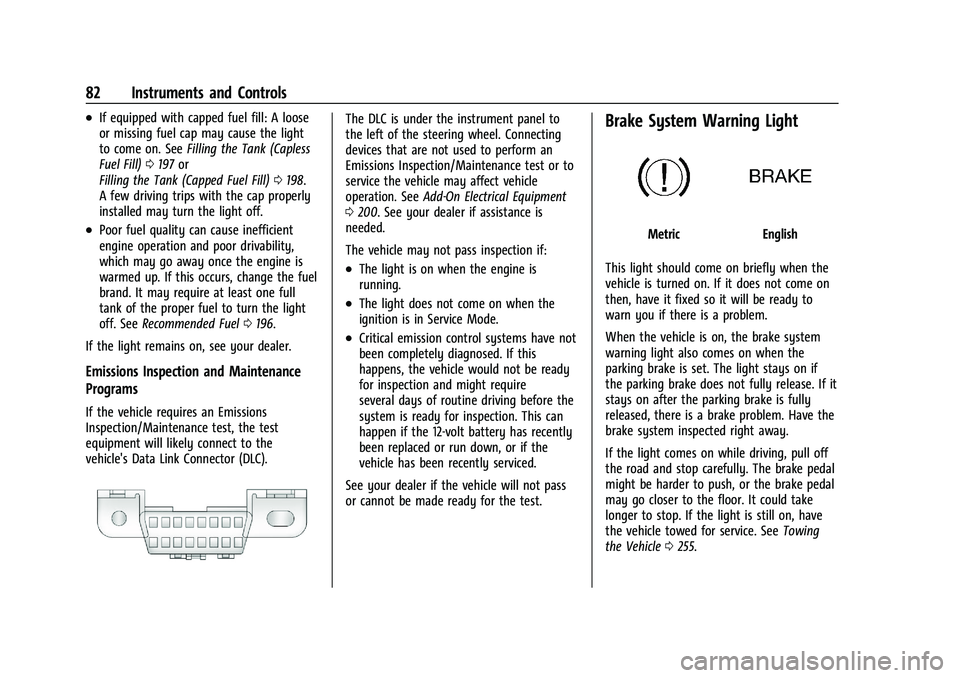
vehicle's Data Link Connector (DLC).
The DLC is under the instrument panel to
the left of the steering wheel. Connecting
devices that are not used to perform an
Emissions Inspection/Maintenance test or to
service the vehicle may affect vehicle
operation. See Add-On Electrical Equipment
0 200. See your dealer if assistance is
needed.
The vehicle may not pass inspection if:
.The light is on when the engine is
running.
.The light does not come on when the
ignition is in Service Mode.
.Critical emission control systems have not
been completely diagnosed. If this
happens, the vehicle would not be ready
for inspection and might require
several days of routine driving before the
system is ready for inspection. This can
happen if the 12-volt battery has recently
been replaced or run down, or if the
vehicle has been recently serviced.
See your dealer if the vehicle will not pass
or cannot be made ready for the test.
Brake System Warning Light
MetricEnglish
This light should come on briefly when the
vehicle is turned on. If it does not come on
then, have it fixed so it will be ready to
warn you if there is a problem.
When the vehicle is on, the brake system
warning light also comes on when the
parking brake is set. The light stays on if
the parking brake does not fully release. If it
stays on after the parking brake is fully
released, there is a brake problem. Have the
brake system inspected right away.
If the light comes on while driving, pull off
the road and stop carefully. The brake pedal
might be harder to push, or the brake pedal
may go closer to the floor. It could take
longer to stop. If the light is still on, have
the vehicle towed for service. See Towing
the Vehicle 0255.
Page 86 of 313
Buick Encore Owner Manual (GMNA-Localizing-U.S./Canada-14607636) -
2021 - CRC - 8/18/20
Instruments and Controls 85
When the Light Flashes First and Then Is On
Steady
If the light flashes for about a minute and
then stays on, there may be a problem with
the TPMS. If the problem is not corrected,
the light will come on at every ignition
cycle. SeeTire Pressure Monitor Operation
0 240.
Engine Oil Pressure Light
Caution
Lack of proper engine oil maintenance
can damage the engine. Driving with the
engine oil low can also damage the
engine. The repairs would not be covered
by the vehicle warranty. Check the oil
level as soon as possible. Add oil if
required, but if the oil level is within the
operating range and the oil pressure is
still low, have the vehicle serviced.
Always follow the maintenance schedule
for changing engine oil.
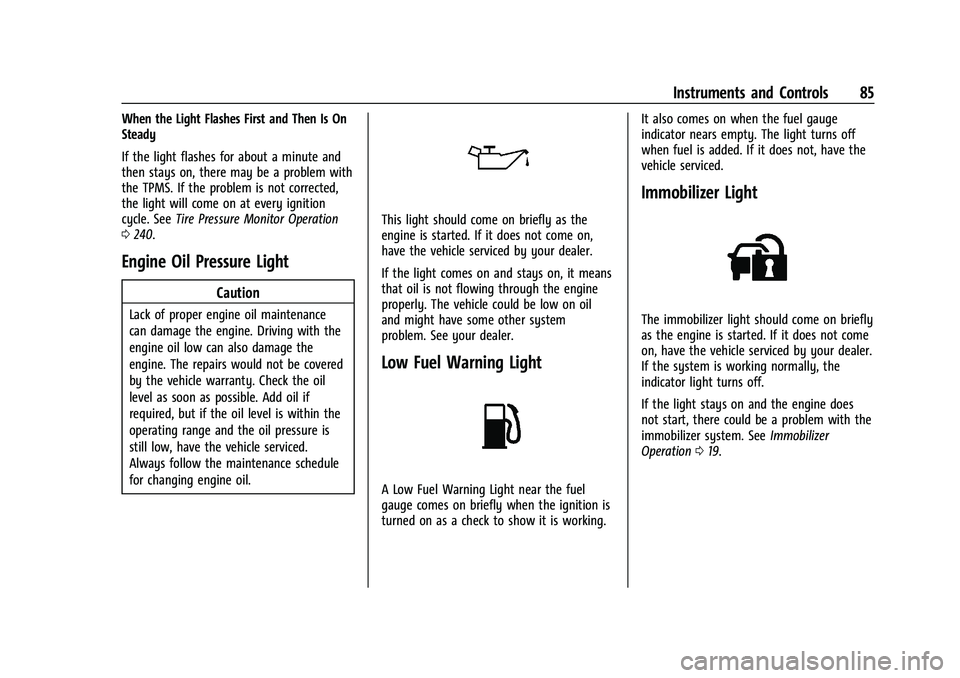
This light should come on briefly as the
engine is started. If it does not come on,
have the vehicle serviced by your dealer.
If the light comes on and stays on, it means
that oil is not flowing through the engine
properly. The vehicle could be low on oil
and might have some other system
problem. See your dealer.
Low Fuel Warning Light
A Low Fuel Warning Light near the fuel
gauge comes on briefly when the ignition is
turned on as a check to show it is working. It also comes on when the fuel gauge
indicator nears empty. The light turns off
when fuel is added. If it does not, have the
vehicle serviced.
Immobilizer Light
The immobilizer light should come on briefly
as the engine is started. If it does not come
on, have the vehicle serviced by your dealer.
If the system is working normally, the
indicator light turns off.
If the light stays on and the engine does
not start, there could be a problem with the
immobilizer system. See
Immobilizer
Operation 019.
Page 87 of 313
Buick Encore Owner Manual (GMNA-Localizing-U.S./Canada-14607636) -
2021 - CRC - 8/18/20
86 Instruments and Controls
High-Beam On Light
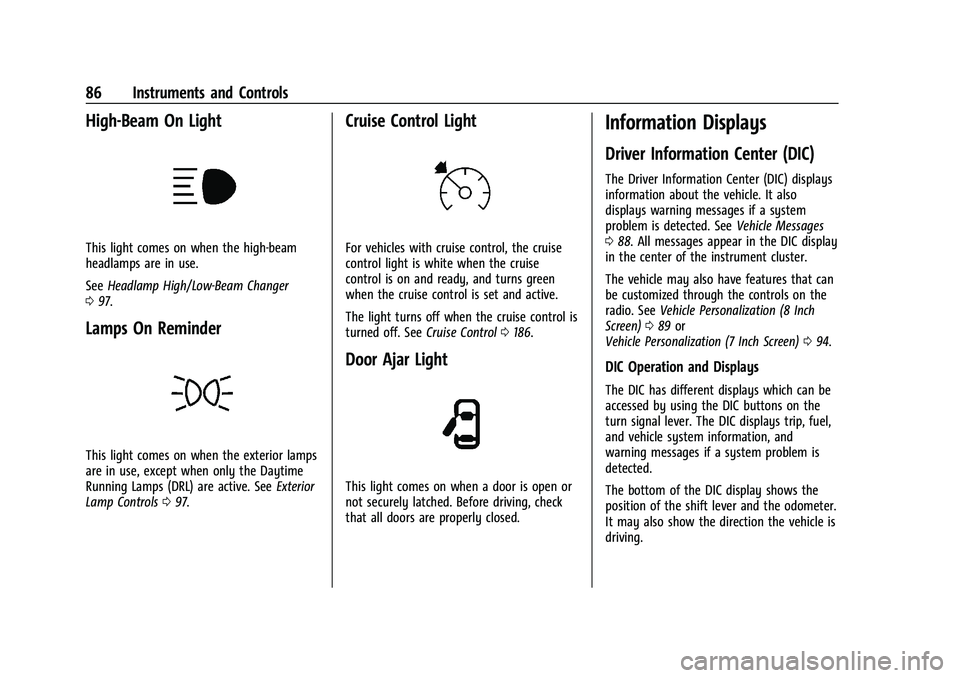
This light comes on when the high-beam
headlamps are in use.
SeeHeadlamp High/Low-Beam Changer
0 97.
Lamps On Reminder
This light comes on when the exterior lamps
are in use, except when only the Daytime
Running Lamps (DRL) are active. See Exterior
Lamp Controls 097.
Cruise Control Light
For vehicles with cruise control, the cruise
control light is white when the cruise
control is on and ready, and turns green
when the cruise control is set and active.
The light turns off when the cruise control is
turned off. See Cruise Control0186.
Door Ajar Light
This light comes on when a door is open or
not securely latched. Before driving, check
that all doors are properly closed.
Information Displays
Driver Information Center (DIC)
The Driver Information Center (DIC) displays
information about the vehicle. It also
displays warning messages if a system
problem is detected. See Vehicle Messages
0 88. All messages appear in the DIC display
in the center of the instrument cluster.
The vehicle may also have features that can
be customized through the controls on the
radio. See Vehicle Personalization (8 Inch
Screen) 089 or
Vehicle Personalization (7 Inch Screen) 094.
DIC Operation and Displays
The DIC has different displays which can be
accessed by using the DIC buttons on the
turn signal lever. The DIC displays trip, fuel,
and vehicle system information, and
warning messages if a system problem is
detected.
The bottom of the DIC display shows the
position of the shift lever and the odometer.
It may also show the direction the vehicle is
driving.
Page 88 of 313
Buick Encore Owner Manual (GMNA-Localizing-U.S./Canada-14607636) -
2021 - CRC - 8/18/20
Instruments and Controls 87
In cold weather the DIC display may change
slowly. This is normal and will move more
quickly as the vehicle's interior temperature
rises.
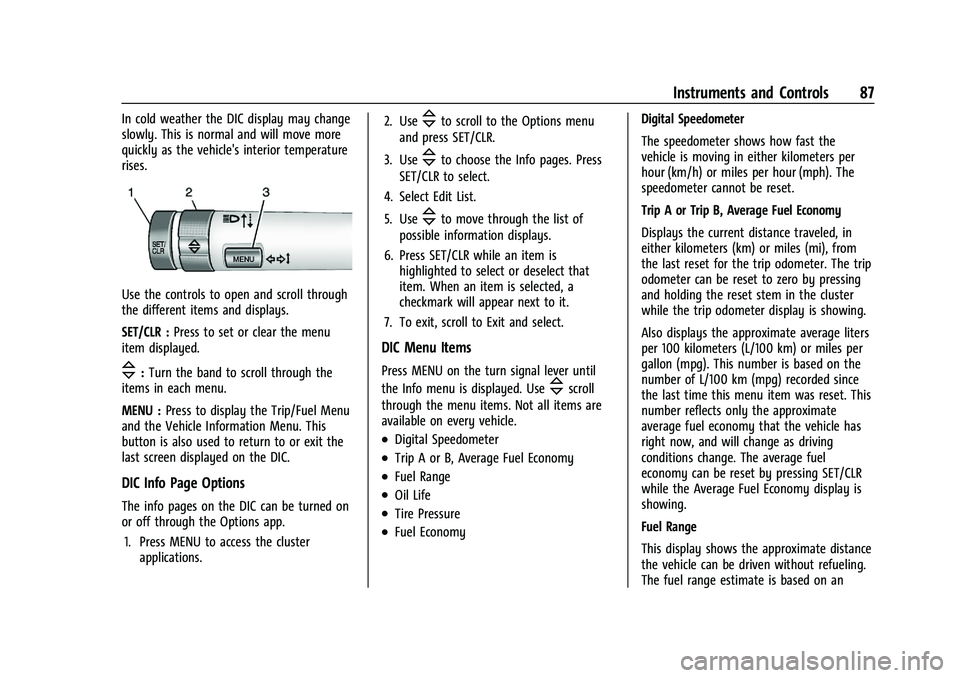
Use the controls to open and scroll through
the different items and displays.
SET/CLR :Press to set or clear the menu
item displayed.
\: Turn the band to scroll through the
items in each menu.
MENU : Press to display the Trip/Fuel Menu
and the Vehicle Information Menu. This
button is also used to return to or exit the
last screen displayed on the DIC.
DIC Info Page Options
The info pages on the DIC can be turned on
or off through the Options app.
1. Press MENU to access the cluster applications. 2. Use
\to scroll to the Options menu
and press SET/CLR.
3. Use
\to choose the Info pages. Press
SET/CLR to select.
4. Select Edit List.
5. Use
\to move through the list of
possible information displays.
6. Press SET/CLR while an item is highlighted to select or deselect that
item. When an item is selected, a
checkmark will appear next to it.
7. To exit, scroll to Exit and select.
DIC Menu Items
Press MENU on the turn signal lever until
the Info menu is displayed. Use
\scroll
through the menu items. Not all items are
available on every vehicle.
.Digital Speedometer
.Trip A or B, Average Fuel Economy
.Fuel Range
.Oil Life
.Tire Pressure
.Fuel Economy Digital Speedometer
The speedometer shows how fast the
vehicle is moving in either kilometers per
hour (km/h) or miles per hour (mph). The
speedometer cannot be reset.
Trip A or Trip B, Average Fuel Economy
Displays the current distance traveled, in
either kilometers (km) or miles (mi), from
the last reset for the trip odometer. The trip
odometer can be reset to zero by pressing
and holding the reset stem in the cluster
while the trip odometer display is showing.
Also displays the approximate average liters
per 100 kilometers (L/100 km) or miles per
gallon (mpg). This number is based on the
number of L/100 km (mpg) recorded since
the last time this menu item was reset. This
number reflects only the approximate
average fuel economy that the vehicle has
right now, and will change as driving
conditions change. The average fuel
economy can be reset by pressing SET/CLR
while the Average Fuel Economy display is
showing.
Fuel Range
This display shows the approximate distance
the vehicle can be driven without refueling.
The fuel range estimate is based on an
Page 89 of 313
Buick Encore Owner Manual (GMNA-Localizing-U.S./Canada-14607636) -
2021 - CRC - 8/18/20
88 Instruments and Controls
average of the vehicle’s fuel economy over
recent driving history and the amount of
fuel remaining in the fuel tank. Fuel range
cannot be reset.
Oil Life
This display shows an estimate of the oil's
remaining useful life. If OIL LIFE 99%
REMAINING is displayed, that means 99% of
the current oil life remains.
When the remaining oil life is low, the
CHANGE ENGINE OIL SOON message will
appear on the display. The oil should be
changed as soon as possible. SeeEngine Oil
0 208. In addition to the Engine Oil Life
System monitoring the oil life, additional
maintenance is recommended in the
Maintenance Schedule in this manual. See
Maintenance Schedule 0267 for more
information.
Remember, the Oil Life display must be
reset after each oil change. It will not reset
itself. Also, be careful not to reset the Oil
Life display accidentally at any time other
than when the oil has just been changed.
It cannot be reset accurately until the next
oil change. To reset the Engine Oil Life
System, press SET/CLR while the Remaining
Oil Life display is active. See Engine Oil Life
System 0210. Tire Pressure
The display will show a vehicle with the
approximate pressures of all four tires. Tire
pressure is displayed in either
kilopascal (kPa) or pounds per square
inch (psi). See
Tire Pressure Monitor System
0 239 and
Tire Pressure Monitor Operation 0240 for
more information.
Fuel Economy
The center displays the approximate
instantaneous fuel economy as a number
and bar graph. Displayed above the bar
graph is a running average of fuel economy
for the most recently travelled selected
distance. Displayed below the bar graph is
the best average fuel economy that has
been achieved for the selected distance. The
selected distance is displayed at the top of
the page as “last xxx mi/km”.
Press SET/CLR to select the distance or reset
best value.
Hold SET/CLR to reset the best average fuel
economy. After reset, the best value
displays until the selected distance has been
travelled. The display provides information
on how current driving behavior affects the running average and how well recent driving
compares to the best that has been
achieved for the selected distance.
Compass
The vehicle has a compass display in the
DIC. See
Compass 074 for more
information.
Vehicle Messages
Messages displayed on the DIC indicate the
status of the vehicle or some action that
may be needed to correct a condition.
Multiple messages may appear one after
another.
The messages that do not require
immediate action can be acknowledged and
cleared by pressing SET/CLR. The messages
that require immediate action cannot be
cleared until that action is performed.
All messages should be taken seriously;
clearing the message does not correct the
problem.
If a SERVICE message appears, see your
dealer.
Page 161 of 313
Buick Encore Owner Manual (GMNA-Localizing-U.S./Canada-14607636) -
2021 - CRC - 8/18/20
160 Climate Controls
The following are climate control settings
that use more fuel:
.Defrost mode
.Extreme temperature settings
.High fan speed settings
To help reduce fuel usage:
.Select a temperature setting that is
higher in hot weather and lower in cold
weather.
.Turn off the air conditioning when it is
not needed.
.Only use defrost to clear the windows.
9: Turn the knob clockwise or
counterclockwise to increase or decrease the
fan speed. Turn the knob completely to 0 to
turn off the fan and air conditioning
compressor.
Temperature Control : Turn the knob
clockwise or counterclockwise to increase or
decrease the temperature setting.
Air Delivery Mode Control : Press
[,Y,
or
Xto change the direction of the airflow.
Air delivery mode settings can be combined.
An indicator light comes on in the selected
mode button.
[: Air is directed to the floor outlets.
Y:Air is directed to the instrument panel
outlets.
X: Air is directed to the windshield and
side window vents.
0: Press to clear the windshield of fog or
frost more quickly. Air is directed to the
windshield.
For best results, clear all snow and ice from
the windshield before defrosting.
Do not drive the vehicle until all the
windows are clear.
Air Conditioning
#: Press to turn the air conditioning on or
off. If the fan is turned off or the outside
temperature falls below freezing, the air
conditioner will not run and the indicator
light turns off.
h: Press to turn on the recirculation. An
indicator light comes on. Air is recirculated
inside the vehicle. It helps to quickly cool
the air inside the vehicle or reduce entry of
outside air and odors. To improve fuel
efficiency and to cool the vehicle faster,
recirculation may be automatically selected
in warm weather when the temperature is
set to the coldest setting. The recirculation light will not come on. Press
hto select
recirculation; press it again to select
outside air.
Rear Window and Outside Mirror
Defogger
1: Press to turn the rear window and
outside mirror defogger on or off. An
indicator light comes on to show that the
feature is on.
The defogger only works when the ignition
is on. The rear window defogger turns off
after about 15 minutes. It can also be turned
off by pressing
1again or by turning the
ignition off or to ACC/ACCESSORY.
Do not drive the vehicle until all the
windows are clear.
If equipped with heated outside mirrors,
they turn on with the rear window defogger
and help to clear fog or frost from the
surface of the mirror. See Heated Mirrors
0 20.
Caution
Do not use a razor blade or sharp object
to clear the inside rear window. Do not
adhere anything to the defogger grid
(Continued)
Page 164 of 313
Buick Encore Owner Manual (GMNA-Localizing-U.S./Canada-14607636) -
2021 - CRC - 8/18/20
Driving and Operating 163
Driving and Operating
Driving Information
Driver Behavior . . . . . . . . . . . . . . . . . . . . . . . . 164
Driving Environment . . . . . . . . . . . . . . . . . . . 164
Vehicle Design . . . . . . . . . . . . . . . . . . . . . . . . . 164
Driving for Better Fuel Economy . . . . . . . 164
Distracted Driving . . . . . . . . . . . . . . . . . . . . . 164
Defensive Driving . . . . . . . . . . . . . . . . . . . . . . 165
Impaired Driving . . . . . . . . . . . . . . . . . . . . . . . 165
Control of a Vehicle . . . . . . . . . . . . . . . . . . . 165
Braking . . . . . . . . . . . . . . . . . . . . . . . . . . . . . . . . 166
Steering . . . . . . . . . . . . . . . . . . . . . . . . . . . . . . . 166
Off-Road Recovery . . . . . . . . . . . . . . . . . . . . . 167
Loss of Control . . . . . . . . . . . . . . . . . . . . . . . . 167
Driving on Wet Roads . . . . . . . . . . . . . . . . . 167
Hill and Mountain Roads . . . . . . . . . . . . . . 168
Winter Driving . . . . . . . . . . . . . . . . . . . . . . . . 169
If the Vehicle Is Stuck . . . . . . . . . . . . . . . . . 169
Vehicle Load Limits . . . . . . . . . . . . . . . . . . . . 170
Starting and Operating
New Vehicle Break-In . . . . . . . . . . . . . . . . . . 173
Ignition Positions . . . . . . . . . . . . . . . . . . . . . . 174
Starting the Engine . . . . . . . . . . . . . . . . . . . . 175
Winter Cover . . . . . . . . . . . . . . . . . . . . . . . . . . 176
Engine Heater . . . . . . . . . . . . . . . . . . . . . . . . . 177
Retained Accessory Power (RAP) . . . . . . . 178
Shifting Into Park . . . . . . . . . . . . . . . . . . . . . . 178
Shifting out of Park . . . . . . . . . . . . . . . . . . . 179Parking over Things That Burn . . . . . . . . 180
Extended Parking . . . . . . . . . . . . . . . . . . . . . . 180
Engine Exhaust
Engine Exhaust . . . . . . . . . . . . . . . . . . . . . . . . 180
Running the Vehicle While Parked . . . . . 181
Automatic Transmission
Automatic Transmission . . . . . . . . . . . . . . . . 181
Manual Mode . . . . . . . . . . . . . . . . . . . . . . . . . 183
Drive Systems
All-Wheel Drive . . . . . . . . . . . . . . . . . . . . . . . . 183
Brakes
Antilock Brake System (ABS) . . . . . . . . . . . 184
Parking Brake . . . . . . . . . . . . . . . . . . . . . . . . . . 184
Brake Assist . . . . . . . . . . . . . . . . . . . . . . . . . . . 185
Hill Start Assist (HSA) . . . . . . . . . . . . . . . . . . 185
Ride Control Systems
Traction Control/Electronic Stability
Control . . . . . . . . . . . . . . . . . . . . . . . . . . . . . . 185
Cruise Control
Cruise Control . . . . . . . . . . . . . . . . . . . . . . . . . 186
Driver Assistance Systems
Driver Assistance Systems . . . . . . . . . . . . . 188
Rear Vision Camera (RVC) . . . . . . . . . . . . . 190
Park Assist . . . . . . . . . . . . . . . . . . . . . . . . . . . . . 191 Forward Collision Alert (FCA)
System . . . . . . . . . . . . . . . . . . . . . . . . . . . . . . 192
Side Blind Zone Alert (SBZA) . . . . . . . . . . . 194
Lane Departure Warning (LDW) . . . . . . . . 195
Fuel
Top Tier Fuel . . . . . . . . . . . . . . . . . . . . . . . . . . 196
Recommended Fuel . . . . . . . . . . . . . . . . . . . . 196
Prohibited Fuels . . . . . . . . . . . . . . . . . . . . . . . 196
Fuels in Foreign Countries . . . . . . . . . . . . . 197
Fuel Additives . . . . . . . . . . . . . . . . . . . . . . . . . 197
Filling the Tank (Capless Fuel Fill) . . . . . . 197
Filling the Tank (Capped Fuel Fill) . . . . . 198
Filling a Portable Fuel Container . . . . . . 200
Trailer Towing
General Towing Information . . . . . . . . . . 200
Conversions and Add-Ons
Add-On Electrical Equipment . . . . . . . . . . 200
Page 165 of 313
Buick Encore Owner Manual (GMNA-Localizing-U.S./Canada-14607636) -
2021 - CRC - 8/18/20
164 Driving and Operating
Driving Information
Driver Behavior
Driving is an important responsibility. Driver
behavior, the driving environment, and the
vehicle's design all affect how well a vehicle
performs.
Being aware of these factors can help in
understanding how the vehicle handles and
what can be done to avoid many types of
crashes, including a rollover crash.
Most serious injuries and fatalities to
unbelted occupants can be reduced or
prevented by the use of seat belts. In a
rollover crash, an unbelted person is
significantly more likely to die than a
person wearing a seat belt. In addition,
avoiding excessive speed, sudden or abrupt
turns, and drunken or aggressive driving can
help make trips safer and avoid the
possibility of a crash.
Driving Environment
Be prepared for driving in inclement
weather, at night, or during other times
where visibility or traction may be limited,such as on curves, slippery roads, or hilly
terrain. Unfamiliar surroundings can also
have hidden hazards.
Vehicle Design
Utility vehicles have a significantly higher
rollover rate than other types of vehicles.
This is because they have a higher ground
clearance and a narrower track or shorter
wheelbase than passenger cars, which makes
them more capable for off-road driving.
While these design characteristics provide
the driver with a better view of the road,
these vehicles do have a higher center of
gravity than other types of vehicles.
A utility vehicle does not handle the same
as a vehicle with a lower center of gravity,
like a car, in similar situations.
Safe driver behavior and understanding of
the environment can help avoid a rollover
crash in any type of vehicle, including utility
vehicles.
Driving for Better Fuel Economy
Driving habits can affect fuel mileage. Here
are some driving tips to get the best fuel
economy possible:
.Set the climate controls to the desired
temperature after the engine is started,
or turn them off when not required.
.Avoid fast starts and accelerate smoothly.
.Brake gradually and avoid abrupt stops.
.Avoid idling the engine for long periods
of time.
.When road and weather conditions are
appropriate, use cruise control.
.Always follow posted speed limits or
drive more slowly when conditions
require.
.Keep vehicle tires properly inflated.
.Combine several trips into a single trip.
.Replace the vehicle's tires with the same
TPC Spec number molded into the tire's
sidewall near the size.
.Follow recommended scheduled
maintenance.
Distracted Driving
Distraction comes in many forms and can
take your focus from the task of driving.
Exercise good judgment and do not let other
activities divert your attention away from
the road. Many local governments have
Page 170 of 313
Buick Encore Owner Manual (GMNA-Localizing-U.S./Canada-14607636) -
2021 - CRC - 8/18/20
Driving and Operating 169
Winter Driving
Driving on Snow or Ice
Snow or ice between the tires and the road
creates less traction or grip, so drive
carefully. Wet ice can occur at about 0 °C
(32 °F) when freezing rain begins to fall.
Avoid driving on wet ice or in freezing rain
until roads can be treated.
For Slippery Road Driving:
.Accelerate gently. Accelerating too quickly
causes the wheels to spin and makes the
surface under the tires slick.
.Turn on Traction Control. SeeTraction
Control/Electronic Stability Control 0185.
.The Antilock Brake System (ABS) improves
vehicle stability during hard stops, but
the brakes should be applied sooner than
when on dry pavement. See Antilock
Brake System (ABS) 0184.
.Allow greater following distance and
watch for slippery spots. Icy patches can
occur on otherwise clear roads in shaded
areas. The surface of a curve or an
overpass can remain icy when the
surrounding roads are clear. Avoid sudden
steering maneuvers and braking while
on ice.
.Turn off cruise control.
Blizzard Conditions
Stop the vehicle in a safe place and signal
for help. Stay with the vehicle unless there
is help nearby. If possible, use Roadside
Assistance. See Roadside Assistance Program
0 285. To get help and keep everyone in the
vehicle safe:
.Turn on the hazard warning flashers.
.Tie a red cloth to an outside mirror.
{Warning
Snow can trap engine exhaust under the
vehicle. This may cause exhaust gases to
get inside. Engine exhaust contains
carbon monoxide (CO), which cannot be
seen or smelled. It can cause
unconsciousness and even death.
If the vehicle is stuck in snow:
.Clear snow from the base of the
vehicle, especially any blocking the
exhaust pipe.
.Open a window about 5 cm (2 in) on
the vehicle side that is away from the
wind, to bring in fresh air.
(Continued)
Warning (Continued)
.Fully open the air outlets on or under
the instrument panel.
.Adjust the climate control system to
circulate the air inside the vehicle and
set the fan speed to the highest
setting. See“Climate Control Systems.”
For more information about CO, see
Engine Exhaust 0180.
To save fuel, run the engine for short
periods to warm the vehicle and then shut
the engine off and partially close the
window. Moving about to keep warm also
helps.
If it takes time for help to arrive, when
running the engine, push the accelerator
pedal slightly so the engine runs faster than
the idle speed. This keeps the battery
charged to restart the vehicle and to signal
for help with the headlamps. Do this as
little as possible, to save fuel.
If the Vehicle Is Stuck
Slowly and cautiously spin the wheels to
free the vehicle when stuck in sand, mud,
ice, or snow.
Page 173 of 313
Buick Encore Owner Manual (GMNA-Localizing-U.S./Canada-14607636) -
2021 - CRC - 8/18/20
172 Driving and Operating
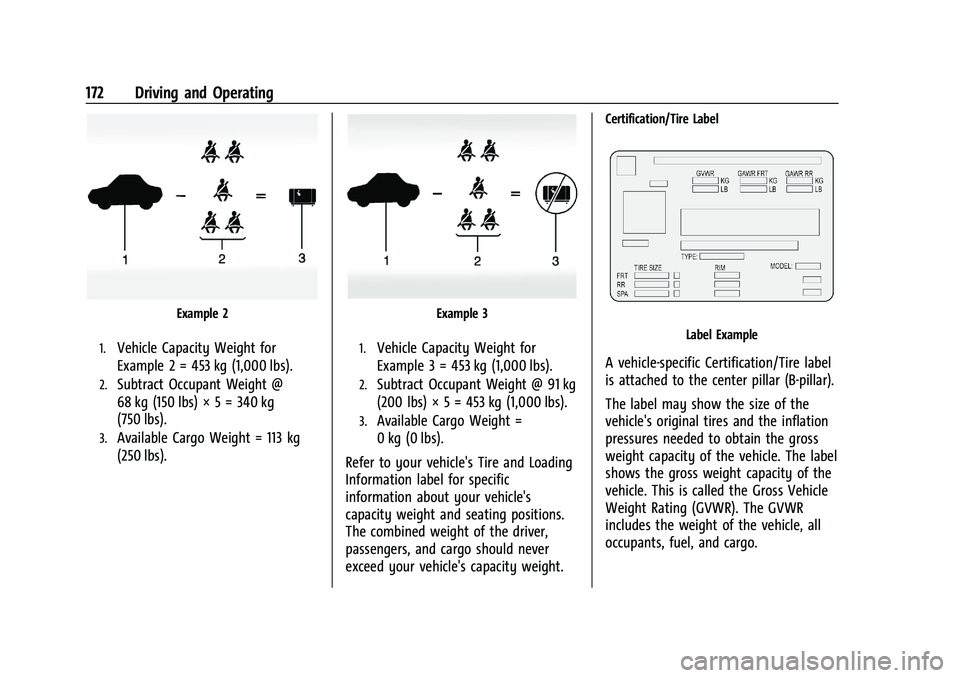
Example 2
1.Vehicle Capacity Weight for
Example 2 = 453 kg (1,000 lbs).
2.Subtract Occupant Weight @
68 kg (150 lbs) × 5 = 340 kg
(750 lbs).
3.Available Cargo Weight = 113 kg
(250 lbs).
Example 3
1.Vehicle Capacity Weight for
Example 3 = 453 kg (1,000 lbs).
2.Subtract Occupant Weight @ 91 kg
(200 lbs) × 5 = 453 kg (1,000 lbs).
3.Available Cargo Weight =
0 kg (0 lbs).
Refer to your vehicle's Tire and Loading
Information label for specific
information about your vehicle's
capacity weight and seating positions.
The combined weight of the driver,
passengers, and cargo should never
exceed your vehicle's capacity weight.
Certification/Tire Label
Label Example
A vehicle-specific Certification/Tire label
is attached to the center pillar (B-pillar).
The label may show the size of the
vehicle's original tires and the inflation
pressures needed to obtain the gross
weight capacity of the vehicle. The label
shows the gross weight capacity of the
vehicle. This is called the Gross Vehicle
Weight Rating (GVWR). The GVWR
includes the weight of the vehicle, all
occupants, fuel, and cargo.