jack BUICK ENCORE 2021 Owner's Manual
[x] Cancel search | Manufacturer: BUICK, Model Year: 2021, Model line: ENCORE, Model: BUICK ENCORE 2021Pages: 313, PDF Size: 11.21 MB
Page 104 of 313
Buick Encore Owner Manual (GMNA-Localizing-U.S./Canada-14607636) -
2021 - CRC - 8/18/20
Infotainment System 103
Infotainment System
Introduction
Introduction . . . . . . . . . . . . . . . . . . . . . . . . . . . 104
Overview (8 Inch Screen) . . . . . . . . . . . . . . 105
Steering Wheel Controls . . . . . . . . . . . . . . . 106
Using the System . . . . . . . . . . . . . . . . . . . . . 106
Software Updates . . . . . . . . . . . . . . . . . . . . . 109
Radio
AM-FM Radio (8 Inch Screen) . . . . . . . . . . 109
HD Radio Technology . . . . . . . . . . . . . . . . . . 112
Satellite Radio . . . . . . . . . . . . . . . . . . . . . . . . . . 112
Radio Reception . . . . . . . . . . . . . . . . . . . . . . . . 113
Multi-Band Antenna . . . . . . . . . . . . . . . . . . . . 113
Audio Players
Avoiding Untrusted Media Devices . . . . . 113
USB Port (8 Inch Screen) . . . . . . . . . . . . . . . 113
Auxiliary Jack . . . . . . . . . . . . . . . . . . . . . . . . . . 116
Bluetooth Audio . . . . . . . . . . . . . . . . . . . . . . . . 117
OnStar System
OnStar System (8 Inch Screen) . . . . . . . . . 118
Voice Recognition
Voice Recognition (8 Inch Screen) . . . . . . 118
Phone
Bluetooth (Overview for 8 InchScreen) . . . . . . . . . . . . . . . . . . . . . . . . . . . . . . . 123 Bluetooth (Pairing and Using the Phone
for 8 Inch Screen) . . . . . . . . . . . . . . . . . . . . 123
Bluetooth (Voice Recognition for 8 Inch Screen) . . . . . . . . . . . . . . . . . . . . . . . . . . . . . . 126
Text Messaging (8 Inch Screen) . . . . . . . . 127
Apple CarPlay and Android Auto (8 Inch
Screen) . . . . . . . . . . . . . . . . . . . . . . . . . . . . . . 128
Settings
Settings (8 Inch Screen) . . . . . . . . . . . . . . . 129
Trademarks and License Agreements
Trademarks and License Agreements . . . 132
Introduction
Introduction . . . . . . . . . . . . . . . . . . . . . . . . . . . 136
Overview (7 Inch Screen) . . . . . . . . . . . . . . 138
Steering Wheel Controls . . . . . . . . . . . . . . . 139
Using the System . . . . . . . . . . . . . . . . . . . . . 139
Radio
AM-FM Radio (7 Inch Screen) . . . . . . . . . . . 141
Radio Data System (RDS) . . . . . . . . . . . . . . 143
Satellite Radio . . . . . . . . . . . . . . . . . . . . . . . . . 143
Radio Reception . . . . . . . . . . . . . . . . . . . . . . . 143
Multi-Band Antenna . . . . . . . . . . . . . . . . . . . 144
Audio Players
Avoiding Untrusted Media Devices . . . . 144
USB Port (7 Inch Screen) . . . . . . . . . . . . . . . 144
Auxiliary Jack . . . . . . . . . . . . . . . . . . . . . . . . . . 147
Bluetooth Audio . . . . . . . . . . . . . . . . . . . . . . . 147
OnStar System
OnStar System (7 Inch Screen) . . . . . . . . 148
Phone
Bluetooth (Overview for 7 InchScreen) . . . . . . . . . . . . . . . . . . . . . . . . . . . . . . 149
Bluetooth (Pairing and Using a Phone for 7 Inch Screen) . . . . . . . . . . . . . . . . . . . . 149
Apple CarPlay and Android Auto . . . . . . . 153
Settings
Settings (7 Inch Screen) . . . . . . . . . . . . . . . . 154
Page 117 of 313
Buick Encore Owner Manual (GMNA-Localizing-U.S./Canada-14607636) -
2021 - CRC - 8/18/20
116 Infotainment System
Audiobooks:1. Touch to view the audiobooks stored on the USB.
2. Touch audiobook.
3. Touch a chapter to begin playback.
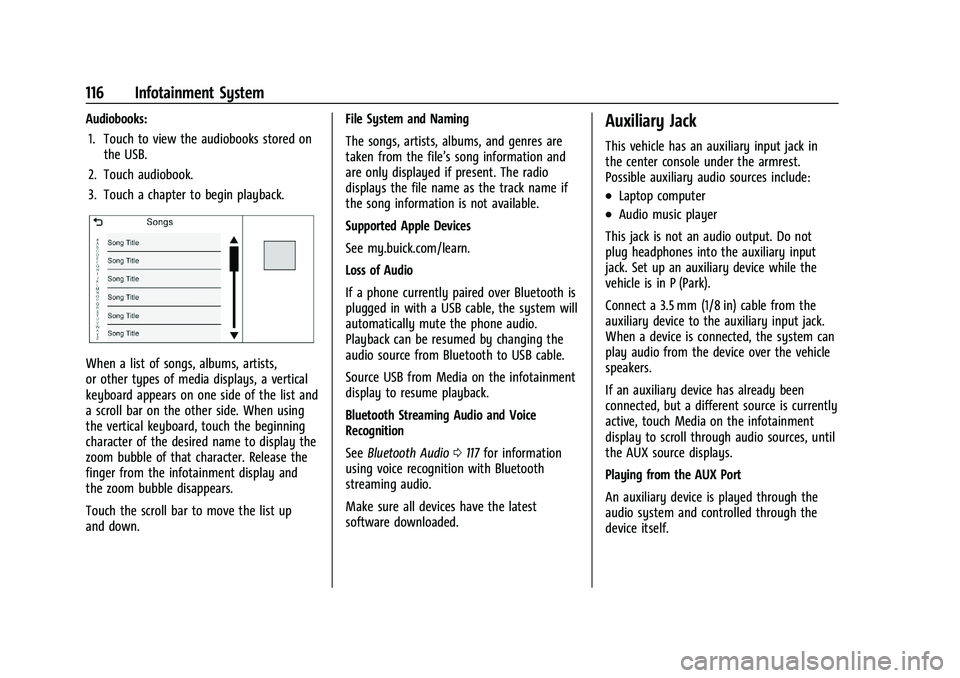
When a list of songs, albums, artists,
or other types of media displays, a vertical
keyboard appears on one side of the list and
a scroll bar on the other side. When using
the vertical keyboard, touch the beginning
character of the desired name to display the
zoom bubble of that character. Release the
finger from the infotainment display and
the zoom bubble disappears.
Touch the scroll bar to move the list up
and down. File System and Naming
The songs, artists, albums, and genres are
taken from the file’s song information and
are only displayed if present. The radio
displays the file name as the track name if
the song information is not available.
Supported Apple Devices
See my.buick.com/learn.
Loss of Audio
If a phone currently paired over Bluetooth is
plugged in with a USB cable, the system will
automatically mute the phone audio.
Playback can be resumed by changing the
audio source from Bluetooth to USB cable.
Source USB from Media on the infotainment
display to resume playback.
Bluetooth Streaming Audio and Voice
Recognition
See
Bluetooth Audio 0117 for information
using voice recognition with Bluetooth
streaming audio.
Make sure all devices have the latest
software downloaded.
Auxiliary Jack
This vehicle has an auxiliary input jack in
the center console under the armrest.
Possible auxiliary audio sources include:
.Laptop computer
.Audio music player
This jack is not an audio output. Do not
plug headphones into the auxiliary input
jack. Set up an auxiliary device while the
vehicle is in P (Park).
Connect a 3.5 mm (1/8 in) cable from the
auxiliary device to the auxiliary input jack.
When a device is connected, the system can
play audio from the device over the vehicle
speakers.
If an auxiliary device has already been
connected, but a different source is currently
active, touch Media on the infotainment
display to scroll through audio sources, until
the AUX source displays.
Playing from the AUX Port
An auxiliary device is played through the
audio system and controlled through the
device itself.
Page 148 of 313
Buick Encore Owner Manual (GMNA-Localizing-U.S./Canada-14607636) -
2021 - CRC - 8/18/20
Infotainment System 147
Podcasts :TouchHnext to any podcast to
store the podcast as a favorite. Touch a
saved favorite to recall a favorite podcast.
The podcast begins to play.
Audiobooks : Touch
Hnext to any
audiobook to store the audiobook as a
favorite. Touch a saved favorite to recall a
favorite audiobook. The first chapter in the
audiobook begins to play.
Media Playback and Mute
USB playback will be paused if the system is
muted. If the steering wheel mute control is
pressed again, playback will resume.
If the source is changed while in mute,
playback resumes and audio will unmute.
Auxiliary Jack
This vehicle has an auxiliary input jack in
the center console. Possible auxiliary audio
sources include:
.Laptop computer
.Audio music player
This jack is not an audio output. Do not
plug headphones into the auxiliary input
jack. Set up an auxiliary device while the
vehicle is in P (Park). Connect a 3.5mm (1/8 in) cable from the
auxiliary device to the auxiliary input jack.
When a device is connected, the system can
play audio from the device over the vehicle
speakers.
If an auxiliary device has already been
connected, but a different source is currently
active, touch More and then touch AUX to
make the source active.
Shuffle and Browse are not available in the
AUX source menu.
Bluetooth Audio
Music may be played from a paired
Bluetooth device. See
Bluetooth (Overview
for 7 Inch Screen) 0149 or
Bluetooth (Pairing and Using a Phone for 7
Inch Screen) 0149 for help pairing a device.
Volume and song selection may be
controlled by using the infotainment
controls or the mobile device. If Bluetooth is
selected and no volume is present, check the
volume setting on the infotainment system.
Music can be launched by touching
Bluetooth from the recent sources list on
the left of the display or by touching the
More option and then touching the
Bluetooth device. To play music via Bluetooth:
1. Power on the device, and pair to connect the device.
2. Once paired, touch Audio from the Home Page, then touch Bluetooth from the
recent sources list on the left of the
display.
Bluetooth Sound Menu
See “Infotainment System Sound Menu”
under AM-FM Radio (7 Inch Screen) 0141.
Manage Bluetooth Devices
From the Home Page: 1. Touch Audio.
2. Touch More.
3. Touch Bluetooth.
4. Touch Devices to add or delete devices.
When touching Bluetooth, the radio may
not be able to launch the audio player on
the connected device to start playing. When
the vehicle is not moving, use the mobile
device to begin playback.
All devices launch audio differently. When
selecting Bluetooth as a source, the radio
may show as paused on the display. Press
play on the device or touch
pon the
display to begin playback.
Page 193 of 313
Buick Encore Owner Manual (GMNA-Localizing-U.S./Canada-14607636) -
2021 - CRC - 8/18/20
192 Driving and Operating
The indicator light in the button comes on
when the system is turned on.
When the system is off, the indicator light
in the button is off or PARK ASSIST OFF
briefly displays on the Driver Information
Center (DIC).
FRPA defaults to the on setting each time
the vehicle is started.
When the System Does Not Seem to
Work Properly
If the FRPA system does not activate due to
a temporary condition, a message may
display on the DIC. This can occur under the
following conditions:
.The driver has disabled the system.
.The sensors are not clean. Keep the
vehicle's bumpers free of mud, dirt, snow,
ice, and slush. For cleaning instructions,
seeExterior Care 0258.
.The Park Assist sensors are covered by
frost or ice. Frost or ice can form around
and behind the sensors and may not
always be seen; this can occur after
washing the vehicle in cold weather. The
message may not clear until the frost or
ice has melted.
.An object was hanging out of the liftgate
during the last drive cycle. Once the
object is removed, FRPA will return to
normal operation.
.An object or cover is attached to the front
of the vehicle.
.The bumper is damaged. Take the vehicle
to your dealer to repair the system.
.Other conditions, such as vibrations from
a jackhammer or the compression of air
brakes on a very large truck, are affecting
system performance.
Forward Collision Alert (FCA)
System
If equipped, the FCA system may help to
avoid or reduce the harm caused by
front-end crashes. When approaching a
vehicle ahead too quickly, FCA provides a
red flashing alert on the windshield and
rapidly beeps.
FCA detects vehicles within a distance of
approximately 60 m (197 ft) and operates at
speeds above 40 km/h (25 mph).
{Warning
FCA is a warning system and does not
apply the brakes. When approaching a
slower-moving or stopped vehicle ahead
too rapidly, or when following a vehicle
too closely, FCA may not provide a
warning with enough time to help avoid
a crash. It also may not provide any
warning at all. FCA does not warn of
pedestrians, animals, signs, guardrails,
bridges, construction barrels, or other
objects. Be ready to take action and
apply the brakes. See Defensive Driving
0 165.
FCA can be disabled with either the FCA
steering wheel control or, if equipped,
through vehicle personalization. See
“Collision/Detection Systems” underVehicle
Personalization (8 Inch Screen) 089 or
Vehicle Personalization (7 Inch Screen) 094.
Page 249 of 313
Buick Encore Owner Manual (GMNA-Localizing-U.S./Canada-14607636) -
2021 - CRC - 8/18/20
248 Vehicle Care
Warning (Continued)
traction device if it contacts the vehicle.
Do not spin the wheels. If traction
devices are used, install them on the
front tires.
If a Tire Goes Flat
It is unusual for a tire to blow out while
driving, especially if the tires are maintained
properly. SeeTires0232. If air goes out of a
tire, it is much more likely to leak out
slowly. But if there ever is a blowout, here
are a few tips about what to expect and
what to do:
If a front tire fails, the flat tire creates a
drag that pulls the vehicle toward that side.
Take your foot off the accelerator pedal and
grip the steering wheel firmly. Steer to
maintain lane position, and then gently
brake to a stop, well off the road,
if possible.
A rear blowout, particularly on a curve, acts
much like a skid and may require the same
correction as used in a skid. Stop pressing
the accelerator pedal and steer to straighten the vehicle. It may be very bumpy and
noisy. Gently brake to a stop, well off the
road, if possible.
{Warning
Driving on a flat tire will cause
permanent damage to the tire.
Re-inflating a tire after it has been driven
on while severely underinflated or flat
may cause a blowout and a serious crash.
Never attempt to re-inflate a tire that has
been driven on while severely
underinflated or flat. Have your dealer or
an authorized tire service center repair or
replace the flat tire as soon as possible.
{Warning
Lifting a vehicle and getting under it to
do maintenance or repairs is dangerous
without the appropriate safety equipment
and training. If a jack is provided with
the vehicle, it is designed only for
changing a flat tire. If it is used for
anything else, you or others could be
badly injured or killed if the vehicle slips
(Continued)
Warning (Continued)
off the jack. If a jack is provided with the
vehicle, only use it for changing a
flat tire.
If a tire goes flat, avoid further tire and
wheel damage by driving slowly to a level
place, well off the road, if possible. Turn on
the hazard warning flashers. See Hazard
Warning Flashers 099.
{Warning
Changing a tire can be dangerous. The
vehicle can slip off the jack and roll over
or fall causing injury or death. Find a
level place to change the tire. To help
prevent the vehicle from moving:
1. Set the parking brake firmly.
2. Put an automatic transmission in P (Park) or a manual transmission in
1 (First) or R (Reverse).
3. Turn off the engine and do not restart while the vehicle is raised.
4. Do not allow passengers to remain in the vehicle.
(Continued)
Page 250 of 313

Buick Encore Owner Manual (GMNA-Localizing-U.S./Canada-14607636) -
2021 - CRC - 8/18/20
Vehicle Care 249
Warning (Continued)
5. Place wheel blocks, if equipped, onboth sides of the tire at the opposite
corner of the tire being changed.
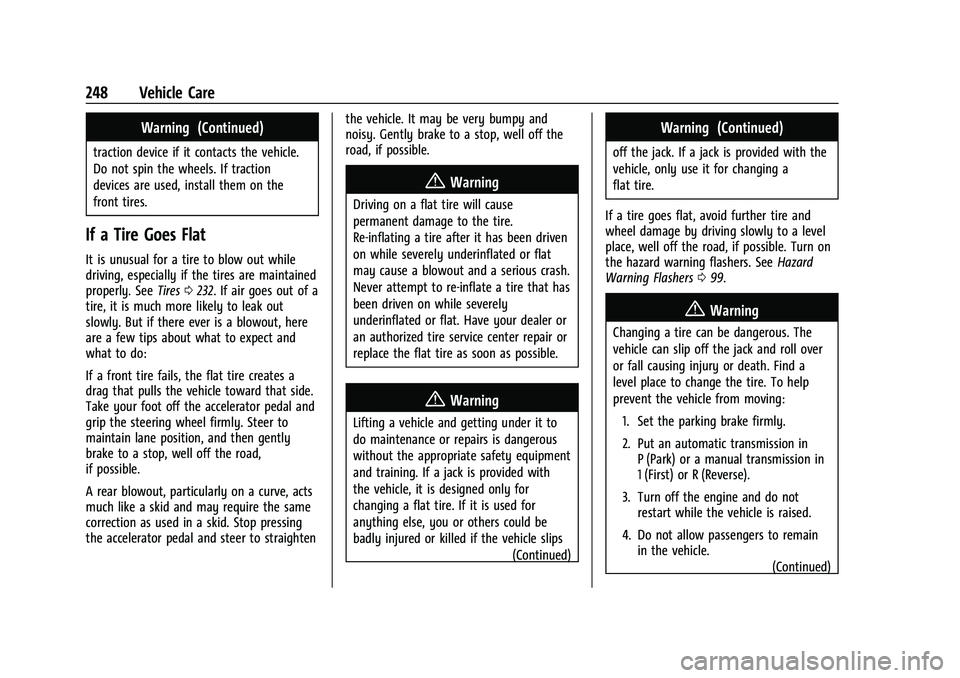
When the vehicle has a flat tire (2), use the
following example as a guide to assist in the
placement of the wheel blocks (1),
if equipped.
1. Wheel Block (If Equipped)
2. Flat Tire
The following information explains how to
repair or change a tire.
Tire Changing
Removing the Spare Tire and Tools
The spare tire and tools are located in the
storage compartment in the rear of the
vehicle.
1. Center Retainer
2. Subwoofer
3. Wrench
4. Strap
5. Tow Eye (if equipped)
6. Jack
To access the spare tire and tools: 1. Open the liftgate. See Liftgate017.
2. Lift the trim cover. 3. Remove the subwoofer assembly on top
of the spare tire by turning the center
retainer counterclockwise.
4. Remove the spare tire, jack, and tools and place them near the tire being
changed.
Removing the Flat Tire and Installing the
Spare Tire
1. Do a safety check before proceeding. See
If a Tire Goes Flat 0248.
2. Turn the wheel wrench counterclockwise
to loosen the wheel nuts. Do not remove
them yet.
Page 251 of 313

Buick Encore Owner Manual (GMNA-Localizing-U.S./Canada-14607636) -
2021 - CRC - 8/18/20
250 Vehicle Care
3. Place the jack at the position markedwith a half circle.
4. Place the hex tube end of the wrenchover the hex head of the jack to
attach it.
5. Turn the wheel wrench clockwise until the lift head is firmly contacting the
proper lifting point nearest the flat tire.
{Warning
Getting under a vehicle when it is lifted
on a jack is dangerous. If the vehicle slips
off the jack, you could be badly injured
or killed. Never get under a vehicle when
it is supported only by a jack.
{Warning
Raising the vehicle with the jack
improperly positioned can damage the
vehicle and even make the vehicle fall. To
help avoid personal injury and vehicle
damage, be sure to fit the jack lift head
into the proper location before raising
the vehicle.
{Warning
Lifting a vehicle and getting under it to
do maintenance or repairs is dangerous
without the appropriate safety equipment
and training. If a jack is provided with
the vehicle, it is designed only for
changing a flat tire. If it is used for
anything else, you or others could be
badly injured or killed if the vehicle slips
off the jack. If a jack is provided with the
vehicle, only use it for changing a
flat tire.
6. Turn the wheel wrench clockwise to raise the vehicle far enough off the ground so
there is enough room for the spare tire
to fit underneath the wheel well.
7. Turn the wheel nuts counterclockwise to remove them.
8. Remove the flat tire.
{Warning
Rust or dirt on a wheel, or on the
parts to which it is fastened, can
cause wheel nuts to become loose
over time. The wheel could come off
(Continued)
Page 252 of 313
Buick Encore Owner Manual (GMNA-Localizing-U.S./Canada-14607636) -
2021 - CRC - 8/18/20
Vehicle Care 251
Warning (Continued)
and cause a crash. When changing a
wheel, remove any rust or dirt from
places where the wheel attaches to
the vehicle. In an emergency, a cloth
or paper towel can be used; however,
use a scraper or wire brush later to
remove all rust or dirt.
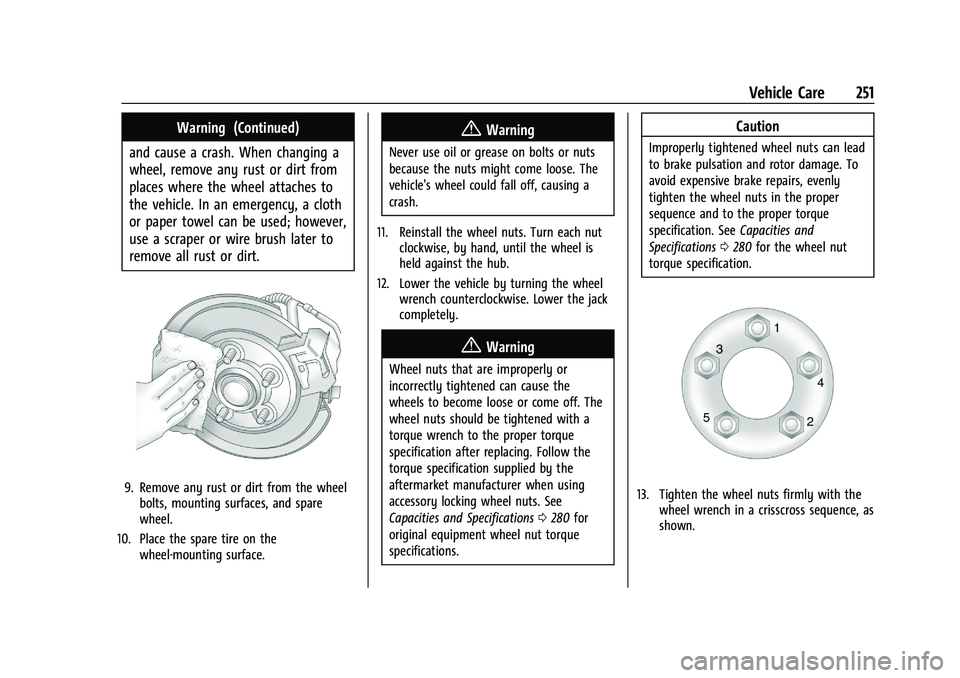
9. Remove any rust or dirt from the wheel bolts, mounting surfaces, and spare
wheel.
10. Place the spare tire on the wheel-mounting surface.
{Warning
Never use oil or grease on bolts or nuts
because the nuts might come loose. The
vehicle's wheel could fall off, causing a
crash.
11. Reinstall the wheel nuts. Turn each nut clockwise, by hand, until the wheel is
held against the hub.
12. Lower the vehicle by turning the wheel wrench counterclockwise. Lower the jack
completely.
{Warning
Wheel nuts that are improperly or
incorrectly tightened can cause the
wheels to become loose or come off. The
wheel nuts should be tightened with a
torque wrench to the proper torque
specification after replacing. Follow the
torque specification supplied by the
aftermarket manufacturer when using
accessory locking wheel nuts. See
Capacities and Specifications 0280 for
original equipment wheel nut torque
specifications.
Caution
Improperly tightened wheel nuts can lead
to brake pulsation and rotor damage. To
avoid expensive brake repairs, evenly
tighten the wheel nuts in the proper
sequence and to the proper torque
specification. See Capacities and
Specifications 0280 for the wheel nut
torque specification.
13. Tighten the wheel nuts firmly with the wheel wrench in a crisscross sequence, as
shown.
Page 253 of 313

Buick Encore Owner Manual (GMNA-Localizing-U.S./Canada-14607636) -
2021 - CRC - 8/18/20
252 Vehicle Care
Caution
Wheel covers will not fit on the vehicle's
compact spare. If you try to put a wheel
cover on the compact spare, the cover or
the spare could be damaged.
Storing a Flat or Spare Tire and Tools
{Warning
Storing a jack, a tire, or other equipment
in the passenger compartment of the
vehicle could cause injury. In a sudden
stop or collision, loose equipment could
strike someone. Store all these in the
proper place.
Storing the Flat Tire and Tools 1. Return the jack and tools to their original storage location.
2. Replace the trim cover.
3. Place the flat tire, lying flat, in the rear storage compartment.
4. Attach one end of the strap to a cargo tie-down in the rear of the vehicle.
5. Route the strap through the wheel, asshown.
6. Attach the other end of the strap to the other cargo tie-down in the rear of the
vehicle.
7. Tighten the strap.
Storing the Compact Spare Tire and Tools
Reverse the instructions for removing the
spare tire and tools to store the spare tire.
The compact spare tire is for temporary use
only. Replace the compact spare tire with a
full-size tire as soon as you can. See
Compact Spare Tire 0252.
Compact Spare Tire
{Warning
Driving with more than one compact
spare tire at a time could result in loss of
braking and handling. This could lead to a
crash and you or others could be injured.
Use only one compact spare tire at
a time.
If this vehicle has a compact spare tire, it
was fully inflated when new; however, it
can lose air over time. Check the inflation
pressure regularly. It should be 420 kPa
(60 psi).
Stop as soon as possible and check that the
spare tire is correctly inflated after being
installed on the vehicle. The compact spare
tire is designed for temporary use only. The
vehicle will perform differently with the
spare tire installed and it is recommended
that the vehicle speed be limited to 80 km/h
(50 mph). To conserve the tread of the spare
tire, have the standard tire repaired or
replaced as soon as convenient and return
the spare tire to the storage area.
Page 304 of 313

Buick Encore Owner Manual (GMNA-Localizing-U.S./Canada-14607636) -
2021 - CRC - 8/18/20
Index 303
Automatic (cont'd)Headlamp System . . . . . . . . . . . . . . . . . . . . . . 98
Transmission . . . . . . . . . . . . . . . . . . . . . . . . . . . . 181
Transmission Fluid . . . . . . . . . . . . . . . . . . . . . 210
Automatic Transmission Manual Mode . . . . . . . . . . . . . . . . . . . . . . . . . 183
Shift Lock Control Function Check . . . . . . 220
Auxiliary Jack . . . . . . . . . . . . . . . . . . . . . . . . 116, 147
Avoiding Untrusted Media Devices . . . . . . . . . . . . . . . . . . . . . . . . . . . . 113, 144
B
BatteryExterior Lighting Battery Saver . . . . . . . . 102
Load Management . . . . . . . . . . . . . . . . . . . . . 101
Power Protection . . . . . . . . . . . . . . . . . . . . . . 102
Battery - North America . . . . . . . . . . . . . 219, 253
Blade Replacement, Wiper . . . . . . . . . . . . . . . 220
Bluetooth
Overview . . . . . . . . . . . . . . . . . . . . . 123, 126, 149
Bluetooth Audio . . . . . . . . . . . . . . . . . . . . . 117, 147
Brake System Warning Light . . . . . . . . . . . . . . . . . . 82
Brakes . . . . . . . . . . . . . . . . . . . . . . . . . . . . . . . . . . . . 217 Antilock . . . . . . . . . . . . . . . . . . . . . . . . . . . . . . . . 184
Assist . . . . . . . . . . . . . . . . . . . . . . . . . . . . . . . . . . 185
Fluid . . . . . . . . . . . . . . . . . . . . . . . . . . . . . . . . . . . 218
Parking . . . . . . . . . . . . . . . . . . . . . . . . . . . . . . . . 184 Braking . . . . . . . . . . . . . . . . . . . . . . . . . . . . . . . . . . 166
Break-In, New Vehicle . . . . . . . . . . . . . . . . . . . . . 173
Bulb Replacement
Halogen Bulbs . . . . . . . . . . . . . . . . . . . . . . . . . 223
Headlamp Aiming . . . . . . . . . . . . . . . . . . . . . . 223
Headlamps . . . . . . . . . . . . . . . . . . . . . . . . . . . . 223
Headlamps, Front Turn Signal, andParking Lamps . . . . . . . . . . . . . . . . . . . . . . . 223
License Plate Lamps . . . . . . . . . . . . . . . . . . . 225
Taillamps, Turn Signal, Sidemarker, Stoplamps, and Backup Lamps . . . . . . . 224
Buying New Tires . . . . . . . . . . . . . . . . . . . . . . . . 244
C
Calibration . . . . . . . . . . . . . . . . . . . . . . . . . . . . . . . . 74
California Perchlorate Materials
Requirements . . . . . . . . . . . . . . . . . . . . . . . . 202
California Proposition 65 Warning . . . . . . . . . . . . . . . . . . .202, 219, 253, Back Cover
Camera Rear Vision (RVC) . . . . . . . . . . . . . . . . . . . . . . 190
Canadian Vehicle Owners . . . . . . . . . . . . . . . . . . . 1
Capacities and Specifications . . . . . . . . . . . . . 280
Carbon Monoxide Engine Exhaust . . . . . . . . . . . . . . . . . . . . . . . . 180
Liftgate . . . . . . . . . . . . . . . . . . . . . . . . . . . . . . . . . . 17 Carbon Monoxide (cont'd)
Winter Driving . . . . . . . . . . . . . . . . . . . . . . . . . 169
Cargo Cover . . . . . . . . . . . . . . . . . . . . . . . . . . . . . . . . . . . 69
Management System . . . . . . . . . . . . . . . . . . . 69
Caution, Danger, and Warning . . . . . . . . . . . . . .2
Center Console Storage . . . . . . . . . . . . . . . . . . . 68
Chains, Tire . . . . . . . . . . . . . . . . . . . . . . . . . . . . . . 247
Charging System Light . . . . . . . . . . . . . . . . . . . . 80
Check Engine Light (Malfunction Indicator) . . . . 81
Child Restraints
Infants and Young Children . . . . . . . . . . . . . 50
Lower Anchors and Tethers forChildren . . . . . . . . . . . . . . . . . . . . . . . . . . . . . . . 54
Older Children . . . . . . . . . . . . . . . . . . . . . . . . . . 48
Securing . . . . . . . . . . . . . . . . . . . . . . . . . . . . 62, 64
Systems . . . . . . . . . . . . . . . . . . . . . . . . . . . . . . . . 52
Circuit Breakers . . . . . . . . . . . . . . . . . . . . . . . . . . 226
Cleaning Exterior Care . . . . . . . . . . . . . . . . . . . . . . . . . . . 258
Interior Care . . . . . . . . . . . . . . . . . . . . . . . . . . . 262
Climate Control Systems . . . . . . . . . . . . . . . . . 159 Air Conditioning . . . . . . . . . . . . . . . . . . . . . . . 159
Heating . . . . . . . . . . . . . . . . . . . . . . . . . . . . . . . . 159
Clock . . . . . . . . . . . . . . . . . . . . . . . . . . . . . . . . . . . . . .75
Cluster, Instrument . . . . . . . . . . . . . . . . . . . . . . . 76
Collision Damage Repair . . . . . . . . . . . . . . . . . 288