Reverse BUICK ENCORE GX 2021 Owner's Manual
[x] Cancel search | Manufacturer: BUICK, Model Year: 2021, Model line: ENCORE GX, Model: BUICK ENCORE GX 2021Pages: 370, PDF Size: 12.38 MB
Page 7 of 370
Buick Encore GX Owner Manual (GMNA-Localizing-U.S./Canada/Mexico-
14608036) - 2021 - CRC - 9/21/20
6 Keys, Doors, and Windows
Keys, Doors, and
Windows
Keys and Locks
Keys . . . . . . . . . . . . . . . . . . . . . . . . . . . . . . . . . . . . . 6
Remote Keyless Entry (RKE) System . . . . . 7
Remote Keyless Entry (RKE) SystemOperation . . . . . . . . . . . . . . . . . . . . . . . . . . . . . . 7
Remote Vehicle Start . . . . . . . . . . . . . . . . . . . 13
Door Locks . . . . . . . . . . . . . . . . . . . . . . . . . . . . . . 15
Power Door Locks . . . . . . . . . . . . . . . . . . . . . . . 16
Delayed Locking . . . . . . . . . . . . . . . . . . . . . . . . 16
Automatic Door Locks . . . . . . . . . . . . . . . . . . . 17
Lockout Protection . . . . . . . . . . . . . . . . . . . . . . 17
Safety Locks . . . . . . . . . . . . . . . . . . . . . . . . . . . . 17
Doors
Liftgate . . . . . . . . . . . . . . . . . . . . . . . . . . . . . . . . . 18
Vehicle Security
Vehicle Security . . . . . . . . . . . . . . . . . . . . . . . . 24
Vehicle Alarm System . . . . . . . . . . . . . . . . . . 24
Immobilizer . . . . . . . . . . . . . . . . . . . . . . . . . . . . . 25
Immobilizer Operation . . . . . . . . . . . . . . . . . . 25
Exterior Mirrors
Convex Mirrors . . . . . . . . . . . . . . . . . . . . . . . . . 26
Power Mirrors . . . . . . . . . . . . . . . . . . . . . . . . . . 26
Folding Mirrors . . . . . . . . . . . . . . . . . . . . . . . . . 26 Heated Mirrors . . . . . . . . . . . . . . . . . . . . . . . . . 26
Reverse Tilt Mirrors . . . . . . . . . . . . . . . . . . . . . 27
Interior Mirrors
Interior Rearview Mirrors . . . . . . . . . . . . . . . 27
Manual Rearview Mirror . . . . . . . . . . . . . . . . 27
Automatic Dimming Rearview Mirror . . . 27
Rear Camera Mirror . . . . . . . . . . . . . . . . . . . . . 27
Windows
Windows . . . . . . . . . . . . . . . . . . . . . . . . . . . . . . . 29
Power Windows . . . . . . . . . . . . . . . . . . . . . . . . 30
Sun Visors . . . . . . . . . . . . . . . . . . . . . . . . . . . . . . 31
Roof
Sunroof . . . . . . . . . . . . . . . . . . . . . . . . . . . . . . . . . 31
Keys and Locks
Keys
{Warning
Leaving children in a vehicle with a
Remote Keyless Entry (RKE) transmitter is
dangerous and children or others could
be seriously injured or killed. They could
operate the power windows or other
controls or make the vehicle move. The
windows will function with the RKE
transmitter in the vehicle, and children or
others could be caught in the path of a
closing window. Do not leave children in
a vehicle with an RKE transmitter.
Page 20 of 370
Buick Encore GX Owner Manual (GMNA-Localizing-U.S./Canada/Mexico-
14608036) - 2021 - CRC - 9/21/20
Keys, Doors, and Windows 19
Use the pull cup to lower and close the
liftgate. Do not press the touch pad while
closing the liftgate. This may cause the
liftgate to be unlatched.
The liftgate has an electric latch. If the
battery is disconnected or has low voltage,
the liftgate will not open. The liftgate will
resume operation when the battery is
reconnected and charged.
Always close the liftgate before driving.
Power Liftgate Operation
{Warning
You or others could be injured if caught
in the path of the power liftgate. Make
sure there is no one in the way of the
liftgate as it is opening and closing.
Caution
Driving with an open and unsecured
liftgate may result in damage to the
power liftgate components.
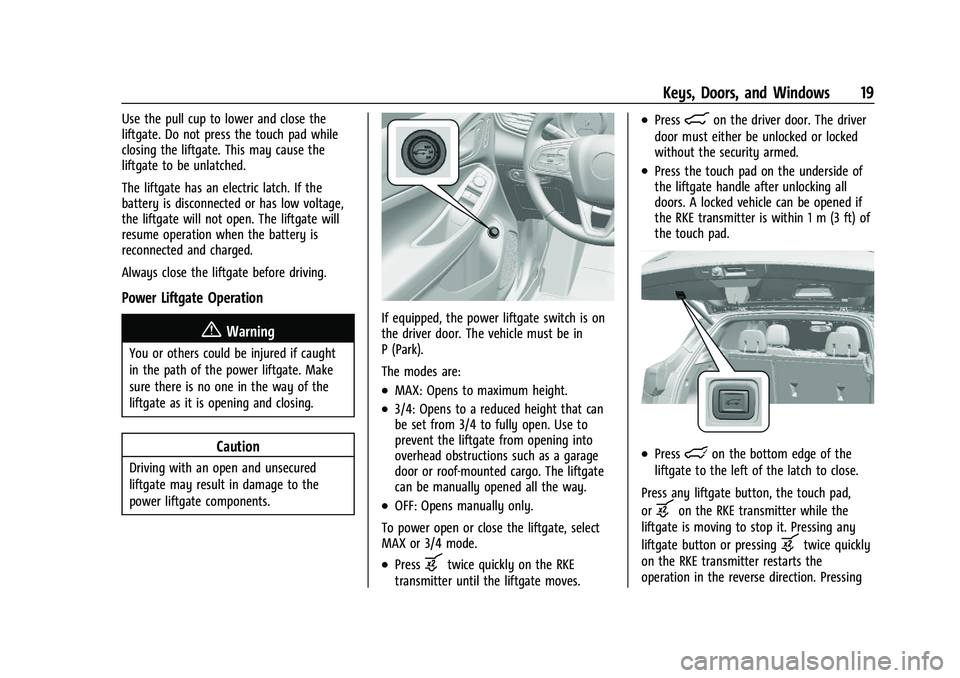
If equipped, the power liftgate switch is on
the driver door. The vehicle must be in
P (Park).
The modes are:
.MAX: Opens to maximum height.
.3/4: Opens to a reduced height that can
be set from 3/4 to fully open. Use to
prevent the liftgate from opening into
overhead obstructions such as a garage
door or roof-mounted cargo. The liftgate
can be manually opened all the way.
.OFF: Opens manually only.
To power open or close the liftgate, select
MAX or 3/4 mode.
.Pressbtwice quickly on the RKE
transmitter until the liftgate moves.
.Press8on the driver door. The driver
door must either be unlocked or locked
without the security armed.
.Press the touch pad on the underside of
the liftgate handle after unlocking all
doors. A locked vehicle can be opened if
the RKE transmitter is within 1 m (3 ft) of
the touch pad.
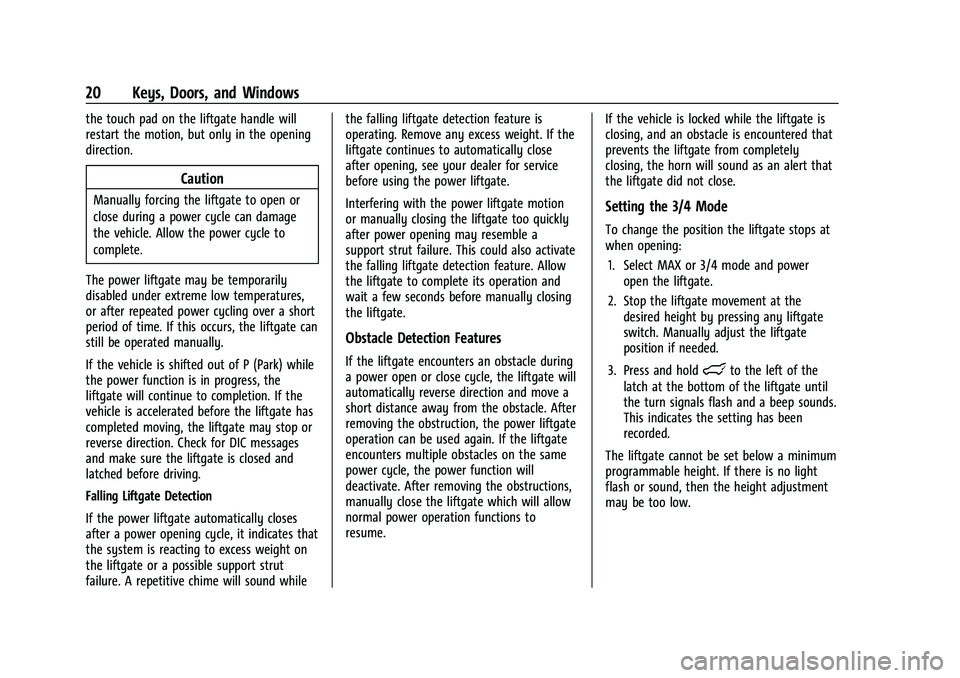
.Presslon the bottom edge of the
liftgate to the left of the latch to close.
Press any liftgate button, the touch pad,
or
bon the RKE transmitter while the
liftgate is moving to stop it. Pressing any
liftgate button or pressing
btwice quickly
on the RKE transmitter restarts the
operation in the reverse direction. Pressing
Page 21 of 370
Buick Encore GX Owner Manual (GMNA-Localizing-U.S./Canada/Mexico-
14608036) - 2021 - CRC - 9/21/20
20 Keys, Doors, and Windows
the touch pad on the liftgate handle will
restart the motion, but only in the opening
direction.
Caution
Manually forcing the liftgate to open or
close during a power cycle can damage
the vehicle. Allow the power cycle to
complete.
The power liftgate may be temporarily
disabled under extreme low temperatures,
or after repeated power cycling over a short
period of time. If this occurs, the liftgate can
still be operated manually.
If the vehicle is shifted out of P (Park) while
the power function is in progress, the
liftgate will continue to completion. If the
vehicle is accelerated before the liftgate has
completed moving, the liftgate may stop or
reverse direction. Check for DIC messages
and make sure the liftgate is closed and
latched before driving.
Falling Liftgate Detection
If the power liftgate automatically closes
after a power opening cycle, it indicates that
the system is reacting to excess weight on
the liftgate or a possible support strut
failure. A repetitive chime will sound while the falling liftgate detection feature is
operating. Remove any excess weight. If the
liftgate continues to automatically close
after opening, see your dealer for service
before using the power liftgate.
Interfering with the power liftgate motion
or manually closing the liftgate too quickly
after power opening may resemble a
support strut failure. This could also activate
the falling liftgate detection feature. Allow
the liftgate to complete its operation and
wait a few seconds before manually closing
the liftgate.
Obstacle Detection Features
If the liftgate encounters an obstacle during
a power open or close cycle, the liftgate will
automatically reverse direction and move a
short distance away from the obstacle. After
removing the obstruction, the power liftgate
operation can be used again. If the liftgate
encounters multiple obstacles on the same
power cycle, the power function will
deactivate. After removing the obstructions,
manually close the liftgate which will allow
normal power operation functions to
resume.
If the vehicle is locked while the liftgate is
closing, and an obstacle is encountered that
prevents the liftgate from completely
closing, the horn will sound as an alert that
the liftgate did not close.
Setting the 3/4 Mode
To change the position the liftgate stops at
when opening:
1. Select MAX or 3/4 mode and power open the liftgate.
2. Stop the liftgate movement at the desired height by pressing any liftgate
switch. Manually adjust the liftgate
position if needed.
3. Press and hold
lto the left of the
latch at the bottom of the liftgate until
the turn signals flash and a beep sounds.
This indicates the setting has been
recorded.
The liftgate cannot be set below a minimum
programmable height. If there is no light
flash or sound, then the height adjustment
may be too low.
Page 28 of 370
Buick Encore GX Owner Manual (GMNA-Localizing-U.S./Canada/Mexico-
14608036) - 2021 - CRC - 9/21/20
Keys, Doors, and Windows 27
Reverse Tilt Mirrors
If equipped with reverse tilt mirrors and
memory seats, the passenger and/or driver
mirror tilts to a preselected position when
the vehicle is in R (Reverse). This allows the
curb to be seen when parallel parking.
The mirror(s) return to the original
position when:
.The vehicle is shifted out of R (Reverse),
or remains in R (Reverse) for about
30 seconds.
.The ignition is turned off.
.The vehicle is driven in R (Reverse) above
a set speed.
To turn this feature on or off, see Vehicle
Personalization 0114.
Interior Mirrors
Interior Rearview Mirrors
Adjust the rearview mirror for a clear view
of the area behind the vehicle.
Do not spray glass cleaner directly on the
mirror. Use a soft towel dampened with
water.
Manual Rearview Mirror
If equipped, push the tab forward for
daytime use and pull it rearward for
nighttime use to avoid glare of the
headlamps from behind.
Automatic Dimming Rearview
Mirror
If equipped, automatic dimming reduces the
glare of headlamps from behind. The
dimming feature comes on when the vehicle
is started.
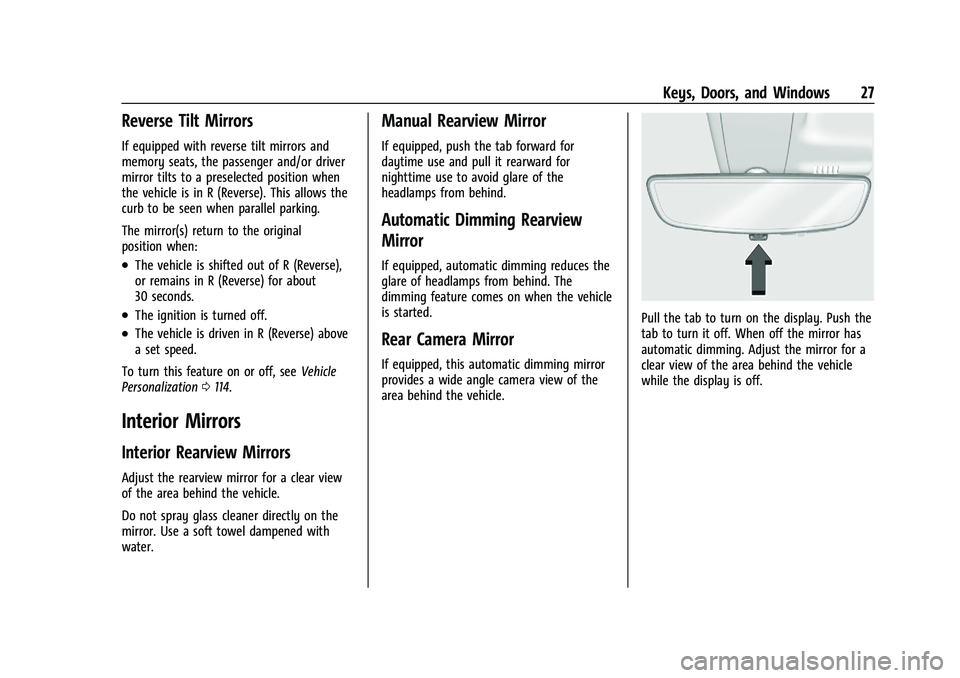
Rear Camera Mirror
If equipped, this automatic dimming mirror
provides a wide angle camera view of the
area behind the vehicle.
Pull the tab to turn on the display. Push the
tab to turn it off. When off the mirror has
automatic dimming. Adjust the mirror for a
clear view of the area behind the vehicle
while the display is off.
Page 32 of 370
Buick Encore GX Owner Manual (GMNA-Localizing-U.S./Canada/Mexico-
14608036) - 2021 - CRC - 9/21/20
Keys, Doors, and Windows 31
Briefly press or pull the window switch in
the same direction to stop that window’s
express movement.
Window Automatic Reversal System
The express-close feature will reverse
window movement if it comes in contact
with an object. Extreme cold or ice could
cause the window to auto-reverse. The
window will operate normally after the
object or condition is removed.
Automatic Reversal System Override
{Warning
If automatic reversal system override is
active, the window will not reverse
automatically. You or others could be
injured and the window could be
damaged. Before using automatic reversal
system override, make sure that all
people and obstructions are clear of the
window path.
When the engine is on, override the
automatic reversal system by pulling and
holding the window switch if conditions
prevent it from closing.
Programming the Power Windows
Programming may be necessary if the
vehicle battery has been disconnected or
discharged. If the window is unable to
express-up, program each express-close
window: 1. Close all doors.
2. Turn the ignition on or to ACC/ ACCESSORY.
3. Partially open the window to be programmed. Then close it and continue
to pull the switch briefly after the
window has fully closed.
4. Open the window and continue to press the switch briefly after the window has
fully opened.
Sun Visors
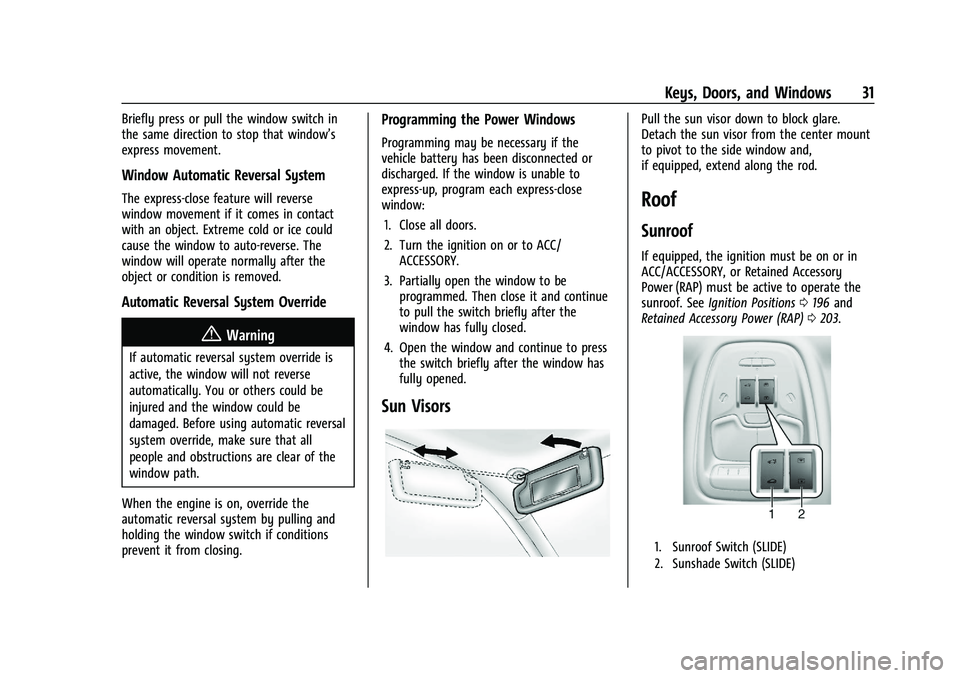
Pull the sun visor down to block glare.
Detach the sun visor from the center mount
to pivot to the side window and,
if equipped, extend along the rod.
Roof
Sunroof
If equipped, the ignition must be on or in
ACC/ACCESSORY, or Retained Accessory
Power (RAP) must be active to operate the
sunroof. See Ignition Positions 0196 and
Retained Accessory Power (RAP) 0203.
1. Sunroof Switch (SLIDE)
2. Sunshade Switch (SLIDE)
Page 86 of 370
Buick Encore GX Owner Manual (GMNA-Localizing-U.S./Canada/Mexico-
14608036) - 2021 - CRC - 9/21/20
Instruments and Controls 85
.Move the windshield wiper lever out of
the AUTO position to deactivate
Rainsense.
To enable or disable this feature, see “Rain
Sense Wipers” underVehicle Personalization
0 114.
Wiper Arm Assembly Protection
When using an automatic car wash, move
the windshield wiper lever to OFF. This
disables the automatic Rainsense windshield
wipers and/or manual windshield wipers.
With Rainsense, if the transmission is in
N (Neutral) and the vehicle speed is very
slow, the wipers will automatically stop at
the base of the windshield.
The wiper operations return to normal when
the transmission is no longer in N (Neutral)
or the vehicle speed has increased.
Windshield Washer
e: Pull the windshield wiper lever
toward you to spray windshield washer fluid
and activate the windshield wipers. The
wipers will continue until the lever is
released or the maximum wash time is
reached. When the windshield wiper lever is
released, additional wipes may occur
depending on how long the windshield washer had been activated. See
Washer
Fluid 0267 for information on filling the
windshield washer fluid reservoir.
Rear Window Wiper/Washer
The ignition must be on or in ACC/
ACCESSORY to operate the rear window
wiper/washer.
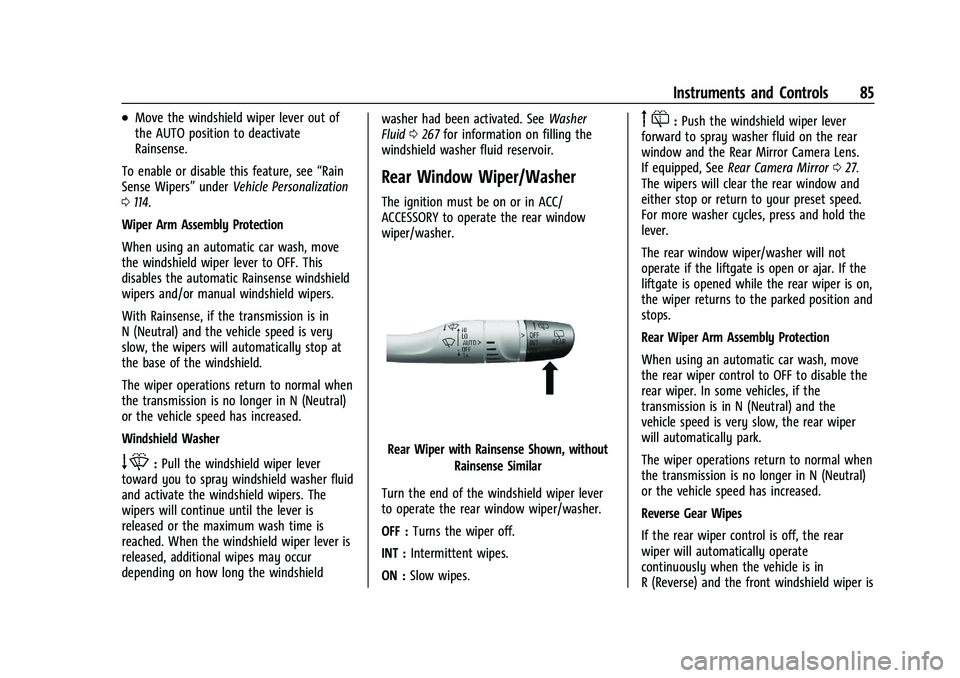
Rear Wiper with Rainsense Shown, without
Rainsense Similar
Turn the end of the windshield wiper lever
to operate the rear window wiper/washer.
OFF : Turns the wiper off.
INT : Intermittent wipes.
ON : Slow wipes.
f:Push the windshield wiper lever
forward to spray washer fluid on the rear
window and the Rear Mirror Camera Lens.
If equipped, See Rear Camera Mirror 027.
The wipers will clear the rear window and
either stop or return to your preset speed.
For more washer cycles, press and hold the
lever.
The rear window wiper/washer will not
operate if the liftgate is open or ajar. If the
liftgate is opened while the rear wiper is on,
the wiper returns to the parked position and
stops.
Rear Wiper Arm Assembly Protection
When using an automatic car wash, move
the rear wiper control to OFF to disable the
rear wiper. In some vehicles, if the
transmission is in N (Neutral) and the
vehicle speed is very slow, the rear wiper
will automatically park.
The wiper operations return to normal when
the transmission is no longer in N (Neutral)
or the vehicle speed has increased.
Reverse Gear Wipes
If the rear wiper control is off, the rear
wiper will automatically operate
continuously when the vehicle is in
R (Reverse) and the front windshield wiper is
Page 87 of 370
Buick Encore GX Owner Manual (GMNA-Localizing-U.S./Canada/Mexico-
14608036) - 2021 - CRC - 9/21/20
86 Instruments and Controls
performing low or high speed wipes. If the
rear wiper control is off, the vehicle is in
R (Reverse), and the front windshield wiper
is performing interval wipes, then the rear
wiper automatically performs interval wipes.
This feature can be turned on or off. See
Vehicle Personalization0114.
The windshield washer reservoir is used for
the windshield and the rear window. Check
the fluid level in the reservoir if either
washer is not working. See Washer Fluid
0 267.
Rear Camera Washer
If equipped, push the windshield wiper lever
forward to spray washer fluid on the rear
camera lens. The lever returns to its starting
position when released. See Rear Camera
Mirror 027.
Compass
The vehicle may have a compass display on
the Driver Information Center (DIC). The
compass receives its heading and other
information from the Global Positioning
System (GPS) antenna, StabiliTrak/Electronic
Stability Control (ESC), and vehicle speed
information.
The compass system is designed to operate
for a certain number of miles or degrees of
turn before needing a signal from the GPS
satellites. When the compass display shows
CAL, drive the vehicle for a short distance in
an open area where it can receive a GPS
signal. The compass system will
automatically determine when a GPS signal
is restored and provide a heading again.
Clock
Set the time and date using the
infotainment system. See "Time / Date"
under Settings 0164.
Power Outlets
Power Outlet 12-Volt Direct Current
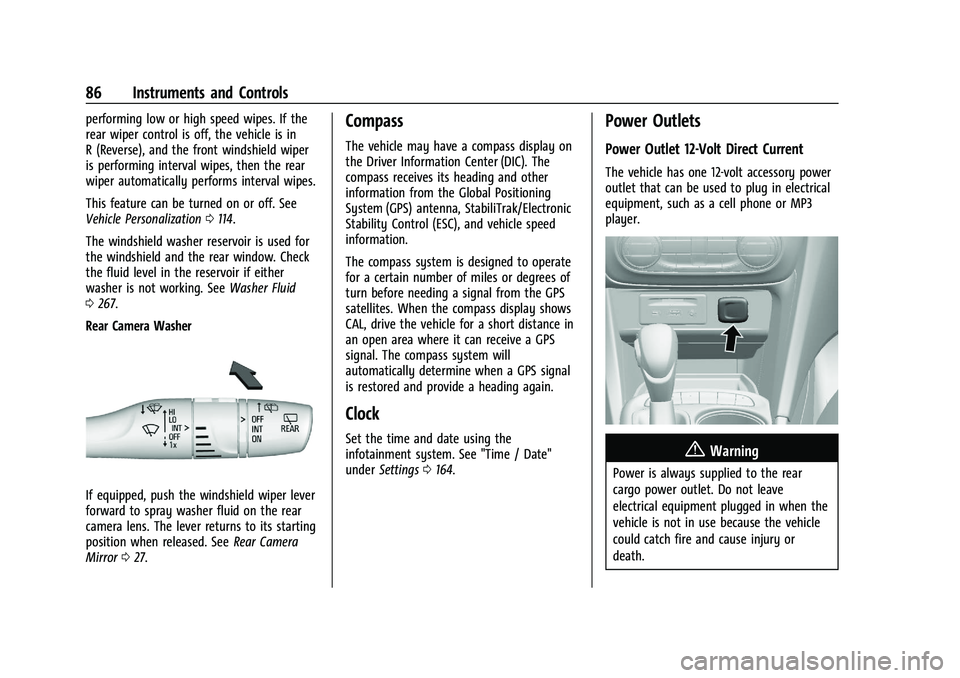
The vehicle has one 12-volt accessory power
outlet that can be used to plug in electrical
equipment, such as a cell phone or MP3
player.
{Warning
Power is always supplied to the rear
cargo power outlet. Do not leave
electrical equipment plugged in when the
vehicle is not in use because the vehicle
could catch fire and cause injury or
death.
Page 116 of 370
Buick Encore GX Owner Manual (GMNA-Localizing-U.S./Canada/Mexico-
14608036) - 2021 - CRC - 9/21/20
Instruments and Controls 115
Auto Rear Defog
When on, this feature turns on the rear
defogger at vehicle start when the interior
temperature is cold and fog is likely. See
“Rear Window Defogger”underDual
Automatic Climate Control System 0182.
Touch Off or On.
Ionizer
If equipped with an ionizer, this feature
helps to clean the air inside the vehicle and
remove contaminants such as pollen, odors,
and dust. See Dual Automatic Climate
Control System 0182.
Touch Off or On.
Collision / Detection Systems
Touch and the following may display:
.Forward Collision System
.Front Pedestrian Detection
.Adaptive Cruise Go Notifier
.Lane Change Alert
.Rear Camera Park Assist Symbols
.Rear Cross Traffic Alert
.Park Assist Forward Collision System
This setting can alert of a potential crash
with a detected vehicle ahead and can apply
brakes to help reduce a collision’s severity.
Touch Off, Alert, or Alert and Brake.
Front Pedestrian Detection
This feature may help avoid or reduce the
harm caused by front-end crashes with
nearby pedestrians. See
Front Pedestrian
Braking (FPB) System 0233.
Touch Off, Alert, or Alert and Brake.
Adaptive Cruise Go Notifier
This setting determines if an alert will
appear when Adaptive Cruise Control brings
the vehicle to a complete stop and the
vehicle ahead of you starts moving again.
See Adaptive Cruise Control (Camera) 0214.
Touch Off or On.
Lane Change Alert
This allows the feature to be turned on or
off. See Lane Change Alert (LCA) 0235.
When Lane Change Alert is disabled, Side
Blind Zone Alert is also disabled.
Touch Off or On. Rear Camera Park Assist Symbols
This setting enables the Rear Camera Park
Assist Symbols. See
Assistance Systems for
Parking or Backing 0224.
Touch Off or On.
Rear Cross Traffic Alert
This setting specifies if you see alerts when
the vehicle detects approaching rear cross
traffic when in R (Reverse). See Assistance
Systems for Parking or Backing 0224.
Touch Off or On.
Park Assist
This setting specifies if you have alerts
when a object is detected near your vehicle
during low speed.
Touch Off or On.
Comfort and Convenience
Touch and the following may display:
.Chime Volume
.Handsfree Liftgate/Trunk Control
.Reverse Tilt Mirror
.Rain Sense Wipers
.Auto Wipe in Reverse Gear
Page 117 of 370
Buick Encore GX Owner Manual (GMNA-Localizing-U.S./Canada/Mexico-
14608036) - 2021 - CRC - 9/21/20
116 Instruments and Controls
Chime Volume
This allows the selection of the chime
volume level.
Touch the infotainment controls to adjust
the volume
Hands Free Liftgate Control
The liftgate may be operated with a kicking
motion under the left side of the rear
bumper. SeeLiftgate018
Touch Off, On-Open and Close,
or On-Open Only.
Reverse Tilt Mirror
When on, the driver, passenger, or both
driver and passenger outside mirrors will tilt
downward when the vehicle is shifted into
R (Reverse) to improve visibility of the
ground near the rear wheels. They may
move from their tilted position when the
vehicle is shifted out of R (Reverse) or
turned off. See Reverse Tilt Mirrors 027.
Touch Off, On - Driver and Passenger, On -
Driver, or On - Passenger.
Rain Sense Wipers
This allows the Rainsense Wipers feature to
be disabled or enabled.
Touch Disabled or Enabled. Auto Wipe in Reverse Gear
This setting automatically turns on the rear
window wiper when the vehicle is in
R (Reverse) and the front wipers are on.
Touch Off or On.
Lighting
Touch and the following may display:
.Vehicle Locator Lights
.Exit Lighting
Vehicle Locator Lights
This feature will flash the exterior lamps
when
Kon the Remote Keyless Entry (RKE)
transmitter is pressed to locate the vehicle.
Touch Off or On.
Exit Lighting
This allows the selection of how long the
exterior lamps stay on when leaving the
vehicle when it is dark outside.
Touch Off, 30 Seconds, 60 Seconds, or 120
Seconds.
Power Door Locks
Touch and the following may display:
.Open Door Anti Lock Out
.Auto Door Unlock
.Delayed Door Lock
Open Door Anti Lock Out
This setting prevents the driver door from
locking when the door is open. If this
setting is on, the Delayed Door Lock menu
will not be available.
Touch Off or On.
Auto Door Unlock
This setting allows you to select which
doors will automatically unlock when the
vehicle is shifted into P (Park).
Touch Off, All Doors, or Driver Door.
Delayed Door Lock
This setting delays the locking of the doors.
To override the delay, press the power door
lock switch on the door.
Touch Off or On.
Remote Lock, Unlock, and Start
Touch and the following may display:
.Remote Unlock Light Feedback
.Remote Lock Feedback
.Remote Door Unlock
.Remote Start Auto Heat Seats
.Passive Door Unlock
Page 119 of 370
Buick Encore GX Owner Manual (GMNA-Localizing-U.S./Canada/Mexico-
14608036) - 2021 - CRC - 9/21/20
118 Instruments and Controls
3. Re-enter the four-digit code.
Touch Lock or Unlock to lock or unlock the
system. Touch Back to go back to the
previous menu.
Universal Remote System
See Radio Frequency Statement 0347.
Universal Remote System
Programming
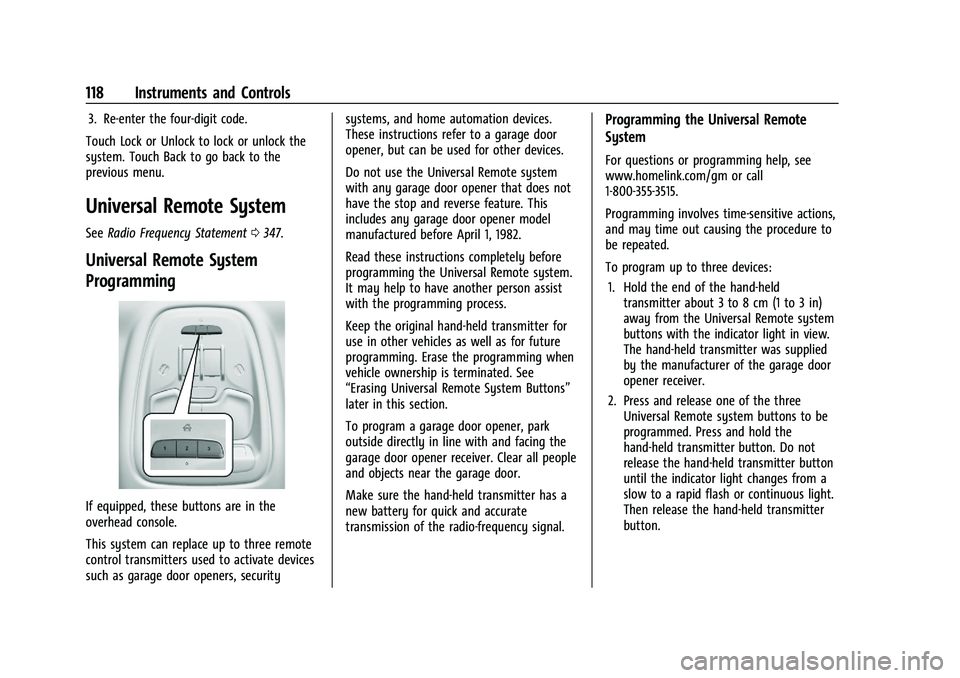
If equipped, these buttons are in the
overhead console.
This system can replace up to three remote
control transmitters used to activate devices
such as garage door openers, security systems, and home automation devices.
These instructions refer to a garage door
opener, but can be used for other devices.
Do not use the Universal Remote system
with any garage door opener that does not
have the stop and reverse feature. This
includes any garage door opener model
manufactured before April 1, 1982.
Read these instructions completely before
programming the Universal Remote system.
It may help to have another person assist
with the programming process.
Keep the original hand-held transmitter for
use in other vehicles as well as for future
programming. Erase the programming when
vehicle ownership is terminated. See
“Erasing Universal Remote System Buttons”
later in this section.
To program a garage door opener, park
outside directly in line with and facing the
garage door opener receiver. Clear all people
and objects near the garage door.
Make sure the hand-held transmitter has a
new battery for quick and accurate
transmission of the radio-frequency signal.
Programming the Universal Remote
System
For questions or programming help, see
www.homelink.com/gm or call
1-800-355-3515.
Programming involves time-sensitive actions,
and may time out causing the procedure to
be repeated.
To program up to three devices:
1. Hold the end of the hand-held transmitter about 3 to 8 cm (1 to 3 in)
away from the Universal Remote system
buttons with the indicator light in view.
The hand-held transmitter was supplied
by the manufacturer of the garage door
opener receiver.
2. Press and release one of the three Universal Remote system buttons to be
programmed. Press and hold the
hand-held transmitter button. Do not
release the hand-held transmitter button
until the indicator light changes from a
slow to a rapid flash or continuous light.
Then release the hand-held transmitter
button.