vehicle personalization BUICK ENCORE GX 2021 Owner's Manual
[x] Cancel search | Manufacturer: BUICK, Model Year: 2021, Model line: ENCORE GX, Model: BUICK ENCORE GX 2021Pages: 370, PDF Size: 12.38 MB
Page 9 of 370
Buick Encore GX Owner Manual (GMNA-Localizing-U.S./Canada/Mexico-
14608036) - 2021 - CRC - 9/21/20
8 Keys, Doors, and Windows
Q:Press to lock all doors. The turn signal
indicators may flash and/or the horn may
sound on the second press to indicate
locking. See Vehicle Personalization 0114.
If the driver door is open when
Qis
pressed, and Open Door Anti Lock Out is
enabled through vehicle personalization, all
doors will lock and then the driver door will
immediately unlock. See Vehicle
Personalization 0114. If the passenger door
is open when
Qis pressed, all doors lock.
Pressing
Qmay also arm the theft-deterrent
system. See Vehicle Alarm System 024.
K:Press to unlock the driver door. Press
unlock again within five seconds to unlock
all doors. The RKE transmitter can be
programmed to unlock all doors on the first
button press. See Vehicle Personalization
0 114. When remotely unlocking the vehicle
at night the back-up lamps will come on for
about 30 seconds to light your approach to
the vehicle. The turn signal indicators may
flash to indicate unlocking. See Vehicle
Personalization 0114.
Pressing
Kwill disarm the theft-deterrent
system. See Vehicle Alarm System 024.
/:Press and releaseQand then
immediately press and hold
/for at least
four seconds to start the engine from
outside the vehicle using the RKE
transmitter. See Remote Vehicle Start 013.
7:Press and release one time to initiate
vehicle locator. The exterior lamps flash and
the horn chirps three times. Press and hold
7for three seconds to sound the panic
alarm. The horn sounds and the turn signal
lamps flash for 30 seconds, or until
7is
pressed again or the vehicle is started.
b: Press twice quickly to open or close
the liftgate.
Press once to stop the liftgate from moving.
Keyless Access Operation
With the Keyless Access system, you can
lock and unlock the doors and access the
liftgate without removing the RKE
transmitter from your pocket, purse,
briefcase, etc. The RKE transmitter should be
within 1 m (3 ft) of the liftgate or door being
opened. The buttons are on the outside door
handles. Keyless Access can be programmed to
unlock all doors on the first lock/unlock
press from the driver door. See
Vehicle
Personalization 0114.
If equipped with memory seats, RKE
transmitters 1 and 2 are linked to seating
positions of memory 1 or 2. See Memory
Seats 038.
Keyless Unlocking/Locking from the
Driver Door
When the doors are locked and the RKE
transmitter is within 1 m (3 ft) of the driver
door handle, pressing the lock/unlock button
on the driver door handle will unlock the
driver door. If the lock/unlock button is
pressed again within five seconds, all
passenger doors will unlock.
Page 10 of 370
Buick Encore GX Owner Manual (GMNA-Localizing-U.S./Canada/Mexico-
14608036) - 2021 - CRC - 9/21/20
Keys, Doors, and Windows 9
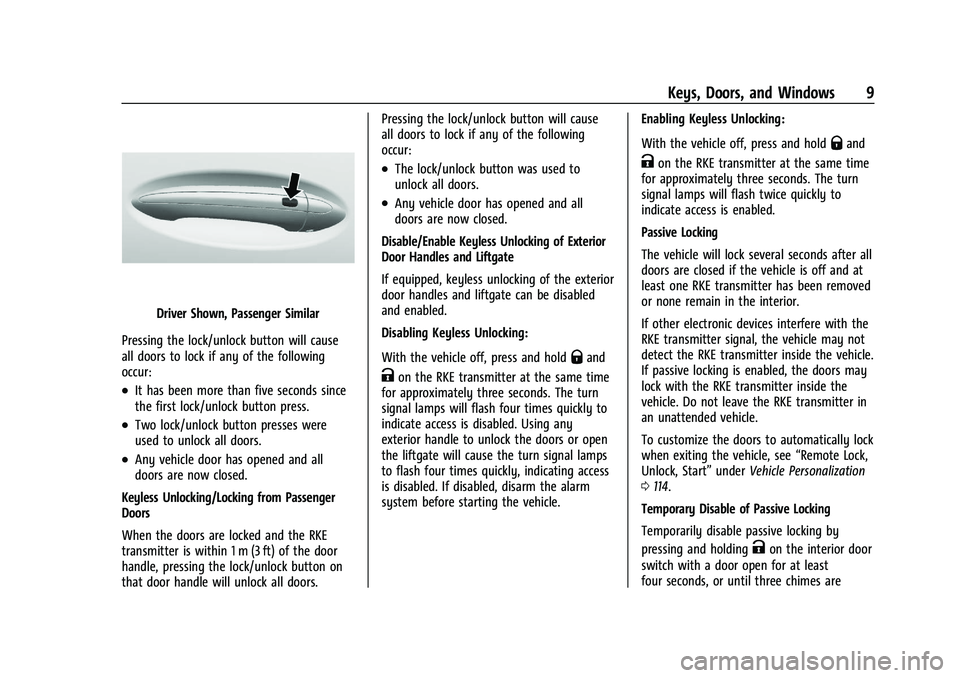
Driver Shown, Passenger Similar
Pressing the lock/unlock button will cause
all doors to lock if any of the following
occur:
.It has been more than five seconds since
the first lock/unlock button press.
.Two lock/unlock button presses were
used to unlock all doors.
.Any vehicle door has opened and all
doors are now closed.
Keyless Unlocking/Locking from Passenger
Doors
When the doors are locked and the RKE
transmitter is within 1 m (3 ft) of the door
handle, pressing the lock/unlock button on
that door handle will unlock all doors. Pressing the lock/unlock button will cause
all doors to lock if any of the following
occur:
.The lock/unlock button was used to
unlock all doors.
.Any vehicle door has opened and all
doors are now closed.
Disable/Enable Keyless Unlocking of Exterior
Door Handles and Liftgate
If equipped, keyless unlocking of the exterior
door handles and liftgate can be disabled
and enabled.
Disabling Keyless Unlocking:
With the vehicle off, press and hold
Qand
Kon the RKE transmitter at the same time
for approximately three seconds. The turn
signal lamps will flash four times quickly to
indicate access is disabled. Using any
exterior handle to unlock the doors or open
the liftgate will cause the turn signal lamps
to flash four times quickly, indicating access
is disabled. If disabled, disarm the alarm
system before starting the vehicle. Enabling Keyless Unlocking:
With the vehicle off, press and hold
Qand
Kon the RKE transmitter at the same time
for approximately three seconds. The turn
signal lamps will flash twice quickly to
indicate access is enabled.
Passive Locking
The vehicle will lock several seconds after all
doors are closed if the vehicle is off and at
least one RKE transmitter has been removed
or none remain in the interior.
If other electronic devices interfere with the
RKE transmitter signal, the vehicle may not
detect the RKE transmitter inside the vehicle.
If passive locking is enabled, the doors may
lock with the RKE transmitter inside the
vehicle. Do not leave the RKE transmitter in
an unattended vehicle.
To customize the doors to automatically lock
when exiting the vehicle, see “Remote Lock,
Unlock, Start” underVehicle Personalization
0 114.
Temporary Disable of Passive Locking
Temporarily disable passive locking by
pressing and holding
Kon the interior door
switch with a door open for at least
four seconds, or until three chimes are
Page 11 of 370
Buick Encore GX Owner Manual (GMNA-Localizing-U.S./Canada/Mexico-
14608036) - 2021 - CRC - 9/21/20
10 Keys, Doors, and Windows
heard. Passive locking will then remain
disabled until
Qon the interior door is
pressed, or until the vehicle is turned on.
Remote Left in Vehicle Alert
When the vehicle is turned off and an RKE
transmitter is left in the vehicle, the horn
will chirp three times after all doors are
closed. To turn on or off see Vehicle
Personalization 0114.
Remote No Longer in Vehicle Alert
If the vehicle is on with a door open, and
then all doors are closed, the vehicle will
check for RKE transmitters inside. If an RKE
transmitter is not detected, the Driver
Information Center (DIC) will display NO
REMOTE DETECTED and the horn will chirp
three times. This occurs only once each time
the vehicle is driven.
Keyless Liftgate Opening
Press the touch pad on the liftgate handle
to open the liftgate if the RKE transmitter is
within 1 m (3 ft).
Key Access
To access a vehicle with a weak transmitter
battery, see Door Locks015.
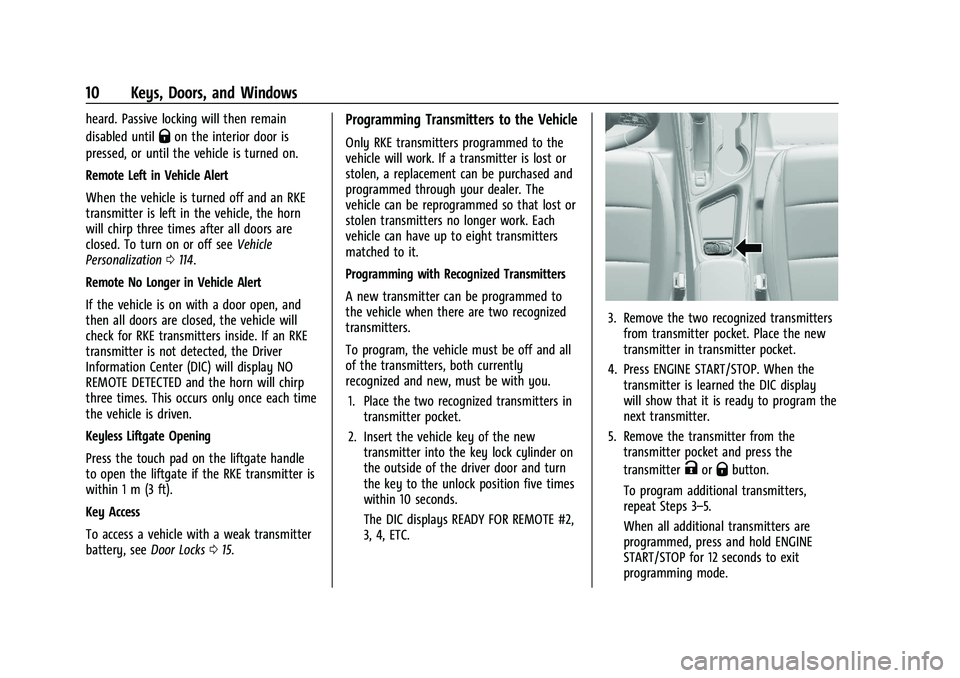
Programming Transmitters to the Vehicle
Only RKE transmitters programmed to the
vehicle will work. If a transmitter is lost or
stolen, a replacement can be purchased and
programmed through your dealer. The
vehicle can be reprogrammed so that lost or
stolen transmitters no longer work. Each
vehicle can have up to eight transmitters
matched to it.
Programming with Recognized Transmitters
A new transmitter can be programmed to
the vehicle when there are two recognized
transmitters.
To program, the vehicle must be off and all
of the transmitters, both currently
recognized and new, must be with you.
1. Place the two recognized transmitters in transmitter pocket.
2. Insert the vehicle key of the new transmitter into the key lock cylinder on
the outside of the driver door and turn
the key to the unlock position five times
within 10 seconds.
The DIC displays READY FOR REMOTE #2,
3, 4, ETC.
3. Remove the two recognized transmittersfrom transmitter pocket. Place the new
transmitter in transmitter pocket.
4. Press ENGINE START/STOP. When the transmitter is learned the DIC display
will show that it is ready to program the
next transmitter.
5. Remove the transmitter from the transmitter pocket and press the
transmitter
KorQbutton.
To program additional transmitters,
repeat Steps 3–5.
When all additional transmitters are
programmed, press and hold ENGINE
START/STOP for 12 seconds to exit
programming mode.
Page 18 of 370
Buick Encore GX Owner Manual (GMNA-Localizing-U.S./Canada/Mexico-
14608036) - 2021 - CRC - 9/21/20
Keys, Doors, and Windows 17
The doors will lock automatically
five seconds after all doors are closed. If a
door is reopened before that time, the
five-second timer will reset when all doors
are closed again.
Press
Qon the door lock switch again or
press
Qon the RKE transmitter to lock the
doors immediately.
This feature can also be programmed. See
Vehicle Personalization 0114.
Automatic Door Locks
The doors will lock automatically when all
doors are closed, the ignition is on, and the
vehicle is shifted out of P (Park).
To unlock the doors:
.PressKon the power door lock switch.
.Shift into P (Park).
Automatic door locking cannot be disabled.
Automatic door unlocking can be
programmed. See Vehicle Personalization
0 114.
Lockout Protection
If the ignition is on or in ACC/ACCESSORY
and the power door lock switch is pressed
with the driver door open, all the doors will
lock and only the driver door will unlock.
If the vehicle is off and locking is requested
while a door is open, when all doors are
closed the vehicle will check for RKE
transmitters inside. If an RKE transmitter is
detected and the number of RKE
transmitters inside has not reduced, the
driver door will unlock and the horn will
chirp three times.
Lockout Protection can be manually
overridden with the driver door open by
pressing and holding
Qon the power door
lock switch.
Open Door Anti Lock Out
If Open Door Anti Lock Out has been turned
on and the vehicle is off, the driver door is
open, and locking is requested, all the doors
will lock and the driver door will lock and
then immediately unlock. The Open Door
Anti-Lock Out feature can be turned on or
off. See Vehicle Personalization 0114.
Safety Locks
The rear door safety locks prevent
passengers from opening the rear doors
from inside the vehicle.
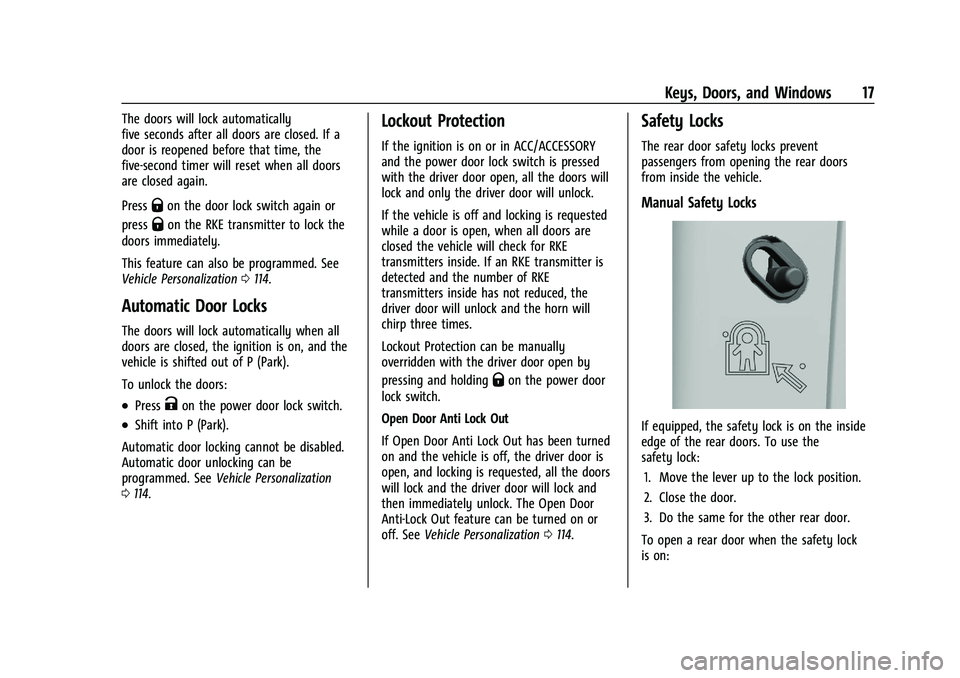
Manual Safety Locks
If equipped, the safety lock is on the inside
edge of the rear doors. To use the
safety lock:
1. Move the lever up to the lock position.
2. Close the door.
3. Do the same for the other rear door.
To open a rear door when the safety lock
is on:
Page 22 of 370

Buick Encore GX Owner Manual (GMNA-Localizing-U.S./Canada/Mexico-
14608036) - 2021 - CRC - 9/21/20
Keys, Doors, and Windows 21
Manual Operation
Select OFF to manually operate the liftgate.
See“Manual Liftgate” at the beginning of
this section.
Caution
Attempting to move the liftgate too
quickly and with excessive force may
result in damage to the vehicle.
Operate the liftgate manually with a
smooth motion and moderate speed. The
system includes a feature which limits the
manual closing speed to protect the
components.
Hands-Free Operation
If equipped, the liftgate may be operated
with a kicking motion near the left side of
the rear bumper at the location of the
projected logo. The RKE transmitter must be
within 1 m (3 ft) of the rear bumper to
operate the power liftgate hands-free.
The hands-free feature will not work while
the liftgate is moving. To stop the liftgate
while in motion use one of the liftgate
switches. The hands-free feature can be customized.
See
Vehicle Personalization 0114. Choose
from the following:
On-Open and Close : The kicking motion is
activated to both open and close the
liftgate.
On-Open Only : The kicking motion is
activated to only open the liftgate.
Off : The feature is disabled.
Kick Zone
To operate, move your foot in a forward
kicking motion near the left side of the rear
bumper at the location of the projected logo, then pull it back. The kick must come
within 14 cm (6 in) of the rear bumper to
activate. Then step back.
Caution
Splashing water may cause the liftgate to
open. Keep the RKE transmitter away
from the rear bumper detection area or
turn the liftgate mode to OFF when
cleaning or working near the rear bumper
to avoid accidental opening.
.Do not sweep your foot side to side.
.Do not keep your foot under the bumper;
the liftgate will not activate.
.Do not touch the liftgate until it has
stopped moving.
When closing the liftgate using this feature,
there will be a short delay. The taillamps
will flash and a chime will sound.
Step away from the liftgate before it starts
moving.
Page 23 of 370
Buick Encore GX Owner Manual (GMNA-Localizing-U.S./Canada/Mexico-
14608036) - 2021 - CRC - 9/21/20
22 Keys, Doors, and Windows
Projected Logo
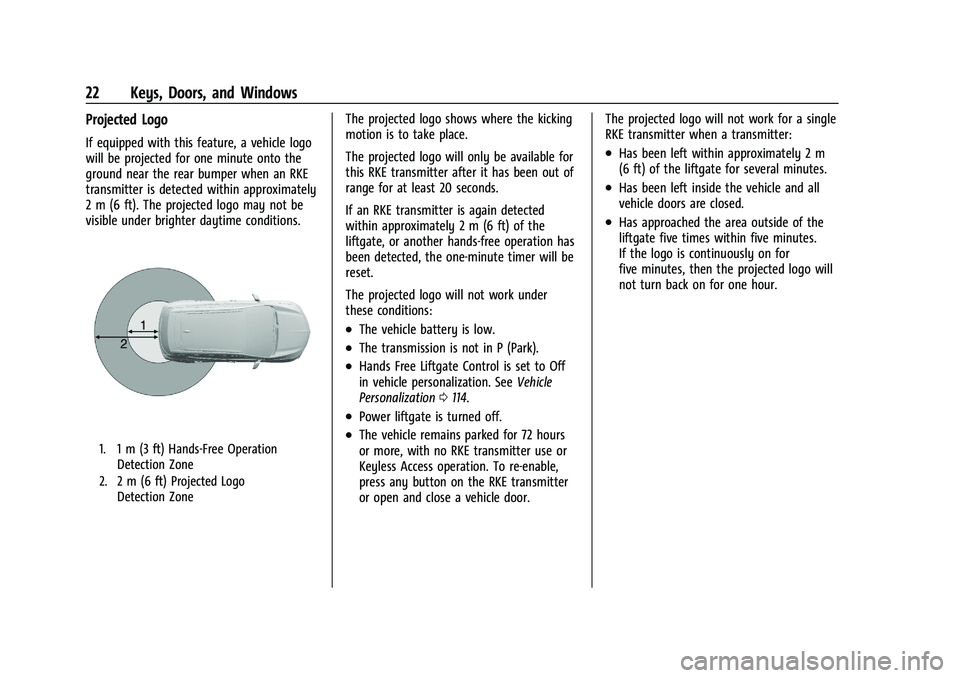
If equipped with this feature, a vehicle logo
will be projected for one minute onto the
ground near the rear bumper when an RKE
transmitter is detected within approximately
2 m (6 ft). The projected logo may not be
visible under brighter daytime conditions.
1. 1 m (3 ft) Hands-Free OperationDetection Zone
2. 2 m (6 ft) Projected Logo Detection Zone
The projected logo shows where the kicking
motion is to take place.
The projected logo will only be available for
this RKE transmitter after it has been out of
range for at least 20 seconds.
If an RKE transmitter is again detected
within approximately 2 m (6 ft) of the
liftgate, or another hands-free operation has
been detected, the one-minute timer will be
reset.
The projected logo will not work under
these conditions:
.The vehicle battery is low.
.The transmission is not in P (Park).
.Hands Free Liftgate Control is set to Off
in vehicle personalization. See Vehicle
Personalization 0114.
.Power liftgate is turned off.
.The vehicle remains parked for 72 hours
or more, with no RKE transmitter use or
Keyless Access operation. To re-enable,
press any button on the RKE transmitter
or open and close a vehicle door. The projected logo will not work for a single
RKE transmitter when a transmitter:
.Has been left within approximately 2 m
(6 ft) of the liftgate for several minutes.
.Has been left inside the vehicle and all
vehicle doors are closed.
.Has approached the area outside of the
liftgate five times within five minutes.
If the logo is continuously on for
five minutes, then the projected logo will
not turn back on for one hour.
Page 28 of 370
Buick Encore GX Owner Manual (GMNA-Localizing-U.S./Canada/Mexico-
14608036) - 2021 - CRC - 9/21/20
Keys, Doors, and Windows 27
Reverse Tilt Mirrors
If equipped with reverse tilt mirrors and
memory seats, the passenger and/or driver
mirror tilts to a preselected position when
the vehicle is in R (Reverse). This allows the
curb to be seen when parallel parking.
The mirror(s) return to the original
position when:
.The vehicle is shifted out of R (Reverse),
or remains in R (Reverse) for about
30 seconds.
.The ignition is turned off.
.The vehicle is driven in R (Reverse) above
a set speed.
To turn this feature on or off, see Vehicle
Personalization 0114.
Interior Mirrors
Interior Rearview Mirrors
Adjust the rearview mirror for a clear view
of the area behind the vehicle.
Do not spray glass cleaner directly on the
mirror. Use a soft towel dampened with
water.
Manual Rearview Mirror
If equipped, push the tab forward for
daytime use and pull it rearward for
nighttime use to avoid glare of the
headlamps from behind.
Automatic Dimming Rearview
Mirror
If equipped, automatic dimming reduces the
glare of headlamps from behind. The
dimming feature comes on when the vehicle
is started.
Rear Camera Mirror
If equipped, this automatic dimming mirror
provides a wide angle camera view of the
area behind the vehicle.
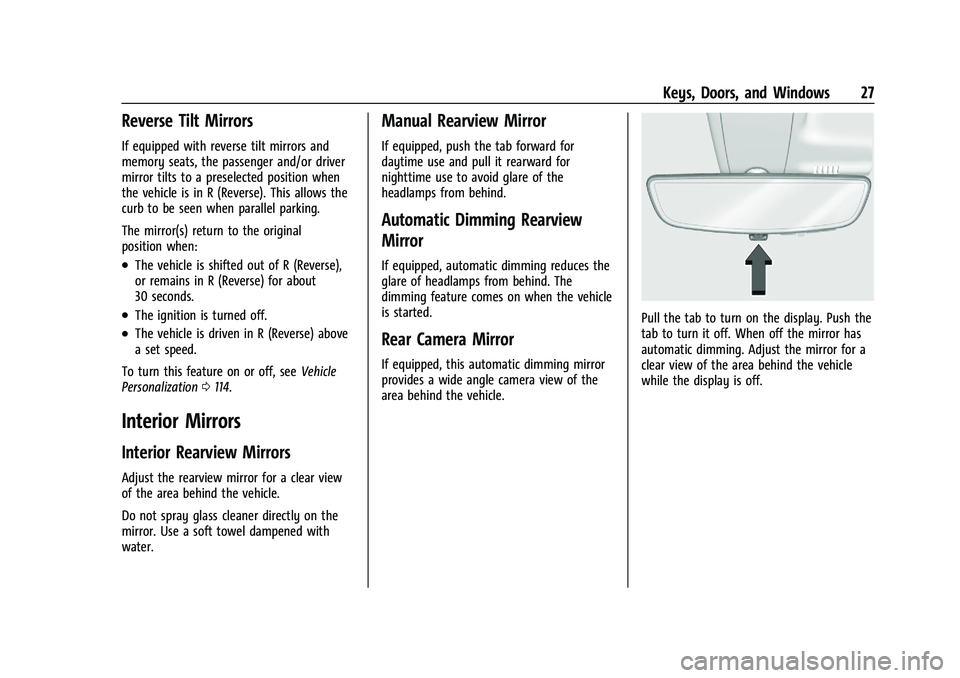
Pull the tab to turn on the display. Push the
tab to turn it off. When off the mirror has
automatic dimming. Adjust the mirror for a
clear view of the area behind the vehicle
while the display is off.
Page 39 of 370
Buick Encore GX Owner Manual (GMNA-Localizing-U.S./Canada/Mexico-
14608036) - 2021 - CRC - 9/21/20
38 Seats and Restraints
Memory Seats
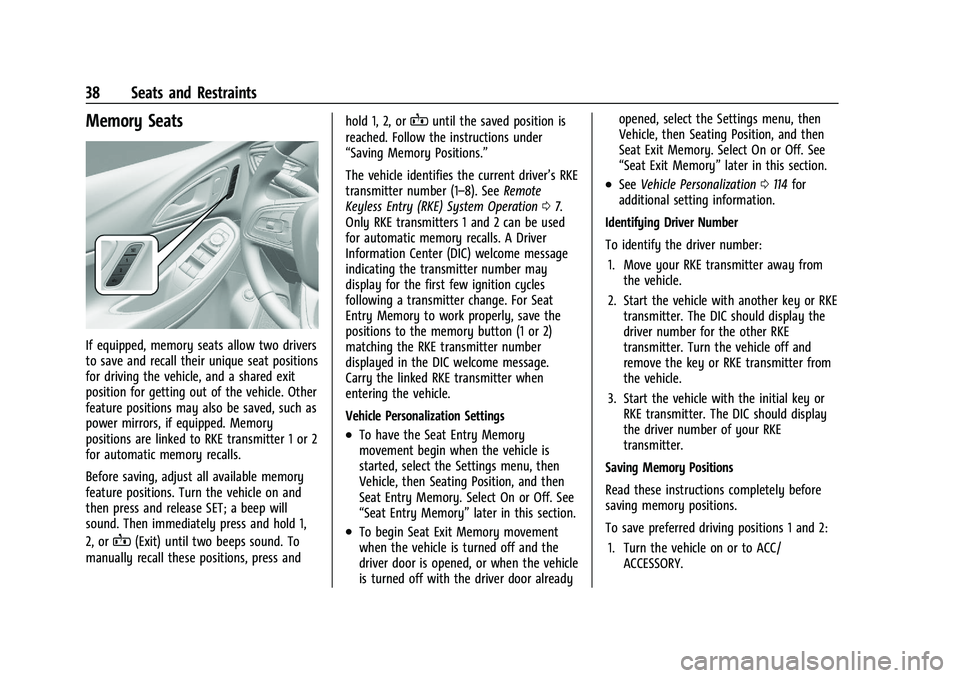
If equipped, memory seats allow two drivers
to save and recall their unique seat positions
for driving the vehicle, and a shared exit
position for getting out of the vehicle. Other
feature positions may also be saved, such as
power mirrors, if equipped. Memory
positions are linked to RKE transmitter 1 or 2
for automatic memory recalls.
Before saving, adjust all available memory
feature positions. Turn the vehicle on and
then press and release SET; a beep will
sound. Then immediately press and hold 1,
2, or
B(Exit) until two beeps sound. To
manually recall these positions, press and hold 1, 2, or
Buntil the saved position is
reached. Follow the instructions under
“Saving Memory Positions.”
The vehicle identifies the current driver’s RKE
transmitter number (1–8). See Remote
Keyless Entry (RKE) System Operation 07.
Only RKE transmitters 1 and 2 can be used
for automatic memory recalls. A Driver
Information Center (DIC) welcome message
indicating the transmitter number may
display for the first few ignition cycles
following a transmitter change. For Seat
Entry Memory to work properly, save the
positions to the memory button (1 or 2)
matching the RKE transmitter number
displayed in the DIC welcome message.
Carry the linked RKE transmitter when
entering the vehicle.
Vehicle Personalization Settings
.To have the Seat Entry Memory
movement begin when the vehicle is
started, select the Settings menu, then
Vehicle, then Seating Position, and then
Seat Entry Memory. Select On or Off. See
“Seat Entry Memory” later in this section.
.To begin Seat Exit Memory movement
when the vehicle is turned off and the
driver door is opened, or when the vehicle
is turned off with the driver door already opened, select the Settings menu, then
Vehicle, then Seating Position, and then
Seat Exit Memory. Select On or Off. See
“Seat Exit Memory”
later in this section.
.SeeVehicle Personalization 0114 for
additional setting information.
Identifying Driver Number
To identify the driver number: 1. Move your RKE transmitter away from the vehicle.
2. Start the vehicle with another key or RKE transmitter. The DIC should display the
driver number for the other RKE
transmitter. Turn the vehicle off and
remove the key or RKE transmitter from
the vehicle.
3. Start the vehicle with the initial key or RKE transmitter. The DIC should display
the driver number of your RKE
transmitter.
Saving Memory Positions
Read these instructions completely before
saving memory positions.
To save preferred driving positions 1 and 2: 1. Turn the vehicle on or to ACC/ ACCESSORY.
Page 40 of 370
Buick Encore GX Owner Manual (GMNA-Localizing-U.S./Canada/Mexico-
14608036) - 2021 - CRC - 9/21/20
Seats and Restraints 39
A DIC welcome message may indicate
driver number 1 or 2.
2. Adjust all available memory features to the desired driving position.
3. Press and release SET; a beep will sound.
4. Immediately press and hold the 1 or 2 memory button matching the above
DIC welcome message until two beeps
sound.
If too much time passes between
releasing SET and pressing 1, the
memory position will not be saved and
two beeps will not sound. Repeat
Steps 3 and 4.
1 or 2 corresponds to the driver number.
See “Identifying Driver Number”
previously in this section.
5. Repeat Steps 1–4 for a second driver using 1 or 2. RKE transmitters 3–8 will
not save memory positions.
To save the position for
Band Seat Exit
Memory features, repeat Steps 1–4 using
B. This saves the position for getting out
of the vehicle.
Save preferred memory feature positions to
both 1 and 2 if you are the only driver. Manually Recalling Memory Positions
Press and hold 1, 2, or
Bto recall the
previously saved memory positions if you
are driver 1 or 2 identified in the DIC
welcome message.
To stop Manual Memory recall movement,
release 1, 2, or
Bor press any of the
following controls:
.Power seat
.Memory SET
.Power mirror, with the driver or
passenger side mirror selected
Manual Memory recall movement for 1, 2,
or
Bbuttons may be initiated and may
complete to the saved memory position if
the vehicle is in or out of P (Park).
Seat Entry Memory
The vehicle identifies the number of the
current driver’s RKE transmitter (1–8). See
Remote Keyless Entry (RKE) System
Operation 07. If the RKE transmitter is 1 or
2, and Seat Entry Memory is enabled in
vehicle personalization, the positions saved
to the same memory button number 1 or 2
are automatically recalled when the vehicle is turned on, or turned from off to ACC/
ACCESSORY. RKE transmitters 3–8 will not
provide automatic memory recalls.
To turn Seat Entry Memory on or off, see
“Vehicle Personalization Settings”
previously
in this section and Vehicle Personalization
0 114.
The shift lever must be in P (Park) to start
Seat Entry Memory. Seat Entry Memory
recall will complete if the vehicle is shifted
out of P (Park) prior to reaching the saved
memory position.
To stop Seat Entry Memory recall
movement, turn the vehicle off or press any
of the following controls:.Power seat
.Memory SET, 1, 2, orB
.Power mirror, with the driver or
passenger side mirror selected
If the saved memory seat position does not
automatically recall or recalls to the wrong
positions, the driver’s RKE transmitter
number (1 or 2) may not match the memory
button number that positions were saved to.
Try storing the position to the other
memory button or try the other RKE
transmitter.
Page 41 of 370
Buick Encore GX Owner Manual (GMNA-Localizing-U.S./Canada/Mexico-
14608036) - 2021 - CRC - 9/21/20
40 Seats and Restraints
Seat Exit Memory
Seat Exit Memory is not linked to an RKE
transmitter. The position saved to
Bis
used for all drivers. To turn Seat Exit
Memory on or off, see "Vehicle
Personalization Settings" previously in this
section and Vehicle Personalization 0114.
If turned on, the position saved to
Bis
automatically recalled when one of the
following occurs:
.The vehicle is turned off and the driver
door is opened within a short time.
.The vehicle is turned off with the driver
door open.
To stop Seat Exit Memory movement, press
any of the following memory controls:
.Power seat
.Memory SET, 1, 2, orB
.Power mirror, with the driver or
passenger side mirror selected
Obstructions
If something has blocked the driver seat
while recalling a memory position, the recall
may stop. Remove the obstruction and try
the recall again. If the memory position still
does not recall, see your dealer.
Heated Front Seats
{Warning
If temperature change or pain to the skin
cannot be felt, the seat heater may cause
burns. To reduce the risk of burns, use
care when using the seat heater,
especially for long periods of time. Do
not place anything on the seat that
insulates against heat, such as a blanket,
cushion, cover, or similar item. This may
cause the seat heater to overheat. An
overheated seat heater may cause a burn
or may damage the seat.
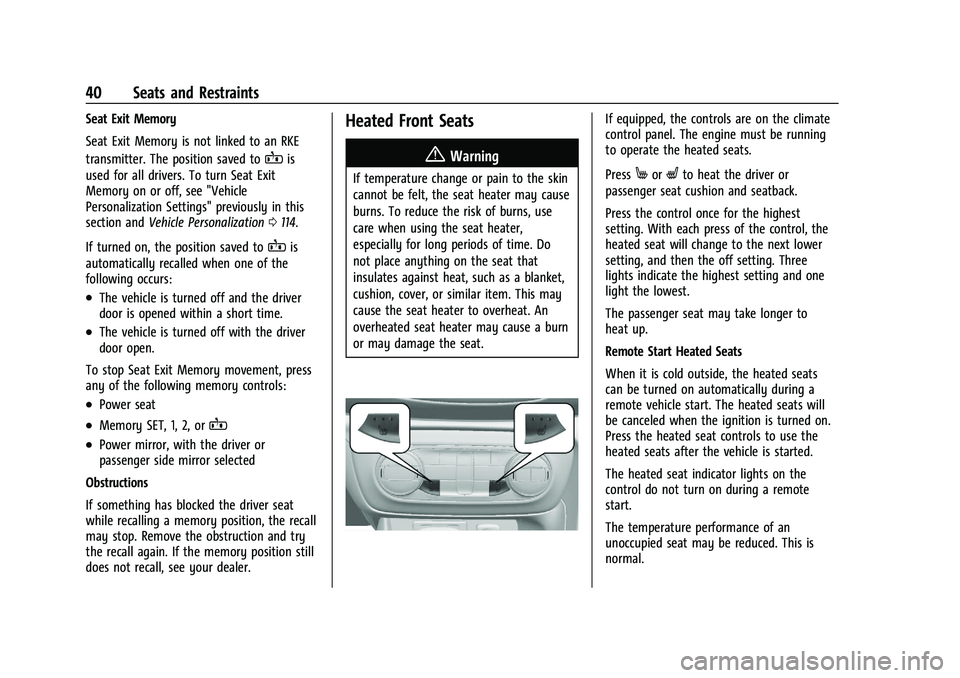
If equipped, the controls are on the climate
control panel. The engine must be running
to operate the heated seats.
Press
MorLto heat the driver or
passenger seat cushion and seatback.
Press the control once for the highest
setting. With each press of the control, the
heated seat will change to the next lower
setting, and then the off setting. Three
lights indicate the highest setting and one
light the lowest.
The passenger seat may take longer to
heat up.
Remote Start Heated Seats
When it is cold outside, the heated seats
can be turned on automatically during a
remote vehicle start. The heated seats will
be canceled when the ignition is turned on.
Press the heated seat controls to use the
heated seats after the vehicle is started.
The heated seat indicator lights on the
control do not turn on during a remote
start.
The temperature performance of an
unoccupied seat may be reduced. This is
normal.