lane assist BUICK ENCORE GX 2022 Owners Manual
[x] Cancel search | Manufacturer: BUICK, Model Year: 2022, Model line: ENCORE GX, Model: BUICK ENCORE GX 2022Pages: 376, PDF Size: 17.43 MB
Page 4 of 376
Buick Encore GX Owner Manual (GMNA-Localizing-U.S./Canada/Mexico-
15481080) - 2022 - CRC - 6/1/21
Introduction 3
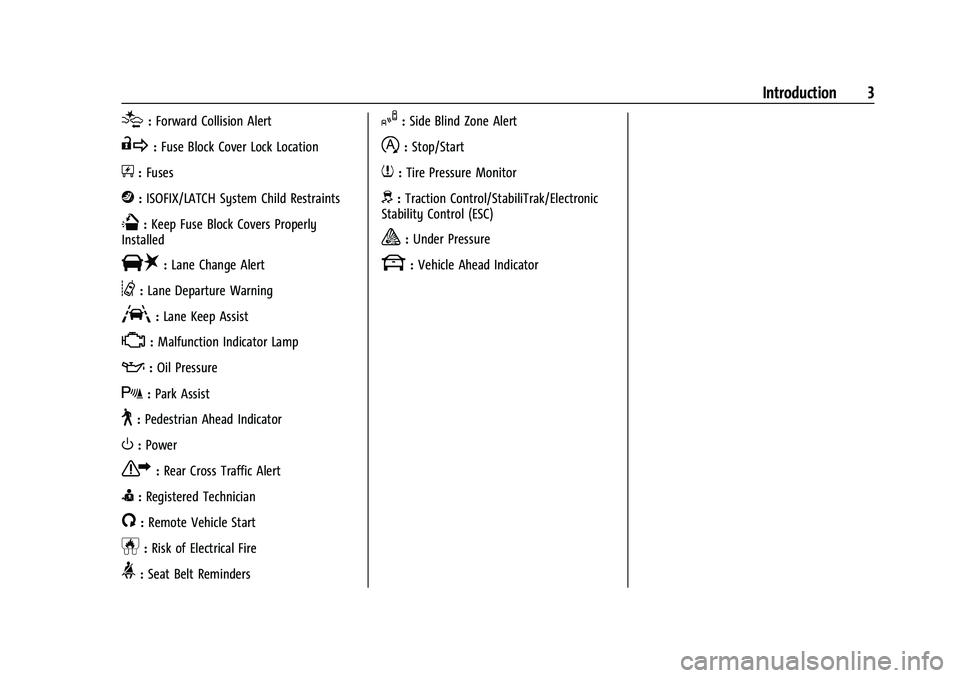
[:Forward Collision Alert
R:Fuse Block Cover Lock Location
+:Fuses
j:ISOFIX/LATCH System Child Restraints
Q:Keep Fuse Block Covers Properly
Installed
|: Lane Change Alert
@:Lane Departure Warning
A:Lane Keep Assist
*: Malfunction Indicator Lamp
::Oil Pressure
X:Park Assist
~:Pedestrian Ahead Indicator
O:Power
7:Rear Cross Traffic Alert
I:Registered Technician
/:Remote Vehicle Start
h:Risk of Electrical Fire
>:Seat Belt Reminders
I:Side Blind Zone Alert
h:Stop/Start
7:Tire Pressure Monitor
d:Traction Control/StabiliTrak/Electronic
Stability Control (ESC)
a: Under Pressure
k: Vehicle Ahead Indicator
Page 6 of 376
Buick Encore GX Owner Manual (GMNA-Localizing-U.S./Canada/Mexico-
15481080) - 2022 - CRC - 6/1/21
Introduction 5
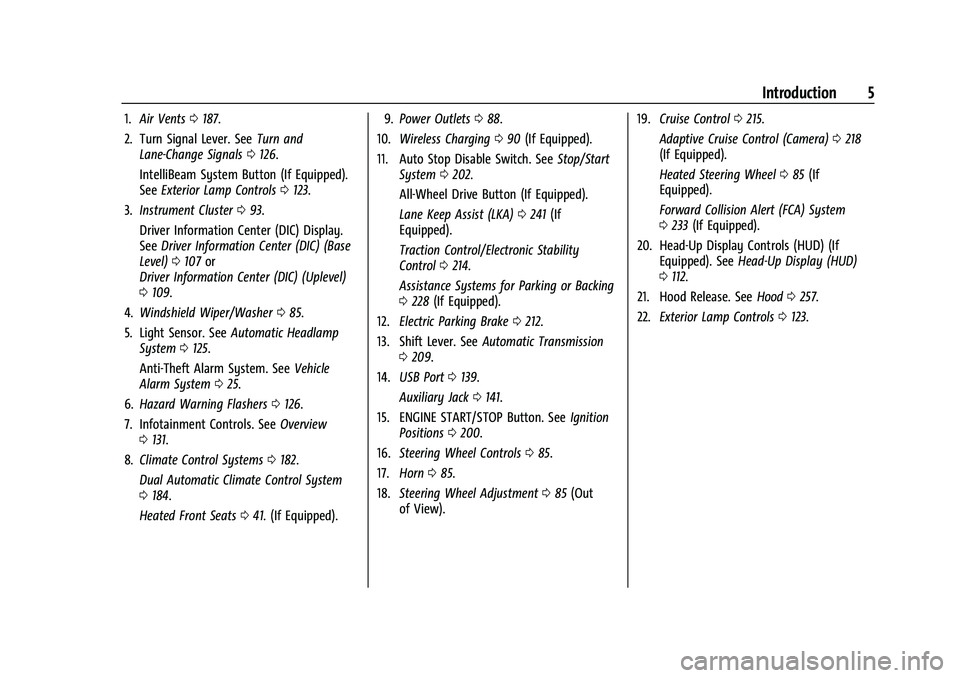
1.Air Vents 0187.
2. Turn Signal Lever. See Turn and
Lane-Change Signals 0126.
IntelliBeam System Button (If Equipped).
See Exterior Lamp Controls 0123.
3. Instrument Cluster 093.
Driver Information Center (DIC) Display.
See Driver Information Center (DIC) (Base
Level) 0107 or
Driver Information Center (DIC) (Uplevel)
0 109.
4. Windshield Wiper/Washer 085.
5. Light Sensor. See Automatic Headlamp
System 0125.
Anti-Theft Alarm System. See Vehicle
Alarm System 025.
6. Hazard Warning Flashers 0126.
7. Infotainment Controls. See Overview
0 131.
8. Climate Control Systems 0182.
Dual Automatic Climate Control System
0 184.
Heated Front Seats 041. (If Equipped). 9.
Power Outlets 088.
10. Wireless Charging 090 (If Equipped).
11. Auto Stop Disable Switch. See Stop/Start
System 0202.
All-Wheel Drive Button (If Equipped).
Lane Keep Assist (LKA) 0241 (If
Equipped).
Traction Control/Electronic Stability
Control 0214.
Assistance Systems for Parking or Backing
0 228 (If Equipped).
12. Electric Parking Brake 0212.
13. Shift Lever. See Automatic Transmission
0 209.
14. USB Port 0139.
Auxiliary Jack 0141.
15. ENGINE START/STOP Button. See Ignition
Positions 0200.
16. Steering Wheel Controls 085.
17. Horn 085.
18. Steering Wheel Adjustment 085 (Out
of View). 19.
Cruise Control 0215.
Adaptive Cruise Control (Camera) 0218
(If Equipped).
Heated Steering Wheel 085 (If
Equipped).
Forward Collision Alert (FCA) System
0 233 (If Equipped).
20. Head-Up Display Controls (HUD) (If Equipped). See Head-Up Display (HUD)
0 112.
21. Hood Release. See Hood0257.
22. Exterior Lamp Controls 0123.
Page 85 of 376
Buick Encore GX Owner Manual (GMNA-Localizing-U.S./Canada/Mexico-
15481080) - 2022 - CRC - 6/1/21
84 Instruments and Controls
Instruments and Controls
Controls
Steering Wheel Adjustment . . . . . . . . . . . . 85
Steering Wheel Controls . . . . . . . . . . . . . . . . 85
Heated Steering Wheel . . . . . . . . . . . . . . . . . 85
Horn . . . . . . . . . . . . . . . . . . . . . . . . . . . . . . . . . . . 85
Windshield Wiper/Washer . . . . . . . . . . . . . . 85
Rear Window Wiper/Washer . . . . . . . . . . . 87
Compass . . . . . . . . . . . . . . . . . . . . . . . . . . . . . . . 88
Clock . . . . . . . . . . . . . . . . . . . . . . . . . . . . . . . . . . . 88
Power Outlets . . . . . . . . . . . . . . . . . . . . . . . . . . 88
Wireless Charging . . . . . . . . . . . . . . . . . . . . . . 90
Warning Lights, Gauges, and Indicators
Warning Lights, Gauges, andIndicators . . . . . . . . . . . . . . . . . . . . . . . . . . . . . 92
Instrument Cluster . . . . . . . . . . . . . . . . . . . . . 93
Speedometer . . . . . . . . . . . . . . . . . . . . . . . . . . . 96
Odometer . . . . . . . . . . . . . . . . . . . . . . . . . . . . . . 96
Trip Odometer . . . . . . . . . . . . . . . . . . . . . . . . . 96
Tachometer . . . . . . . . . . . . . . . . . . . . . . . . . . . . 96
Fuel Gauge . . . . . . . . . . . . . . . . . . . . . . . . . . . . . 96
Engine Coolant Temperature Gauge . . . . 97
Seat Belt Reminders . . . . . . . . . . . . . . . . . . . . 98
Airbag Readiness Light . . . . . . . . . . . . . . . . . 98
Passenger Airbag Status Indicator . . . . . . 99
Charging System Light . . . . . . . . . . . . . . . . . 99 Malfunction Indicator Lamp (Check
Engine Light) . . . . . . . . . . . . . . . . . . . . . . . . 100
Brake System Warning Light . . . . . . . . . . . 101
Electric Parking Brake Light . . . . . . . . . . . . 102
Service Electric Parking Brake Light . . . . 102
Antilock Brake System (ABS) Warning Light . . . . . . . . . . . . . . . . . . . . . . . . . . . . . . . . . 102
Lane Keep Assist (LKA) Light . . . . . . . . . . . 102
Vehicle Ahead Indicator . . . . . . . . . . . . . . . 103
Pedestrian Ahead Indicator . . . . . . . . . . . . 103
Traction Off Light . . . . . . . . . . . . . . . . . . . . . . 103
StabiliTrak OFF Light . . . . . . . . . . . . . . . . . . 104
Traction Control System (TCS)/ StabiliTrak Light . . . . . . . . . . . . . . . . . . . . . 104
Tire Pressure Light . . . . . . . . . . . . . . . . . . . . 104
Engine Oil Pressure Light . . . . . . . . . . . . . . 105
Low Fuel Warning Light . . . . . . . . . . . . . . . 105
Security Light . . . . . . . . . . . . . . . . . . . . . . . . . . 105
High-Beam On Light . . . . . . . . . . . . . . . . . . . 106
Front Fog Lamp Light . . . . . . . . . . . . . . . . . 106
Lamps On Reminder . . . . . . . . . . . . . . . . . . . 106
Cruise Control Light . . . . . . . . . . . . . . . . . . . 106
Door Ajar Light . . . . . . . . . . . . . . . . . . . . . . . . 107
Information Displays
Driver Information Center (DIC) (Base Level) . . . . . . . . . . . . . . . . . . . . . . . . . . . . . . . . 107
Driver Information Center (DIC) (Uplevel) . . . . . . . . . . . . . . . . . . . . . . . . . . . . 109
Head-Up Display (HUD) . . . . . . . . . . . . . . . . 112
Vehicle Messages
Vehicle Messages . . . . . . . . . . . . . . . . . . . . . . 115
Engine Power Messages . . . . . . . . . . . . . . . 116
Vehicle Speed Messages . . . . . . . . . . . . . . . 116
Vehicle Personalization
Vehicle Personalization . . . . . . . . . . . . . . . . . 116
Universal Remote System
Universal Remote System . . . . . . . . . . . . . 120
Universal Remote System Programming . . . . . . . . . . . . . . . . . . . . . . . . 120
Universal Remote System Operation . . . 122
Page 103 of 376
Buick Encore GX Owner Manual (GMNA-Localizing-U.S./Canada/Mexico-
15481080) - 2022 - CRC - 6/1/21
102 Instruments and Controls
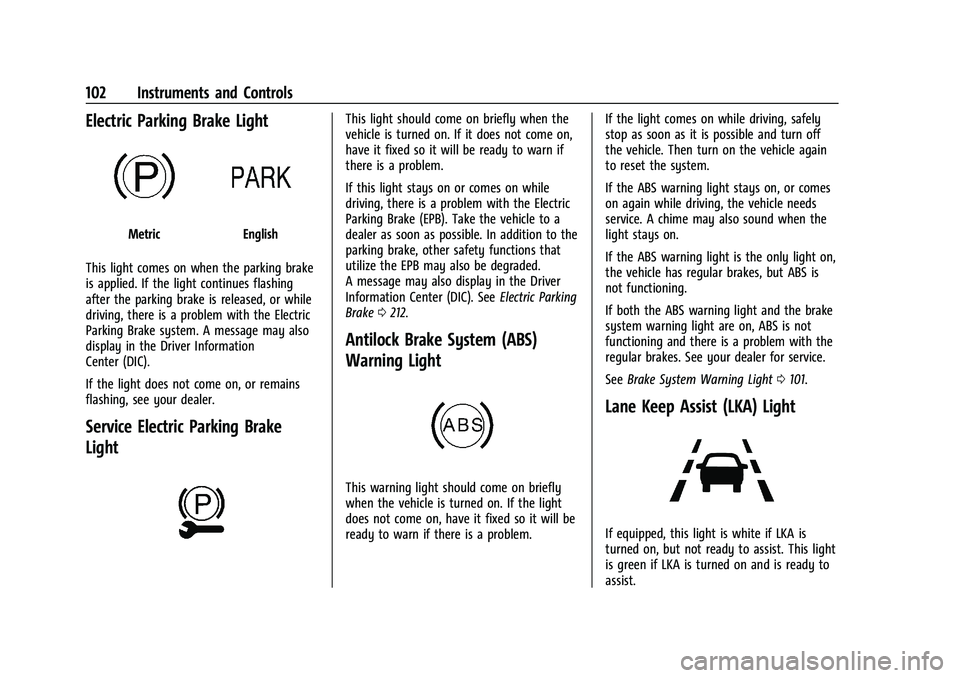
Electric Parking Brake Light
MetricEnglish
This light comes on when the parking brake
is applied. If the light continues flashing
after the parking brake is released, or while
driving, there is a problem with the Electric
Parking Brake system. A message may also
display in the Driver Information
Center (DIC).
If the light does not come on, or remains
flashing, see your dealer.
Service Electric Parking Brake
Light
This light should come on briefly when the
vehicle is turned on. If it does not come on,
have it fixed so it will be ready to warn if
there is a problem.
If this light stays on or comes on while
driving, there is a problem with the Electric
Parking Brake (EPB). Take the vehicle to a
dealer as soon as possible. In addition to the
parking brake, other safety functions that
utilize the EPB may also be degraded.
A message may also display in the Driver
Information Center (DIC). See Electric Parking
Brake 0212.
Antilock Brake System (ABS)
Warning Light
This warning light should come on briefly
when the vehicle is turned on. If the light
does not come on, have it fixed so it will be
ready to warn if there is a problem. If the light comes on while driving, safely
stop as soon as it is possible and turn off
the vehicle. Then turn on the vehicle again
to reset the system.
If the ABS warning light stays on, or comes
on again while driving, the vehicle needs
service. A chime may also sound when the
light stays on.
If the ABS warning light is the only light on,
the vehicle has regular brakes, but ABS is
not functioning.
If both the ABS warning light and the brake
system warning light are on, ABS is not
functioning and there is a problem with the
regular brakes. See your dealer for service.
See
Brake System Warning Light 0101.
Lane Keep Assist (LKA) Light
If equipped, this light is white if LKA is
turned on, but not ready to assist. This light
is green if LKA is turned on and is ready to
assist.
Page 104 of 376

Buick Encore GX Owner Manual (GMNA-Localizing-U.S./Canada/Mexico-
15481080) - 2022 - CRC - 6/1/21
Instruments and Controls 103
LKA may assist by gently turning the
steering wheel if the vehicle approaches a
detected lane marking. The LKA light is
amber when assisting.
This light flashes amber as a Lane Departure
Warning (LDW) alert, to indicate that the
lane marking has been unintentionally
crossed. If the system detects that the
vehicle has been steered intentionally across
a lane marker, the LDW may not be given.
Do not expect the LDW to occur when
intentionally crossing the lane marker.
LKA will not assist or alert if the turn signal
is active in the direction of lane departure,
or if LKA detects that you are accelerating,
braking, or actively steering.
SeeLane Keep Assist (LKA) 0241.
Vehicle Ahead Indicator
If equipped, this indicator will display green
when a vehicle is detected ahead and amber
when you are following a vehicle ahead
much too closely.
See Forward Collision Alert (FCA) System
0 233.
Pedestrian Ahead Indicator
If equipped, this indicator will display amber
on the uplevel instrument cluster and white
on the base level instrument cluster when a
nearby pedestrian is detected in front of the
vehicle.
See Front Pedestrian Braking (FPB) System
0 237.
Traction Off Light
This light comes on briefly when the vehicle
is turned on. If it does not, have the vehicle
serviced by your dealer. If the system is
working normally, the indicator light then
turns off.
The traction off light comes on when the
Traction Control System (TCS) has been
turned off. If StabiliTrak/Electronic Stability
Control (ESC) is turned off, TCS is also
turned off. To turn TCS and ESC off and on,
see Traction Control/Electronic Stability
Control 0214.
If TCS is off, wheel spin is not limited unless
necessary to help protect the driveline from
damage. Adjust driving accordingly.
Page 114 of 376
Buick Encore GX Owner Manual (GMNA-Localizing-U.S./Canada/Mexico-
15481080) - 2022 - CRC - 6/1/21
Instruments and Controls 113
The language selection is changed through
the radio and the units of measurement is
changed through the instrument cluster. See
Settings0165 and “Options” under
Instrument Cluster 093.
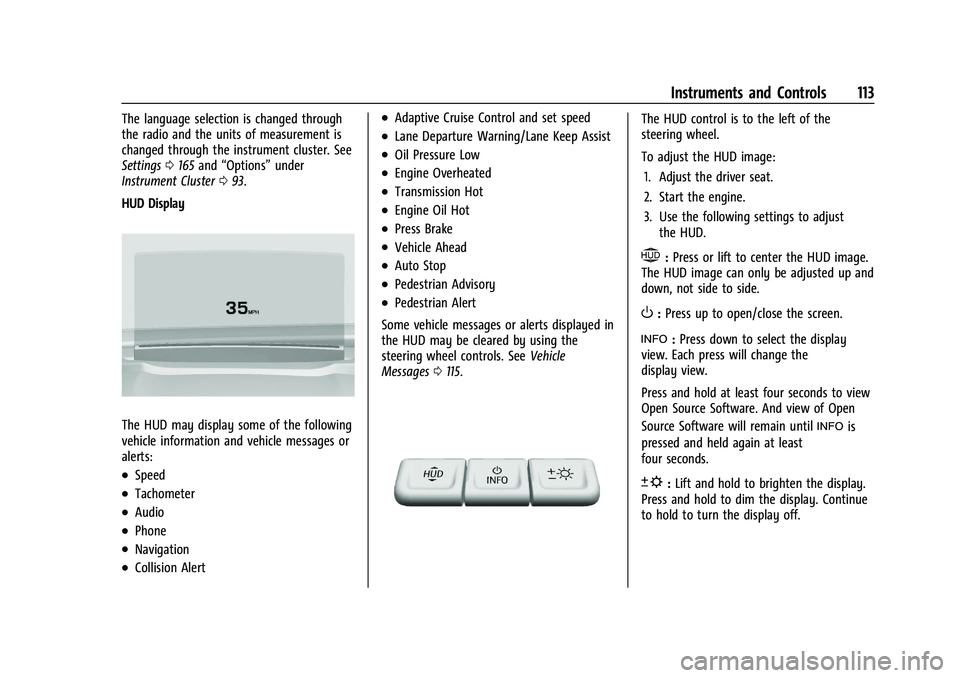
HUD Display
The HUD may display some of the following
vehicle information and vehicle messages or
alerts:
.Speed
.Tachometer
.Audio
.Phone
.Navigation
.Collision Alert
.Adaptive Cruise Control and set speed
.Lane Departure Warning/Lane Keep Assist
.Oil Pressure Low
.Engine Overheated
.Transmission Hot
.Engine Oil Hot
.Press Brake
.Vehicle Ahead
.Auto Stop
.Pedestrian Advisory
.Pedestrian Alert
Some vehicle messages or alerts displayed in
the HUD may be cleared by using the
steering wheel controls. See Vehicle
Messages 0115.
The HUD control is to the left of the
steering wheel.
To adjust the HUD image:
1. Adjust the driver seat.
2. Start the engine.
3. Use the following settings to adjust the HUD.
$:Press or lift to center the HUD image.
The HUD image can only be adjusted up and
down, not side to side.
O: Press up to open/close the screen.
!: Press down to select the display
view. Each press will change the
display view.
Press and hold at least four seconds to view
Open Source Software. And view of Open
Source Software will remain until
!is
pressed and held again at least
four seconds.
D: Lift and hold to brighten the display.
Press and hold to dim the display. Continue
to hold to turn the display off.
Page 115 of 376
Buick Encore GX Owner Manual (GMNA-Localizing-U.S./Canada/Mexico-
15481080) - 2022 - CRC - 6/1/21
114 Instruments and Controls
The HUD image will automatically dim and
brighten to compensate for outside lighting.
The HUD brightness control can also be
adjusted as needed.
The HUD image can temporarily light up
depending on the angle and position of
sunlight on the HUD display. This is normal.
Polarized sunglasses could make the HUD
image harder to see.
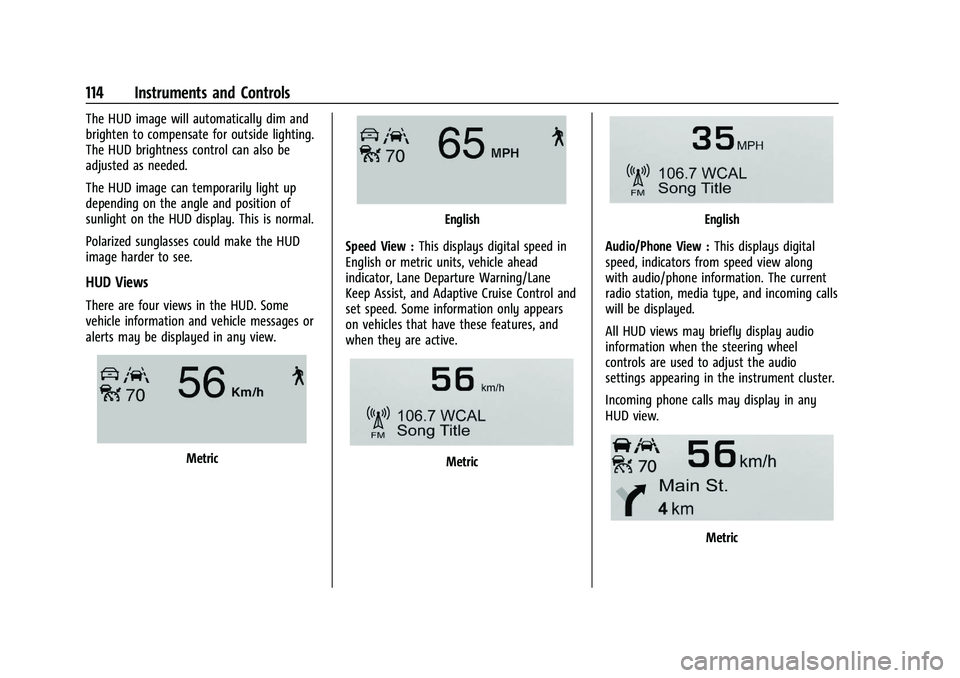
HUD Views
There are four views in the HUD. Some
vehicle information and vehicle messages or
alerts may be displayed in any view.
Metric
English
Speed View : This displays digital speed in
English or metric units, vehicle ahead
indicator, Lane Departure Warning/Lane
Keep Assist, and Adaptive Cruise Control and
set speed. Some information only appears
on vehicles that have these features, and
when they are active.
Metric
English
Audio/Phone View : This displays digital
speed, indicators from speed view along
with audio/phone information. The current
radio station, media type, and incoming calls
will be displayed.
All HUD views may briefly display audio
information when the steering wheel
controls are used to adjust the audio
settings appearing in the instrument cluster.
Incoming phone calls may display in any
HUD view.
Metric
Page 118 of 376
Buick Encore GX Owner Manual (GMNA-Localizing-U.S./Canada/Mexico-
15481080) - 2022 - CRC - 6/1/21
Instruments and Controls 117
5. Touch X to go to the top level of theSettings menu.
The menu may contain the following:
Rear Seat Reminder
This feature allows for a chime and a
message when the rear door has been
opened before or during operation of the
vehicle.
Touch Off or On.
Climate and Air Quality
Touch and the following may display:
.Auto Fan Speed
.Auto Defog
.Auto Rear Defog
.Ionizer
Auto Fan Speed
This feature will set the auto fan speed.
Touch Low, Medium, or High.
Auto Defog
When set to On, the front defog will
automatically react to temperature and
humidity conditions that may cause fogging.
Touch Off or On. Auto Rear Defog
When on, this feature turns on the rear
defogger at vehicle start when the interior
temperature is cold and fog is likely. See
“Rear Window Defogger”
underDual
Automatic Climate Control System 0184.
Touch Off or On.
Ionizer
If equipped with an ionizer, this feature
helps to clean the air inside the vehicle and
remove contaminants such as pollen, odors,
and dust. See Dual Automatic Climate
Control System 0184.
Touch Off or On.
Collision / Detection Systems
Touch and the following may display:
.Forward Collision System
.Front Pedestrian Detection
.Adaptive Cruise Go Notifier
.Lane Change Alert
.Rear Camera Park Assist Symbols
.Rear Cross Traffic Alert
.Park Assist Forward Collision System
This setting can alert of a potential crash
with a detected vehicle ahead and can apply
brakes to help reduce a collision’s severity.
Touch Off, Alert, or Alert and Brake.
Front Pedestrian Detection
This feature may help avoid or reduce the
harm caused by front-end crashes with
nearby pedestrians. See
Front Pedestrian
Braking (FPB) System 0237.
Touch Off, Alert, or Alert and Brake.
Adaptive Cruise Go Notifier
This setting determines if an alert will
appear when Adaptive Cruise Control brings
the vehicle to a complete stop and the
vehicle ahead of you starts moving again.
See Adaptive Cruise Control (Camera) 0218.
Touch Off or On.
Lane Change Alert
This allows the feature to be turned on or
off. See Lane Change Alert (LCA) 0239.
When Lane Change Alert is disabled, Side
Blind Zone Alert is also disabled.
Touch Off or On.
Page 173 of 376
Buick Encore GX Owner Manual (GMNA-Localizing-U.S./Canada/Mexico-
15481080) - 2022 - CRC - 6/1/21
172 Infotainment System
On certain vehicles, when the Speed Limiter
is turned ON, the vehicle’s maximum
acceleration will be limited. The DIC will
display a message that the acceleration is
limited.
Teen Driver Speed Warning :Allows the
speed warning to be turned on or off. Touch
Set Teen Driver Speed Warning to set the
warning speed.
Set Teen Driver Speed Warning : Displays a
warning in the DIC when exceeding a
selectable speed. Choose the desired speed
warning level. The speed warning does not
limit the speed of the vehicle.
SiriusXM Explicit Content Filter (if
equipped) : Allows the SiriusXM Explicit
Content Filter to be turned ON or OFF.
When ON, the teen driver will not be able
to listen to SiriusXM stations that contain
explicit content, and the Explicit Content
Filter selection in the Audio Settings will be
unavailable for change.
When Teen Driver is Active:
.The radio will mute when the driver seat
belt, and in some vehicles the front
passenger seat belt, is not buckled. The
audio from any device paired to the
vehicle will also be muted.
.If an object, such as a briefcase, handbag,
grocery bag, laptop, or other electronic
device, is on the front passenger seat, it
could cause the radio to mute. If this
happens, remove the object from the
seat. See Passenger Sensing System 057.
.Some safety systems, such as Forward
Collision Alert, if equipped, cannot be
turned off. They may include: Park Assist,
Side Blind Zone Alert, Lane Change Alert,
Rear Cross Traffic Alert, Forward Collision
Alert, Automatic Emergency Braking,
Pedestrian Braking, Lane Departure
Warning, Lane Keep Assist, Daytime
Running Lamps/Automatic Light Control,
Traction Control, Stability Control, and
Antilock Brakes.
.The gap setting for the Forward Collision
Alert and Adaptive Cruise Control,
if equipped, cannot be changed.
.When trying to change a safety feature
that is not configurable in Teen Driver,
the feature may be grayed out or
removed from the infotainment menu,
or the DIC will display a message
indicating that Teen Driver is active and
the action is not available.
.Super Cruise, if equipped, is not available.
.Enhanced Low Fuel Warning (if equipped)
–When the vehicle is low on fuel, the
low fuel light on the instrument cluster
flashes and the DIC low fuel warning
cannot be dismissed.
.Do not tow a trailer.
Report Card
The vehicle owner must secure the driver’s
consent to record certain vehicle data when
the vehicle is driven with a registered Teen
Driver key. There is one Report Card per
vehicle. Data is only recorded when a
registered Teen Driver key is used to
operate the vehicle.
The Report Card data is collected from the
time Teen Driver is activated or the last
time the Report Card was reset. The
following items may be recorded:
.Distance Driven –the total distance
driven.
.Maximum Speed –the maximum vehicle
speed detected.
.Overspeed Warnings –the number of
times the speed warning setting was
exceeded.
.Wide Open Throttle –the number of
times the accelerator pedal was pressed
nearly all the way down.
Page 190 of 376
Buick Encore GX Owner Manual (GMNA-Localizing-U.S./Canada/Mexico-
15481080) - 2022 - CRC - 6/1/21
Driving and Operating 189
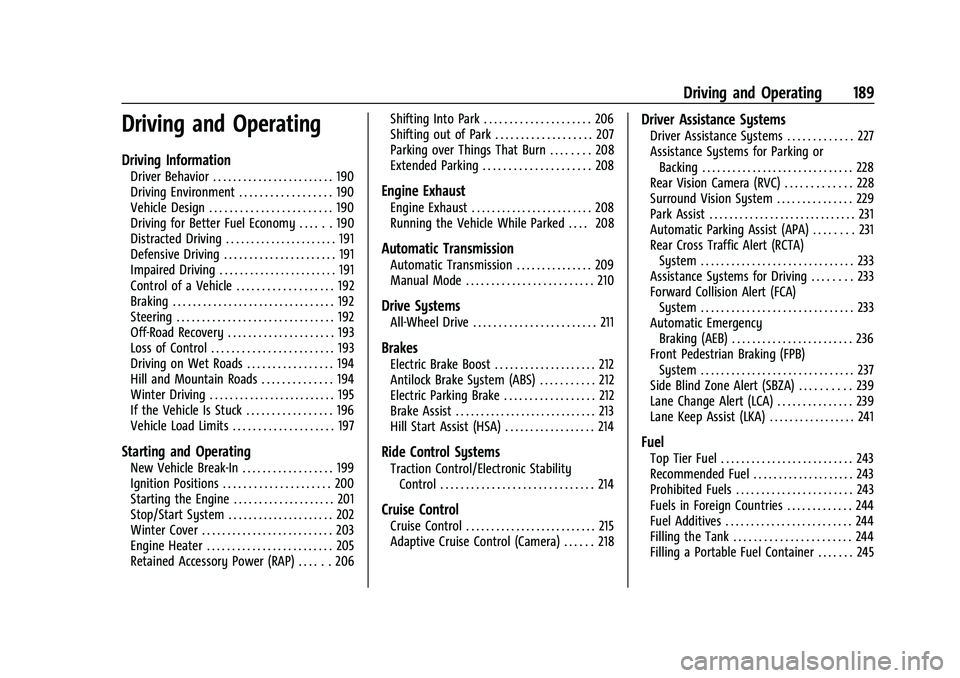
Driving and Operating
Driving Information
Driver Behavior . . . . . . . . . . . . . . . . . . . . . . . . 190
Driving Environment . . . . . . . . . . . . . . . . . . 190
Vehicle Design . . . . . . . . . . . . . . . . . . . . . . . . 190
Driving for Better Fuel Economy . . . . . . 190
Distracted Driving . . . . . . . . . . . . . . . . . . . . . . 191
Defensive Driving . . . . . . . . . . . . . . . . . . . . . . 191
Impaired Driving . . . . . . . . . . . . . . . . . . . . . . . 191
Control of a Vehicle . . . . . . . . . . . . . . . . . . . 192
Braking . . . . . . . . . . . . . . . . . . . . . . . . . . . . . . . . 192
Steering . . . . . . . . . . . . . . . . . . . . . . . . . . . . . . . 192
Off-Road Recovery . . . . . . . . . . . . . . . . . . . . . 193
Loss of Control . . . . . . . . . . . . . . . . . . . . . . . . 193
Driving on Wet Roads . . . . . . . . . . . . . . . . . 194
Hill and Mountain Roads . . . . . . . . . . . . . . 194
Winter Driving . . . . . . . . . . . . . . . . . . . . . . . . . 195
If the Vehicle Is Stuck . . . . . . . . . . . . . . . . . 196
Vehicle Load Limits . . . . . . . . . . . . . . . . . . . . 197
Starting and Operating
New Vehicle Break-In . . . . . . . . . . . . . . . . . . 199
Ignition Positions . . . . . . . . . . . . . . . . . . . . . 200
Starting the Engine . . . . . . . . . . . . . . . . . . . . 201
Stop/Start System . . . . . . . . . . . . . . . . . . . . . 202
Winter Cover . . . . . . . . . . . . . . . . . . . . . . . . . . 203
Engine Heater . . . . . . . . . . . . . . . . . . . . . . . . . 205
Retained Accessory Power (RAP) . . . . . . 206Shifting Into Park . . . . . . . . . . . . . . . . . . . . . 206
Shifting out of Park . . . . . . . . . . . . . . . . . . . 207
Parking over Things That Burn . . . . . . . . 208
Extended Parking . . . . . . . . . . . . . . . . . . . . . 208
Engine Exhaust
Engine Exhaust . . . . . . . . . . . . . . . . . . . . . . . . 208
Running the Vehicle While Parked . . . . 208
Automatic Transmission
Automatic Transmission . . . . . . . . . . . . . . . 209
Manual Mode . . . . . . . . . . . . . . . . . . . . . . . . . 210
Drive Systems
All-Wheel Drive . . . . . . . . . . . . . . . . . . . . . . . . 211
Brakes
Electric Brake Boost . . . . . . . . . . . . . . . . . . . . 212
Antilock Brake System (ABS) . . . . . . . . . . . 212
Electric Parking Brake . . . . . . . . . . . . . . . . . . 212
Brake Assist . . . . . . . . . . . . . . . . . . . . . . . . . . . . 213
Hill Start Assist (HSA) . . . . . . . . . . . . . . . . . . 214
Ride Control Systems
Traction Control/Electronic Stability
Control . . . . . . . . . . . . . . . . . . . . . . . . . . . . . . 214
Cruise Control
Cruise Control . . . . . . . . . . . . . . . . . . . . . . . . . . 215
Adaptive Cruise Control (Camera) . . . . . . 218
Driver Assistance Systems
Driver Assistance Systems . . . . . . . . . . . . . 227
Assistance Systems for Parking orBacking . . . . . . . . . . . . . . . . . . . . . . . . . . . . . . 228
Rear Vision Camera (RVC) . . . . . . . . . . . . . 228
Surround Vision System . . . . . . . . . . . . . . . 229
Park Assist . . . . . . . . . . . . . . . . . . . . . . . . . . . . . 231
Automatic Parking Assist (APA) . . . . . . . . 231
Rear Cross Traffic Alert (RCTA) System . . . . . . . . . . . . . . . . . . . . . . . . . . . . . . 233
Assistance Systems for Driving . . . . . . . . 233
Forward Collision Alert (FCA) System . . . . . . . . . . . . . . . . . . . . . . . . . . . . . . 233
Automatic Emergency Braking (AEB) . . . . . . . . . . . . . . . . . . . . . . . . 236
Front Pedestrian Braking (FPB) System . . . . . . . . . . . . . . . . . . . . . . . . . . . . . . 237
Side Blind Zone Alert (SBZA) . . . . . . . . . . 239
Lane Change Alert (LCA) . . . . . . . . . . . . . . . 239
Lane Keep Assist (LKA) . . . . . . . . . . . . . . . . . 241
Fuel
Top Tier Fuel . . . . . . . . . . . . . . . . . . . . . . . . . . 243
Recommended Fuel . . . . . . . . . . . . . . . . . . . . 243
Prohibited Fuels . . . . . . . . . . . . . . . . . . . . . . . 243
Fuels in Foreign Countries . . . . . . . . . . . . . 244
Fuel Additives . . . . . . . . . . . . . . . . . . . . . . . . . 244
Filling the Tank . . . . . . . . . . . . . . . . . . . . . . . 244
Filling a Portable Fuel Container . . . . . . . 245