RKE BUICK ENVISION 2017 Owner's Guide
[x] Cancel search | Manufacturer: BUICK, Model Year: 2017, Model line: ENVISION, Model: BUICK ENVISION 2017Pages: 366, PDF Size: 5.37 MB
Page 162 of 366

Buick Envision Owner Manual (GMNA-Localizing-U.S./Canada/Mexico-
10122659) - 2017 - crc - 11/16/16
Lighting 161
.The vehicle's windshield is dirty,
cracked, or obstructed by
something that blocks the view
of the light sensor.
. The vehicle is loaded such that
the front end points upward,
causing the light sensor to aim
high and not detect headlamps
and taillamps.
. Driving on winding or hilly roads.
The automatic high-beam
headlamps may need to be disabled
if any of the above conditions exist.
Exterior Lamps Off
Reminder
A warning chime sounds if the driver
door is opened while the ignition is
off and the exterior lamps are on.
Headlamp High/
Low-Beam Changer
3
: Push the turn signal lever away
from you and release, to turn the
high beams on. To return to low
beams, push the lever again or pull
it toward you and release.
This indicator light turns on in the
instrument cluster when the
high-beam headlamps are on.
Flash-to-Pass
To flash the high beams, pull the
turn signal lever toward you, and
release.
Daytime Running
Lamps (DRL)
DRL can make it easier for others to
see the front of the vehicle during
the day. Fully functional DRL are
required on all vehicles first sold in
Canada.
The DRL system comes on when
the following conditions are met:
. The ignition is on.
. The exterior lamp control is
in AUTO. .
The transmission is not in
P (Park).
. The light sensor determines it is
daytime.
When the DRL system is on, only
the DRL are on. The taillamps,
sidemarker lamps, instrument panel
lights, and other lamps will not
be on.
When it begins to get dark, the
automatic headlamp system
switches from DRL to the
headlamps.
To turn off the DRL, turn the exterior
lamp control to the off position and
then release. For vehicles first sold
in Canada, off will only work when
the vehicle is parked.
Automatic Headlamp
System
When the exterior lamp control is
set to AUTO and it is dark enough
outside, the headlamps come on
automatically.
Page 166 of 366
Buick Envision Owner Manual (GMNA-Localizing-U.S./Canada/Mexico-
10122659) - 2017 - crc - 11/16/16
Lighting 165
Reading Lamps
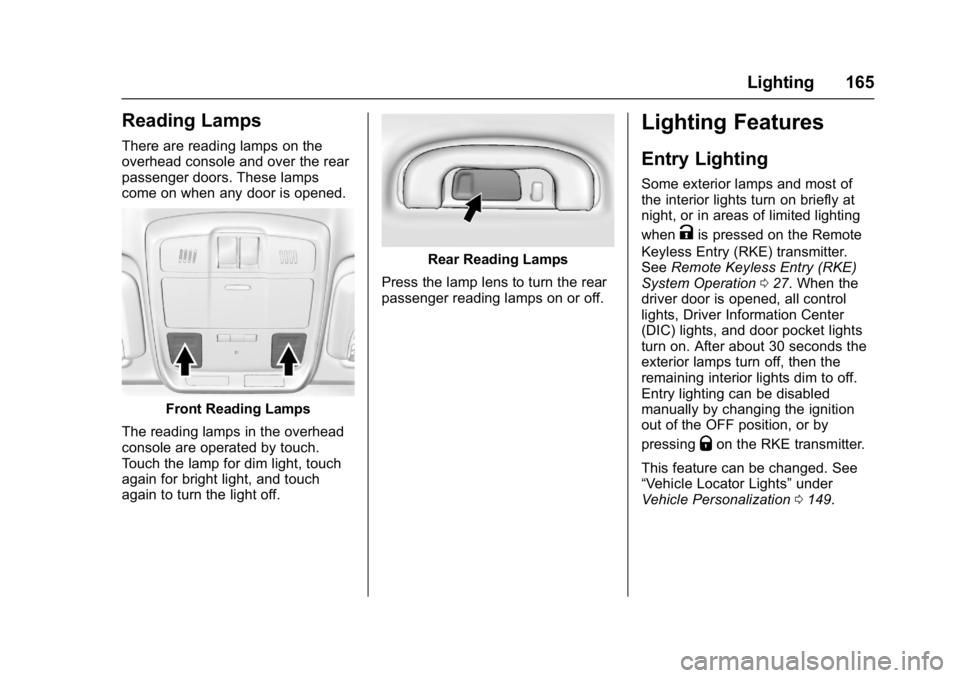
There are reading lamps on the
overhead console and over the rear
passenger doors. These lamps
come on when any door is opened.
Front Reading Lamps
The reading lamps in the overhead
console are operated by touch.
Touch the lamp for dim light, touch
again for bright light, and touch
again to turn the light off.
Rear Reading Lamps
Press the lamp lens to turn the rear
passenger reading lamps on or off.
Lighting Features
Entry Lighting
Some exterior lamps and most of
the interior lights turn on briefly at
night, or in areas of limited lighting
when
Kis pressed on the Remote
Keyless Entry (RKE) transmitter.
See Remote Keyless Entry (RKE)
System Operation 027. When the
driver door is opened, all control
lights, Driver Information Center
(DIC) lights, and door pocket lights
turn on. After about 30 seconds the
exterior lamps turn off, then the
remaining interior lights dim to off.
Entry lighting can be disabled
manually by changing the ignition
out of the OFF position, or by
pressing
Qon the RKE transmitter.
This feature can be changed. See
“Vehicle Locator Lights” under
Vehicle Personalization 0149.
Page 176 of 366
Buick Envision Owner Manual (GMNA-Localizing-U.S./Canada/Mexico-
10122659) - 2017 - crc - 11/16/16
Driving and Operating 175
Driving and
Operating
Driving Information
Driver Behavior . . . . . . . . . . . . . . . 176
Driving Environment . . . . . . . . . . 176
Vehicle Design . . . . . . . . . . . . . . . 176
Distracted Driving . . . . . . . . . . . . 177
Defensive Driving . . . . . . . . . . . . . 177
Drunk Driving . . . . . . . . . . . . . . . . . 178
Control of a Vehicle . . . . . . . . . . . 178
Braking . . . . . . . . . . . . . . . . . . . . . . . 178
Steering . . . . . . . . . . . . . . . . . . . . . . 178
Off-Road Recovery . . . . . . . . . . . 179
Loss of Control . . . . . . . . . . . . . . . 179
Driving on Wet Roads . . . . . . . . 180
Hill and Mountain Roads . . . . . 181
Winter Driving . . . . . . . . . . . . . . . . 181
If the Vehicle Is Stuck . . . . . . . . 183
Vehicle Load Limits . . . . . . . . . . . 183
Starting and Operating
New Vehicle Break-In . . . . . . . . . 187
Ignition Positions . . . . . . . . . . . . . 187
Starting the Engine . . . . . . . . . . . 189
Engine Heater . . . . . . . . . . . . . . . . 191
Retained AccessoryPower (RAP) . . . . . . . . . . . . . . . . 192
Shifting Into Park . . . . . . . . . . . . . 192 Shifting out of Park . . . . . . . . . . . 193
Parking over Things
That Burn . . . . . . . . . . . . . . . . . . . 193
Extended Parking . . . . . . . . . . . . 194
Engine Exhaust
Engine Exhaust . . . . . . . . . . . . . . 194
Running the Vehicle While Parked . . . . . . . . . . . . . . . . . . . . . . 195
Automatic Transmission
Automatic Transmission . . . . . . 195
Manual Mode . . . . . . . . . . . . . . . . . 197
Drive Systems
All-Wheel Drive . . . . . . . . . . . . . . . 198
Brakes
Antilock BrakeSystem (ABS) . . . . . . . . . . . . . . . 198
Electric Parking Brake . . . . . . . . 199
Brake Assist . . . . . . . . . . . . . . . . . . 201
Hill Start Assist (HSA) . . . . . . . . 201
Ride Control Systems
Traction Control/Electronic Stability Control . . . . . . . . . . . . . 201
Cruise Control
Cruise Control . . . . . . . . . . . . . . . . 203
Adaptive Cruise Control . . . . . . 205
Driver Assistance Systems
Driver Assistance Systems . . . 213
Assistance Systems forParking or Backing . . . . . . . . . . 214
Assistance Systems for Driving . . . . . . . . . . . . . . . . . . . . . . 218
Forward Collision Alert (FCA) System . . . . . . . . . . . . . . . . . . . . . . 218
Forward Automatic Braking (FAB) . . . . . . . . . . . . . . . 221
Side Blind Zone Alert (SBZA) . . . . . . . . . . . . . . . . 222
Lane Change Alert (LCA) . . . . . 222
Lane Departure Warning (LDW) . . . . . . . . . . . . . 224
Lane Keep Assist (LKA) . . . . . . 224
Fuel
Fuel . . . . . . . . . . . . . . . . . . . . . . . . . . 226
California Fuel Requirements . . . . . . . . . . . . . . . 227
Fuels in Foreign Countries . . . 228
Fuel Additives . . . . . . . . . . . . . . . . 228
Filling the Tank . . . . . . . . . . . . . . . 228
Filling a Portable Fuel Container . . . . . . . . . . . . . . . . . . . 230
Trailer Towing
General TowingInformation . . . . . . . . . . . . . . . . . . 230
Page 178 of 366
Buick Envision Owner Manual (GMNA-Localizing-U.S./Canada/Mexico-
10122659) - 2017 - crc - 11/16/16
Driving and Operating 177
Safe driver behavior and
understanding of the environment
can help avoid a rollover crash in
any type of vehicle, including utility
vehicles.
Distracted Driving
Distraction comes in many forms
and can take your focus from the
task of driving. Exercise good
judgment and do not let other
activities divert your attention away
from the road. Many local
governments have enacted laws
regarding driver distraction. Become
familiar with the local laws in
your area.
To avoid distracted driving, keep
your eyes on the road, keep your
hands on the steering wheel, and
focus your attention on driving.
.It is against the law to use a
phone held in your hand while
driving. Use a hands-free
method to place or receive
necessary phone calls. .
Watch the road. Do not read,
take notes, or look up
information on phones or other
electronic devices.
. Designate a front seat
passenger to handle potential
distractions.
. Become familiar with vehicle
features before driving, such as
programming favorite radio
stations and adjusting climate
control and seat settings.
Program all trip information into
any navigation device prior to
driving.
. Wait until the vehicle is parked
to retrieve items that have fallen
to the floor.
. Stop or park the vehicle to tend
to children.
. Keep pets in an appropriate
carrier or restraint.
. Avoid stressful conversations
while driving, whether with a
passenger or on a cell phone.
{Warning
Taking your eyes off the road too
long or too often could cause a
crash resulting in injury or death.
Focus your attention on driving.
Refer to the infotainment section for
more information on using that
system, including pairing and using
a cell phone.
Defensive Driving
Defensive driving means “always
expect the unexpected.” The first
step in driving defensively is to wear
the safety belt. See Safety Belts
0 61.
. Assume that other road users
(pedestrians, bicyclists, and
other drivers) are going to be
careless and make mistakes.
Anticipate what they might do
and be ready.
. Allow enough following distance
between you and the driver in
front of you.
Page 189 of 366

Buick Envision Owner Manual (GMNA-Localizing-U.S./Canada/Mexico-
10122659) - 2017 - crc - 11/16/16
188 Driving and Operating
The Remote Keyless Entry (RKE)
transmitter must be in the vehicle for
the system to operate. If the
pushbutton start is not working, the
vehicle may be near a strong radio
antenna signal causing interference
to the Keyless Access system. See
Remote Keyless Entry (RKE)
System Operation027.
To shift out of P (Park), the vehicle
must be in ON/RUN and the brake
pedal must be applied.
Stopping the Engine/LOCK/
OFF (No Indicator Lights) : When
the vehicle is stopped, press
ENGINE START/STOP once to turn
the engine off.
If the vehicle is in P (Park), the
ignition will turn off, and Retained
Accessory Power (RAP) will remain
active. See Retained Accessory
Power (RAP) 0192.
If the vehicle is not in P (Park), the
ignition will return to ACC/
ACCESSORY and display the
message SHIFT TO PARK in the
Driver Information Center (DIC).
See Transmission Messages 0148. When the vehicle is shifted into
P (Park), the ignition system will
switch to OFF.
The vehicle may have an electric
steering column lock. The lock is
activated when the vehicle is
switched to OFF and either front
door is opened. A sound may be
heard as the lock actuates or
releases. The steering column lock
may not release with the wheels
turned off center. If this happens,
the vehicle may not start. Move the
steering wheel from left to right
while attempting to start the vehicle.
If this does not work, the vehicle
needs service.
Do not turn the engine off when the
vehicle is moving. This will cause a
loss of power assist in the brake
and steering systems and disable
the airbags.
If the vehicle must be shut off in an
emergency:
1. Brake using a firm and steady pressure. Do not pump the
brakes repeatedly. This may
deplete power assist, requiring
increased brake pedal force. 2. Shift the vehicle to N (Neutral).
This can be done while the
vehicle is moving. After shifting
to N (Neutral), firmly apply the
brakes and steer the vehicle to
a safe location.
3. Come to a complete stop, shift to P (Park), and turn the
ignition to OFF. On vehicles
with an automatic transmission,
the shift lever must be in
P (Park) to turn the ignition
switch to the OFF position.
4. Set the parking brake. See Electric Parking Brake 0199.
{Warning
Turning off the vehicle while
moving may cause loss of power
assist in the brake and steering
systems and disable the airbags.
While driving, only shut the
vehicle off in an emergency.
Page 190 of 366

Buick Envision Owner Manual (GMNA-Localizing-U.S./Canada/Mexico-
10122659) - 2017 - crc - 11/16/16
Driving and Operating 189
If the vehicle cannot be pulled over
and must be shut off while driving,
press and hold ENGINE START/
STOP for longer than two seconds,
or press twice in five seconds.
ACC/ACCESSORY (Amber
Indicator Light) :This mode allows
you to use some electrical
accessories when the engine is off.
With the ignition off, pressing the
button one time without the brake
pedal applied will place the ignition
system in ACC/ACCESSORY.
The ignition will switch from ACC/
ACCESSORY to OFF after
five minutes to prevent battery
rundown.
ON/RUN/START (Green Indicator
Light) : This mode is for driving and
starting. With the ignition off and the
brake pedal applied, pressing the
button once will place the ignition
system in ON/RUN/START. Once
engine cranking begins, release the
button. Engine cranking will
continue until the engine starts. See
Starting the Engine 0189. The
ignition will then remain in ON/RUN. Service Only Mode
This power mode is available for
service and diagnostics, and to
verify the proper operation of the
malfunction indicator lamp as may
be required for emission inspection
purposes. With the vehicle off and
the brake pedal not applied,
pressing and holding the button for
more than five seconds will place
the vehicle in Service Only Mode.
The instruments and audio systems
will operate as they do in ON/RUN,
but the vehicle will not be able to be
driven. The engine will not start in
Service Only Mode. Press the
button again to turn the vehicle off.
Starting the Engine
Move the shift lever to P (Park) or
N (Neutral). To restart the engine
when the vehicle is already moving,
use N (Neutral) only.
Caution
Do not try to shift to P (Park) if the
vehicle is moving. If you do, you
could damage the transmission.
Shift to P (Park) only when the
vehicle is stopped.
Caution
If you add electrical parts or
accessories, you could change
the way the engine operates. Any
resulting damage would not be
covered by the vehicle warranty.
See
Add-On Electrical Equipment
0 237.
Starting Procedure 1. With the Keyless Access system, the RKE transmitter
must be in the vehicle. Press
ENGINE START/STOP with the
brake pedal applied. When the
engine begins cranking, let go
of the button.
Page 193 of 366
Buick Envision Owner Manual (GMNA-Localizing-U.S./Canada/Mexico-
10122659) - 2017 - crc - 11/16/16
192 Driving and Operating
Warning (Continued)
it overheat and cause a fire,
property damage, electric
shock, and injury.
. Do not operate the vehicle
with the heater cord
permanently attached to the
vehicle. Possible heater
cord and thermostat
damage could occur.
. While in use, do not let the
heater cord touch vehicle
parts or sharp edges. Never
close the hood on the
heater cord.
. Before starting the vehicle,
unplug the cord, reattach
the cover to the plug, and
securely fasten the cord.
Keep the cord away from
any moving parts.
5. Before starting the engine, be sure to unplug and store the
cord as it was before to keep it away from moving engine
parts. If you do not it could be
damaged.
The length of time the heater should
remain plugged in depends on
several factors. Ask a dealer in the
area where you will be parking the
vehicle for the best advice on this.
Retained Accessory
Power (RAP)
These vehicle accessories can be
used for up to 10 minutes after the
engine is turned off:
. Audio system
. Power windows
. Sunroof (if equipped)
Power to the audio system will
continue to operate for up to
10 minutes or until the driver door is
opened.
Power to the power windows and
sunroof will continue to operate for
up to 10 minutes or until any door is
opened. All these features will work when the
vehicle is on or in ACC/
ACCESSORY.
Shifting Into Park
To shift into P (Park):
1. Hold the brake pedal down and set the parking brake.
See Electric Parking Brake
0 199.
2. Move the shift lever into P (Park) by holding in the
button on the back of the shift
lever and pushing the lever all
the way toward the front of the
vehicle.
3. Turn the ignition to LOCK/OFF.
4. Take the Remote Keyless Entry (RKE) transmitter with you.
Page 195 of 366

Buick Envision Owner Manual (GMNA-Localizing-U.S./Canada/Mexico-
10122659) - 2017 - crc - 11/16/16
194 Driving and Operating
Extended Parking
It is better not to park with the
vehicle running. If the vehicle is left
while running, follow the proper
steps to be sure the vehicle will not
move and there is adequate
ventilation.
SeeShifting Into Park 0192 and
Engine Exhaust 0194.
If the vehicle is left parked while
running and the Remote Keyless
Entry (RKE) transmitter is outside
the vehicle, the vehicle will turn off
after one hour. If the vehicle is left
parked while running and the RKE
transmitter is inside, the vehicle will
turn off after two hours.
The timer will reset if the vehicle is
taken out of P (Park) while it is
running.
Engine Exhaust
{Warning
Engine exhaust contains carbon
monoxide (CO), which cannot be
seen or smelled. Exposure to CO
can cause unconsciousness and
even death.
Exhaust may enter the vehicle if: . The vehicle idles in areas
with poor ventilation
(parking garages, tunnels,
deep snow that may block
underbody airflow or tail
pipes).
. The exhaust smells or
sounds strange or different.
. The exhaust system leaks
due to corrosion or damage.
. The vehicle exhaust system
has been modified,
damaged, or improperly
repaired.
(Continued)
Warning (Continued)
.There are holes or openings
in the vehicle body from
damage or aftermarket
modifications that are not
completely sealed.
If unusual fumes are detected or
if it is suspected that exhaust is
coming into the vehicle: . Drive it only with the
windows completely down.
. Have the vehicle repaired
immediately.
Never park the vehicle with the
engine running in an enclosed
area such as a garage or a
building that has no fresh air
ventilation.
Page 196 of 366

Buick Envision Owner Manual (GMNA-Localizing-U.S./Canada/Mexico-
10122659) - 2017 - crc - 11/16/16
Driving and Operating 195
Running the Vehicle
While Parked
It is better not to park with the
engine running.
If the vehicle is left with the engine
running, follow the proper steps to
be sure the vehicle will not move.
SeeShifting Into Park 0192 and
Engine Exhaust 0194.
Automatic
Transmission
P : This position locks the front
wheels. Use P (Park) when starting
the engine because the vehicle
cannot move easily.
{Warning
It is dangerous to get out of the
vehicle if the shift lever is not fully
in P (Park) with the parking brake
firmly set. The vehicle can roll.
(Continued)
Warning (Continued)
Do not leave the vehicle when the
engine is running. If you have left
the engine running, the vehicle
can move suddenly. You or others
could be injured. To be sure the
vehicle will not move, even when
you are on fairly level ground,
always set the parking brake and
move the shift lever to P (Park).
SeeShifting Into Park 0192.
The vehicle has an automatic
transmission shift lock control
system. You must fully apply the
regular brake first and then press
the shift lever button before shifting
from P (Park) when the ignition is in
ON/RUN. If you cannot shift out of
P (Park), ease pressure on the shift
lever, then push the shift lever all
the way into P (Park) as you
maintain brake application. Then
press the shift lever button and
move the shift lever into another
gear. See Shifting out of Park 0193.
R : Use this gear to back up.
Page 218 of 366

Buick Envision Owner Manual (GMNA-Localizing-U.S./Canada/Mexico-
10122659) - 2017 - crc - 11/16/16
Driving and Operating 217
RCTA can also be turned off
through vehicle personalization. See
“Collision/Detection Systems”under
Vehicle Personalization 0149.
To turn the RPA symbols or
guidance lines on or off, see “Rear
Camera” underVehicle
Personalization 0149.
Automatic Parking
Assist (APA)
If equipped, APA searches for and
steers the vehicle into parallel and
perpendicular parking spots. When
using APA, you must still shift gears,
and control the brakes and
accelerator. A display and audible
beeps help to guide parking
maneuvers.
{Warning
APA does not apply the brakes.
APA may not detect objects in the
parking space, objects that are
soft or narrow, objects high off the
ground such as flatbed trucks,
or objects below ground level
(Continued)
Warning (Continued)
such as large potholes. Always
verify that the parking space is
appropriate for parking a vehicle.
APA does not respond to changes
in the parking space, such as
movement of an adjacent vehicle,
or a person or object entering the
parking space. APA does not
detect or avoid traffic that is
behind or alongside of the
vehicle. Always be prepared to
stop the vehicle during the
parking maneuver.
Press
Oon the center stack to
enable the system to search for a
parking space that is large enough
and within 1.5 m (5 ft) of the vehicle.
The vehicle speed must be below
30 km/h (18 mph). The system
cannot:
. Detect whether it is a legal
parking space. .
Park exactly lined up with the
vehicle next to it if the spot is
approached at an angle or if the
parking space is angled.
. Park exactly centered in a spot
that is marked too large.
. Always detect short curbs.
If the vehicle is equipped with
perpendicular parking mode, press
and hold
Oduring the search
process to switch the APA parking
mode between perpendicular and
parallel parking.
APA searches for parking spaces to
the right of the vehicle. To search for
a parking space to the left, turn on
the left turn signal.