automatic transmission BUICK ENVISION 2017 Owner's Manual
[x] Cancel search | Manufacturer: BUICK, Model Year: 2017, Model line: ENVISION, Model: BUICK ENVISION 2017Pages: 366, PDF Size: 5.37 MB
Page 6 of 366
Buick Envision Owner Manual (GMNA-Localizing-U.S./Canada/Mexico-
10122659) - 2017 - crc - 11/16/16
In Brief 5
In Brief
Instrument Panel
Instrument Panel Overview . . . . . . 6
Initial Drive Information
Initial Drive Information . . . . . . . . . . 8
Remote Keyless Entry (RKE)System . . . . . . . . . . . . . . . . . . . . . . . . 8
Remote Vehicle Start . . . . . . . . . . . 9
Door Locks . . . . . . . . . . . . . . . . . . . . . 9
Liftgate . . . . . . . . . . . . . . . . . . . . . . . . . . 9
Windows . . . . . . . . . . . . . . . . . . . . . . . 10
Seat Adjustment . . . . . . . . . . . . . . . 10
Memory Features . . . . . . . . . . . . . . 11
Heated and Ventilated Seats . . . 12
Head Restraint Adjustment . . . . 12
Safety Belts . . . . . . . . . . . . . . . . . . . . 12
Passenger Sensing System . . . 13
Mirror Adjustment . . . . . . . . . . . . . . 13
Steering Wheel Adjustment . . . . 14
Interior Lighting . . . . . . . . . . . . . . . . 14
Exterior Lighting . . . . . . . . . . . . . . . 15
Windshield Wiper/Washer . . . . . . 16
Climate Controls . . . . . . . . . . . . . . . 17
Transmission . . . . . . . . . . . . . . . . . . 18
Vehicle Features
Infotainment System . . . . . . . . . . . 18
Steering Wheel Controls . . . . . . . 18
Cruise Control . . . . . . . . . . . . . . . . . 18
Driver Information Center (DIC) . . . . . . . . . . . . . . . . . 19
Forward Collision Alert (FCA) System . . . . . . . . . . . . . . . . . . . . . . . 19
Forward Automatic Braking (FAB) . . . . . . . . . . . . . . . . 19
Lane Keep Assist (LKA) . . . . . . . 20
Lane Change Alert (LCA) . . . . . . 20
Surround Vision . . . . . . . . . . . . . . . 20
Rear Vision Camera (RVC) . . . . 20
Rear Cross Traffic Alert (RCTA) System . . . . . . . . . . . . . . . . . . . . . . . 20
Parking Assist . . . . . . . . . . . . . . . . . 21
Automatic Parking Assist (APA) . . . . . . . . . . . . . . . . . . 21
Power Outlets . . . . . . . . . . . . . . . . . 21
Universal Remote System . . . . . 21
Sunroof . . . . . . . . . . . . . . . . . . . . . . . . 22
Performance and Maintenance
Traction Control/Electronic Stability Control . . . . . . . . . . . . . . 23
Tire Pressure Monitor . . . . . . . . . . 23
Fuel (2.5L Engine) . . . . . . . . . . . . . 24
Fuel (2.0L Engine) . . . . . . . . . . . . . 24
E85 or FlexFuel . . . . . . . . . . . . . . . . 24
Engine Oil Life System . . . . . . . . 24
Driving for Better Fuel Economy . . . . . . . . . . . . . . . . . . . . . 25
Roadside Assistance Program . . . . . . . . . . . . . . . . . . . . . . 25
Page 8 of 366

Buick Envision Owner Manual (GMNA-Localizing-U.S./Canada/Mexico-
10122659) - 2017 - crc - 11/16/16
In Brief 7
1.Air Vents 0172.
2. Turn Signal Lever. See Turn
and Lane-Change Signals
0 163.
3. Instrument Cluster 0114.
Driver Information Center
Display.
See Driver Information Center
(DIC) (Base Level) 0131 or
Driver Information Center (DIC)
(Uplevel) 0134.
4. Windshield Wiper/Washer
0108.
Rear Window Wiper/Washer
0 110.
5. Hazard Warning Flashers
0163.
6. Infotainment 0167.
7. Light Sensor. See Automatic
Headlamp System 0161.
8. Lane Keep Assist (LKA) 0224
(If Equipped).
Assistance Systems for
Parking or Backing 0214 (If
Equipped).
9. Clock 0111. 10.
Heated and Ventilated Front
Seats 057 (If Equipped).
11. Dual Automatic Climate Control
System 0168.
12. Traction Control/Electronic
Stability Control 0201.
13. Electric Parking Brake 0199.
14. Shift Lever. See Automatic
Transmission 0195.
15. ENGINE START/STOP Button. SeeIgnition Positions 0187.
16. Steering Wheel Controls 0107
(If Equipped).
Driver Information Center (DIC)
Buttons.
See Driver Information Center
(DIC) (Base Level) 0131 or
Driver Information Center (DIC)
(Uplevel) 0134.
17. Horn 0108.
18. Steering Wheel Adjustment
0107.
19. Cruise Control 0203.
Adaptive Cruise Control 0205
(If Equipped). Heated Steering Wheel
0107
(If Equipped).
Forward Collision Alert (FCA)
System 0218 (If Equipped).
20. Data Link Connector (DLC) (Out of View). See Malfunction
Indicator Lamp (Check Engine
Light) 0122.
21. Front Storage 0100.
22. Instrument Panel Illumination
Control 0164.
Head-Up Display (HUD) 0136
(If Equipped) (Out of View).
23. Exterior Lamp Controls 0159.
Fog Lamps 0164 (If
Equipped).
Page 19 of 366
Buick Envision Owner Manual (GMNA-Localizing-U.S./Canada/Mexico-
10122659) - 2017 - crc - 11/16/16
18 In Brief
10. Rear Window Defogger
11. Power
SeeDual Automatic Climate Control
System 0168 andRear Climate
Control System 0171 (if equipped).
Transmission
Electronic Range Select
(ERS) Mode
ERS or manual mode allows for the
selection of the range of gear
positions. Use this mode when
driving downhill to limit the top gear
and vehicle speed.
To use this feature:
1. Move the shift lever to L (Low).
2. Press the plus/minus button on the shift lever to increase or
decrease the gear range
available.
See Manual Mode 0197.
Vehicle Features
Infotainment System
See the infotainment manual for
information on the radio, audio
players, phone, navigation system,
and voice or speech recognition.
It also includes information on
settings.
Steering Wheel Controls
The infotainment system can be
operated by using the steering
wheel controls. See "Steering
Wheel Controls" in the infotainment
manual.
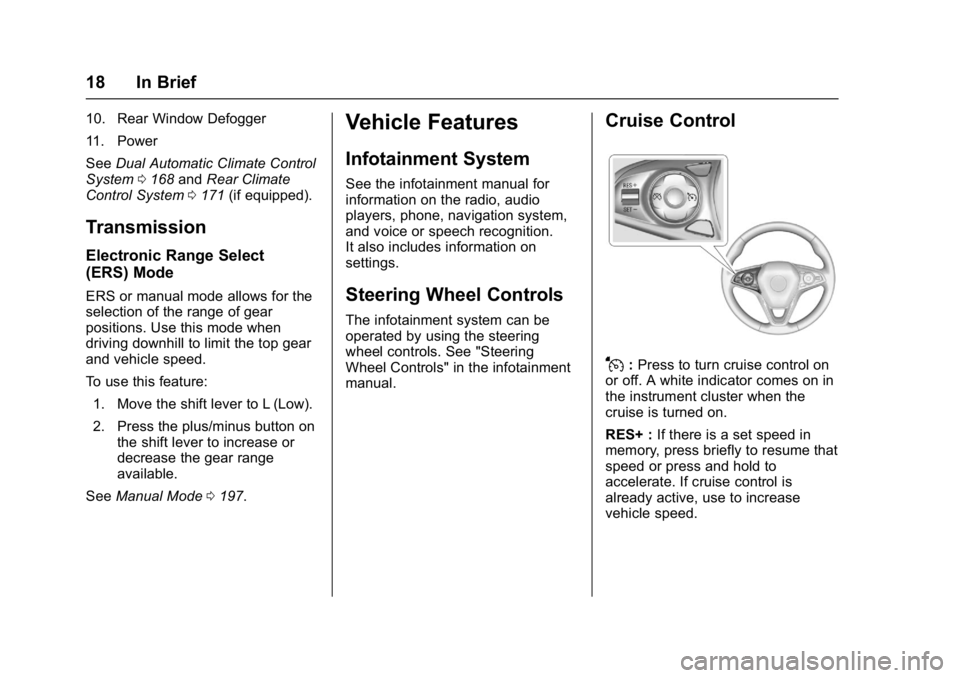
Cruise Control
J:Press to turn cruise control on
or off. A white indicator comes on in
the instrument cluster when the
cruise is turned on.
RES+ : If there is a set speed in
memory, press briefly to resume that
speed or press and hold to
accelerate. If cruise control is
already active, use to increase
vehicle speed.
Page 37 of 366

Buick Envision Owner Manual (GMNA-Localizing-U.S./Canada/Mexico-
10122659) - 2017 - crc - 11/16/16
36 Keys, Doors, and Windows
Delayed Locking
This feature delays the actual
locking of the doors until
five seconds after all doors are
closed.
Delayed locking can only be turned
on when the Unlocked Door Anti
Lock Out feature has been
turned off.
When
Qis pressed on the power
door lock switch with the door open,
a chime will sound three times
indicating that delayed locking is
active.
The doors will then lock
automatically five seconds after all
doors are closed. If a door is
reopened before five seconds have
elapsed, the five-second timer will
reset once all the doors are closed
again.
Press
Qon the door lock switch
again, or press
Qon the RKE
transmitter, to override this feature
and lock the doors immediately. Delayed locking can be
programmed through the Driver
Information Center (DIC). See
Vehicle Personalization
0149.
Automatic Door Locks
The doors will lock automatically
when all doors are closed, the
ignition is on, and the vehicle is
shifted out of P (Park).
To unlock the doors:
.
Press
Kon the power door lock
switch.
. Shift the transmission into
P (Park).
Automatic door locking cannot be
disabled. Automatic door unlocking
can be programmed. See Vehicle
Personalization 0149.
Lockout Protection
If the vehicle is in ACC/
ACCESSORY or ON/RUN/START
and the power door lock switch is
pressed with the driver door open,
all the doors will lock and only the
driver door will unlock. If the vehicle is off and locking is
requested while a door is open,
when all doors are closed the
vehicle will check for RKE
transmitters inside. If an RKE
transmitter is detected and the
number of RKE transmitters inside
has not reduced, the driver door will
unlock and the horn will chirp three
times.
Lockout Protection can be manually
overridden with the driver door open
by pressing and holding
Qon the
power door lock switch.
Unlocked Door Anti Lockout
If Unlocked Door Anti Lockout is
turned on and the vehicle is off, the
driver door is open, and locking is
requested, all the doors will lock and
only the driver door will unlock. The
Unlocked Door Anti Lockout feature
can be turned on or off using the
vehicle personalization menus. See
Vehicle Personalization 0149.
Page 57 of 366

Buick Envision Owner Manual (GMNA-Localizing-U.S./Canada/Mexico-
10122659) - 2017 - crc - 11/16/16
56 Seats and Restraints
To save positions forBand easy
exit features, repeat Steps 1–4
using
B. This stores the positions
for getting out of the vehicle.
Manually Recalling Memory
Positions
Press and hold 1, 2, or
Bto recall
the previously stored memory
positions.
To stop manual recall movement,
release 1, 2, or
B. Recall can also
be stopped by pressing a power
seat, SET, power mirror, or power
steering wheel control, if memory
equipped. The driver or passenger
side mirror must be selected.
Auto Memory Recall
The vehicle identifies the number of
the current driver ’s RKE transmitter
(1–8). See Remote Keyless Entry
(RKE) System Operation 027. If the
RKE transmitter is 1 or 2, and Auto
Memory Recall is programmed on in
vehicle personalization, the
positions saved to the same
memory button number 1 or 2 are
automatically recalled when the ignition is turned on, or turned from
OFF to ACC/ACCESSORY. RKE
transmitters 3–8 will not provide
automatic memory recalls.
To turn Auto Memory Recall on or
off, see "Vehicle Personalization
Settings" previously in this section
and
Vehicle Personalization 0149.
The transmission must be in
P (Park) to initiate Auto Memory
Recall. Auto Memory Recall will
complete if the vehicle is shifted out
of P (Park) prior to reaching the
stored memory position.
To stop Auto Memory Recall
movement, turn the ignition off or
press any of the following memory
controls:
. Power seat
. Memory SET, 1, 2, or
B
.Power mirror, with the driver or
passenger side mirror selected
. Power steering wheel,
if equipped
If the stored memory seat position
does not automatically recall or
recalls to the wrong positions, the driver
’s RKE transmitter number
(1 or 2) may not match the memory
button number that positions were
saved to. Try storing the position to
the other memory button or try the
other RKE transmitter.
Easy Exit Recall
Easy Exit Recall is not linked to an
RKE transmitter. The position stored
to
Bis used for all drivers. To turn
Easy Exit Recall on or off, see
"Vehicle Personalization Settings"
previously in this section and
Vehicle Personalization 0149.
If turned on, the positions saved to
Bare automatically recalled when
one of the following occurs:
. The vehicle is turned off and the
driver door is opened within a
short time.
. The vehicle is turned off with the
driver door open.
To stop Easy Exit Recall movement,
press any of the following memory
controls:
. Power seat
Page 110 of 366
Buick Envision Owner Manual (GMNA-Localizing-U.S./Canada/Mexico-
10122659) - 2017 - crc - 11/16/16
Instruments and Controls 109
If the windshield wiper lever is then
moved to OFF before the driver
door is opened or within 10 minutes,
the wipers will restart and move to
the base of the windshield.
If the ignition is changed to LOCK/
OFF while the wipers are performing
wipes due to windshield washing or
Rainsense, the wipers continue to
run until they reach the base of the
windshield.
Rainsense™
If equipped with Rainsense, a
sensor located near the top center
of the windshield detects the
amount of water on the windshield
and automatically controls the
frequency of the windshield wiper.
When Rainsense is enabled, the
normal intermittent control operates
as a sensitivity control.
Keep this area of the windshield
clear of debris to allow for best
system performance.
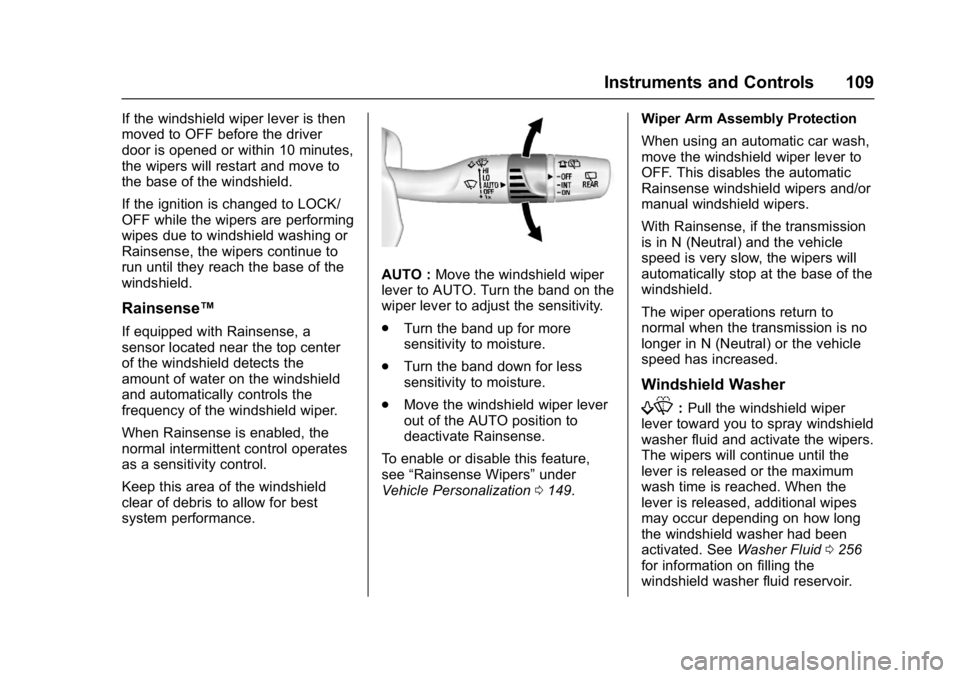
AUTO :Move the windshield wiper
lever to AUTO. Turn the band on the
wiper lever to adjust the sensitivity.
. Turn the band up for more
sensitivity to moisture.
. Turn the band down for less
sensitivity to moisture.
. Move the windshield wiper lever
out of the AUTO position to
deactivate Rainsense.
To enable or disable this feature,
see “Rainsense Wipers” under
Vehicle Personalization 0149. Wiper Arm Assembly Protection
When using an automatic car wash,
move the windshield wiper lever to
OFF. This disables the automatic
Rainsense windshield wipers and/or
manual windshield wipers.
With Rainsense, if the transmission
is in N (Neutral) and the vehicle
speed is very slow, the wipers will
automatically stop at the base of the
windshield.
The wiper operations return to
normal when the transmission is no
longer in N (Neutral) or the vehicle
speed has increased.
Windshield Washer
f:
Pull the windshield wiper
lever toward you to spray windshield
washer fluid and activate the wipers.
The wipers will continue until the
lever is released or the maximum
wash time is reached. When the
lever is released, additional wipes
may occur depending on how long
the windshield washer had been
activated. See Washer Fluid0256
for information on filling the
windshield washer fluid reservoir.
Page 162 of 366

Buick Envision Owner Manual (GMNA-Localizing-U.S./Canada/Mexico-
10122659) - 2017 - crc - 11/16/16
Lighting 161
.The vehicle's windshield is dirty,
cracked, or obstructed by
something that blocks the view
of the light sensor.
. The vehicle is loaded such that
the front end points upward,
causing the light sensor to aim
high and not detect headlamps
and taillamps.
. Driving on winding or hilly roads.
The automatic high-beam
headlamps may need to be disabled
if any of the above conditions exist.
Exterior Lamps Off
Reminder
A warning chime sounds if the driver
door is opened while the ignition is
off and the exterior lamps are on.
Headlamp High/
Low-Beam Changer
3
: Push the turn signal lever away
from you and release, to turn the
high beams on. To return to low
beams, push the lever again or pull
it toward you and release.
This indicator light turns on in the
instrument cluster when the
high-beam headlamps are on.
Flash-to-Pass
To flash the high beams, pull the
turn signal lever toward you, and
release.
Daytime Running
Lamps (DRL)
DRL can make it easier for others to
see the front of the vehicle during
the day. Fully functional DRL are
required on all vehicles first sold in
Canada.
The DRL system comes on when
the following conditions are met:
. The ignition is on.
. The exterior lamp control is
in AUTO. .
The transmission is not in
P (Park).
. The light sensor determines it is
daytime.
When the DRL system is on, only
the DRL are on. The taillamps,
sidemarker lamps, instrument panel
lights, and other lamps will not
be on.
When it begins to get dark, the
automatic headlamp system
switches from DRL to the
headlamps.
To turn off the DRL, turn the exterior
lamp control to the off position and
then release. For vehicles first sold
in Canada, off will only work when
the vehicle is parked.
Automatic Headlamp
System
When the exterior lamp control is
set to AUTO and it is dark enough
outside, the headlamps come on
automatically.
Page 163 of 366

Buick Envision Owner Manual (GMNA-Localizing-U.S./Canada/Mexico-
10122659) - 2017 - crc - 11/16/16
162 Lighting
There is a light sensor on top of the
instrument panel. Do not cover the
sensor; otherwise the headlamps
will come on when they are not
needed.
The system may also turn on the
headlamps when driving through a
parking garage or tunnel.
When it is bright enough outside,
the headlamps will turn off or may
change to Daytime Running
Lamps (DRL).
The automatic headlamp system
turns off when the exterior lamp
control is turned to
Oor the ignition
is off.
Lights On with Wipers
If the windshield wipers are
activated in daylight with the engine
on, and the exterior lamp control is
in AUTO, the headlamps, parking
lamps, and other exterior lamps
come on. The transition time for the
lamps coming on varies based on
wiper speed. When the wipers are
not operating, these lamps turn off.
Move the exterior lamp control to
O
or;to disable this feature.
Adaptive Forward
Lighting (AFL)
If equipped with the AFL System,
the headlamps pivot horizontally to
provide greater road illumination
while turning.
To enable AFL, set the exterior lamp
control to the AUTO position.
Moving the control out of AUTO will
deactivate the system. AFL will
operate when the vehicle speed is
greater than 3 km/h (2 mph). AFL
will not operate when the
transmission is in R (Reverse). AFL
is not immediately operable after starting the vehicle; driving a short
distance is required to calibrate the
AFL. See
Exterior Lamp Controls
0 159.
Headlamp Leveling
Control
Automatic Headlamp Leveling
If equipped, the level of the
headlamps is adjusted automatically
based on the vehicle load.
Headlamp aiming is important to
safe driving. If the headlamps
require aiming or the automatic
headlamp leveling system is
malfunctioning, see your dealer for
service.
Page 176 of 366
Buick Envision Owner Manual (GMNA-Localizing-U.S./Canada/Mexico-
10122659) - 2017 - crc - 11/16/16
Driving and Operating 175
Driving and
Operating
Driving Information
Driver Behavior . . . . . . . . . . . . . . . 176
Driving Environment . . . . . . . . . . 176
Vehicle Design . . . . . . . . . . . . . . . 176
Distracted Driving . . . . . . . . . . . . 177
Defensive Driving . . . . . . . . . . . . . 177
Drunk Driving . . . . . . . . . . . . . . . . . 178
Control of a Vehicle . . . . . . . . . . . 178
Braking . . . . . . . . . . . . . . . . . . . . . . . 178
Steering . . . . . . . . . . . . . . . . . . . . . . 178
Off-Road Recovery . . . . . . . . . . . 179
Loss of Control . . . . . . . . . . . . . . . 179
Driving on Wet Roads . . . . . . . . 180
Hill and Mountain Roads . . . . . 181
Winter Driving . . . . . . . . . . . . . . . . 181
If the Vehicle Is Stuck . . . . . . . . 183
Vehicle Load Limits . . . . . . . . . . . 183
Starting and Operating
New Vehicle Break-In . . . . . . . . . 187
Ignition Positions . . . . . . . . . . . . . 187
Starting the Engine . . . . . . . . . . . 189
Engine Heater . . . . . . . . . . . . . . . . 191
Retained AccessoryPower (RAP) . . . . . . . . . . . . . . . . 192
Shifting Into Park . . . . . . . . . . . . . 192 Shifting out of Park . . . . . . . . . . . 193
Parking over Things
That Burn . . . . . . . . . . . . . . . . . . . 193
Extended Parking . . . . . . . . . . . . 194
Engine Exhaust
Engine Exhaust . . . . . . . . . . . . . . 194
Running the Vehicle While Parked . . . . . . . . . . . . . . . . . . . . . . 195
Automatic Transmission
Automatic Transmission . . . . . . 195
Manual Mode . . . . . . . . . . . . . . . . . 197
Drive Systems
All-Wheel Drive . . . . . . . . . . . . . . . 198
Brakes
Antilock BrakeSystem (ABS) . . . . . . . . . . . . . . . 198
Electric Parking Brake . . . . . . . . 199
Brake Assist . . . . . . . . . . . . . . . . . . 201
Hill Start Assist (HSA) . . . . . . . . 201
Ride Control Systems
Traction Control/Electronic Stability Control . . . . . . . . . . . . . 201
Cruise Control
Cruise Control . . . . . . . . . . . . . . . . 203
Adaptive Cruise Control . . . . . . 205
Driver Assistance Systems
Driver Assistance Systems . . . 213
Assistance Systems forParking or Backing . . . . . . . . . . 214
Assistance Systems for Driving . . . . . . . . . . . . . . . . . . . . . . 218
Forward Collision Alert (FCA) System . . . . . . . . . . . . . . . . . . . . . . 218
Forward Automatic Braking (FAB) . . . . . . . . . . . . . . . 221
Side Blind Zone Alert (SBZA) . . . . . . . . . . . . . . . . 222
Lane Change Alert (LCA) . . . . . 222
Lane Departure Warning (LDW) . . . . . . . . . . . . . 224
Lane Keep Assist (LKA) . . . . . . 224
Fuel
Fuel . . . . . . . . . . . . . . . . . . . . . . . . . . 226
California Fuel Requirements . . . . . . . . . . . . . . . 227
Fuels in Foreign Countries . . . 228
Fuel Additives . . . . . . . . . . . . . . . . 228
Filling the Tank . . . . . . . . . . . . . . . 228
Filling a Portable Fuel Container . . . . . . . . . . . . . . . . . . . 230
Trailer Towing
General TowingInformation . . . . . . . . . . . . . . . . . . 230
Page 189 of 366

Buick Envision Owner Manual (GMNA-Localizing-U.S./Canada/Mexico-
10122659) - 2017 - crc - 11/16/16
188 Driving and Operating
The Remote Keyless Entry (RKE)
transmitter must be in the vehicle for
the system to operate. If the
pushbutton start is not working, the
vehicle may be near a strong radio
antenna signal causing interference
to the Keyless Access system. See
Remote Keyless Entry (RKE)
System Operation027.
To shift out of P (Park), the vehicle
must be in ON/RUN and the brake
pedal must be applied.
Stopping the Engine/LOCK/
OFF (No Indicator Lights) : When
the vehicle is stopped, press
ENGINE START/STOP once to turn
the engine off.
If the vehicle is in P (Park), the
ignition will turn off, and Retained
Accessory Power (RAP) will remain
active. See Retained Accessory
Power (RAP) 0192.
If the vehicle is not in P (Park), the
ignition will return to ACC/
ACCESSORY and display the
message SHIFT TO PARK in the
Driver Information Center (DIC).
See Transmission Messages 0148. When the vehicle is shifted into
P (Park), the ignition system will
switch to OFF.
The vehicle may have an electric
steering column lock. The lock is
activated when the vehicle is
switched to OFF and either front
door is opened. A sound may be
heard as the lock actuates or
releases. The steering column lock
may not release with the wheels
turned off center. If this happens,
the vehicle may not start. Move the
steering wheel from left to right
while attempting to start the vehicle.
If this does not work, the vehicle
needs service.
Do not turn the engine off when the
vehicle is moving. This will cause a
loss of power assist in the brake
and steering systems and disable
the airbags.
If the vehicle must be shut off in an
emergency:
1. Brake using a firm and steady pressure. Do not pump the
brakes repeatedly. This may
deplete power assist, requiring
increased brake pedal force. 2. Shift the vehicle to N (Neutral).
This can be done while the
vehicle is moving. After shifting
to N (Neutral), firmly apply the
brakes and steer the vehicle to
a safe location.
3. Come to a complete stop, shift to P (Park), and turn the
ignition to OFF. On vehicles
with an automatic transmission,
the shift lever must be in
P (Park) to turn the ignition
switch to the OFF position.
4. Set the parking brake. See Electric Parking Brake 0199.
{Warning
Turning off the vehicle while
moving may cause loss of power
assist in the brake and steering
systems and disable the airbags.
While driving, only shut the
vehicle off in an emergency.