turn signal BUICK ENVISION 2017 Owner's Manual
[x] Cancel search | Manufacturer: BUICK, Model Year: 2017, Model line: ENVISION, Model: BUICK ENVISION 2017Pages: 366, PDF Size: 5.37 MB
Page 8 of 366

Buick Envision Owner Manual (GMNA-Localizing-U.S./Canada/Mexico-
10122659) - 2017 - crc - 11/16/16
In Brief 7
1.Air Vents 0172.
2. Turn Signal Lever. See Turn
and Lane-Change Signals
0 163.
3. Instrument Cluster 0114.
Driver Information Center
Display.
See Driver Information Center
(DIC) (Base Level) 0131 or
Driver Information Center (DIC)
(Uplevel) 0134.
4. Windshield Wiper/Washer
0108.
Rear Window Wiper/Washer
0 110.
5. Hazard Warning Flashers
0163.
6. Infotainment 0167.
7. Light Sensor. See Automatic
Headlamp System 0161.
8. Lane Keep Assist (LKA) 0224
(If Equipped).
Assistance Systems for
Parking or Backing 0214 (If
Equipped).
9. Clock 0111. 10.
Heated and Ventilated Front
Seats 057 (If Equipped).
11. Dual Automatic Climate Control
System 0168.
12. Traction Control/Electronic
Stability Control 0201.
13. Electric Parking Brake 0199.
14. Shift Lever. See Automatic
Transmission 0195.
15. ENGINE START/STOP Button. SeeIgnition Positions 0187.
16. Steering Wheel Controls 0107
(If Equipped).
Driver Information Center (DIC)
Buttons.
See Driver Information Center
(DIC) (Base Level) 0131 or
Driver Information Center (DIC)
(Uplevel) 0134.
17. Horn 0108.
18. Steering Wheel Adjustment
0107.
19. Cruise Control 0203.
Adaptive Cruise Control 0205
(If Equipped). Heated Steering Wheel
0107
(If Equipped).
Forward Collision Alert (FCA)
System 0218 (If Equipped).
20. Data Link Connector (DLC) (Out of View). See Malfunction
Indicator Lamp (Check Engine
Light) 0122.
21. Front Storage 0100.
22. Instrument Panel Illumination
Control 0164.
Head-Up Display (HUD) 0136
(If Equipped) (Out of View).
23. Exterior Lamp Controls 0159.
Fog Lamps 0164 (If
Equipped).
Page 10 of 366
Buick Envision Owner Manual (GMNA-Localizing-U.S./Canada/Mexico-
10122659) - 2017 - crc - 11/16/16
In Brief 9
Remote Vehicle Start
If equipped, the engine can be
started from outside of the vehicle.
Starting the Vehicle
1. Press and releaseQon the
RKE transmitter.
2. Immediately press and hold
/
for at least four seconds or until
the turn signal lamps flash.
Start the vehicle normally after
entering.
When the vehicle starts, the parking
lamps will turn on.
Remote start can be extended.
Canceling a Remote Start
To cancel a remote start, do one of
the following:
. Press and hold
/until the
parking lamps turn off.
. Turn on the hazard warning
flashers.
. Turn the vehicle on and then off.
See Remote Vehicle Start 033.
Door Locks
See Door Locks 034.
Keyless Access
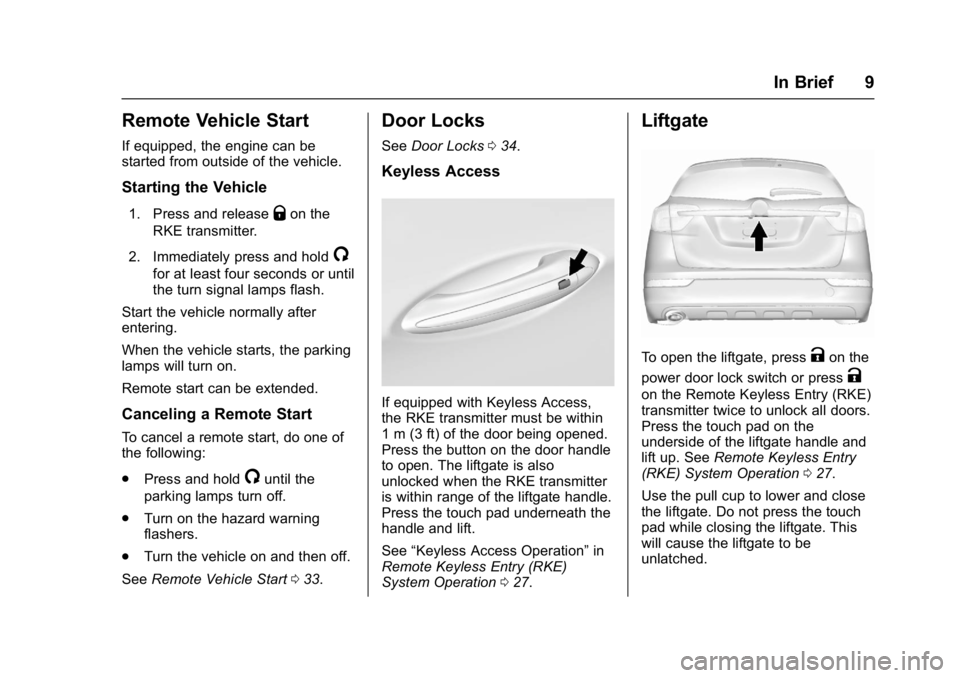
If equipped with Keyless Access,
the RKE transmitter must be within
1 m (3 ft) of the door being opened.
Press the button on the door handle
to open. The liftgate is also
unlocked when the RKE transmitter
is within range of the liftgate handle.
Press the touch pad underneath the
handle and lift.
See “Keyless Access Operation” in
Remote Keyless Entry (RKE)
System Operation 027.
Liftgate
To open the liftgate, pressKon the
power door lock switch or press
K
on the Remote Keyless Entry (RKE)
transmitter twice to unlock all doors.
Press the touch pad on the
underside of the liftgate handle and
lift up. See Remote Keyless Entry
(RKE) System Operation 027.
Use the pull cup to lower and close
the liftgate. Do not press the touch
pad while closing the liftgate. This
will cause the liftgate to be
unlatched.
Page 21 of 366
Buick Envision Owner Manual (GMNA-Localizing-U.S./Canada/Mexico-
10122659) - 2017 - crc - 11/16/16
20 In Brief
vehicle. This can help avoid or
lessen the severity of crashes when
driving in a forward gear.
SeeForward Automatic Braking
(FAB) 0221.
Lane Keep Assist (LKA)
If equipped, LKA may help avoid
crashes due to unintentional lane
departures. It may assist by gently
turning the steering wheel if the
vehicle approaches a detected lane
marking without using a turn signal
in that direction. It may also provide
a Lane Departure Warning (LDW)
alert as the lane marking is crossed.
The system will not assist or alert if
it detects that you are actively
steering. Override LKA by turning
the steering wheel. LKA uses a
camera to detect lane markings
between 60 km/h (37 mph) and
180 km/h (112 mph).
See Lane Departure Warning (LDW)
0 224 andLane Keep Assist (LKA)
0 224.
Lane Change Alert (LCA)
If equipped, the LCA system is a
lane-changing aid that assists
drivers with avoiding lane change
crashes that occur with moving
vehicles in the side blind zone (or
spot) areas or with vehicles rapidly
approaching these areas from
behind. The LCA warning display
will light up in the corresponding
outside mirror and will flash if the
turn signal is on. The Side Blind
Zone Alert (SBZA) system is
included as part of the LCA system.
See Side Blind Zone Alert (SBZA)
0 222 andLane Change Alert (LCA)
0 222.
Surround Vision
If equipped, views around the
vehicle display in the infotainment
display to aid with parking and
low-speed maneuvers.
See “Surround Vision” under
Assistance Systems for Parking or
Backing 0214. Front Vision Camera
If equipped, a view of the area in
front of the vehicle displays on the
infotainment display to aid with
parking and low-speed maneuvers.
See
“Front Vision Camera” under
Assistance Systems for Parking or
Backing 0214.
Rear Vision
Camera (RVC)
If equipped, RVC shows a view of
the area behind the vehicle on the
infotainment display when the
vehicle is shifted into R (Reverse) to
aid with parking and low-speed
backing maneuvers.
See Assistance Systems for Parking
or Backing 0214.
Rear Cross Traffic Alert
(RCTA) System
If equipped, the RCTA system uses
a triangle with an arrow displayed
on the infotainment display to warn
of traffic behind your vehicle that
may cross your vehicle's path while
Page 28 of 366

Buick Envision Owner Manual (GMNA-Localizing-U.S./Canada/Mexico-
10122659) - 2017 - crc - 11/16/16
Keys, Doors, and Windows 27
The key that is part of the Remote
Keyless Entry (RKE) transmitter can
be used to open the driver door.
Press the button on the RKE
transmitter to remove the key.
If it becomes difficult to turn the key,
inspect the key blade for debris.
Periodically clean with a brush
or pick.
See your dealer if a new key is
needed.
If locked out of the vehicle, see
Roadside Assistance Program
0334.
With an active OnStar subscription,
an OnStar Advisor may remotely
unlock the vehicle. See OnStar
Overview 0344.
Remote Keyless Entry
(RKE) System
See Radio Frequency Statement
0 340.
If there is a decrease in the Remote
Keyless Entry (RKE) operating
range:
. Check the distance. The
transmitter may be too far from
the vehicle. .
Check the location. Other
vehicles or objects may be
blocking the signal.
. Check the transmitter's battery.
See “Battery Replacement” later
in this section.
. If the transmitter is still not
working correctly, see your
dealer or a qualified technician
for service.
Remote Keyless Entry
(RKE) System Operation
The RKE transmitter may work up to
60 m (197 ft) away from the vehicle.
Other conditions can affect the
performance of the transmitter. See
Remote Keyless Entry (RKE)
System 027.
Page 29 of 366

Buick Envision Owner Manual (GMNA-Localizing-U.S./Canada/Mexico-
10122659) - 2017 - crc - 11/16/16
28 Keys, Doors, and Windows
The following may be available:
Q:Press to lock all doors. The turn
signal indicators may flash and/or
the horn may sound to indicate
locking. See Vehicle Personalization
0 149. If a passenger door is open
when
Qis pressed, all doors lock.
If the driver door is open when
Qis
pressed, all doors lock except the
driver door. These settings can be
modified. See Vehicle
Personalization 0149.
Pressing
Qmay also arm the alarm
system. See Vehicle Alarm System
0 42.
K:Press to unlock the driver door
or all doors. See Vehicle
Personalization 0149. The turn
signal indicators may flash to
indicate unlocking has occurred.
See Vehicle Personalization 0149.
Pressing
Kmay also disarm the
alarm system. See Vehicle Alarm
System 042.
For vehicles with the manual
liftgate, press
Ktwice within
five seconds to unlock the liftgate.
b: If equipped, press twice
quickly to open or close the liftgate.
Press and release once to stop the
liftgate from moving.
7: Press and release one time to
initiate vehicle locator. The exterior
lamps flash and the horn chirps
three times. Press and hold
7for at
least three seconds to sound the
panic alarm. The horn sounds and
the turn signals flash until
7is
pressed again or the vehicle is
started.
/: Press and releaseQand then
immediately press and hold
/for at
least four seconds to start the
engine from outside the vehicle
using the RKE transmitter.
Keyless Access Operation
The Keyless Access system lets
you lock and unlock the doors and
access the liftgate without removing
the RKE transmitter from your
pocket, purse, briefcase, etc. The
RKE transmitter should be within
1 m (3 ft) of the door or liftgate being
opened. If equipped, there will be
buttons on the outside front door
handles.
Keyless Access can be
programmed to unlock all doors on
the first lock/unlock press from the
driver door. See Vehicle
Personalization 0149.
Keyless Unlocking/Locking from
the Driver Door
When the doors are locked and the
RKE transmitter is within 1 m (3 ft)
of the driver door handle, pressing
the lock/unlock button on the driver
door handle will unlock the driver
Page 30 of 366

Buick Envision Owner Manual (GMNA-Localizing-U.S./Canada/Mexico-
10122659) - 2017 - crc - 11/16/16
Keys, Doors, and Windows 29
door. If the lock/unlock button is
pressed again within five seconds,
all passenger doors will unlock. Pull
the door handle to unlatch the door.
Driver Side Shown, PassengerSide Similar
Pressing the lock/unlock button will
cause all doors to lock if any of the
following occur:
. It has been more than
five seconds since the first lock/
unlock button press.
. Two lock/unlock button presses
were used to unlock all doors.
. Any vehicle door has opened
and all doors are now closed. Keyless Unlocking/Locking from
the Passenger Doors
When the doors are locked and the
RKE transmitter is within 1 m (3 ft)
of the passenger door handle,
pressing the lock/unlock button on
the passenger door handle will
unlock all doors.
Pressing the lock/unlock button will
cause all doors to lock if any of the
following occur:
.
The lock/unlock button was used
to unlock all doors.
. Any vehicle door has opened
and all doors are now closed.
Passive Locking
If equipped with Keyless Access,
the vehicle will lock several seconds
after all doors are closed if the
vehicle is off and at least one
transmitter has been removed or
none remain in the vehicle.
If other electronic devices interfere
with the RKE transmitter signal, the
vehicle may not detect the RKE
transmitter inside the vehicle.
If passive locking is enabled, the doors may lock with the RKE
transmitter inside the vehicle. Do
not leave the RKE transmitter in an
unattended vehicle.
Temporary Disable of the Passive
Locking Feature
Temporarily disable passive locking
by pressing and holding
Kon the
interior door switch with a door open
for at least four seconds, or until
three chimes are heard. Passive
locking will then remain disabled
until
Qon the interior door is
pressed, or until the vehicle is
turned on.
To customize the doors to
automatically lock when exiting the
vehicle, see Vehicle Personalization
0 149.
Remote Left In Vehicle Alert
When the vehicle is turned off and a
remote is left in the vehicle, the horn
will chirp three times after all doors
are closed. To turn on or off see
Vehicle Personalization 0149.
Page 32 of 366

Buick Envision Owner Manual (GMNA-Localizing-U.S./Canada/Mexico-
10122659) - 2017 - crc - 11/16/16
Keys, Doors, and Windows 31
must be off and all of the
transmitters to be programmed must
be with you.1. Insert the vehicle key of the transmitter into the key lock
cylinder on the outside of the
driver door and turn the key to
the unlock position five times
within 10 seconds.
The Driver Information Center
(DIC) displays REMOTE
LEARN PENDING,
PLEASE WAIT.
2. Wait for 10 minutes until the DIC displays PRESS ENGINE
START BUTTON TO LEARN
and then press ENGINE
START/STOP.
The DIC displays will again
show REMOTE LEARN
PENDING, PLEASE WAIT.
3. Repeat Step 2 two additional times. After the third time, all
previously known transmitters
will no longer work with the
vehicle. Remaining transmitters
can be relearned during the
next steps. The DIC display should now
show READY FOR REMOTE
# 1.
4. Place the new transmitter in
the front cupholder.
5. Press ENGINE START/STOP. When the transmitter is
learned, the DIC will show that
it is ready to program the next
transmitter.
6. Remove the transmitter from the cupholder and press
K.
To program additional
transmitters, repeat Steps 4–6. When all additional transmitters
are programmed, press and
hold ENGINE START/STOP for
12 seconds to exit
programming mode.
Starting the Vehicle with a Low
Transmitter Battery
If the transmitter battery is weak or if
there is interference with the signal,
the DIC may display NO REMOTE
DETECTED or NO REMOTE KEY
WAS DETECTED PLACE KEY IN
TRANSMITTER POCKET THEN
START YOUR VEHICLE. See
Key
and Lock Messages 0143.
Page 34 of 366
Buick Envision Owner Manual (GMNA-Localizing-U.S./Canada/Mexico-
10122659) - 2017 - crc - 11/16/16
Keys, Doors, and Windows 33
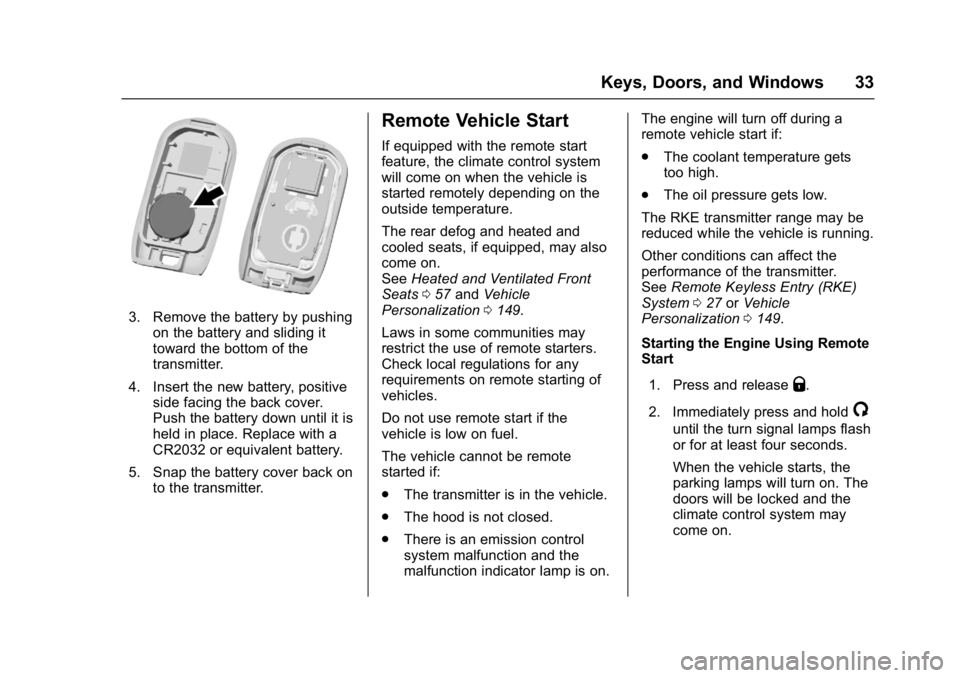
3. Remove the battery by pushingon the battery and sliding it
toward the bottom of the
transmitter.
4. Insert the new battery, positive side facing the back cover.
Push the battery down until it is
held in place. Replace with a
CR2032 or equivalent battery.
5. Snap the battery cover back on to the transmitter.
Remote Vehicle Start
If equipped with the remote start
feature, the climate control system
will come on when the vehicle is
started remotely depending on the
outside temperature.
The rear defog and heated and
cooled seats, if equipped, may also
come on.
See Heated and Ventilated Front
Seats 057 and Vehicle
Personalization 0149.
Laws in some communities may
restrict the use of remote starters.
Check local regulations for any
requirements on remote starting of
vehicles.
Do not use remote start if the
vehicle is low on fuel.
The vehicle cannot be remote
started if:
. The transmitter is in the vehicle.
. The hood is not closed.
. There is an emission control
system malfunction and the
malfunction indicator lamp is on. The engine will turn off during a
remote vehicle start if:
.
The coolant temperature gets
too high.
. The oil pressure gets low.
The RKE transmitter range may be
reduced while the vehicle is running.
Other conditions can affect the
performance of the transmitter.
See Remote Keyless Entry (RKE)
System 027 orVehicle
Personalization 0149.
Starting the Engine Using Remote
Start
1. Press and release
Q.
2. Immediately press and hold
/
until the turn signal lamps flash
or for at least four seconds.
When the vehicle starts, the
parking lamps will turn on. The
doors will be locked and the
climate control system may
come on.
Page 41 of 366
Buick Envision Owner Manual (GMNA-Localizing-U.S./Canada/Mexico-
10122659) - 2017 - crc - 11/16/16
40 Keys, Doors, and Windows
DIC messages and make sure the
liftgate is closed and latched before
driving.
Falling Liftgate Detection
The power liftgate will automatically
close if the support strut has lost
pressure. See your dealer for
service before using the power
liftgate.
Obstacle Detection Features
If the liftgate encounters an obstacle
during a power open or close cycle,
a warning chime will sound and the
liftgate will automatically reverse
direction and move a short distance
away from the obstacle. After
removing the obstruction, the power
liftgate operation can be used again.
If the liftgate encounters multiple
obstacles on the same power cycle,
the power function will deactivate.
After removing the obstructions,
manually close the liftgate which will
allow normal power operation
functions to resume.
If the vehicle is locked while the
liftgate is closing, and an obstacle is
encountered that prevents theliftgate from completely closing, the
horn will sound as an alert that the
liftgate did not close.
Pinch sensors are on the side
edges of the liftgate. If an object is
caught between the liftgate and the
vehicle and presses against this
sensor, the liftgate will reverse
direction and open fully. The liftgate
will remain open until it is activated
again or closed manually.Setting the 3/4 Mode
To change the position the liftgate
stops at when opening:
1. Select MAX or 3/4 mode and power open the liftgate.
2. Stop the liftgate movement at the desired height by pressing
any liftgate switch. Manually
adjust the liftgate position if
needed.
3. Press and hold
lnext to the
pull cup on the outside of the
liftgate until the turn signals
flash and a beep sounds. This
indicates the setting has been
recorded. The liftgate cannot be set below a
minimum programmable height.
If there is no light flash or sound,
then the height adjustment may be
too low.
Manual Operation
Select OFF to manually operate the
liftgate. See
“Manual Liftgate” at the
beginning of this section.
Caution
Attempting to move the liftgate
too quickly and with excessive
force may result in damage to the
vehicle.
Operate the liftgate manually with a
smooth motion and moderate
speed. The system includes a
feature which limits the manual
closing speed to protect the
components.
Page 44 of 366
Buick Envision Owner Manual (GMNA-Localizing-U.S./Canada/Mexico-
10122659) - 2017 - crc - 11/16/16
Keys, Doors, and Windows 43
The vehicle alarm system will not
arm if the doors are locked with
the key.
If the driver door is opened without
first unlocking with the RKE
transmitter, the horn will chirp and
the lights will flash to indicate
pre-alarm. If the vehicle is not
started, or the door is not unlocked
by pressing
Kon the RKE
transmitter during the 10-second
pre-alarm, the alarm will be
activated.
The aIarm will also be activated if a
door, the hood, or the liftgate is
opened without first disarming the
system. When the alarm is
activated, the turn signals will flash
and the horn will sound for about
30 seconds. The alarm system will
then re-arm to monitor for the next
unauthorized event.
Disarming the Alarm System
To disarm the alarm system or turn
off the alarm if it has been activated:
. Press
Kon the RKE transmitter. .
Unlock the vehicle using the
Keyless Access system.
. Start the vehicle.
To avoid setting off the alarm by
accident:
. Lock the vehicle after all
occupants have exited.
. Always unlock the vehicle with
the RKE transmitter, or use the
Keyless Access system.
Unlocking the driver door with the
key will not disarm the system or
turn off the alarm.
How to Detect a Tamper
Condition
IfKis pressed on the RKE
transmitter and the horn chirps and
the lights flash three times, an alarm
occurred previously while the alarm
system was armed.
If the alarm has been activated, a
message will appear on the DIC.
See Security Messages 0146.
Immobilizer
See Radio Frequency Statement
0 340.
Immobilizer Operation
This vehicle has a passive
theft-deterrent system.
The system does not have to be
manually armed or disarmed.
The vehicle is automatically
immobilized when the transmitter
leaves the vehicle.
The immobilization system is
disarmed when the ignition button is
pushed in and a valid transmitter is
found in the vehicle.
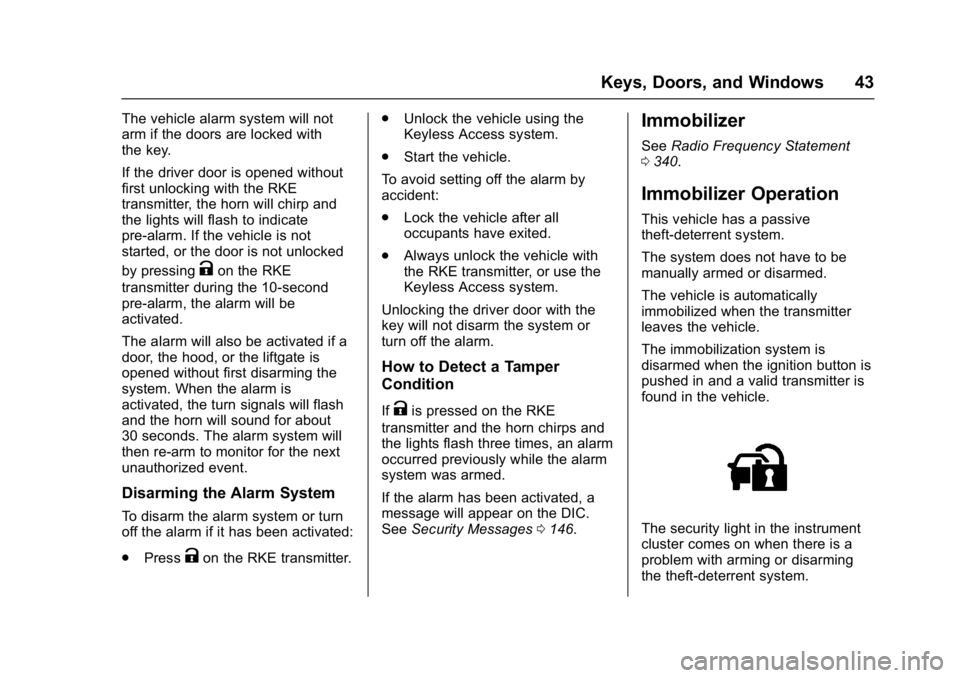
The security light in the instrument
cluster comes on when there is a
problem with arming or disarming
the theft-deterrent system.