ABS BUICK ENVISION 2018 User Guide
[x] Cancel search | Manufacturer: BUICK, Model Year: 2018, Model line: ENVISION, Model: BUICK ENVISION 2018Pages: 365, PDF Size: 5.56 MB
Page 197 of 365
Buick Envision Owner Manual (GMNA-Localizing-U.S./Canada/Mexico-
11434432) - 2018 - CRC - 10/25/17
196 Driving and Operating
The vehicle may automatically apply
the EPB in some situations when
the vehicle is not moving. This is
normal, and is done to periodically
check the correct operation of the
EPB system.
If the EPB fails to apply, the rear
wheels should be blocked to
prevent vehicle movement.
EPB Release
To release the EPB:1. Turn the ignition on or to ACC/ ACCESSORY.
2. Apply and hold the brake pedal.
3. Push down momentarily on the EPB switch.
The EPB is released when the red
parking brake status light is off.
If the amber parking brake warning
light is on, release the EPB by
pushing down on the EPB switch and holding it down. Continue to
hold the switch until the red parking
brake status light is off. If either light
stays on after release is attempted,
see your dealer.
Caution
Driving with the parking brake on
can overheat the brake system
and cause premature wear or
damage to brake system parts.
Make sure that the parking brake
is fully released and the brake
warning light is off before driving.
Automatic EPB Release
The EPB will automatically release if
the vehicle is running, placed into
gear, and an attempt is made to
drive away. Avoid rapid acceleration
when the EPB is applied, to
preserve brake lining life.
Brake Assist
The Brake Assist feature is
designed to assist the driver in
stopping or decreasing vehicle
speed in emergency driving
conditions. This feature uses the
stability system hydraulic brake
control module to supplement the
power brake system under
conditions where the driver has
quickly and forcefully applied the
brake pedal in an attempt to quickly
stop or slow down the vehicle. The
stability system hydraulic brake
control module increases brake
pressure at each corner of the
vehicle until the ABS activates.
Minor brake pedal pulsation or
pedal movement during this time is
normal and the driver should
continue to apply the brake pedal as
the driving situation dictates. The
Brake Assist feature will
automatically disengage when the
brake pedal is released or brake
pedal pressure is quickly
decreased.
Page 230 of 365
Buick Envision Owner Manual (GMNA-Localizing-U.S./Canada/Mexico-
11434432) - 2018 - CRC - 10/25/17
Driving and Operating 229
turning the engine off. If the
overheat warning comes on, see
Engine Overheating0250.
Parking on Hills
{Warning
Parking the vehicle on a hill with
the trailer attached can be
dangerous. If something goes
wrong, the rig could start to move.
People can be injured, and both
the vehicle and the trailer can be
damaged. When possible, always
park the rig on a flat surface.
If parking the rig on a hill: 1. Press the brake pedal, but do not shift into P (Park) yet. Turn
the wheels into the curb if
facing downhill or into traffic if
facing uphill.
2. Have someone place chocks under the trailer wheels. 3. When the wheel chocks are in
place, release the brake pedal
until the chocks absorb
the load.
4. Reapply the brake pedal. Then apply the parking brake and
shift into P (Park).
5. Release the brake pedal.
Leaving After Parking on a Hill
1. Apply and hold the brake pedal while you:
1.1. Start the engine.
1.2. Shift into a gear.
1.3. Release the parking brake.
2. Let up on the brake pedal.
3. Drive slowly until the trailer is clear of the chocks.
4. Stop and have someone pick up and store the chocks.
Maintenance When Trailer
Towing
The vehicle needs service more
often when pulling a trailer. See the
Maintenance Schedule 0312.
Things that are especially important
in trailer operation are automatic
transmission fluid, engine oil, axle
lubricant, belts, cooling system, and
brake system. Inspect these before
and during the trip.
Check periodically to see that all
hitch nuts and bolts are tight.
Engine Cooling When Trailer
Towing
The cooling system may temporarily
overheat during severe operating
conditions. See Engine Overheating
0 250.
Page 255 of 365
Buick Envision Owner Manual (GMNA-Localizing-U.S./Canada/Mexico-
11434432) - 2018 - CRC - 10/25/17
254 Vehicle Care
.A fluid leak in the brake
hydraulic system. Have the
brake hydraulic system fixed.
With a leak, the brakes will not
work well.
Always clean the brake fluid
reservoir cap and the area around
the cap before removing it.
Do not top off the brake fluid.
Adding fluid does not correct a leak.
If fluid is added when the linings are
worn, there will be too much fluid
when new brake linings are
installed. Add or remove fluid, as
necessary, only when work is done
on the brake hydraulic system.
{Warning
If too much brake fluid is added, it
can spill on the engine and burn,
if the engine is hot enough. You
or others could be burned, and
the vehicle could be damaged.
Add brake fluid only when work is
done on the brake hydraulic
system. When the brake fluid falls to a low
level, the brake warning light comes
on. See
Brake System Warning
Light 0127.
Brake fluid absorbs water over time
which degrades the effectiveness of
the brake fluid. Replace brake fluid
at the specified intervals to prevent
increased stopping distance. See
Maintenance Schedule 0312.
What to Add
Use only GM approved DOT 4
brake fluid from a clean, sealed
container. See Recommended
Fluids and Lubricants 0320.
{Warning
The wrong or contaminated brake
fluid could result in damage to the
brake system. This could result in
the loss of braking leading to a
possible injury. Always use the
proper GM approved brake fluid.
Caution
If brake fluid is spilled on the
vehicle's painted surfaces, the
paint finish can be damaged.
Immediately wash off any painted
surface.
Battery - North America
The original equipment battery is
maintenance free. Do not remove
the cap and do not add fluid.
Refer to the replacement number
shown on the original battery label
when a new battery is needed. See
Engine Compartment Overview
0238 for battery location.
The vehicle has an Absorbed Glass
Mat (AGM) 12-volt battery.
Installation of a standard 12-volt
battery will result in reduced 12-volt
battery life.
When using a 12-volt battery
charger on the 12-volt AGM battery,
some chargers have an AGM
battery setting on the charger.
If available, use the AGM setting on
Page 264 of 365
Buick Envision Owner Manual (GMNA-Localizing-U.S./Canada/Mexico-
11434432) - 2018 - CRC - 10/25/17
Vehicle Care 263
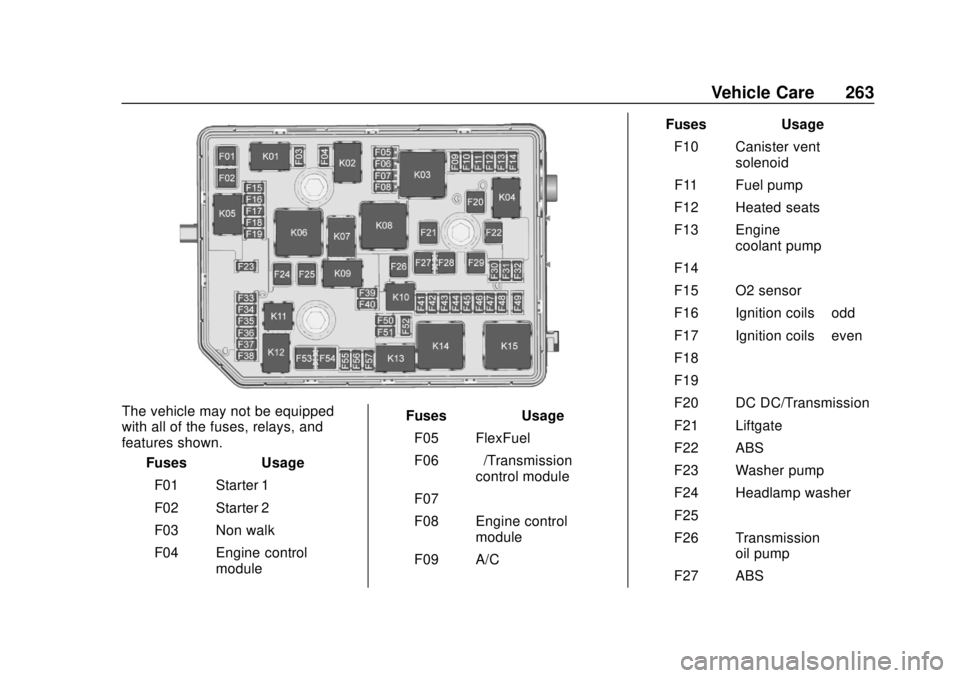
The vehicle may not be equipped
with all of the fuses, relays, and
features shown.Fuses Usage
F01 Starter 1
F02 Starter 2
F03 Non walk
F04 Engine control module Fuses Usage
F05 FlexFuel
F06 –/Transmission
control module
F07 –
F08 Engine control module
F09 A/C Fuses Usage
F10 Canister vent solenoid
F11 Fuel pump
F12 Heated seats
F13 Engine coolant pump
F14 –
F15 O2 sensor
F16 Ignition coils –odd
F17 Ignition coils –even
F18 –
F19 –
F20 DC DC/Transmission
F21 Liftgate
F22 ABS
F23 Washer pump
F24 Headlamp washer
F25 –
F26 Transmission oil pump
F27 ABS
Page 266 of 365

Buick Envision Owner Manual (GMNA-Localizing-U.S./Canada/Mexico-
11434432) - 2018 - CRC - 10/25/17
Vehicle Care 265
Circuit
Breakers Usage
K14 Run/Crank
K15 Rear window/Mirror defogger
Instrument Panel Fuse
Block
The instrument panel fuse block is
in the glove box. To access the
fuses, open the fuse panel door
from the passenger side by pulling
it out. To reinstall the door, insert the tabs
on the top of the door into the
console first, then push the door
back into its original location.
The vehicle may not be equipped
with all of the fuses, relays, and
features shown.
Fuses
Usage
F1 –
F2 Front HVAC blower
F3 Power seat
F4 Lighter (China only)
F5 – Fuses
Usage
F6 Front power windows
F7 –
F8 Accessory power outlet
F9 Body control module 8
F10 Rear power windows F11 –
F12 Sunroof
F13 Front heated seats
F14 Exterior rearview mirror
F15 Body control module 3
F16 –
F17 Body control module 6
F18 Body control module 7
F19 Data link connector
F20 SDM
Page 294 of 365

Buick Envision Owner Manual (GMNA-Localizing-U.S./Canada/Mexico-
11434432) - 2018 - CRC - 10/25/17
Vehicle Care 293
3. Place the flat tire, lying flat, inthe rear storage compartment.
4. Attach one end of the strap to a cargo tie-down in the rear of
the vehicle.
5. Route the strap through thewheel, as shown.
6. Attach the other end of the strap to the other cargo
tie-down in the rear of the
vehicle.
7. Tighten the strap. The compact spare is for temporary
use only. Replace the compact
spare tire with a full-size tire as
soon as you can.
Compact Spare Tire
{Warning
Driving with more than one
compact spare tire at a time could
result in loss of braking and
handling. This could lead to a
crash and you or others could be
injured. Use only one compact
spare tire at a time.
If this vehicle has a compact spare
tire, it was fully inflated when new;
however, it can lose air over time.
Check the inflation pressure
regularly. It should be 420 kPa
(60 psi). Stop as soon as possible and check
that the spare tire is correctly
inflated after being installed on the
vehicle. The compact spare tire is
designed for temporary use only.
The vehicle will perform differently
with the spare tire installed and it is
recommended that the vehicle
speed be limited to 80 km/h
(50 mph). To conserve the tread of
the spare tire, have the standard tire
repaired or replaced as soon as
convenient and return the spare tire
to the storage area.
When using a compact spare tire,
the AWD (if equipped), ABS, and
Traction Control systems may
engage until the spare tire is
recognized by the vehicle,
especially on slippery roads. Adjust
driving to reduce possible
wheel slip.
Page 302 of 365
Buick Envision Owner Manual (GMNA-Localizing-U.S./Canada/Mexico-
11434432) - 2018 - CRC - 10/25/17
Vehicle Care 301
Appearance Care
Exterior Care
Locks
Locks are lubricated at the factory.
Use a de-icing agent only when
absolutely necessary, and have the
locks greased after using. See
Recommended Fluids and
Lubricants0320.
Washing the Vehicle
To preserve the vehicle's finish,
wash it often and out of direct
sunlight.
Caution
Do not use petroleum-based,
acidic, or abrasive cleaning
agents as they can damage the
vehicle's paint, metal, or plastic
parts. If damage occurs, it would
not be covered by the vehicle
warranty. Approved cleaning
products can be obtained from
(Continued)
Caution (Continued)
your dealer. Follow all
manufacturer directions regarding
correct product usage, necessary
safety precautions, and
appropriate disposal of any
vehicle care product.
Caution
Avoid using high-pressure
washes closer than 30 cm (12 in)
to the surface of the vehicle. Use
of power washers exceeding
8,274 kPa (1,200 psi) can result
in damage or removal of paint
and decals.
Caution
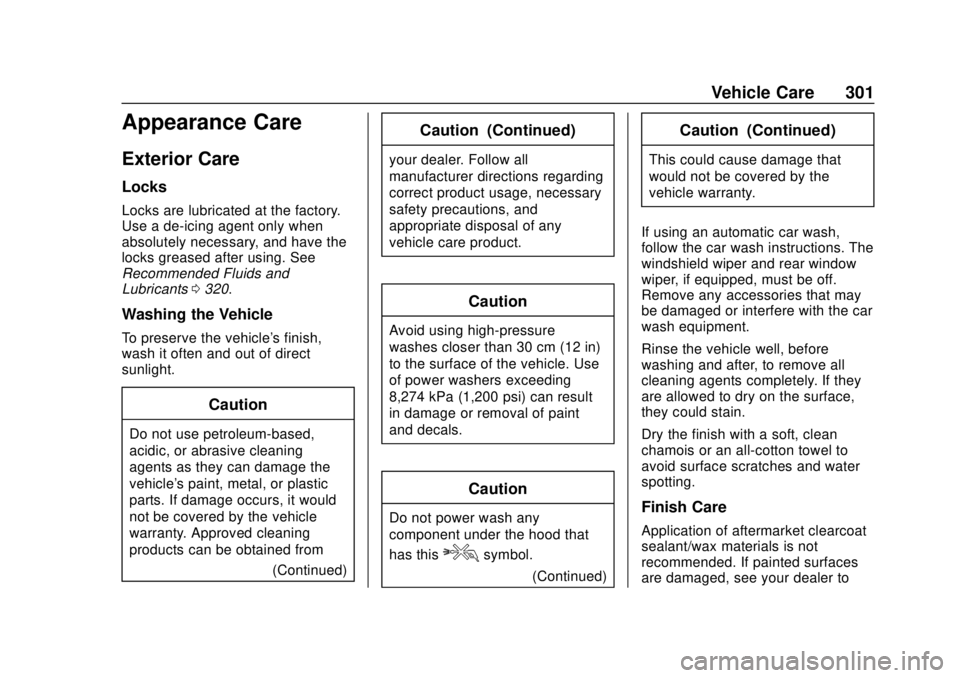
Do not power wash any
component under the hood that
has this
esymbol.
(Continued)
Caution (Continued)
This could cause damage that
would not be covered by the
vehicle warranty.
If using an automatic car wash,
follow the car wash instructions. The
windshield wiper and rear window
wiper, if equipped, must be off.
Remove any accessories that may
be damaged or interfere with the car
wash equipment.
Rinse the vehicle well, before
washing and after, to remove all
cleaning agents completely. If they
are allowed to dry on the surface,
they could stain.
Dry the finish with a soft, clean
chamois or an all-cotton towel to
avoid surface scratches and water
spotting.
Finish Care
Application of aftermarket clearcoat
sealant/wax materials is not
recommended. If painted surfaces
are damaged, see your dealer to
Page 354 of 365

Buick Envision Owner Manual (GMNA-Localizing-U.S./Canada/Mexico-
11434432) - 2018 - CRC - 10/25/17
Index 353
IndexA
About Driving the Vehicle . . . . . . . . . 3
Accessories andModifications . . . . . . . . . . . . . . . . . . 236
Accessory Power . . . . . . . . . . . . . . . 188
Adaptive Cruise Control . . . . . . . . 201
Adaptive Forward
Lighting (AFL) . . . . . . . . . . . . . . . . . 157
Adaptive Forward Lighting (AFL) Light . . . . . . . . . . . . . . . . . . . . 133
Add-On Electrical Equipment . . . 233
Additional Information OnStar . . . . . . . . . . . . . . . . . . . . . . . 347
Additional Maintenance
and Care . . . . . . . . . . . . . . . . . . . . . . 317
Adjustments Lumbar, Front Seats . . . . . . . . . . . . 56
Thigh Support . . . . . . . . . . . . . . . . . . 56
Air Cleaner/Filter, Engine . . . . . . . 245
Air Conditioning . . . . . . . . . . . 163, 166
Air Filter, Passenger
Compartment . . . . . . . . . . . . . . . . . 168
Air Vents . . . . . . . . . . . . . . . . . . . . . . . 168
Airbag System Check . . . . . . . . . . . . . . . . . . . . . . . . . . 83
How Does an AirbagRestrain? . . . . . . . . . . . . . . . . . . . . . 76
Passenger Sensing System . . . . 78 Airbag System (cont'd)
What Makes an Airbag
Inflate? . . . . . . . . . . . . . . . . . . . . . . . . 76
What Will You See after an
Airbag Inflates? . . . . . . . . . . . . . . . 77
When Should an Airbag Inflate? . . . . . . . . . . . . . . . . . . . . . . . . 75
Where Are the Airbags? . . . . . . . . 73
Airbags
Adding Equipment to theVehicle . . . . . . . . . . . . . . . . . . . . . . . . 83
Passenger Status Indicator . . . 124
Readiness Light . . . . . . . . . . . . . . 124
Servicing Airbag-Equipped Vehicles . . . . . . . . . . . . . . . . . . . . . . . 82
System Check . . . . . . . . . . . . . . . . . . 72
Alarm Vehicle Security . . . . . . . . . . . . . . . . 45
Alert Lane Change . . . . . . . . . . . . . . . . . 218
Side Blind Zone (SBZA) . . . . . . 218
All-Season Tires . . . . . . . . . . . . . . . . 268
All-Wheel Drive . . . . . . . . . . . . 194, 255
Antilock Brake System (ABS) . . . 194 Warning Light . . . . . . . . . . . . . . . . . 128
Appearance Care Exterior . . . . . . . . . . . . . . . . . . . . . . . 301
Interior . . . . . . . . . . . . . . . . . . . . . . . . 305
Page 359 of 365

Buick Envision Owner Manual (GMNA-Localizing-U.S./Canada/Mexico-
11434432) - 2018 - CRC - 10/25/17
358 Index
I
Ignition Positions . . . . . . . . . . . . . . . 183
Immobilizer . . . . . . . . . . . . . . . . . . . . . . 46
IndicatorVehicle Ahead . . . . . . . . . . . . . . . . 129
Infants and Young Children, Restraints . . . . . . . . . . . . . . . . . . . . . . 86
Infotainment . . . . . . . . . . . . . . . . . . . . 162
Infotainment System . . . . . . . . . . . . 340
Instrument Cluster . . . . . . . . . . . . . . 117
Instrument Panel Overview . . . . . . . 6
Interior Rearview Mirrors . . . . . . . . . 48
Introduction . . . . . . . . . . . . . . . . . . . . . . . 2
J
Jump Starting - North America . . . . . . . . . . . . . . . . . . . . . . . 294
K
Keyless EntryRemote (RKE) System . . . . . . . . . 28
Keys . . . . . . . . . . . . . . . . . . . . . . . . . . . . . 27
L
Labeling, Tire Sidewall . . . . . . . . . . 269
Lamps Courtesy . . . . . . . . . . . . . . . . . . . . . . 159
Daytime Running (DRL) . . . . . . 156
Dome . . . . . . . . . . . . . . . . . . . . . . . . . 159 Lamps (cont'd)
Exterior Controls . . . . . . . . . . . . . . 154
Exterior Lamps Off
Reminder . . . . . . . . . . . . . . . . . . . 156
Exterior Lighting Battery Saver . . . . . . . . . . . . . . . . . . . . . . . 161
License Plate . . . . . . . . . . . . . . . . . 261
Malfunction Indicator (Check Engine) . . . . . . . . . . . . . 125
On Reminder . . . . . . . . . . . . . . . . . 134
Reading . . . . . . . . . . . . . . . . . . . . . . 160
Lane Change Alert (LCA) . . . . . . . 218
Lane Departure Warning (LDW) . . . . . . . . . . . . . . . . 220
Lane Keep Assist (LKA) . . . . . . . . 221
Lane Keep Assist Light . . . . . . . . . 129
Lap-Shoulder Belt . . . . . . . . . . . . . . . 67
LATCH System Replacing Parts after aCrash . . . . . . . . . . . . . . . . . . . . . . . . . 97
LATCH, Lower Anchors and Tethers for Children . . . . . . . . . . . . 91
Leveling Control
Headlamp . . . . . . . . . . . . . . . . . . . . 158
Liftgate . . . . . . . . . . . . . . . . . . . . . . . . . . 40
Lighting Adaptive Forward . . . . . . . . . . . . . 157
Entry . . . . . . . . . . . . . . . . . . . . . . . . . 160 Lighting (cont'd)
Exit . . . . . . . . . . . . . . . . . . . . . . . . . . . 161
Illumination Control . . . . . . . . . . . 159
Lights
Adaptive Forward Lighting(AFL) Light . . . . . . . . . . . . . . . . . . 133
Airbag Readiness . . . . . . . . . . . . . 124
Antilock Brake System (ABS) Warning . . . . . . . . . . . . . . 128
Brake System Warning . . . . . . . 127
Charging System . . . . . . . . . . . . . 125
Check Engine (Malfunction Indicator) . . . . . . . . . . . . . . . . . . . . 125
Cruise Control . . . . . . . . . . . . . . . . 134
Door Ajar . . . . . . . . . . . . . . . . . . . . . 134
Electric Parking Brake . . . . . . . . 128
Engine Coolant Temperature Warning . . . . . . . 131
Engine Oil Pressure . . . . . . . . . . 132
Flash-to-Pass . . . . . . . . . . . . . . . . . 156
Front Fog Lamp . . . . . . . . . . . . . . 133
High-Beam On . . . . . . . . . . . . . . . . 133
High/Low Beam Changer . . . . . 156
Lane Keep Assist . . . . . . . . . . . . . 129
Low Fuel Warning . . . . . . . . . . . . 132
Seat Belt Reminders . . . . . . . . . . 123
Security . . . . . . . . . . . . . . . . . . . . . . 132