Rear door lock BUICK ENVISION 2018 Owner's Manual
[x] Cancel search | Manufacturer: BUICK, Model Year: 2018, Model line: ENVISION, Model: BUICK ENVISION 2018Pages: 365, PDF Size: 5.56 MB
Page 6 of 365
Buick Envision Owner Manual (GMNA-Localizing-U.S./Canada/Mexico-
11434432) - 2018 - CRC - 10/25/17
In Brief 5
In Brief
Instrument Panel
Instrument Panel Overview . . . . . . 6
Initial Drive Information
Initial Drive Information . . . . . . . . . . 8
Stop/Start System . . . . . . . . . . . . . . . 8
Remote Keyless Entry (RKE)System . . . . . . . . . . . . . . . . . . . . . . . . 8
Remote Vehicle Start . . . . . . . . . . . 9
Door Locks . . . . . . . . . . . . . . . . . . . . . 9
Liftgate . . . . . . . . . . . . . . . . . . . . . . . . 10
Windows . . . . . . . . . . . . . . . . . . . . . . . 10
Seat Adjustment . . . . . . . . . . . . . . . 11
Memory Features . . . . . . . . . . . . . . 12
Heated and Ventilated Seats . . . 12
Head Restraint Adjustment . . . . 13
Seat Belts . . . . . . . . . . . . . . . . . . . . . 13
Passenger Sensing System . . . 13
Mirror Adjustment . . . . . . . . . . . . . . 14
Steering Wheel Adjustment . . . . 15
Interior Lighting . . . . . . . . . . . . . . . . 15
Exterior Lighting . . . . . . . . . . . . . . . 16
Windshield Wiper/Washer . . . . . . 16
Climate Controls . . . . . . . . . . . . . . . 18
Transmission . . . . . . . . . . . . . . . . . . 18
Vehicle Features
Infotainment System . . . . . . . . . . . 19
Steering Wheel Controls . . . . . . . 19
Cruise Control . . . . . . . . . . . . . . . . . 19
Driver Information Center (DIC) . . . . . . . . . . . . . . . . . 20
Forward Collision Alert (FCA) System . . . . . . . . . . . . . . . . . . . . . . . 20
Forward Automatic Braking (FAB) . . . . . . . . . . . . . . . . 20
Lane Keep Assist (LKA) . . . . . . . 20
Lane Change Alert (LCA) . . . . . . 21
Surround Vision . . . . . . . . . . . . . . . 21
Rear Vision Camera (RVC) . . . . 21
Rear Cross Traffic Alert (RCTA) System . . . . . . . . . . . . . . . . . . . . . . . 21
Parking Assist . . . . . . . . . . . . . . . . . 21
Automatic Parking Assist (APA) . . . . . . . . . . . . . . . . . . 22
Power Outlets . . . . . . . . . . . . . . . . . 22
Universal Remote System . . . . . 22
Sunroof . . . . . . . . . . . . . . . . . . . . . . . . 22
Performance and Maintenance
Traction Control/Electronic Stability Control . . . . . . . . . . . . . . 23
Tire Pressure Monitor . . . . . . . . . . 24
Fuel (2.5L Engine) . . . . . . . . . . . . . 24
Fuel (2.0L Engine) . . . . . . . . . . . . . 24
E85 or FlexFuel . . . . . . . . . . . . . . . . 25 Engine Oil Life System . . . . . . . . 25
Driving for Better Fuel
Economy . . . . . . . . . . . . . . . . . . . . . 25
Roadside Assistance Program . . . . . . . . . . . . . . . . . . . . . . 26
Page 16 of 365
Buick Envision Owner Manual (GMNA-Localizing-U.S./Canada/Mexico-
11434432) - 2018 - CRC - 10/25/17
In Brief 15
Steering Wheel
Adjustment
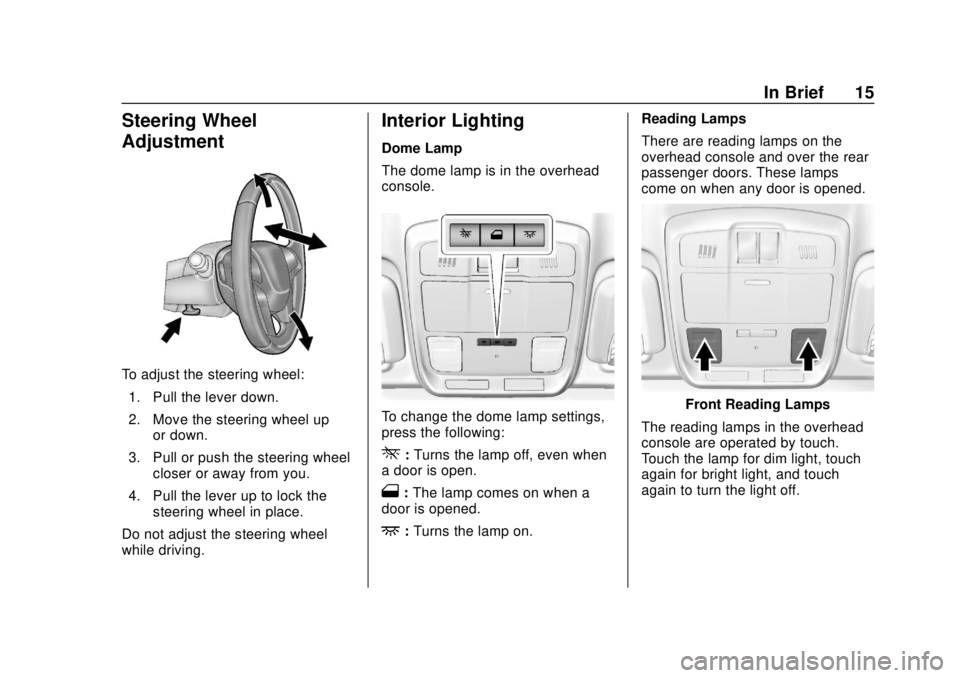
To adjust the steering wheel:1. Pull the lever down.
2. Move the steering wheel up or down.
3. Pull or push the steering wheel closer or away from you.
4. Pull the lever up to lock the steering wheel in place.
Do not adjust the steering wheel
while driving.
Interior Lighting
Dome Lamp
The dome lamp is in the overhead
console.
To change the dome lamp settings,
press the following:
*: Turns the lamp off, even when
a door is open.
1: The lamp comes on when a
door is opened.
+: Turns the lamp on. Reading Lamps
There are reading lamps on the
overhead console and over the rear
passenger doors. These lamps
come on when any door is opened.
Front Reading Lamps
The reading lamps in the overhead
console are operated by touch.
Touch the lamp for dim light, touch
again for bright light, and touch
again to turn the light off.
Page 28 of 365
Buick Envision Owner Manual (GMNA-Localizing-U.S./Canada/Mexico-
11434432) - 2018 - CRC - 10/25/17
Keys, Doors, and Windows 27
Keys, Doors, and
Windows
Keys and Locks
Keys . . . . . . . . . . . . . . . . . . . . . . . . . . . 27
Remote Keyless Entry (RKE)System . . . . . . . . . . . . . . . . . . . . . . . 28
Remote Keyless Entry (RKE) System Operation . . . . . . . . . . . . 28
Remote Vehicle Start . . . . . . . . . . 34
Door Locks . . . . . . . . . . . . . . . . . . . . 36
Power Door Locks . . . . . . . . . . . . . 38
Delayed Locking . . . . . . . . . . . . . . . 38
Automatic Door Locks . . . . . . . . . 38
Lockout Protection . . . . . . . . . . . . . 38
Safety Locks . . . . . . . . . . . . . . . . . . . 39
Doors
Liftgate . . . . . . . . . . . . . . . . . . . . . . . . 40
Vehicle Security
Vehicle Security . . . . . . . . . . . . . . . . 45
Vehicle Alarm System . . . . . . . . . 45
Immobilizer . . . . . . . . . . . . . . . . . . . . 46
Immobilizer Operation . . . . . . . . . 46
Exterior Mirrors
Convex Mirrors . . . . . . . . . . . . . . . . 47
Power Mirrors . . . . . . . . . . . . . . . . . . 47
Folding Mirrors . . . . . . . . . . . . . . . . . 48
Heated Mirrors . . . . . . . . . . . . . . . . . 48
Automatic Dimming Mirror . . . . . 48
Reverse Tilt Mirrors . . . . . . . . . . . . 48
Interior Mirrors
Interior Rearview Mirrors . . . . . . . 48
Automatic Dimming Rearview Mirror . . . . . . . . . . . . . . . . . . . . . . . . . 48
Windows
Windows . . . . . . . . . . . . . . . . . . . . . . . 49
Power Windows . . . . . . . . . . . . . . . 49
Sun Visors . . . . . . . . . . . . . . . . . . . . . 51
Roof
Sunroof . . . . . . . . . . . . . . . . . . . . . . . . 51
Keys and Locks
Keys
{Warning
Leaving children in a vehicle with
a Remote Keyless Entry (RKE)
transmitter is dangerous and
children or others could be
seriously injured or killed. They
could operate the power windows
or other controls or make the
vehicle move. The windows will
function with the RKE transmitter
in the vehicle, and children or
others could be caught in the path
of a closing window. Do not leave
children in a vehicle with an RKE
transmitter.
Page 40 of 365

Buick Envision Owner Manual (GMNA-Localizing-U.S./Canada/Mexico-
11434432) - 2018 - CRC - 10/25/17
Keys, Doors, and Windows 39
driver door open, all the doors will
lock and only the driver door will
unlock.
If the vehicle is off and locking is
requested while a door is open,
when all doors are closed the
vehicle will check for RKE
transmitters inside. If an RKE
transmitter is detected and the
number of RKE transmitters inside
has not reduced, the driver door will
unlock and the horn will chirp three
times.
Lockout Protection can be manually
overridden with the driver door open
by pressing and holding
Qon the
power door lock switch.
Unlocked Door Anti-Lockout
If Unlocked Door Anti-Lockout is
turned on and the vehicle is off, the
driver door is open, and locking is
requested, all the doors will lock and
the driver door will remain open. Press the button again to lock the
driver door. The Unlocked Door
Anti-Lockout feature can be turned
on or off. See
Vehicle
Personalization 0143.
Safety Locks
The rear door safety locks prevent
passengers from opening the rear
doors from inside the vehicle. Press
Z
{to activate the rear door
safety locks. The indicator light
comes on when activated.
Press
Z {again to deactivate the
safety locks.
If an inside rear door handle is
being pulled at the same time a
safety lock is deactivated, only that
door will remain locked and the
indicator light may flash. Release
the handle, then press the safety
lock twice to deactivate the safety
locks.
The rear window lockout is also
enabled. See Power Windows 049.
Page 44 of 365

Buick Envision Owner Manual (GMNA-Localizing-U.S./Canada/Mexico-
11434432) - 2018 - CRC - 10/25/17
Keys, Doors, and Windows 43
liftgate operation can be used again.
If the liftgate encounters multiple
obstacles on the same power cycle,
the power function will deactivate.
After removing the obstructions,
manually close the liftgate which will
allow normal power operation
functions to resume.
If the vehicle is locked while the
liftgate is closing, and an obstacle is
encountered that prevents the
liftgate from completely closing, the
horn will sound as an alert that the
liftgate did not close.
Pinch sensors are on the side
edges of the liftgate. If an object is
caught between the liftgate and the
vehicle and presses against this
sensor, the liftgate will reverse
direction and open fully. The liftgate
will remain open until it is activated
again or closed manually.
Setting the 3/4 Mode
To change the position the liftgate
stops at when opening:1. Select MAX or 3/4 mode and power open the liftgate. 2. Stop the liftgate movement at
the desired height by pressing
any liftgate switch. Manually
adjust the liftgate position if
needed.
3. Press and hold
8next to the
pull cup on the outside of the
liftgate until the turn signals
flash and a beep sounds. This
indicates the setting has been
recorded.
The liftgate cannot be set below a
minimum programmable height.
If there is no light flash or sound,
then the height adjustment may be
too low.
Manual Operation
Select OFF to manually operate the
liftgate. See “Manual Liftgate” at the
beginning of this section.
Caution
Attempting to move the liftgate
too quickly and with excessive
force may result in damage to the
vehicle. Operate the liftgate manually with a
smooth motion and moderate
speed. The system includes a
feature which limits the manual
closing speed to protect the
components.
Hands-Free Operation
If equipped, the liftgate may be
operated with a kicking motion
under the rear bumper.
The liftgate will not operate if the
RKE transmitter is not within
1 m (3 ft).
The hands-free feature will not work
while the liftgate is moving. To stop
the liftgate while in motion use one
of the liftgate switches.
The hands-free feature can be
customized. See
Vehicle
Personalization 0143. Choose from
the following:
On-Open and Close : The kicking
motion is activated to both open and
close the liftgate.
On-Open Only : The kicking motion
is activated to only open the liftgate.
Page 50 of 365

Buick Envision Owner Manual (GMNA-Localizing-U.S./Canada/Mexico-
11434432) - 2018 - CRC - 10/25/17
Keys, Doors, and Windows 49
Windows
{Warning
Never leave a child, a helpless
adult, or a pet alone in a vehicle,
especially with the windows
closed in warm or hot weather.
They can be overcome by the
extreme heat and suffer
permanent injuries or even death
from heat stroke.
The vehicle aerodynamics are
designed to improve fuel economy
performance. This may result in a
pulsing sound when either rear
window is down and the front
windows are up. To reduce the
sound, open either a front window
or the sunroof, if equipped.
Power Windows
{Warning
Children could be seriously
injured or killed if caught in the
path of a closing window. Never
leave the Remote Keyless Entry
(RKE) transmitter in a vehicle with
children. When there are children
in the rear seat, use the window
lockout switch to prevent
operation of the windows. See
Keys027.Power windows work when the
ignition is on, in ACC/ACCESSORY,
or when Retained Accessory Power
(RAP) is active. See Retained
Accessory Power (RAP) 0188.
Using the window switch, press to
open or pull to close the window.
The windows may be temporarily
disabled if they are used repeatedly
within a short time.
Page 51 of 365

Buick Envision Owner Manual (GMNA-Localizing-U.S./Canada/Mexico-
11434432) - 2018 - CRC - 10/25/17
50 Keys, Doors, and Windows
Window Lockout
This feature stops the rear window
switches from working.
.PressZto engage the rear
window lockout feature. The
indicator light is on when
engaged.
. Press
Zagain to disengage.
This also disables the rear power
door locks. See Safety Locks039.
Window Express Movement
All windows can be opened without
holding the window switch. Press
the switch down fully and quickly
release to express open the
window.
If equipped, pull the window switch
up fully and quickly release to
express close the window.
Briefly press or pull the window
switch in the same direction to stop
that window’s express movement.
Window Automatic Reversal
System
The express-close feature will
reverse window movement if it
comes in contact with an object.
Extreme cold or ice could cause the
window to auto-reverse. The
window will operate normally after
the object or condition is removed.
Automatic Reversal System
Override
{Warning
If automatic reversal system
override is active, the window will
not reverse automatically. You or
others could be injured and the
window could be damaged.
Before using automatic reversal
system override, make sure that
all people and obstructions are
clear of the window path.
When the engine is on, override the
automatic reversal system by pulling
and holding the window switch if
conditions prevent it from closing.
Page 70 of 365

Buick Envision Owner Manual (GMNA-Localizing-U.S./Canada/Mexico-
11434432) - 2018 - CRC - 10/25/17
Seats and Restraints 69
Before a door is closed, be sure the
seat belt is out of the way. If a door
is slammed against a seat belt,
damage can occur to both the seat
belt and the vehicle.
Shoulder Belt Height Adjuster
The vehicle has a shoulder belt
height adjuster for the driver and
front outboard passenger seating
positions.
Adjust the height so the shoulder
portion of the belt is on the shoulder
and not falling off of it. The belt
should be close to, but not
contacting, the neck. Improper
shoulder belt height adjustment
could reduce the effectiveness of
the seat belt in a crash. SeeHow to
Wear Seat Belts Properly 066.
Move the height adjuster up to the
desired position by pushing up on
the height adjuster.
Press the release button to lower
the height adjuster. After the height
adjuster is set to the desired
position, try to move it down without
pressing the release button to make
sure it has locked into position.
Seat Belt Pretensioners
This vehicle has seat belt
pretensioners for the front outboard
occupants. Although the seat belt
pretensioners cannot be seen, they
are part of the seat belt assembly.
They can help tighten the seat belts
during the early stages of a
moderate to severe frontal, near
frontal, or rear crash if the threshold
conditions for pretensioner
activation are met. Seat belt
pretensioners can also help tighten
the seat belts in a side crash or a
rollover event.
Pretensioners work only once. If the
pretensioners activate in a crash,
the pretensioners and probably
other parts of the vehicle's seat belt
system will need to be replaced.
See Replacing Seat Belt System
Parts after a Crash 071.
Do not sit on the outboard seat belt
while entering or exiting the vehicle
or at any time while sitting in the
seat. Sitting on the seat belt can
damage the webbing and hardware.
Page 110 of 365
Buick Envision Owner Manual (GMNA-Localizing-U.S./Canada/Mexico-
11434432) - 2018 - CRC - 10/25/17
Instruments and Controls 109
Instruments and
Controls
Controls
Steering Wheel Adjustment . . . 110
Steering Wheel Controls . . . . . . 110
Heated Steering Wheel . . . . . . . 110
Horn . . . . . . . . . . . . . . . . . . . . . . . . . . 110
Windshield Wiper/Washer . . . . 110
Rear Window Wiper/Washer . . . . . . . . . . . . . . . . . . . . . . 112
Headlamp Washer . . . . . . . . . . . . 113
Compass . . . . . . . . . . . . . . . . . . . . . 113
Clock . . . . . . . . . . . . . . . . . . . . . . . . . 113
Power Outlets . . . . . . . . . . . . . . . . 114
Warning Lights, Gauges, and
Indicators
Warning Lights, Gauges, and Indicators . . . . . . . . . . . . . . . . . . . 116
Instrument Cluster . . . . . . . . . . . . 117
Speedometer . . . . . . . . . . . . . . . . . 120
Odometer . . . . . . . . . . . . . . . . . . . . . 120
Trip Odometer . . . . . . . . . . . . . . . . 120
Tachometer . . . . . . . . . . . . . . . . . . . 120
Fuel Gauge . . . . . . . . . . . . . . . . . . . 121
Engine Coolant Temperature
Gauge . . . . . . . . . . . . . . . . . . . . . . 122 Seat Belt Reminders . . . . . . . . . 123
Airbag Readiness Light . . . . . . . 124
Passenger Airbag Status
Indicator . . . . . . . . . . . . . . . . . . . . 124
Charging System Light . . . . . . . 125
Malfunction Indicator Lamp
(Check Engine Light) . . . . . . . . 125
Brake System Warning Light . . . . . . . . . . . . . . . . . . . . . . . . 127
Electric Parking Brake Light . . . . . . . . . . . . . . . . . . . . . . . . 128
Service Electric Parking Brake Light . . . . . . . . . . . . . . . . . . . . . . . . 128
Antilock Brake System (ABS) Warning Light . . . . . . . . . . . . . . . 128
Lane Keep Assist (LKA) Light . . . . . . . . . . . . . . . . . . . . . . . . 129
Vehicle Ahead Indicator . . . . . . 129
Traction Off Light . . . . . . . . . . . . . 130
StabiliTrak OFF Light . . . . . . . . . 130
Traction Control System (TCS)/ StabiliTrak Light . . . . . . . . . . . . . 130
Engine Coolant Temperature Warning Light . . . . . . . . . . . . . . . 131
Tire Pressure Light . . . . . . . . . . . 131
Engine Oil Pressure Light . . . . 132
Low Fuel Warning Light . . . . . . 132
Security Light . . . . . . . . . . . . . . . . . 132
High-Beam On Light . . . . . . . . . . 133 Adaptive Forward Lighting
(AFL) Light . . . . . . . . . . . . . . . . . . 133
Front Fog Lamp Light . . . . . . . . . 133
Lamps On Reminder . . . . . . . . . 134
Cruise Control Light . . . . . . . . . . 134
Door Ajar Light . . . . . . . . . . . . . . . 134
Information Displays
Driver Information Center (DIC) (Base Level) . . . . . . . . . . . . . . . . 134
Driver Information Center (DIC) (Uplevel) . . . . . . . . . . . . . . . . . . . . 137
Head-Up Display (HUD) . . . . . . 139
Vehicle Messages
Vehicle Messages . . . . . . . . . . . . 142
Engine Power Messages . . . . . 143
Vehicle Speed Messages . . . . . 143
Vehicle Personalization
Vehicle Personalization . . . . . . . 143
Universal Remote System
Universal Remote System . . . . 150
Universal Remote System Programming . . . . . . . . . . . . . . . 150
Universal Remote System Operation . . . . . . . . . . . . . . . . . . . 152
Page 145 of 365
Buick Envision Owner Manual (GMNA-Localizing-U.S./Canada/Mexico-
11434432) - 2018 - CRC - 10/25/17
144 Instruments and Controls
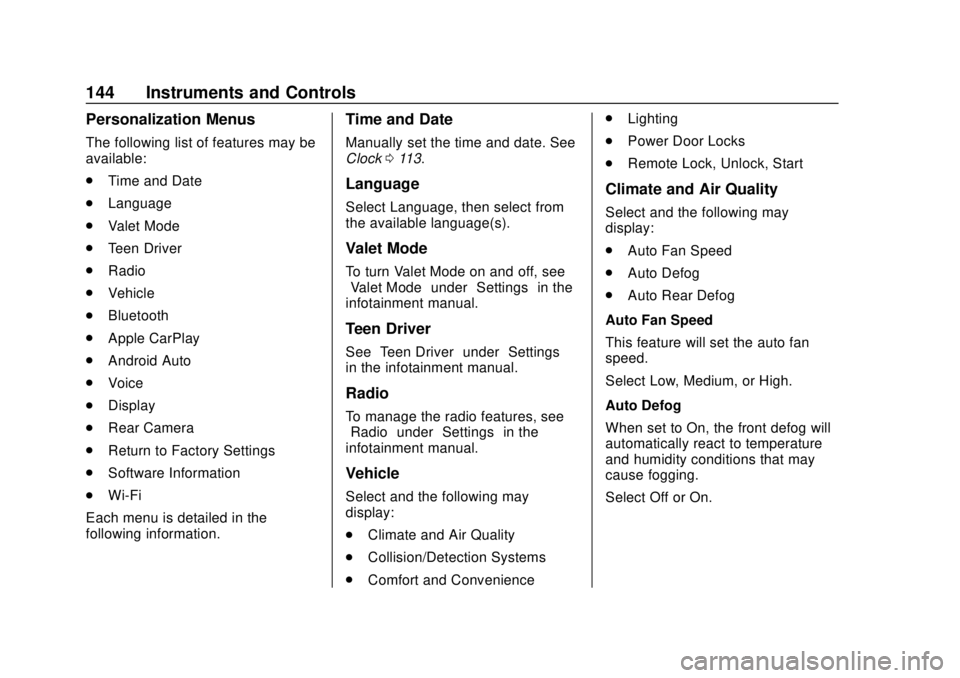
Personalization Menus
The following list of features may be
available:
.Time and Date
. Language
. Valet Mode
. Teen Driver
. Radio
. Vehicle
. Bluetooth
. Apple CarPlay
. Android Auto
. Voice
. Display
. Rear Camera
. Return to Factory Settings
. Software Information
. Wi-Fi
Each menu is detailed in the
following information.
Time and Date
Manually set the time and date. See
Clock 0113.
Language
Select Language, then select from
the available language(s).
Valet Mode
To turn Valet Mode on and off, see
“Valet Mode” under“Settings” in the
infotainment manual.
Teen Driver
See “Teen Driver” under“Settings”
in the infotainment manual.
Radio
To manage the radio features, see
“Radio” under“Settings” in the
infotainment manual.
Vehicle
Select and the following may
display:
. Climate and Air Quality
. Collision/Detection Systems
. Comfort and Convenience .
Lighting
. Power Door Locks
. Remote Lock, Unlock, Start
Climate and Air Quality
Select and the following may
display:
.Auto Fan Speed
. Auto Defog
. Auto Rear Defog
Auto Fan Speed
This feature will set the auto fan
speed.
Select Low, Medium, or High.
Auto Defog
When set to On, the front defog will
automatically react to temperature
and humidity conditions that may
cause fogging.
Select Off or On.