lift gate sensor BUICK ENVISION 2018 Owner's Manual
[x] Cancel search | Manufacturer: BUICK, Model Year: 2018, Model line: ENVISION, Model: BUICK ENVISION 2018Pages: 365, PDF Size: 5.56 MB
Page 44 of 365

Buick Envision Owner Manual (GMNA-Localizing-U.S./Canada/Mexico-
11434432) - 2018 - CRC - 10/25/17
Keys, Doors, and Windows 43
liftgate operation can be used again.
If the liftgate encounters multiple
obstacles on the same power cycle,
the power function will deactivate.
After removing the obstructions,
manually close the liftgate which will
allow normal power operation
functions to resume.
If the vehicle is locked while the
liftgate is closing, and an obstacle is
encountered that prevents the
liftgate from completely closing, the
horn will sound as an alert that the
liftgate did not close.
Pinch sensors are on the side
edges of the liftgate. If an object is
caught between the liftgate and the
vehicle and presses against this
sensor, the liftgate will reverse
direction and open fully. The liftgate
will remain open until it is activated
again or closed manually.
Setting the 3/4 Mode
To change the position the liftgate
stops at when opening:1. Select MAX or 3/4 mode and power open the liftgate. 2. Stop the liftgate movement at
the desired height by pressing
any liftgate switch. Manually
adjust the liftgate position if
needed.
3. Press and hold
8next to the
pull cup on the outside of the
liftgate until the turn signals
flash and a beep sounds. This
indicates the setting has been
recorded.
The liftgate cannot be set below a
minimum programmable height.
If there is no light flash or sound,
then the height adjustment may be
too low.
Manual Operation
Select OFF to manually operate the
liftgate. See “Manual Liftgate” at the
beginning of this section.
Caution
Attempting to move the liftgate
too quickly and with excessive
force may result in damage to the
vehicle. Operate the liftgate manually with a
smooth motion and moderate
speed. The system includes a
feature which limits the manual
closing speed to protect the
components.
Hands-Free Operation
If equipped, the liftgate may be
operated with a kicking motion
under the rear bumper.
The liftgate will not operate if the
RKE transmitter is not within
1 m (3 ft).
The hands-free feature will not work
while the liftgate is moving. To stop
the liftgate while in motion use one
of the liftgate switches.
The hands-free feature can be
customized. See
Vehicle
Personalization 0143. Choose from
the following:
On-Open and Close : The kicking
motion is activated to both open and
close the liftgate.
On-Open Only : The kicking motion
is activated to only open the liftgate.
Page 264 of 365
Buick Envision Owner Manual (GMNA-Localizing-U.S./Canada/Mexico-
11434432) - 2018 - CRC - 10/25/17
Vehicle Care 263
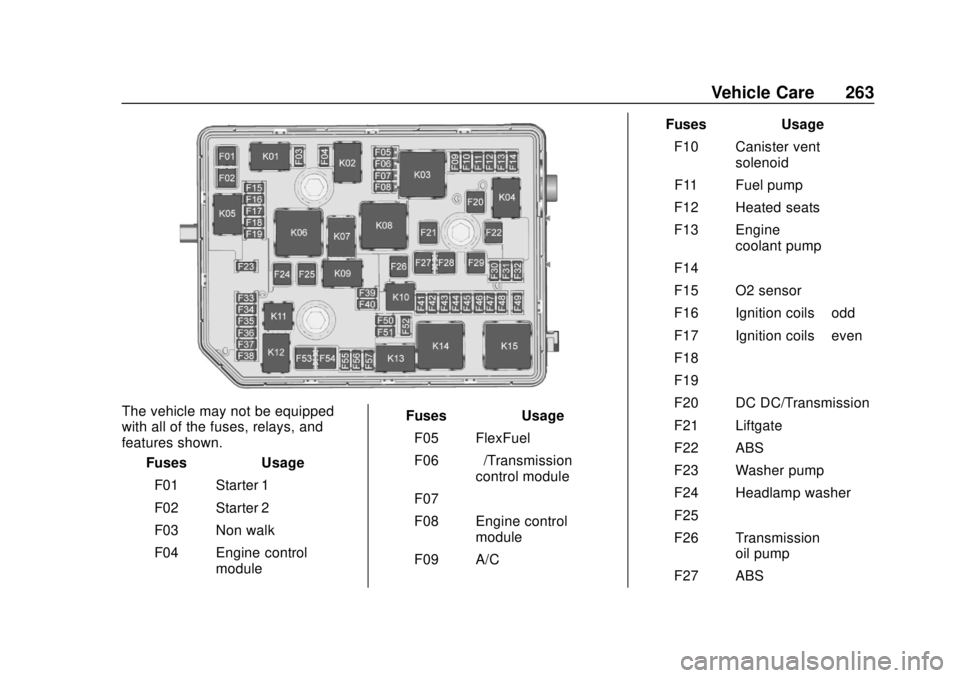
The vehicle may not be equipped
with all of the fuses, relays, and
features shown.Fuses Usage
F01 Starter 1
F02 Starter 2
F03 Non walk
F04 Engine control module Fuses Usage
F05 FlexFuel
F06 –/Transmission
control module
F07 –
F08 Engine control module
F09 A/C Fuses Usage
F10 Canister vent solenoid
F11 Fuel pump
F12 Heated seats
F13 Engine coolant pump
F14 –
F15 O2 sensor
F16 Ignition coils –odd
F17 Ignition coils –even
F18 –
F19 –
F20 DC DC/Transmission
F21 Liftgate
F22 ABS
F23 Washer pump
F24 Headlamp washer
F25 –
F26 Transmission oil pump
F27 ABS
Page 267 of 365
Buick Envision Owner Manual (GMNA-Localizing-U.S./Canada/Mexico-
11434432) - 2018 - CRC - 10/25/17
266 Vehicle Care
FusesUsage
F21 HVAC
F22 Liftgate release
F23 Passive entry/ Passive start
F24 OCC sensor
F25 Steering wheel controls
F26 Ignition
F27 Body control module 4
F28 Transmission control module
F29 Body control module 2
F30 USB
F31 Rear HVAC blower
F32 Body control module 1
F33 Universal remote system
F34 Parking assist
F35 OnStar Fuses
Usage
F36 Display
F37 Radio
Rear Compartment Fuse
Block
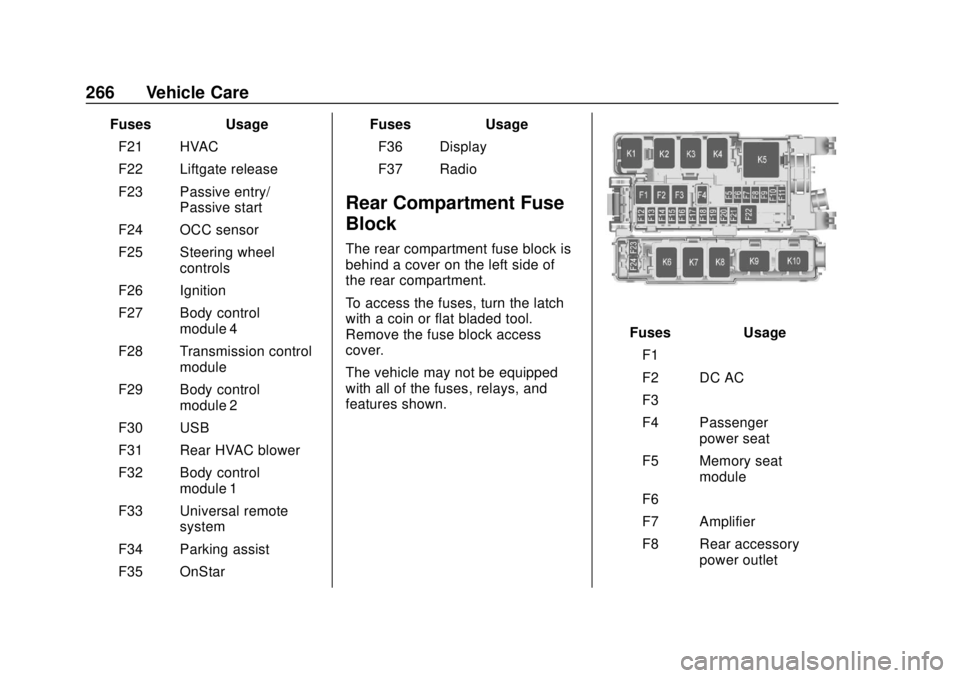
The rear compartment fuse block is
behind a cover on the left side of
the rear compartment.
To access the fuses, turn the latch
with a coin or flat bladed tool.
Remove the fuse block access
cover.
The vehicle may not be equipped
with all of the fuses, relays, and
features shown.
Fuses Usage
F1 –
F2 DC AC
F3 –
F4 Passenger power seat
F5 Memory seat module
F6 –
F7 Amplifier
F8 Rear accessory power outlet
Page 268 of 365

Buick Envision Owner Manual (GMNA-Localizing-U.S./Canada/Mexico-
11434432) - 2018 - CRC - 10/25/17
Vehicle Care 267
FusesUsage
F9 Rear heated seat
F10 Logistics relay
F11 Rear HVAC
F12 Power liftgate HF sensor
F13 Parking/Trailer lamps
F14 Side blind zone alert
F15 Left parking lamp
F16 Right parking lamp
F17 Body control module 6
F18 Heated steering wheel
F19 AWD
F20 Lumbar seat
F21 Rear heated seat
F22 Rear drive control module
F23 Trailer left turn signal lamp Fuses
Usage
F24 Trailer right turn signal lamp
Circuit
Breakers Usage
K1 Parking lamps
K2 –
K3 Ignition
K4 Logistics
K5 DC AC
K6 –
K7 Parking assist
K8 Right turn
K9 Left turn
K10 –Wheels and Tires
Tires
Every new GM vehicle has
high-quality tires made by a
leading tire manufacturer. See
the warranty manual for
information regarding the tire
warranty and where to get
service. For additional
information refer to the tire
manufacturer.
{Warning
.Poorly maintained and
improperly used tires are
dangerous.
.Overloading the tires can
cause overheating as a
result of too much
flexing. There could be a
blowout and a serious
crash. See Vehicle Load
Limits 0178.
(Continued)