light BUICK ENVISION 2018 Owner's Manual
[x] Cancel search | Manufacturer: BUICK, Model Year: 2018, Model line: ENVISION, Model: BUICK ENVISION 2018Pages: 365, PDF Size: 5.56 MB
Page 2 of 365

Buick Envision Owner Manual (GMNA-Localizing-U.S./Canada/Mexico-
11434432) - 2018 - CRC - 10/25/17
ContentsIntroduction . . . . . . . . . . . . . . . . . . . . . . 2
In Brief . . . . . . . . . . . . . . . . . . . . . . . . . . . 5
Keys, Doors, and Windows . . . . . 27
Seats and Restraints . . . . . . . . . . . 53
Storage . . . . . . . . . . . . . . . . . . . . . . . 103
Instruments and Controls . . . . . . 109
Lighting . . . . . . . . . . . . . . . . . . . . . . . 154
Infotainment System . . . . . . . . . . 162
Climate Controls . . . . . . . . . . . . . . 163
Driving and Operating . . . . . . . . . 170
Vehicle Care . . . . . . . . . . . . . . . . . . 234
Service and Maintenance . . . . . 310
Technical Data . . . . . . . . . . . . . . . . 323
Customer Information . . . . . . . . . 327
Reporting Safety Defects . . . . . . 337
OnStar . . . . . . . . . . . . . . . . . . . . . . . . 341
Index . . . . . . . . . . . . . . . . . . . . 353
Page 5 of 365
Buick Envision Owner Manual (GMNA-Localizing-U.S./Canada/Mexico-
11434432) - 2018 - CRC - 10/25/17
4 Introduction
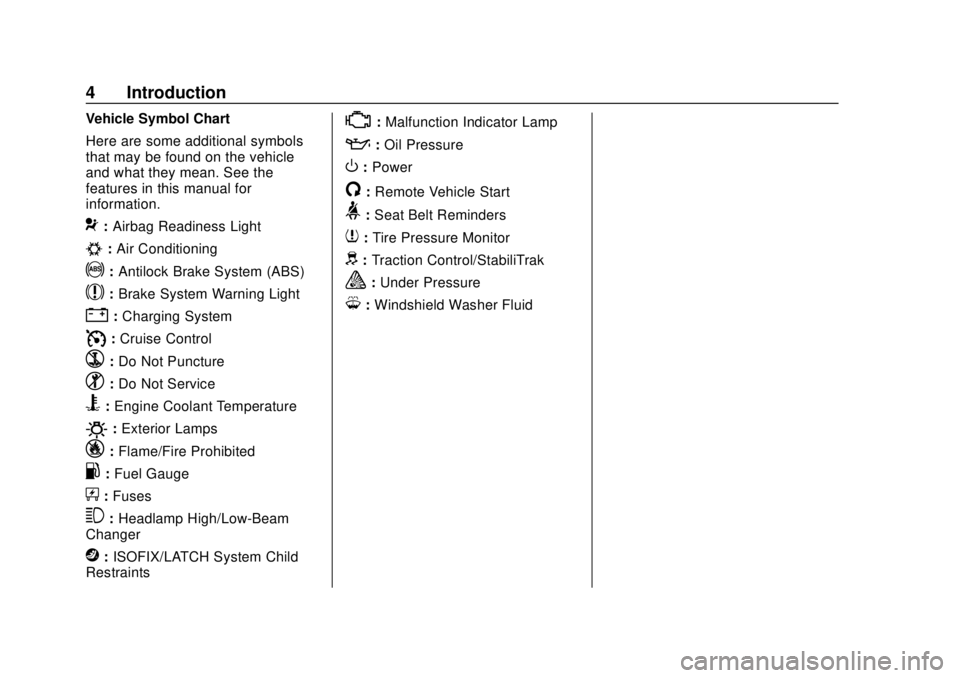
Vehicle Symbol Chart
Here are some additional symbols
that may be found on the vehicle
and what they mean. See the
features in this manual for
information.
9:Airbag Readiness Light
#:Air Conditioning
!:Antilock Brake System (ABS)
$:Brake System Warning Light
":Charging System
I: Cruise Control
`:Do Not Puncture
^:Do Not Service
B:Engine Coolant Temperature
O:Exterior Lamps
_: Flame/Fire Prohibited
.:Fuel Gauge
+: Fuses
3:Headlamp High/Low-Beam
Changer
j: ISOFIX/LATCH System Child
Restraints
*: Malfunction Indicator Lamp
::Oil Pressure
O:Power
/:Remote Vehicle Start
>: Seat Belt Reminders
7:Tire Pressure Monitor
d:Traction Control/StabiliTrak
a:Under Pressure
M: Windshield Washer Fluid
Page 6 of 365
Buick Envision Owner Manual (GMNA-Localizing-U.S./Canada/Mexico-
11434432) - 2018 - CRC - 10/25/17
In Brief 5
In Brief
Instrument Panel
Instrument Panel Overview . . . . . . 6
Initial Drive Information
Initial Drive Information . . . . . . . . . . 8
Stop/Start System . . . . . . . . . . . . . . . 8
Remote Keyless Entry (RKE)System . . . . . . . . . . . . . . . . . . . . . . . . 8
Remote Vehicle Start . . . . . . . . . . . 9
Door Locks . . . . . . . . . . . . . . . . . . . . . 9
Liftgate . . . . . . . . . . . . . . . . . . . . . . . . 10
Windows . . . . . . . . . . . . . . . . . . . . . . . 10
Seat Adjustment . . . . . . . . . . . . . . . 11
Memory Features . . . . . . . . . . . . . . 12
Heated and Ventilated Seats . . . 12
Head Restraint Adjustment . . . . 13
Seat Belts . . . . . . . . . . . . . . . . . . . . . 13
Passenger Sensing System . . . 13
Mirror Adjustment . . . . . . . . . . . . . . 14
Steering Wheel Adjustment . . . . 15
Interior Lighting . . . . . . . . . . . . . . . . 15
Exterior Lighting . . . . . . . . . . . . . . . 16
Windshield Wiper/Washer . . . . . . 16
Climate Controls . . . . . . . . . . . . . . . 18
Transmission . . . . . . . . . . . . . . . . . . 18
Vehicle Features
Infotainment System . . . . . . . . . . . 19
Steering Wheel Controls . . . . . . . 19
Cruise Control . . . . . . . . . . . . . . . . . 19
Driver Information Center (DIC) . . . . . . . . . . . . . . . . . 20
Forward Collision Alert (FCA) System . . . . . . . . . . . . . . . . . . . . . . . 20
Forward Automatic Braking (FAB) . . . . . . . . . . . . . . . . 20
Lane Keep Assist (LKA) . . . . . . . 20
Lane Change Alert (LCA) . . . . . . 21
Surround Vision . . . . . . . . . . . . . . . 21
Rear Vision Camera (RVC) . . . . 21
Rear Cross Traffic Alert (RCTA) System . . . . . . . . . . . . . . . . . . . . . . . 21
Parking Assist . . . . . . . . . . . . . . . . . 21
Automatic Parking Assist (APA) . . . . . . . . . . . . . . . . . . 22
Power Outlets . . . . . . . . . . . . . . . . . 22
Universal Remote System . . . . . 22
Sunroof . . . . . . . . . . . . . . . . . . . . . . . . 22
Performance and Maintenance
Traction Control/Electronic Stability Control . . . . . . . . . . . . . . 23
Tire Pressure Monitor . . . . . . . . . . 24
Fuel (2.5L Engine) . . . . . . . . . . . . . 24
Fuel (2.0L Engine) . . . . . . . . . . . . . 24
E85 or FlexFuel . . . . . . . . . . . . . . . . 25 Engine Oil Life System . . . . . . . . 25
Driving for Better Fuel
Economy . . . . . . . . . . . . . . . . . . . . . 25
Roadside Assistance Program . . . . . . . . . . . . . . . . . . . . . . 26
Page 8 of 365

Buick Envision Owner Manual (GMNA-Localizing-U.S./Canada/Mexico-
11434432) - 2018 - CRC - 10/25/17
In Brief 7
1.Air Vents 0168.
2. Turn Signal Lever. See Turn
and Lane-Change Signals
0 158.
3. Instrument Cluster 0117.
Driver Information Center
Display. See Driver Information
Center (DIC) (Base Level)
0 134 orDriver Information
Center (DIC) (Uplevel) 0137.
4. Windshield Wiper/Washer
0110.
Rear Window Wiper/Washer
0 112.
5. Hazard Warning Flashers
0158.
6. Infotainment 0162.
7. Light Sensor. See Automatic
Headlamp System 0157.
8. Lane Keep Assist (LKA) 0221
(If Equipped).
Assistance Systems for
Parking or Backing 0210 (If
Equipped). 9.
Clock 0113.
10. Heated and Ventilated Front
Seats 060 (If Equipped).
11. Dual Automatic Climate Control
System 0163.
12. Traction Control/Electronic
Stability Control 0197.
13. Electric Parking Brake 0195.
14. Shift Lever. See Automatic
Transmission 0191.
15. ENGINE START/STOP Button. SeeIgnition Positions 0183.
16. Steering Wheel Controls 0110.
Driver Information Center (DIC)
Buttons. See Driver Information
Center (DIC) (Base Level)
0 134 orDriver Information
Center (DIC) (Uplevel) 0137.
17. Horn 0110.
18. Steering Wheel Adjustment
0110 (Out of View). 19.
Cruise Control 0199.
Adaptive Cruise Control 0201
(If Equipped).
Heated Steering Wheel 0110
(If Equipped).
Forward Collision Alert (FCA)
System 0214 (If Equipped).
20. Data Link Connector (DLC) (Out of View). See Malfunction
Indicator Lamp (Check Engine
Light) 0125.
21. Front Storage 0103.
22. Instrument Panel Illumination
Control 0159.
Head-Up Display (HUD) 0139
(If Equipped) (Out of View).
23. Exterior Lamp Controls 0154.
Fog Lamps 0159 (If
Equipped).
Page 13 of 365
Buick Envision Owner Manual (GMNA-Localizing-U.S./Canada/Mexico-
11434432) - 2018 - CRC - 10/25/17
12 In Brief
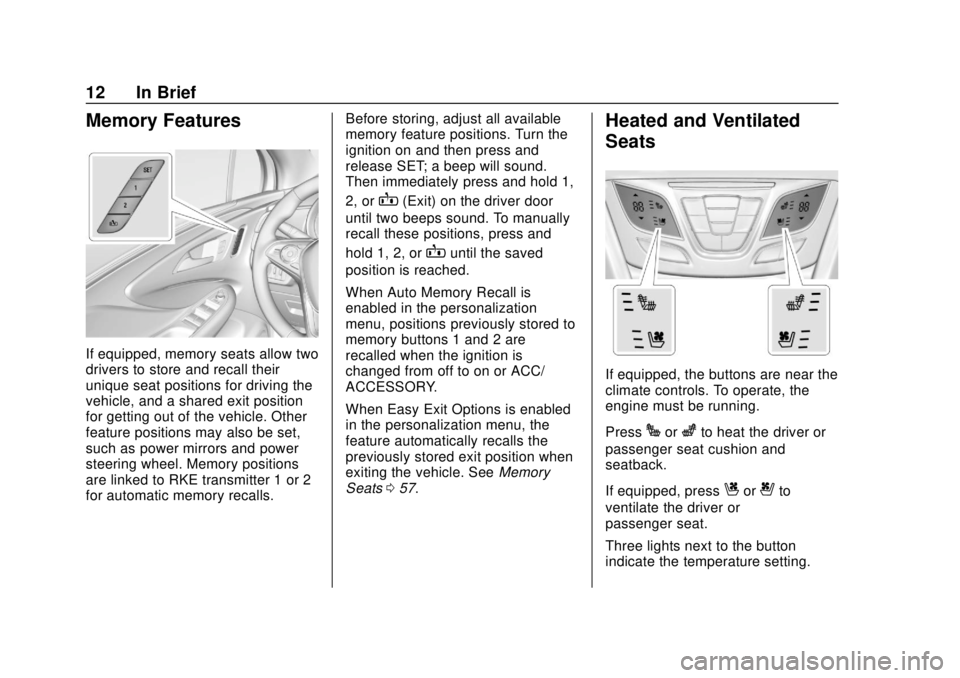
Memory Features
If equipped, memory seats allow two
drivers to store and recall their
unique seat positions for driving the
vehicle, and a shared exit position
for getting out of the vehicle. Other
feature positions may also be set,
such as power mirrors and power
steering wheel. Memory positions
are linked to RKE transmitter 1 or 2
for automatic memory recalls.Before storing, adjust all available
memory feature positions. Turn the
ignition on and then press and
release SET; a beep will sound.
Then immediately press and hold 1,
2, or
B(Exit) on the driver door
until two beeps sound. To manually
recall these positions, press and
hold 1, 2, or
Buntil the saved
position is reached.
When Auto Memory Recall is
enabled in the personalization
menu, positions previously stored to
memory buttons 1 and 2 are
recalled when the ignition is
changed from off to on or ACC/
ACCESSORY.
When Easy Exit Options is enabled
in the personalization menu, the
feature automatically recalls the
previously stored exit position when
exiting the vehicle. See Memory
Seats 057.
Heated and Ventilated
Seats
If equipped, the buttons are near the
climate controls. To operate, the
engine must be running.
Press
Jorzto heat the driver or
passenger seat cushion and
seatback.
If equipped, press
Cor{to
ventilate the driver or
passenger seat.
Three lights next to the button
indicate the temperature setting.
Page 15 of 365
Buick Envision Owner Manual (GMNA-Localizing-U.S./Canada/Mexico-
11434432) - 2018 - CRC - 10/25/17
14 In Brief
The passenger airbag status
indicator lights on the overhead
console are visible when the vehicle
is started. SeePassenger Airbag
Status Indicator 0124.
Mirror Adjustment
Interior Mirrors
Adjust the rearview mirror for a clear
view of the area behind your
vehicle.
Automatic Dimming Rearview
Mirror
Automatic dimming reduces the
glare of headlamps from behind.
The dimming feature comes on
when the vehicle is started.
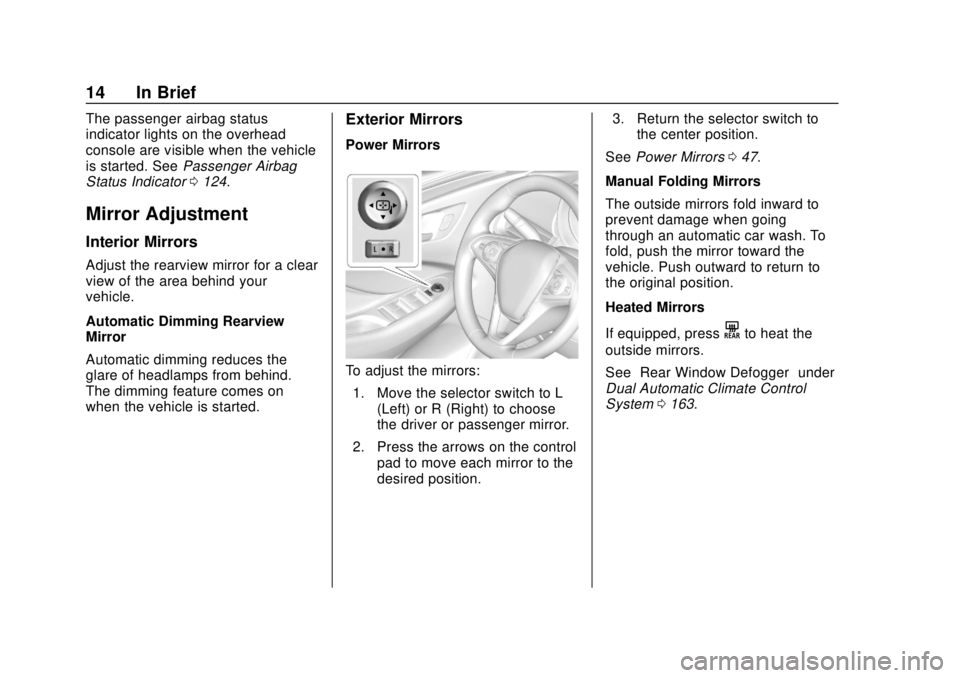
Exterior Mirrors
Power Mirrors
To adjust the mirrors:
1. Move the selector switch to L (Left) or R (Right) to choose
the driver or passenger mirror.
2. Press the arrows on the control pad to move each mirror to the
desired position. 3. Return the selector switch to
the center position.
See Power Mirrors 047.
Manual Folding Mirrors
The outside mirrors fold inward to
prevent damage when going
through an automatic car wash. To
fold, push the mirror toward the
vehicle. Push outward to return to
the original position.
Heated Mirrors
If equipped, press
Kto heat the
outside mirrors.
See “Rear Window Defogger” under
Dual Automatic Climate Control
System 0163.
Page 16 of 365
Buick Envision Owner Manual (GMNA-Localizing-U.S./Canada/Mexico-
11434432) - 2018 - CRC - 10/25/17
In Brief 15
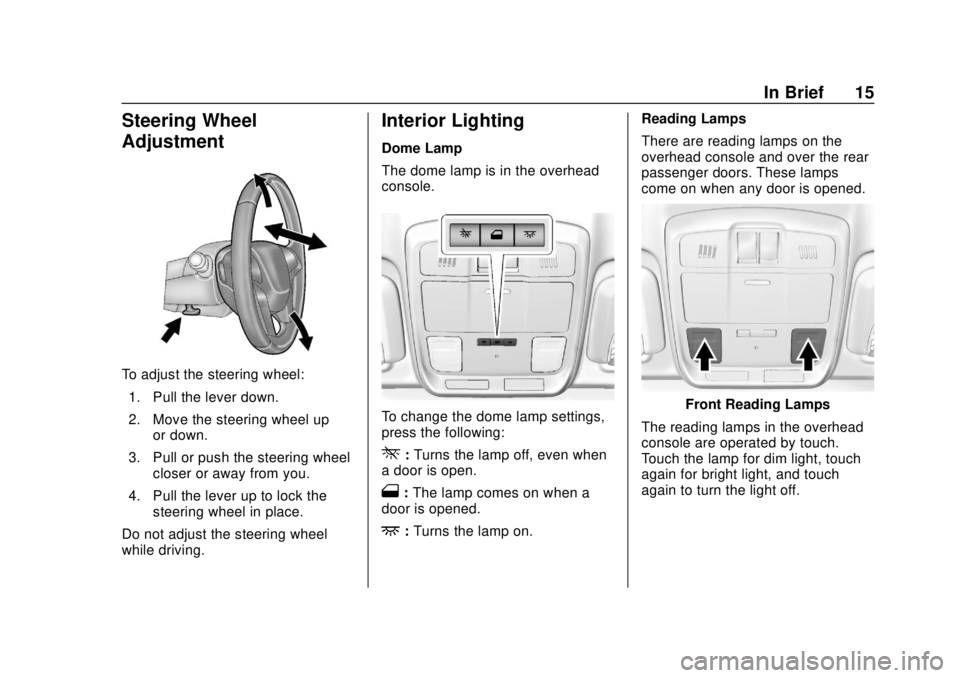
Steering Wheel
Adjustment
To adjust the steering wheel:1. Pull the lever down.
2. Move the steering wheel up or down.
3. Pull or push the steering wheel closer or away from you.
4. Pull the lever up to lock the steering wheel in place.
Do not adjust the steering wheel
while driving.
Interior Lighting
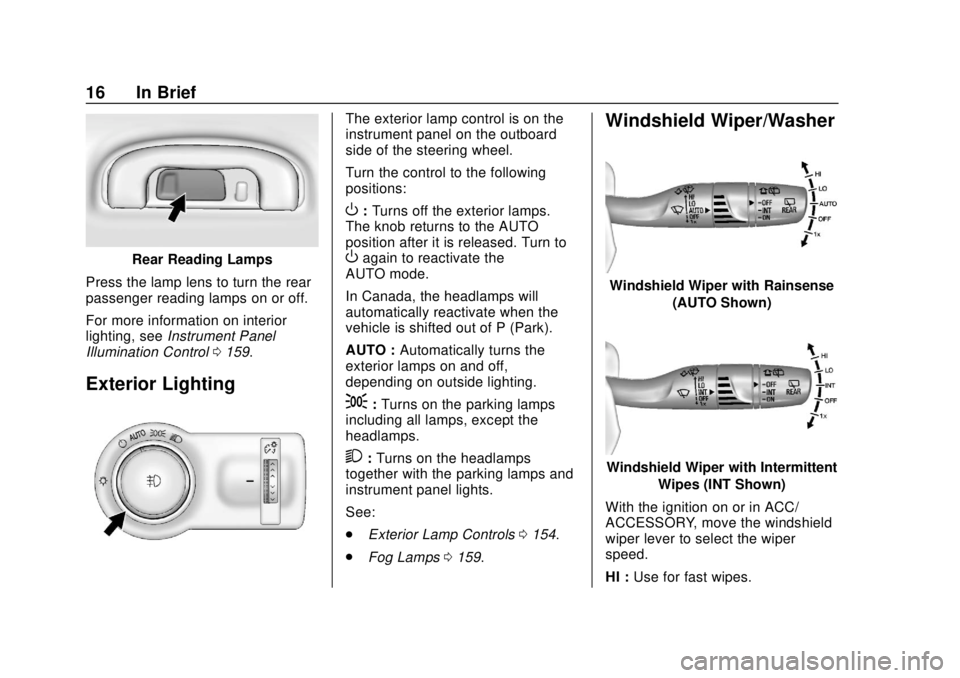
Dome Lamp
The dome lamp is in the overhead
console.
To change the dome lamp settings,
press the following:
*: Turns the lamp off, even when
a door is open.
1: The lamp comes on when a
door is opened.
+: Turns the lamp on. Reading Lamps
There are reading lamps on the
overhead console and over the rear
passenger doors. These lamps
come on when any door is opened.
Front Reading Lamps
The reading lamps in the overhead
console are operated by touch.
Touch the lamp for dim light, touch
again for bright light, and touch
again to turn the light off.
Page 17 of 365
Buick Envision Owner Manual (GMNA-Localizing-U.S./Canada/Mexico-
11434432) - 2018 - CRC - 10/25/17
16 In Brief
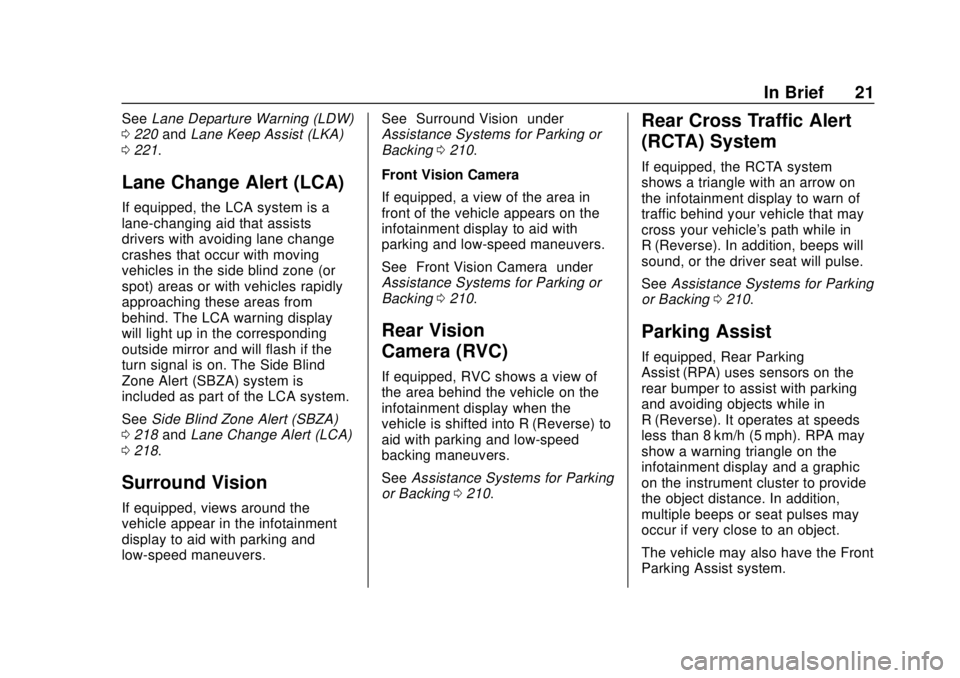
Rear Reading Lamps
Press the lamp lens to turn the rear
passenger reading lamps on or off.
For more information on interior
lighting, see Instrument Panel
Illumination Control 0159.
Exterior Lighting
The exterior lamp control is on the
instrument panel on the outboard
side of the steering wheel.
Turn the control to the following
positions:
O:Turns off the exterior lamps.
The knob returns to the AUTO
position after it is released. Turn to
Oagain to reactivate the
AUTO mode.
In Canada, the headlamps will
automatically reactivate when the
vehicle is shifted out of P (Park).
AUTO : Automatically turns the
exterior lamps on and off,
depending on outside lighting.
;: Turns on the parking lamps
including all lamps, except the
headlamps.
2: Turns on the headlamps
together with the parking lamps and
instrument panel lights.
See:
. Exterior Lamp Controls 0154.
. Fog Lamps 0159.
Windshield Wiper/Washer
Windshield Wiper with Rainsense
(AUTO Shown)
Windshield Wiper with IntermittentWipes (INT Shown)
With the ignition on or in ACC/
ACCESSORY, move the windshield
wiper lever to select the wiper
speed.
HI : Use for fast wipes.
Page 22 of 365
Buick Envision Owner Manual (GMNA-Localizing-U.S./Canada/Mexico-
11434432) - 2018 - CRC - 10/25/17
In Brief 21
SeeLane Departure Warning (LDW)
0 220 andLane Keep Assist (LKA)
0 221.
Lane Change Alert (LCA)
If equipped, the LCA system is a
lane-changing aid that assists
drivers with avoiding lane change
crashes that occur with moving
vehicles in the side blind zone (or
spot) areas or with vehicles rapidly
approaching these areas from
behind. The LCA warning display
will light up in the corresponding
outside mirror and will flash if the
turn signal is on. The Side Blind
Zone Alert (SBZA) system is
included as part of the LCA system.
See Side Blind Zone Alert (SBZA)
0 218 andLane Change Alert (LCA)
0 218.
Surround Vision
If equipped, views around the
vehicle appear in the infotainment
display to aid with parking and
low-speed maneuvers. See
“Surround Vision” under
Assistance Systems for Parking or
Backing 0210.
Front Vision Camera
If equipped, a view of the area in
front of the vehicle appears on the
infotainment display to aid with
parking and low-speed maneuvers.
See “Front Vision Camera” under
Assistance Systems for Parking or
Backing 0210.
Rear Vision
Camera (RVC)
If equipped, RVC shows a view of
the area behind the vehicle on the
infotainment display when the
vehicle is shifted into R (Reverse) to
aid with parking and low-speed
backing maneuvers.
See Assistance Systems for Parking
or Backing 0210.
Rear Cross Traffic Alert
(RCTA) System
If equipped, the RCTA system
shows a triangle with an arrow on
the infotainment display to warn of
traffic behind your vehicle that may
cross your vehicle's path while in
R (Reverse). In addition, beeps will
sound, or the driver seat will pulse.
See Assistance Systems for Parking
or Backing 0210.
Parking Assist
If equipped, Rear Parking
Assist (RPA) uses sensors on the
rear bumper to assist with parking
and avoiding objects while in
R (Reverse). It operates at speeds
less than 8 km/h (5 mph). RPA may
show a warning triangle on the
infotainment display and a graphic
on the instrument cluster to provide
the object distance. In addition,
multiple beeps or seat pulses may
occur if very close to an object.
The vehicle may also have the Front
Parking Assist system.
Page 24 of 365
Buick Envision Owner Manual (GMNA-Localizing-U.S./Canada/Mexico-
11434432) - 2018 - CRC - 10/25/17
In Brief 23
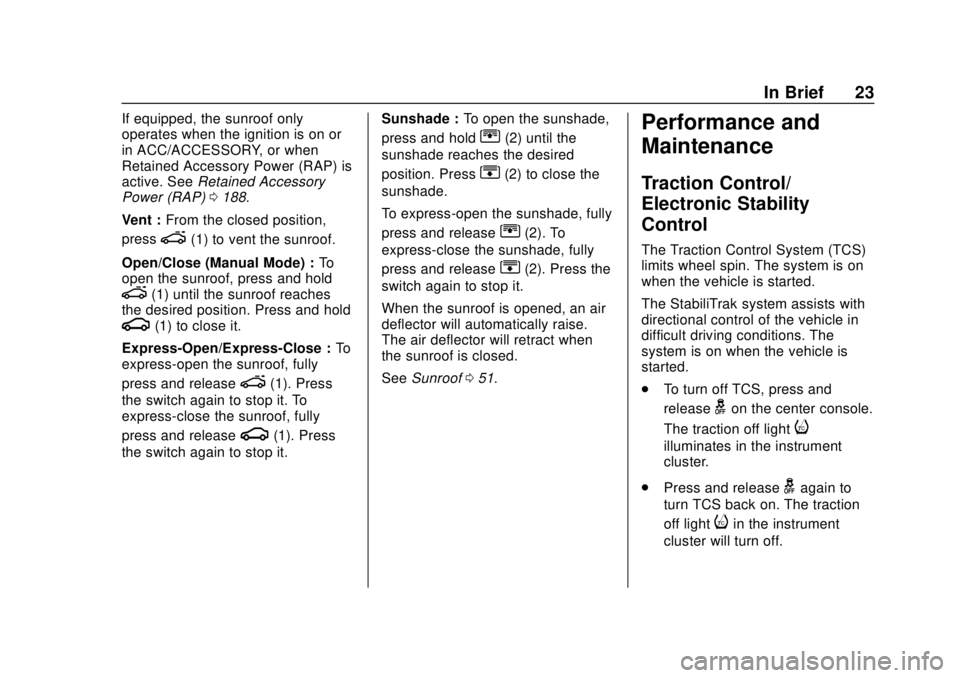
If equipped, the sunroof only
operates when the ignition is on or
in ACC/ACCESSORY, or when
Retained Accessory Power (RAP) is
active. SeeRetained Accessory
Power (RAP) 0188.
Vent : From the closed position,
press
e(1) to vent the sunroof.
Open/Close (Manual Mode) : To
open the sunroof, press and hold
e(1) until the sunroof reaches
the desired position. Press and hold
g(1) to close it.
Express-Open/Express-Close : To
express-open the sunroof, fully
press and release
e(1). Press
the switch again to stop it. To
express-close the sunroof, fully
press and release
g(1). Press
the switch again to stop it. Sunshade :
To open the sunshade,
press and hold
r(2) until the
sunshade reaches the desired
position. Press
s(2) to close the
sunshade.
To express-open the sunshade, fully
press and release
r(2). To
express-close the sunshade, fully
press and release
s(2). Press the
switch again to stop it.
When the sunroof is opened, an air
deflector will automatically raise.
The air deflector will retract when
the sunroof is closed.
See Sunroof 051.
Performance and
Maintenance
Traction Control/
Electronic Stability
Control
The Traction Control System (TCS)
limits wheel spin. The system is on
when the vehicle is started.
The StabiliTrak system assists with
directional control of the vehicle in
difficult driving conditions. The
system is on when the vehicle is
started.
.
To turn off TCS, press and
release
gon the center console.
The traction off light
i
illuminates in the instrument
cluster.
. Press and release
gagain to
turn TCS back on. The traction
off light
iin the instrument
cluster will turn off.