rear view mirror BUICK ENVISION 2018 Owner's Manual
[x] Cancel search | Manufacturer: BUICK, Model Year: 2018, Model line: ENVISION, Model: BUICK ENVISION 2018Pages: 365, PDF Size: 5.56 MB
Page 6 of 365
Buick Envision Owner Manual (GMNA-Localizing-U.S./Canada/Mexico-
11434432) - 2018 - CRC - 10/25/17
In Brief 5
In Brief
Instrument Panel
Instrument Panel Overview . . . . . . 6
Initial Drive Information
Initial Drive Information . . . . . . . . . . 8
Stop/Start System . . . . . . . . . . . . . . . 8
Remote Keyless Entry (RKE)System . . . . . . . . . . . . . . . . . . . . . . . . 8
Remote Vehicle Start . . . . . . . . . . . 9
Door Locks . . . . . . . . . . . . . . . . . . . . . 9
Liftgate . . . . . . . . . . . . . . . . . . . . . . . . 10
Windows . . . . . . . . . . . . . . . . . . . . . . . 10
Seat Adjustment . . . . . . . . . . . . . . . 11
Memory Features . . . . . . . . . . . . . . 12
Heated and Ventilated Seats . . . 12
Head Restraint Adjustment . . . . 13
Seat Belts . . . . . . . . . . . . . . . . . . . . . 13
Passenger Sensing System . . . 13
Mirror Adjustment . . . . . . . . . . . . . . 14
Steering Wheel Adjustment . . . . 15
Interior Lighting . . . . . . . . . . . . . . . . 15
Exterior Lighting . . . . . . . . . . . . . . . 16
Windshield Wiper/Washer . . . . . . 16
Climate Controls . . . . . . . . . . . . . . . 18
Transmission . . . . . . . . . . . . . . . . . . 18
Vehicle Features
Infotainment System . . . . . . . . . . . 19
Steering Wheel Controls . . . . . . . 19
Cruise Control . . . . . . . . . . . . . . . . . 19
Driver Information Center (DIC) . . . . . . . . . . . . . . . . . 20
Forward Collision Alert (FCA) System . . . . . . . . . . . . . . . . . . . . . . . 20
Forward Automatic Braking (FAB) . . . . . . . . . . . . . . . . 20
Lane Keep Assist (LKA) . . . . . . . 20
Lane Change Alert (LCA) . . . . . . 21
Surround Vision . . . . . . . . . . . . . . . 21
Rear Vision Camera (RVC) . . . . 21
Rear Cross Traffic Alert (RCTA) System . . . . . . . . . . . . . . . . . . . . . . . 21
Parking Assist . . . . . . . . . . . . . . . . . 21
Automatic Parking Assist (APA) . . . . . . . . . . . . . . . . . . 22
Power Outlets . . . . . . . . . . . . . . . . . 22
Universal Remote System . . . . . 22
Sunroof . . . . . . . . . . . . . . . . . . . . . . . . 22
Performance and Maintenance
Traction Control/Electronic Stability Control . . . . . . . . . . . . . . 23
Tire Pressure Monitor . . . . . . . . . . 24
Fuel (2.5L Engine) . . . . . . . . . . . . . 24
Fuel (2.0L Engine) . . . . . . . . . . . . . 24
E85 or FlexFuel . . . . . . . . . . . . . . . . 25 Engine Oil Life System . . . . . . . . 25
Driving for Better Fuel
Economy . . . . . . . . . . . . . . . . . . . . . 25
Roadside Assistance Program . . . . . . . . . . . . . . . . . . . . . . 26
Page 15 of 365
Buick Envision Owner Manual (GMNA-Localizing-U.S./Canada/Mexico-
11434432) - 2018 - CRC - 10/25/17
14 In Brief
The passenger airbag status
indicator lights on the overhead
console are visible when the vehicle
is started. SeePassenger Airbag
Status Indicator 0124.
Mirror Adjustment
Interior Mirrors
Adjust the rearview mirror for a clear
view of the area behind your
vehicle.
Automatic Dimming Rearview
Mirror
Automatic dimming reduces the
glare of headlamps from behind.
The dimming feature comes on
when the vehicle is started.
Exterior Mirrors
Power Mirrors
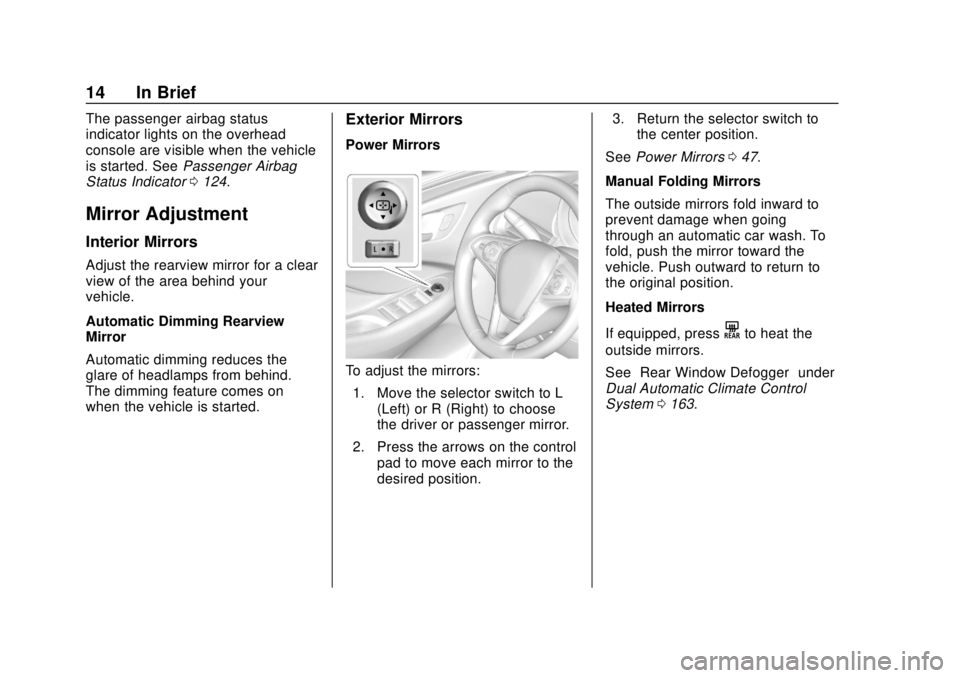
To adjust the mirrors:
1. Move the selector switch to L (Left) or R (Right) to choose
the driver or passenger mirror.
2. Press the arrows on the control pad to move each mirror to the
desired position. 3. Return the selector switch to
the center position.
See Power Mirrors 047.
Manual Folding Mirrors
The outside mirrors fold inward to
prevent damage when going
through an automatic car wash. To
fold, push the mirror toward the
vehicle. Push outward to return to
the original position.
Heated Mirrors
If equipped, press
Kto heat the
outside mirrors.
See “Rear Window Defogger” under
Dual Automatic Climate Control
System 0163.
Page 22 of 365
Buick Envision Owner Manual (GMNA-Localizing-U.S./Canada/Mexico-
11434432) - 2018 - CRC - 10/25/17
In Brief 21
SeeLane Departure Warning (LDW)
0 220 andLane Keep Assist (LKA)
0 221.
Lane Change Alert (LCA)
If equipped, the LCA system is a
lane-changing aid that assists
drivers with avoiding lane change
crashes that occur with moving
vehicles in the side blind zone (or
spot) areas or with vehicles rapidly
approaching these areas from
behind. The LCA warning display
will light up in the corresponding
outside mirror and will flash if the
turn signal is on. The Side Blind
Zone Alert (SBZA) system is
included as part of the LCA system.
See Side Blind Zone Alert (SBZA)
0 218 andLane Change Alert (LCA)
0 218.
Surround Vision
If equipped, views around the
vehicle appear in the infotainment
display to aid with parking and
low-speed maneuvers. See
“Surround Vision” under
Assistance Systems for Parking or
Backing 0210.
Front Vision Camera
If equipped, a view of the area in
front of the vehicle appears on the
infotainment display to aid with
parking and low-speed maneuvers.
See “Front Vision Camera” under
Assistance Systems for Parking or
Backing 0210.
Rear Vision
Camera (RVC)
If equipped, RVC shows a view of
the area behind the vehicle on the
infotainment display when the
vehicle is shifted into R (Reverse) to
aid with parking and low-speed
backing maneuvers.
See Assistance Systems for Parking
or Backing 0210.
Rear Cross Traffic Alert
(RCTA) System
If equipped, the RCTA system
shows a triangle with an arrow on
the infotainment display to warn of
traffic behind your vehicle that may
cross your vehicle's path while in
R (Reverse). In addition, beeps will
sound, or the driver seat will pulse.
See Assistance Systems for Parking
or Backing 0210.
Parking Assist
If equipped, Rear Parking
Assist (RPA) uses sensors on the
rear bumper to assist with parking
and avoiding objects while in
R (Reverse). It operates at speeds
less than 8 km/h (5 mph). RPA may
show a warning triangle on the
infotainment display and a graphic
on the instrument cluster to provide
the object distance. In addition,
multiple beeps or seat pulses may
occur if very close to an object.
The vehicle may also have the Front
Parking Assist system.
Page 28 of 365
Buick Envision Owner Manual (GMNA-Localizing-U.S./Canada/Mexico-
11434432) - 2018 - CRC - 10/25/17
Keys, Doors, and Windows 27
Keys, Doors, and
Windows
Keys and Locks
Keys . . . . . . . . . . . . . . . . . . . . . . . . . . . 27
Remote Keyless Entry (RKE)System . . . . . . . . . . . . . . . . . . . . . . . 28
Remote Keyless Entry (RKE) System Operation . . . . . . . . . . . . 28
Remote Vehicle Start . . . . . . . . . . 34
Door Locks . . . . . . . . . . . . . . . . . . . . 36
Power Door Locks . . . . . . . . . . . . . 38
Delayed Locking . . . . . . . . . . . . . . . 38
Automatic Door Locks . . . . . . . . . 38
Lockout Protection . . . . . . . . . . . . . 38
Safety Locks . . . . . . . . . . . . . . . . . . . 39
Doors
Liftgate . . . . . . . . . . . . . . . . . . . . . . . . 40
Vehicle Security
Vehicle Security . . . . . . . . . . . . . . . . 45
Vehicle Alarm System . . . . . . . . . 45
Immobilizer . . . . . . . . . . . . . . . . . . . . 46
Immobilizer Operation . . . . . . . . . 46
Exterior Mirrors
Convex Mirrors . . . . . . . . . . . . . . . . 47
Power Mirrors . . . . . . . . . . . . . . . . . . 47
Folding Mirrors . . . . . . . . . . . . . . . . . 48
Heated Mirrors . . . . . . . . . . . . . . . . . 48
Automatic Dimming Mirror . . . . . 48
Reverse Tilt Mirrors . . . . . . . . . . . . 48
Interior Mirrors
Interior Rearview Mirrors . . . . . . . 48
Automatic Dimming Rearview Mirror . . . . . . . . . . . . . . . . . . . . . . . . . 48
Windows
Windows . . . . . . . . . . . . . . . . . . . . . . . 49
Power Windows . . . . . . . . . . . . . . . 49
Sun Visors . . . . . . . . . . . . . . . . . . . . . 51
Roof
Sunroof . . . . . . . . . . . . . . . . . . . . . . . . 51
Keys and Locks
Keys
{Warning
Leaving children in a vehicle with
a Remote Keyless Entry (RKE)
transmitter is dangerous and
children or others could be
seriously injured or killed. They
could operate the power windows
or other controls or make the
vehicle move. The windows will
function with the RKE transmitter
in the vehicle, and children or
others could be caught in the path
of a closing window. Do not leave
children in a vehicle with an RKE
transmitter.
Page 49 of 365
Buick Envision Owner Manual (GMNA-Localizing-U.S./Canada/Mexico-
11434432) - 2018 - CRC - 10/25/17
48 Keys, Doors, and Windows
Turn Signal Indicator
The vehicle may also have a turn
signal indicator on the mirror. An
arrow on the mirror flashes in the
direction of the turn or lane change.
Folding Mirrors
Manual Folding Mirrors
The mirrors can be folded inward
toward the vehicle to prevent
damage when going through an
automatic car wash. Push the mirror
outward to return it to the original
position.
Heated Mirrors
If equipped with heated mirrors:
K:The rear window defogger also
heats the outside mirrors.
See Dual Automatic Climate Control
System 0163.
Automatic Dimming
Mirror
If equipped, the vehicle has an
automatic dimming outside mirror(s).
The mirror(s) will adjust for the glare
of headlamps behind you.
Reverse Tilt Mirrors
If equipped with memory seats, the
passenger and/or driver mirror tilts
to a preselected position when the
vehicle is in R (Reverse). This
allows the curb to be seen when
parallel parking.
The mirror(s) return to the original
position when:
.
The vehicle is shifted out of
R (Reverse), or remains in
R (Reverse) for about
30 seconds.
. The ignition is turned off.
. The vehicle is driven in
R (Reverse) above a set speed.
To turn this feature on or off, see
Vehicle Personalization 0143.
Interior Mirrors
Interior Rearview Mirrors
Adjust the rearview mirror for a clear
view of the area behind the vehicle.
Do not spray glass cleaner directly
on the mirror. Use a soft towel
dampened with water.
Automatic Dimming
Rearview Mirror
The rearview mirror automatically
dims to reduce the glare of the
headlamps from behind. This
feature comes on when the vehicle
is started.
Page 209 of 365
Buick Envision Owner Manual (GMNA-Localizing-U.S./Canada/Mexico-
11434432) - 2018 - CRC - 10/25/17
208 Driving and Operating
Other Vehicle Lane Changes
ACC will not detect a vehicle ahead
until it is completely in the lane. The
brake may need to be manually
applied.
Do Not Use ACC on Hills and
When Towing a Trailer
Do not use ACC when driving on
steep hills or when towing a trailer.
ACC will not detect a vehicle in the
lane while driving on steep hills. The
driver will often need to take over
acceleration and braking on steep
hills, especially when towing a
trailer. If the brakes are applied, the
ACC disengages.
Ending ACC
There are three ways to
disengage ACC:
.Step lightly on the brake pedal.
. Press
*.
. Press
].
Erasing Speed Memory
The cruise control set speed is
erased from memory if
]is
pressed or if the ignition is
turned off. Cleaning the Sensing System
The camera sensor on the
windshield ahead of the rearview
mirror and the radar sensors on the
front of the vehicle can become
blocked by snow, ice, dirt, or mud.
These areas need to be cleaned for
ACC to operate properly.
For cleaning instructions, see
“Washing the Vehicle”
under
Exterior Care 0301.
System operation may also be
limited under snow, heavy rain,
or road spray conditions.
Page 211 of 365

Buick Envision Owner Manual (GMNA-Localizing-U.S./Canada/Mexico-
11434432) - 2018 - CRC - 10/25/17
210 Driving and Operating
Assistance Systems for
Parking or Backing
If equipped, the Rear Vision Camera
(RVC), Rear Parking Assist (RPA),
Front Parking Assist (FPA),
Surround Vision, Front Vision
Camera, Rear Cross Traffic Alert
(RCTA), and Automatic Parking
Assist (APA) may help the driver
park or avoid objects. Always check
around the vehicle when parking or
backing.
Rear Vision Camera (RVC)
When the vehicle is shifted into
R (Reverse), the RVC displays an
image of the area behind the vehicle
in the infotainment display. The
previous screen displays when the
vehicle is shifted out of R (Reverse)
after a short delay. To return to the
previous screen sooner, press any
button on the infotainment system,
shift into P (Park), or reach a vehicle
speed of approximately 12 km/h
(8 mph).
1. View Displayed by theCamera
1. View Displayed by theCamera
2. Corners of the Rear Bumper
Displayed images may be farther or
closer than they appear. The area
displayed is limited and objects that
are close to either corner of the
bumper or under the bumper do not
display.
A warning triangle may appear on
the infotainment display to show
that it has detected an object. This
triangle changes from amber to red
and increases in size the closer the
object.
Surround Vision
If equipped, Surround Vision
displays an image of the area
surrounding the vehicle, along with
the front or rear camera views in the
center stack. The front camera is in
the grille or near the front emblem,
the side cameras are on the bottom
of the outside rearview mirrors, and
the rear camera is above the license
plate.
Page 218 of 365
Buick Envision Owner Manual (GMNA-Localizing-U.S./Canada/Mexico-
11434432) - 2018 - CRC - 10/25/17
Driving and Operating 217
vehicles, or shadows. These alerts
are normal operation and the
vehicle does not need service.
Cleaning the System
If the FCA system does not seem to
operate properly, this may correct
the issue:
.Clean the outside of the
windshield in front of the
rearview mirror.
. Clean the entire front of the
vehicle.
. Clean the headlamps.
Forward Automatic
Braking (FAB)
If the vehicle has Adaptive Cruise
Control (ACC), it also has FAB,
which includes Intelligent Brake
Assist (IBA). When the system
detects a vehicle ahead in your path
that is traveling in the same
direction that you may be about to
crash into, it can provide a boost to
braking or automatically brake the
vehicle. This can help avoid or
lessen the severity of crashes when driving in a forward gear. Depending
on the situation, the vehicle may
automatically brake moderately or
hard. This forward automatic
braking can only occur if a vehicle is
detected. This is shown by the FCA
vehicle ahead indicator being lit.
See
Forward Collision Alert (FCA)
System 0214.
The system works when driving in a
forward gear above 4 km/h (2 mph).
It can detect vehicles up to
approximately 60 m (197 ft).
{Warning
FAB is an emergency crash
preparation feature and is not
designed to avoid crashes. Do
not rely on FAB to brake the
vehicle. FAB will not brake
outside of its operating speed
range and only responds to
detected vehicles.
FAB may not: . Detect a vehicle ahead on
winding or hilly roads.
(Continued)
Warning (Continued)
.Detect all vehicles,
especially vehicles with a
trailer, tractors, muddy
vehicles, etc.
. Detect a vehicle when
weather limits visibility, such
as in fog, rain, or snow.
. Detect a vehicle ahead if it
is partially blocked by
pedestrians or other objects.
Complete attention is always
required while driving, and you
should be ready to take action
and apply the brakes and/or steer
the vehicle to avoid crashes.
FAB may slow the vehicle to a
complete stop to try to avoid a
potential crash. If this happens, FAB
may engage the Electric Parking
Brake (EPB) to hold the vehicle at a
stop. Release the EPB or firmly
press the accelerator pedal.
Page 223 of 365
Buick Envision Owner Manual (GMNA-Localizing-U.S./Canada/Mexico-
11434432) - 2018 - CRC - 10/25/17
222 Driving and Operating
How the System Works
The LKA camera sensor is on the
windshield ahead of the rearview
mirror.
To turn LKA on and off, press
A
on the center stack.
When on,
Ais green if LKA is
available to assist and provide LDW
alerts. It may assist by gently
turning the steering wheel and
display
Aas amber if the vehicle
approaches a detected lane marking
without using a turn signal in that
direction. It may also provide an
LDW alert by flashing
Aamber
as the lane marking is crossed.
Additionally, there may be three
beeps, or the driver seat may pulse
three times, on the right or left,
depending on the lane departure
direction. Take Steering
The LKA system does not
continuously steer the vehicle.
If LKA does not detect active driver
steering, an alert, chime, or DIC
message may be provided. Steer
the vehicle to dismiss.
When the System Does Not
Seem to Work Properly
The system performance may be
affected by:
.
Close vehicles ahead.
. Sudden lighting changes, such
as when driving through tunnels.
. Banked roads.
. Roads with poor lane markings,
such as two-lane roads. If the LKA system is not functioning
properly when lane markings are
clearly visible, cleaning the
windshield may help.
A system unavailable message may
display if the camera is blocked.
The LKA system does not need
service.
LKA assistance and/or LDW alerts
may occur due to tar marks,
shadows, cracks in the road,
temporary or construction lane
markings, or other road
imperfections. This is normal system
operation; the vehicle does not need
service. Turn LKA off if these
conditions continue.
Page 265 of 365
Buick Envision Owner Manual (GMNA-Localizing-U.S./Canada/Mexico-
11434432) - 2018 - CRC - 10/25/17
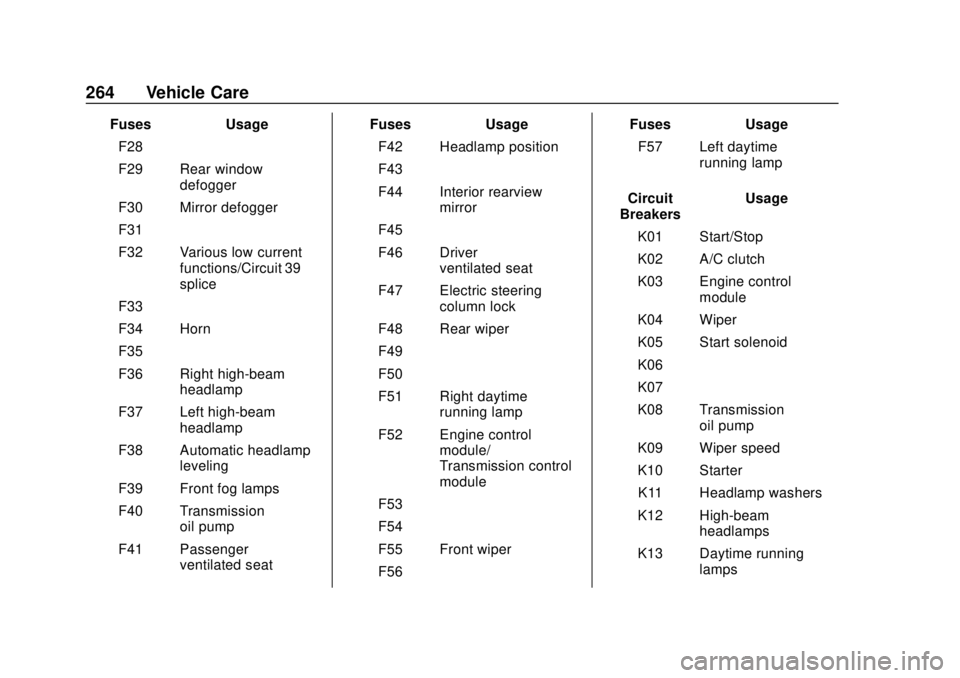
264 Vehicle Care
FusesUsage
F28 –
F29 Rear window defogger
F30 Mirror defogger
F31 –
F32 Various low current functions/Circuit 39
splice
F33 –
F34 Horn
F35 –
F36 Right high-beam headlamp
F37 Left high-beam headlamp
F38 Automatic headlamp leveling
F39 Front fog lamps
F40 Transmission oil pump
F41 Passenger ventilated seat Fuses
Usage
F42 Headlamp position
F43 –
F44 Interior rearview mirror
F45 –
F46 Driver ventilated seat
F47 Electric steering column lock
F48 Rear wiper
F49 –
F50 –
F51 Right daytime running lamp
F52 Engine control module/
Transmission control
module
F53 –
F54 –
F55 Front wiper
F56 – Fuses
Usage
F57 Left daytime running lamp
Circuit
Breakers Usage
K01 Start/Stop
K02 A/C clutch
K03 Engine control module
K04 Wiper
K05 Start solenoid
K06 –
K07 –
K08 Transmission oil pump
K09 Wiper speed
K10 Starter K11 Headlamp washers
K12 High-beam headlamps
K13 Daytime running lamps