instrument panel BUICK ENVISION 2019 Owner's Guide
[x] Cancel search | Manufacturer: BUICK, Model Year: 2019, Model line: ENVISION, Model: BUICK ENVISION 2019Pages: 377, PDF Size: 6.03 MB
Page 173 of 377
Buick Envision Owner Manual (GMNA-Localizing-U.S./Canada/Mexico-
12032235) - 2019 - CRC - 6/27/18
172 Climate Controls
automatically when the interior
temperature is cold and the outside
temperature is about 7 °C (44 °F)
and below. The auto rear defogger
turns off automatically.
If the vehicle is equipped with
heated outside mirrors, they turn on
when the rear window defogger
button is on and help to clear fog or
frost from the surface of the mirror.
SeeHeated Mirrors 047.
Caution
Do not try to clear frost or other
material from the inside of the
front windshield and rear window
with a razor blade or anything
else that is sharp. This may
damage the rear window
defogger grid and affect the
radio's ability to pick up stations
clearly. The repairs would not be
covered by the vehicle warranty.
Jorz:PressJorz,
if equipped, to heat the driver or
passenger seat. Press
Cor{, if equipped, to
ventilate the driver or passenger
seat. See Heated and Ventilated
Front Seats 061.
Sensor
The solar sensor on top of the
instrument panel near the
windshield, monitors the solar heat.
The climate control system uses the
sensor information to adjust the
temperature, fan speed,
recirculation, and air delivery mode
for best comfort.
Do not cover the sensor; otherwise
the automatic climate control system
may not work properly.
Rear Climate Control
System
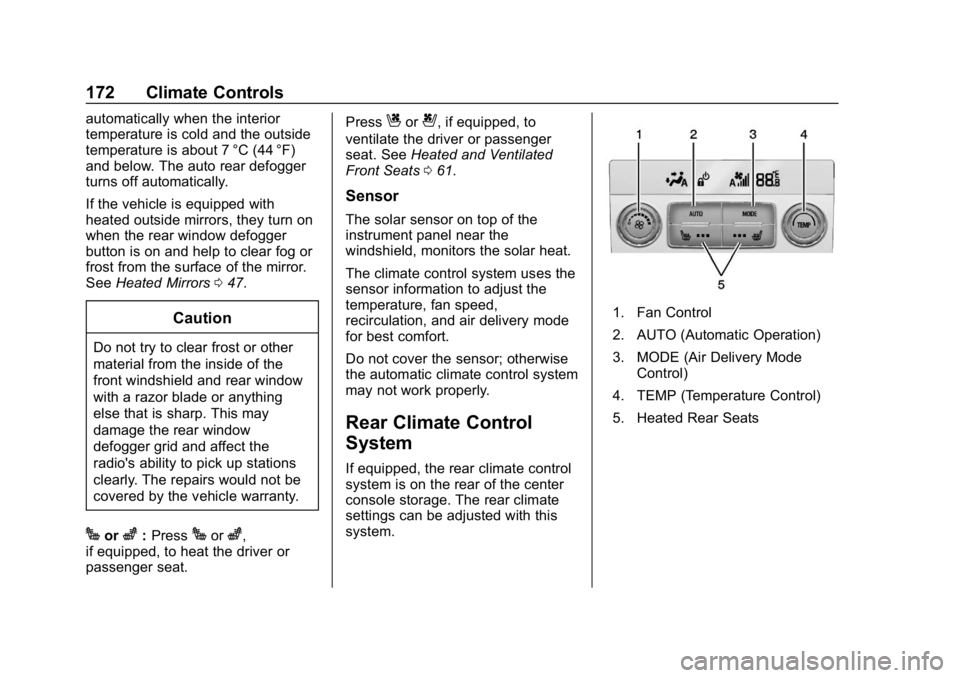
If equipped, the rear climate control
system is on the rear of the center
console storage. The rear climate
settings can be adjusted with this
system.
1. Fan Control
2. AUTO (Automatic Operation)
3. MODE (Air Delivery Mode
Control)
4. TEMP (Temperature Control)
5. Heated Rear Seats
Page 184 of 377

Buick Envision Owner Manual (GMNA-Localizing-U.S./Canada/Mexico-
12032235) - 2019 - CRC - 6/27/18
Driving and Operating 183
.The Antilock Brake System
(ABS) improves vehicle stability
during hard stops, but the
brakes should be applied sooner
than when on dry pavement.
See Antilock Brake System
(ABS) 0200.
. Allow greater following distance
and watch for slippery spots. Icy
patches can occur on otherwise
clear roads in shaded areas.
The surface of a curve or an
overpass can remain icy when
the surrounding roads are clear.
Avoid sudden steering
maneuvers and braking while
on ice.
. Turn off cruise control.
Blizzard Conditions
Stop the vehicle in a safe place and
signal for help. Stay with the vehicle
unless there is help nearby.
If possible, use Roadside
Assistance. See Roadside
Assistance Program 0343. To get
help and keep everyone in the
vehicle safe: .
Turn on the hazard warning
flashers.
. Tie a red cloth to an outside
mirror.
{Warning
Snow can trap engine exhaust
under the vehicle. This may
cause exhaust gases to get
inside. Engine exhaust contains
carbon monoxide (CO), which
cannot be seen or smelled. It can
cause unconsciousness and even
death.
If the vehicle is stuck in snow:
. Clear snow from the base of
the vehicle, especially any
blocking the exhaust pipe.
. Open a window about 5 cm
(2 in) on the vehicle side
that is away from the wind,
to bring in fresh air.
. Fully open the air outlets on
or under the instrument
panel.
(Continued)
Warning (Continued)
.Adjust the climate control
system to circulate the air
inside the vehicle and set
the fan speed to the highest
setting. See “Climate
Control Systems.”
For more information about CO,
see Engine Exhaust 0196.
To save fuel, run the engine for
short periods to warm the vehicle
and then shut the engine off and
partially close the window. Moving
about to keep warm also helps.
If it takes time for help to arrive,
when running the engine, push the
accelerator pedal slightly so the
engine runs faster than the idle
speed. This keeps the battery
charged to restart the vehicle and to
signal for help with the headlamps.
Do this as little as possible, to
save fuel.
Page 211 of 377

Buick Envision Owner Manual (GMNA-Localizing-U.S./Canada/Mexico-
12032235) - 2019 - CRC - 6/27/18
210 Driving and Operating
Select the set speed desired for
cruise. This is the vehicle speed
when no vehicle is detected in
its path.
ACC will not set at a speed less
than 24 km/h (15 mph), although it
can be resumed when driving at
lower speeds.
To set ACC:1. Press
].
2. Get up to the desired speed.
3. Press and release SET– .
4. Remove your foot from the accelerator.
After ACC is set, it may immediately
apply the brakes if a vehicle ahead
is detected closer than the selected
following gap.
The ACC indicator displays in the
instrument cluster and Head-Up
Display (HUD), if equipped. When
the ACC is active, the indicator
turns green.
Be mindful of speed limits,
surrounding traffic speeds, and
weather conditions when selecting
the set speed.
Resuming a Set Speed
If the ACC is set at a desired speed
and then the brakes are applied, the
ACC is disengaged without erasing
the set speed from memory.
To begin using ACC again, press
RES+ up briefly.
. If the vehicle is moving, it returns
to the previous set speed.
Increasing Speed While ACC is at
a Set Speed
If ACC is already activated, do one
of the following:
. Use the accelerator to get to the
higher speed. Press SET– down.
Release the control and the accelerator pedal. The vehicle
will now cruise at the higher
speed.
When the accelerator pedal is
pressed, ACC will not brake
because it is overridden. The
ACC indicator will turn blue on
the instrument panel and heads
up display, if equipped.
. Press and hold RES+ up until
the desired set speed appears
on the display, then release it.
. To increase vehicle speed in
small increments, press RES+
up briefly. For each press, the
vehicle goes 1 km/h (1 mph)
faster.
When it is determined that there is
no vehicle ahead inside the selected
following gap, then the vehicle
speed will increase to the set speed.
Page 214 of 377

Buick Envision Owner Manual (GMNA-Localizing-U.S./Canada/Mexico-
12032235) - 2019 - CRC - 6/27/18
Driving and Operating 213
The ACC active indicator will turn
white when ACC is no longer active.
Notification to Resume ACC
ACC will maintain a follow gap
behind a detected vehicle and slow
your vehicle to a stop behind that
vehicle.
If the stopped vehicle ahead has
driven away and ACC has not
resumed, the vehicle ahead
indicator will flash as a reminder to
check traffic before proceeding. In
addition, three beeps will sound.
See“Adaptive Cruise Go Notifier” in
“Collision/Detection Systems” under
Vehicle Personalization 0150.
When the vehicle ahead drives
away, press RES+ or the
accelerator pedal to resume ACC.
If stopped for more than
two minutes or if the driver door is
opened and the driver seat belt is
unbuckled, the ACC automatically
applies the Electric Parking Brake
(EPB) to hold the vehicle. The EPB
status light will turn on. See Electric
Parking Brake 0201. To release the
EPB, press the accelerator pedal. A DIC warning message may
display indicating to shift to P (Park)
before exiting the vehicle.
{Warning
If ACC has stopped the vehicle,
and if ACC is disengaged, turned
off, or canceled, the vehicle will
no longer be held at a stop. The
vehicle can move. When ACC is
holding the vehicle at a stop,
always be prepared to manually
apply the brakes.
{Warning
Leaving the vehicle without
placing it in P (Park) can be
dangerous. Do not leave the
vehicle while it is being held at a
stop by ACC. Always place the
vehicle in P (Park) and turn off
the ignition before leaving the
vehicle.
ACC Override
If using the accelerator pedal while
ACC is active, automatic braking will
not occur. The ACC indicator will
turn blue on the instrument panel
and heads up display, if equipped.
ACC will resume operation when the
accelerator pedal is not being
pressed.
{Warning
The ACC will not automatically
apply the brakes if your foot is
resting on the accelerator pedal.
You could crash into a vehicle
ahead of you.
Curves in the Road
{Warning
On curves, ACC may not detect a
vehicle ahead in your lane. You
could be startled if the vehicle
accelerates up to the set speed,
especially when following a (Continued)
Page 236 of 377
Buick Envision Owner Manual (GMNA-Localizing-U.S./Canada/Mexico-
12032235) - 2019 - CRC - 6/27/18
Driving and Operating 235
.Vehicles can tow in D (Drive).
If the transmission downshifts
too often, a lower gear may be
selected using Manual Mode
See Manual Mode 0199.
If equipped, the following driver
assistance features should be
turned off when towing a trailer:
. Adaptive Cruise Control (ACC)
. Super Cruise Control
. Lane Keep Assist (LKA)
. Parking Assist
. Automatic Parking Assist (APA)
. Reverse Automatic
Braking (RAB)
If equipped, the following driver
assistance features should be
turned to alert or off when towing a
trailer:
. Forward Automatic Braking
System (FAB)
. Intelligent Brake Assist (IBA)
. Front Pedestrian Braking (FPB) If equipped with Lane Change Alert
(LCA), the LCA detection zones that
extend back from the side of the
vehicle do not move further back
when a trailer is towed. Use caution
while changing lanes when towing a
trailer.
If equipped with Rear Cross Traffic
Alert (RCTA), use caution while
backing up when towing a trailer, as
the RCTA detection zones that
extend out from the back of the
vehicle do not move further back
when a trailer is towed.
{Warning
To prevent serious injury or death
from carbon monoxide (CO),
when towing a trailer:
. Do not drive with the
liftgate, trunk/hatch,
or rear-most window open.
. Fully open the air outlets on
or under the instrument
panel.
(Continued)
Warning (Continued)
.Adjust the climate control
system to a setting that
brings in only outside air.
See “Climate Control
Systems” in the Index.
For more information about
carbon monoxide, see Engine
Exhaust 0196.
Towing a trailer requires experience.
The combination of the vehicle and
trailer is longer and not as
responsive as the vehicle itself. Get
used to the handling and braking of
the combination by driving on a
level road surface before driving on
public roads.
The trailer structure, the tires, and
the brakes must be all be rated to
carry the intended cargo.
Inadequate trailer equipment can
cause the combination to operate in
an unexpected or unsafe manner.
Before driving, inspect all trailer
hitch parts and attachments, safety
chains, electrical connectors, lamps,
Page 244 of 377
Buick Envision Owner Manual (GMNA-Localizing-U.S./Canada/Mexico-
12032235) - 2019 - CRC - 6/27/18
Vehicle Care 243
Vehicle Care
General Information
General Information . . . . . . . . . . 244
California Proposition65 Warning . . . . . . . . . . . . . . . . . 244
California Perchlorate Materials Requirements . . . . . 245
Accessories and Modifications . . . . . . . . . . . . . . . . 245
Vehicle Checks
Doing Your OwnService Work . . . . . . . . . . . . . . . 245
Hood . . . . . . . . . . . . . . . . . . . . . . . . . 246
Engine Compartment Overview . . . . . . . . . . . . . . . . . . . . 247
Engine Oil . . . . . . . . . . . . . . . . . . . . 250
Engine Oil Life System . . . . . . . 252
Automatic Transmission Fluid . . . . . . . . . . . . . . . . . . . . . . . . 253
Engine Air Cleaner/Filter . . . . . . 254
Cooling System . . . . . . . . . . . . . . 256
Engine Overheating . . . . . . . . . . 259
Washer Fluid . . . . . . . . . . . . . . . . . 261
Brakes . . . . . . . . . . . . . . . . . . . . . . . 261
Brake Fluid . . . . . . . . . . . . . . . . . . . 262
Battery - North America . . . . . . 263
All-Wheel Drive . . . . . . . . . . . . . . . 264 Starter Switch Check . . . . . . . . . 264
Automatic Transmission Shift
Lock Control Function
Check . . . . . . . . . . . . . . . . . . . . . . . 265
Park Brake and P (Park)
Mechanism Check . . . . . . . . . . 265
Wiper Blade Replacement . . . . 265
Windshield Replacement . . . . . 267
Gas Strut(s) . . . . . . . . . . . . . . . . . . 267
Headlamp Aiming
Headlamp Aiming . . . . . . . . . . . . 268
Bulb Replacement
Bulb Replacement . . . . . . . . . . . . 269
Halogen Bulbs . . . . . . . . . . . . . . . . 269
High Intensity Discharge (HID) Lighting . . . . . . . . . . . . . . . . . . . . . 269
License Plate Lamp . . . . . . . . . . 269
Electrical System
Electrical System Overload . . . 270
Fuses and Circuit Breakers . . . 271
Engine Compartment Fuse Block . . . . . . . . . . . . . . . . . . . . . . . . 271
Instrument Panel Fuse Block . . . . . . . . . . . . . . . . . . . . . . . . 274
Rear Compartment Fuse Block . . . . . . . . . . . . . . . . . . . . . . . . 275
Wheels and Tires
Tires . . . . . . . . . . . . . . . . . . . . . . . . . . 277 All-Season Tires . . . . . . . . . . . . . . 278
Winter Tires . . . . . . . . . . . . . . . . . . 278
Summer Tires . . . . . . . . . . . . . . . . 279
Tire Sidewall Labeling . . . . . . . . 279
Tire Designations . . . . . . . . . . . . . 281
Tire Terminology and
Definitions . . . . . . . . . . . . . . . . . . 282
Tire Pressure . . . . . . . . . . . . . . . . . 284
Tire Pressure Monitor System . . . . . . . . . . . . . . . . . . . . . . 286
Tire Pressure Monitor Operation . . . . . . . . . . . . . . . . . . . 287
Tire Inspection . . . . . . . . . . . . . . . . 291
Tire Rotation . . . . . . . . . . . . . . . . . 291
When It Is Time for New Tires . . . . . . . . . . . . . . . . . . . . . . . . 292
Buying New Tires . . . . . . . . . . . . . 293
Different Size Tires and Wheels . . . . . . . . . . . . . . . . . . . . . . 294
Uniform Tire Quality Grading . . . . . . . . . . . . . . . . . . . . . 294
Wheel Alignment and Tire Balance . . . . . . . . . . . . . . . . . . . . . 296
Wheel Replacement . . . . . . . . . . 296
Tire Chains . . . . . . . . . . . . . . . . . . . 297
If a Tire Goes Flat . . . . . . . . . . . . 297
Tire Changing . . . . . . . . . . . . . . . . 299
Compact Spare Tire . . . . . . . . . . 304
Page 247 of 377

Buick Envision Owner Manual (GMNA-Localizing-U.S./Canada/Mexico-
12032235) - 2019 - CRC - 6/27/18
246 Vehicle Care
If equipped with remote vehicle
start, open the hood before
performing any service work to
prevent remote starting the vehicle
accidentally. SeeRemote Vehicle
Start 034.
Keep a record with all parts receipts
and list the mileage and the date of
any service work performed. See
Maintenance Records 0334.
Caution
Even small amounts of
contamination can cause damage
to vehicle systems. Do not allow
contaminants to contact the fluids,
reservoir caps, or dipsticks.
Hood
To open the hood:
1. Pull the hood release handle
with this symbol until the hood
is ajar. The release handle is
located to the left of the
steering column below the
instrument panel.
2. Go to the front of the vehicle tofind the secondary release
handle. The handle is under
the front edge of the hood near
the center. Push the handle to
the right and at the same time
raise the hood.
To close the hood: 1. Before closing the hood, be sure all the filler caps are on
properly.
2. Lower the hood and push down to close. Check to make sure
the hood is closed and repeat
the process if necessary.
Page 272 of 377
Buick Envision Owner Manual (GMNA-Localizing-U.S./Canada/Mexico-
12032235) - 2019 - CRC - 6/27/18
Vehicle Care 271
Fuses and Circuit
Breakers
The wiring circuits in the vehicle are
protected from short circuits by a
combination of fuses and circuit
breakers. This greatly reduces the
chance of damage caused by
electrical problems.
{Danger
Fuses and circuit breakers are
marked with their ampere rating.
Do not exceed the
specified amperage rating when
replacing fuses and circuit
breakers. Use of an oversized
fuse or circuit breaker can result
in a vehicle fire. You and others
could be seriously injured or
killed.To check a fuse, look at the
silver-colored band inside the fuse.
If the band is broken or melted,
replace the fuse. Be sure to replace
a bad fuse with a new one of the
identical size and rating.
Fuses of the same amperage can
be temporarily borrowed from
another fuse location, if a fuse goes
out. Replace the fuse as soon as
possible.
To identify and check fuses, circuit
breakers, and relays, see
Engine
Compartment Fuse Block 0271,
Instrument Panel Fuse Block 0274,
and Rear Compartment Fuse Block
0 275.
Engine Compartment
Fuse Block
To remove the fuse block cover,
squeeze the clips on the cover and
lift it straight up. See Engine
Compartment Overview 0247.
Caution
Spilling liquid on any electrical
component on the vehicle may
damage it. Always keep the
covers on any electrical
component.
Page 275 of 377
Buick Envision Owner Manual (GMNA-Localizing-U.S./Canada/Mexico-
12032235) - 2019 - CRC - 6/27/18
274 Vehicle Care
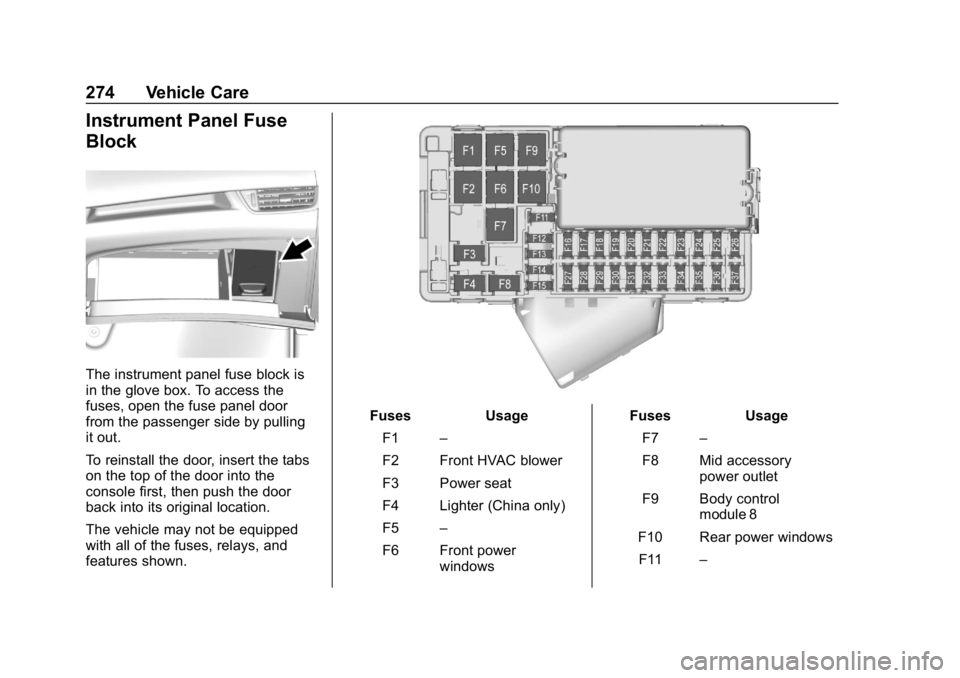
Instrument Panel Fuse
Block
The instrument panel fuse block is
in the glove box. To access the
fuses, open the fuse panel door
from the passenger side by pulling
it out.
To reinstall the door, insert the tabs
on the top of the door into the
console first, then push the door
back into its original location.
The vehicle may not be equipped
with all of the fuses, relays, and
features shown.
FusesUsage
F1 –
F2 Front HVAC blower
F3 Power seat
F4 Lighter (China only)
F5 –
F6 Front power windows Fuses
Usage
F7 –
F8 Mid accessory power outlet
F9 Body control module 8
F10 Rear power windows F11 –
Page 311 of 377
Buick Envision Owner Manual (GMNA-Localizing-U.S./Canada/Mexico-
12032235) - 2019 - CRC - 6/27/18
310 Vehicle Care
.Is the proper towing equipment
going to be used? See your
dealer or trailering professional
for additional advice and
equipment recommendations.
. Is the vehicle ready to be
towed? Just as preparing the
vehicle for a long trip, make sure
the vehicle is prepared to be
towed.
Caution
Use of a shield mounted in front
of the vehicle grille could restrict
airflow and cause damage to the
transmission. The repairs would
not be covered by the vehicle
warranty. If using a shield, only
use one that attaches to the
towing vehicle.
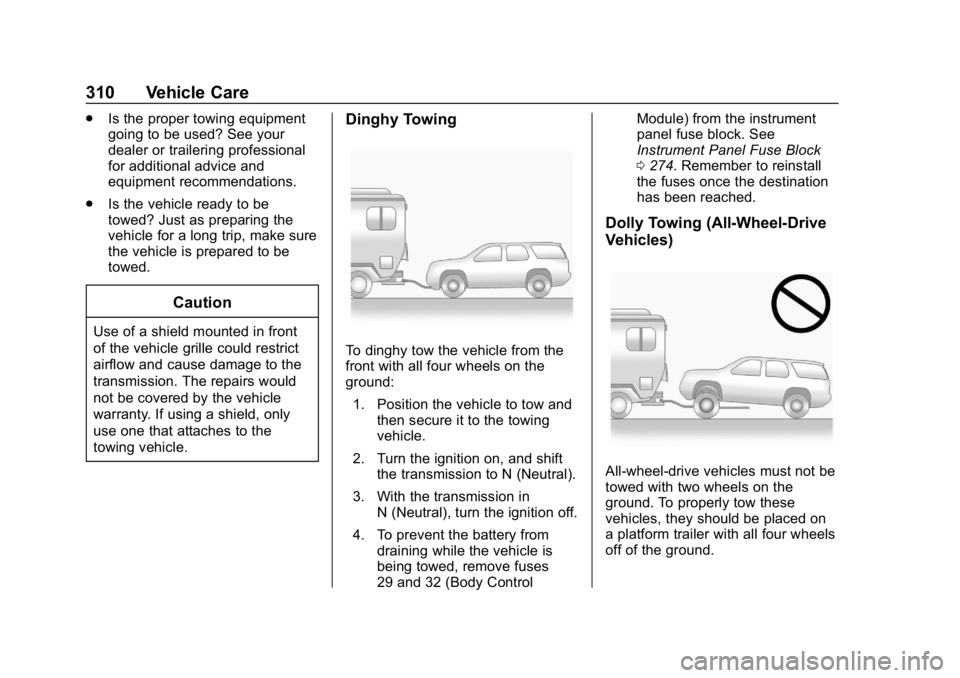
Dinghy Towing
To dinghy tow the vehicle from the
front with all four wheels on the
ground:
1. Position the vehicle to tow and then secure it to the towing
vehicle.
2. Turn the ignition on, and shift the transmission to N (Neutral).
3. With the transmission in N (Neutral), turn the ignition off.
4. To prevent the battery from draining while the vehicle is
being towed, remove fuses
29 and 32 (Body Control Module) from the instrument
panel fuse block. See
Instrument Panel Fuse Block
0
274. Remember to reinstall
the fuses once the destination
has been reached.
Dolly Towing (All-Wheel-Drive
Vehicles)
All-wheel-drive vehicles must not be
towed with two wheels on the
ground. To properly tow these
vehicles, they should be placed on
a platform trailer with all four wheels
off of the ground.