center console BUICK ENVISION 2020 Owners Manual
[x] Cancel search | Manufacturer: BUICK, Model Year: 2020, Model line: ENVISION, Model: BUICK ENVISION 2020Pages: 363, PDF Size: 7.26 MB
Page 46 of 363

Buick Envision Owner Manual (GMNA-Localizing-U.S./Canada/Mexico-
13555857) - 2020 - CRC - 3/25/19
Seats and Restraints 45If equipped, the rear seat has an
armrest in the center of the
seatback. Lower the armrest to
access the cupholders.
To fold, lift the armrest up and push
it rearward until it is flush with the
seatback.
Heated Rear Seats
{ WarningIf temperature change or pain to
the skin cannot be felt, the seat
heater may cause burns. See the
Warning under Heated and
Ventilated Front Seats 0 41 . If equipped, the buttons are on the
rear of the center console.
With the ignition on, press
M or
Lto heat the left or right outboard seat
cushion. An indicator on the climate
control display appears when this
feature is on.
Press the button once for the
highest setting. With each press of
the button, the heated seat changes
to the next lower setting, and then
the off setting. Three lights indicate
the highest setting, and one light
indicates the lowest. Seat Belts This section describes how to use
seat belts properly, and some things
not to do.
{ WarningDo not let anyone ride where a
seat belt cannot be worn properly.
In a crash, if you or your
passenger(s) are not wearing
seat belts, injuries can be much
worse than if you are wearing
seat belts. You can be seriously
injured or killed by hitting things
inside the vehicle harder or by
being ejected from the vehicle. In
addition, anyone who is not
buckled up can strike other
passengers in the vehicle.
It is extremely dangerous to ride
in a cargo area, inside or outside
of a vehicle. In a collision,
passengers riding in these areas
are more likely to be seriously
injured or killed. Do not allow
(Continued)
Page 88 of 363

Buick Envision Owner Manual (GMNA-Localizing-U.S./Canada/Mexico-
13555857) - 2020 - CRC - 3/12/19
Storage 87
Storage Storage Compartments Storage Compartments . . . . . . . . 87
Glove Box . . . . . . . . . . . . . . . . . . . . . 87
Cupholders . . . . . . . . . . . . . . . . . . . . 87
Front Storage . . . . . . . . . . . . . . . . . . 88
Sunglasses Storage . . . . . . . . . . . 88
Rear Storage . . . . . . . . . . . . . . . . . . 88
Center Console Storage . . . . . . . 90
Additional Storage Features Cargo Cover . . . . . . . . . . . . . . . . . . . 90
Cargo Tie-Downs . . . . . . . . . . . . . . 91
Cargo Management System . . . 91
Convenience Net . . . . . . . . . . . . . . 92
Roof Rack System Roof Rack System . . . . . . . . . . . . . 93 Storage
Compartments
{ WarningDo not store heavy or sharp
objects in storage compartments.
In a crash, these objects may
cause the cover to open and
could result in injury.
Glove Box Open the glove box by lifting up on
the lever.
Cupholders Front
There are two cupholders in the
center console. Rear
Cupholders may be located in the
second row seat armrest. To
access, pull the armrest down.
Page 91 of 363

Buick Envision Owner Manual (GMNA-Localizing-U.S./Canada/Mexico-
13555857) - 2020 - CRC - 3/12/19
90 Storage
Center Console Storage
Press the button to access the
storage in the center console.
If equipped there is an auxiliary
jack, an SD card reader, and a
single or dual USB port inside. There is a small bin directly in front
of the center console. On some
models, the bin has a cover. Use
the handle to open the covered bin. Additional Storage
Features Cargo Cover
{ WarningAn unsecured cargo cover could
strike people in a sudden stop or
turn, or in a crash. Store the
cargo cover securely or remove it
from the vehicle.
{ WarningDo not place objects on the cargo
cover. Sudden stops or turns can
cause objects to be thrown in the
vehicle. You or others could be
injured.
Page 100 of 363
Buick Envision Owner Manual (GMNA-Localizing-U.S./Canada/Mexico-
13555857) - 2020 - CRC - 2/25/19
Instruments and Controls 99
Clock Setting the Digital Clock The infotainment system controls
are used to access the time and
date settings through the menu
system. See “ Using the System ” in
the infotainment manual.
To set the time:
1. Touch SETTINGS from the
Home Page, then touch Time
and Date.
2. Touch Set Time and touch
«or
ª to increase or decrease
hours, minutes, and AM or PM.
Touch 12 – 24 Hr for 12 or
24 hour clock.
3. Touch
S to go back to the
previous menu.
Auto Set requires an active OnStar
or connected service plan.
If auto timing is set, the time
displayed on the clock may not
update immediately when driving
into a new time zone. To set the date:
1. Touch SETTINGS from the
Home Page, then touch Time
and Date.
2. Touch Set Date and touch
«or
ª to increase or decrease
month, day, or year.
3. Touch
S to go back to the
previous menu.
To set the clock display:
1. Touch SETTINGS and touch
Time and Date.
2. Touch Clock Display and touch
Off or On to turn the clock
display off or on.
3. Touch
S to go back to the
previous menu.
Setting the Analog Clock
The clock on the center stack is not
connected to any other vehicle
system. To adjust the time:
1. Press and hold the button next
to the clock to quickly advance
the time. 2. Press and release the button to
increase the time by
one-minute intervals.
Power Outlets The vehicle has four 12-volt
accessory power outlets, which can
be used to plug in electrical
equipment, such as a cell phone or
MP3 player.
There are power outlets:
.
On the center floor console.
.
Inside the center floor console.
.
On the rear of the center floor
console.
.
In the rear cargo area.
To use the outlet, remove the cover.
Caution
Leaving electrical equipment
plugged in for an extended period
of time while the vehicle is off will
drain the battery. Always unplug
electrical equipment when not in
(Continued)
Page 101 of 363
Buick Envision Owner Manual (GMNA-Localizing-U.S./Canada/Mexico-
13555857) - 2020 - CRC - 2/25/19
100 Instruments and Controls Caution (Continued)use and do not plug in equipment
that exceeds the maximum
20 amp rating.
{ WarningPower is always supplied to the
rear cargo power outlet. Do not
leave electrical equipment
plugged in when the vehicle is not
in use because the vehicle could
catch fire and cause injury or
death.
Certain accessory plugs may not be
compatible with the accessory
power outlet and could overload
vehicle and adapter fuses. If a
problem is experienced, see your
dealer. When adding electrical equipment,
be sure to follow the proper
installation instructions included with
the equipment. See Add-On
Electrical Equipment 0 228 .
CautionHanging heavy equipment from
the power outlet can cause
damage not covered by the
vehicle warranty. The power
outlets are designed for
accessory power plugs only, such
as cell phone charge cords.
Power Outlet 110/120 Volt
Alternating Current If equipped, this power outlet can be
used to plug in electrical equipment
that uses a maximum limit of 400
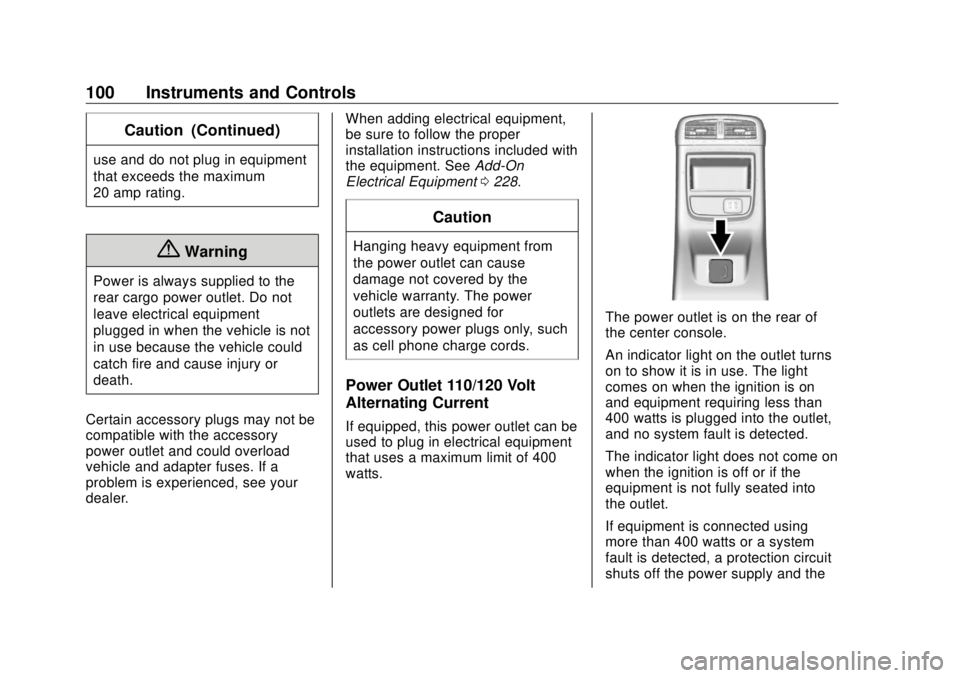
watts. The power outlet is on the rear of
the center console.
An indicator light on the outlet turns
on to show it is in use. The light
comes on when the ignition is on
and equipment requiring less than
400 watts is plugged into the outlet,
and no system fault is detected.
The indicator light does not come on
when the ignition is off or if the
equipment is not fully seated into
the outlet.
If equipment is connected using
more than 400 watts or a system
fault is detected, a protection circuit
shuts off the power supply and the
Page 102 of 363
Buick Envision Owner Manual (GMNA-Localizing-U.S./Canada/Mexico-
13555857) - 2020 - CRC - 2/25/19
Instruments and Controls 101indicator light turns off. To reset the
circuit, unplug the item and plug it
back in or turn the Retained
Accessory Power (RAP) off and
then back on. See Retained
Accessory Power (RAP) 0 179 . The
power restarts when equipment
using 400 watts or less is plugged
into the outlet and a system fault is
not detected.
The power outlet is not designed for
the following and may not work
properly if they are plugged in:
.
Equipment with high initial peak
wattage, such as
compressor-driven refrigerators
and electric power tools
.
Other equipment requiring an
extremely stable power supply,
such as
microcomputer-controlled
electric blankets and touch
sensor lamps
.
Medical equipment Wireless Charging If equipped, the vehicle has a
wireless charging pocket outside the
armrest of the center console. The
system operates at 145 kHz and
wirelessly charges one Qi
compatible smartphone. The power
output of the system is capable of
charging at a rate up to 3 amp
(15W), as requested by the
compatible smartphone. See Radio
Frequency Statement 0 335 .
{ WarningWireless charging can affect the
operation of an implanted
pacemaker or other medical
devices. If you have one, it is
recommended to consult with
your doctor before using the
wireless charging system.
The vehicle must be on, in ACC/
ACCESSORY, or in Retained
Accessory Power (RAP). The
wireless charging feature may not correctly indicate charging when the
vehicle is in RAP. See Retained
Accessory Power (RAP) 0 179 .
The operating temperature is − 20 °C
( − 4 °F) to 60 °C (140 °F) for the
charging system and 0 °C (32 °F) to
35 °C (95 °F) for the compatible
smartphone.
{ WarningRemove all objects from the
charging pocket before charging
your compatible smartphone.
Objects, such as coins, keys,
rings, paper clips, or cards,
between the smartphone and the
charger will become very hot. On
the rare occasion that the
charging system does not detect
an object, and the object gets
wedged between the smartphone
and the charger, remove the
smartphone and allow the object
to cool before removing it from
the charging pocket, to prevent
burns.
Page 115 of 363

Buick Envision Owner Manual (GMNA-Localizing-U.S./Canada/Mexico-
13555857) - 2020 - CRC - 2/25/19
114 Instruments and Controls
{ WarningIf the airbag readiness light stays
on after the vehicle is started or
comes on while driving, it means
the airbag system might not be
working properly. The airbags in
the vehicle might not inflate in a
crash, or they could even inflate
without a crash. To help avoid
injury, have the vehicle serviced
right away.
If there is a problem with the airbag
system, a Driver Information Center
(DIC) message may also come on.
Passenger Airbag Status
Indicator The vehicle has a passenger
sensing system. See Passenger
Sensing System 0 60 for important
safety information. The overhead
console has a passenger airbag
status indicator. United States
Canada and Mexico
When the vehicle is started, the
passenger airbag status indicator
will light ON and OFF, or the
symbols for on and off for several
seconds as a system check. Then,
after several more seconds, the
status indicator will light either ON
or OFF, or the on or off symbol to let
you know the status of the front
outboard passenger frontal airbag
and knee airbag.
If the word ON or the on symbol is
lit on the passenger airbag status
indicator, it means that the front outboard passenger frontal airbag
and knee airbag are allowed to
inflate.
If the word OFF or the off symbol is
lit on the airbag status indicator, it
means that the passenger sensing
system has turned off the front
outboard passenger frontal airbag
and knee airbag.
If, after several seconds, both status
indicator lights remain on, or if there
are no lights at all, there may be a
problem with the lights or the
passenger sensing system. See
your dealer for service.
{ Warning
If the airbag readiness light ever
comes on and stays on, it means
that something may be wrong
with the airbag system. To help
avoid injury to yourself or others,
have the vehicle serviced right
away. See Airbag Readiness
Light 0 113 for more information,
including important safety
information.
Page 157 of 363

Buick Envision Owner Manual (GMNA-Localizing-U.S./Canada/Mexico-
13555857) - 2020 - CRC - 2/25/19
156 Climate Controls automatically when the interior
temperature is cold and the outside
temperature is about 7 °C (44 °F)
and below. The auto rear defogger
turns off automatically.
If equipped, the heated outside
mirrors turn on when the rear
window defogger button is on and
help to clear fog or frost from the
surface of the mirror. See Heated
Mirrors 0 28 .
CautionDo not try to clear frost or other
material from the inside of the
front windshield and rear window
with a razor blade or anything
else that is sharp. This may
damage the rear window
defogger grid and affect the
radio's ability to pick up stations
clearly. The repairs would not be
covered by the vehicle warranty.
J or
z : Press
J or
z ,
if equipped, to heat the driver or
passenger seat. Press
C or
{ , if equipped, to
ventilate the driver or passenger
seat. See Heated and Ventilated
Front Seats 0 41 .
Sensor The solar sensor, on top of the
instrument panel near the
windshield, monitors the solar heat.
The climate control system uses the
sensor information to adjust the
temperature, fan speed,
recirculation, and air delivery mode
for best comfort.
Do not cover the sensor; otherwise
the automatic climate control system
may not work properly.
Rear Climate Control
System If equipped, the rear climate control
system is on the rear of the center
console storage. The rear climate
settings can be adjusted with this
system. 1. Fan Control
2. AUTO (Automatic Operation)
3. MODE (Air Delivery Mode
Control)
4. TEMP (Temperature Control)
5. Heated Rear Seats
Page 187 of 363

Buick Envision Owner Manual (GMNA-Localizing-U.S./Canada/Mexico-
13555857) - 2020 - CRC - 2/25/19
186 Driving and Operating ABS does not change the time
needed to get a foot on the brake
pedal and does not always
decrease stopping distance. If you
get too close to the vehicle ahead,
there will not be enough time to
apply the brakes if that vehicle
suddenly slows or stops. Always
leave enough room ahead to stop,
even with ABS.
Using ABS Do not pump the brakes. Just hold
the brake pedal down firmly.
Hearing or feeling ABS operate is
normal.
Braking in Emergencies ABS allows steering and braking at
the same time. In many
emergencies, steering can help
even more than braking. Electric Parking Brake
The Electric Parking Brake (EPB)
switch is on the center console. The
EPB can always be activated, even
if the ignition is off. To prevent
draining the battery, avoid repeated
cycles of the EPB when the engine
is not running.
The system has a red parking brake
status light and an amber parking
brake warning light. See Electric
Parking Brake Light 0 117 and
Service Electric Parking Brake Light
0 118 . There are also parking
brake-related Driver Information Center (DIC) messages. In case of
insufficient electrical power, the EPB
cannot be applied or released.
Before leaving the vehicle, check
the red parking brake status light to
ensure that the parking brake is
applied.
EPB Apply To apply the EPB:
1. Be sure the vehicle is at a
complete stop.
2. Lift up the EPB switch
momentarily.
The red parking brake status light
will flash and then stay on once the
EPB is fully applied. If the red
parking brake status light flashes
continuously, then the EPB is only
partially applied or there is a
problem with the EPB. A DIC
message will display. Release the
EPB and try to apply it again. If the
light does not come on, or keeps
flashing, have the vehicle serviced.
Do not drive the vehicle if the red
Page 353 of 363

Buick Envision Owner Manual (GMNA-Localizing-U.S./Canada/Mexico-
13555857) - 2020 - CRC - 2/25/19
352 Index Assistance Systems for
Driving . . . . . . . . . . . . . . . . . . . . . . . . 207
Assistance Systems for
Parking and Backing . . . . . . . . . . 202
Auto Stop
Stop/Start System . . . . . . . . . . . . 176
Automatic
Dimming Mirrors . . . . . . . . . . . . . . . . 28
Door Locks . . . . . . . . . . . . . . . . . . . . . 18
Emergency Braking (AEB) . . . . 209
Headlamp System . . . . . . . . . . . . 147
Transmission . . . . . . . . . . . . . . . . . 182
Transmission Fluid . . . . . . . . . . . 240
Automatic Transmission
Manual Mode . . . . . . . . . . . . . . . . . 184
B Battery
Exterior Lighting Battery
Saver . . . . . . . . . . . . . . . . . . . . . . . 151
Load Management . . . . . . . . . . . . 150
Power Protection . . . . . . . . . . . . . 151
Battery - North America . . . . 251, 293
Blade Replacement, Wiper . . . . . 252
Brake
Parking, Electric . . . . . . . . . . . . . . 186
System Warning Light . . . . . . . . .117
Brakes . . . . . . . . . . . . . . . . . . . . . . . . . . 249 Brakes (cont'd)
Antilock . . . . . . . . . . . . . . . . . . . . . . . 185
Assist . . . . . . . . . . . . . . . . . . . . . . . . . 187
Fluid . . . . . . . . . . . . . . . . . . . . . . . . . . 250
Braking . . . . . . . . . . . . . . . . . . . . . . . . . 163
Automatic
Emergency (AEB) . . . . . . . . . . . 209
Break-In, New Vehicle . . . . . . . . . . 173
Bulb Replacement
Halogen Bulbs . . . . . . . . . . . . . . . . 256
Headlamp Aiming . . . . . . . . . . . . . 255
Headlamps . . . . . . . . . . . . . . . . . . . 256
High Intensity Discharge
(HID) Lighting . . . . . . . . . . . . . . . 256
License Plate Lamps . . . . . . . . . 256
Buying New Tires . . . . . . . . . . . . . . . 281
C Calibration . . . . . . . . . . . . . . . . . . . . . . . 98
California
Perchlorate Materials
Requirements . . . . . . . . . . . . . . . 231
California
Proposition
65 Warning . . . . . . . . . .230, 251, 293,
Back Cover
Canadian Vehicle Owners . . . . . . . . 2 Capacities and
Specifications . . . . . . . . . . . . . . . . . 324
Carbon Monoxide
Engine Exhaust . . . . . . . . . . . . . . . 181
Liftgate . . . . . . . . . . . . . . . . . . . . . . . . . 20
Winter Driving . . . . . . . . . . . . . . . . 167
Cargo
Cover . . . . . . . . . . . . . . . . . . . . . . . . . . . 90
Management System . . . . . . . . . . . 91
Tie-Downs . . . . . . . . . . . . . . . . . . . . . . 91
Caution, Danger, and Warning . . . . 3
Center Console Storage . . . . . . . . . 90
Chains, Tire . . . . . . . . . . . . . . . . . . . . 285
Charging
Wireless . . . . . . . . . . . . . . . . . . . . . . 101
Charging System Light . . . . . . . . . 115
Check
Engine Light (Malfunction
Indicator) . . . . . . . . . . . . . . . . . . . . .115
Child Restraints
Infants and Young Children . . . . . 68
Lower Anchors and Tethers
for Children . . . . . . . . . . . . . . . . . . . 73
Older Children . . . . . . . . . . . . . . . . . . 67
Securing . . . . . . . . . . . . . . . . . . . . 82, 84
Systems . . . . . . . . . . . . . . . . . . . . . . . . 71
Circuit Breakers . . . . . . . . . . . . . . . . 258