center console BUICK ENVISION 2022 User Guide
[x] Cancel search | Manufacturer: BUICK, Model Year: 2022, Model line: ENVISION, Model: BUICK ENVISION 2022Pages: 369, PDF Size: 14.04 MB
Page 205 of 369

Buick Envision Owner Manual (GMNA-Localizing-U.S./Canada/Mexico-
15218978) - 2022 - CRC - 5/12/21
204 Driving and Operating
Shifting Into Park
{Warning
It can be dangerous to get out of the
vehicle if the vehicle is not in P (Park)
with the parking brake set. The vehicle
can roll. If you have left the engine
running, the vehicle can move suddenly.
You or others could be injured. To be
sure the vehicle will not move, even
when you are on fairly level ground, use
the steps that follow. If you are pulling a
trailer, seeDriving Characteristics and
Towing Tips 0249.
1. Hold the brake pedal down and set the parking brake. See Electric Parking Brake
0 211.
2. Press the P (Park) switch on the center stack.
3. Press ENGINE START/STOP to turn the engine off.
If the vehicle is shifted into P (Park) on a
hill, the Electric Parking Brake (EPB) may
apply automatically. The driver may not be
able to release the EPB using the EPB
switch. It should automatically release when
the vehicle is shifted out of P (Park).
Leaving the Vehicle with the Engine
Running
{Warning
It can be dangerous to leave the vehicle
with the engine running. It could
overheat and catch fire.
It is dangerous to get out of the vehicle
if the vehicle is not in P (Park) with the
parking brake set. The vehicle can roll.
Do not leave the vehicle when the engine
is running. If you have left the engine
running, the vehicle can move suddenly.
You or others could be injured. To be
sure the vehicle will not move, even
when you are on fairly level ground,
always set the parking brake and shift
the vehicle to P (Park). See Shifting Into
Park 0204. If you are towing a trailer,
see Driving Characteristics and Towing
Tips 0249.
If you have to leave the vehicle with the
engine running, the vehicle must be in
P (Park) with the parking brake set.
Confirm that the vehicle is in P (Park).
Shifting out of Park
This vehicle is equipped with an electronic
transmission.
To shift out of P (Park): 1. Ensure the engine is running.
2. Apply the brake pedal.
3. Press or pull the desired shift switch on the center console. For N (Neutral) press
and hold the N (Neutral) switch until the
N indicator illuminates red.
The P indicator will turn white and the gear
indicator on the selected shift switch will
turn red when the vehicle is no longer in
P (Park).
If the vehicle cannot shift from P (Park), a
Driver Information Center (DIC) message will
be displayed. Check that the ignition is on,
the engine is running, and the brake pedal
is applied when you are attempting to shift
out of P (Park). If all of these are met but
the vehicle will not shift out of P (Park), see
your dealer for service.
Page 207 of 369

Buick Envision Owner Manual (GMNA-Localizing-U.S./Canada/Mexico-
15218978) - 2022 - CRC - 5/12/21
206 Driving and Operating
Warning (Continued)
If unusual fumes are detected or if it is
suspected that exhaust is coming into the
vehicle:
.Drive it only with the windows
completely down.
.Have the vehicle repaired immediately.
Never park the vehicle with the engine
running in an enclosed area such as a
garage or a building that has no fresh air
ventilation.
Running the Vehicle While Parked
It is better not to leave the engine running
while parked.
If the vehicle is left with the engine running,
follow the proper steps to be sure the
vehicle will not move. See Shifting Into Park
0 204 and
Engine Exhaust 0205.
Automatic Transmission
The shift switches are on the center console.
The selected gear position will illuminate red
on the shift switch, while all others will be
displayed in white. If the shift is not
immediate, as in very cold conditions, the
indicator on the shift switch may flash until
it is fully engaged.
The transmission does not operate when the
vehicle is off.
If the vehicle is in ACC/ACCESSORY, the
transmission can be shifted into P (Park).
If ENGINE START/STOP is pressed twice while
at a relatively high speed, the engine will
turn off and the transmission will automatically shift into N (Neutral). Once
the vehicle is stopped, P (Park) can be
selected.
P :
This position locks the drive wheels. Use
P (Park) when starting the vehicle to ensure
the vehicle does not move.
{Warning
It is dangerous to get out of the vehicle
if the transmission is not in P (Park) with
the parking brake set. The vehicle
can roll.
Do not leave the vehicle when the engine
is running. If the engine has been left
running, the vehicle can move suddenly.
You or others could be injured. To be
sure the vehicle will not move, even
when on fairly level ground, always set
the parking brake and place the
transmission into P (Park). See Shifting
Into Park 0204 and
Driving Characteristics and Towing Tips
0 249.
This vehicle is equipped with an
electronically controlled transmission. The
R (Reverse) and D (Drive) shift switches are
Page 208 of 369

Buick Envision Owner Manual (GMNA-Localizing-U.S./Canada/Mexico-
15218978) - 2022 - CRC - 5/12/21
Driving and Operating 207
designed to prevent inadvertent shifting out
of P (Park) unless the ignition is on, and the
brake pedal is applied.
When the vehicle is stopped, press ENGINE
START/STOP to turn off the vehicle. The
transmission will shift to P (Park)
automatically.
The vehicle will not shift into P (Park) if it is
moving too fast. Stop the vehicle and shift
into P (Park).
To shift in and out of P (Park), seeShifting
Into Park 0204 and
Shifting out of Park 0204.
R : Use this gear to back up.
If the vehicle is shifted into R (Reverse)
while the speed is too high, the vehicle will
shift into N (Neutral). Reduce the vehicle
speed and try the shift again.
To shift into R (Reverse): 1. Bring the vehicle to a complete stop.
2. Pull the R (Reverse) switch on the center console.
To shift out of R (Reverse): 1. Bring the vehicle to a complete stop.
2. Shift to the desired gear. At low vehicle speeds, R (Reverse) can be
used to rock the vehicle back and forth to
get out of snow, ice, or sand without
damaging the transmission. See
If the
Vehicle Is Stuck 0195.
N : In this position, the engine does not
connect with the wheels. To restart the
engine when the vehicle is already moving,
use N (Neutral) only.
{Warning
Shifting into a drive gear while the
engine is running at high speed is
dangerous. Unless your foot is firmly on
the brake pedal, the vehicle could move
very rapidly. You could lose control and
hit people or objects. Do not shift into a
drive gear while the engine is running at
high speed.
Caution
Shifting out of P (Park) or N (Neutral) with
the engine running at high speed may
damage the transmission. The repairs
would not be covered by the vehicle
(Continued)
Caution (Continued)
warranty. Be sure the engine is not
running at high speed when shifting the
vehicle.
Caution
The vehicle is not designed to stay in
N (Neutral) for extended periods of time.
It will automatically shift into P (Park).
To shift into N (Neutral), press the
N (Neutral) switch until the N indicator
is red.
To shift out of N (Neutral): 1. Bring the vehicle to a complete stop.
2. Shift into the desired gear.
Car Wash Mode
This vehicle includes a Car Wash Mode that
allows the vehicle to remain in N (Neutral)
for use in automatic car washes. Car Wash
Mode is not to be used for vehicle towing.
If the vehicle needs to be towed, see Towing
the Vehicle 0310.
Page 210 of 369

Buick Envision Owner Manual (GMNA-Localizing-U.S./Canada/Mexico-
15218978) - 2022 - CRC - 5/12/21
Driving and Operating 209
If the vehicle is shifted into D (Drive) while
the speed is too high, the transmission will
get ready to engage D (Drive). Reduce the
vehicle speed, then the transmission will
engage D (Drive).
To shift into D (Drive):1. Bring the vehicle to a complete stop.
2. Pull the D (Drive) switch on the center console.
To shift out of D (Drive): 1. Bring the vehicle to a complete stop.
2. Shift to the desired gear.
Downshifting the transmission in slippery
road conditions could result in skidding. See
“Skidding” underLoss of Control 0192.
Caution
Spinning the tires or holding the vehicle
in one place on a hill using only the
accelerator pedal may damage the
transmission. The repair will not be
covered by the vehicle warranty. If the
vehicle is stuck, do not spin the tires.
When stopping on a hill, use the brakes
to hold the vehicle in place.
Manual Mode
Tap Shift
Caution
Driving with the engine at a high rpm
without upshifting while using Tap Shift,
could damage the vehicle. Always upshift
when necessary while using Tap Shift.
Vehicles with Tap Shift have controls on the
back of the steering wheel to manually shift
the automatic transmission. Permanent Tap Shift Mode
To enter Permanent Tap Shift Mode:
1. With the vehicle in D (Drive), press the M (Manual Mode) button.
2. Pull the steering wheel control toward you to shift. Pull the left control to
downshift, and the right control to
upshift.
To exit Permanent Tap Shift Mode, pull the
D (Drive) switch on the center console.
Temporary Tap Manual Shift Mode
To enter Temporary Tap Shift Mode: 1. With the transmission in D (Drive) and not in Permanent Tap Shift Mode, the
Tap Shift controls will activate a
Temporary Tap Shift Mode, allowing the
transmission to be manually shifted.
2. To deactivate, hold the right control briefly. Automatic shifts return after no
manual shifts have been done for seven
to 10 seconds.
While using Tap Shift, the vehicle will have
firmer, quicker shifting. This can be used for
sport driving or when climbing or
descending hills, to stay in gear longer,
or to downshift for more power or engine
braking.
Page 217 of 369
Buick Envision Owner Manual (GMNA-Localizing-U.S./Canada/Mexico-
15218978) - 2022 - CRC - 5/12/21
216 Driving and Operating
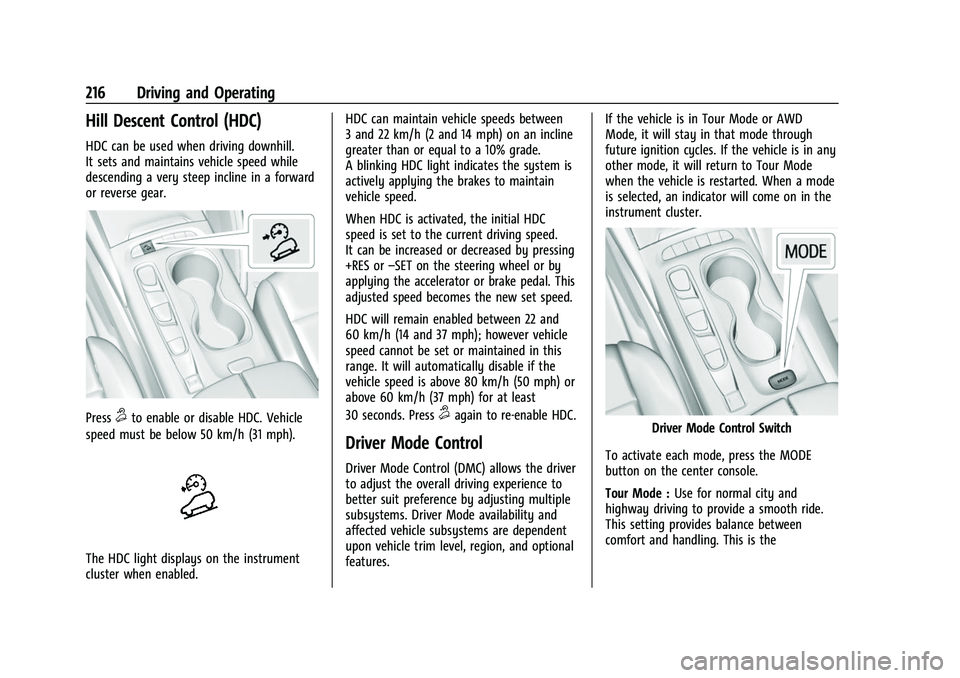
Hill Descent Control (HDC)
HDC can be used when driving downhill.
It sets and maintains vehicle speed while
descending a very steep incline in a forward
or reverse gear.
Press5to enable or disable HDC. Vehicle
speed must be below 50 km/h (31 mph).
The HDC light displays on the instrument
cluster when enabled. HDC can maintain vehicle speeds between
3 and 22 km/h (2 and 14 mph) on an incline
greater than or equal to a 10% grade.
A blinking HDC light indicates the system is
actively applying the brakes to maintain
vehicle speed.
When HDC is activated, the initial HDC
speed is set to the current driving speed.
It can be increased or decreased by pressing
+RES or
–SET on the steering wheel or by
applying the accelerator or brake pedal. This
adjusted speed becomes the new set speed.
HDC will remain enabled between 22 and
60 km/h (14 and 37 mph); however vehicle
speed cannot be set or maintained in this
range. It will automatically disable if the
vehicle speed is above 80 km/h (50 mph) or
above 60 km/h (37 mph) for at least
30 seconds. Press
5again to re-enable HDC.
Driver Mode Control
Driver Mode Control (DMC) allows the driver
to adjust the overall driving experience to
better suit preference by adjusting multiple
subsystems. Driver Mode availability and
affected vehicle subsystems are dependent
upon vehicle trim level, region, and optional
features. If the vehicle is in Tour Mode or AWD
Mode, it will stay in that mode through
future ignition cycles. If the vehicle is in any
other mode, it will return to Tour Mode
when the vehicle is restarted. When a mode
is selected, an indicator will come on in the
instrument cluster.
Driver Mode Control Switch
To activate each mode, press the MODE
button on the center console.
Tour Mode : Use for normal city and
highway driving to provide a smooth ride.
This setting provides balance between
comfort and handling. This is the
Page 246 of 369

Buick Envision Owner Manual (GMNA-Localizing-U.S./Canada/Mexico-
15218978) - 2022 - CRC - 5/12/21
Driving and Operating 245
{Warning
Using LKA while towing a trailer or on
slippery roads could cause loss of control
of the vehicle and a crash. Turn the
system off.
How the System Works
LKA uses a camera sensor installed on the
windshield ahead of the rearview mirror to
detect lane markings. It may provide brief
steering assist if it detects an unintended
lane departure. It may further provide an
audible alert or the driver seat may pulse
indicating that a lane marking has been
crossed.
To turn LKA on and off, press
Aon the
center console. If equipped, the indicator
light on the button comes on when LKA is
on and turns off when LKA is disabled.
When on,
Ais white, if equipped,
indicating that the system is not ready to
assist.
Ais green if LKA is ready to
assist. LKA may assist by gently turning the
steering wheel if the vehicle approaches a
detected lane marking.
Ais amber when
assisting. It may also provide a Lane
Departure Warning (LDW) alert by flashing
Aamber if the vehicle crosses a
detected lane marking. Additionally, there
may be three beeps, or the driver seat may
pulse three times, on the right or left,
depending on the lane departure direction.
Take Steering
The LKA system does not continuously steer
the vehicle. If LKA does not detect active
driver steering, an alert and chime may be
provided. Steer the vehicle to dismiss. LKA
may become temporarily unavailable after
repeated take steering alerts.
When the System Does Not Seem to
Work Properly
The system performance may be
affected by:
.Close vehicles ahead.
.Sudden lighting changes, such as when
driving through tunnels.
.Banked roads.
.Roads with poor lane markings, such as
two-lane roads.
If the LKA system is not functioning
properly when lane markings are clearly
visible, cleaning the windshield may help. A camera blocked message may display if
the camera is blocked. Some driver
assistance systems may have reduced
performance or not work at all. An LKA or
LDW unavailable message may display if the
systems are temporarily unavailable. This
message could be due to a blocked camera.
The LKA system does not need service. Clean
the outside of the windshield behind the
rearview mirror.
LKA assistance and/or LDW alerts may occur
due to tar marks, shadows, cracks in the
road, temporary or construction lane
markings, or other road imperfections. This
is normal system operation; the vehicle does
not need service. Turn LKA off if these
conditions continue.
Fuel
Top Tier Fuel
GM recommends the use of TOP TIER
Detergent Gasoline to keep the engine clean,
reduce engine deposits, and maintain
optimal vehicle performance. Look for the
TOP TIER Logo or see www.toptiergas.com
for a list of TOP TIER Detergent Gasoline
marketers and applicable countries.
Page 285 of 369

Buick Envision Owner Manual (GMNA-Localizing-U.S./Canada/Mexico-
15218978) - 2022 - CRC - 5/12/21
284 Vehicle Care
Fuses UsageF34 RUN/CRANK MISC 1 & 2–Shifter
Interface Board
Module/
Instrument Panel
Cluster/
Transmission
Control Module
(MISC 1)/Sensing
and Diagnostic
Module/Headlamp
Manual Leveling
Switch/Reflective
Light Auxiliary
Display (MISC 2)
F35 RUN CRANK ECM IGN–RUN/CRANK
Engine Control
Module Ignition
F36 EPB SWITCH/ SHIFTER INTERFACE
BOARD–Electric
Park Brake Switch/
Shifter Interface
Board Fuses Usage
F37 RADIO/CSM/ AUXILIARY JACK –
Radio/Center Stack
Module/
Auxiliary Jack
F38 –
F39 STR/WHL/CNTRLS SWS–SW
Controls –Cruise/
Fast Idle Switches
F40 Exterior Lighting Module 2
F41 Heated Steering Wheel Module
F42 Direct Current to Alternate Current
Inverter Module
CB1 –
CB2 APO CONSOLE –
Auxiliary Power
Outlet Console
Relays Usage K01 RAP/ACCY –Retained
Accessory Power Relays Usage
K02 Run/Crank
K03 –
K04 –
K05 –
Wheels and Tires
Tires
Every new GM vehicle has high-quality
tires made by a leading tire
manufacturer. See the warranty manual
for information regarding the tire
warranty and where to get service. For
additional information refer to the tire
manufacturer.
{Warning
.Poorly maintained and improperly
used tires are dangerous.
(Continued)
Page 358 of 369
Buick Envision Owner Manual (GMNA-Localizing-U.S./Canada/Mexico-
15218978) - 2022 - CRC - 5/12/21
Index 357
Appearance CareExterior . . . . . . . . . . . . . . . . . . . . . . . . . . . . . . . . . 311
Interior . . . . . . . . . . . . . . . . . . . . . . . . . . . . . . . . 315
Apple CarPlay and Android Auto . . . . . . . . . 160
Assistance Program, Roadside . . . . . . . . . . . . 339
Assistance Systems for Driving . . . . . . . . . . 237
Assistance Systems for Parking and Backing . . . . . . . . . . . . . . . . . . . . . . . . . . . . . . . . 228
Audio Bluetooth . . . . . . . . . . . . . . . . . . . . . . . . . . . . . . 139
Auto Stop
Stop/Start System . . . . . . . . . . . . . . . . . . . . . 201
Automatic Dimming Mirrors . . . . . . . . . . . . . . . . . . . . . . . 26
Door Locks . . . . . . . . . . . . . . . . . . . . . . . . . . . . . . 16
Emergency Braking (AEB) . . . . . . . . . . . . . . 239
Headlamp System . . . . . . . . . . . . . . . . . . . . . . 121
Parking Assist (APA) . . . . . . . . . . . . . . . . . . . 232
Transmission . . . . . . . . . . . . . . . . . . . . . . . . . . . 206
Transmission Fluid . . . . . . . . . . . . . . . . . . . . . 265
Automatic Transmission
Manual Mode . . . . . . . . . . . . . . . . . . . . . . . . . 209
Avoiding Untrusted Media Devices . . . . . . . 136B
Battery Exterior Lighting Battery Saver . . . . . . . . 126
Load Management . . . . . . . . . . . . . . . . . . . . . 125
Power Protection . . . . . . . . . . . . . . . . . . . . . . 126
Battery - North America . . . . . . . . . . . . 273, 308
Blade Replacement, Wiper . . . . . . . . . . . . . . . 274
Bluetooth Overview . . . . . . . . . . . . . . . . . . . . . . . . . . . . . . 156
Bluetooth Audio . . . . . . . . . . . . . . . . . . . . . . . . . 139
Brake
Parking, Electric . . . . . . . . . . . . . . . . . . . . . . . . . 211
System Warning Light . . . . . . . . . . . . . . . . . . 97
Brakes . . . . . . . . . . . . . . . . . . . . . . . . . . . . . . . . . . . . 271
Antilock . . . . . . . . . . . . . . . . . . . . . . . . . . . . . . . . 210
Assist . . . . . . . . . . . . . . . . . . . . . . . . . . . . . . . . . . 212
Fluid . . . . . . . . . . . . . . . . . . . . . . . . . . . . . . . . . . . 272
Braking . . . . . . . . . . . . . . . . . . . . . . . . . . . . . . . . . . . 191 Automatic Emergency (AEB) . . . . . . . . . . . 239
Reverse Automatic . . . . . . . . . . . . . . . . . . . . . 235
Braking System Front Pedestrian (FPB) . . . . . . . . . . . . . . . . . 240
Break-In, New Vehicle . . . . . . . . . . . . . . . . . . . . 199
Buckle To Drive . . . . . . . . . . . . . . . . . . . . . . . . . . . 43
Bulb Replacement Headlamp Aiming . . . . . . . . . . . . . . . . . . . . . . 276
Headlamps . . . . . . . . . . . . . . . . . . . . . . . . . . . . 276
Buying New Tires . . . . . . . . . . . . . . . . . . . . . . . . 297
C
California
Perchlorate MaterialsRequirements . . . . . . . . . . . . . . . . . . . . . . . . 259
California Proposition
65 Warning . . . . . . . . . . . . . . . . . . . . . . . 273, 308, Back Cover
Camera Rear Vision (RVC) . . . . . . . . . . . . . . . . . . . . . . 228
Canadian Vehicle Owners . . . . . . . . . . . . . . . . . . . 1
Capacities and Specifications . . . . . . . . . . . . . 333
Carbon Monoxide
Engine Exhaust . . . . . . . . . . . . . . . . . . . . . . . . 205
Liftgate . . . . . . . . . . . . . . . . . . . . . . . . . . . . . . . . . . 17
Winter Driving . . . . . . . . . . . . . . . . . . . . . . . . . 194
Cargo Cover . . . . . . . . . . . . . . . . . . . . . . . . . . . . . . . . . . . 79
Management System . . . . . . . . . . . . . . . . . . . 80
Tie-Downs . . . . . . . . . . . . . . . . . . . . . . . . . . . . . . 79
Caution, Danger, and Warning . . . . . . . . . . . . . .2
Center Console Storage . . . . . . . . . . . . . . . . . . . 78
Chains, Tire . . . . . . . . . . . . . . . . . . . . . . . . . . . . . . 300
Charging Wireless . . . . . . . . . . . . . . . . . . . . . . . . . . . . . . . . 87
Charging System Light . . . . . . . . . . . . . . . . . . . . 96
Check Engine Light (Malfunction Indicator) . . . . 96
Page 366 of 369

Buick Envision Owner Manual (GMNA-Localizing-U.S./Canada/Mexico-
15218978) - 2022 - CRC - 5/12/21
Index 365
Servicing System . . . . . . . . . . . . . . . . . . . . . . . . 150
Servicing the Airbag . . . . . . . . . . . . . . . . . . . . . . 58
Settings . . . . . . . . . . . . . . . . . . . . . . . . . . . . . . . . . . . 161
ShiftingInto Park . . . . . . . . . . . . . . . . . . . . . . . . . . . . . . 204
Out of Park . . . . . . . . . . . . . . . . . . . . . . . . . . . . 204
Side Blind Zone Alert (SBZA) . . . . . . . . . . . . . 242
Signals, Turn and Lane-Change . . . . . . . . . . . . 123
Software Updates . . . . . . . . . . . . . . . . . . . . . . . . . 132
Spare Tire Compact . . . . . . . . . . . . . . . . . . . . . . . . . . . . . . . 307
Special Application Services . . . . . . . . . . . . . . 326
Specifications and Capacities . . . . . . . . . . . . . 333
Speedometer . . . . . . . . . . . . . . . . . . . . . . . . . . . . . 93
StabiliTrak OFF Light . . . . . . . . . . . . . . . . . . . . . . . . . . . . . . 100
Start Assist, Hill . . . . . . . . . . . . . . . . . . . . . . . . . . . 212
Start Vehicle, Remote . . . . . . . . . . . . . . . . . . . . . . 12
Starting the Engine . . . . . . . . . . . . . . . . . . . . . . 201
Steering . . . . . . . . . . . . . . . . . . . . . . . . . . . . . . . . . . 191 Heated Wheel . . . . . . . . . . . . . . . . . . . . . . . . . . 83
Wheel Adjustment . . . . . . . . . . . . . . . . . . . . . . 83
Wheel Controls . . . . . . . . . . . . . . . . . . . . . . . . . 83
Steering Column Lock . . . . . . . . . . . . . . . . . . . . . 24
Steering Wheel Controls . . . . . . . . . . . . . . . . . 129
Stop/Start System . . . . . . . . . . . . . . . . . . . . . . . 201 Storage Areas
Cargo Cover . . . . . . . . . . . . . . . . . . . . . . . . . . . . 79
Cargo Management System . . . . . . . . . . . . 80
Center Console . . . . . . . . . . . . . . . . . . . . . . . . . 78
Convenience Net . . . . . . . . . . . . . . . . . . . . . . . . 80
Front . . . . . . . . . . . . . . . . . . . . . . . . . . . . . . . . . . . 78
Glove Box . . . . . . . . . . . . . . . . . . . . . . . . . . . . . . 77
Roof Rack System . . . . . . . . . . . . . . . . . . . . . . . 80
Storage Compartments . . . . . . . . . . . . . . . . . . . .77
Struts Gas . . . . . . . . . . . . . . . . . . . . . . . . . . . . . . . . . . . . 275
Stuck Vehicle . . . . . . . . . . . . . . . . . . . . . . . . . . . . 195
Sun Visors . . . . . . . . . . . . . . . . . . . . . . . . . . . . . . . . 30
Sunroof . . . . . . . . . . . . . . . . . . . . . . . . . . . . . . . . . . . 30
Surround Vision System . . . . . . . . . . . . . . . . . 229
Symbols . . . . . . . . . . . . . . . . . . . . . . . . . . . . . . . . . . . .2 Navigation . . . . . . . . . . . . . . . . . . . . . . . . . . . . . 142
System Engine Air Filter Life . . . . . . . . . . . . . . . . . . . 265
Forward Collision Alert (FCA) . . . . . . . . . . . 237
Global Positioning . . . . . . . . . . . . . . . . . . . . . 149
Infotainment . . . . . . . . . . . . . . . . . . . . . . . . . . . 347
Rear Cross Traffic Alert . . . . . . . . . . . . . . . . 236
Roof Rack . . . . . . . . . . . . . . . . . . . . . . . . . . . . . . . 80
Surround Vision . . . . . . . . . . . . . . . . . . . . . . . . 229
Systems Driver Assistance . . . . . . . . . . . . . . . . . . . . . . 227T
Tachometer . . . . . . . . . . . . . . . . . . . . . . . . . . . . . . . 93
Teen Driver . . . . . . . . . . . . . . . . . . . . . . . . . . . . . . 169
Text Telephone (TTY) Users . . . . . . . . . . . . . . 338
Theft-Deterrent Systems . . . . . . . . . . . . . . . . . . 24
Time . . . . . . . . . . . . . . . . . . . . . . . . . . . . . . . . . . . . . . 86
Tires . . . . . . . . . . . . . . . . . . . . . . . . . . . . . . . . . . . . . 284All-Season . . . . . . . . . . . . . . . . . . . . . . . . . . . . . 285
Buying New Tires . . . . . . . . . . . . . . . . . . . . . . 297
Chains . . . . . . . . . . . . . . . . . . . . . . . . . . . . . . . . . 300
Changing . . . . . . . . . . . . . . . . . . . . . . . . . . . . . . 302
Compact Spare . . . . . . . . . . . . . . . . . . . . . . . . 307
Designations . . . . . . . . . . . . . . . . . . . . . . . . . . . 287
Different Size . . . . . . . . . . . . . . . . . . . . . . . . . . 298
If a Tire Goes Flat . . . . . . . . . . . . . . . . . . . . . 301
Inspection . . . . . . . . . . . . . . . . . . . . . . . . . . . . . 295
Pressure . . . . . . . . . . . . . . . . . . . . . . . . . . 290, 291
Pressure Light . . . . . . . . . . . . . . . . . . . . . . . . . 102
Pressure Monitor Operation . . . . . . . . . . . 293
Pressure Monitor System . . . . . . . . . . . . . . 292
Rotation . . . . . . . . . . . . . . . . . . . . . . . . . . . . . . . 295
Sidewall Labeling . . . . . . . . . . . . . . . . . . . . . . 286
Terminology and Definitions . . . . . . . . . . . 288
Uniform Tire Quality Grading . . . . . . . . . . 298
Wheel Alignment and Tire Balance . . . . 300
Wheel Replacement . . . . . . . . . . . . . . . . . . . . 300
When It Is Time for New Tires . . . . . . . . . 296
Winter . . . . . . . . . . . . . . . . . . . . . . . . . . . . . . . . . 285