child lock BUICK ENVISION 2022 User Guide
[x] Cancel search | Manufacturer: BUICK, Model Year: 2022, Model line: ENVISION, Model: BUICK ENVISION 2022Pages: 369, PDF Size: 14.04 MB
Page 62 of 369

Buick Envision Owner Manual (GMNA-Localizing-U.S./Canada/Mexico-
15218978) - 2022 - CRC - 5/12/21
Seats and Restraints 61
Infants and Young Children
Everyone in a vehicle needs protection! This
includes infants and all other children.
Neither the distance traveled nor the age
and size of the traveler changes the need,
for everyone, to use safety restraints. In
fact, the law in every state in the United
States and in every Canadian province says
children up to some age must be restrained
while in a vehicle.
{Warning
Children can be seriously injured or killed
if the shoulder belt is worn behind their
back, under their legs, or wrapped around
their neck. The shoulder belt can tighten
but cannot be loosened if it is locked. The
shoulder belt locks when it is pulled all
the way out of the retractor. It unlocks
when the shoulder belt is allowed to go
all the way back into the retractor, but it
cannot do this if it is wrapped around the
child. Never leave children unattended in
a vehicle and never allow children to
improperly wear, or play with, the seat
belts.
Every time infants and young children ride
in vehicles, they should have the protection
provided by appropriate child restraints.
Neither the vehicle's seat belt system nor its
airbag system is designed for them.
Children who are not restrained properly can
strike other people, or can be thrown out of
the vehicle.
{Warning
Never hold an infant or a child while
riding in a vehicle. Due to crash forces, an
infant or a child will become so heavy it
is not possible to hold it during a crash.
For example, in a crash at only
40 km/h (25 mph), a 5.5 kg (12 lb) infant
will suddenly become a 110 kg (240 lb)
force on a person's arms. An infant or
child should be secured in an appropriate
child restraint.
Page 71 of 369

Buick Envision Owner Manual (GMNA-Localizing-U.S./Canada/Mexico-
15218978) - 2022 - CRC - 5/12/21
70 Seats and Restraints
{Warning
To reduce the risk of serious or fatal
injuries during a crash, do not attach
more than one child restraint to a single
anchor. Attaching more than one child
restraint to a single anchor could cause
the anchor or attachment to come loose
or even break during a crash. A child or
others could be injured.
{Warning
Children can be seriously injured or
strangled if a shoulder belt is wrapped
around their neck. The shoulder belt can
tighten but cannot be loosened if it is
locked. The shoulder belt locks when it is
pulled all the way out of the retractor.
It unlocks when the shoulder belt is
allowed to go all the way back into the
retractor, but it cannot do this if it is
wrapped around a child’s neck. If the
shoulder belt is locked and tightened
around a child’s neck, the only way to
loosen the belt is to cut it.(Continued)
Warning (Continued)
Buckle any unused seat belts behind the
child restraint so children cannot reach
them. Pull the shoulder belt all the way
out of the retractor to set the lock, and
tighten the belt behind the child restraint
after the child restraint has been
installed.
Caution
Do not let the LATCH attachments rub
against the vehicle’s seat belts. This may
damage these parts. If necessary, move
buckled seat belts to avoid rubbing the
LATCH attachments.
Do not fold the rear seatback when the
seat is occupied. Do not fold the empty
rear seat with a seat belt buckled. This
could damage the seat belt or the seat.
Unbuckle and return the seat belt to its
stowed position, before folding the seat.
If you need to secure more than one child
restraint in the rear seat, see Where to Put
the Restraint 064. 1. Attach and tighten the lower
attachments to the lower anchors. If the
child restraint does not have lower
attachments or the desired seating
position does not have lower anchors,
secure the child restraint with the top
tether and the seat belt. Refer to the
child restraint manufacturer instructions
and the instructions in this manual.
1.1. Find the lower anchors for the desired seating position.
1.2. Put the child restraint on the seat.
1.3. Attach and tighten the lower attachments on the child restraint
to the lower anchors.
2. If the child restraint manufacturer recommends that the top tether be
attached, adjust the top tether to its full
length and attach it to the anchor. Refer
to the child restraint instructions and the
following steps:
2.1. Find the top tether anchor.
2.2. Route, attach and tighten the top tether according to your child
restraint instructions and the
following instructions:
Page 74 of 369

Buick Envision Owner Manual (GMNA-Localizing-U.S./Canada/Mexico-
15218978) - 2022 - CRC - 5/12/21
Seats and Restraints 73
4. Pull the shoulder belt all the way out ofthe retractor to set the lock. When the
retractor lock is set, the belt can be
tightened but not pulled out of the
retractor.5. To tighten the belt, push down on thechild restraint, pull the shoulder portion
of the belt to tighten the lap portion of
the belt, and feed the shoulder belt back
into the retractor. When installing a
forward-facing child restraint, it may be
helpful to use your knee to push down
on the child restraint as you tighten
the belt.
Try to pull the belt out of the retractor
to make sure the retractor is locked.
If the retractor is not locked, repeat
Steps 4 and 5. 6. If the child restraint has a top tether,
follow the child restraint manufacturer's
instructions regarding the use of the top
tether. See Lower Anchors and Tethers
for Children (LATCH System) 065.
7. Before placing a child in the child restraint, make sure it is securely held in
place. To check, grasp the child restraint
at the seat belt path and attempt to
move it side to side and back and forth.
When the child restraint is properly
installed, there should be no more than
2.5 cm (1 in) of movement.
To remove the child restraint, unbuckle the
vehicle seat belt and let it return to the
stowed position. If the top tether is attached
to a top tether anchor, disconnect it.
If the head restraint was removed, reinstall
it before the seating position is used. See
"Head Restraint Removal and Reinstallation"
underLower Anchors and Tethers for Children
(LATCH System) 065 for additional
information on installing the head restraint
properly.
Page 76 of 369

Buick Envision Owner Manual (GMNA-Localizing-U.S./Canada/Mexico-
15218978) - 2022 - CRC - 5/12/21
Seats and Restraints 75
When the passenger sensing system has
turned off the front outboard passenger
frontal airbag, the off indicator on the
passenger airbag status indicator should
light and stay lit when you start the
vehicle. SeePassenger Airbag Status
Indicator 095.
2. Put the child restraint on the seat.
3. Pick up the latch plate, and run the lap and shoulder portions of the vehicle seat
belt through or around the restraint. The
child restraint instructions will show
you how.
4. Push the latch plate into the buckle untilit clicks. Position the release button on the
buckle, away from the child restraint, so
that the seat belt could be quickly
unbuckled if necessary.
5. Pull the shoulder belt all the way out of
the retractor to set the lock. When the
retractor lock is set, the belt can be
tightened but not pulled out of the
retractor.
6. To tighten the belt, push down on thechild restraint, pull the shoulder portion
of the belt to tighten the lap portion of
the belt, and feed the shoulder belt back
into the retractor. When installing a
forward-facing child restraint, it may be
helpful to use your knee to push down
on the child restraint as you tighten
the belt.
Try to pull the belt out of the retractor
to make sure the retractor is locked.
If the retractor is not locked, repeat
Steps 5 and 6.
Page 221 of 369
Buick Envision Owner Manual (GMNA-Localizing-U.S./Canada/Mexico-
15218978) - 2022 - CRC - 5/12/21
220 Driving and Operating
{Warning
ACC will not detect or brake for children,
pedestrians, animals, or other objects.
Do not use ACC when:
.On winding and hilly roads or when
the sensors are blocked by snow, ice,
or dirt. The system may not detect a
vehicle ahead. Keep the entire front of
the vehicle clean.
.Visibility is low, such as in fog, rain,
or snow conditions. ACC performance
is limited under these conditions.
.On slippery roads where fast changes
in tire traction can cause excessive
wheel slip.
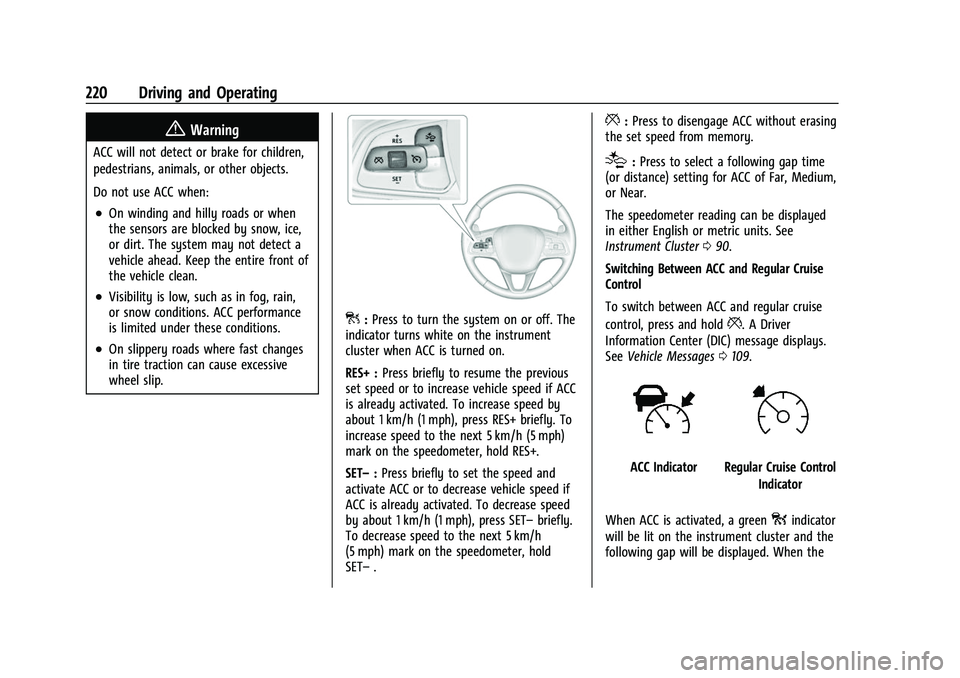
]:Press to turn the system on or off. The
indicator turns white on the instrument
cluster when ACC is turned on.
RES+ : Press briefly to resume the previous
set speed or to increase vehicle speed if ACC
is already activated. To increase speed by
about 1 km/h (1 mph), press RES+ briefly. To
increase speed to the next 5 km/h (5 mph)
mark on the speedometer, hold RES+.
SET– :Press briefly to set the speed and
activate ACC or to decrease vehicle speed if
ACC is already activated. To decrease speed
by about 1 km/h (1 mph), press SET– briefly.
To decrease speed to the next 5 km/h
(5 mph) mark on the speedometer, hold
SET– .
*:Press to disengage ACC without erasing
the set speed from memory.
[: Press to select a following gap time
(or distance) setting for ACC of Far, Medium,
or Near.
The speedometer reading can be displayed
in either English or metric units. See
Instrument Cluster 090.
Switching Between ACC and Regular Cruise
Control
To switch between ACC and regular cruise
control, press and hold
*. A Driver
Information Center (DIC) message displays.
See Vehicle Messages 0109.
ACC IndicatorRegular Cruise Control
Indicator
When ACC is activated, a green
oindicator
will be lit on the instrument cluster and the
following gap will be displayed. When the
Page 228 of 369

Buick Envision Owner Manual (GMNA-Localizing-U.S./Canada/Mexico-
15218978) - 2022 - CRC - 5/12/21
Driving and Operating 227
Weather Conditions Affecting ACC
System operation may be limited under
snow, heavy rain, or road spray conditions.
Accessory Installations and Vehicle
Modifications
Do not install or place any object around
the front camera windshield area that would
obstruct the front camera view.
Do not install objects on top of the vehicle
that overhang and obstruct the front
camera, such as a canoe, kayak, or other
items that can be transported on a roof rack
system. SeeRoof Rack System 080.
Do not modify the hood, headlamps, or fog
lamps, as this may limit the camera’s ability
to detect an object.
Cleaning the Sensing System
The camera sensor on the windshield ahead
of the rearview mirror and the radar sensors
on the front of the vehicle can become
blocked by snow, ice, dirt, mud, or debis.
These areas need to be cleaned for ACC to
operate properly. If ACC will not operate, regular cruise control
may be available. See
“Switching Between
ACC and Regular Cruise Control” in this
section. Always consider driving conditions
before using either cruise control system.
For cleaning instructions, see “Washing the
Vehicle” underExterior Care 0311.
Driver Assistance Systems
This vehicle may have features that work
together to help avoid crashes or reduce
crash damage while driving, backing, and
parking. Read this entire section before
using these systems.
{Warning
Do not rely on the Driver Assistance
Systems. These systems do not replace
the need for paying attention and driving
safely. You may not hear or feel alerts or
warnings provided by these systems.
Failure to use proper care when driving
may result in injury, death, or vehicle
damage. See Defensive Driving 0190.
(Continued)
Warning (Continued)
Under many conditions, these systems
will not:
.Detect children, pedestrians, bicyclists,
or animals.
.Detect vehicles or objects outside the
area monitored by the system.
.Work at all driving speeds.
.Warn you or provide you with enough
time to avoid a crash.
.Work under poor visibility or bad
weather conditions.
.Work if the detection sensor is not
cleaned or is covered by ice, snow,
mud, or dirt.
.Work if the detection sensor is
covered up, such as with a sticker,
magnet, or metal plate.
.Work if the area surrounding the
detection sensor is damaged or not
properly repaired. (Continued)
Page 237 of 369
Buick Envision Owner Manual (GMNA-Localizing-U.S./Canada/Mexico-
15218978) - 2022 - CRC - 5/12/21
236 Driving and Operating
Warning (Continued)
the brakes, check the RVC and check the
area around the vehicle to make sure it is
safe to proceed.
Rear Pedestrian Alert
Under certain conditions, this feature can
provide alerts for a pedestrian within the
system’s range directly behind the vehicle.
This feature only works in R (Reverse) below
12 km/h (8 mph), and detects pedestrians up
to 8 m (26 ft) away during daytime driving.
During nighttime driving, feature
performance is very limited.
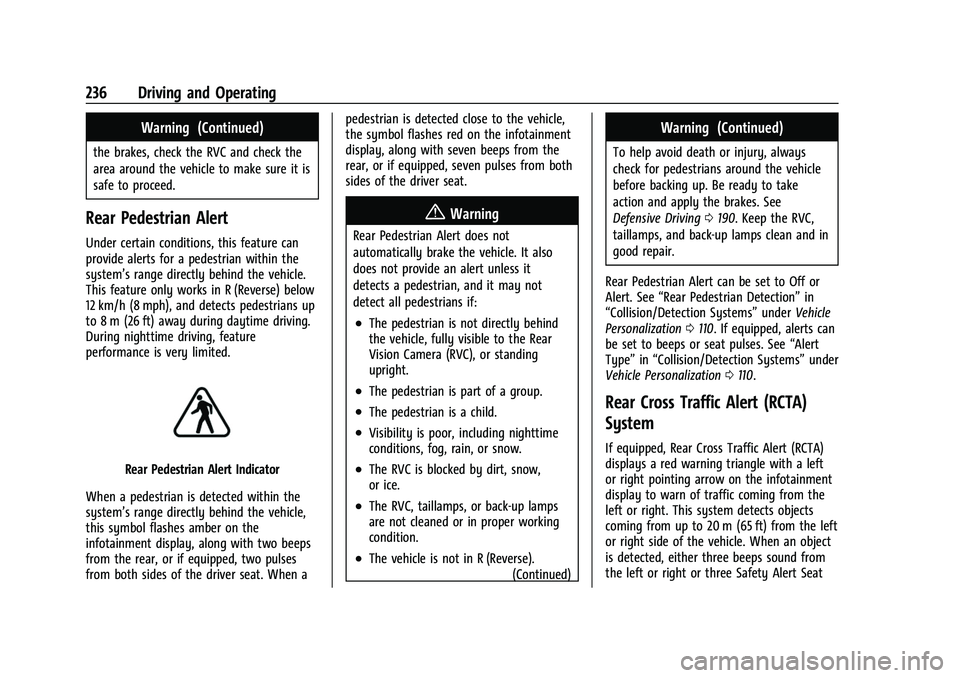
Rear Pedestrian Alert Indicator
When a pedestrian is detected within the
system’s range directly behind the vehicle,
this symbol flashes amber on the
infotainment display, along with two beeps
from the rear, or if equipped, two pulses
from both sides of the driver seat. When a pedestrian is detected close to the vehicle,
the symbol flashes red on the infotainment
display, along with seven beeps from the
rear, or if equipped, seven pulses from both
sides of the driver seat.
{Warning
Rear Pedestrian Alert does not
automatically brake the vehicle. It also
does not provide an alert unless it
detects a pedestrian, and it may not
detect all pedestrians if:
.The pedestrian is not directly behind
the vehicle, fully visible to the Rear
Vision Camera (RVC), or standing
upright.
.The pedestrian is part of a group.
.The pedestrian is a child.
.Visibility is poor, including nighttime
conditions, fog, rain, or snow.
.The RVC is blocked by dirt, snow,
or ice.
.The RVC, taillamps, or back-up lamps
are not cleaned or in proper working
condition.
.The vehicle is not in R (Reverse).
(Continued)
Warning (Continued)
To help avoid death or injury, always
check for pedestrians around the vehicle
before backing up. Be ready to take
action and apply the brakes. See
Defensive Driving0190. Keep the RVC,
taillamps, and back-up lamps clean and in
good repair.
Rear Pedestrian Alert can be set to Off or
Alert. See “Rear Pedestrian Detection” in
“Collision/Detection Systems” underVehicle
Personalization 0110. If equipped, alerts can
be set to beeps or seat pulses. See “Alert
Type” in“Collision/Detection Systems” under
Vehicle Personalization 0110.
Rear Cross Traffic Alert (RCTA)
System
If equipped, Rear Cross Traffic Alert (RCTA)
displays a red warning triangle with a left
or right pointing arrow on the infotainment
display to warn of traffic coming from the
left or right. This system detects objects
coming from up to 20 m (65 ft) from the left
or right side of the vehicle. When an object
is detected, either three beeps sound from
the left or right or three Safety Alert Seat
Page 242 of 369

Buick Envision Owner Manual (GMNA-Localizing-U.S./Canada/Mexico-
15218978) - 2022 - CRC - 5/12/21
Driving and Operating 241
{Warning
FPB does not provide an alert or
automatically brake the vehicle, unless it
detects a pedestrian. FPB may not detect
pedestrians, including children:
.When the pedestrian is not directly
ahead, fully visible, or standing
upright, or when part of a group.
.Due to poor visibility, including
nighttime conditions, fog, rain,
or snow.
.If the FPB sensor is blocked by dirt,
snow, or ice.
.If the headlamps or windshield are not
cleaned or in proper condition.
Be ready to take action and apply the
brakes. For more information, see
Defensive Driving 0190. Keep the
windshield, headlamps, and FPB sensor
clean and in good repair.
FPB can be set to Off, Alert, or Alert and
Brake through vehicle personalization. See
“Collision/Detection Systems” underVehicle
Personalization 0110.
Detecting the Pedestrian Ahead
FPB alerts and automatic braking will not
occur unless the FPB system detects a
pedestrian. When a nearby pedestrian is
detected in front of the vehicle, the
pedestrian ahead indicator will display
amber.
Front Pedestrian Alert
With Head-Up Display
Without Head-Up Display
When the vehicle approaches a pedestrian
ahead too rapidly, the red FPB alert display
will flash on the windshield. Eight rapid
high-pitched beeps will sound from the
front, or both sides of the Safety Alert Seat
will pulse five times. When this Pedestrian
Alert occurs, the brake system may prepare
for driver braking to occur more rapidly
which can cause a brief, mild deceleration.
Continue to apply the brake pedal as
needed. Cruise control may be disengaged
when the Front Pedestrian Alert occurs.
Automatic Braking
If FPB detects it is about to crash into a
pedestrian directly ahead, and the brakes
have not been applied, FPB may
automatically brake moderately or brake
hard. This can help to avoid some very low
speed pedestrian crashes or reduce
pedestrian injury. FPB can automatically
brake to detected pedestrians between
Page 359 of 369
Buick Envision Owner Manual (GMNA-Localizing-U.S./Canada/Mexico-
15218978) - 2022 - CRC - 5/12/21
358 Index
Child RestraintsInfants and Young Children . . . . . . . . . . . . . 61
Lower Anchors and Tethers for
Children . . . . . . . . . . . . . . . . . . . . . . . . . . . . . . . 65
Older Children . . . . . . . . . . . . . . . . . . . . . . . . . . 59
Securing . . . . . . . . . . . . . . . . . . . . . . . . . . . . . 72, 74
Systems . . . . . . . . . . . . . . . . . . . . . . . . . . . . . . . . 63
Circuit Breakers . . . . . . . . . . . . . . . . . . . . . . . . . . 278
Cleaning Exterior Care . . . . . . . . . . . . . . . . . . . . . . . . . . . . 311
Interior Care . . . . . . . . . . . . . . . . . . . . . . . . . . . 315
Climate Control Systems . . . . . . . . . . . . . . . . . 180 Air Conditioning . . . . . . . . . . . . . . . . . . . . . . . 180
Dual Automatic . . . . . . . . . . . . . . . . . . . . . . . . 182
Heating . . . . . . . . . . . . . . . . . . . . . . . . . . . . . . . . 180
Clock . . . . . . . . . . . . . . . . . . . . . . . . . . . . . . . . . . . . . 86
Cluster, Instrument . . . . . . . . . . . . . . . . . . . . . . . 90
Collision Damage Repair . . . . . . . . . . . . . . . . . 342
Compact Spare Tire . . . . . . . . . . . . . . . . . . . . . . 307
Compartments Storage . . . . . . . . . . . . . . . . . . . . . . . . . . . . . . . . . 77
Connected Services Connections . . . . . . . . . . . . . . . . . . . . . . . . . . . 353
Diagnostics . . . . . . . . . . . . . . . . . . . . . . . . . . . . 355
Navigation . . . . . . . . . . . . . . . . . . . . . . . . . . . . . 353
Connections Connected Services . . . . . . . . . . . . . . . . . . . . 353 Control
Hill Descent . . . . . . . . . . . . . . . . . . . . . . . . . . . . 216
Traction and Electronic Stability . . . . . . . 212
Control Light Hill Descent . . . . . . . . . . . . . . . . . . . . . . . . . . . . . 99
Control of a Vehicle . . . . . . . . . . . . . . . . . . . . . . 191
Controls Steering Wheel . . . . . . . . . . . . . . . . . . . . . . . . 129
Convenience Net . . . . . . . . . . . . . . . . . . . . . . . . . . 80
Coolant Engine Temperature Gauge . . . . . . . . . . . . . 94
Engine Temperature Warning Light . . . . 101
Cooling . . . . . . . . . . . . . . . . . . . . . . . . . . . . . .180, 182
Cooling System . . . . . . . . . . . . . . . . . . . . . . . . . . 266
Courtesy Lamps . . . . . . . . . . . . . . . . . . . . . . . . . . .124
Courtesy Transportation Program . . . . . . . . .341
Cover Cargo . . . . . . . . . . . . . . . . . . . . . . . . . . . . . . . . . . . 79
Coverage Explanations . . . . . . . . . . . . . . . . . . . 150
Cruise Control . . . . . . . . . . . . . . . . . . . . . . . . . . . . 217 Light . . . . . . . . . . . . . . . . . . . . . . . . . . . . . . . . . . . 103
Cruise Control, Adaptive . . . . . . . . . . . . . . . . . 219
Cupholders . . . . . . . . . . . . . . . . . . . . . . . . . . . . . . . .77
Customer Assistance . . . . . . . . . . . . . . . . . . . . . 338 Offices . . . . . . . . . . . . . . . . . . . . . . . . . . . . . . . . . 338
Text Telephone (TTY) Users . . . . . . . . . . . . 338 Customer Information
Publications Ordering Information . . . . . 343
Customer Satisfaction Procedure . . . . . . . . . 336
Cybersecurity . . . . . . . . . . . . . . . . . . . . . . . . . . . . 345
D
Damage Repair, Collision . . . . . . . . . . . . . . . . . 342
Danger, Warning, and Caution . . . . . . . . . . . . . .2
Data Collection Infotainment System . . . . . . . . . . . . . . . . . . 347
OnStar . . . . . . . . . . . . . . . . . . . . . . . . . . . . . . . . . 347
Data Recorders, Event . . . . . . . . . . . . . . . . . . . 346
Database Coverage Explanations . . . . . . . . . 150
Daytime Running Lamps (DRL) . . . . . . . . . . . . 121
Defensive Driving . . . . . . . . . . . . . . . . . . . . . . . . 190
Delayed Locking . . . . . . . . . . . . . . . . . . . . . . . . . . . 15
Destination . . . . . . . . . . . . . . . . . . . . . . . . . . . . . . .143
Diagnostics
Connected Services . . . . . . . . . . . . . . . . . . . . 355
Distracted Driving . . . . . . . . . . . . . . . . . . . . . . . . 190
Dome Lamps . . . . . . . . . . . . . . . . . . . . . . . . . . . . . .124
Door Ajar Light . . . . . . . . . . . . . . . . . . . . . . . . . . . . . . 104
Delayed Locking . . . . . . . . . . . . . . . . . . . . . . . . . 15
Locks . . . . . . . . . . . . . . . . . . . . . . . . . . . . . . . . . . . . 13
Power Locks . . . . . . . . . . . . . . . . . . . . . . . . . . . . . 15
Drive Belt Routing, Engine . . . . . . . . . . . . . . . 335
Page 362 of 369
Buick Envision Owner Manual (GMNA-Localizing-U.S./Canada/Mexico-
15218978) - 2022 - CRC - 5/12/21
Index 361
I
If the System Needs Service . . . . . . . . . . . . . 150
Ignition Positions . . . . . . . . . . . . . . . . . . . . . . . . 199
IndicatorPedestrian Ahead . . . . . . . . . . . . . . . . . . . . . . 100
Vehicle Ahead . . . . . . . . . . . . . . . . . . . . . . . . . 100
Infants and Young Children, Restraints . . . . .61
Information Publication Ordering . . . . . . . . . . . . . . . . . . . 343
Infotainment System . . . . . . . . . . . . . . . . . . . . 347
Instrument Cluster . . . . . . . . . . . . . . . . . . . . . . . . 90
Instrument Panel Overview . . . . . . . . . . . . . . . . 4
Interior Rearview Mirrors . . . . . . . . . . . . . . . . . 26
Introduction . . . . . . . . . . . . . . . . . . . . . . . . . . . .1, 127
J
Jump Starting - North America . . . . . . . . . . . 308
K
Keyless Entry Remote (RKE) System . . . . . . . . . . . . . . . . . . . . 7
Keys . . . . . . . . . . . . . . . . . . . . . . . . . . . . . . . . . . . . . . . 6
L
Labeling, Tire Sidewall . . . . . . . . . . . . . . . . . . . 286
Lamps Courtesy . . . . . . . . . . . . . . . . . . . . . . . . . . . . . . . 124
Daytime Running (DRL) . . . . . . . . . . . . . . . . . 121
Dome . . . . . . . . . . . . . . . . . . . . . . . . . . . . . . . . . . 124 Lamps (cont'd)
Exterior Controls . . . . . . . . . . . . . . . . . . . . . . . . 118
Exterior Lamps Off Reminder . . . . . . . . . . . 121
Exterior Lighting Battery Saver . . . . . . . . 126
Malfunction Indicator (Check
Engine) . . . . . . . . . . . . . . . . . . . . . . . . . . . . . . . 96
On Reminder . . . . . . . . . . . . . . . . . . . . . . . . . . 103
Reading . . . . . . . . . . . . . . . . . . . . . . . . . . . . . . . . 124
Lane Change Alert (LCA) . . . . . . . . . . . . . . . . . 242
Lane Keep Assist (LKA) . . . . . . . . . . . . . . . . . . . 244
Lane Keep Assist Light . . . . . . . . . . . . . . . . . . . . 99
Lap-Shoulder Belt . . . . . . . . . . . . . . . . . . . . . . . . . 45
LATCH System Replacing Parts after a Crash . . . . . . . . . . . . 71
LATCH, Lower Anchors and Tethers for Children . . . . . . . . . . . . . . . . . . . . . . . . . . . . . . . . . 65
LED Lighting . . . . . . . . . . . . . . . . . . . . . . . . . . . . . 276
Liftgate . . . . . . . . . . . . . . . . . . . . . . . . . . . . . . . . . . . . 17
Lighting Adaptive Forward . . . . . . . . . . . . . . . . . . . . . . 122
Entry . . . . . . . . . . . . . . . . . . . . . . . . . . . . . . . . . . 125
Exit . . . . . . . . . . . . . . . . . . . . . . . . . . . . . . . . . . . . 125
Illumination Control . . . . . . . . . . . . . . . . . . . 123
LED . . . . . . . . . . . . . . . . . . . . . . . . . . . . . . . . . . . . 276
Lights Airbag Readiness . . . . . . . . . . . . . . . . . . . . . . . 95
All-Wheel Drive . . . . . . . . . . . . . . . . . . . . . . . . . 99 Lights (cont'd)
Antilock Brake System (ABS)
Warning . . . . . . . . . . . . . . . . . . . . . . . . . . . . . . 98
Brake System Warning . . . . . . . . . . . . . . . . . 97
Charging System . . . . . . . . . . . . . . . . . . . . . . . 96
Check Engine (Malfunction Indicator) . . . . . . . . . . . . . . . . . . . . . . . . . . . . . 96
Cruise Control . . . . . . . . . . . . . . . . . . . . . . . . . 103
Door Ajar . . . . . . . . . . . . . . . . . . . . . . . . . . . . . . 104
Driver Mode Control . . . . . . . . . . . . . . . . . . . 101
Electric Parking Brake . . . . . . . . . . . . . . . . . . . 98
Engine Coolant Temperature Warning . . . . . . . . . . . . . . . . . . . . . . . . . . . . . 101
Engine Oil Pressure . . . . . . . . . . . . . . . . . . . . 102
Flash-to-Pass . . . . . . . . . . . . . . . . . . . . . . . . . . . . 121
High-Beam On . . . . . . . . . . . . . . . . . . . . . . . . . 103
High/Low Beam Changer . . . . . . . . . . . . . . . 121
Hill Descent Control . . . . . . . . . . . . . . . . . . . . 99
Lane Keep Assist . . . . . . . . . . . . . . . . . . . . . . . . 99
Low Fuel Warning . . . . . . . . . . . . . . . . . . . . . 103
Seat Belt Reminders . . . . . . . . . . . . . . . . . . . . 94
Security . . . . . . . . . . . . . . . . . . . . . . . . . . . . . . . . 103
Service Electric Parking Brake . . . . . . . . . . . 98
StabiliTrak OFF . . . . . . . . . . . . . . . . . . . . . . . . . 100
Tire Pressure . . . . . . . . . . . . . . . . . . . . . . . . . . . 102
Traction Control System (TCS)/StabiliTrak . . . . . . . . . . . . . . . . . . . . . 101
Traction Off . . . . . . . . . . . . . . . . . . . . . . . . . . . . 100