night vision BUICK ENVISION 2022 User Guide
[x] Cancel search | Manufacturer: BUICK, Model Year: 2022, Model line: ENVISION, Model: BUICK ENVISION 2022Pages: 369, PDF Size: 14.04 MB
Page 190 of 369

Buick Envision Owner Manual (GMNA-Localizing-U.S./Canada/Mexico-
15218978) - 2022 - CRC - 5/12/21
Driving and Operating 189
Fuel
Top Tier Fuel . . . . . . . . . . . . . . . . . . . . . . . . . . 245
Recommended Fuel . . . . . . . . . . . . . . . . . . . 246
Prohibited Fuels . . . . . . . . . . . . . . . . . . . . . . . 246
Fuels in Foreign Countries . . . . . . . . . . . . . 246
Fuel Additives . . . . . . . . . . . . . . . . . . . . . . . . . 246
Filling the Tank . . . . . . . . . . . . . . . . . . . . . . . . 247
Filling a Portable Fuel Container . . . . . . . 248
Trailer Towing
General Towing Information . . . . . . . . . . 248
Driving Characteristics andTowing Tips . . . . . . . . . . . . . . . . . . . . . . . . . 249
Trailer Towing . . . . . . . . . . . . . . . . . . . . . . . . . 252
Towing Equipment . . . . . . . . . . . . . . . . . . . . 254
Trailer Sway Control (TSC) . . . . . . . . . . . . . 256
Conversions and Add-Ons
Add-On Electrical Equipment . . . . . . . . . . . 257
Driving Information
Driver Behavior
Driving is an important responsibility. Driver
behavior, the driving environment, and the
vehicle's design all affect how well a vehicle
performs.
Being aware of these factors can help in
understanding how the vehicle handles and
what can be done to avoid many types of
crashes, including a rollover crash.
Most serious injuries and fatalities to
unbelted occupants can be reduced or
prevented by the use of seat belts. In a
rollover crash, an unbelted person is
significantly more likely to die than a
person wearing a seat belt. In addition,
avoiding excessive speed, sudden or abrupt
turns, and drunken or aggressive driving can
help make trips safer and avoid the
possibility of a crash.
Driving Environment
Be prepared for driving in inclement
weather, at night, or during other times
where visibility or traction may be limited,
such as on curves, slippery roads, or hilly
terrain. Unfamiliar surroundings can also
have hidden hazards.
Vehicle Design
Utility vehicles have a significantly higher
rollover rate than other types of vehicles.
This is because they have a higher ground
clearance and a narrower track or shorter
wheelbase than passenger cars, which makes
them more capable for off-road driving.
While these design characteristics provide
the driver with a better view of the road,
these vehicles do have a higher center of
gravity than other types of vehicles.
A utility vehicle does not handle the same
as a vehicle with a lower center of gravity,
like a car, in similar situations.
Safe driver behavior and understanding of
the environment can help avoid a rollover
crash in any type of vehicle, including utility
vehicles.
Page 237 of 369
Buick Envision Owner Manual (GMNA-Localizing-U.S./Canada/Mexico-
15218978) - 2022 - CRC - 5/12/21
236 Driving and Operating
Warning (Continued)
the brakes, check the RVC and check the
area around the vehicle to make sure it is
safe to proceed.
Rear Pedestrian Alert
Under certain conditions, this feature can
provide alerts for a pedestrian within the
system’s range directly behind the vehicle.
This feature only works in R (Reverse) below
12 km/h (8 mph), and detects pedestrians up
to 8 m (26 ft) away during daytime driving.
During nighttime driving, feature
performance is very limited.
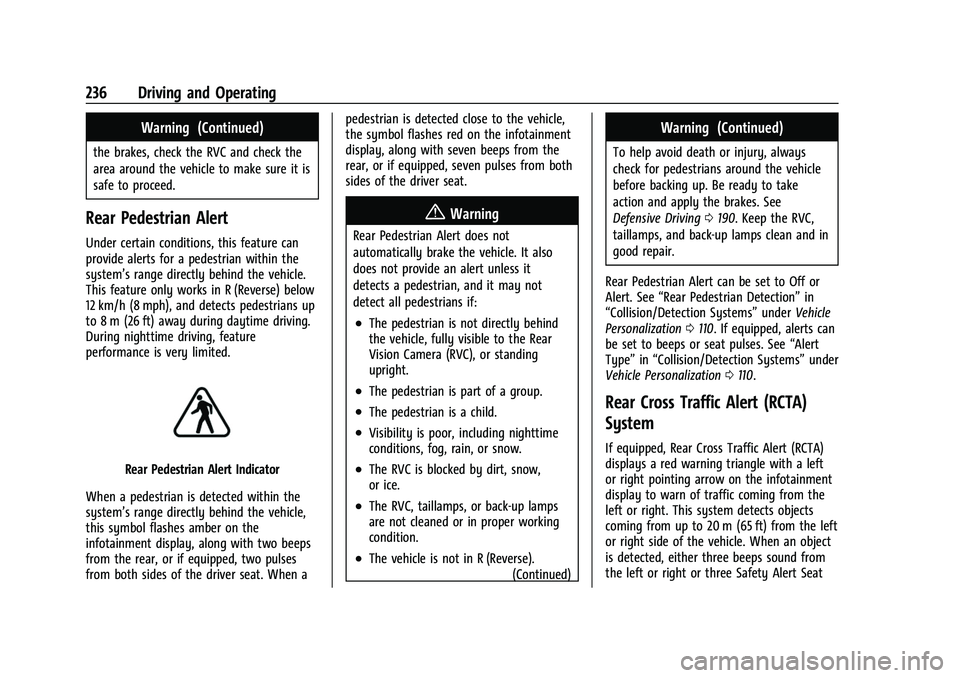
Rear Pedestrian Alert Indicator
When a pedestrian is detected within the
system’s range directly behind the vehicle,
this symbol flashes amber on the
infotainment display, along with two beeps
from the rear, or if equipped, two pulses
from both sides of the driver seat. When a pedestrian is detected close to the vehicle,
the symbol flashes red on the infotainment
display, along with seven beeps from the
rear, or if equipped, seven pulses from both
sides of the driver seat.
{Warning
Rear Pedestrian Alert does not
automatically brake the vehicle. It also
does not provide an alert unless it
detects a pedestrian, and it may not
detect all pedestrians if:
.The pedestrian is not directly behind
the vehicle, fully visible to the Rear
Vision Camera (RVC), or standing
upright.
.The pedestrian is part of a group.
.The pedestrian is a child.
.Visibility is poor, including nighttime
conditions, fog, rain, or snow.
.The RVC is blocked by dirt, snow,
or ice.
.The RVC, taillamps, or back-up lamps
are not cleaned or in proper working
condition.
.The vehicle is not in R (Reverse).
(Continued)
Warning (Continued)
To help avoid death or injury, always
check for pedestrians around the vehicle
before backing up. Be ready to take
action and apply the brakes. See
Defensive Driving0190. Keep the RVC,
taillamps, and back-up lamps clean and in
good repair.
Rear Pedestrian Alert can be set to Off or
Alert. See “Rear Pedestrian Detection” in
“Collision/Detection Systems” underVehicle
Personalization 0110. If equipped, alerts can
be set to beeps or seat pulses. See “Alert
Type” in“Collision/Detection Systems” under
Vehicle Personalization 0110.
Rear Cross Traffic Alert (RCTA)
System
If equipped, Rear Cross Traffic Alert (RCTA)
displays a red warning triangle with a left
or right pointing arrow on the infotainment
display to warn of traffic coming from the
left or right. This system detects objects
coming from up to 20 m (65 ft) from the left
or right side of the vehicle. When an object
is detected, either three beeps sound from
the left or right or three Safety Alert Seat
Page 241 of 369

Buick Envision Owner Manual (GMNA-Localizing-U.S./Canada/Mexico-
15218978) - 2022 - CRC - 5/12/21
240 Driving and Operating
Parking Brake (EPB) to hold the vehicle at a
stop. Release the EPB or firmly press the
accelerator pedal.
{Warning
AEB may automatically brake the vehicle
suddenly in situations where it is
unexpected and undesired. It could
respond to a turning vehicle ahead,
guardrails, signs, and other non-moving
objects. To override AEB, firmly press the
accelerator pedal, if it is safe to do so.
Intelligent Brake Assist (IBA)
IBA may activate when the brake pedal is
applied quickly by providing a boost to
braking based on the speed of approach and
distance to a vehicle ahead.
Minor brake pedal pulsations or pedal
movement during this time is normal and
the brake pedal should continue to be
applied as needed. IBA will automatically
disengage only when the brake pedal is
released.
{Warning
IBA may increase vehicle braking in
situations when it may not be necessary.
You could block the flow of traffic. If this
occurs, take your foot off the brake pedal
and then apply the brakes as needed.
AEB and IBA can be disabled through vehicle
personalization. See “Collision/Detection
Systems” underVehicle Personalization
0 110.
{Warning
Using AEB or IBA while towing a trailer
could cause you to lose control of the
vehicle and crash. Turn the system to
Alert or Off when towing a trailer.
A system unavailable message may
display if:
.The front of the vehicle or windshield is
not clean.
.Heavy rain or snow is interfering with
object detection.
.There is a problem with the StabiliTrak/
Electronic Stability Control (ESC) system.
The AEB system does not need service.
Front Pedestrian Braking (FPB)
System
If equipped, the FPB system may help avoid
or reduce the harm caused by front-end
crashes with nearby pedestrians when
driving in a forward gear. FPB displays an
amber indicator,
~, when a nearby
pedestrian is detected ahead. When
approaching a detected pedestrian too
quickly, FPB provides a red flashing alert on
the windshield and rapidly beeps or pulses
the driver seat. FPB can provide a boost to
braking or automatically brake the vehicle.
This system includes Intelligent Brake Assist
(IBA), and the Automatic Emergency Braking
(AEB) system may also respond to
pedestrians. See Automatic Emergency
Braking (AEB) 0239.
The FPB system can detect and alert to
pedestrians in a forward gear at speeds
between 8 km/h (5 mph) and 80 km/h
(50 mph). During daytime driving, the
system detects pedestrians up to a distance
of approximately 40 m (131 ft). During
nighttime driving, system performance is
very limited.
Page 242 of 369

Buick Envision Owner Manual (GMNA-Localizing-U.S./Canada/Mexico-
15218978) - 2022 - CRC - 5/12/21
Driving and Operating 241
{Warning
FPB does not provide an alert or
automatically brake the vehicle, unless it
detects a pedestrian. FPB may not detect
pedestrians, including children:
.When the pedestrian is not directly
ahead, fully visible, or standing
upright, or when part of a group.
.Due to poor visibility, including
nighttime conditions, fog, rain,
or snow.
.If the FPB sensor is blocked by dirt,
snow, or ice.
.If the headlamps or windshield are not
cleaned or in proper condition.
Be ready to take action and apply the
brakes. For more information, see
Defensive Driving 0190. Keep the
windshield, headlamps, and FPB sensor
clean and in good repair.
FPB can be set to Off, Alert, or Alert and
Brake through vehicle personalization. See
“Collision/Detection Systems” underVehicle
Personalization 0110.
Detecting the Pedestrian Ahead
FPB alerts and automatic braking will not
occur unless the FPB system detects a
pedestrian. When a nearby pedestrian is
detected in front of the vehicle, the
pedestrian ahead indicator will display
amber.
Front Pedestrian Alert
With Head-Up Display
Without Head-Up Display
When the vehicle approaches a pedestrian
ahead too rapidly, the red FPB alert display
will flash on the windshield. Eight rapid
high-pitched beeps will sound from the
front, or both sides of the Safety Alert Seat
will pulse five times. When this Pedestrian
Alert occurs, the brake system may prepare
for driver braking to occur more rapidly
which can cause a brief, mild deceleration.
Continue to apply the brake pedal as
needed. Cruise control may be disengaged
when the Front Pedestrian Alert occurs.
Automatic Braking
If FPB detects it is about to crash into a
pedestrian directly ahead, and the brakes
have not been applied, FPB may
automatically brake moderately or brake
hard. This can help to avoid some very low
speed pedestrian crashes or reduce
pedestrian injury. FPB can automatically
brake to detected pedestrians between
Page 342 of 369
Buick Envision Owner Manual (GMNA-Localizing-U.S./Canada/Mexico-
15218978) - 2022 - CRC - 5/12/21
Customer Information 341
get local emergency road service. You will
receive payment, up to $100, after
sending the original receipt to Roadside
Assistance. Mechanical failures may be
covered, however any cost for parts and
labor for repairs not covered by the
warranty are the owner responsibility.
Scheduling Service Appointments
When the vehicle requires warranty service,
contact your dealer and request an
appointment. By scheduling a service
appointment and advising the service
consultant of your transportation needs,
your dealer can help minimize your
inconvenience.
If the vehicle cannot be scheduled into the
service department immediately, keep
driving it until it can be scheduled for
service, unless, of course, the problem is
safety related. If it is, please call your
dealership, let them know this, and ask for
instructions.
If your dealer requests you to bring the
vehicle for service, you are urged to do so
as early in the work day as possible to
allow for same-day repair.
Courtesy Transportation Program
To enhance your ownership experience, we
and our participating dealers are proud to
offer Courtesy Transportation, a customer
support program for vehicles with the
Bumper-to-Bumper (Base Warranty Coverage
period in Canada), Federal Emission,
Extended Powertrain or Electric specific
warranties in both the U.S. and Canada.
Several Courtesy Transportation options are
available to assist in reducing inconvenience
when warranty repairs are required.
Courtesy Transportation is not a part of the
New Vehicle Limited Warranty. A separate
manual entitled“Limited Warranty and
Owner Assistance Information” furnished
with each new vehicle provides detailed
warranty coverage information.
Transportation Options
Warranty service can generally be
completed while you wait. However, if you
are unable to do so, your dealer may offer
the following transportation options:
Shuttle Service
This includes one-way or round-trip shuttle
service within reasonable time and distance
parameters of your dealer's area. Public Transportation or Fuel Reimbursement
If overnight warranty repairs are needed,
and public transportation is used, the
expense must be supported by original
receipts and within the maximum amount
allowed by GM. If U.S. customers arrange
their own transportation, limited
reimbursement for reasonable fuel expenses
may be available. Claim amounts should
reflect actual costs and be supported by
original receipts. See your dealer for
information.
Courtesy Rental Vehicle
For an overnight warranty repair, the dealer
may provide an available courtesy rental
vehicle or provide for reimbursement of a
rental vehicle. Reimbursement is limited and
must be supported by original receipts as
well as a signed and completed rental
agreement and meet state/provincial, local,
and rental vehicle provider requirements.
Requirements vary and may include
minimum age requirements, insurance
coverage, credit card, etc. Additional fees
such as fuel, rental vehicle insurance, taxes,
levies, usage fees, excessive mileage,
or rental usage beyond the completion of
the repair are also your responsibility.