outlet BUICK ENVISION 2022 User Guide
[x] Cancel search | Manufacturer: BUICK, Model Year: 2022, Model line: ENVISION, Model: BUICK ENVISION 2022Pages: 369, PDF Size: 14.04 MB
Page 185 of 369

Buick Envision Owner Manual (GMNA-Localizing-U.S./Canada/Mexico-
15218978) - 2022 - CRC - 5/12/21
184 Climate Controls
Manual Operation
ON/OFF :Press to turn the system off or
on. When off is selected, the system will
prevent outside air from entering the
vehicle. If any climate control buttons are
pressed, the system will turn on and
operate at the current setting.
Q^or^ R:Lift or press to increase or
decrease the fan speed. The fan speed
setting appears on the main display. Lifting
or pressing either button cancels automatic
fan control and the fan is controlled
manually. Press AUTO to return to
automatic operation.
Q/R: The temperature can be adjusted
separately for the driver and the passenger.
Lift or press to increase or decrease the
temperature.
SYNC : Press to link the passenger
temperature settings to the driver setting.
The SYNC indicator light will turn on. When
the passenger settings are adjusted, the
SYNC indicator light turns off.
Air Delivery Mode Controls : In the climate
control display, press
z,Y, or[to
change the direction of the airflow. The
indicator light in the button will turn on.
Any combination of the three buttons can be selected. The current mode appears in
the display. Pressing any of the three
buttons cancels automatic air delivery
control and the direction of the airflow is
controlled manually. Press AUTO to return
to automatic operation.
To change the current mode, select one or
more of the following:
z:
Clears the windows of fog or moisture.
Air is directed to the windshield.
Y: Air is directed to the instrument panel
outlets.
[: Air is directed to the floor outlets.
0MAX : Air is directed to the windshield
and the fan runs at a higher speed. Fog or
frost is cleared from the windshield more
quickly. When the button is pressed again,
the system returns to the previous mode
setting.
For best results, clear all snow and ice from
the windshield before defrosting.
A/C : Press to turn the air conditioning
system on or off. If the climate control
system is turned off or the outside
temperature falls below freezing, the air
conditioner will not run. Pressing this button cancels automatic air
conditioning and turns off the air
conditioner. Press AUTO to return to
automatic operation and the air conditioner
runs automatically as needed. When the
indicator light is on, the air conditioner runs
automatically to cool the air inside the
vehicle or to dry the air needed to defog
the windshield faster.
@:
Press to turn on recirculation. An
indicator light comes on. Air is recirculated
to quickly cool the inside of the vehicle or
to reduce the entry of outside air and odors.
xory: Liftxoryfor the highest
heated seat setting. Lifting the heated seat
button again will keep the heated seat at
the highest setting. Press the heated seat
button down to lower the heat level or turn
the heated seat off.
Press
xory, if available, for the highest
ventilated seat setting. Pressing the
ventilated seat button again will keep the
ventilated seat at the highest setting. Lift
the ventilated seat button to lower the vent
level or turn the ventilated seat off. See
Heated and Ventilated Front Seats 039.
Page 187 of 369
Buick Envision Owner Manual (GMNA-Localizing-U.S./Canada/Mexico-
15218978) - 2022 - CRC - 5/12/21
186 Climate Controls
equipped with a cabin filter which cleans the
air and reduces this pollution anytime the
HVAC is on.
The displayed value is updated every few
seconds by a sensor in the vehicle’s interior.
Higher numbers indicate a higher level of
pollution in the air while lower numbers
indicate cleaner air. A reading of zero
indicates the pollution level is too low to be
read by the sensor.
The interior air quality level is displayed in
the application which can be opened from
the home screen. The interior air quality
level may also be continually displayed in
the lower right corner of the screen. This
can be turned on or off by selecting the
Settings menu, then Applications, and then
Air Quality.
The number scaling, colors, and categories
are set according to regional standards.
More information is available by touching
the screen within the Interior Air Quality
application. For more information on the
pollution scale in your region visit:
https://www.epa.gov/pm-pollutionAfterblow Feature
If equipped, under certain conditions, the
fan may stay on or may turn on and off
several times after you turn off and lock the
vehicle. This is normal.
Air Vents
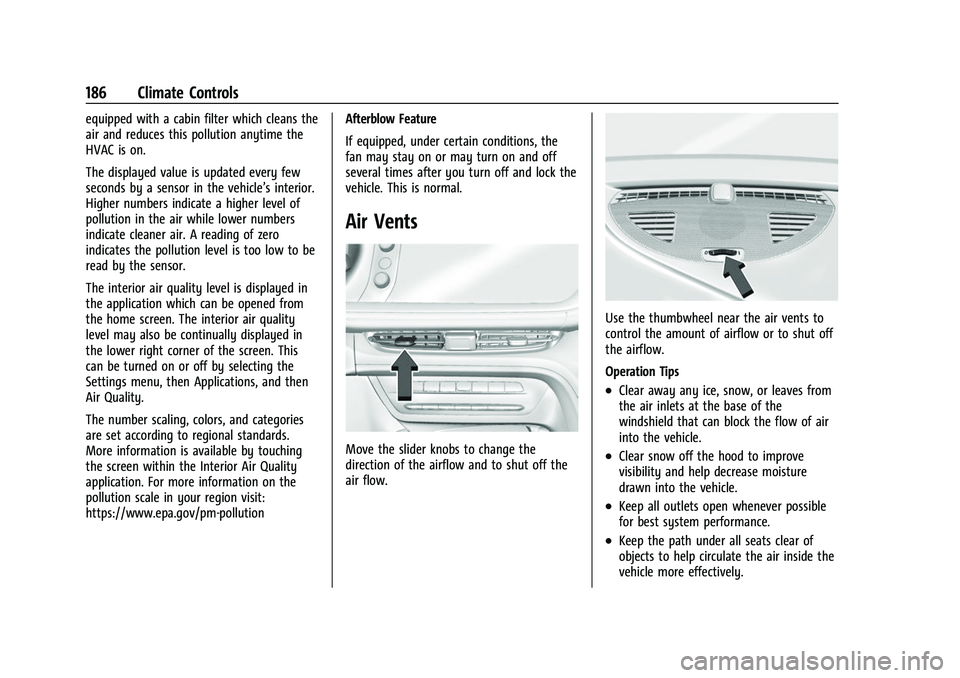
Move the slider knobs to change the
direction of the airflow and to shut off the
air flow.
Use the thumbwheel near the air vents to
control the amount of airflow or to shut off
the airflow.
Operation Tips
.Clear away any ice, snow, or leaves from
the air inlets at the base of the
windshield that can block the flow of air
into the vehicle.
.Clear snow off the hood to improve
visibility and help decrease moisture
drawn into the vehicle.
.Keep all outlets open whenever possible
for best system performance.
.Keep the path under all seats clear of
objects to help circulate the air inside the
vehicle more effectively.
Page 196 of 369

Buick Envision Owner Manual (GMNA-Localizing-U.S./Canada/Mexico-
15218978) - 2022 - CRC - 5/12/21
Driving and Operating 195
{Warning
Snow can trap engine exhaust under the
vehicle. This may cause exhaust gases to
get inside. Engine exhaust contains
carbon monoxide (CO), which cannot be
seen or smelled. It can cause
unconsciousness and even death.
If the vehicle is stuck in snow:
.Clear snow from the base of the
vehicle, especially any blocking the
exhaust pipe.
.Open a window about 5 cm (2 in) on
the vehicle side that is away from the
wind, to bring in fresh air.
.Fully open the air outlets on or under
the instrument panel.
.Adjust the climate control system to
circulate the air inside the vehicle and
set the fan speed to the highest
setting. See“Climate Control Systems.”
For more information about CO, see
Engine Exhaust 0205. To save fuel, run the engine for short
periods to warm the vehicle and then shut
the engine off and partially close the
window. Moving about to keep warm also
helps.
If it takes time for help to arrive, when
running the engine, push the accelerator
pedal slightly so the engine runs faster than
the idle speed. This keeps the battery
charged to restart the vehicle and to signal
for help with the headlamps. Do this as
little as possible, to save fuel.
If the Vehicle Is Stuck
Slowly and cautiously spin the wheels to
free the vehicle when stuck in sand, mud,
ice, or snow.
If stuck too severely for the traction system
to free the vehicle, turn the traction system
off and use the rocking method. See
Traction Control/Electronic Stability Control
0
212.
{Warning
If the vehicle's tires spin at high speed,
they can explode, and you or others
could be injured. The vehicle can
overheat, causing an engine compartment
fire or other damage. Spin the wheels as
little as possible and avoid going above
56 km/h (35 mph).
Rocking the Vehicle to Get it Out
Turn the steering wheel left and right to
clear the area around the front wheels. Turn
off any traction system. Shift back and forth
between R (Reverse) and a low forward gear,
spinning the wheels as little as possible. To
prevent transmission wear, wait until the
wheels stop spinning before shifting gears.
Release the accelerator pedal while shifting,
and press lightly on the accelerator pedal
when the transmission is in gear. Slowly
spinning the wheels in the forward and
reverse directions causes a rocking motion
that could free the vehicle. If that does not
get the vehicle out after a few tries, it
might need to be towed out. If the vehicle
does need to be towed out, see Towing the
Vehicle 0310.
Page 204 of 369
Buick Envision Owner Manual (GMNA-Localizing-U.S./Canada/Mexico-
15218978) - 2022 - CRC - 5/12/21
Driving and Operating 203
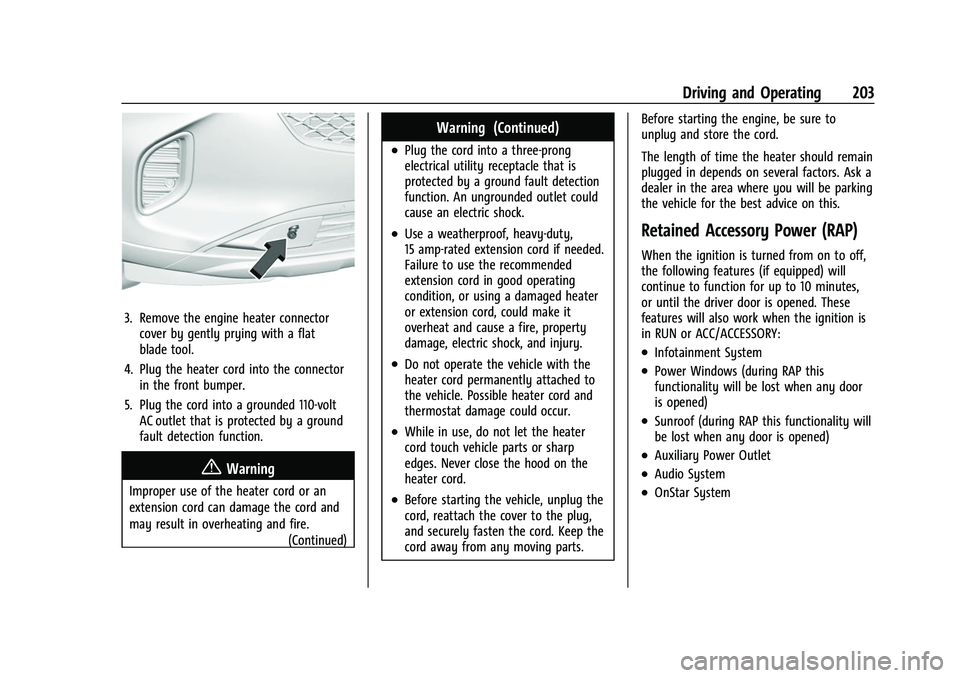
3. Remove the engine heater connectorcover by gently prying with a flat
blade tool.
4. Plug the heater cord into the connector in the front bumper.
5. Plug the cord into a grounded 110-volt AC outlet that is protected by a ground
fault detection function.
{Warning
Improper use of the heater cord or an
extension cord can damage the cord and
may result in overheating and fire.
(Continued)
Warning (Continued)
.Plug the cord into a three-prong
electrical utility receptacle that is
protected by a ground fault detection
function. An ungrounded outlet could
cause an electric shock.
.Use a weatherproof, heavy-duty,
15 amp-rated extension cord if needed.
Failure to use the recommended
extension cord in good operating
condition, or using a damaged heater
or extension cord, could make it
overheat and cause a fire, property
damage, electric shock, and injury.
.Do not operate the vehicle with the
heater cord permanently attached to
the vehicle. Possible heater cord and
thermostat damage could occur.
.While in use, do not let the heater
cord touch vehicle parts or sharp
edges. Never close the hood on the
heater cord.
.Before starting the vehicle, unplug the
cord, reattach the cover to the plug,
and securely fasten the cord. Keep the
cord away from any moving parts. Before starting the engine, be sure to
unplug and store the cord.
The length of time the heater should remain
plugged in depends on several factors. Ask a
dealer in the area where you will be parking
the vehicle for the best advice on this.
Retained Accessory Power (RAP)
When the ignition is turned from on to off,
the following features (if equipped) will
continue to function for up to 10 minutes,
or until the driver door is opened. These
features will also work when the ignition is
in RUN or ACC/ACCESSORY:
.Infotainment System
.Power Windows (during RAP this
functionality will be lost when any door
is opened)
.Sunroof (during RAP this functionality will
be lost when any door is opened)
.Auxiliary Power Outlet
.Audio System
.OnStar System
Page 251 of 369
Buick Envision Owner Manual (GMNA-Localizing-U.S./Canada/Mexico-
15218978) - 2022 - CRC - 5/12/21
250 Driving and Operating
If equipped with Rear Cross Traffic Alert
(RCTA), use caution while backing up when
towing a trailer, as the RCTA detection zones
that extend out from the back of the vehicle
do not move further back when a trailer is
towed.
{Warning
To prevent serious injury or death from
carbon monoxide (CO), when towing a
trailer:
.Do not drive with the liftgate, trunk/
hatch, or rear-most window open.
.Fully open the air outlets on or under
the instrument panel.
.Adjust the climate control system to a
setting that brings in only outside air.
See“Climate Control Systems” in the
Index.
For more information about carbon
monoxide, see Engine Exhaust 0205.
Towing a trailer requires experience. The
combination of the vehicle and trailer is
longer and not as responsive as the vehicle
itself. Get used to the handling and braking
of the combination by driving on a level
road surface before driving on public roads. The trailer structure, the tires, and the
brakes must be all be rated to carry the
intended cargo. Inadequate trailer
equipment can cause the combination to
operate in an unexpected or unsafe manner.
Before driving, inspect all trailer hitch parts
and attachments, safety chains, electrical
connectors, lamps, tires, and mirrors. See
Towing Equipment
0254. If the trailer has
electric brakes, start the combination
moving and then manually apply the trailer
brake controller to check that the trailer
brakes work. During the trip, occasionally
check that the cargo and trailer are secure
and that the lamps and any trailer brakes
are working.Towing with a Stability Control System
When towing, the stability control system
might be heard. The system reacts to
vehicle movement caused by the trailer,
which mainly occurs during cornering. This is
normal when towing heavier trailers.
Following Distance
Stay at least twice as far behind the vehicle
ahead as you would when driving without a
trailer. This can help to avoid heavy braking
and sudden turns.
Passing
More passing distance is needed when
towing a trailer. The combination of the
vehicle and trailer will not accelerate as
quickly and is much longer than the vehicle
alone. It is necessary to go much farther
beyond the passed vehicle before returning
to the lane. Pass on level roadways. Avoid
passing on hills if possible.
Backing Up
Hold the bottom of the steering wheel with
one hand. To move the trailer to the left,
move that hand to the left. To move the
trailer to the right, move that hand to the
right. Always back up slowly and, if possible,
have someone guide you.
Making Turns
Caution
Turn more slowly and make wider arcs
when towing a trailer to prevent damage
to your vehicle. Making very sharp turns
could cause the trailer to contact the
vehicle.
Page 283 of 369

Buick Envision Owner Manual (GMNA-Localizing-U.S./Canada/Mexico-
15218978) - 2022 - CRC - 5/12/21
282 Vehicle Care
Fuses UsageF1 DC-DC CONVERTER 2 –
Direct Current to
Direct Current
Converter 2
F2 Body Control Module 4
F3 –
F4 – Fuses Usage
F5 Body Control Module 2
F6 Body Control Module 3
F7 –
F8 Exterior Lighting Module 5
F9 – Fuses Usage
F10 Steering Column Lock
F11 Body Control Module 1
F12 –
F13 –
F14 –
F15 APO REAR CARGO –Auxiliary Power
Outlet Rear Cargo
F16 –
F17 Exterior Lighting Module 7
F18 UPLVL T/LAMP –
Uplevel Tail Lamp
F19 MISC 5 –Overhead
Console Module/
Universal Garage
Door Opener/Rain
Sensor/Electronic
Toll Collector
Page 284 of 369

Buick Envision Owner Manual (GMNA-Localizing-U.S./Canada/Mexico-
15218978) - 2022 - CRC - 5/12/21
Vehicle Care 283
Fuses UsageF20 SDM/AOS/DLC/ WCM–Sensing
Diagnostic
Module/Automatic
Occupant Sensing/
Data Link
Connector/
Wireless Charger
Module
F21 CGM/OnStar –
Central Gateway
Module/OnStar
F22 EOCM/LRR/PRK Assist/FCM/SBZA –
External Object
Calculating
Module/Long
Range Radar/Park
Assist/Front
Camera Module/
Side Blind Zone
Alert
F23 Video Processing Module
F24 – Fuses Usage
F25 AC POWER OUTLET/USB
CHARGE PORT –
Alternate Current
Power Outlet/USB
Charge Port
F26 –
F27 Amplifier
F28 MISC 4 –Heated
Steering Wheel
Module/Exterior
Lighting Module
Battery 2/Direct
Current/Alternate
Current Inverter
F29 IPC/HUD/AQI MDL/CS & HVAC
DISPLAYS –
Instrument Panel
Cluster/Heads Up
Display/Air Quality
Ionizer Module/
Center Stack
Display/Heating
Ventilation and Air
Conditioning
Display Fuses Usage
F30 –
F31 Run/Crank Auxiliary Power
Module/Battery
System Manager/
Motor Control Unit
F32 RUN/CRANK MISC 3 –Humidity
Sensors/Exterior
Lighting Module/
Electronic Brake
Control Module/
Exterior Air
Quality Sensor/
Manual Headlamp
Leveling/Inside
Rear View Mirror/
Interior Particulate
Matter Sensor/
Seat Fan Control
Cushion and Back
Driver and
Passenger
F33 –
Page 285 of 369

Buick Envision Owner Manual (GMNA-Localizing-U.S./Canada/Mexico-
15218978) - 2022 - CRC - 5/12/21
284 Vehicle Care
Fuses UsageF34 RUN/CRANK MISC 1 & 2–Shifter
Interface Board
Module/
Instrument Panel
Cluster/
Transmission
Control Module
(MISC 1)/Sensing
and Diagnostic
Module/Headlamp
Manual Leveling
Switch/Reflective
Light Auxiliary
Display (MISC 2)
F35 RUN CRANK ECM IGN–RUN/CRANK
Engine Control
Module Ignition
F36 EPB SWITCH/ SHIFTER INTERFACE
BOARD–Electric
Park Brake Switch/
Shifter Interface
Board Fuses Usage
F37 RADIO/CSM/ AUXILIARY JACK –
Radio/Center Stack
Module/
Auxiliary Jack
F38 –
F39 STR/WHL/CNTRLS SWS–SW
Controls –Cruise/
Fast Idle Switches
F40 Exterior Lighting Module 2
F41 Heated Steering Wheel Module
F42 Direct Current to Alternate Current
Inverter Module
CB1 –
CB2 APO CONSOLE –
Auxiliary Power
Outlet Console
Relays Usage K01 RAP/ACCY –Retained
Accessory Power Relays Usage
K02 Run/Crank
K03 –
K04 –
K05 –
Wheels and Tires
Tires
Every new GM vehicle has high-quality
tires made by a leading tire
manufacturer. See the warranty manual
for information regarding the tire
warranty and where to get service. For
additional information refer to the tire
manufacturer.
{Warning
.Poorly maintained and improperly
used tires are dangerous.
(Continued)
Page 363 of 369

Buick Envision Owner Manual (GMNA-Localizing-U.S./Canada/Mexico-
15218978) - 2022 - CRC - 5/12/21
362 Index
LockSteering Column . . . . . . . . . . . . . . . . . . . . . . . . 24
Locks Automatic Door . . . . . . . . . . . . . . . . . . . . . . . . . 16
Delayed Locking . . . . . . . . . . . . . . . . . . . . . . . . . 15
Door . . . . . . . . . . . . . . . . . . . . . . . . . . . . . . . . . . . . . 13
Lockout Protection . . . . . . . . . . . . . . . . . . . . . . 16
Power Door . . . . . . . . . . . . . . . . . . . . . . . . . . . . . . 15
Safety . . . . . . . . . . . . . . . . . . . . . . . . . . . . . . . . . . 16
Loss of Control . . . . . . . . . . . . . . . . . . . . . . . . . . 192
Low Fuel Warning Light . . . . . . . . . . . . . . . . . 103
Lower Anchors and Tethers for Children (LATCH System) . . . . . . . . . . . . . . . . 65
Lumbar Adjustment . . . . . . . . . . . . . . . . . . . . . . . 36 Front Seats . . . . . . . . . . . . . . . . . . . . . . . . . . . . . 36
M
MaintenanceRecords . . . . . . . . . . . . . . . . . . . . . . . . . . . . . . . . 331
Maintenance and Care Additional . . . . . . . . . . . . . . . . . . . . . . . . . . . . . 326
Maintenance Schedule . . . . . . . . . . . . . . . . . . . . 321 Recommended Fluids andLubricants . . . . . . . . . . . . . . . . . . . . . . . . . . . . 329
Malfunction Indicator Lamp . . . . . . . . . . . . . . . 96
Manual Mode . . . . . . . . . . . . . . . . . . . . . . . . . . . 209 Map Data Updates . . . . . . . . . . . . . . . . . . . . . . . 150
Maps . . . . . . . . . . . . . . . . . . . . . . . . . . . . . . . . . . . . .142
Massage
Seats . . . . . . . . . . . . . . . . . . . . . . . . . . . . . . . . . . . 36
Media Avoiding Untrusted Devices . . . . . . . . . . . . 136
Memory Seats . . . . . . . . . . . . . . . . . . . . . . . . . . . . 36
Messages
Engine Power . . . . . . . . . . . . . . . . . . . . . . . . . . 110
Vehicle . . . . . . . . . . . . . . . . . . . . . . . . . . . . . . . . 109
Vehicle Speed . . . . . . . . . . . . . . . . . . . . . . . . . . 110
Mirror Rear Camera . . . . . . . . . . . . . . . . . . . . . . . . . . . . 26
Mirrors Automatic Dimming . . . . . . . . . . . . . . . . . . . . 26
Automatic Dimming Rearview . . . . . . . . . . 26
Folding . . . . . . . . . . . . . . . . . . . . . . . . . . . . . . . . . 25
Heated . . . . . . . . . . . . . . . . . . . . . . . . . . . . . . . . . 26
Manual Rearview . . . . . . . . . . . . . . . . . . . . . . . 26
Power . . . . . . . . . . . . . . . . . . . . . . . . . . . . . . . . . . 25
Tilt in Reverse . . . . . . . . . . . . . . . . . . . . . . . . . . 26
Mirrors, Interior Rearview . . . . . . . . . . . . . . . . . 26
Mode . . . . . . . . . . . . . . . . . . . . . . . . . . . . . . . . . . . . 216 Driver Control . . . . . . . . . . . . . . . . . . . . . . . . . 216
Monitor System, Tire Pressure . . . . . . . . . . . 292
Multi-band Antenna . . . . . . . . . . . . . . . . . . . . . . 135
N
Navigation
Connected Services . . . . . . . . . . . . . . . . . . . . 353
Destination . . . . . . . . . . . . . . . . . . . . . . . . . . . . 143
Using the System . . . . . . . . . . . . . . . . . . . . . . 139
Navigation Symbols . . . . . . . . . . . . . . . . . . . . . .142
Net, Convenience . . . . . . . . . . . . . . . . . . . . . . . . . 80
New Vehicle Break-In . . . . . . . . . . . . . . . . . . . . 199
O
Odometer . . . . . . . . . . . . . . . . . . . . . . . . . . . . . . . . 93 Trip . . . . . . . . . . . . . . . . . . . . . . . . . . . . . . . . . . . . . 93
Off-Road Recovery . . . . . . . . . . . . . . . . . . . . . . . . . . . . . . . 192
Oil
Engine . . . . . . . . . . . . . . . . . . . . . . . . . . . . . . . . . 262
Engine Oil Life System . . . . . . . . . . . . . . . . . 264
Pressure Light . . . . . . . . . . . . . . . . . . . . . . . . . 102
Older Children, Restraints . . . . . . . . . . . . . . . . . 59
Online Owner Center . . . . . . . . . . . . . . . . . . . . 338
OnStar . . . . . . . . . . . . . . . . . . . . . . . . . . . . . . . . . . . 347
OnStar Additional Information . . . . . . . . . . . 350
OnStar Emergency . . . . . . . . . . . . . . . . . . . . . . . 349
OnStar Overview . . . . . . . . . . . . . . . . . . . . . . . . . 348
OnStar Security . . . . . . . . . . . . . . . . . . . . . . . . . . 349
Outlets Power . . . . . . . . . . . . . . . . . . . . . . . . . . . . . . . . . . 86
Page 364 of 369

Buick Envision Owner Manual (GMNA-Localizing-U.S./Canada/Mexico-
15218978) - 2022 - CRC - 5/12/21
Index 363
Overheating, Engine . . . . . . . . . . . . . . . . . . . . . 269
Overview . . . . . . . . . . . . . . . . . . . . . . . . . . . . . . . . .128Instrument Panel . . . . . . . . . . . . . . . . . . . . . . . . 4
P
ParkShifting Into . . . . . . . . . . . . . . . . . . . . . . . . . . . 204
Shifting Out of . . . . . . . . . . . . . . . . . . . . . . . . 204
Park Assist . . . . . . . . . . . . . . . . . . . . . . . . . . . 228, 231
Parking Brake and P (Park) MechanismCheck . . . . . . . . . . . . . . . . . . . . . . . . . . . . . . . . 273
Extended . . . . . . . . . . . . . . . . . . . . . . . . . . . . . . 205
Over Things That Burn . . . . . . . . . . . . . . . . . 205
Parking Assist Automatic . . . . . . . . . . . . . . . . . . . . . . . . . . . . . 232
Parking or Backing
Assistance Systems . . . . . . . . . . . . . . . . . . . . 228
Passenger Airbag Status Indicator . . . . . . . . . 95
Passenger Compartment Air Filter . . . . . . . .187
Passenger Sensing System . . . . . . . . . . . . . . . . 54
Pedestrian Ahead Indicator . . . . . . . . . . . . . . 100
Perchlorate Materials Requirements, California . . . . . . . . . . . . . . . . . . . . . . . . . . . . . . 259
Personalization Vehicle . . . . . . . . . . . . . . . . . . . . . . . . . . . . . . . . 110 Phone
Apple CarPlay and Android Auto . . . . . . . 160
Bluetooth . . . . . . . . . . . . . . . . . . . . . . . . . . . . . . 156
Port USB . . . . . . . . . . . . . . . . . . . . . . . . . . . . . . . . . . . . 136
Positioning Vehicle . . . . . . . . . . . . . . . . . . . . . . . . . . . . . . . . 149
Power Door Locks . . . . . . . . . . . . . . . . . . . . . . . . . . . . . . . 15
Mirrors . . . . . . . . . . . . . . . . . . . . . . . . . . . . . . . . . 25
Outlets . . . . . . . . . . . . . . . . . . . . . . . . . . . . . . . . . 86
Protection, Battery . . . . . . . . . . . . . . . . . . . . . 126
Retained Accessory (RAP) . . . . . . . . . . . . . . 203
Seat Adjustment . . . . . . . . . . . . . . . . . . . . . . . . 34
Windows . . . . . . . . . . . . . . . . . . . . . . . . . . . . . . . 29
Pregnancy, Using Seat Belts . . . . . . . . . . . . . . 48
Privacy
Vehicle Data Recording . . . . . . . . . . . . . . . . 345
Problems with Route Guidance . . . . . . . . . . 149
Program Courtesy Transportation . . . . . . . . . . . . . . . 341
Prohibited Fuels . . . . . . . . . . . . . . . . . . . . . . . . . 246
Proposition 65 Warning, California . . . . . . . . . . . . . . . . . . . . . . . . . 273, 308, Back Cover
Publication Ordering Information . . . . . . . . 343
R
Radio HD Radio Technology . . . . . . . . . . . . . . . . . . 134
Radio Data System (RDS) . . . . . . . . . . . . . . . . .134
Radio Frequency Statement . . . . . . . . . . . . . . 344
Radio Reception . . . . . . . . . . . . . . . . . . . . . . . . . . 135
Radios AM-FM Radio . . . . . . . . . . . . . . . . . . . . . . . . . . 132
Satellite . . . . . . . . . . . . . . . . . . . . . . . . . . . . . . . . 135
Reading Lamps . . . . . . . . . . . . . . . . . . . . . . . . . . .124
Rear Camera Mirror . . . . . . . . . . . . . . . . . . . . . . . 26
Rear Cross Traffic Alert System . . . . . . . . . . 236
Rear Pedestrian Alert . . . . . . . . . . . . . . . . . . . . 236
Rear Seats . . . . . . . . . . . . . . . . . . . . . . . . . . . . . . . . 40
Heated . . . . . . . . . . . . . . . . . . . . . . . . . . . . . . . . . 41
Rear Vision Camera (RVC) . . . . . . . . . . . . . . . . 228
Rear Window Washer/Wiper . . . . . . . . . . . . . 85
Rearview Mirrors . . . . . . . . . . . . . . . . . . . . . . . . . 26 Automatic Dimming . . . . . . . . . . . . . . . . . . . . 26
Reclining Seatbacks . . . . . . . . . . . . . . . . . . . . . . . 34
Recognition Voice . . . . . . . . . . . . . . . . . . . . . . . . . . . . . . . . . . 150
Recommended Fuel . . . . . . . . . . . . . . . . . . . . . . . . . . . . . . . . . . . . 246
Recommended Fluids and Lubricants . . . . . 329