check oil BUICK ENVISION 2023 User Guide
[x] Cancel search | Manufacturer: BUICK, Model Year: 2023, Model line: ENVISION, Model: BUICK ENVISION 2023Pages: 356, PDF Size: 7.42 MB
Page 262 of 356
Buick Envision Owner Manual (GMNA-Localizing-U.S./Canada/Mexico-
16060855) - 2023 - CRC - 2/9/22
Vehicle Care 261
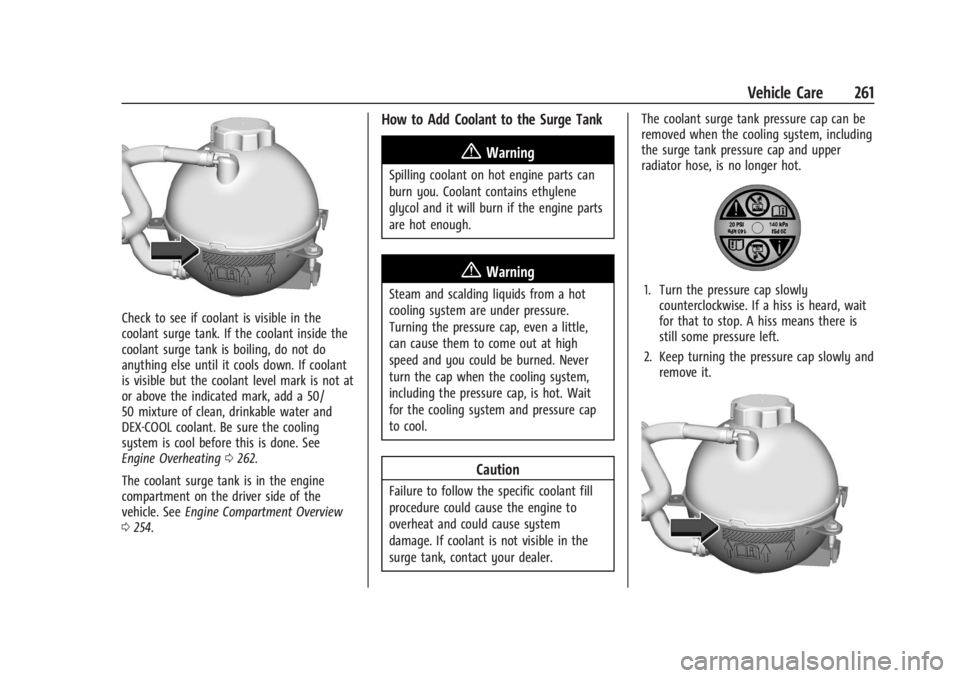
Check to see if coolant is visible in the
coolant surge tank. If the coolant inside the
coolant surge tank is boiling, do not do
anything else until it cools down. If coolant
is visible but the coolant level mark is not at
or above the indicated mark, add a 50/
50 mixture of clean, drinkable water and
DEX-COOL coolant. Be sure the cooling
system is cool before this is done. See
Engine Overheating0262.
The coolant surge tank is in the engine
compartment on the driver side of the
vehicle. See Engine Compartment Overview
0 254.
How to Add Coolant to the Surge Tank
{Warning
Spilling coolant on hot engine parts can
burn you. Coolant contains ethylene
glycol and it will burn if the engine parts
are hot enough.
{Warning
Steam and scalding liquids from a hot
cooling system are under pressure.
Turning the pressure cap, even a little,
can cause them to come out at high
speed and you could be burned. Never
turn the cap when the cooling system,
including the pressure cap, is hot. Wait
for the cooling system and pressure cap
to cool.
Caution
Failure to follow the specific coolant fill
procedure could cause the engine to
overheat and could cause system
damage. If coolant is not visible in the
surge tank, contact your dealer. The coolant surge tank pressure cap can be
removed when the cooling system, including
the surge tank pressure cap and upper
radiator hose, is no longer hot.
1. Turn the pressure cap slowly
counterclockwise. If a hiss is heard, wait
for that to stop. A hiss means there is
still some pressure left.
2. Keep turning the pressure cap slowly and remove it.
Page 313 of 356

Buick Envision Owner Manual (GMNA-Localizing-U.S./Canada/Mexico-
16060855) - 2023 - CRC - 2/9/22
312 Service and Maintenance
Service and Maintenance
General Information
General Information . . . . . . . . . . . . . . . . . . . 312
Maintenance Schedule
Maintenance Schedule . . . . . . . . . . . . . . . . . 313
Multi-Point Vehicle Inspection (MPVI)
Multi-Point VehicleInspection (MPVI) . . . . . . . . . . . . . . . . . . . . 315
Special Application Services
Special Application Services . . . . . . . . . . . . 316
Recommended Fluids, Lubricants, and
Parts
Recommended Fluids and Lubricants . . . 317
Maintenance Replacement Parts . . . . . . . 318
Maintenance Records
Maintenance Records . . . . . . . . . . . . . . . . . . 319
General Information
Your vehicle is an important investment.
This section describes the required
maintenance for the vehicle. Follow this
schedule to help protect against major repair
expenses resulting from neglect or
inadequate maintenance. It may also help to
maintain the value of the vehicle if it is
sold. It is the responsibility of the owner to
have all required maintenance performed.
Your dealer has trained technicians who can
perform required maintenance using genuine
replacement parts. They have up-to-date
tools and equipment for fast and accurate
diagnostics. Many dealers have extended
evening and Saturday hours, courtesy
transportation, and online scheduling to
assist with service needs.
Your dealer recognizes the importance of
providing competitively priced maintenance
and repair services. With trained technicians,
the dealer is the place for routine
maintenance such as oil changes and tire
rotations and additional maintenance items
like tires, brakes, batteries, and wiper blades.
Caution
Damage caused by improper maintenance
can lead to costly repairs and may not be
covered by the vehicle warranty.
Maintenance intervals, checks,
inspections, recommended fluids, and
lubricants are important to keep the
vehicle in good working condition.
Do not have chemical flushes that are not
approved by GM performed on the
vehicle. The use of flushes, solvents,
cleaners, or lubricants that are not
approved by GM could damage the
vehicle, requiring expensive repairs that
are not covered by the vehicle warranty.
The Tire Rotation and Required Services are
the responsibility of the vehicle owner. It is
recommended to have your dealer perform
these services every 12 000 km/7,500 mi.
Proper vehicle maintenance helps to keep
the vehicle in good working condition,
improves fuel economy, and reduces vehicle
emissions.
Page 314 of 356

Buick Envision Owner Manual (GMNA-Localizing-U.S./Canada/Mexico-
16060855) - 2023 - CRC - 2/9/22
Service and Maintenance 313
Because of the way people use vehicles,
maintenance needs vary. There may need to
be more frequent checks and services. The
Additional Required Services - Normal are for
vehicles that:
.Carry passengers and cargo within
recommended limits on the Tire and
Loading Information label. SeeVehicle
Load Limits 0188.
.Are driven on reasonable road surfaces
within legal driving limits.
.Use the recommended fuel. See
Recommended Fuel 0239.
Refer to the information in the Maintenance
Schedule Additional Required Services -
Normal Service.
The Additional Required Services - Severe are
for vehicles that are:
.Mainly driven in heavy city traffic in hot
weather.
.Mainly driven in hilly or mountainous
terrain.
.Frequently towing a trailer.
.Used for high speed or competitive
driving.
.Used for taxi, police, or delivery service. Refer to the information in the Maintenance
Schedule Additional Required Services -
Severe Service.
{Warning
Performing maintenance work can be
dangerous and can cause serious injury.
Perform maintenance work only if the
required information, proper tools, and
equipment are available. If they are not,
see your dealer to have a trained
technician do the work. See
Doing Your
Own Service Work 0252.
Maintenance Schedule
Tire Rotation and Required Services
Every 12 000 km (7,500 mi)
Tires are rotated to achieve a more uniform
wear for all tires. The first rotation is the
most important.
Anytime unusual wear is noticed, rotate the
tires as soon as possible, check for proper
tire inflation pressure, and check for
damaged tires or wheels. If the unusual
wear continues after the rotation, check the wheel alignment. See
When It Is Time for
New Tires 0289 and
Wheel Replacement 0293.
.Perform Multi-Point Vehicle Inspection.
See Multi-Point Vehicle Inspection (MPVI)
0 315.
.Lubricate body components. See Exterior
Care 0304.
Additional Required Services —Normal
Service
Every 12 000 km (7,500 mi)
.Check the engine oil level and oil
life percentage. If needed, change engine
oil and filter, and reset oil life system. Or
when the CHANGE ENGINE OIL SOON
message displays, have the engine oil and
filter changed within the next 1 000 km
(600 mi). If driven under the best
conditions, the engine oil life system may
not indicate the need for vehicle service
for up to a year. The engine oil and filter
must be changed at least once a year,
and the oil life system must be reset.
Your trained dealer technician can
perform this work. If the engine oil life
system is reset accidentally, service the
vehicle within 5 000 km (3,000 mi) of the
Page 316 of 356

Buick Envision Owner Manual (GMNA-Localizing-U.S./Canada/Mexico-
16060855) - 2023 - CRC - 2/9/22
Service and Maintenance 315
Extreme service is for vehicles mainly
driven off-road in four-wheel drive or used
in farming, mining, forestry, or snow
plowing.
Additional Required Services—Severe
Service
Every 72 000 km (45,000 mi)
.Change automatic transmission fluid and
filter.
Every 120 000 km (75,000 mi)
.Change rear axle fluid, if equipped with
AWD. Do not directly power wash the
transfer case and/or front/rear axle
output seals. High pressure water can
overcome the seals and contaminate the
transfer case fluid. Contaminated fluid
will decrease the life of the transfer case
and/or axles and should be replaced.
Owner Checks and Services
Every Five Years
.Replace brake fluid every five years. See
Brake Fluid 0265. Every Seven Years
.Replace Air Conditioning Desiccant every
seven years. The air conditioning system
requires maintenance every seven years.
This service requires replacement of the
desiccant to help the longevity and
efficient operation of the air conditioning
system. This service can be complex. See
your dealer.
Multi-Point Vehicle
Inspection (MPVI)
A Multi Point Vehicle Inspection (MPVI)
completed by a GM dealer technician is a
maintenance assessment of your vehicle.
The benefit of the MPVI is to identify and
inform the customer of service items that
require immediate attention and those that
may require attention in the future.
The technician will perform the following
checks on your vehicle. For a complete list
of checks, inspections, and services, see your
dealer.
Some items may not apply to your vehicle
and/or region.
Diagnostics
.OnStar active, if equipped
.Service history/recall check
Engine Oil and Filter
.Engine oil
.Oil life monitor
‐
Reset oil life monitor
Exterior Lights
.Visual inspection
Windshield and Wipers
.Visual inspection
Battery
.Battery visual inspection
.Battery test results
.Battery cables and connections
Systems, Fluids, and Visible Leak
Inspection
.Engine oil
.Transmission
.Drive axle
Page 317 of 356

Buick Envision Owner Manual (GMNA-Localizing-U.S./Canada/Mexico-
16060855) - 2023 - CRC - 2/9/22
316 Service and Maintenance
.Transfer case
.Engine cooling system
.Power steering, if equipped
.Fuel system
.Windshield washer fluid
Tire Inspection
.Tire pressure, tread depth, and wear
.Rotation, if applicable
.Alignment check, optional
.Reset tire pressure monitor
.Check tire sealant expiration date,
if equipped
.Check spare tire, if equipped
Brakes
.Check brake system
Visible and Functional Inspections
.Seat belt components
.Exhaust system
.Accelerator pedal
.Passenger compartment air filter,
if equipped
.Engine air filter
.Hoses
.Belts
.Shocks and struts
.Steering components
.Axle boots or driveshaft and u-joints
.Compartment lift struts, if equipped
.Floor mats secured, no interference with
pedals
.Horn
.Ignition lock, if equipped
.Starter switch
.Evaporative control system
Lubricate
.Chassis components
Special Application Services
.Severe Commercial Use Vehicles Only:
Lubricate chassis components every oil
change.
.Have underbody flushing service
performed. See "Underbody Maintenance"
in Exterior Care 0304.
Page 322 of 356

Buick Envision Owner Manual (GMNA-Localizing-U.S./Canada/Mexico-
16060855) - 2023 - CRC - 2/9/22
Technical Data 321
Vehicle Data
Capacities and Specifications
The following approximate capacities are given in metric and English conversions. SeeRecommended Fluids and Lubricants0317 for more
information.
Application Capacities
Metric English
Air Conditioning Refrigerant For the air conditioning system refrigerant type and charge
amount, see the refrigerant label under the hood. See your dealer for more information.
Engine Cooling System* 9.4 L9.9 qt
Engine Oil with Filter 5.0 L5.3 qt
Fuel Tank
IFWD 60.2 L
15.9 gal
IAWD 60.9 L
16.1 gal
Wheel Nut Torque 190Y 140 lb ft
All capacities are approximate. When adding, be sure to fill to the approximate level, as recommended in this manual. Recheck fluid level
after filling.
*Engine cooling system capacity values are based on the entire cooling system and its components.
Page 342 of 356

Buick Envision Owner Manual (GMNA-Localizing-U.S./Canada/Mexico-
16060855) - 2023 - CRC - 2/9/22
Connected Services 341
Ensuring Security
.Change the default passwords for the
Wi-Fi hotspot and myBuick mobile
application. Make these passwords
different from each other and use a
combination of letters and numbers to
increase the security.
.Change the default name of the SSID
(Service Set Identifier). This is your
network’s name that is visible to other
wireless devices. Choose a unique name
and avoid family names or vehicle
descriptions.
Wi-Fi Hotspot (If Equipped)
The vehicle may have a built-in Wi-Fi
hotspot that provides access to the Internet
and web content at 4G LTE speed. Up to
seven mobile devices can be connected.
A data plan is required. Use the in-vehicle
controls only when it is safe to do so. 1. To retrieve Wi-Fi hotspot information, press
=to open the OnStar app on the
infotainment display, then select Wi-Fi
Hotspot. On some vehicles, touch Wi-Fi
or Wi-Fi Settings on the screen. 2. The Wi-Fi settings will display the Wi-Fi
hotspot name (SSID), password, and on
some vehicles, the connection type (no
Internet connection, 3G, 4G, 4G LTE), and
signal quality (poor, good, excellent). The
LTE icon shows connection to Wi-Fi. It is
possible that the icon may not illuminate
even though the vehicle has an active
connection.
3. To change the SSID or password, press
Qor call 1-888-4ONSTAR to connect
with an Advisor. On some vehicles, the
SSID and password can be changed in
the Wi-Fi Hotspot menu.
After initial set-up, your vehicle’s Wi-Fi
hotspot will connect automatically to your
mobile devices. Manage data usage by
turning Wi-Fi on or off on your mobile
device, by using the myBuick mobile app,
or by contacting an OnStar Advisor. On
some vehicles, Wi-Fi can also be managed
from the Wi-Fi Hotspot menu. MyBuick Mobile App (If Available)
Download the myBuick mobile app to
compatible Apple and Android smartphones.
Buick users can access the following services
from a smartphone:
.Remotely start/stop the vehicle,
if factory-equipped.
.Lock/unlock doors, if equipped with
automatic locks.
.Activate the horn and lamps.
.Check the vehicle’s fuel level, oil life,
or tire pressure, if factory-equipped with
the Tire Pressure Monitor System.
.Send destinations to the vehicle.
.Locate the vehicle on a map (U.S.
market only).
.Turn the vehicle's Wi-Fi hotspot on/off,
manage settings, and monitor data
consumption, if equipped.
.Locate a dealer and schedule service.
.Request Roadside Assistance.
.Set a parking reminder with pin drop,
take a photo, make a note, and set a
timer.
.Connect with Buick on social media.
Page 347 of 356

Buick Envision Owner Manual (GMNA-Localizing-U.S./Canada/Mexico-
16060855) - 2023 - CRC - 2/9/22
346 Index
Door (cont'd)Locks . . . . . . . . . . . . . . . . . . . . . . . . . . . . . . . . . . . 14
Power Locks . . . . . . . . . . . . . . . . . . . . . . . . . . . . 16
Drive Belt Routing, Engine . . . . . . . . . . . . . . . 322
Drive Systems All-Wheel Drive . . . . . . . . . . . . . . . . . . . 201, 266
Driver
Assistance Systems . . . . . . . . . . . . . . . . . . . . 219
Behavior . . . . . . . . . . . . . . . . . . . . . . . . . . . . . . . . 181
Information Center (DIC) . . . . . . . . . . . . . . . 106
Mode Control . . . . . . . . . . . . . . . . . . . . . . . . . . 208
Mode Control Light . . . . . . . . . . . . . . . . . . . . 103
Teen . . . . . . . . . . . . . . . . . . . . . . . . . . . . . . . . . . . 162
Driving Assistance Systems . . . . . . . . . . . . . . . . . . . . 229
Better Fuel Economy . . . . . . . . . . . . . . . . . . . . 181
Characteristics and Towing Tips . . . . . . . . 242
Defensive . . . . . . . . . . . . . . . . . . . . . . . . . . . . . . 182
Environment . . . . . . . . . . . . . . . . . . . . . . . . . . . . 181
Hill and Mountain Roads . . . . . . . . . . . . . . 185
If the Vehicle is Stuck . . . . . . . . . . . . . . . . . 187
Impaired . . . . . . . . . . . . . . . . . . . . . . . . . . . . . . . 183
Loss of Control . . . . . . . . . . . . . . . . . . . . . . . . 184
Off-Road Recovery . . . . . . . . . . . . . . . . . . . . . 184
Vehicle Load Limits . . . . . . . . . . . . . . . . . . . . 188
Wet Roads . . . . . . . . . . . . . . . . . . . . . . . . . . . . . 185
Winter . . . . . . . . . . . . . . . . . . . . . . . . . . . . . . . . . 186 Driving the Vehicle . . . . . . . . . . . . . . . . . . . . . . . . .2
Dual
Automatic Climate Control System . . . . 174
E
ElectricParking Brake . . . . . . . . . . . . . . . . . . . . . . . . . . 202
Parking Brake Light . . . . . . . . . . . . . . . . . . . . 100
Electrical Equipment, Add-On . . . . . . . . . . . . . . . . . . . . 249
System Overload . . . . . . . . . . . . . . . . . . . . . . 269
Electrical System
Engine Compartment Fuse Block . . . . . . . . 271
Fuses and Circuit Breakers . . . . . . . . . . . . . . 271
Instrument Panel Fuse Block . . . . . . . . . . . 274
Emergency OnStar . . . . . . . . . . . . . . . . . . . . . . . . . . . . . . . . . 336
Engine Air Cleaner/Filter . . . . . . . . . . . . . . . . . . . . . . 258
Air Filter Life System . . . . . . . . . . . . . . . . . . 258
Check Light (Malfunction Indicator) . . . . . 98
Compartment Overview . . . . . . . . . . . . . . . . 254
Coolant Temperature Gauge . . . . . . . . . . . . 96
Coolant Temperature WarningLight . . . . . . . . . . . . . . . . . . . . . . . . . . . . . . . . . 103
Cooling System . . . . . . . . . . . . . . . . . . . . . . . . 259
Drive Belt Routing . . . . . . . . . . . . . . . . . . . . . 322
Exhaust . . . . . . . . . . . . . . . . . . . . . . . . . . . . . . . . 197 Engine (cont'd)
Heater . . . . . . . . . . . . . . . . . . . . . . . . . . . . . . . . . 194
Oil Life System . . . . . . . . . . . . . . . . . . . . . . . . 257
Oil Pressure Light . . . . . . . . . . . . . . . . . . . . . . 104
Overheating . . . . . . . . . . . . . . . . . . . . . . . . . . . 262
Power Messages . . . . . . . . . . . . . . . . . . . . . . . . 111
Running While Parked . . . . . . . . . . . . . . . . . 197
Starting . . . . . . . . . . . . . . . . . . . . . . . . . . . . . . . . 192
Entry Lighting . . . . . . . . . . . . . . . . . . . . . . . . . . . . 123
Equipment, Towing . . . . . . . . . . . . . . . . . . . . . . 247
Event Data Recorders . . . . . . . . . . . . . . . . . . . . 333
Exit Lighting . . . . . . . . . . . . . . . . . . . . . . . . . . . . . . 123
Extended Parking . . . . . . . . . . . . . . . . . . . . . . . . 197
Extender, Seat Belt . . . . . . . . . . . . . . . . . . . . . . . 50
Exterior Lamp Controls . . . . . . . . . . . . . . . . . . . . . . . . . . 115
Lamps Off Reminder . . . . . . . . . . . . . . . . . . . . 118
Lighting Battery Saver . . . . . . . . . . . . . . . . . 124
F
FilterEngine Air Cleaner . . . . . . . . . . . . . . . . . . . . . 258
Flash-to-Pass . . . . . . . . . . . . . . . . . . . . . . . . . . . . . . 118
Flashers, Hazard Warning . . . . . . . . . . . . . . . . . 121
Flat Tire . . . . . . . . . . . . . . . . . . . . . . . . . . . . . . . . . 294 Changing . . . . . . . . . . . . . . . . . . . . . . . . . . . . . . 295
Floor Mats . . . . . . . . . . . . . . . . . . . . . . . . . . . . . . . . 311
Page 351 of 356

Buick Envision Owner Manual (GMNA-Localizing-U.S./Canada/Mexico-
16060855) - 2023 - CRC - 2/9/22
350 Index
OilEngine . . . . . . . . . . . . . . . . . . . . . . . . . . . . . . . . . 255
Engine Oil Life System . . . . . . . . . . . . . . . . . 257
Pressure Light . . . . . . . . . . . . . . . . . . . . . . . . . 104
Older Children, Restraints . . . . . . . . . . . . . . . . . .61
Online Account . . . . . . . . . . . . . . . . . . . . . . . . . . 325
OnStar . . . . . . . . . . . . . . . . . . . . . . . . . . . . . . . . . . . 334 Additional Information . . . . . . . . . . . . . . . . . 337
Overview . . . . . . . . . . . . . . . . . . . . . . . . . . . . . . 335
OnStar Emergency . . . . . . . . . . . . . . . . . . . . . . . 336
OnStar Security . . . . . . . . . . . . . . . . . . . . . . . . . . 336
Outlets Power . . . . . . . . . . . . . . . . . . . . . . . . . . . . . . . . . . 88
Overheating, Engine . . . . . . . . . . . . . . . . . . . . . 262
Overview . . . . . . . . . . . . . . . . . . . . . . . . . . . . . . . . 126 Instrument Panel . . . . . . . . . . . . . . . . . . . . . . . . 5
P
Park
Assist . . . . . . . . . . . . . . . . . . . . . . . . . . . . . . 221, 223
Shifting Into . . . . . . . . . . . . . . . . . . . . . . . . . . . 196
Shifting Out of . . . . . . . . . . . . . . . . . . . . . . . . 196
Parking Brake and P (Park) MechanismCheck . . . . . . . . . . . . . . . . . . . . . . . . . . . . . . . . 266
Extended . . . . . . . . . . . . . . . . . . . . . . . . . . . . . . 197
Over Things That Burn . . . . . . . . . . . . . . . . . 196 Parking Assist
Automatic . . . . . . . . . . . . . . . . . . . . . . . . . . . . . 225
Parking or Backing Assistance Systems . . . . . . . . . . . . . . . . . . . . 221
Passenger Airbag Status Indicator . . . . . . . . . . . . . . . . . 97
Compartment Air Filter . . . . . . . . . . . . . . . . 179
Sensing System . . . . . . . . . . . . . . . . . . . . . . . . . 56
Pedestrian Ahead Indicator . . . . . . . . . . . . . . 102
Perchlorate Materials Requirements, California . . . . . . . . . . . . . . . . . . . . . . . . . . . . . . 252
Phone Apple CarPlay and Android Auto . . . . . . . . 157
Bluetooth . . . . . . . . . . . . . . . . . . . . . . . . . . 153, 154
Port USB . . . . . . . . . . . . . . . . . . . . . . . . . . . . . . . . . . . . 134
Positioning Vehicle . . . . . . . . . . . . . . . . . . . . . . . . . . . . . . . . 147
Power Door Locks . . . . . . . . . . . . . . . . . . . . . . . . . . . . . . 16
Mirrors . . . . . . . . . . . . . . . . . . . . . . . . . . . . . . . . . 26
Outlets . . . . . . . . . . . . . . . . . . . . . . . . . . . . . . . . . 88
Protection, Battery . . . . . . . . . . . . . . . . . . . . . 124
Retained Accessory (RAP) . . . . . . . . . . . . . . 195
Seat Adjustment . . . . . . . . . . . . . . . . . . . . . . . . 36
Windows . . . . . . . . . . . . . . . . . . . . . . . . . . . . . . . 30
Pregnancy, Using Seat Belts . . . . . . . . . . . . . . 50 Privacy
Vehicle Data Recording . . . . . . . . . . . . . . . . 332
Problems with Route Guidance . . . . . . . . . . .147
Program Courtesy Transportation . . . . . . . . . . . . . . . 328
Prohibited Fuels . . . . . . . . . . . . . . . . . . . . . . . . . 239
Proposition 65 Warning California . . . . . . . . . . . . . . . . . . . . . . . . . . . . . . . . . 1
Proposition 65 Warning, California . . . . . . . 300
Publication Ordering Information . . . . . . . . . 331
R
Radiator . . . . . . . . . . . . . . . . . . . . . . . . . . . . . . . . . 259
Radio AM-FM Radio . . . . . . . . . . . . . . . . . . . . . . . . . . 130
Data System (RDS) . . . . . . . . . . . . . . . . . . . . . 132
Frequency Statement . . . . . . . . . . . . . . . . . . 331
HD Radio Technology . . . . . . . . . . . . . . . . . . 132
Reception . . . . . . . . . . . . . . . . . . . . . . . . . . . . . . 133
Satellite . . . . . . . . . . . . . . . . . . . . . . . . . . . . . . . . 133
Reading Lamps . . . . . . . . . . . . . . . . . . . . . . . . . . . 122
Rear
Camera Mirror . . . . . . . . . . . . . . . . . . . . . . . . . . 27
Cross Traffic Alert (RCTA) System . . . . . . 229
Heated Seats . . . . . . . . . . . . . . . . . . . . . . . . . . . 43
Pedestrian Alert . . . . . . . . . . . . . . . . . . . . . . . 228
Seats . . . . . . . . . . . . . . . . . . . . . . . . . . . . . . . . . . . 42
Vision Camera (RVC) . . . . . . . . . . . . . . . . . . . 221