power steering BUICK ENVISION 2023 User Guide
[x] Cancel search | Manufacturer: BUICK, Model Year: 2023, Model line: ENVISION, Model: BUICK ENVISION 2023Pages: 356, PDF Size: 7.42 MB
Page 193 of 356
Buick Envision Owner Manual (GMNA-Localizing-U.S./Canada/Mexico-
16060855) - 2023 - CRC - 2/9/22
192 Driving and Operating
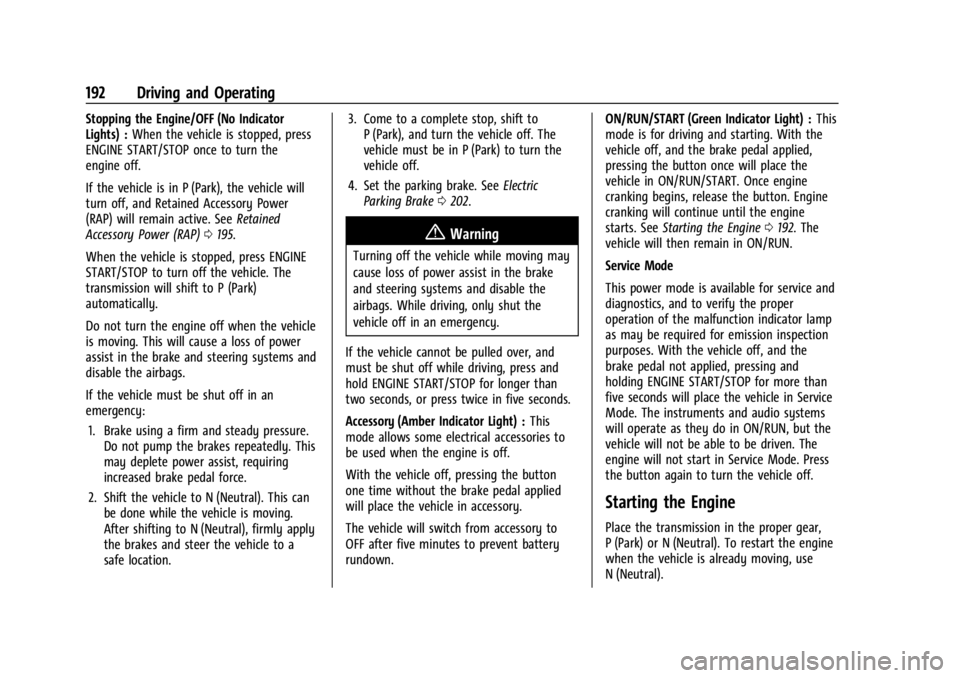
Stopping the Engine/OFF (No Indicator
Lights) :When the vehicle is stopped, press
ENGINE START/STOP once to turn the
engine off.
If the vehicle is in P (Park), the vehicle will
turn off, and Retained Accessory Power
(RAP) will remain active. See Retained
Accessory Power (RAP) 0195.
When the vehicle is stopped, press ENGINE
START/STOP to turn off the vehicle. The
transmission will shift to P (Park)
automatically.
Do not turn the engine off when the vehicle
is moving. This will cause a loss of power
assist in the brake and steering systems and
disable the airbags.
If the vehicle must be shut off in an
emergency: 1. Brake using a firm and steady pressure. Do not pump the brakes repeatedly. This
may deplete power assist, requiring
increased brake pedal force.
2. Shift the vehicle to N (Neutral). This can be done while the vehicle is moving.
After shifting to N (Neutral), firmly apply
the brakes and steer the vehicle to a
safe location. 3. Come to a complete stop, shift to
P (Park), and turn the vehicle off. The
vehicle must be in P (Park) to turn the
vehicle off.
4. Set the parking brake. See Electric
Parking Brake 0202.
{Warning
Turning off the vehicle while moving may
cause loss of power assist in the brake
and steering systems and disable the
airbags. While driving, only shut the
vehicle off in an emergency.
If the vehicle cannot be pulled over, and
must be shut off while driving, press and
hold ENGINE START/STOP for longer than
two seconds, or press twice in five seconds.
Accessory (Amber Indicator Light) : This
mode allows some electrical accessories to
be used when the engine is off.
With the vehicle off, pressing the button
one time without the brake pedal applied
will place the vehicle in accessory.
The vehicle will switch from accessory to
OFF after five minutes to prevent battery
rundown. ON/RUN/START (Green Indicator Light) :
This
mode is for driving and starting. With the
vehicle off, and the brake pedal applied,
pressing the button once will place the
vehicle in ON/RUN/START. Once engine
cranking begins, release the button. Engine
cranking will continue until the engine
starts. See Starting the Engine 0192. The
vehicle will then remain in ON/RUN.
Service Mode
This power mode is available for service and
diagnostics, and to verify the proper
operation of the malfunction indicator lamp
as may be required for emission inspection
purposes. With the vehicle off, and the
brake pedal not applied, pressing and
holding ENGINE START/STOP for more than
five seconds will place the vehicle in Service
Mode. The instruments and audio systems
will operate as they do in ON/RUN, but the
vehicle will not be able to be driven. The
engine will not start in Service Mode. Press
the button again to turn the vehicle off.
Starting the Engine
Place the transmission in the proper gear,
P (Park) or N (Neutral). To restart the engine
when the vehicle is already moving, use
N (Neutral).
Page 202 of 356

Buick Envision Owner Manual (GMNA-Localizing-U.S./Canada/Mexico-
16060855) - 2023 - CRC - 2/9/22
Driving and Operating 201
Manual Mode
Tap ShiftCaution
Driving with the engine at a high rpm
without upshifting while using Tap Shift,
could damage the vehicle. Always upshift
when necessary while using Tap Shift.
Vehicles with Tap Shift have controls on the
back of the steering wheel to manually shift
the automatic transmission. Permanent Tap Shift Mode
To enter Permanent Tap Shift Mode:
1. With the vehicle in D (Drive), press the M (Manual Mode) button.
2. Pull the steering wheel control toward you to shift. Pull the left control to
downshift, and the right control to
upshift.
To exit Permanent Tap Shift Mode, pull the
D (Drive) switch on the center console.
Temporary Tap Manual Shift Mode
To enter Temporary Tap Shift Mode: 1. With the transmission in D (Drive) and not in Permanent Tap Shift Mode, the
Tap Shift controls will activate a
Temporary Tap Shift Mode, allowing the
transmission to be manually shifted.
2. To deactivate, hold the right control briefly. Automatic shifts return after no
manual shifts have been done for seven
to 10 seconds.
While using Tap Shift, the vehicle will have
firmer, quicker shifting. This can be used for
sport driving or when climbing or
descending hills, to stay in gear longer,
or to downshift for more power or engine
braking. The transmission will only allow shifting
into gears appropriate for the vehicle speed
and engine revolutions per minute (rpm).
If shifting is prevented for any reason, the
M or D will flash in the instrument cluster.
The transmission will not automatically shift
to the next higher gear if the engine rpm is
too high. It will only automatically shift to
the next lower gear if the engine rpm is
much too low.
Drive Systems
All-Wheel Drive
Vehicles with this feature can operate in
All-Wheel Drive (AWD) Mode. When the
AWD feature is active, the system transfers
engine power, if required, to all four wheels.
The system is fully automatic and adjusts to
road conditions for improved traction and
control. In FWD Mode engine power is
transferred to the front wheels only, and
the AWD feature is off.
The AWD feature is automatically activated
when certain modes are selected using the
Driver Mode Control switch. When an AWD
mode change is requested the light will
flash briefly while the system is engaging
and the AWD light will be displayed when
Page 203 of 356

Buick Envision Owner Manual (GMNA-Localizing-U.S./Canada/Mexico-
16060855) - 2023 - CRC - 2/9/22
202 Driving and Operating
the system is active. When a non-AWD
Mode is selected, the light will flash briefly
while the system disengages and a 2WD
light will be displayed when the AWD
system is off. SeeDriver Mode Control
0 208.
When a compact spare tire is installed on an
AWD vehicle, the system will automatically
detect the compact spare and reduce AWD
performance to protect the system. To
restore AWD operation and prevent
excessive wear on the system, replace the
compact spare with a full-size tire as soon as
possible. See Compact Spare Tire 0300.
Brakes
Antilock Brake System (ABS)
The Antilock Brake System (ABS) helps
prevent a braking skid and maintain steering
while braking hard.
ABS performs a system check when the
vehicle is first driven. A momentary motor
or clicking noise may be heard while this
test is going on, and the brake pedal may
move slightly. This is normal.
If there is a problem with ABS, this warning
light stays on. See Antilock Brake System
(ABS) Warning Light 0100.
ABS does not change the time needed to
get a foot on the brake pedal and does not
always decrease stopping distance. If you
get too close to the vehicle ahead, there will
not be enough time to apply the brakes if
that vehicle suddenly slows or stops. Always
leave enough room ahead to stop, even
with ABS.
Using ABS
Do not pump the brakes. Just hold the brake
pedal down firmly. Hearing or feeling ABS
operate is normal.
Braking in Emergencies
ABS allows steering and braking at the same
time. In many emergencies, steering can
help even more than braking.
Electric Parking Brake
The Electric Parking Brake (EPB) can always
be applied, even if the vehicle is off. In case
of insufficient electrical power, the EPB
cannot be applied or released. To prevent
draining the battery, avoid unnecessary
repeated cycles of the EPB.
The system has a red parking brake status
light and an amber service parking brake
warning light. See Electric Parking Brake
Light 0100 and
Service Electric Parking Brake Light 0100.
There are also parking brake-related Driver
Information Center (DIC) messages.
Page 275 of 356

Buick Envision Owner Manual (GMNA-Localizing-U.S./Canada/Mexico-
16060855) - 2023 - CRC - 2/9/22
274 Vehicle Care
FusesUsage
F82 ECM BATT –Engine
Control Module Battery
F83 ECM/IGN COIL –Engine
Control Module/Ignition
Coils
F84 MISC 1 –Mass Airflow/
Oxygen/Inlet Air
Temperature/Throttle
Inlet Absolute Pressure
and Humidity/Oxygen
Heated Sensor/Block
Coolant Valve/Evaporative
Emission Purge Pump/
Wide Range Air Fuel
Oxygen Sensor/Canister
Purge, Turbo Bypass,
Step Cam Intake,
Step Cam Exhaust, Engine
Oil Control Solenoids
F86 –
F87 S/ROOF –Sunroof
F88 AERO SH –Aeroshutter
F89 –
F93 TRLR PRK LAMP –Trailer
Park Lamp Fuses
Usage
F95 –
F96 –
F99 –
Relays Usage
K4 REAR DEFOG –Rear
Window Defog
K25 FRT/WPR/CNTRL –Front
Wiper Control
K37 FRT/WPR/SPD –Front
Wiper Speed
K64 STRTR MTR –Starter
Motor
K66 PWR/TRN –Power Train
K71 –
K73 A/C Control –Air
Conditioning Control
K80 STRTR PINION –Starter
Pinion
K90 –
K98 –Instrument Panel Fuse Block
The instrument panel fuse block is on the
driver side of the instrument panel, between
the steering wheel and the door. To access
the fuses, remove the panel, starting at the
top. Once clips are disengaged, the tabs
along the bottom of the door can be
disengaged from the instrument panel to
remove the door.
To reinstall the door, place the bottom tabs
into the slots, and rotate the door into
position, engaging the clips. The vehicle may
not be equipped with all of the fuses, relays,
and features shown.
Page 276 of 356

Buick Envision Owner Manual (GMNA-Localizing-U.S./Canada/Mexico-
16060855) - 2023 - CRC - 2/9/22
Vehicle Care 275
Fuses UsageF1 DC-DC CONVERTER 2 –
Direct Current to
Direct Current
Converter 2
F2 Body Control Module 4
F3 –
F4 – Fuses Usage
F5 Body Control Module 2
F6 Body Control Module 3
F7 –
F8 Exterior Lighting Module 5
F9 – Fuses Usage
F10 Steering Column Lock
F11 Body Control Module 1
F12 –
F13 –
F14 –
F15 APO REAR CARGO –Auxiliary Power
Outlet Rear Cargo
F16 –
F17 Exterior Lighting Module 7
F18 UPLVL T/LAMP –
Uplevel Tail Lamp
F19 MISC 5 –Overhead
Console Module/
Universal Garage
Door Opener/Rain
Sensor/Electronic
Toll Collector
Page 277 of 356
Buick Envision Owner Manual (GMNA-Localizing-U.S./Canada/Mexico-
16060855) - 2023 - CRC - 2/9/22
276 Vehicle Care
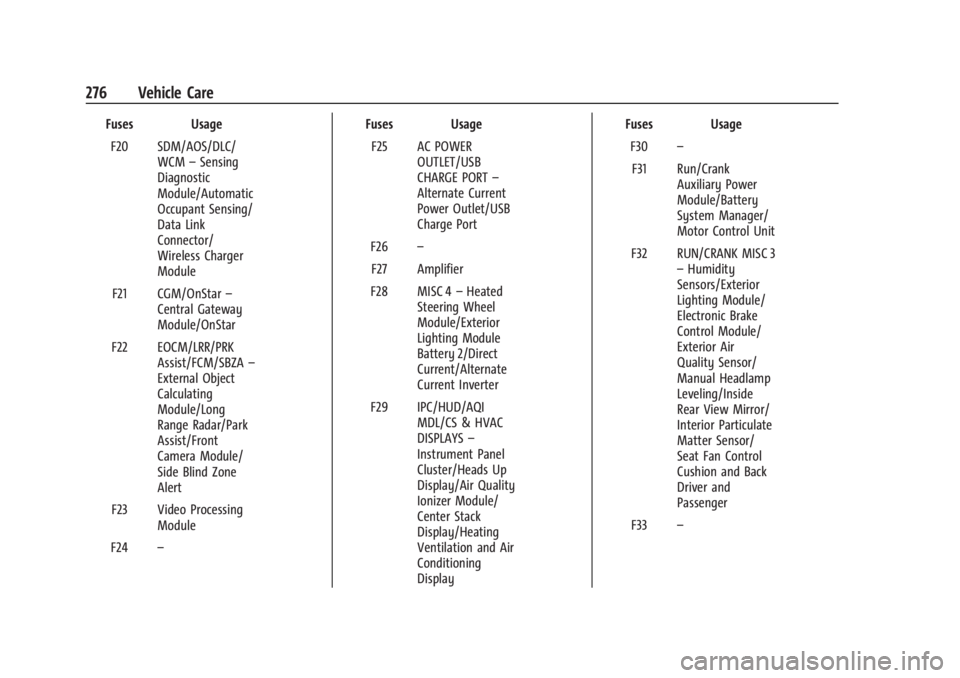
Fuses UsageF20 SDM/AOS/DLC/ WCM–Sensing
Diagnostic
Module/Automatic
Occupant Sensing/
Data Link
Connector/
Wireless Charger
Module
F21 CGM/OnStar –
Central Gateway
Module/OnStar
F22 EOCM/LRR/PRK Assist/FCM/SBZA –
External Object
Calculating
Module/Long
Range Radar/Park
Assist/Front
Camera Module/
Side Blind Zone
Alert
F23 Video Processing Module
F24 – Fuses Usage
F25 AC POWER OUTLET/USB
CHARGE PORT –
Alternate Current
Power Outlet/USB
Charge Port
F26 –
F27 Amplifier
F28 MISC 4 –Heated
Steering Wheel
Module/Exterior
Lighting Module
Battery 2/Direct
Current/Alternate
Current Inverter
F29 IPC/HUD/AQI MDL/CS & HVAC
DISPLAYS –
Instrument Panel
Cluster/Heads Up
Display/Air Quality
Ionizer Module/
Center Stack
Display/Heating
Ventilation and Air
Conditioning
Display Fuses Usage
F30 –
F31 Run/Crank Auxiliary Power
Module/Battery
System Manager/
Motor Control Unit
F32 RUN/CRANK MISC 3 –Humidity
Sensors/Exterior
Lighting Module/
Electronic Brake
Control Module/
Exterior Air
Quality Sensor/
Manual Headlamp
Leveling/Inside
Rear View Mirror/
Interior Particulate
Matter Sensor/
Seat Fan Control
Cushion and Back
Driver and
Passenger
F33 –
Page 278 of 356

Buick Envision Owner Manual (GMNA-Localizing-U.S./Canada/Mexico-
16060855) - 2023 - CRC - 2/9/22
Vehicle Care 277
Fuses UsageF34 RUN/CRANK MISC 1 & 2–Shifter
Interface Board
Module/
Instrument Panel
Cluster/
Transmission
Control Module
(MISC 1)/Sensing
and Diagnostic
Module/Headlamp
Manual Leveling
Switch/Reflective
Light Auxiliary
Display (MISC 2)
F35 RUN CRANK ECM IGN–RUN/CRANK
Engine Control
Module Ignition
F36 EPB SWITCH/ SHIFTER INTERFACE
BOARD–Electric
Park Brake Switch/
Shifter Interface
Board Fuses Usage
F37 RADIO/CSM/ AUXILIARY JACK –
Radio/Center Stack
Module/
Auxiliary Jack
F38 –
F39 STR/WHL/CNTRLS SWS–SW
Controls –Cruise/
Fast Idle Switches
F40 Exterior Lighting Module 2
F41 Heated Steering Wheel Module
F42 Direct Current to Alternate Current
Inverter Module
CB1 –
CB2 APO CONSOLE –
Auxiliary Power
Outlet Console Relays Usage
K01 RAP/ACCY –Retained
Accessory Power
K02 Run/Crank
K03 –
K04 –
K05 –
Wheels and Tires
Tires
Every new GM vehicle has high-quality
tires made by a leading tire
manufacturer. See the warranty manual
for information regarding the tire
warranty and where to get service. For
additional information refer to the tire
manufacturer.
Page 308 of 356

Buick Envision Owner Manual (GMNA-Localizing-U.S./Canada/Mexico-
16060855) - 2023 - CRC - 2/9/22
Vehicle Care 307
Caution
Using petroleum-based tire dressing
products on the vehicle may damage the
paint finish and/or tires. When applying a
tire dressing, always wipe off any
overspray from all painted surfaces on
the vehicle.
Wheels and Wheel Trim
Use a soft, clean cloth with mild soap and
water to clean the wheels. After rinsing
thoroughly with clean water, dry with a
soft, clean towel. A wax may then be
applied.
Caution
Chrome wheels and chrome wheel trim
may be damaged if the vehicle is not
washed after driving on roads that have
been sprayed with magnesium chloride or
calcium chloride. These are used on roads
for conditions such as dust and ice.
Always wash the chrome with soap and
water after exposure.
Caution
To avoid surface damage on wheels and
wheel trim, do not use strong soaps,
chemicals, abrasive polishes, cleaners,
or brushes. Use only GM approved
cleaners. Do not drive the vehicle through
an automatic car wash that uses silicon
carbide tire/wheel cleaning brushes.
Damage could occur and the repairs
would not be covered by the vehicle
warranty.
Brake System
Visually inspect brake lines and hoses for
proper hook-up, binding, leaks, cracks,
chafing, etc. Inspect disc brake pads for wear
and rotors for surface condition. Inspect all
other brake parts.
Steering, Suspension, and Chassis
Components
Visually inspect steering, suspension, and
chassis components for damaged, loose,
or missing parts or signs of wear at least
once a year.
Inspect power steering for proper
attachment, connections, binding, leaks,
cracks, chafing, etc.Visually check constant velocity joint boots
and axle seals for leaks.
Body Component Lubrication
Lubricate all key lock cylinders, hood hinges,
liftgate hinges, and the steel fuel door
hinge, unless the components are plastic.
Applying silicone grease on weatherstrips
with a clean cloth will make them last
longer, seal better, and not stick or squeak.
Underbody Maintenance
At least twice a year, spring and fall, use
plain water to flush any corrosive materials
from the underbody. Take care to
thoroughly clean any areas where mud and
other debris can collect.
Do not directly power wash the transfer
case and/or front/rear axle output seals.
High pressure water can overcome the seals
and contaminate the fluid. Contaminated
fluid will decrease the life of the transfer
case and/or axles and should be replaced.
Sheet Metal Damage
If the vehicle is damaged and requires sheet
metal repair or replacement, make sure the
body repair shop applies anti-corrosion
material to parts repaired or replaced to
restore corrosion protection.
Page 317 of 356

Buick Envision Owner Manual (GMNA-Localizing-U.S./Canada/Mexico-
16060855) - 2023 - CRC - 2/9/22
316 Service and Maintenance
.Transfer case
.Engine cooling system
.Power steering, if equipped
.Fuel system
.Windshield washer fluid
Tire Inspection
.Tire pressure, tread depth, and wear
.Rotation, if applicable
.Alignment check, optional
.Reset tire pressure monitor
.Check tire sealant expiration date,
if equipped
.Check spare tire, if equipped
Brakes
.Check brake system
Visible and Functional Inspections
.Seat belt components
.Exhaust system
.Accelerator pedal
.Passenger compartment air filter,
if equipped
.Engine air filter
.Hoses
.Belts
.Shocks and struts
.Steering components
.Axle boots or driveshaft and u-joints
.Compartment lift struts, if equipped
.Floor mats secured, no interference with
pedals
.Horn
.Ignition lock, if equipped
.Starter switch
.Evaporative control system
Lubricate
.Chassis components
Special Application Services
.Severe Commercial Use Vehicles Only:
Lubricate chassis components every oil
change.
.Have underbody flushing service
performed. See "Underbody Maintenance"
in Exterior Care 0304.
Page 350 of 356

Buick Envision Owner Manual (GMNA-Localizing-U.S./Canada/Mexico-
16060855) - 2023 - CRC - 2/9/22
Index 349
Lights (cont'd)Engine Coolant Temperature
Warning . . . . . . . . . . . . . . . . . . . . . . . . . . . . . 103
Engine Oil Pressure . . . . . . . . . . . . . . . . . . . . 104
Gauges and Indicators . . . . . . . . . . . . . . . . . . 92
High-Beam On . . . . . . . . . . . . . . . . . . . . . . . . . 105
Hill Descent Control . . . . . . . . . . . . . . . . . . . 101
Lane Keep Assist . . . . . . . . . . . . . . . . . . . . . . . 101
Low Fuel Warning . . . . . . . . . . . . . . . . . . . . . 105
Seat Belt Reminders . . . . . . . . . . . . . . . . . . . . 96
Security . . . . . . . . . . . . . . . . . . . . . . . . . . . . . . . . 105
Service Electric Parking Brake . . . . . . . . . . 100
StabiliTrak OFF . . . . . . . . . . . . . . . . . . . . . . . . . 102
Tire Pressure . . . . . . . . . . . . . . . . . . . . . . . . . . . 104
Traction Control System (TCS)/StabiliTrak . . . . . . . . . . . . . . . . . . . . . 103
Traction Off . . . . . . . . . . . . . . . . . . . . . . . . . . . . 102
Lock Steering Column . . . . . . . . . . . . . . . . . . . . . . . . 25
Locks Automatic Door . . . . . . . . . . . . . . . . . . . . . . . . . . 17
Delayed Locking . . . . . . . . . . . . . . . . . . . . . . . . 16
Door . . . . . . . . . . . . . . . . . . . . . . . . . . . . . . . . . . . . 14
Lockout Protection . . . . . . . . . . . . . . . . . . . . . . . 17
Power Door . . . . . . . . . . . . . . . . . . . . . . . . . . . . . 16
Safety . . . . . . . . . . . . . . . . . . . . . . . . . . . . . . . . . . . 17
Loss of Control . . . . . . . . . . . . . . . . . . . . . . . . . . 184
Low Fuel Warning Light . . . . . . . . . . . . . . . . . 105 Lower Anchors and Tethers for
Children (LATCH System) . . . . . . . . . . . . . . . . 67
Lumbar Adjustment . . . . . . . . . . . . . . . . . . . . . . . 38 Front Seats . . . . . . . . . . . . . . . . . . . . . . . . . . . . . 38
M
MaintenanceRecords . . . . . . . . . . . . . . . . . . . . . . . . . . . . . . . . 319
Maintenance Schedule . . . . . . . . . . . . . . . . . . . . 313 Recommended Fluids andLubricants . . . . . . . . . . . . . . . . . . . . . . . . . . . . . 317
Malfunction Indicator Lamp . . . . . . . . . . . . . . . 98
Manual
Mode . . . . . . . . . . . . . . . . . . . . . . . . . . . . . . . . . . 201
Map Data Updates . . . . . . . . . . . . . . . . . . . . . . . 148
Maps . . . . . . . . . . . . . . . . . . . . . . . . . . . . . . . . . . . . 140
Massage Seats . . . . . . . . . . . . . . . . . . . . . . . . . . . . . . . . . . . 38
Media Avoiding Untrusted Devices . . . . . . . . . . . . 134
Memory Seats . . . . . . . . . . . . . . . . . . . . . . . . . . . . 38
Messages
Engine Power . . . . . . . . . . . . . . . . . . . . . . . . . . . 111
Vehicle . . . . . . . . . . . . . . . . . . . . . . . . . . . . . . . . . 111
Vehicle Speed . . . . . . . . . . . . . . . . . . . . . . . . . . . 112
Mirrors
Automatic Dimming . . . . . . . . . . . . . . . . . . . . 27
Automatic Dimming Rearview . . . . . . . . . . 27 Mirrors (cont'd)
Convex . . . . . . . . . . . . . . . . . . . . . . . . . . . . . . . . . 26
Folding . . . . . . . . . . . . . . . . . . . . . . . . . . . . . . . . . 27
Heated . . . . . . . . . . . . . . . . . . . . . . . . . . . . . . . . . 27
Interior Rearview . . . . . . . . . . . . . . . . . . . . . . . 27
Manual Rearview . . . . . . . . . . . . . . . . . . . . . . . 27
Power . . . . . . . . . . . . . . . . . . . . . . . . . . . . . . . . . . 26
Rear Camera . . . . . . . . . . . . . . . . . . . . . . . . . . . . 27
Tilt in Reverse . . . . . . . . . . . . . . . . . . . . . . . . . . 27
Mode Driver Control . . . . . . . . . . . . . . . . . . . . . . . . . 208
Monitor System, Tire Pressure . . . . . . . . . . . 285
Multi-band Antenna . . . . . . . . . . . . . . . . . . . . . . 133
Multi-Point Vehicle Inspection (MPVI) . . . . . 315
N
Navigation
Connected Services . . . . . . . . . . . . . . . . . . . . 340
Destination . . . . . . . . . . . . . . . . . . . . . . . . . . . . . 141
Symbols . . . . . . . . . . . . . . . . . . . . . . . . . . . . . . . 140
Using the System . . . . . . . . . . . . . . . . . . . . . . . 137
Net, Convenience . . . . . . . . . . . . . . . . . . . . . . . . . 82
New Vehicle Break-In . . . . . . . . . . . . . . . . . . . . . 191
O
Odometer . . . . . . . . . . . . . . . . . . . . . . . . . . . . . . . . 95 Trip . . . . . . . . . . . . . . . . . . . . . . . . . . . . . . . . . . . . . 95
Off-Road Recovery . . . . . . . . . . . . . . . . . . . . . . . . . . . . . . . 184