option BUICK LACROSSE 2006 User Guide
[x] Cancel search | Manufacturer: BUICK, Model Year: 2006, Model line: LACROSSE, Model: BUICK LACROSSE 2006Pages: 444, PDF Size: 2.66 MB
Page 206 of 444
FOB LOCK FEEDBACK
This feature allows you to select the type of feedback
you will receive when locking the vehicle with the remote
keyless entry transmitter.
Press the option button until FOB LOCK FEEDBACK
appears on the DIC display. Press the set/reset button to
scroll through the following choices:
OFF:There will be no feedback when locking the
vehicle.
LIGHTS:The exterior lamps will ash when you press
the lock button on the remote keyless entry transmitter.
LIGHTS and HORN (default):The exterior lamps
will ash when you press the lock button on the remote
keyless entry transmitter, and the horn will sound when
the lock button is pressed again within ve seconds of the
previous command.
Select one of the available choices and press the option
button while it is displayed on the DIC to select it and
move on to the next feature.
REMOTE START
If your vehicle has remote start, this feature allows the
remote start to be turned off or on. The remote start
feature allows you to start the engine from outside of
the vehicle using your remote keyless entry transmitter.
See “Remote Vehicle Start” underRemote Keyless
Entry System Operation on page 2-4for more
information.
Press the option button until REMOTE START appears
on the DIC display. Press the set/reset button to
scroll through the following choices:
OFF:The remote start feature will be disabled.
ON (default):The remote start feature will be enabled.
Select one of the available choices and press the
option button while it is displayed on the DIC to select it
and move on to the next feature.
3-80
Page 207 of 444
Personalization Menu Items
The following are personalization features that allow you
to program setting for up to two drivers:
PERSONALIZE KEY
This feature allows you to personalize a key to be
recognized as key 1 or 2. A personalized key allows
you to program personalization features to a preferred
setting to correspond to key 1 or 2. If you are using
a key that has already been personalized, this screen
will not display.
Press the option button until PERSONALIZE KEY
appears on the DIC display. Press the set/reset button
to scroll through the following choices:
NO (default):The key will not be personalized.
YES:The key will be personalized.
Select one of the available choices and press the option
button while it is displayed on the DIC to select it and
move on to the next feature.
REPLACE KEY
This screen displays only if YES was selected for the
PERSONALIZE KEY feature, keys 1 and 2 have already
been personalized, and the current key being used is
not key 1 or 2. This feature allows you to program a key
to be recognized as key 1 or 2 in the event that the
previously programmed key needs to be replaced.
1:The key will be programmed to be recognized as
key 1.
2:The key will be programmed to be recognized as
key 2.
CANCEL (default):The key will not be programmed.
RADIO STATIONS PERSONALIZED
This screen displays only if YES was selected for the
PERSONALIZE KEY feature. This feature allows you
to set the radio station presets to be recognized for the
key, 1 or 2, that is being used. You may notice a change
to the radio after this message displays. After this
message displays, any change to the presets will be
recognized for key 1 or 2 and will be maintained by
the radio.
3-81
Page 208 of 444
AUTO DOOR LOCK
This feature allows automatic door locking to be turned
OFF or ON.
Press the option button until AUTO DOOR LOCK
appears on the DIC display. Press the set/reset button
to scroll through the following choices:
OFF:All automatic door locking is disabled. The doors
will always need to be locked manually before driving,
to increase occupant safety.
ON (default):The vehicle’s doors automatically lock
when the doors are closed and the vehicle is shifted
into DRIVE (D).
Select one of the available choices and press the option
button while it is displayed on the DIC to select it and
move on to the next feature.
AUTO DOOR UNLOCK
This feature displays only if ON was selected for
the AUTO DOOR LOCK feature. This feature allows
automatic door unlocking to be turned off, used for the
driver’s door only, or for all of the doors.Press the option button until AUTO DOOR UNLOCK
appears on the DIC display. Press the set/reset button to
scroll through the following choices:
OFF:None of the doors will unlock when the vehicle
is shifted into PARK (P) or the key is taken out of the
ignition.
DRIVER:Only the driver’s door will unlock when the
vehicle is shifted into PARK (P) or the key is taken out of
the ignition.
ALL (default):All of the doors will unlock when the
vehicle is shifted into PARK (P) or the key is taken out
of the ignition.
Select one of the available choices and press the option
button while it is displayed on the DIC to select it and
move on to the next feature.
AUTO UNLOCK ON
This feature displays only if DRIVER or ALL was
selected for the AUTO DOOR UNLOCK feature. This
feature allows the selection of when the vehicle’s doors
will unlock.
3-82
Page 209 of 444
Press the option button until AUTO UNLOCK ON
appears on the DIC display. Press the set/reset button
to scroll through the following choices:
KEY-OUT:The door(s) will unlock when the key is
taken out of the ignition.
PARK (default):The door(s) will unlock when the
vehicle is shifted into PARK (P).
Select one of the available choices and press the option
button while it is displayed on the DIC to select it and
move on to the next feature.
FOB UNLOCK ON 1ST PRESS
This feature allows the selection of which doors will
unlock on the rst press of the unlock button on
the remote keyless entry transmitter. SeeRemote
Keyless Entry System Operation on page 2-4for more
information.
Press the option button until FOB UNLOCK ON 1ST
PRESS appears on the DIC display. Press the set/reset
button to scroll through the following choices:
DRIVER (default):The driver’s door will unlock on the
rst press of the unlock button on the remote keyless
entry transmitter.ALL:All of the doors will unlock on the rst press of
the unlock button on the remote keyless entry
transmitter.
Select one of the available choices and press the option
button while it is displayed on the DIC to select it.
The DIC will then display PRESS UNLOCK SWITCH
ON KEY FOB. Press the unlock button on the remote
keyless entry transmitter and your setting will be
saved for that remote keyless entry transmitter.
After programming the last option, the message
PERSONAL OPTIONS SAVED appears on the
DIC display for a few seconds, then the display
returns to the PERSONAL PROGRAM main screen.Exiting the Personal Program Menu
The personal program menu will be exited when any of
the following occurs:
The vehicle is shifted out of PARK (P).
The vehicle is no longer in RUN.
The end of the personal program menu is reached.
3-83
Page 295 of 444
If You Do Decide To Pull A Trailer
Here are some important points:
There are many different laws, including speed limit
restrictions, having to do with trailering. Make sure
your rig will be legal, not only where you live
but also where you will be driving. A good source
for this information can be state or provincial police.
Consider using a sway control. Ask a hitch
dealer about sway controls.
Do not tow a trailer at all during the rst 1,000 miles
(1 600 km) the vehicle is driven. The engine, axle or
other parts could be damaged.
Then, during the rst 500 miles (800 km) that the
vehicle tows a trailer, do not drive over 50 mph
(80 km/h) and do not make starts at full throttle.
This helps the engine and other parts of the vehicle
wear in at the heavier loads.
Obey speed limit restrictions when towing a trailer.
Do not drive faster than the maximum posted
speed for trailers, or no more than 55 mph
(90 km/h), to save wear on the vehicle’s parts.
There are three important considerations have to do
with weight:
The weight of the trailer
The weight of the trailer tongue
The total weight on the vehicle’s tires
Weight of the Trailer
How heavy can a trailer safely be?
It should never weigh more than 1,000 lbs (450 kg).
But even that can be too heavy.
It depends on how you plan to use your rig. For
example, speed, altitude, road grades, outside
temperature and how much the vehicle is used to pull
a trailer are all important. It can also depend on any
special equipment that is on the vehicle, and the amount
of tongue weight the vehicle can carry. See “Weight
of the Trailer Tongue” later in this section for more
information.
Maximum trailer weight is calculated assuming only the
driver is in the tow vehicle and it has all the required
trailering equipment. The weight of additional optional
equipment, passengers and cargo must be subtracted
from the maximum trailer weight.
Ask your dealer for our trailering information or advice,
or you can write us at:
Buick Customer Assistance Center
P.O. Box 33136
Detroit, MI 48232-5136
In Canada, write to:
General Motors of Canada Limited
Customer Communication Centre, 163-005
1908 Colonel Sam Drive
Oshawa, Ontario L1H 8P7
4-39
Page 296 of 444
Weight of the Trailer Tongue
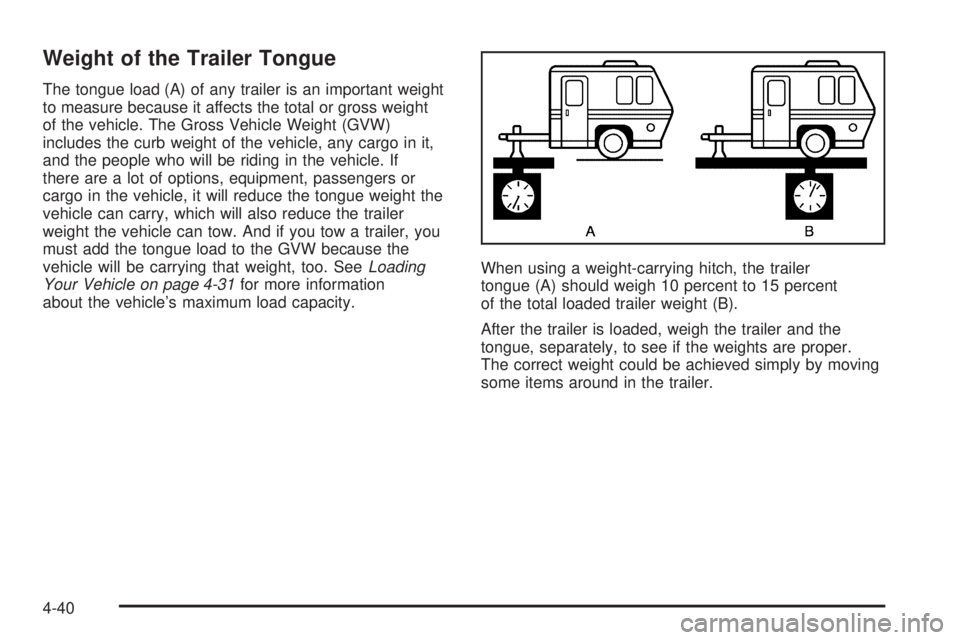
The tongue load (A) of any trailer is an important weight
to measure because it affects the total or gross weight
of the vehicle. The Gross Vehicle Weight (GVW)
includes the curb weight of the vehicle, any cargo in it,
and the people who will be riding in the vehicle. If
there are a lot of options, equipment, passengers or
cargo in the vehicle, it will reduce the tongue weight the
vehicle can carry, which will also reduce the trailer
weight the vehicle can tow. And if you tow a trailer, you
must add the tongue load to the GVW because the
vehicle will be carrying that weight, too. SeeLoading
Your Vehicle on page 4-31for more information
about the vehicle’s maximum load capacity.When using a weight-carrying hitch, the trailer
tongue (A) should weigh 10 percent to 15 percent
of the total loaded trailer weight (B).
After the trailer is loaded, weigh the trailer and the
tongue, separately, to see if the weights are proper.
The correct weight could be achieved simply by moving
some items around in the trailer.
4-40
Page 302 of 444
Wheel Alignment and Tire Balance..................5-70
Wheel Replacement......................................5-70
Tire Chains..................................................5-72
If a Tire Goes Flat........................................5-72
Changing a Flat Tire.....................................5-73
Removing the Spare Tire and Tools................5-74
Removing the Flat Tire and Installing
the Spare Tire..........................................5-76
Storing a Flat or Spare Tire and Tools............5-82
Compact Spare Tire......................................5-83
Appearance Care............................................5-84
Cleaning the Inside of Your Vehicle.................5-84
Fabric/Carpet...............................................5-85
Leather.......................................................5-86
Instrument Panel, Vinyl, and Other
Plastic Surfaces........................................5-86
Care of Safety Belts......................................5-87
Weatherstrips...............................................5-87
Washing Your Vehicle...................................5-87
Cleaning Exterior Lamps/Lenses.....................5-87
Finish Care..................................................5-88Windshield and Wiper Blades.........................5-88
Aluminum or Chrome-Plated Wheels................5-89
Tires...........................................................5-89
Sheet Metal Damage.....................................5-90
Finish Damage.............................................5-90
Underbody Maintenance................................5-90
Chemical Paint Spotting.................................5-90
Vehicle Care/Appearance Materials..................5-91
Vehicle Identication......................................5-92
Vehicle Identication Number (VIN).................5-92
Service Parts Identication Label.....................5-92
Electrical System............................................5-93
Add-On Electrical Equipment..........................5-93
Headlamp Wiring..........................................5-93
Windshield Wiper Fuses................................5-93
Power Windows and Other Power Options.......5-93
Fuses and Circuit Breakers............................5-93
Instrument Panel Fuse Block..........................5-94
Underhood Fuse Block..................................5-95
Capacities and Specications..........................5-98
Section 5 Service and Appearance Care
5-2
Page 319 of 444
After changing the engine oil, reset the system by
performing the following steps:
Vehicles with Driver Information Center (DIC)
1. Press the option button on the DIC until
ENGINE OIL MONITOR appears on the
DIC screen.
2. Press the set/reset button to reset the system.
The next screen indicates that the CHANGE
OIL SOON message has been reset.
If the vehicle has the uplevel DIC, when
the gages button is pressed and the
OIL LIFE REMAINING mode appears,
it should read 100 percent OIL LIFE
REMAINING.
3. Turn the key to OFF.
Vehicles without Driver Information Center (DIC)
1. With the engine off, turn the ignition key
to RUN.
2. Fully press and release the accelerator pedal
slowly three times within ve seconds.
3. Turn the key to OFF, then start the vehicle.
If the light or message comes back on when you
start your vehicle, the oil life system has not reset.
Repeat the procedure.
What to Do with Used Oil
Used engine oil contains certain elements that may be
unhealthy for your skin and could even cause cancer.
Do not let used oil stay on your skin for very long. Clean
your skin and nails with soap and water, or a good
hand cleaner. Wash or properly dispose of clothing or
rags containing used engine oil. See the manufacturer’s
warnings about the use and disposal of oil products.
Used oil can be a threat to the environment. If you
change your own oil, be sure to drain all the oil from the
lter before disposal. Never dispose of oil by putting it in
the trash, pouring it on the ground, into sewers, or into
streams or bodies of water. Instead, recycle it by taking it
to a place that collects used oil. If you have a problem
properly disposing of used oil, ask your dealer, a service
station or a local recycling center for help.
5-19
Page 360 of 444
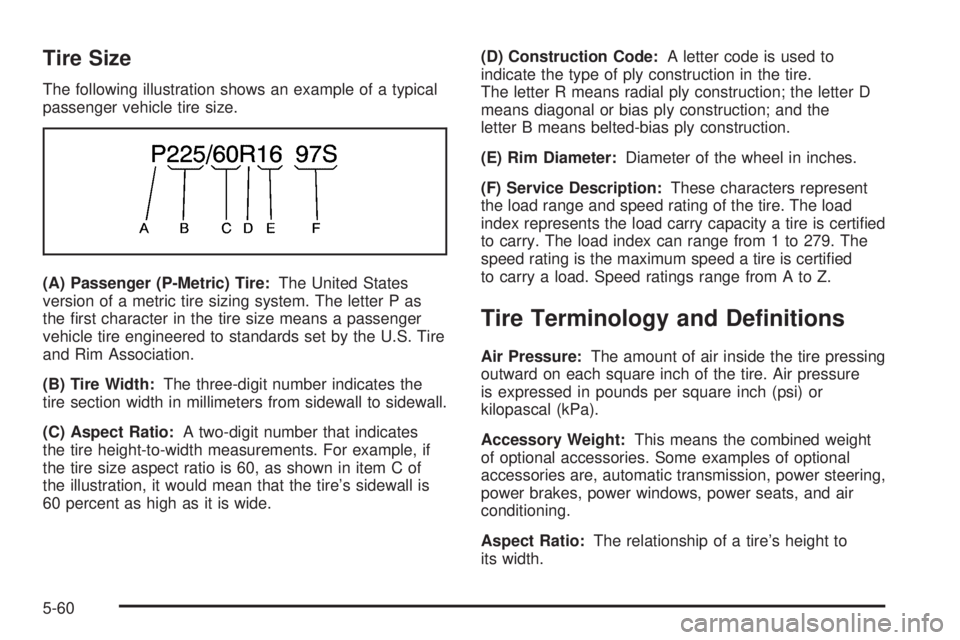
Tire Size
The following illustration shows an example of a typical
passenger vehicle tire size.
(A) Passenger (P-Metric) Tire:The United States
version of a metric tire sizing system. The letter P as
the rst character in the tire size means a passenger
vehicle tire engineered to standards set by the U.S. Tire
and Rim Association.
(B) Tire Width:The three-digit number indicates the
tire section width in millimeters from sidewall to sidewall.
(C) Aspect Ratio:A two-digit number that indicates
the tire height-to-width measurements. For example, if
the tire size aspect ratio is 60, as shown in item C of
the illustration, it would mean that the tire’s sidewall is
60 percent as high as it is wide.(D) Construction Code:A letter code is used to
indicate the type of ply construction in the tire.
The letter R means radial ply construction; the letter D
means diagonal or bias ply construction; and the
letter B means belted-bias ply construction.
(E) Rim Diameter:Diameter of the wheel in inches.
(F) Service Description:These characters represent
the load range and speed rating of the tire. The load
index represents the load carry capacity a tire is certied
to carry. The load index can range from 1 to 279. The
speed rating is the maximum speed a tire is certied
to carry a load. Speed ratings range from A to Z.
Tire Terminology and Denitions
Air Pressure:The amount of air inside the tire pressing
outward on each square inch of the tire. Air pressure
is expressed in pounds per square inch (psi) or
kilopascal (kPa).
Accessory Weight:This means the combined weight
of optional accessories. Some examples of optional
accessories are, automatic transmission, power steering,
power brakes, power windows, power seats, and air
conditioning.
Aspect Ratio:The relationship of a tire’s height to
its width.
5-60
Page 361 of 444
Belt:A rubber coated layer of cords that is located
between the plies and the tread. Cords may be made
from steel or other reinforcing materials.
Bead:The tire bead contains steel wires wrapped by
steel cords that hold the tire onto the rim.
Bias Ply Tire:A pneumatic tire in which the plies are
laid at alternate angles less than 90 degrees to the
centerline of the tread.
Cold Tire Pressure:The amount of air pressure
in a tire, measured in pounds per square inch (psi)
or kilopascals (kPa) before a tire has built up heat from
driving. SeeInation - Tire Pressure on page 5-63.
Curb Weight:This means the weight of a motor vehicle
with standard and optional equipment including the
maximum capacity of fuel, oil, and coolant, but without
passengers and cargo.
DOT Markings:A code molded into the sidewall of
a tire signifying that the tire is in compliance with the
U.S. Department of Transportation (DOT) motor vehicle
safety standards. The DOT code includes the Tire
Identication Number (TIN), an alphanumeric designator
which can also identify the tire manufacturer, production
plant, brand, and date of production.
GVWR:Gross Vehicle Weight Rating. SeeLoading
Your Vehicle on page 4-31.GAWR FRT:Gross Axle Weight Rating for the front
axle. SeeLoading Your Vehicle on page 4-31.
GAWR RR:Gross Axle Weight Rating for the rear axle.
SeeLoading Your Vehicle on page 4-31.
Intended Outboard Sidewall:The side of an
asymmetrical tire, that must always face outward when
mounted on a vehicle.
Kilopascal (kPa):The metric unit for air pressure.
Light Truck (LT-Metric) Tire:A tire used on light duty
trucks and some multipurpose passenger vehicles.
Load Index:An assigned number ranging from 1 to 279
that corresponds to the load carrying capacity of a tire.
Maximum Ination Pressure:The maximum air
pressure to which a cold tire may be inated. The
maximum air pressure is molded onto the sidewall.
Maximum Load Rating:The load rating for a tire at the
maximum permissible ination pressure for that tire.
Maximum Loaded Vehicle Weight:The sum of curb
weight, accessory weight, vehicle capacity weight,
and production options weight.
Normal Occupant Weight:The number of occupants a
vehicle is designed to seat multiplied by 150 lbs (68 kg).
SeeLoading Your Vehicle on page 4-31.
5-61