tow BUICK LACROSSE 2006 Owner's Guide
[x] Cancel search | Manufacturer: BUICK, Model Year: 2006, Model line: LACROSSE, Model: BUICK LACROSSE 2006Pages: 444, PDF Size: 2.66 MB
Page 167 of 444
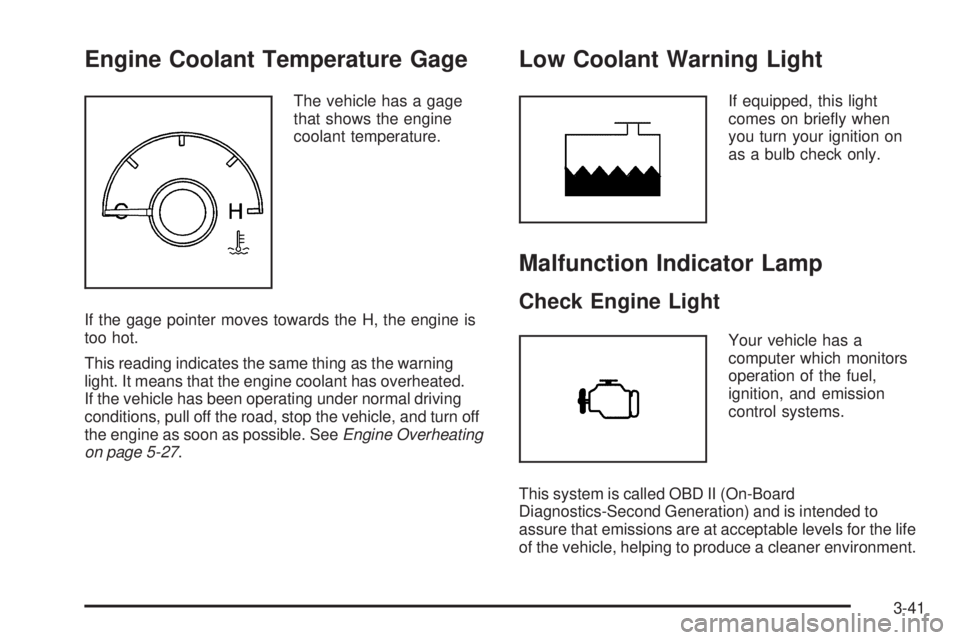
Engine Coolant Temperature Gage
The vehicle has a gage
that shows the engine
coolant temperature.
If the gage pointer moves towards the H, the engine is
too hot.
This reading indicates the same thing as the warning
light. It means that the engine coolant has overheated.
If the vehicle has been operating under normal driving
conditions, pull off the road, stop the vehicle, and turn off
the engine as soon as possible. SeeEngine Overheating
on page 5-27.
Low Coolant Warning Light
If equipped, this light
comes on briey when
you turn your ignition on
as a bulb check only.
Malfunction Indicator Lamp
Check Engine Light
Your vehicle has a
computer which monitors
operation of the fuel,
ignition, and emission
control systems.
This system is called OBD II (On-Board
Diagnostics-Second Generation) and is intended to
assure that emissions are at acceptable levels for the life
of the vehicle, helping to produce a cleaner environment.
3-41
Page 168 of 444
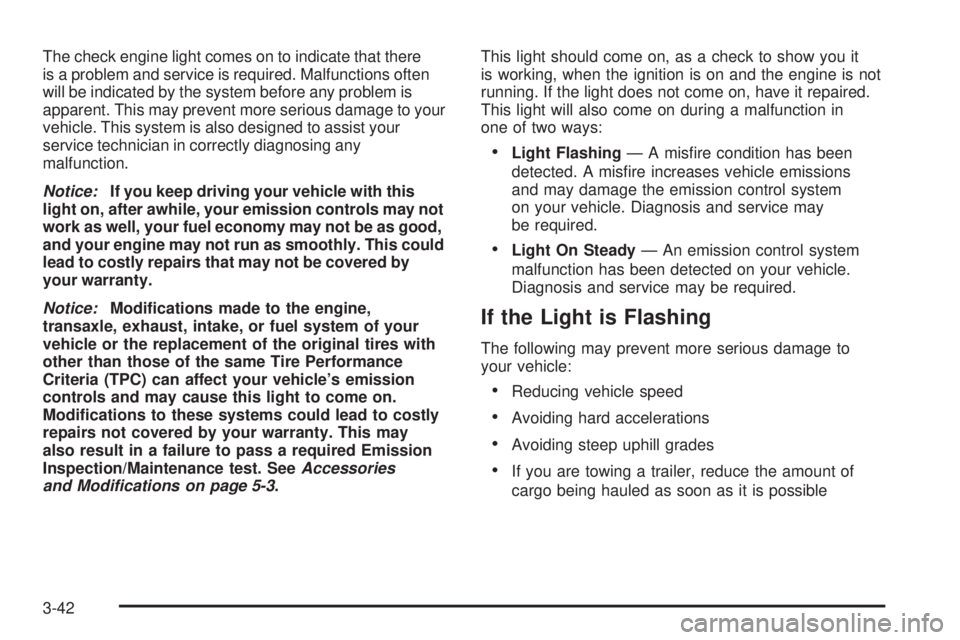
The check engine light comes on to indicate that there
is a problem and service is required. Malfunctions often
will be indicated by the system before any problem is
apparent. This may prevent more serious damage to your
vehicle. This system is also designed to assist your
service technician in correctly diagnosing any
malfunction.
Notice:If you keep driving your vehicle with this
light on, after awhile, your emission controls may not
work as well, your fuel economy may not be as good,
and your engine may not run as smoothly. This could
lead to costly repairs that may not be covered by
your warranty.
Notice:Modications made to the engine,
transaxle, exhaust, intake, or fuel system of your
vehicle or the replacement of the original tires with
other than those of the same Tire Performance
Criteria (TPC) can affect your vehicle’s emission
controls and may cause this light to come on.
Modications to these systems could lead to costly
repairs not covered by your warranty. This may
also result in a failure to pass a required Emission
Inspection/Maintenance test. SeeAccessories
and Modifications on page 5-3.This light should come on, as a check to show you it
is working, when the ignition is on and the engine is not
running. If the light does not come on, have it repaired.
This light will also come on during a malfunction in
one of two ways:
Light Flashing— A misre condition has been
detected. A misre increases vehicle emissions
and may damage the emission control system
on your vehicle. Diagnosis and service may
be required.
Light On Steady— An emission control system
malfunction has been detected on your vehicle.
Diagnosis and service may be required.
If the Light is Flashing
The following may prevent more serious damage to
your vehicle:
Reducing vehicle speed
Avoiding hard accelerations
Avoiding steep uphill grades
If you are towing a trailer, reduce the amount of
cargo being hauled as soon as it is possible
3-42
Page 213 of 444
To scan preset stations, press and hold either arrow for
more than four seconds. PSC will appear on the display
and the radio will produce two beeps. The radio will go to
a preset station, play for a few seconds, then go on to the
next preset station. Press either arrow again or one of the
pushbuttons to stop scanning.
The radio will only seek and scan stations with a strong
signal that are in the selected band.
Setting Preset Stations
Up to 18 stations (six FM1, six FM2, and six AM), can
be programmed on the six numbered pushbuttons,
by performing the following steps:
1. Turn the radio on.
2. Press BAND to select FM1, FM2, or AM.
3. Tune in the desired station.
4. Press and hold one of the six numbered
pushbuttons until you hear a beep. Whenever
that numbered pushbutton is pressed, the station
that was set will return.
5. Repeat the steps for each pushbutton.
Setting the Tone (Bass/Treble)
e
(Bass/Treble):Push and release this knob until
BAS or TRE appears on the display. Turn this knob to
increase or to decrease. The display will show the
bass or the treble level. If a station is weak or noisy,
decrease the treble.
To adjust the bass and the treble to the middle position,
push and hold the tone knob. The radio will produce
one beep.
To adjust all tone and speaker controls to the middle
position, push and hold the tone knob when no tone or
speaker control is displayed. CEN will appear on the
display and you will hear a beep.
Adjusting the Speakers (Balance/Fade)
e
(Balance/Fade):To adjust the balance between
the right and the left speakers, push and release
this knob until BAL appears on the display. Turn the
knob to move the sound toward the right or the
left speakers.
To adjust the fade between the front and the rear
speakers, push and release the speaker knob until FAD
appears on the display. Turn the knob to move the
sound toward the front or the rear speakers.
3-87
Page 219 of 444
Setting the Tone (Bass/Treble)
e
(Bass/Treble):Push and release this knob until
BASS or TREBLE appears on the display. Turn this knob
to increase or to decrease. The display will show the bass
or the treble level. If a station is weak or noisy, decrease
the treble.
To adjust the bass and the treble to the middle position,
push and hold the tone knob. The radio will produce
one beep.
To adjust all tone and speaker controls to the middle
position, push and hold the tone knob when no tone or
speaker control is displayed. ALL CENTERED will appear
on the display and you will hear a beep.
EQ (Equalization):Press this button to select
customized equalization settings designed for
country/western, jazz, talk, pop, rock, classical, and
custom.
To return the bass and treble to the manual mode, push
and release the tone knob until BASS or TREBLE
appears on the display.
Adjusting the Speakers (Balance/Fade)
e
(Balance/Fade):To adjust the balance between
the right and the left speakers, push and release
this knob until BAL appears on the display. Turn the
knob to move the sound toward the right or the
left speakers.
To adjust the fade between the front and the rear
speakers, push and release the speaker knob until
FAD appears on the display. Turn the knob to move
the sound toward the front or the rear speakers.
To adjust the balance and the fade to the middle
position, push the speaker knob, then push it again
and hold it until you hear one beep.
To adjust all tone and speaker controls to the middle
position, push and hold the speaker knob when no tone
or speaker control is displayed. ALL CENTERED will
appear on the display and you will hear a beep.
3-93
Page 228 of 444
Setting the Tone (Bass/Treble)
e
(Bass/Treble):Push and release this knob until
BASS or TREBLE appears on the display. Turn this
knob to increase or to decrease. The display will show
the bass or the treble level. If a station is weak or noisy,
decrease the treble.
To adjust the bass and the treble to the middle position,
push and hold the tone knob. The radio will produce
one beep.
To adjust all tone and speaker controls to the middle
position, push and hold the tone knob when no tone or
speaker control is displayed. ALL CENTERED will appear
on the display and you will hear a beep.
EQ (Equalization):Press this button to select
customized equalization settings designed for
country/western, jazz, talk, pop, rock, classical,
and custom.
To return the bass and treble to the manual mode, push
and release the tone knob until BASS or TREBLE
appears on the display.
Adjusting the Speakers (Balance/Fade)
e
(Balance/Fade):To adjust the balance between the
right and the left speakers, push and release this knob
until BAL appears on the display. Turn the knob to move
the sound toward the right or the left speakers.
To adjust the fade between the front and the rear
speakers, push and release the speaker knob until FAD
appears on the display. Turn the knob to move the sound
toward the front or the rear speakers.
To adjust the balance and the fade to the middle position,
push the speaker knob, then push it again and hold it until
you hear one beep.
To adjust all tone and speaker controls to the middle
position, push and hold the speaker knob when no tone
or speaker control is displayed. ALL CENTERED will
appear on the display and you will hear a beep.
3-102
Page 242 of 444
Adjusting the Speakers (Balance/Fade)
e
(Balance/Fade):To adjust the balance between
the right and the left speakers, push and release
this knob until BAL appears on the display. Turn the
knob to move the sound toward the right or the
left speakers.
To adjust the fade between the front and the rear
speakers, push and release the speaker knob until
FADE appears on the display. Turn the knob to move
the sound toward the front or the rear speakers.
To adjust the balance and the fade to the middle
position, push the speaker knob, then push it again
and hold it until you hear one beep.
To adjust all tone and speaker controls to the middle
position, push and hold the speaker knob when no tone
or speaker control is displayed. CEN will appear on
the display and you will hear a beep.
Finding a Category (CAT) Station
(XM™ Satellite Radio Service Only)
To select and nd a desired category perform the
following:
1. Press the CAT button to activate category select
mode. The current category will appear on the
display.
2. Turn the tune knob to select a category.
3. Once the desired category is displayed, press either
SEEK arrow to take you to the categories rst
station.
4. To go to another station within that category
and the category is displayed, press either SEEK
arrow again. If CAT times out and is no longer on the
display, go back to Step 1.
5. Press CAT to exit category select mode or wait for
CAT to time out.
If the radio cannot nd the desired category, NOT
FOUND will appear on the display and the radio
will return to the last station you were listening to.
3-116
Page 257 of 444
Your Driving, the Road, and Your Vehicle..........4-2
Defensive Driving...........................................4-2
Drunken Driving.............................................4-3
Control of a Vehicle........................................4-6
Braking.........................................................4-6
Anti-Lock Brake System (ABS).........................4-7
Braking in Emergencies...................................4-9
Traction Control System (TCS).......................4-10
StabiliTrak
®System......................................4-11
Steering......................................................4-11
Off-Road Recovery.......................................4-13
Passing.......................................................4-14
Loss of Control.............................................4-15
Driving at Night............................................4-16
Driving in Rain and on Wet Roads..................4-17City Driving..................................................4-20
Freeway Driving...........................................4-21
Before Leaving on a Long Trip.......................4-22
Highway Hypnosis........................................4-23
Hill and Mountain Roads................................4-24
Winter Driving..............................................4-26
If Your Vehicle is Stuck in Sand, Mud,
Ice, or Snow.............................................4-30
Rocking Your Vehicle to Get It Out.................4-31
Loading Your Vehicle....................................4-31
Towing..........................................................4-36
Towing Your Vehicle.....................................4-36
Recreational Vehicle Towing...........................4-36
Towing a Trailer...........................................4-38
Section 4 Driving Your Vehicle
4-1
Page 287 of 444
Rocking Your Vehicle to Get It Out
First, turn your steering wheel left and right. That will
clear the area around your front wheels. If your vehicle
has traction control, you should turn your traction
control system off. SeeTraction Control System (TCS)
on page 4-10. Then shift back and forth between
REVERSE (R) and a forward gear, spinning the wheels
as little as possible. Release the accelerator pedal while
you shift, and press lightly on the accelerator pedal when
the transaxle is in gear. By slowly spinning your wheels in
the forward and reverse directions, you will cause a
rocking motion that may free your vehicle. If that does not
get you out after a few tries, you may need to be towed
out. If you do need to be towed out, seeTowing Your
Vehicle on page 4-36.
Loading Your Vehicle
It is very important to know how much weight your vehicle
can carry. Two labels on your vehicle show how much
weight it may properly carry, the Tire and Loading
Information label and the Vehicle Certication label.
{CAUTION:
Do not load your vehicle any heavier than the
Gross Vehicle Weight Rating (GVWR), or either
the maximum front or rear Gross Axle Weight
Rating (GAWR). If you do, parts on your
vehicle can break, and it can change the way
your vehicle handles. These could cause you
to lose control and crash. Also, overloading
can shorten the life of your vehicle.
4-31
Page 289 of 444
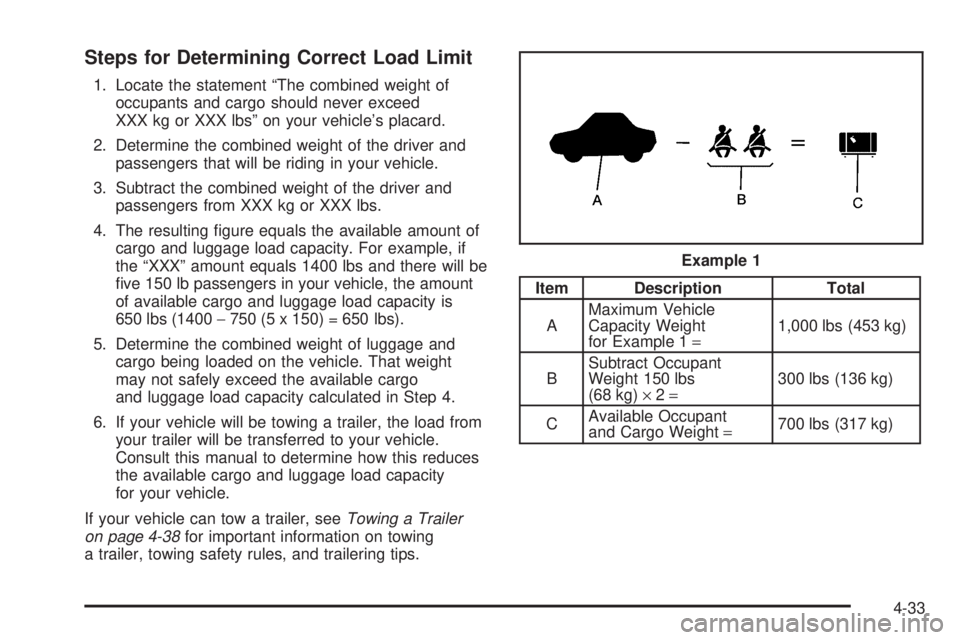
Steps for Determining Correct Load Limit
1. Locate the statement “The combined weight of
occupants and cargo should never exceed
XXX kg or XXX lbs” on your vehicle’s placard.
2. Determine the combined weight of the driver and
passengers that will be riding in your vehicle.
3. Subtract the combined weight of the driver and
passengers from XXX kg or XXX lbs.
4. The resulting gure equals the available amount of
cargo and luggage load capacity. For example, if
the “XXX” amount equals 1400 lbs and there will be
ve 150 lb passengers in your vehicle, the amount
of available cargo and luggage load capacity is
650 lbs (1400−750 (5 x 150) = 650 lbs).
5. Determine the combined weight of luggage and
cargo being loaded on the vehicle. That weight
may not safely exceed the available cargo
and luggage load capacity calculated in Step 4.
6. If your vehicle will be towing a trailer, the load from
your trailer will be transferred to your vehicle.
Consult this manual to determine how this reduces
the available cargo and luggage load capacity
for your vehicle.
If your vehicle can tow a trailer, seeTowing a Trailer
on page 4-38for important information on towing
a trailer, towing safety rules, and trailering tips.
Item Description Total
AMaximum Vehicle
Capacity Weight
for Example 1=1,000 lbs (453 kg)
BSubtract Occupant
Weight 150 lbs
(68 kg)×2=300 lbs (136 kg)
CAvailable Occupant
and Cargo Weight=700 lbs (317 kg) Example 1
4-33
Page 292 of 444
If things like suitcases, tools, packages, or anything else
are put inside the vehicle, they will go as fast as the
vehicle goes. If you have to stop or turn quickly,
or if there is a crash, they will keep going.
{CAUTION:
Things you put inside your vehicle can strike
and injure people in a sudden stop or turn, or
in a crash.
Put things in the trunk of your vehicle. In
a trunk, put them as far forward as you
can. Try to spread the weight evenly.
Never stack heavier things, like suitcases,
inside the vehicle so that some of them
are above the tops of the seats.
Do not leave an unsecured child restraint
in your vehicle.
When you carry something inside the
vehicle, secure it whenever you can.
Do not leave a seat folded down unless
you need to.
Towing
Towing Your Vehicle
Consult your dealer or a professional towing service if
you need to have your disabled vehicle towed. See
Roadside Assistance Program on page 7-6.
If you want to tow your vehicle behind another vehicle
for recreational purposes (such as behind a motorhome),
see “Recreational Vehicle Towing” following.
Recreational Vehicle Towing
Recreational vehicle towing means towing your vehicle
behind another vehicle — such as behind a motorhome.
The two most common types of recreational vehicle
towing are known as dinghy towing, towing your vehicle
with all four wheels on the ground, and dolly towing,
towing your vehicle with two wheels on the ground and
two wheels up on a device known as a dolly.
With the proper preparation and equipment, many
vehicles can be towed in these ways. See “Dinghy
Towing” and “Dolly Towing,” following.
4-36