key BUICK LACROSSE 2006 Workshop Manual
[x] Cancel search | Manufacturer: BUICK, Model Year: 2006, Model line: LACROSSE, Model: BUICK LACROSSE 2006Pages: 444, PDF Size: 2.66 MB
Page 205 of 444
Press the option button until DELAYED LOCKING
appears on the DIC display. Press the set/reset button
to scroll through the following choices:
OFF:There will be no delayed locking of the
vehicle’s doors.
ON (default):The locking of the vehicle’s doors will be
delayed by ve seconds while a door is open after a
power door lock switch is pressed, or the lock button on
the remote keyless entry transmitter is pressed while
a door is open.
Select one of the available choices and press the option
button while it is displayed on the DIC to select it and
move on to the next feature.CONTENT THEFT
If your vehicle has the content theft-deterrent system,
once this feature is turned on, the system will activate
if someone tries to enter the vehicle without using the
remote keyless entry transmitter or the correct key.
Press the option button until CONTENT THEFT appears
on the DIC display. Press the set/reset button to
scroll through the following choices:
OFF:The content theft-deterrent system will be
turned off.
ON (default):The content theft-deterrent system will be
turned on.
When ON is selected, the content theft-deterrent system
will be armed when the vehicle is locked by pressing the
lock button on the remote keyless entry transmitter or
by pressing the power door lock switch. SeeContent
Theft-Deterrent on page 2-18andPower Door Locks
on page 2-11for more information.
Select one of the available choices and press the option
button while it is displayed on the DIC to select it and
move on to the next feature.
3-79
Page 206 of 444
FOB LOCK FEEDBACK
This feature allows you to select the type of feedback
you will receive when locking the vehicle with the remote
keyless entry transmitter.
Press the option button until FOB LOCK FEEDBACK
appears on the DIC display. Press the set/reset button to
scroll through the following choices:
OFF:There will be no feedback when locking the
vehicle.
LIGHTS:The exterior lamps will ash when you press
the lock button on the remote keyless entry transmitter.
LIGHTS and HORN (default):The exterior lamps
will ash when you press the lock button on the remote
keyless entry transmitter, and the horn will sound when
the lock button is pressed again within ve seconds of the
previous command.
Select one of the available choices and press the option
button while it is displayed on the DIC to select it and
move on to the next feature.
REMOTE START
If your vehicle has remote start, this feature allows the
remote start to be turned off or on. The remote start
feature allows you to start the engine from outside of
the vehicle using your remote keyless entry transmitter.
See “Remote Vehicle Start” underRemote Keyless
Entry System Operation on page 2-4for more
information.
Press the option button until REMOTE START appears
on the DIC display. Press the set/reset button to
scroll through the following choices:
OFF:The remote start feature will be disabled.
ON (default):The remote start feature will be enabled.
Select one of the available choices and press the
option button while it is displayed on the DIC to select it
and move on to the next feature.
3-80
Page 207 of 444
Personalization Menu Items
The following are personalization features that allow you
to program setting for up to two drivers:
PERSONALIZE KEY
This feature allows you to personalize a key to be
recognized as key 1 or 2. A personalized key allows
you to program personalization features to a preferred
setting to correspond to key 1 or 2. If you are using
a key that has already been personalized, this screen
will not display.
Press the option button until PERSONALIZE KEY
appears on the DIC display. Press the set/reset button
to scroll through the following choices:
NO (default):The key will not be personalized.
YES:The key will be personalized.
Select one of the available choices and press the option
button while it is displayed on the DIC to select it and
move on to the next feature.
REPLACE KEY
This screen displays only if YES was selected for the
PERSONALIZE KEY feature, keys 1 and 2 have already
been personalized, and the current key being used is
not key 1 or 2. This feature allows you to program a key
to be recognized as key 1 or 2 in the event that the
previously programmed key needs to be replaced.
1:The key will be programmed to be recognized as
key 1.
2:The key will be programmed to be recognized as
key 2.
CANCEL (default):The key will not be programmed.
RADIO STATIONS PERSONALIZED
This screen displays only if YES was selected for the
PERSONALIZE KEY feature. This feature allows you
to set the radio station presets to be recognized for the
key, 1 or 2, that is being used. You may notice a change
to the radio after this message displays. After this
message displays, any change to the presets will be
recognized for key 1 or 2 and will be maintained by
the radio.
3-81
Page 208 of 444
AUTO DOOR LOCK
This feature allows automatic door locking to be turned
OFF or ON.
Press the option button until AUTO DOOR LOCK
appears on the DIC display. Press the set/reset button
to scroll through the following choices:
OFF:All automatic door locking is disabled. The doors
will always need to be locked manually before driving,
to increase occupant safety.
ON (default):The vehicle’s doors automatically lock
when the doors are closed and the vehicle is shifted
into DRIVE (D).
Select one of the available choices and press the option
button while it is displayed on the DIC to select it and
move on to the next feature.
AUTO DOOR UNLOCK
This feature displays only if ON was selected for
the AUTO DOOR LOCK feature. This feature allows
automatic door unlocking to be turned off, used for the
driver’s door only, or for all of the doors.Press the option button until AUTO DOOR UNLOCK
appears on the DIC display. Press the set/reset button to
scroll through the following choices:
OFF:None of the doors will unlock when the vehicle
is shifted into PARK (P) or the key is taken out of the
ignition.
DRIVER:Only the driver’s door will unlock when the
vehicle is shifted into PARK (P) or the key is taken out of
the ignition.
ALL (default):All of the doors will unlock when the
vehicle is shifted into PARK (P) or the key is taken out
of the ignition.
Select one of the available choices and press the option
button while it is displayed on the DIC to select it and
move on to the next feature.
AUTO UNLOCK ON
This feature displays only if DRIVER or ALL was
selected for the AUTO DOOR UNLOCK feature. This
feature allows the selection of when the vehicle’s doors
will unlock.
3-82
Page 209 of 444
Press the option button until AUTO UNLOCK ON
appears on the DIC display. Press the set/reset button
to scroll through the following choices:
KEY-OUT:The door(s) will unlock when the key is
taken out of the ignition.
PARK (default):The door(s) will unlock when the
vehicle is shifted into PARK (P).
Select one of the available choices and press the option
button while it is displayed on the DIC to select it and
move on to the next feature.
FOB UNLOCK ON 1ST PRESS
This feature allows the selection of which doors will
unlock on the rst press of the unlock button on
the remote keyless entry transmitter. SeeRemote
Keyless Entry System Operation on page 2-4for more
information.
Press the option button until FOB UNLOCK ON 1ST
PRESS appears on the DIC display. Press the set/reset
button to scroll through the following choices:
DRIVER (default):The driver’s door will unlock on the
rst press of the unlock button on the remote keyless
entry transmitter.ALL:All of the doors will unlock on the rst press of
the unlock button on the remote keyless entry
transmitter.
Select one of the available choices and press the option
button while it is displayed on the DIC to select it.
The DIC will then display PRESS UNLOCK SWITCH
ON KEY FOB. Press the unlock button on the remote
keyless entry transmitter and your setting will be
saved for that remote keyless entry transmitter.
After programming the last option, the message
PERSONAL OPTIONS SAVED appears on the
DIC display for a few seconds, then the display
returns to the PERSONAL PROGRAM main screen.Exiting the Personal Program Menu
The personal program menu will be exited when any of
the following occurs:
The vehicle is shifted out of PARK (P).
The vehicle is no longer in RUN.
The end of the personal program menu is reached.
3-83
Page 260 of 444
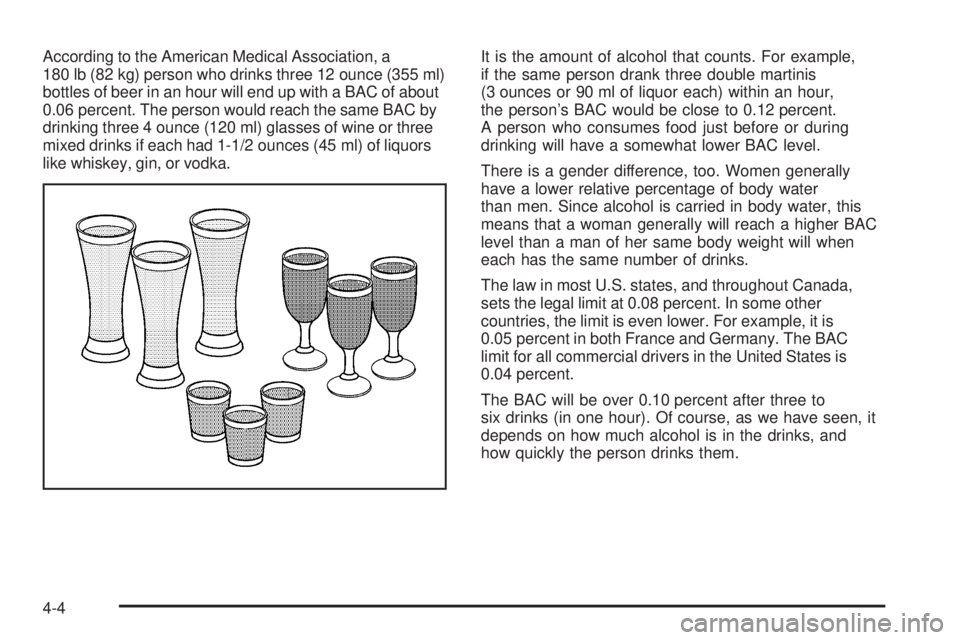
According to the American Medical Association, a
180 lb (82 kg) person who drinks three 12 ounce (355 ml)
bottles of beer in an hour will end up with a BAC of about
0.06 percent. The person would reach the same BAC by
drinking three 4 ounce (120 ml) glasses of wine or three
mixed drinks if each had 1-1/2 ounces (45 ml) of liquors
like whiskey, gin, or vodka.It is the amount of alcohol that counts. For example,
if the same person drank three double martinis
(3 ounces or 90 ml of liquor each) within an hour,
the person’s BAC would be close to 0.12 percent.
A person who consumes food just before or during
drinking will have a somewhat lower BAC level.
There is a gender difference, too. Women generally
have a lower relative percentage of body water
than men. Since alcohol is carried in body water, this
means that a woman generally will reach a higher BAC
level than a man of her same body weight will when
each has the same number of drinks.
The law in most U.S. states, and throughout Canada,
sets the legal limit at 0.08 percent. In some other
countries, the limit is even lower. For example, it is
0.05 percent in both France and Germany. The BAC
limit for all commercial drivers in the United States is
0.04 percent.
The BAC will be over 0.10 percent after three to
six drinks (in one hour). Of course, as we have seen, it
depends on how much alcohol is in the drinks, and
how quickly the person drinks them.
4-4
Page 293 of 444
Here are some important things to consider before you
do recreational vehicle towing:
What is the towing capacity of the towing vehicle?
Be sure you read the tow vehicle manufacturer’s
recommendations.
How far will you tow? Some vehicles have
restrictions on how far and how long they can tow.
Do you have the proper towing equipment?
See your dealer or trailering professional for
additional advice and equipment recommendations.
Is your vehicle ready to be towed? Just as you
would prepare your vehicle for a long trip, you
will want to make sure your vehicle is prepared to
be towed. SeeBefore Leaving on a Long Trip
on page 4-22.
Dinghy Towing
Notice:If you tow your vehicle with all four wheels
on the ground, the drivetrain components could
be damaged. The repairs would not be covered by
your warranty. Do not tow your vehicle with all
four wheels on the ground.
The vehicle was not designed to be towed with all four
wheels on the ground. If your vehicle must be towed,
you should use a dolly. See “Dolly Towing” that follows
for more information.
Dolly Towing
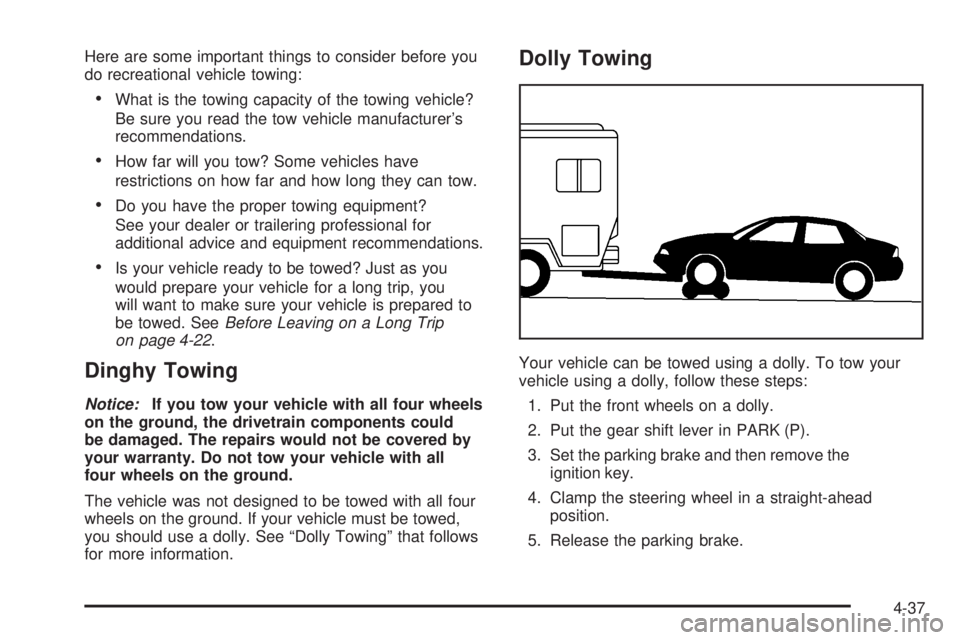
Your vehicle can be towed using a dolly. To tow your
vehicle using a dolly, follow these steps:
1. Put the front wheels on a dolly.
2. Put the gear shift lever in PARK (P).
3. Set the parking brake and then remove the
ignition key.
4. Clamp the steering wheel in a straight-ahead
position.
5. Release the parking brake.
4-37
Page 319 of 444
After changing the engine oil, reset the system by
performing the following steps:
Vehicles with Driver Information Center (DIC)
1. Press the option button on the DIC until
ENGINE OIL MONITOR appears on the
DIC screen.
2. Press the set/reset button to reset the system.
The next screen indicates that the CHANGE
OIL SOON message has been reset.
If the vehicle has the uplevel DIC, when
the gages button is pressed and the
OIL LIFE REMAINING mode appears,
it should read 100 percent OIL LIFE
REMAINING.
3. Turn the key to OFF.
Vehicles without Driver Information Center (DIC)
1. With the engine off, turn the ignition key
to RUN.
2. Fully press and release the accelerator pedal
slowly three times within ve seconds.
3. Turn the key to OFF, then start the vehicle.
If the light or message comes back on when you
start your vehicle, the oil life system has not reset.
Repeat the procedure.
What to Do with Used Oil
Used engine oil contains certain elements that may be
unhealthy for your skin and could even cause cancer.
Do not let used oil stay on your skin for very long. Clean
your skin and nails with soap and water, or a good
hand cleaner. Wash or properly dispose of clothing or
rags containing used engine oil. See the manufacturer’s
warnings about the use and disposal of oil products.
Used oil can be a threat to the environment. If you
change your own oil, be sure to drain all the oil from the
lter before disposal. Never dispose of oil by putting it in
the trash, pouring it on the ground, into sewers, or into
streams or bodies of water. Instead, recycle it by taking it
to a place that collects used oil. If you have a problem
properly disposing of used oil, ask your dealer, a service
station or a local recycling center for help.
5-19
Page 338 of 444
How to Check Power Steering Fluid
To check the power steering uid, do the following:
1. Turn the key off and let the engine compartment
cool down.
2. Wipe the cap and the top of the reservoir clean.
3. Unscrew the cap and wipe the dipstick with a
clean rag.
4. Replace the cap and completely tighten it.
5. Remove the cap again and look at the uid level
on the dipstick.
If your vehicle has the 3.8L V6 engine, the uid level
should be between the ADD and HOT marks when the
engine is cold, and at the HOT mark when the engine
is hot. If the uid is at the ADD mark when the engine
is cold or hot, power steering uid should be added.
If your vehicle has the 3.6L V6 engine, the uid
level should be between the Min (Minimum) and
Max (Maximum) marks when the engine is cold, and
at the Max mark when the engine is hot. If the uid
is at the Min mark when the engine is cold or hot,
power steering uid should be added.
What to Use
To determine what kind of uid to use, see
Recommended Fluids and Lubricants on page 6-12.
Always use the proper uid. Failure to use the proper
uid can cause leaks and damage hoses and seals.
Windshield Washer Fluid
What to Use
When you need windshield washer uid, be sure to
read the manufacturer’s instructions before use. If you
will be operating your vehicle in an area where the
temperature may fall below freezing, use a uid that
has sufficient protection against freezing.
Adding Washer Fluid
When the windshield washer uid is low, a low washer
uid light may appear on the instrument panel cluster.
SeeLow Washer Fluid Warning Light on page 3-47
for more information.
In addition, if your vehicle is equipped with a Driver
Information Center (DIC), the LOW WASHER FLUID
message will appear when the uid level is low.
SeeDIC Warnings and Messages on page 3-59for
more information.
5-38
Page 342 of 444
Replacing Brake System Parts
The braking system on a vehicle is complex. Its many
parts have to be of top quality and work well together if
the vehicle is to have really good braking. Your vehicle
was designed and tested with top-quality GM brake parts.
When you replace parts of your braking system — for
example, when your brake linings wear down and you
need new ones put in — be sure you get new approved
GM replacement parts. If you do not, your brakes may no
longer work properly. For example, if someone puts in
brake linings that are wrong for your vehicle, the balance
between your front and rear brakes can change — for
the worse. The braking performance you have come to
expect can change in many other ways if someone puts
in the wrong replacement brake parts.
Battery
Your vehicle has a maintenance free battery. When
it is time for a new battery, get one that has the
replacement number shown on the original battery’s
label. We recommend an ACDelco
®replacement battery.
SeeEngine Compartment Overview on page 5-12for
battery location.
Warning:Battery posts, terminals, and related
accessories contain lead and lead compounds,
chemicals known to the State of California to cause
cancer and reproductive harm. Wash hands after
handling.If the battery has a very low charge or is dead, you may
not be able to remove the ignition key from the ignition
switch or shift out of PARK (P). Refer toShifting
Out of Park (P) on page 2-33.
Vehicle Storage
If you are not going to drive your vehicle for 25 days
or more, remove the black, negative (−) cable from
the battery. This will help keep the battery from
running down.
{CAUTION:
Batteries have acid that can burn you and
gas that can explode. You can be badly hurt
if you are not careful. SeeJump Starting on
page 5-42for tips on working around a battery
without getting hurt.
Jump Starting
If your vehicle’s battery has run down, you may want to
use another vehicle and some jumper cables to start
your vehicle. Be sure to use the following steps to do
it safely.
5-42