stop start BUICK LACROSSE 2007 User Guide
[x] Cancel search | Manufacturer: BUICK, Model Year: 2007, Model line: LACROSSE, Model: BUICK LACROSSE 2007Pages: 512
Page 190 of 512
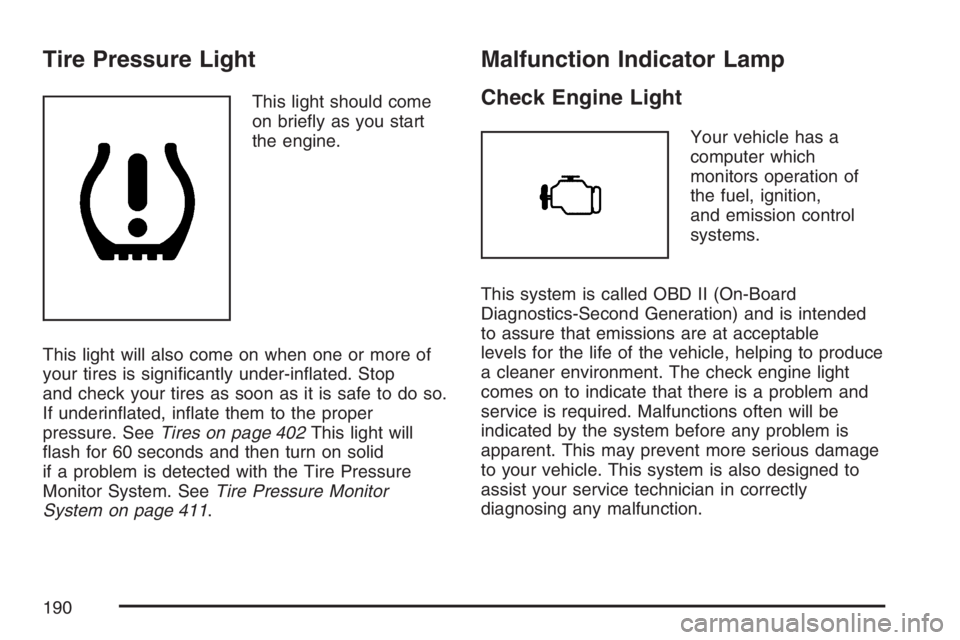
Tire Pressure Light
This light should come
on briey as you start
the engine.
This light will also come on when one or more of
your tires is signicantly under-inated. Stop
and check your tires as soon as it is safe to do so.
If underinated, inate them to the proper
pressure. SeeTires on page 402This light will
ash for 60 seconds and then turn on solid
if a problem is detected with the Tire Pressure
Monitor System. SeeTire Pressure Monitor
System on page 411.
Malfunction Indicator Lamp
Check Engine Light
Your vehicle has a
computer which
monitors operation of
the fuel, ignition,
and emission control
systems.
This system is called OBD II (On-Board
Diagnostics-Second Generation) and is intended
to assure that emissions are at acceptable
levels for the life of the vehicle, helping to produce
a cleaner environment. The check engine light
comes on to indicate that there is a problem and
service is required. Malfunctions often will be
indicated by the system before any problem is
apparent. This may prevent more serious damage
to your vehicle. This system is also designed to
assist your service technician in correctly
diagnosing any malfunction.
190
Page 192 of 512
If the Light is Flashing
The following may prevent more serious damage
to your vehicle:
Reducing vehicle speed
Avoiding hard accelerations
Avoiding steep uphill grades
If you are towing a trailer, reduce the amount of
cargo being hauled as soon as it is possible
If the light stops ashing and remains on steady,
see “If the Light Is On Steady” following.
If the light continues to ash, when it is safe to do
so, stop the vehicle. Find a safe place to park
your vehicle. Turn the key off, wait at least
10 seconds and restart the engine. If the light
remains on steady, see “If the Light Is On Steady”
following. If the light is still ashing, follow the
previous steps, and see your dealer for service as
soon as possible.
If the Light Is On Steady
You may be able to correct the emission system
malfunction by considering the following:
Did you recently put fuel into your vehicle?
If so, reinstall the fuel cap, making sure to fully
install the cap. SeeFilling the Tank on page 346.
The diagnostic system can determine if the fuel cap
has been left off or improperly installed. A loose or
missing fuel cap will allow fuel to evaporate into the
atmosphere. A few driving trips with the cap
properly installed should turn the light off.
Did you just drive through a deep puddle
of water?
If so, your electrical system may be wet. The
condition will usually be corrected when the
electrical system dries out. A few driving trips
should turn the light off.
192
Page 194 of 512
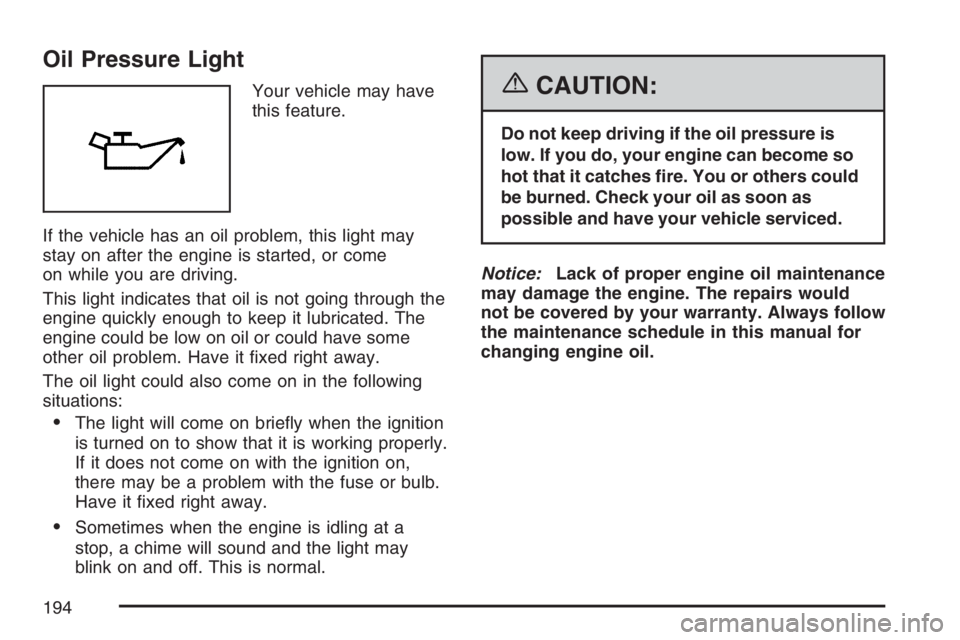
Oil Pressure Light
Your vehicle may have
this feature.
If the vehicle has an oil problem, this light may
stay on after the engine is started, or come
on while you are driving.
This light indicates that oil is not going through the
engine quickly enough to keep it lubricated. The
engine could be low on oil or could have some
other oil problem. Have it xed right away.
The oil light could also come on in the following
situations:
The light will come on briey when the ignition
is turned on to show that it is working properly.
If it does not come on with the ignition on,
there may be a problem with the fuse or bulb.
Have it xed right away.
Sometimes when the engine is idling at a
stop, a chime will sound and the light may
blink on and off. This is normal.
{CAUTION:
Do not keep driving if the oil pressure is
low. If you do, your engine can become so
hot that it catches re. You or others could
be burned. Check your oil as soon as
possible and have your vehicle serviced.
Notice:Lack of proper engine oil maintenance
may damage the engine. The repairs would
not be covered by your warranty. Always follow
the maintenance schedule in this manual for
changing engine oil.
194
Page 202 of 512
There is also a retroactive trip odometer function
that performs the following for each trip odometer:
If the vehicle’s speed has exceeded 3 mph
(5 km/h) during the current ignition cycle, this
function will set the trip odometer to the
distance driven during the current ignition cycle.
If the vehicle’s speed has not exceeded 3 mph
(5 km/h), this function will set the trip odometer
to the distance driven during the previous
ignition cycle plus the distance driven during
the current ignition cycle.
Press and hold the set/reset button on the uplevel
vehicle or the trip/odometer button on the base
level vehicle for three seconds, then release
the button. The retroactive trip odometer value will
be set into the currently displayed trip odometer.
Time Elapsed (Uplevel Only)
Press the trip/odometer button until TIME
ELAPSED :00 displays. This mode is like a
stopwatch, in that you can clock the time it takes
to get from one point to another. Each of the
elds for the hours, minutes, and seconds are
two numeric digits.Once TIME ELAPSED :00 is displayed, press the
set/reset button on the uplevel vehicle to start
the timing feature. Press the set/reset button again
to stop it. If you will be starting and stopping
your vehicle, during a trip for instance, the TIME
ELAPSED feature will automatically start timing
where it left off when you last stopped. To reset it,
press and hold the set/reset button for about
1.5 seconds. The display will return to zero. Press
the trip/odometer button to exit from the TIME
ELAPSED display.
Average Speed (Uplevel Only)
Press the trip/odometer button until AVERAGE
SPEED displays. This mode shows the average
speed of the vehicle in miles per hour (mph)
or kilometers per hour (km/h). This average is
calculated based on the various vehicle speed
recorded since the last reset of this value. To reset
the value, press the trip/odometer button to
display AVERAGE SPEED, then press and hold
the set/reset button on the uplevel vehicle.
The display will return to zero.
202
Page 214 of 512
This message continues to display for two seconds
if it has not been acknowledged when the engine is
turned off. It also re-displays for two seconds if the
message has been acknowledged, but the
condition still exists when the engine is turned off.
If the condition still exists, the message re-appears
when the engine is turned on.
HOOD AJAR
If your vehicle has the remote start feature, this
message displays when the hood is not closed
properly. Make sure that the hood is closed
completely. SeeHood Release on page 349.
This message displays while the ignition is in RUN.
Press any of the DIC buttons to acknowledge
this message and to clear it from the screen.
This message continues to display for two seconds
if it has not been acknowledged when the engine is
turned off. It also re-displays for two seconds if the
message has been acknowledged, but the
condition still exists when the engine is turned off.
If the condition still exists, the message re-appears
when the engine is turned on.
HOT TRANS FLUID
This message displays when the transaxle uid in
your vehicle is too hot. Stop the vehicle and
allow it to idle until it cools down. If the warning
message continues to display, have the vehicle
serviced by your dealer as soon as possible.
This message displays and a chime sounds only
while the ignition is in RUN. Press any of the
DIC buttons to acknowledge this message and to
clear it from the screen.
This message continues to display for two seconds
if it has not been acknowledged when the engine is
turned off. It also re-displays for two seconds if the
message has been acknowledged, but the
condition still exists when the engine is turned off.
If the condition still exists, the message re-appears
when the engine is turned on.
214
Page 224 of 512
SERVICE STABILITY SYSTEM
If your vehicle has StabiliTrak®, this message
displays if there has been a problem detected with
StabiliTrak
®. A warning light also appears on
the instrument panel cluster. SeeTraction Control
System (TCS) Warning Light on page 187. See
StabiliTrak
®System on page 296for more
information.
If this message turns on while you are driving, pull
off the road as soon as possible and stop carefully.
Try resetting the system by turning the ignition off
and then back on. If this message still stays on or
turns back on again while you are driving, your
vehicle needs service. Have the StabiliTrak
®
System inspected by your dealer as soon as
possible.
This message displays only while the ignition is in
RUN. Press any of the DIC buttons to acknowledge
this message and to clear it from the screen.
This message continues to display for two seconds
if it has not been acknowledged when the engine is
turned off. It also re-displays for two seconds if the
message has been acknowledged, but the
condition still exists when the engine is turned off.
If the condition still exists, the message re-appears
when the engine is turned on.
SERVICE THEFT SYSTEM
This message displays when there is a problem
with the theft-deterrent system programmed in the
key. A fault has been detected in the system
which means that the system is disabled and it is
not protecting the vehicle. The vehicle usually
restarts; however, you may want to take the
vehicle to your dealer before turning off the engine.
SeePASS-Key
®III Operation on page 107for
more information.
This message displays and a chime sounds only
while the ignition is in RUN. Press any of the
DIC buttons to acknowledge this message and to
clear it from the screen.
This message continues to display for two seconds
if it has not been acknowledged when the engine is
turned off. It also re-displays for two seconds if the
message has been acknowledged, but the
condition still exists when the engine is turned off.
If the condition still exists, the message re-appears
when the engine is turned on.
224
Page 242 of 512
Adjusting the Speakers (Balance/Fade)
e
(Balance/Fade):To adjust the balance
between the right and the left speakers, push and
release this knob until BAL appears on the
display. Turn the knob to move the sound toward
the right or the left speakers.
To adjust the fade between the front and the rear
speakers, push and release the speaker knob until
FAD appears on the display. Turn the knob to move
the sound toward the front or the rear speakers.
To adjust the balance and the fade to the middle
position, push the speaker knob, then push it again
and hold it until you hear one beep.
To adjust all tone and speaker controls to the
middle position, push and hold the speaker knob
when no tone or speaker control is displayed. CEN
will appear on the display and you will hear a beep.
Radio Messages
CAL (Calibration):The audio system has been
calibrated for your vehicle from the factory. If CAL
appears on the display it means that the radio has
not been congured properly for your vehicle and it
must be returned to your dealer for service.
LOC (Locked):This message is displayed when
the THEFTLOCK
®system has locked up the
radio. Take your vehicle to your dealer for service.
If any error occurs repeatedly or if an error
cannot be corrected, contact your dealer.
Playing a CD
Insert a CD partway into the slot, label side up. The
player will pull it in and the CD should begin playing.
If you want to insert a CD with the ignition off, rst
press the eject button or the DISP knob.
If the ignition or radio is turned off with a CD in
the player it will stay in the player. When the
ignition or radio is turned on, the CD will start to
play where it stopped, if it was the last selected
audio source.
242
Page 249 of 512
Scanning Categories (CAT)
(XM™ Satellite Radio Service Only)
To scan a desired category perform the following:
1. Press the CAT button to activate category
select mode. The current category will
appear on the display.
2. Turn the tune knob to select a category.
3. Once the desired category is displayed, press
either SEEK arrow for two seconds to scan
the stations in the category.
4. Press either SEEK arrow again to stop
scanning.
If the radio cannot nd the desired category,
NOT FOUND will appear on the display and the
radio will return to the last station you were
listening to.
Radio Messages
CALIBRATE:The audio system has been
calibrated for your vehicle from the factory. If
CALIBRATE appears on the display it means that
the radio has not been congured properly for
your vehicle and it must be returned to your
GM dealer for service.LOCKED:This message is displayed when the
THEFTLOCK
®system has locked up. Take
your vehicle to your GM dealer for service.
If any error occurs repeatedly or if an error cannot
be corrected, contact your GM dealer.
Radio Messages for XM™ Only
SeeXM Radio Messages on page 278later in this
section for further detail.
Playing a CD
Insert a CD partway into the slot, label side up. The
player will pull it in and the CD should begin playing.
If you want to insert a CD with the ignition off, rst
press the eject button or the DISP knob.
If the ignition or radio is turned off with a CD in
the player it will stay in the player. When the
ignition or radio is turned on, the CD will start to
play where it stopped, if it was the last selected
audio source.
When the CD is inserted, the CD symbol will appear
on the display. As each new track starts to play, the
track number will appear on the display.
249
Page 257 of 512
Scanning Categories (CAT)
(XM™ Satellite Radio Service Only)
To scan a desired category perform the following:
1. Press the CAT button to activate category
select mode. The current category will
appear on the display.
2. Turn the tune knob to select a category.
3. Once the desired category is displayed, press
either SEEK arrow for two seconds to scan
the stations in the category.
4. Press either SEEK arrow again to stop
scanning.
If the radio cannot nd the desired category,
NOT FOUND will appear on the display and the
radio will return to the last station you were
listening to.
Radio Messages
CALIBRATE:The audio system has been
calibrated for your vehicle from the factory. If
CALIBRATE appears on the display it means that
the radio has not been congured properly for
your vehicle and it must be returned to your dealer
for service.LOCKED:This message is displayed when the
THEFTLOCK
®system has locked up. Take
your vehicle to your dealer for service.
If any error occurs repeatedly or if an error cannot
be corrected, contact your GM dealer.
Radio Messages for XM™ Only
SeeXM Radio Messages on page 278later in this
section for further detail.
Playing a CD
Insert a CD partway into the slot, label side up. The
player will pull it in and the CD should begin playing.
If you want to insert a CD with the ignition off, rst
press the eject button or the DISP knob.
If the ignition or radio is turned off with a CD in
the player it will stay in the player. When the
ignition or radio is turned on, the CD will start to
play where it stopped, if it was the last selected
audio source.
When the CD is inserted, the CD symbol will appear
on the display. As each new track starts to play, the
track number will appear on the display.
257
Page 265 of 512
Scanning Categories (CAT)
(XM™ Satellite Radio Service Only)
To scan a desired category perform the following:
1. Press the CAT button to activate category
select mode. The current category will
appear on the display.
2. Turn the tune knob to select a category.
3. Once the desired category is displayed, press
either SEEK arrow for two seconds to scan
the stations in the category.
4. Press either SEEK arrow again to
stop scanning.
If the radio cannot nd the desired category,
NOT FOUND will appear on the display and the
radio will return to the last station you were
listening to.
Radio Messages
CALIBRATE:The audio system has been
calibrated for your vehicle from the factory. If
CALIBRATE appears on the display it means that
the radio has not been congured properly for
your vehicle and it must be returned to your
GM dealer for service.
LOCKED:This message is displayed when the
THEFTLOCK
®system has locked up. Take
your vehicle to your GM dealer for service.
If any error occurs repeatedly or if an error cannot
be corrected, contact your GM dealer.
Radio Messages for XM™ Only
SeeXM Radio Messages on page 278later in this
section for further detail.
Playing a CD
If the ignition or radio is turned off, with a CD in
the player, it will stay in the player. When the
ignition or radio is turned on, the CD will
start playing where it stopped, if it was the last
selected audio source.
265