radio BUICK LACROSSE 2008 Owner's Guide
[x] Cancel search | Manufacturer: BUICK, Model Year: 2008, Model line: LACROSSE, Model: BUICK LACROSSE 2008Pages: 440
Page 231 of 440
Radio Reception
Frequency interference and static during normal radio
reception can occur if items such as cellphone chargers,
vehicle convenience accessories, and external
electronic devices are plugged into the accessory power
outlet. If there is interference or static, unplug the
item from the accessory power outlet.
AM
The range for most AM stations is greater than for FM,
especially at night. The longer range can cause
station frequencies to interfere with each other. For
better radio reception, most AM radio stations boost the
power levels during the day, and then reduce these
levels during the night. Static can also occur when things
like storms and power lines interfere with radio
reception. When this happens, try reducing the treble on
your radio.
FM Stereo
FM stereo gives the best sound, but FM signals reach
only about 10 to 40 miles (16 to 65 km). Tall buildings or
hills can interfere with FM signals, causing the sound
to fade in and out.
XM™ Satellite Radio Service
XM™ Satellite Radio Service gives digital radio
reception from coast-to-coast in the 48 contiguous
United States, and in Canada. Just as with FM,
tall buildings or hills can interfere with satellite radio
signals, causing the sound to fade in and out. In
addition, traveling or standing under heavy foliage,
bridges, garages, or tunnels may cause loss of the XM™
signal for a period of time. The radio may display NO
SIGNAL to indicate interference.
3-103
Page 232 of 440
Backglass Antenna
The AM-FM antenna is integrated with the rear window
defogger, located in the rear window. Make sure that the
inside surface of the rear window is not scratched and
that the lines on the glass are not damaged. If the inside
surface is damaged, it could interfere with radio
reception. Also, for proper radio reception, the antenna
connector at the top-center of the rear window needs to
be properly attached to the post on the glass.
Notice:Using a razor blade or sharp object to clear
the inside rear window may damage the rear
window antenna and/or the rear window defogger.
Repairs would not be covered by your warranty. Do
not clear the inside rear window with sharp
objects.
Notice:Do not apply aftermarket glass tinting with
metallic lm. The metallic lm in some tinting
materials will interfere with or distort the incoming
radio reception. Any damage caused to your
backglass antenna due to metallic tinting materials
will not be covered by your warranty.Because this antenna is built into the rear window, there
is a reduced risk of damage caused by car washes
and vandals.
If static is heard on the radio, when the rear window
defogger is turned on, it could mean that a defogger grid
line has been damaged and the grid line must be
repaired.
If adding a cellular telephone to your vehicle, and the
antenna needs to be attached to the glass, make
sure that you do not damage the grid lines for the
AM-FM antenna. There is enough space between the
lines to attach a cellular telephone antenna without
interfering with radio reception.
3-104
Page 233 of 440
XM™ Satellite Radio Antenna
System
The XM™ Satellite Radio antenna is located on the roof
of your vehicle. Keep this antenna clear of snow and
ice build up for clear radio reception.
If your vehicle has a sunroof, the performance of the
XM™ system may be affected if the sunroof is open.
Loading items onto the roof of your vehicle can interfere
with the performance of the XM™ system. Make sure
the XM™ Satellite Radio antenna is not obstructed.
Chime Level Adjustment
The radio is used to adjust the vehicle’s chime level.
To change the volume level of the chime, press and hold
pushbutton 6 with the ignition on and the radio power
off. The volume level will change from the normal
level to loud, and LOUD will appear on the radio display.
To change back to the default or normal setting,
press and hold pushbutton 6 again. The volume level
will change from the loud level to normal, and NORMAL
will appear on the radio display. Removing the radio
and not replacing it with a factory radio or chime module
will disable vehicle chimes.
3-105
Page 240 of 440
Traction Control System (TCS)
Your vehicle may have a Traction Control System (TCS)
that limits wheel spin. This is especially useful in
slippery road conditions. The system operates only if it
senses that one or both of the front wheels are
spinning or beginning to lose traction. When this
happens, the system works the front brakes and reduces
engine power to limit wheel spin. It may also upshift
the transmission to limit wheel spin. You may feel
or hear the system working, but this is normal.
The TRACTION CONTROL ACTIVE message on the
Driver Information Center (DIC) will be displayed
when the system is limiting wheel spin.
If the vehicle is in cruise control when the TCS begins
to limit wheel spin, the cruise control will automatically
disengage. When road conditions allow safe use of
the cruise control, it can be used again. SeeCruise
Control on page 3-10.
The TCS operates in all transmission shift lever
positions. But the system can upshift the transmission
only as high as the shift lever position that was chosen,
so use the lower gears only when necessary. See
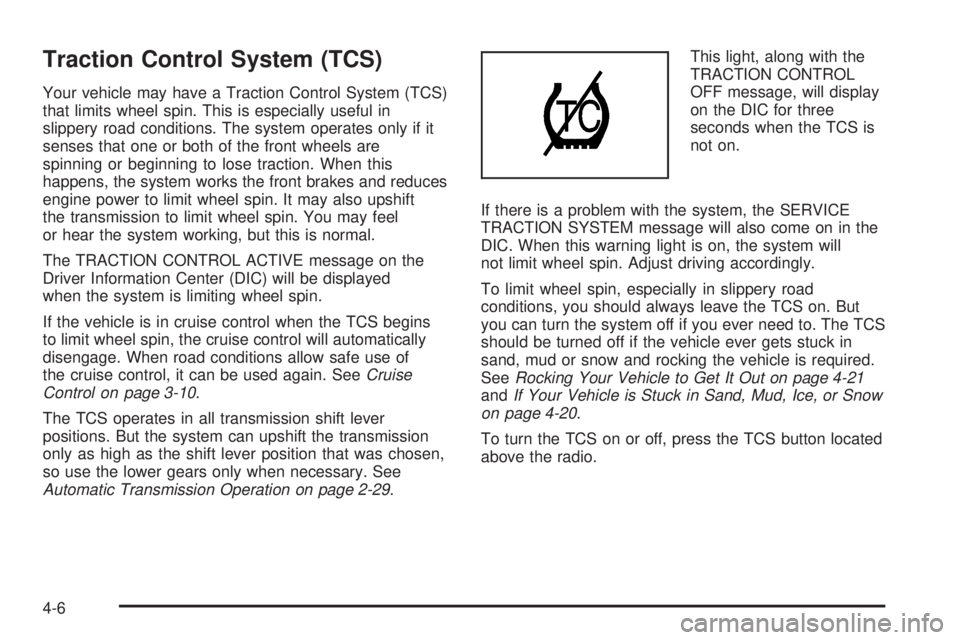
Automatic Transmission Operation on page 2-29.This light, along with the
TRACTION CONTROL
OFF message, will display
on the DIC for three
seconds when the TCS is
not on.
If there is a problem with the system, the SERVICE
TRACTION SYSTEM message will also come on in the
DIC. When this warning light is on, the system will
not limit wheel spin. Adjust driving accordingly.
To limit wheel spin, especially in slippery road
conditions, you should always leave the TCS on. But
you can turn the system off if you ever need to. The TCS
should be turned off if the vehicle ever gets stuck in
sand, mud or snow and rocking the vehicle is required.
SeeRocking Your Vehicle to Get It Out on page 4-21
andIf Your Vehicle is Stuck in Sand, Mud, Ice, or Snow
on page 4-20.
To turn the TCS on or off, press the TCS button located
above the radio.
4-6
Page 242 of 440
To limit wheel spin, especially in slippery road
conditions, you should always leave the ETS on. But
you can turn the system off if you ever need to. The ETS
should be turned off if the vehicle ever gets stuck in
sand, mud or snow and rocking the vehicle is required
To turn the ETS on or off, press the Traction Control
button located above the radio.
When the ETS is turned off, the ETS warning light will
come on along with the TRACTION CONTROL OFF
message on the DIC. It will disappear when the ETS is
turned back on. If the ETS is limiting wheel spin when the
traction control button is pressed, the ETS warning light
will come on and the ETS will turn off right away.
StabiliTrak®System
Your vehicle may be equipped with a vehicle stability
enhancement system called StabiliTrak®.Itisan
advanced computer controlled system that assists you
with directional control of the vehicle in difficult
driving conditions.
StabiliTrak
®activates when the computer senses a
discrepancy between your intended path and the
direction the vehicle is actually traveling.
StabiliTrak
®selectively applies braking pressure at any
one of the vehicle’s brakes to help steer the vehicle
in the direction which you are steering.When the system activates, a STABILITY CONTROL
ACTIVE message will be displayed on the Driver
Information Center (DIC). SeeDIC Warnings and
Messages on page 3-58. You may also hear a noise or
feel vibration in the brake pedal. This is normal. Continue
to steer the vehicle in the direction you want it to go.
If there is a problem detected with StabiliTrak
®,a
SERVICE STABILITY SYSTEM or STABILITY
CONTROL OFF message will be displayed on the
Driver Information Center (DIC). A warning light will also
appear on the instrument panel cluster. SeeDIC
Warnings and Messages on page 3-58. When this
message is displayed, the system is not operational.
Driving should be adjusted accordingly.
If your vehicle is in cruise control when the StabiliTrak
®
activates, the cruise control will automatically
disengage. When road conditions allow you to safely
use it again, you may reengage the cruise control. See
Cruise Control on page 3-10for more information.
For vehicles with the 5.3L V8 engine, StabiliTrak
®can
be turned off by pressing and holding the traction control
button, located above the radio, for approximately ve
seconds. A STABILITY CONTROL OFF message will be
displayed on the Driver Information Center (DIC)
when StabiliTrak
®is turned off. StabiliTrak®will remain
off until the traction control button is pressed once to
turn it back on, or until the engine is started.
4-8
Page 321 of 440
Notice:If you leave your radio or other accessories
on during the jump starting procedure, they could
be damaged. The repairs would not be covered by
your warranty. Always turn off your radio and other
accessories when jump starting your vehicle.
3. Turn off the ignition on both vehicles. Unplug
unnecessary accessories plugged into the cigarette
lighter or the accessory power outlets. Turn off the
radio and all lamps that are not needed. This will
avoid sparks and help save both batteries. And it
could save the radio!
4. Open the hood on the other vehicle and locate the
positive (+) and negative (−) terminal locations on
that vehicle.
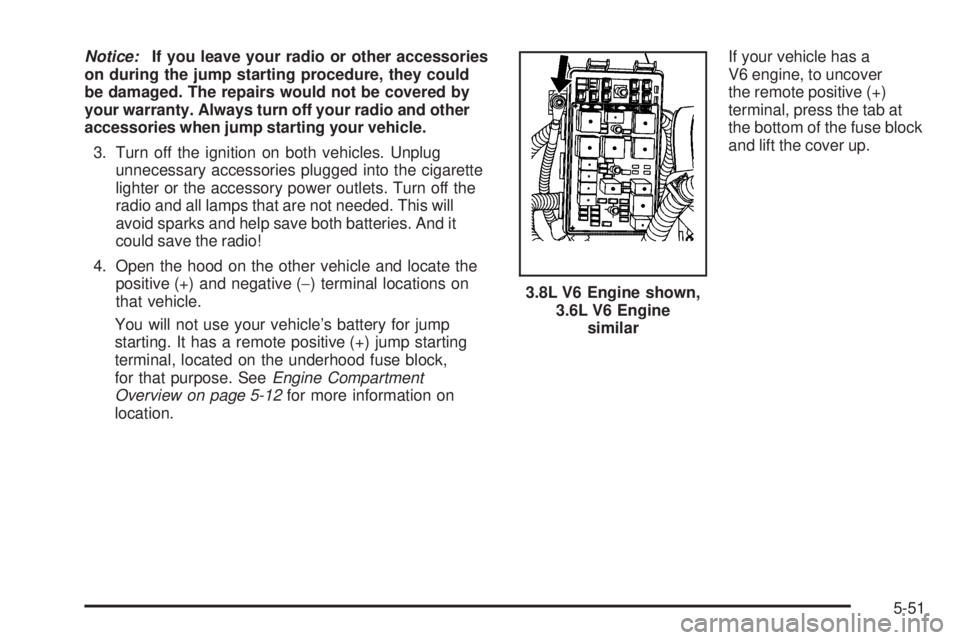
You will not use your vehicle’s battery for jump
starting. It has a remote positive (+) jump starting
terminal, located on the underhood fuse block,
for that purpose. SeeEngine Compartment
Overview on page 5-12for more information on
location.If your vehicle has a
V6 engine, to uncover
the remote positive (+)
terminal, press the tab at
the bottom of the fuse block
and lift the cover up.
3.8L V6 Engine shown,
3.6L V6 Engine
similar
5-51
Page 341 of 440
How to Check
Use a good quality pocket-type gage to check tire
pressure. You cannot tell if your tires are properly
inated simply by looking at them. Radial tires may
look properly inated even when they are
under-inated. Check the tire’s ination pressure
when the tires are cold. Cold means your vehicle
has been sitting for at least three hours or driven no
more than 1 mile (1.6 km).
Remove the valve cap from the tire valve stem.
Press the tire gage rmly onto the valve to get a
pressure measurement. If the cold tire ination
pressure matches the recommended pressure on
the Tire and Loading Information label, no further
adjustment is necessary. If the ination pressure is
low, add air until you reach the recommended
amount.
If you overll the tire, release air by pushing on
the metal stem in the center of the tire valve.
Re-check the tire pressure with the tire gage.
Be sure to put the valve caps back on the valve
stems. They help prevent leaks by keeping out dirt
and moisture.
Tire Pressure Monitor System
The Tire Pressure Monitor System (TPMS) uses radio
and sensor technology to check tire pressure levels. The
TPMS sensors monitor the air pressure in your vehicle’s
tires and transmit tire pressure readings to a receiver
located in the vehicle.
Each tire, including the spare (if provided), should be
checked monthly when cold and inated to the ination
pressure recommended by the vehicle manufacturer
on the vehicle placard or tire ination pressure label.
(If your vehicle has tires of a different size than the size
indicated on the vehicle placard or tire ination
pressure label, you should determine the proper tire
ination pressure for those tires.)
As an added safety feature, your vehicle has been
equipped with a tire pressure monitoring system (TPMS)
that illuminates a low tire pressure telltale when one
or more of your tires is signicantly under-inated.
Accordingly, when the low tire pressure telltale
illuminates, you should stop and check your tires as
soon as possible, and inate them to the proper
pressure. Driving on a signicantly under-inated tire
causes the tire to overheat and can lead to tire failure.
Under-ination also reduces fuel efficiency and tire
tread life, and may affect the vehicle’s handling and
stopping ability.
5-71
Page 342 of 440
Please note that the TPMS is not a substitute for proper
tire maintenance, and it is the driver’s responsibility to
maintain correct tire pressure, even if under-ination has
not reached the level to trigger illumination of the TPMS
low tire pressure telltale.
Your vehicle has also been equipped with a TPMS
malfunction indicator to indicate when the system is not
operating properly. The TPMS malfunction indicator
is combined with the low tire pressure telltale. When the
system detects a malfunction, the telltale will ash for
approximately one minute and then remain continuously
illuminated. This sequence will continue upon
subsequent vehicle start-ups as long as the malfunction
exists.
When the malfunction indicator is illuminated, the
system may not be able to detect or signal low tire
pressure as intended. TPMS malfunctions may occur for
a variety of reasons, including the installation of
replacement or alternate tires or wheels on the vehicle
that prevent the TPMS from functioning properly. Always
check the TPMS malfunction telltale after replacing one
or more tires or wheels on your vehicle to ensure that the
replacement or alternate tires and wheels allow the
TPMS to continue to function properly.
SeeTire Pressure Monitor Operation on page 5-73, for
additional information.Federal Communications Commission
(FCC) and Industry and Science
Canada
The Tire Pressure Monitor System (TPMS) operates on
a radio frequency and complies with Part 15 of the
FCC Rules. Operation is subject to the following
two conditions:
1. This device may not cause harmful interference.
2. This device must accept any interference received,
including interference that may cause undesired
operation.
The Tire Pressure Monitor System (TPMS) operates on
a radio frequency and complies with RSS-210 of
Industry and Science Canada. Operation is subject to
the following two conditions:
1. This device may not cause interference.
2. This device must accept any interference received,
including interference that may cause undesired
operation of the device.
Changes or modications to this system by other than
an authorized service facility could void authorization to
use this equipment.
5-72
Page 344 of 440
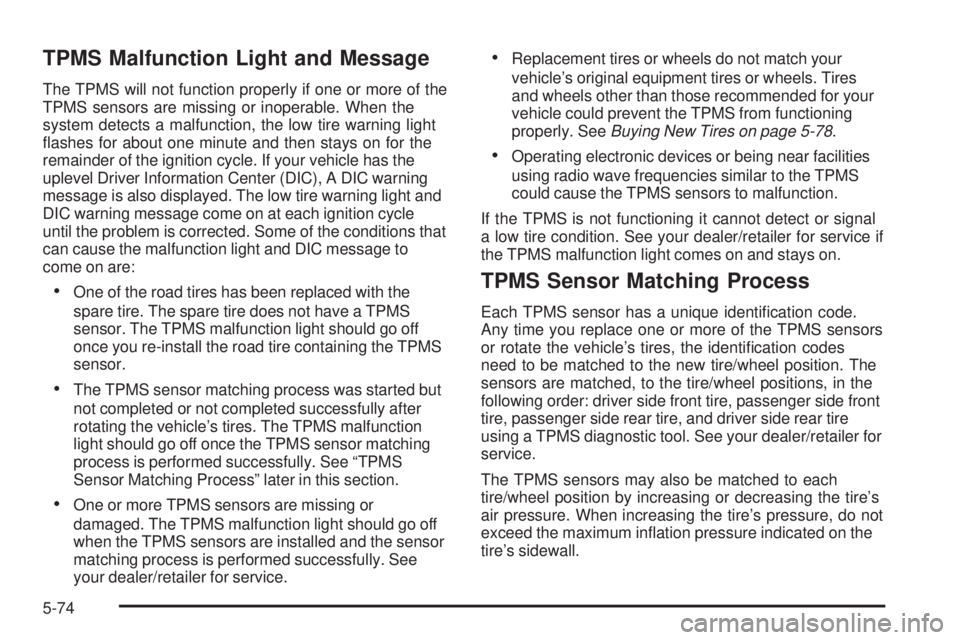
TPMS Malfunction Light and Message
The TPMS will not function properly if one or more of the
TPMS sensors are missing or inoperable. When the
system detects a malfunction, the low tire warning light
ashes for about one minute and then stays on for the
remainder of the ignition cycle. If your vehicle has the
uplevel Driver Information Center (DIC), A DIC warning
message is also displayed. The low tire warning light and
DIC warning message come on at each ignition cycle
until the problem is corrected. Some of the conditions that
can cause the malfunction light and DIC message to
come on are:
One of the road tires has been replaced with the
spare tire. The spare tire does not have a TPMS
sensor. The TPMS malfunction light should go off
once you re-install the road tire containing the TPMS
sensor.
The TPMS sensor matching process was started but
not completed or not completed successfully after
rotating the vehicle’s tires. The TPMS malfunction
light should go off once the TPMS sensor matching
process is performed successfully. See “TPMS
Sensor Matching Process” later in this section.
One or more TPMS sensors are missing or
damaged. The TPMS malfunction light should go off
when the TPMS sensors are installed and the sensor
matching process is performed successfully. See
your dealer/retailer for service.
Replacement tires or wheels do not match your
vehicle’s original equipment tires or wheels. Tires
and wheels other than those recommended for your
vehicle could prevent the TPMS from functioning
properly. SeeBuying New Tires on page 5-78.
Operating electronic devices or being near facilities
using radio wave frequencies similar to the TPMS
could cause the TPMS sensors to malfunction.
If the TPMS is not functioning it cannot detect or signal
a low tire condition. See your dealer/retailer for service if
the TPMS malfunction light comes on and stays on.
TPMS Sensor Matching Process
Each TPMS sensor has a unique identication code.
Any time you replace one or more of the TPMS sensors
or rotate the vehicle’s tires, the identication codes
need to be matched to the new tire/wheel position. The
sensors are matched, to the tire/wheel positions, in the
following order: driver side front tire, passenger side front
tire, passenger side rear tire, and driver side rear tire
using a TPMS diagnostic tool. See your dealer/retailer for
service.
The TPMS sensors may also be matched to each
tire/wheel position by increasing or decreasing the tire’s
air pressure. When increasing the tire’s pressure, do not
exceed the maximum ination pressure indicated on the
tire’s sidewall.
5-74
Page 381 of 440
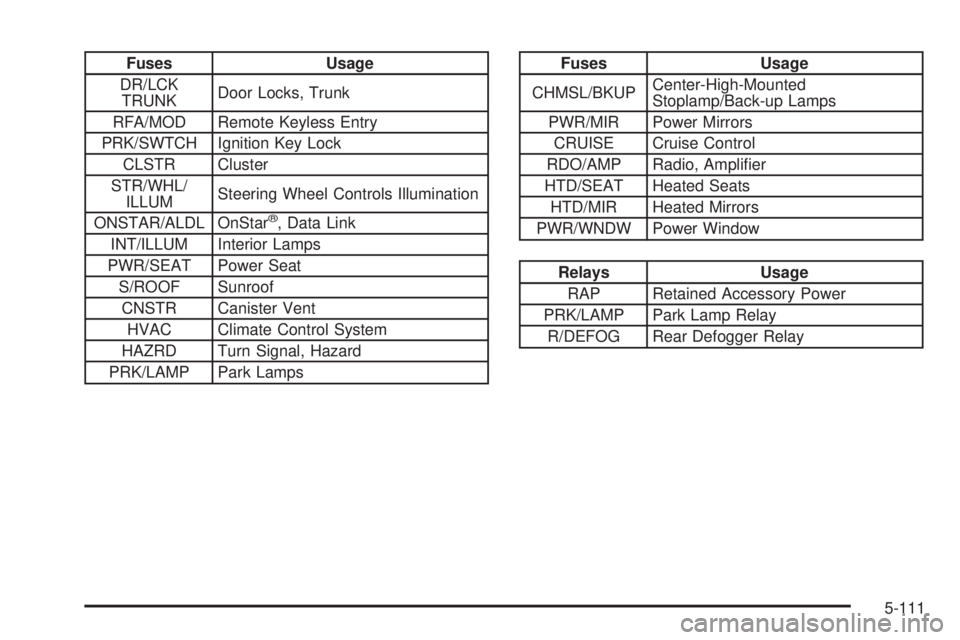
Fuses Usage
DR/LCK
TRUNKDoor Locks, Trunk
RFA/MOD Remote Keyless Entry
PRK/SWTCH Ignition Key Lock
CLSTR Cluster
STR/WHL/
ILLUMSteering Wheel Controls Illumination
ONSTAR/ALDL OnStar
®, Data Link
INT/ILLUM Interior Lamps
PWR/SEAT Power Seat
S/ROOF Sunroof
CNSTR Canister Vent
HVAC Climate Control System
HAZRD Turn Signal, Hazard
PRK/LAMP Park Lamps
Fuses Usage
CHMSL/BKUPCenter-High-Mounted
Stoplamp/Back-up Lamps
PWR/MIR Power Mirrors
CRUISE Cruise Control
RDO/AMP Radio, Amplier
HTD/SEAT Heated Seats
HTD/MIR Heated Mirrors
PWR/WNDW Power Window
Relays Usage
RAP Retained Accessory Power
PRK/LAMP Park Lamp Relay
R/DEFOG Rear Defogger Relay
5-111