oil level BUICK LACROSSE 2008 Owner's Manual
[x] Cancel search | Manufacturer: BUICK, Model Year: 2008, Model line: LACROSSE, Model: BUICK LACROSSE 2008Pages: 440
Page 130 of 440
Low Coolant Warning Light............................3-41
Tire Pressure Light.......................................3-41
Malfunction Indicator Lamp.............................3-42
Oil Pressure Light.........................................3-45
Change Engine Oil Light................................3-45
Security Light...............................................3-45
Cruise Control Light......................................3-46
Reduced Engine Power Light.........................3-46
Highbeam On Light.......................................3-46
Headlamps Suggested Light...........................3-47
Low Washer Fluid Warning Light.....................3-47
Door Ajar Light.............................................3-47
Trunk Ajar Light............................................3-47
Service Vehicle Soon Light............................3-48
Fuel Gage...................................................3-48
Low Fuel Warning Light.................................3-48
Check Gas Cap Light....................................3-49Driver Information Center (DIC).......................3-49
DIC Operation and Displays...........................3-50
DIC Compass (Uplevel Only)..........................3-56
DIC Warnings and Messages.........................3-58
DIC Vehicle Personalization............................3-76
Audio System(s).............................................3-84
Setting the Clock..........................................3-85
Radio(s)......................................................3-86
Using an MP3..............................................3-97
XM Radio Messages...................................3-100
Theft-Deterrent Feature................................3-101
Audio Steering Wheel Controls......................3-102
Radio Reception.........................................3-103
Backglass Antenna......................................3-104
XM™ Satellite Radio Antenna System............3-105
Chime Level Adjustment...............................3-105
Section 3 Instrument Panel
3-2
Page 179 of 440
2(Gages)*:Press this button to display the battery
voltage, oil life, and tire pressure readings.
r(Set/Reset)*:Press this button to set or reset
certain functions and to turn off or acknowledge
messages on the DIC.
4(Option)*:Press this button to display the units,
language, personalization, compass zone, and compass
calibration. SeeDIC Vehicle Personalization on
page 3-76andDIC Compass (Uplevel Only) on
page 3-56for more information.
t(Traction Control):Press this button to turn
traction control on or off. SeeTraction Control System
(TCS) on page 4-6for more information.
Press and hold this button to turn StabiliTrak
®off, for
vehicles with this feature. Press this button again to turn
both traction control and StabiliTrak
®on. See
StabiliTrak®System on page 4-8for more information.
|(Hazard):Press this button to turn the hazard
warning ashers on and off. SeeHazard Warning
Flashers on page 3-6for more information.
*These buttons are only available on vehicles with the
uplevel DIC.
**This button is only available on vehicles with the base
level DIC.
Trip/Odometer Menu Items
TRIP/ODO (Trip Odometer):Press this button to scroll
through the following menu items:
Odometer
Press the trip/odometer button until the odometer
displays. This mode shows the distance the vehicle has
been driven in either miles or kilometers.
Trip A and Trip B
Press the trip/odometer button until A or B displays.
This mode shows the current distance traveled in either
miles or kilometers since the last reset for each trip
odometer. Both trip odometers can be used at the
same time.
The display will show the odometer on the top line and
the trip odometer information, either A or B, on the
bottom line.
Each trip odometer can be reset to zero separately by
briey pressing the set/reset button on vehicles with the
uplevel DIC or by briey pressing and holding the trip
odometer button on vehicles with the base level
DIC while the desired trip odometer is displayed.
3-51
Page 187 of 440
BATTERY SAVER ACTIVE
This message displays when the system detects that
the battery voltage is dropping beyond a reasonable
level. The battery saver system starts reducing certain
features of the vehicle that you may be able to notice.
At the point that the features are disabled, this message
is displayed. It means that the vehicle is trying to
save the charge in the battery.
Turn off all unnecessary accessories to allow the battery
to recharge.
The normal battery voltage range is 11.5 to 15.5 volts.
If your vehicle has an uplevel DIC, you can monitor
the battery voltage by pressing the gages button until
BATTERY displays.
CHANGE OIL SOON
This message displays when service is required for the
vehicle. See your dealer/retailer. SeeEngine Oil on
page 5-18andScheduled Maintenance on page 6-4for
more information.
The CHANGE OIL SOON message is reset by
acknowledging the message. The OIL LIFE screen
under the gages menu on the DIC must also be reset.
See “Oil Life” underDIC Operation and Displays on
page 3-50andEngine Oil Life System on page 5-21.This message displays while the ignition is in ON/RUN.
Press any of the DIC buttons to acknowledge this
message and to clear it from the screen.
This message continues to display for two seconds if it
has not been acknowledged when the engine is
turned off. It also re-displays for two seconds if the
message has been acknowledged, but the condition still
exists when the engine is turned off.
If the condition still exists, the message re-appears
when the engine is turned on.
CHARGING SYSTEM FAILURE
This message displays when there is a problem with the
generator and battery charging systems. Driving with
this problem could drain the battery. Turn off all
unnecessary accessories. Stop and turn off the vehicle
as soon as it is safe to do so. Have the electrical
system checked by your dealer/retailer immediately.
This message displays and a chime sounds while the
ignition is in ON/RUN. Press any of the DIC buttons
to acknowledge this message and to clear it from
the screen.
3-59
Page 249 of 440
Before Leaving on a Long Trip
To prepare your vehicle for a long trip, consider having
it serviced by your dealer/retailer before departing.
Things to check on your own include:
Windshield Washer Fluid:Reservoir full? Windows
clean — inside and outside?
Wiper Blades:In good shape?
Fuel, Engine Oil, Other Fluids:All levels checked?
Lamps:Do they all work and are lenses clean?
Tires:Are treads good? Are tires inated to
recommended pressure?
Weather and Maps:Safe to travel? Have up-to-date
maps?
Highway Hypnosis
Always be alert and pay attention to your surroundings
while driving. If you become tired or sleepy, nd a
safe place to park your vehicle and rest.
Other driving tips include:
Keep the vehicle well ventilated.
Keep interior temperature cool.
Keep your eyes moving — scan the road ahead
and to the sides.
Check the rearview mirror and vehicle instruments
often.
4-15
Page 283 of 440
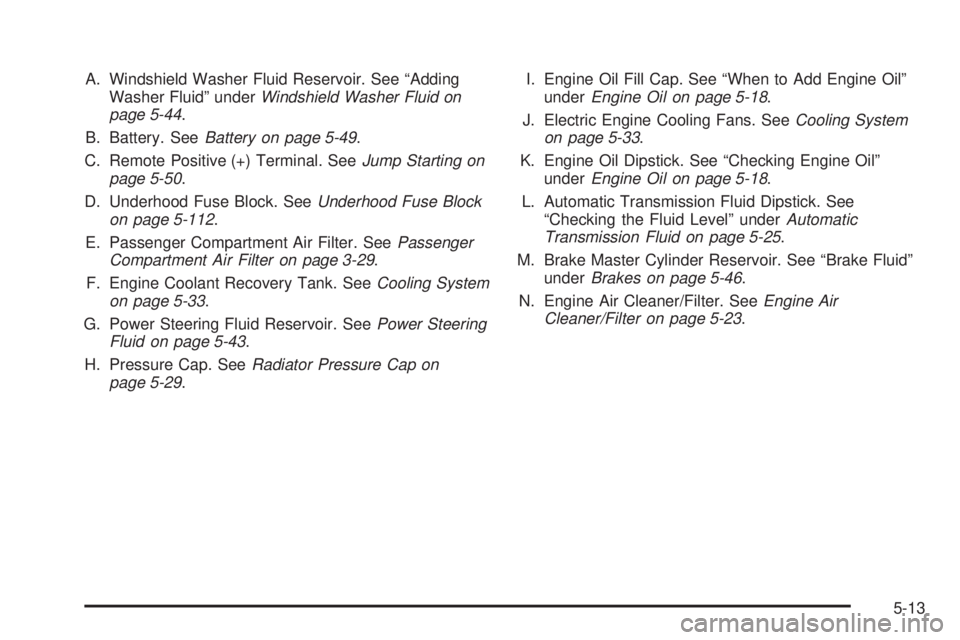
A. Windshield Washer Fluid Reservoir. See “Adding
Washer Fluid” underWindshield Washer Fluid on
page 5-44.
B. Battery. SeeBattery on page 5-49.
C. Remote Positive (+) Terminal. SeeJump Starting on
page 5-50.
D. Underhood Fuse Block. SeeUnderhood Fuse Block
on page 5-112.
E. Passenger Compartment Air Filter. SeePassenger
Compartment Air Filter on page 3-29.
F. Engine Coolant Recovery Tank. SeeCooling System
on page 5-33.
G. Power Steering Fluid Reservoir. SeePower Steering
Fluid on page 5-43.
H. Pressure Cap. SeeRadiator Pressure Cap on
page 5-29.I. Engine Oil Fill Cap. See “When to Add Engine Oil”
underEngine Oil on page 5-18.
J. Electric Engine Cooling Fans. SeeCooling System
on page 5-33.
K. Engine Oil Dipstick. See “Checking Engine Oil”
underEngine Oil on page 5-18.
L. Automatic Transmission Fluid Dipstick. See
“Checking the Fluid Level” underAutomatic
Transmission Fluid on page 5-25.
M. Brake Master Cylinder Reservoir. See “Brake Fluid”
underBrakes on page 5-46.
N. Engine Air Cleaner/Filter. SeeEngine Air
Cleaner/Filter on page 5-23.
5-13
Page 285 of 440
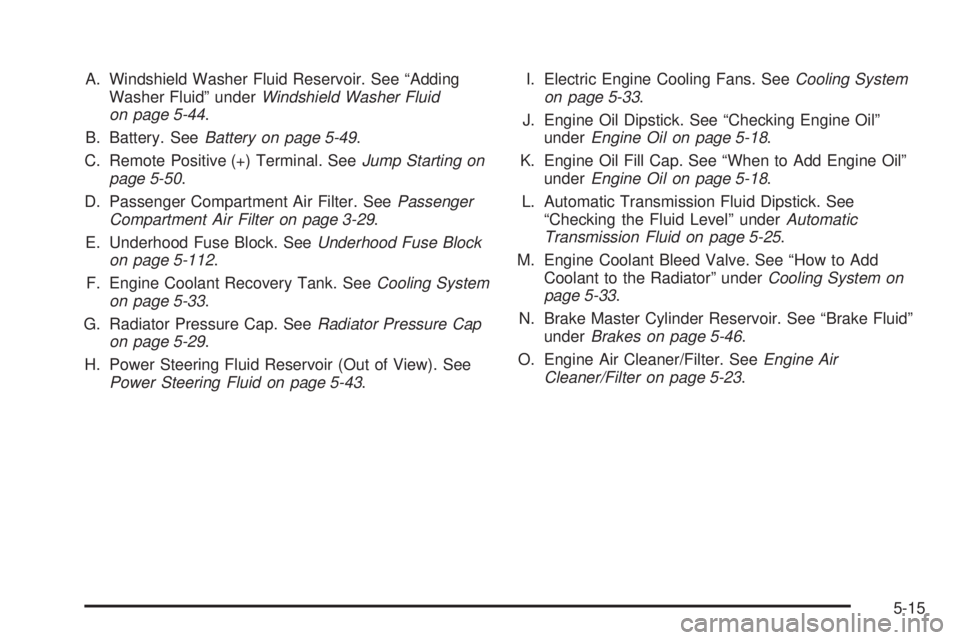
A. Windshield Washer Fluid Reservoir. See “Adding
Washer Fluid” underWindshield Washer Fluid
on page 5-44.
B. Battery. SeeBattery on page 5-49.
C. Remote Positive (+) Terminal. SeeJump Starting on
page 5-50.
D. Passenger Compartment Air Filter. SeePassenger
Compartment Air Filter on page 3-29.
E. Underhood Fuse Block. SeeUnderhood Fuse Block
on page 5-112.
F. Engine Coolant Recovery Tank. SeeCooling System
on page 5-33.
G. Radiator Pressure Cap. SeeRadiator Pressure Cap
on page 5-29.
H. Power Steering Fluid Reservoir (Out of View). See
Power Steering Fluid on page 5-43.I. Electric Engine Cooling Fans. SeeCooling System
on page 5-33.
J. Engine Oil Dipstick. See “Checking Engine Oil”
underEngine Oil on page 5-18.
K. Engine Oil Fill Cap. See “When to Add Engine Oil”
underEngine Oil on page 5-18.
L. Automatic Transmission Fluid Dipstick. See
“Checking the Fluid Level” underAutomatic
Transmission Fluid on page 5-25.
M. Engine Coolant Bleed Valve. See “How to Add
Coolant to the Radiator” underCooling System on
page 5-33.
N. Brake Master Cylinder Reservoir. See “Brake Fluid”
underBrakes on page 5-46.
O. Engine Air Cleaner/Filter. SeeEngine Air
Cleaner/Filter on page 5-23.
5-15
Page 287 of 440
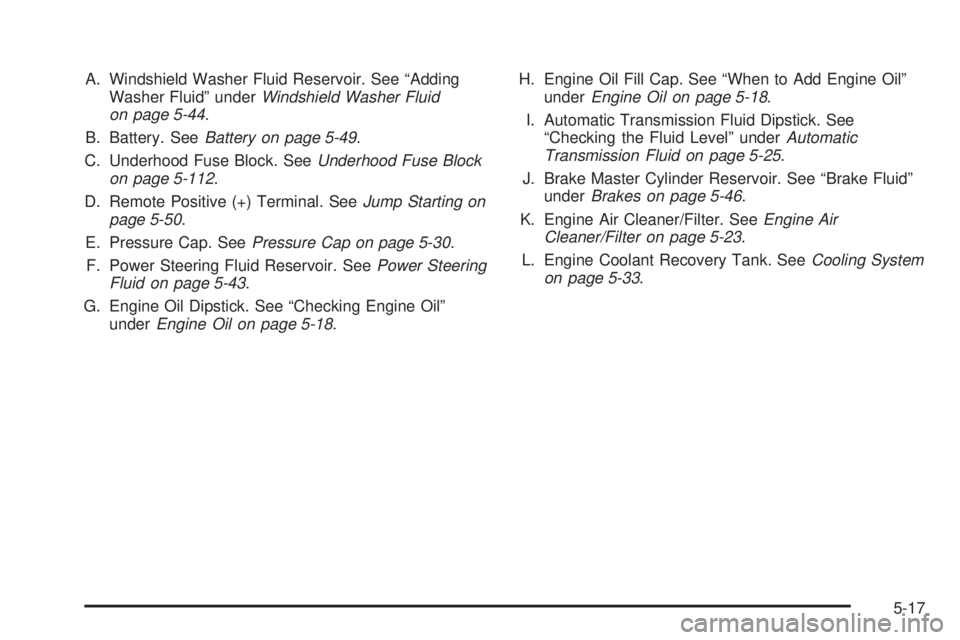
A. Windshield Washer Fluid Reservoir. See “Adding
Washer Fluid” underWindshield Washer Fluid
on page 5-44.
B. Battery. SeeBattery on page 5-49.
C. Underhood Fuse Block. SeeUnderhood Fuse Block
on page 5-112.
D. Remote Positive (+) Terminal. SeeJump Starting on
page 5-50.
E. Pressure Cap. SeePressure Cap on page 5-30.
F. Power Steering Fluid Reservoir. SeePower Steering
Fluid on page 5-43.
G. Engine Oil Dipstick. See “Checking Engine Oil”
underEngine Oil on page 5-18.H. Engine Oil Fill Cap. See “When to Add Engine Oil”
underEngine Oil on page 5-18.
I. Automatic Transmission Fluid Dipstick. See
“Checking the Fluid Level” underAutomatic
Transmission Fluid on page 5-25.
J. Brake Master Cylinder Reservoir. See “Brake Fluid”
underBrakes on page 5-46.
K. Engine Air Cleaner/Filter. SeeEngine Air
Cleaner/Filter on page 5-23.
L. Engine Coolant Recovery Tank. SeeCooling System
on page 5-33.
5-17
Page 288 of 440
Engine Oil
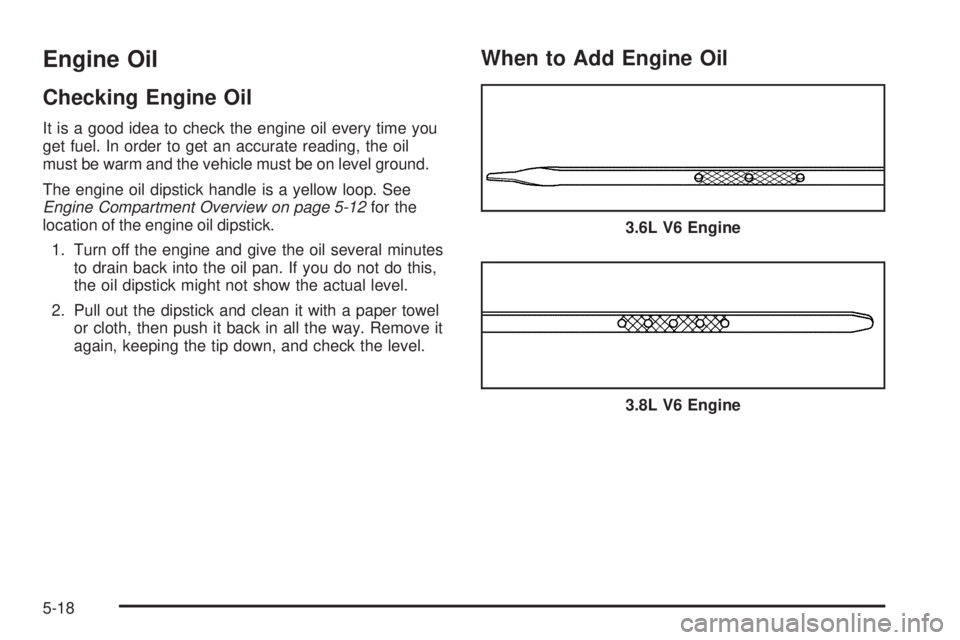
Checking Engine Oil
It is a good idea to check the engine oil every time you
get fuel. In order to get an accurate reading, the oil
must be warm and the vehicle must be on level ground.
The engine oil dipstick handle is a yellow loop. See
Engine Compartment Overview on page 5-12for the
location of the engine oil dipstick.
1. Turn off the engine and give the oil several minutes
to drain back into the oil pan. If you do not do this,
the oil dipstick might not show the actual level.
2. Pull out the dipstick and clean it with a paper towel
or cloth, then push it back in all the way. Remove it
again, keeping the tip down, and check the level.
When to Add Engine Oil
3.6L V6 Engine
3.8L V6 Engine
5-18
Page 289 of 440
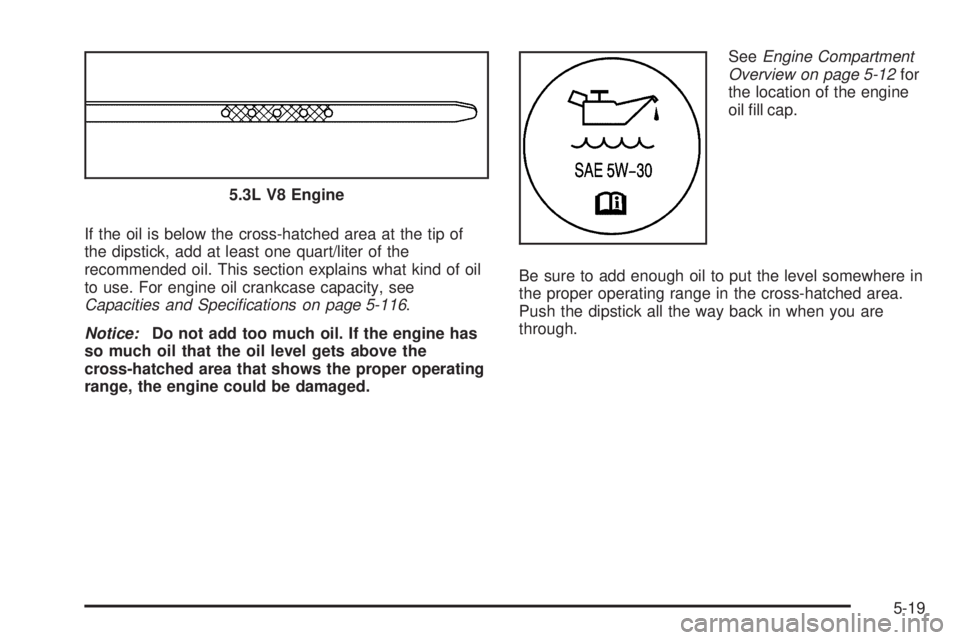
If the oil is below the cross-hatched area at the tip of
the dipstick, add at least one quart/liter of the
recommended oil. This section explains what kind of oil
to use. For engine oil crankcase capacity, see
Capacities and Specifications on page 5-116.
Notice:Do not add too much oil. If the engine has
so much oil that the oil level gets above the
cross-hatched area that shows the proper operating
range, the engine could be damaged.SeeEngine Compartment
Overview on page 5-12for
the location of the engine
oil ll cap.
Be sure to add enough oil to put the level somewhere in
the proper operating range in the cross-hatched area.
Push the dipstick all the way back in when you are
through. 5.3L V8 Engine
5-19
Page 291 of 440
Engine Oil Additives
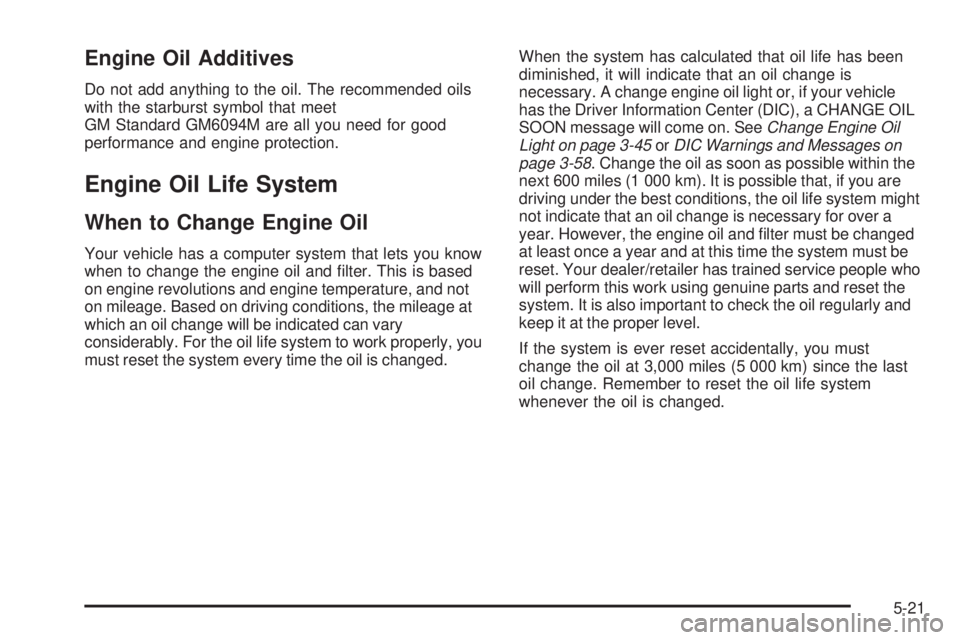
Do not add anything to the oil. The recommended oils
with the starburst symbol that meet
GM Standard GM6094M are all you need for good
performance and engine protection.
Engine Oil Life System
When to Change Engine Oil
Your vehicle has a computer system that lets you know
when to change the engine oil and lter. This is based
on engine revolutions and engine temperature, and not
on mileage. Based on driving conditions, the mileage at
which an oil change will be indicated can vary
considerably. For the oil life system to work properly, you
must reset the system every time the oil is changed.When the system has calculated that oil life has been
diminished, it will indicate that an oil change is
necessary. A change engine oil light or, if your vehicle
has the Driver Information Center (DIC), a CHANGE OIL
SOON message will come on. SeeChange Engine Oil
Light on page 3-45orDIC Warnings and Messages on
page 3-58. Change the oil as soon as possible within the
next 600 miles (1 000 km). It is possible that, if you are
driving under the best conditions, the oil life system might
not indicate that an oil change is necessary for over a
year. However, the engine oil and lter must be changed
at least once a year and at this time the system must be
reset. Your dealer/retailer has trained service people who
will perform this work using genuine parts and reset the
system. It is also important to check the oil regularly and
keep it at the proper level.
If the system is ever reset accidentally, you must
change the oil at 3,000 miles (5 000 km) since the last
oil change. Remember to reset the oil life system
whenever the oil is changed.
5-21