remote control BUICK LACROSSE 2008 Owner's Manual
[x] Cancel search | Manufacturer: BUICK, Model Year: 2008, Model line: LACROSSE, Model: BUICK LACROSSE 2008Pages: 440
Page 1 of 440
Seats and Restraint Systems........................... 1-1
Front Seats
............................................... 1-2
Rear Seats
............................................... 1-8
Safety Belts
.............................................. 1-9
Child Restraints
.......................................1-29
Airbag System
.........................................1-54
Restraint System Check
............................1-68
Features and Controls..................................... 2-1
Keys
........................................................ 2-3
Doors and Locks
......................................2-11
Windows
.................................................2-17
Theft-Deterrent Systems
............................2-20
Starting and Operating Your Vehicle
...........2-24
Mirrors
....................................................2-38
Object Detection Systems
..........................2-41
OnStar
®System
......................................2-43
Universal Home Remote System
................2-47
Storage Areas
.........................................2-52
Sunroof
..................................................2-54
Instrument Panel............................................. 3-1
Instrument Panel Overview
.......................... 3-4
Climate Controls
......................................3-20
Warning Lights, Gages, and Indicators
........3-30
Driver Information Center (DIC)
..................3-49
Audio System(s)
.......................................3-84Driving Your Vehicle....................................... 4-1
Your Driving, the Road, and Your Vehicle
..... 4-2
Towing
...................................................4-27
Service and Appearance Care.......................... 5-1
Service
..................................................... 5-3
Fuel
......................................................... 5-5
Checking Things Under the Hood
...............5-10
Headlamp Aiming
.....................................5-56
Bulb Replacement
....................................5-58
Windshield Replacement
...........................5-62
Windshield Wiper Blade Replacement
.........5-62
Tires
......................................................5-63
Appearance Care
.....................................5-99
Vehicle Identication
...............................5-107
Electrical System
....................................5-108
Capacities and Specications
...................5-116
Maintenance Schedule..................................... 6-1
Maintenance Schedule
................................ 6-2
Customer Assistance Information.................... 7-1
Customer Assistance and Information
........... 7-2
Reporting Safety Defects
...........................7-15
Vehicle Data Recording and Privacy
...........7-17
Index................................................................ 1
2008 Buick LaCrosse Owner ManualM
Page 75 of 440
Keys...............................................................2-3
Remote Keyless Entry (RKE) System................2-4
Remote Keyless Entry (RKE) System
Operation...................................................2-5
Remote Vehicle Start......................................2-8
Doors and Locks............................................2-11
Door Locks..................................................2-11
Power Door Locks........................................2-11
Delayed Locking...........................................2-12
Automatic Door Lock.....................................2-12
Programmable Automatic Door Unlock.............2-12
Rear Door Security Locks..............................2-12
Lockout Protection........................................2-13
Trunk..........................................................2-14
Windows........................................................2-17
Power Windows............................................2-18
Sun Visors...................................................2-19
Theft-Deterrent Systems..................................2-20
Content Theft-Deterrent.................................2-20
PASS-Key
®III ..............................................2-22
PASS-Key®III Operation...............................2-22Starting and Operating Your Vehicle................2-24
New Vehicle Break-In....................................2-24
Ignition Positions..........................................2-24
Retained Accessory Power (RAP)...................2-25
Starting the Engine.......................................2-26
Engine Coolant Heater..................................2-27
Active Fuel Management™.............................2-28
Automatic Transmission Operation...................2-29
Parking Brake..............................................2-32
Shifting Into PARK (P)...................................2-33
Shifting Out of PARK (P)...............................2-35
Parking Over Things That Burn.......................2-36
Engine Exhaust............................................2-37
Running the Vehicle While Parked..................2-37
Mirrors...........................................................2-38
Manual Rearview Mirror.................................2-38
Manual Rearview Mirror with OnStar
®..............2-38
Automatic Dimming Rearview Mirror................2-39
Automatic Dimming Rearview Mirror
with OnStar
®............................................2-39
Outside Power Mirrors...................................2-40
Outside Power Heated Mirrors........................2-40
Outside Convex Mirror...................................2-40
Section 2 Features and Controls
2-1
Page 76 of 440
Object Detection Systems...............................2-41
Ultrasonic Rear Parking Assist (URPA)............2-41
OnStar
®System.............................................2-43
Universal Home Remote System......................2-47
Universal Home Remote System.....................2-47
Universal Home Remote System Operation......2-48Storage Areas................................................2-52
Glove Box...................................................2-52
Cupholder(s)................................................2-52
Center Console Storage.................................2-53
Convenience Net..........................................2-54
Sunroof.........................................................2-54
Section 2 Features and Controls
2-2
Page 82 of 440
Remote Vehicle Start
Your vehicle may have a remote starting feature that
allows you to start the engine from outside the vehicle.
It may also start the vehicle’s heating or air conditioning
systems and rear window defogger. When the remote
start system is active and the vehicle has an automatic
climate control system, it will automatically regulate
the inside temperature. Normal operation of these
systems will return after the ignition key is turned to
ON/RUN.
Laws in some communities may restrict the use of
remote starters. For example, some laws may require a
person using remote start to have the vehicle in view
when doing so. Check local regulations for any
requirements on remote starting of vehicles.
Do not use the remote start feature if your vehicle is
low on fuel. Your vehicle may run out of fuel.
There are other conditions which can affect the
performance of the transmitter, seeRemote Keyless
Entry (RKE) System on page 2-4for additional
information.
/(Remote Start):This button will be on the RKE
transmitter if you have remote start.
To start the vehicle using the remote start feature:
1. Aim the transmitter at the vehicle.
2. Press and release the transmitter’s lock button,
then immediately press and hold the transmitter’s
remote start button for about four seconds or
until the vehicle’s turn signal lamps ash. The doors
will lock.
When the vehicle starts, the parking lamps turn on
and remain on while the engine is running.
The remote start feature provides two separate starts
per ignition cycle, each with 10 minutes of engine
running time, or one start with a time extension. The
rst start must expire or be canceled to get two separate
10 minute starts.
If it is the rst remote start since the vehicle has been
driven, repeat the previous steps, while the engine is still
running, to extend the engine running time by 10 minutes
from the time you repeat the steps for remote starting.
The remote start running time can be extended one time
and only after the rst remote start.
2-8
Page 88 of 440
Trunk
{CAUTION:
It can be dangerous to drive with the trunk lid
open because carbon monoxide (CO) gas can
come into your vehicle. You cannot see or
smell CO. It can cause unconsciousness and
even death. If you must drive with the trunk lid
open or if electrical wiring or other cable
connections must pass through the seal
between the body and the trunk lid:
Make sure all other windows are shut.
Turn the fan on your heating or cooling
system to its highest speed and select the
control setting that will force outside air
into your vehicle. See Climate Control
System.
If you have air outlets on or under the
instrument panel, open them all the way.
SeeEngine Exhaust on page 2-37.
Opening the Trunk
To open the trunk from the outside, use the Remote
Keyless Entry (RKE) transmitter. SeeRemote Keyless
Entry (RKE) System Operation on page 2-5for more
information.
The ignition must be off, or the transmission must be in
PARK (P) to open the trunk.
2-14
Page 120 of 440
OnStar Steering Wheel Controls
Your vehicle may have a Talk/Mute button that can be
used to interact with OnStar Hands-Free Calling.
SeeAudio Steering Wheel Controls on page 3-102for
more information.
On some vehicles, you may have to hold the button for
a few seconds and give the command “ONSTAR” to
activate the OnStar Hands-Free Calling.
On some vehicles, the mute button can be used to dial
numbers into voicemail systems, or to dial phone
extensions. See the OnStar Owner’s Guide for more
information.
How OnStar Service Works
Your vehicle’s OnStar system has the capability of
recording and transmitting vehicle information. This
information is automatically sent to an OnStar Call
Center at the time of an OnStar button press,
Emergency button press or if your airbags or AACN
system deploys. The vehicle information usually includes
your GPS location and, in the event of a crash,
additional information regarding the accident that your
vehicle has been involved in (e.g. the direction from
which your vehicle was hit). When you use the VirtualAdvisor feature of OnStar Hands-Free Calling, your
vehicle also sends OnStar your GPS location so that we
can provide you with location-based services.
OnStar service cannot work unless your vehicle is in a
place where OnStar has an agreement with a wireless
service provider for service in that area. OnStar
service also cannot work unless you are in a place
where the wireless service provider OnStar has hired for
that area has coverage, network capacity and reception
when the service is needed, and technology that is
compatible with the OnStar service. Not all services are
available everywhere, particularly in remote or
enclosed areas, or at all times.
Location information about your vehicle is only available
if the GPS satellite signals are unobstructed and
available.
Your vehicle must have a working electrical system
(including adequate battery power) for the OnStar
equipment to operate. There are other problems OnStar
cannot control that may prevent OnStar from providing
OnStar service to you at any particular time or place.
Some examples are damage to important parts of your
vehicle in an accident, hills, tall buildings, tunnels,
weather or wireless phone network congestion.
2-46
Page 122 of 440
Universal Home Remote System
Operation
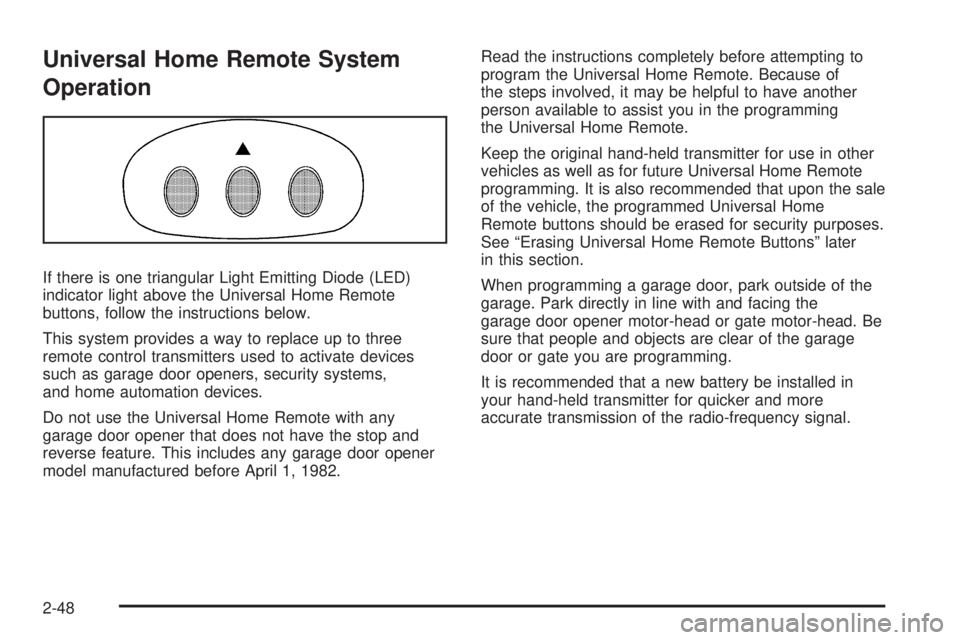
If there is one triangular Light Emitting Diode (LED)
indicator light above the Universal Home Remote
buttons, follow the instructions below.
This system provides a way to replace up to three
remote control transmitters used to activate devices
such as garage door openers, security systems,
and home automation devices.
Do not use the Universal Home Remote with any
garage door opener that does not have the stop and
reverse feature. This includes any garage door opener
model manufactured before April 1, 1982.Read the instructions completely before attempting to
program the Universal Home Remote. Because of
the steps involved, it may be helpful to have another
person available to assist you in the programming
the Universal Home Remote.
Keep the original hand-held transmitter for use in other
vehicles as well as for future Universal Home Remote
programming. It is also recommended that upon the sale
of the vehicle, the programmed Universal Home
Remote buttons should be erased for security purposes.
See “Erasing Universal Home Remote Buttons” later
in this section.
When programming a garage door, park outside of the
garage. Park directly in line with and facing the
garage door opener motor-head or gate motor-head. Be
sure that people and objects are clear of the garage
door or gate you are programming.
It is recommended that a new battery be installed in
your hand-held transmitter for quicker and more
accurate transmission of the radio-frequency signal.
2-48
Page 124 of 440
4. At the same time, press and hold both the Universal
Home Remote button that you would like to use to
control the garage door and the hand-held
transmitter button. Do not release the Universal
Home Remote button or the hand-held transmitter
button until Step 4 has been completed.
Some entry gates and garage door openers may
require you to substitute Step 3 with the procedure
noted in “Gate Operator and Canadian
Programming” later in this section.
5. The indicator light on the Universal Home Remote
will ash slowly at rst and then rapidly after
Universal Home Remote successfully receives the
frequency signal from the hand-held transmitter.
Release both buttons.
6. Press and hold the newly-trained Universal Home
Remote button and observe the indicator light.
If the indicator light stays on continuously,
the programming is complete and your garage door
should move when the Universal Home Remote
button is pressed and released. You do not need to
continue the programming Steps 6 through 8 and
can stop here.
If the Universal Home Remote indicator light blinks
rapidly for two seconds and then turns to a
constant light, continue with the programming Steps
6 through 8.It may be helpful to have another person available
to assist with the remaining steps.
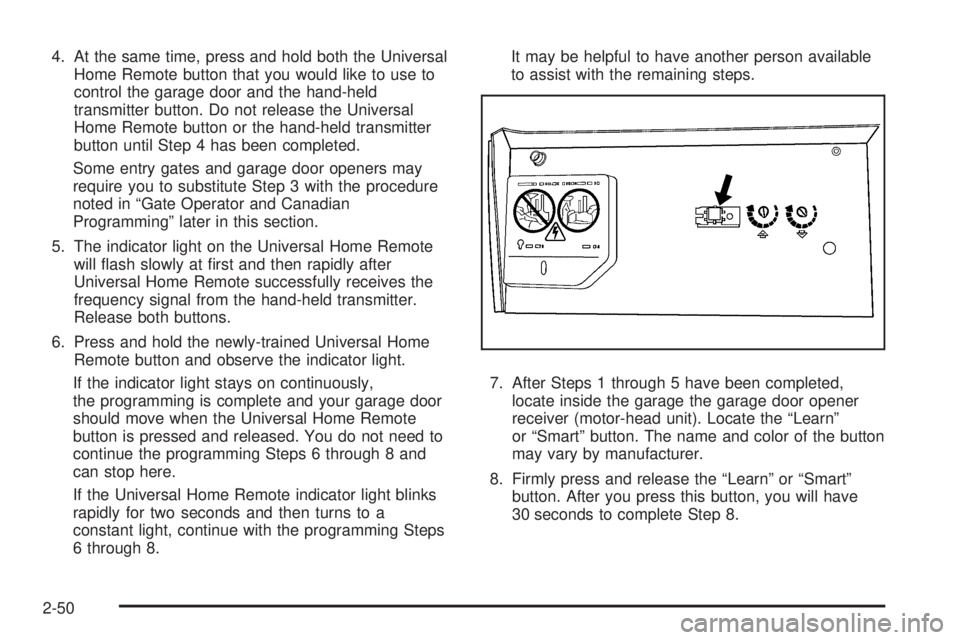
7. After Steps 1 through 5 have been completed,
locate inside the garage the garage door opener
receiver (motor-head unit). Locate the “Learn”
or “Smart” button. The name and color of the button
may vary by manufacturer.
8. Firmly press and release the “Learn” or “Smart”
button. After you press this button, you will have
30 seconds to complete Step 8.
2-50
Page 125 of 440
9. Immediately return to the vehicle. Firmly press and
hold the Universal Home Remote button, chosen in
Step 3 to control the garage door, for two
seconds, and then release it. If the garage door
does not move, press and hold the same button a
second time for two seconds, and then release
it. Again, if the door does not move, press and hold
the same button a third time for two seconds,
and then release.
The Universal Home Remote should now activate
the garage door.
To program the remaining two Universal Home Remote
buttons, begin with Step 2 of “Programming the
Universal Home Remote System.” Do not repeat Step 1,
as this will erase all previous programming from the
Universal Home Remote buttons.
Gate Operator and Canadian
Programming
If you have questions or need help programming the
Universal Home Remote System, call 1-800-355-3515 or
go to www.homelink.com.
Canadian radio-frequency laws require transmitter
signals to time out or quit after several seconds of
transmission. This may not be long enough for Universal
Home Remote to pick up the signal during programming.
Similarly, some U.S. gate operators are manufactured
to time out in the same manner.If you live in Canada, or you are having difficulty
programming a gate operator or garage door opener by
using the “Programming Universal Home Remote”
procedures, regardless of where you live, replace Step
3 under “Programming Universal Home Remote”
with the following:
Continue to press and hold the Universal Home Remote
button while you press and release every two seconds
(cycle) the hand-held transmitter button until the
frequency signal has been successfully accepted by the
Universal Home Remote. The Universal Home Remote
indicator light will ash slowly at rst and then rapidly.
Proceed with Step 4 under “Programming Universal
Home Remote” to complete.
Using Universal Home Remote
Press and hold the appropriate Universal Home Remote
button for at least half of a second. The indicator light
will come on while the signal is being transmitted.
Operation can only occur with the vehicle in
ACC/ACCESSORY or ON/RUN and until 10 minutes
after the ignition is turned off.
2-51
Page 144 of 440
Interior Lamps
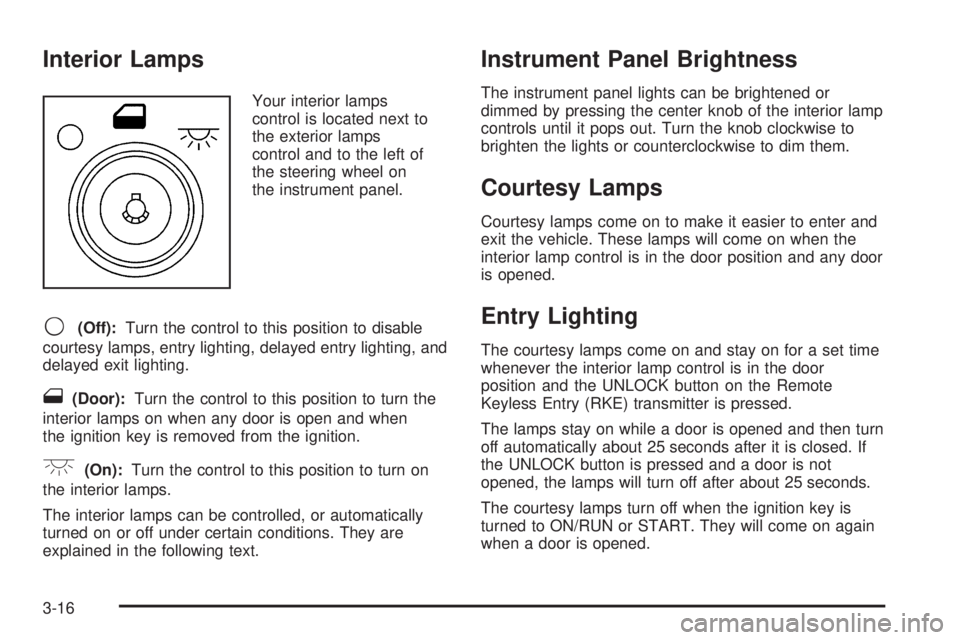
Your interior lamps
control is located next to
the exterior lamps
control and to the left of
the steering wheel on
the instrument panel.
9(Off):Turn the control to this position to disable
courtesy lamps, entry lighting, delayed entry lighting, and
delayed exit lighting.
1(Door):Turn the control to this position to turn the
interior lamps on when any door is open and when
the ignition key is removed from the ignition.
+(On):Turn the control to this position to turn on
the interior lamps.
The interior lamps can be controlled, or automatically
turned on or off under certain conditions. They are
explained in the following text.
Instrument Panel Brightness
The instrument panel lights can be brightened or
dimmed by pressing the center knob of the interior lamp
controls until it pops out. Turn the knob clockwise to
brighten the lights or counterclockwise to dim them.
Courtesy Lamps
Courtesy lamps come on to make it easier to enter and
exit the vehicle. These lamps will come on when the
interior lamp control is in the door position and any door
is opened.
Entry Lighting
The courtesy lamps come on and stay on for a set time
whenever the interior lamp control is in the door
position and the UNLOCK button on the Remote
Keyless Entry (RKE) transmitter is pressed.
The lamps stay on while a door is opened and then turn
off automatically about 25 seconds after it is closed. If
the UNLOCK button is pressed and a door is not
opened, the lamps will turn off after about 25 seconds.
The courtesy lamps turn off when the ignition key is
turned to ON/RUN or START. They will come on again
when a door is opened.
3-16