sensor BUICK LACROSSE 2010 User Guide
[x] Cancel search | Manufacturer: BUICK, Model Year: 2010, Model line: LACROSSE, Model: BUICK LACROSSE 2010Pages: 414
Page 218 of 414
7-6 Climate Controls
0(Defrost):Clears the
windshield of fog or frost more
quickly. Air is directed to the
windshield.
For best results, clear all snow and
ice from windshield before
defrosting.
#(Air Conditioning): Press to
turn the air conditioning system on
or off. If the fan is turned off or the
outside temperature falls below
freezing, the air conditioner will
not run.
Pressing this button cancels
automatic air conditioning and turns
off the air conditioner. Press AUTO
to return to automatic operation and
the air conditioner runs
automatically as needed. When the
indicator light is on, the air
conditioner runs automatically to
cool the air inside the vehicle or to
dry the air needed to defog the
windshield faster.
>//(Recirculation/Auto
Recirculation): Press to change to
automatic control of air recirculation
inside the vehicle. When the auto
recirculation indicator light is on, the
air is automatically recirculated as
needed to help quickly cool the air
inside the vehicle.
In auto recirculation control, the Air
Quality Control system may operate
when pollution is detected. To adjust
the sensitivity of the Air Quality
Control, see Climate and Air Quality
under Vehicle Personalization
on
page 4‑38.
When the
>indicator light is on, air
is recirculated inside the vehicle.
If both indicator lights are off,
outside air will flow into the vehicle.
Press AUTO or
/to return to
automatic operation. Auto Defog:
The climate control
system may have a sensor to
automatically detect high humidity
inside the vehicle. When high
humidity is detected, the climate
control system may adjust to
outside air supply and turn on the
air conditioner. The fan speed may
slightly increase to help prevent
fogging. If the climate control
system does not detect possible
window fogging, it returns to normal
operation. To turn Auto Defog off or
on, see Climate and Air Quality
under Vehicle Personalization
on
page 4‑38.
Page 219 of 414
Climate Controls 7-7
Rear Window Defogger
=(Rear Window Defogger):
Press to turn the rear window
defogger on or off.
The rear window defogger turns off
automatically after about
10 minutes. If turned on again it
runs for about 5 minutes before
turning off. The defogger can also
be turned off by turning the ignition
to ACC/ACCESSORY or
LOCK/OFF.
The rear window defogger can be
set to automatic operation, see
Climate and Air Quality under
Vehicle Personalization
on
page 4‑38. When auto rear defog is
selected, the rear window defogger
turns on automatically when the
interior temperature is cold and the
outside temperature is about 40°F
and below. The auto rear defogger
turns off automatically after about
10 minutes, or after 5 minutes if the
outside temperature is not as cold. For vehicles with heated outside
rearview mirrors, they turn on when
the rear window defogger button is
on and helps to clear fog or frost
from the surface of the mirror. See
Heated Mirrors on page 1‑16.
Notice:
Do not try to clear frost
or other material from the inside
of the front windshield and rear
window with a razor blade or
anything else that is sharp. This
may damage the rear window
defogger grid and affect your
radio's ability to pick up stations
clearly. The repairs wouldn't be
covered by your warranty.((Heated Steering Wheel): For
vehicles with this feature, press to
turn on or off. See Heated Steering
Wheel on page 4‑7. Remote Start Climate Control
Operation:
For vehicles with the
remote vehicle start feature, the
climate control system may run
when the vehicle is started remotely.
The system uses the driver's
previous settings to heat or cool the
inside of the vehicle. See Remote
Vehicle Start on page 1‑8.
The rear window defogger turns on
if it is cold outside.
Sensors
The solar sensor, located on top of
the instrument panel near the
windshield monitors the solar heat.
The climate control system uses the
sensor information to adjust the
temperature, fan speed,
recirculation, and air delivery mode
for best comfort.
Do not cover the sensors or the
automatic climate control system
may not work properly.
Page 262 of 414
8-40 Driving and Operating
Using Cruise Control on Hills
How well the cruise control works
on hills depends upon the vehicle's
speed, load, and the steepness of
the hills. When going up steep hills,
you might have to step on the
accelerator pedal to maintain the
vehicle's speed. When going
downhill, you might have to brake or
shift to a lower gear to maintain the
vehicle's speed. When the brakes
are applied the cruise control
shuts off.Ending Cruise Control
There are three ways to disengage
the cruise control:
.Step lightly on the brake pedal
or clutch; when cruise control
disengages, the indicator light
will not be lit.
.Press\.
.Press5to turn the cruise
control system off completely.
The cruise control cannot be
resumed.
Erasing Speed Memory
The cruise control set speed
memory is erased when the cruise
control or the ignition is turned off.
Object Detection
Systems
Ultrasonic Parking Assist
For vehicles with the Ultrasonic
Rear Parking Assist (URPA) system,
it assists the driver with parking and
avoiding objects while in
R (Reverse). URPA operates at
speeds less than 8 km/h (5 mph),
and the sensors on the rear bumper
detect objects up to 2.5 m (8 ft.)
behind the vehicle, and at least
20 cm (8 in.) off the ground.
Page 264 of 414
8-42 Driving and Operating
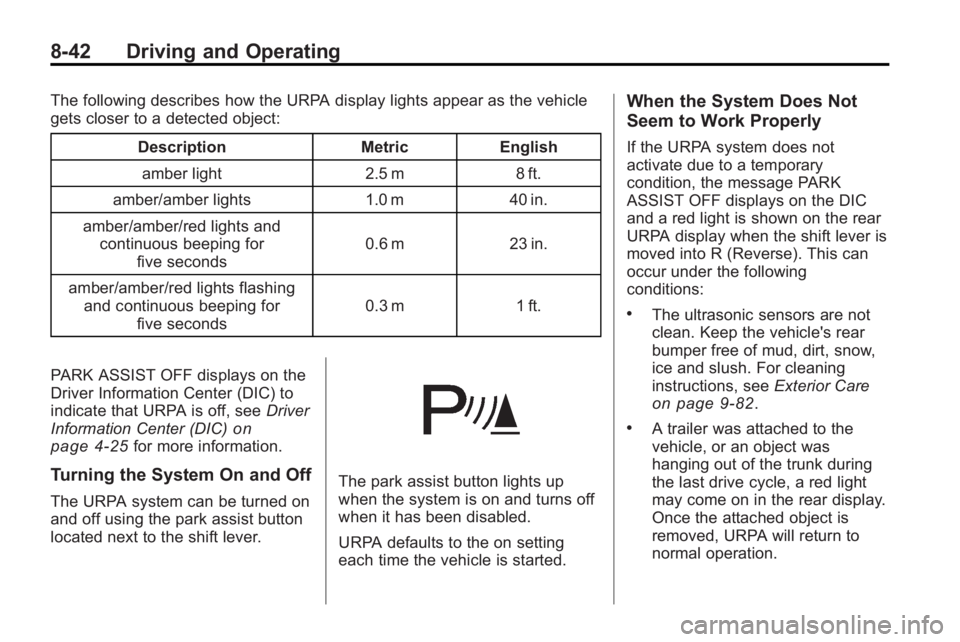
The following describes how the URPA display lights appear as the vehicle
gets closer to a detected object:Description Metric Englishamber light 2.5 m 8 ft.
amber/amber lights 1.0 m 40 in.
amber/amber/red lights and continuous beeping for five seconds 0.6 m 23 in.
amber/amber/red lights flashing and continuous beeping for five seconds 0.3 m 1 ft.
PARK ASSIST OFF displays on the
Driver Information Center (DIC) to
indicate that URPA is off, see Driver
Information Center (DIC)
on
page 4‑25for more information.
Turning the System On and Off
The URPA system can be turned on
and off using the park assist button
located next to the shift lever.
The park assist button lights up
when the system is on and turns off
when it has been disabled.
URPA defaults to the on setting
each time the vehicle is started.
When the System Does Not
Seem to Work Properly
If the URPA system does not
activate due to a temporary
condition, the message PARK
ASSIST OFF displays on the DIC
and a red light is shown on the rear
URPA display when the shift lever is
moved into R (Reverse). This can
occur under the following
conditions:
.The ultrasonic sensors are not
clean. Keep the vehicle's rear
bumper free of mud, dirt, snow,
ice and slush. For cleaning
instructions, see Exterior Care
on page 9‑82.
.A trailer was attached to the
vehicle, or an object was
hanging out of the trunk during
the last drive cycle, a red light
may come on in the rear display.
Once the attached object is
removed, URPA will return to
normal operation.
Page 266 of 414
8-44 Driving and Operating
SBZA Detection Zones
The SBZA sensor covers a zone
of approximately one lane over
from both sides of the vehicle,
3.5 m (11 ft.). This zone starts at
each side mirror and goes back
approximately 5.0 m (16 ft.). The
height of the zone is approximately
between 0.5 m (1.5 ft.) and
2.0 m (6 ft.) off the ground.
The SBZA detection zones do not
change if the vehicle is towing a
trailer. So be extra careful when
changing lanes while towing a
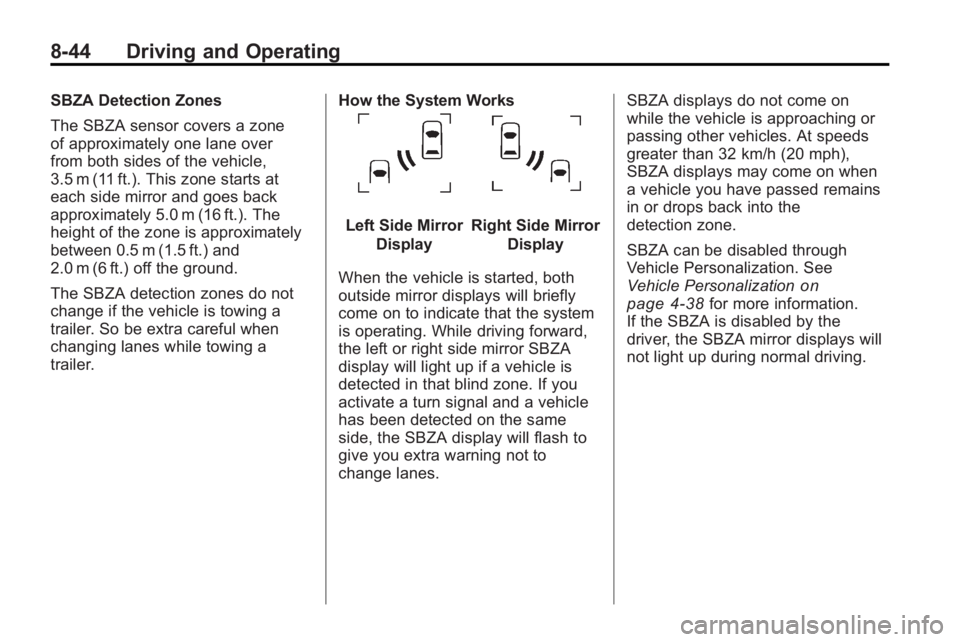
trailer.How the System Works
Left Side Mirror
DisplayRight Side Mirror Display
When the vehicle is started, both
outside mirror displays will briefly
come on to indicate that the system
is operating. While driving forward,
the left or right side mirror SBZA
display will light up if a vehicle is
detected in that blind zone. If you
activate a turn signal and a vehicle
has been detected on the same
side, the SBZA display will flash to
give you extra warning not to
change lanes. SBZA displays do not come on
while the vehicle is approaching or
passing other vehicles. At speeds
greater than 32 km/h (20 mph),
SBZA displays may come on when
a vehicle you have passed remains
in or drops back into the
detection zone.
SBZA can be disabled through
Vehicle Personalization. See
Vehicle Personalization
on
page 4‑38for more information.
If the SBZA is disabled by the
driver, the SBZA mirror displays will
not light up during normal driving.
Page 267 of 414
Driving and Operating 8-45
When the System Does Not Seem
To Work Properly
Occasional missed alerts can occur
under normal circumstances and will
increase in wet conditions. The
system does not need to be
serviced due to an occasional
missed alert. The number of missed
alerts will increase with increased
rainfall or road spray.
If the SBZA displays do not light up
when the system is on and vehicles
are in the blind zone, the system
may need service. Take the vehicle
to your dealer/retailer.
SBZA is designed to ignore
stationary objects; however, the
system may occasionally light up
due to guard rails, signs, trees,
shrubs, and other stationary objects.
This is normal system operation, the
vehicle does not need service.SBZA does not operate when the
left or right corners of the rear
bumper are covered with mud, dirt,
snow, ice, slush, or in heavy
rainstorms. For cleaning
instructions, see
Exterior Care
on
page 9‑82. If the infotainment
display still shows the SIDE BLIND
ZONE SYS. UNAVAILABLE
message after cleaning the bumper,
see your dealer/retailer.
The SBZA displays may remain on
if a trailer is attached to the vehicle,
or a bicycle or object is extending
out to either side of the vehicle.
When SBZA is disabled for any
reason other than the driver turning
it off, the driver will not be able to
turn SBZA back on using Vehicle
Personalization. The SIDE BLIND
ZONE ALERT ON option will not be
selectable if the conditions for
normal system operation are not
met. Until normal operating
conditions for SBZA are met, you
should not rely upon SBZA while
driving. SBZA Error Messages
The following messages may
appear on the infotainment display:
SIDE BLIND ZONE ALERT
SYSTEM OFF:
This message
indicates that the driver has turned
the system off.
SIDE BLIND ZONE SYS.
UNAVAILABLE: This message
indicates that the SBZA system is
disabled because the sensor is
blocked and cannot detect vehicles
in the blind zone. The sensor may
be blocked by mud, dirt, snow, ice,
slush, or even heavy rainstorms.
This message may also activate
during heavy rain or due to road
spray. The vehicle does not need
service. For cleaning, see Exterior
Care on page 9‑82.
Page 322 of 414
9-40 Vehicle Care
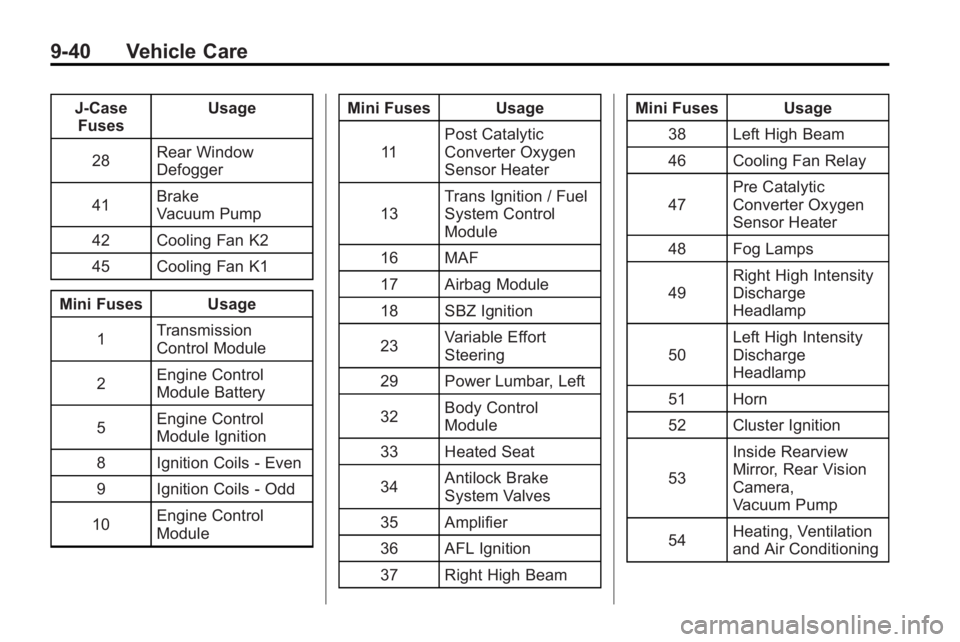
J-CaseFuses Usage
28 Rear Window
Defogger
41 Brake
Vacuum Pump
42 Cooling Fan K2
45 Cooling Fan K1
Mini Fuses Usage 1 Transmission
Control Module
2 Engine Control
Module Battery
5 Engine Control
Module Ignition
8 Ignition Coils ‐Even
9 Ignition Coils ‐Odd
10 Engine Control
Module Mini Fuses Usage
11 Post Catalytic
Converter Oxygen
Sensor Heater
13 Trans Ignition / Fuel
System Control
Module
16 MAF
17 Airbag Module
18 SBZ Ignition
23 Variable Effort
Steering
29 Power Lumbar, Left
32 Body Control
Module
33 Heated Seat
34 Antilock Brake
System Valves
35 Amplifier
36 AFL Ignition
37 Right High Beam Mini Fuses Usage
38 Left High Beam
46 Cooling Fan Relay
47 Pre Catalytic
Converter Oxygen
Sensor Heater
48 Fog Lamps
49 Right High Intensity
Discharge
Headlamp
50 Left High Intensity
Discharge
Headlamp
51 Horn
52 Cluster Ignition
53 Inside Rearview
Mirror, Rear Vision
Camera,
Vacuum Pump
54 Heating, Ventilation
and Air Conditioning
Page 323 of 414
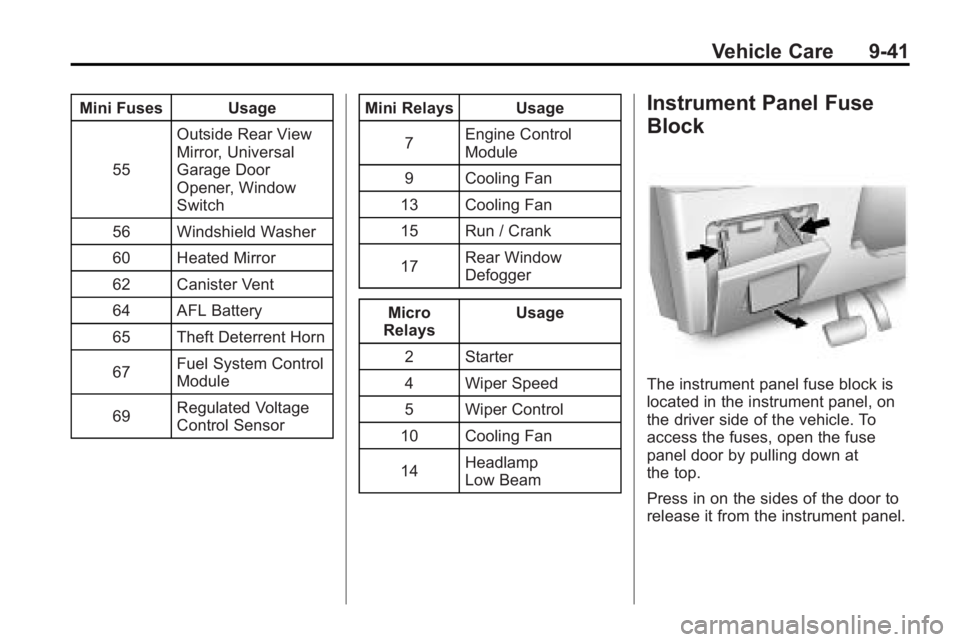
Vehicle Care 9-41
Mini Fuses Usage55 Outside Rear View
Mirror, Universal
Garage Door
Opener, Window
Switch
56 Windshield Washer
60 Heated Mirror
62 Canister Vent
64 AFL Battery
65 Theft Deterrent Horn
67 Fuel System Control
Module
69 Regulated Voltage
Control Sensor Mini Relays Usage
7 Engine Control
Module
9 Cooling Fan
13 Cooling Fan
15 Run / Crank
17 Rear Window
Defogger
Micro
Relays Usage
2 Starter
4 Wiper Speed
5 Wiper Control
10 Cooling Fan
14 Headlamp
Low BeamInstrument Panel Fuse
Block
The instrument panel fuse block is
located in the instrument panel, on
the driver side of the vehicle. To
access the fuses, open the fuse
panel door by pulling down at
the top.
Press in on the sides of the door to
release it from the instrument panel.
Page 336 of 414
9-54 Vehicle Care
How to Check
Use a good quality pocket-type
gage to check tire pressure. You
cannot tell if your tires are
properly inflated simply by
looking at them. Radial tires may
look properly inflated even when
they are under-inflated. Check
the tire's inflation pressure when
the tires are cold. Cold means
your vehicle has been sitting for
at least three hours or driven no
more than 1.6 km (1 mile).
Remove the valve cap from the
tire valve stem. Press the tire
gage firmly onto the valve to get
a pressure measurement. If the
cold tire inflation pressure
matches the recommended
pressure on the Tire and
Loading Information label, no
further adjustment is necessary.
If the inflation pressure is low,
add air until you reach the
recommended amount.If you overfill the tire, release air
by pushing on the metal stem in
the center of the tire valve.
Re-check the tire pressure with
the tire gage.
Be sure to put the valve caps
back on the valve stems. They
help prevent leaks by keeping
out dirt and moisture.
Tire Pressure Monitor
System
The Tire Pressure Monitor System
(TPMS) uses radio and sensor
technology to check tire pressure
levels. The TPMS sensors monitor
the air pressure in your vehicle's
tires and transmit tire pressure
readings to a receiver located in the
vehicle.
Each tire, including the spare
(if provided), should be checked
monthly when cold and inflated to
the inflation pressure recommended
by the vehicle manufacturer on the
vehicle placard or tire inflation pressure label. (If your vehicle has
tires of a different size than the size
indicated on the vehicle placard or
tire inflation pressure label, you
should determine the proper tire
inflation pressure for those tires.)
As an added safety feature, your
vehicle has been equipped with a
tire pressure monitoring system
(TPMS) that illuminates a low tire
pressure telltale when one or more
of your tires is significantly
under-inflated.
Accordingly, when the low tire
pressure telltale illuminates, you
should stop and check your tires as
soon as possible, and inflate them
to the proper pressure. Driving on a
significantly under-inflated tire
causes the tire to overheat and can
lead to tire failure. Under-inflation
also reduces fuel efficiency and tire
tread life, and may affect the
vehicle's handling and stopping
ability.
Page 337 of 414
Vehicle Care 9-55
Please note that the TPMS is
not a substitute for proper tire
maintenance, and it is the driver's
responsibility to maintain correct tire
pressure, even if under-inflation has
not reached the level to trigger
illumination of the TPMS low tire
pressure telltale.
Your vehicle has also been
equipped with a TPMS malfunction
indicator to indicate when the
system is not operating properly.
The TPMS malfunction indicator is
combined with the low tire pressure
telltale. When the system detects a
malfunction, the telltale will flash for
approximately one minute and then
remain continuously illuminated.
This sequence will continue upon
subsequent vehicle start-ups as
long as the malfunction exists.
When the malfunction indicator is
illuminated, the system may not be
able to detect or signal low tire
pressure as intended. TPMS
malfunctions may occur for a variety
of reasons, including the installation
of replacement or alternate tires orwheels on the vehicle that prevent
the TPMS from functioning properly.
Always check the TPMS malfunction
telltale after replacing one or more
tires or wheels on your vehicle to
ensure that the replacement or
alternate tires and wheels allow the
TPMS to continue to function
properly.
See
Tire Pressure Monitor
Operation
on page 9‑55for
additional information.
Federal Communications
Commission (FCC) and
Industry and Science Canada
See Radio Frequency Statement
(US, Can)on page 12‑16for
information regarding Part 15 of the
Federal Communications
Commission (FCC) Rules and
RSS-210/211 of Industry and
Science Canada.
Tire Pressure Monitor
Operation
This vehicle may have a Tire
Pressure Monitor System (TPMS).
The TPMS is designed to warn the
driver when a low tire pressure
condition exists. TPMS sensors are
mounted onto each tire and wheel
assembly, excluding the spare tire
and wheel assembly. The TPMS
sensors monitor the air pressure in
the vehicle's tires and transmits the
tire pressure readings to a receiver
located in the vehicle.
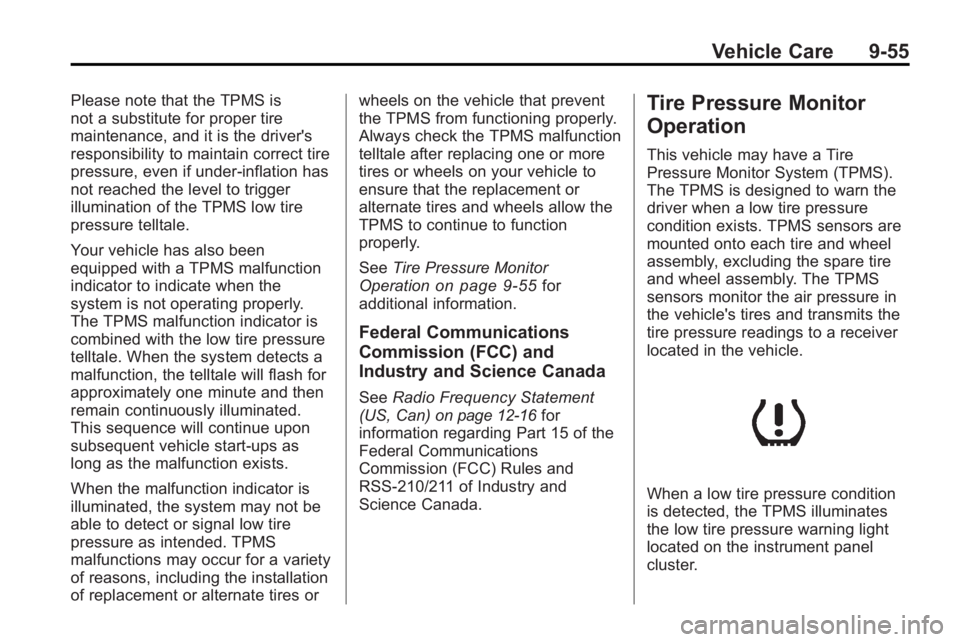
When a low tire pressure condition
is detected, the TPMS illuminates
the low tire pressure warning light
located on the instrument panel
cluster.