audio BUICK LACROSSE 2010 Owner's Guide
[x] Cancel search | Manufacturer: BUICK, Model Year: 2010, Model line: LACROSSE, Model: BUICK LACROSSE 2010Pages: 414
Page 209 of 414
Infotainment System 6-63
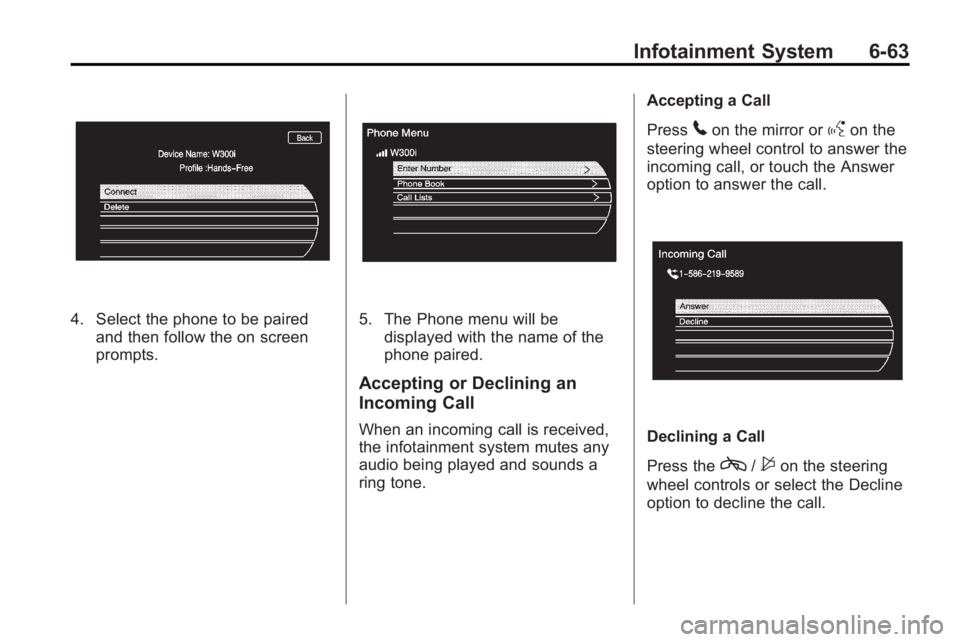
4. Select the phone to be pairedand then follow the on screen
prompts.5. The Phone menu will bedisplayed with the name of the
phone paired.
Accepting or Declining an
Incoming Call
When an incoming call is received,
the infotainment system mutes any
audio being played and sounds a
ring tone. Accepting a Call
Press
5on the mirror orgon the
steering wheel control to answer the
incoming call, or touch the Answer
option to answer the call.
Declining a Call
Press the
c/$on the steering
wheel controls or select the Decline
option to decline the call.
Page 242 of 414
8-20 Driving and Operating
To place the ignition in ON/RUN/
START from OFF without starting
the engine, press the button two
times without your foot on the brake
pedal.
The battery could be drained if you
leave the ignition in the ON/RUN/
START position with the engine off.
You may not be able to start the
vehicle if the battery is allowed to
drain for an extended period of time.
Retained Accessory
Power (RAP)
These vehicle accessories can be
used for up to 10 minutes after the
engine is turned off:
.Audio System
.Power Windows
.Sunroof (if equipped)
.Auxiliary Power OutletPower to the audio system will
continue to operate for up to
10 minutes or until the driver door is
opened.
Power to the power windows and
sunroof will continue to operate for
up to 10 minutes or until any door is
opened.
All these features will work when the
key is in ON/RUN or ACC/
ACCESSORY.
Starting the Engine
Move the shift lever to P (Park) or
N (Neutral). The engine will not start
in any other position. To restart the
engine when the vehicle is already
moving, use N (Neutral) only.
Notice:
Do not try to shift to
P (Park) if the vehicle is moving.
If you do, you could damage the
transmission. Shift to P (Park)
only when the vehicle is stopped. Notice:
The engine is designed to
work with the electronics in the
vehicle. If you add electrical parts
or accessories, you could change
the way the engine operates.
Before adding electrical
equipment, check with your
dealer/retailer. If you do not, the
engine might not perform
properly. Any resulting damage
would not be covered by the
vehicle warranty.
Starting Procedure (Key Access)
1. With your foot off the accelerator
pedal, turn the ignition key to
START. When the engine starts,
let go of the ignition.
The idle speed will go down as
your engine gets warm. Do not
race the engine immediately
after starting it. Operate the
engine and transmission gently
to allow the oil to warm up and
lubricate all moving parts.
Page 403 of 414
INDEX i-1
A
Accessories andModifications . . . . . . . . . . . . . . . . . . 9-3
Accessory Power . . . . . . . . . . . . . . 8-20
Adaptive Forward Lighting (AFL) . . . . . . . . . . . . . . . . . 5-3
Add-On Electrical
Equipment . . . . . . . . . . . . . . . . . . . 8-60
Adding Equipment to the Airbag-Equipped Vehicle . . . . . 2-38
Adjustments
Lumbar, Front Seats . . . . . . . . . . . 2-5
Air Cleaner/Filter, Engine . . . . . . 9-15
Air Filter, Passenger Compartment . . . . . . . . . . . . . . . . . 7-8
Air Intake . . . . . . . . . . . . . . . . . . . . . . . 7-8
Air Vents . . . . . . . . . . . . . . . . . . . . . . . 7-8
Airbag System
Check . . . . . . . . . . . . . . . . . . . . . . . . 2-39
How Does an AirbagRestrain? . . . . . . . . . . . . . . . . . . . 2-30
Passenger Sensing System . . . . . . . . . . . . . . . . . . . . . . 2-32 Airbag System (cont.)
What Makes an Airbag
Inflate? . . . . . . . . . . . . . . . . . . . . . . 2-30
What Will You See After
an Airbag Inflates? . . . . . . . . . . 2-30
When Should an Airbag Inflate? . . . . . . . . . . . . . . . . . . . . . . 2-28
Where Are the Airbags? . . . . . . 2-27
Airbags
Adding Equipment to theVehicle . . . . . . . . . . . . . . . . . . . . . . 2-38
Passenger Status Indicator . . . 4-16
Readiness Light . . . . . . . . . . . . . . 4-16
Servicing Airbag-Equipped Vehicles . . . . . . . . . . . . . . . . . . . . . 2-37
System Check . . . . . . . . . . . . . . . . 2-24
Alarm System Anti-Theft . . . . . . . . . . . . . . . . . . . . . 1-13
All-Wheel Drive . . . . . . . . . . . . . . . . 8-30
AM-FM Radio . . . . . . . . . . . . . . . . . . 6-12
Antenna Satellite Radio . . . . . . . . . . . . . . . . 6-19
Anti-Theft
Alarm System . . . . . . . . . . . . . . . . 1-13
Alarm System Messages . . . . . 4-37 Antilock Brake
System (ABS) . . . . . . . . . . . . . . . . 8-31
Warning Light . . . . . . . . . . . . . . . . . 4-21
Appearance Care Exterior . . . . . . . . . . . . . . . . . . . . . . . 9-82
Interior . . . . . . . . . . . . . . . . . . . . . . . . 9-86
Assistance Program,
Roadside . . . . . . . . . . . . . . . . . . . . . 12-6
Audio Players . . . . . . . . . . . . . . . . . 6-20 CD . . . . . . . . . . . . . . . . . . . . . . . . . . . 6-20
Audio System
Backglass Antenna . . . . . . . . . . . 6-19
Radio Reception . . . . . . . . . . . . . . 6-18
Theft-Deterrent Feature . . . . . . . . 6-2
Automatic Headlamp System . . . . . . . . . . . . . 5-3
Automatic Climate Control System . . . . . . . . . . . . . . . . . . . . . . . . 7-1
Automatic Transmission . . . . . . . 8-27 Fluid . . . . . . . . . . . . . . . . . . . . . . . . . . 9-15
Manual Mode . . . . . . . . . . . . . . . . . 8-29
Shiftlock Control SystemCheck . . . . . . . . . . . . . . . . . . . . . . . 9-27
Auxiliary Devices . . . . . . . . 6-28, 6-31