audio BUICK LACROSSE 2011 User Guide
[x] Cancel search | Manufacturer: BUICK, Model Year: 2011, Model line: LACROSSE, Model: BUICK LACROSSE 2011Pages: 462, PDF Size: 5.73 MB
Page 161 of 462
Black plate (39,1)Buick LaCrosse Owner Manual - 2011
Instruments and Controls 5-39
Window Messages
OPEN, THEN CLOSE DRIVER
WINDOW
This message is displayed when the
window needs to be reprogrammed.
If the vehicle's battery has been
recharged or disconnected, you
will need to reprogram each front
window for the express-up feature
to work. SeePower Windows on
page 2‑19 for more information.
OPEN, THEN CLOSE
PASSENGER WINDOW
This message is displayed when the
window needs to be reprogrammed.
If the vehicle's battery has been
recharged or disconnected, you
will need to reprogram each front
window for the express-up feature
to work. See Power Windows on
page 2‑19 for more information.
Vehicle
Personalization
The audio system controls are
used to access the personalization
menus for customizing vehicle
features.
CONFIG (Configuration):
Press to access the Configuration
Settings Menu.
MENU/SELECT Knob: Press
the center of this knob to enter
the menus and select menu items.
Turn the knob to scroll through the
menus.
0BACK: Press to exit or move
backward in a menu.
Entering the Personalization
Menus
1. Press CONFIG to access the Configuration Settings menu.
2. Turn the MENU/SELECT knob to highlight Vehicle Settings. 3. Press the center of the
MENU/SELECT knob to select
the Vehicle Settings menu.
The following list of menu items will
be available:
.Climate and Air Quality
.Comfort and Convenience
.Collision/Detection Systems
.Language
.Lighting
.Power Door Locks
.Remote Lock/Unlock/Start
.Return to Factory Settings
Turn the MENU/SELECT knob to
highlight the menu. Press the knob
to select it. Each of the menus is
detailed in the following information.
Page 181 of 462
Black plate (1,1)Buick LaCrosse Owner Manual - 2011
Infotainment System 7-1
Infotainment
System
Introduction
Infotainment . . . . . . . . . . . . . . . . . . . 7-1
Theft-Deterrent Feature . . . . . . . 7-2
Overview (Radio with CD) . . . . . 7-3
Overview (Radio with CD/DVDand MEM) . . . . . . . . . . . . . . . . . . . 7-5
Operation . . . . . . . . . . . . . . . . . . . . . 7-7
Radio
AM-FM Radio . . . . . . . . . . . . . . . . 7-12
Satellite Radio . . . . . . . . . . . . . . . 7-15
Radio Reception . . . . . . . . . . . . . 7-19
Backglass Antenna . . . . . . . . . . 7-19
Satellite Radio Antenna . . . . . . 7-20
Audio Players
CD Player . . . . . . . . . . . . . . . . . . . 7-20
CD/DVD Player . . . . . . . . . . . . . . 7-23
Mass Storage Media (MEM) . . . . . . . . . . . . . . . 7-27
Auxiliary Devices
(Radio with CD) . . . . . . . . . . . . 7-31
Auxiliary Devices (Radio with CD/DVD and MEM) . . . . . . . . 7-34
Rear Seat Infotainment
Rear Seat Entertainment(RSE) System . . . . . . . . . . . . . . 7-36
Phone
Bluetooth (Overview) . . . . . . . . 7-46
Bluetooth (InfotainmentControls) . . . . . . . . . . . . . . . . . . . 7-48
Bluetooth (Voice Recognition) . . . . . . . . . . . . . . . 7-53
Introduction
Infotainment
Read the following pages to
become familiar with the audio
system's features.
{WARNING
Taking your eyes off the road
for extended periods could
cause a crash resulting in
injury or death to you or others.
Do not give extended attention to
entertainment tasks while driving.
This system provides access to
many audio and non‐audio listings.
Page 182 of 462
Black plate (2,1)Buick LaCrosse Owner Manual - 2011
7-2 Infotainment System
To minimize taking your eyes off the
road while driving, do the following
while the vehicle is parked:
.Become familiar with the
operation and controls of the
audio system.
.Set up the tone, speaker
adjustments, and preset
radio stations.
For more information, see Defensive
Driving on page 9‑2. Notice:
Contact your dealer
before adding any equipment.
Adding audio or communication
equipment could interfere with
the operation of the engine, radio,
or other systems, and could
damage them. Follow federal
rules covering mobile radio
and telephone equipment.
The vehicle has Retained
Accessory Power (RAP). With RAP,
the audio system can be played
even after the ignition is turned
off. See Retained Accessory
Power (RAP) on page 9‑24
for more information.
Navigation System
For vehicles with a navigation
system, see the separate Navigation
System Manual.
Theft-Deterrent Feature
The theft-deterrent feature works
by learning a portion of the Vehicle
Identification Number (VIN) to
the infotainment system. The
infotainment system does not
operate if it is stolen or moved
to a different vehicle.
Page 184 of 462
Black plate (4,1)Buick LaCrosse Owner Manual - 2011
7-4 Infotainment System
F. CD/AUX
.Selects the CD player or
an external audio source.
G.
g
.Radio: Seeks the previous
station.
.CD: Select the previous
track or rewinds within a
track.
H.
XCD Eject
.Removes a disc from the
CD slot.
I.
l
.Radio: Seeks the next
station.
.CD: Select the next track
or fast forwards within a
track. J. RADIO/BAND
.Changes the band while
listening to the radio.
.Selects the radio when
listening to a different
audio source.
K. Menu Knob
.Opens menus, highlights
menu items, or sets
numeric values while
in a menu.
L. SELECT
.Selects menu items.
M. CONFIG
.Opens the Settings menu. N.
0BACK
.Menu: Moves one
level back.
.Character Input: Deletes
the last character.
O.
H
.Opens the Clock menu.
P. TONE
.Opens the Tone menu.
Q.
5
.Opens the Phone
main menu.
.Mutes the audio system.
Page 186 of 462
Black plate (6,1)Buick LaCrosse Owner Manual - 2011
7-6 Infotainment System
E. TUNE/k
.Manually selects radio
stations and pauses time
shifted content.
.CD/DVD: Select tracks,
pauses playback, and
stops playback.
.MEM: Select tracks and
pauses playback.
F. RADIO/BAND
.Changes the band while
listening to the radio.
.Selects the radio when
listening to a different
audio source.
G.
g
.Radio: Seeks the previous
station.
.CD: Selects the previous
track or rewinds within a
track.
.MEM: Selects the previous
track or rewinds within a
track. H.
XCD Eject
.Removes a disc from the
CD slot.
I. REC
O
.AUX: Records content
from audio CDs,
MP3/WMA CDs, and
USB mass storage
devices.
J. DEL
.MEM: Deletes the current
track from MEM.
K.
l
.Radio: Seeks the next
station.
.CD: Selects the next track
or fast forwards within a
track.
.MEM: Selects the next
track or fast forwards
within a track. L. SELECT
.Selects menu items.
M. Menu Knob
.Opens menus, highlights
menu items, or sets
numeric values while
in a menu.
N.
0BACK
.Menu: Moves one
level back.
.Character Input: Deletes
the last character.
O. TONE
.Opens the Tone menu.
P.
H
.Opens the Clock menu.
Q. CONFIG
.Opens the Settings menu.
Page 187 of 462
Black plate (7,1)Buick LaCrosse Owner Manual - 2011
Infotainment System 7-7
R.5
.Opens the Phone
main menu.
.Mutes the audio system.
S. MEM/DVD/AUX
.Selects MEM, CD/DVD,
USB, or a connected front
or rear auxiliary audio
source.
Operation
Controls
The infotainment system is
operated by using the pushbuttons,
multifunction knobs, menus shown
on the display, and steering wheel
controls, if equipped.
Turning the System On or Off
VOL/O(Volume/Power): Press to
turn the system on and off.
Automatic Switch‐Off
If the infotainment system has
been turned on after the ignition is
turned off, the system will turn off
automatically after 10 minutes.
Volume Control
VOL/O(Volume/Power): Turn to
adjust the volume.
5(Phone/Mute): For vehicles with
OnStar®, press and hold5to mute
the infotainment system. Press and
hold
5again, or turn the VOL/O
knob to cancel mute.
For vehicles without OnStar
®,
press
5to mute the infotainment
system. Press
5again, or turn
the VOL/
Oknob to cancel mute.
Menu System
Controls
The Menu knob, SELECT button,
and
0BACK button are used to
navigate the menu system.
Menu Knob: Turn to:
.Enter the menu system.
.Highlight a menu option.
.Select a value.
SELECT: Press to:
.Select or activate the highlighted
menu option.
.Confirm a set value.
.Turn a system setting on or off.
0BACK:Press to:
.Exit a menu.
.Return from a submenu screen
to the previous menu screen.
.Delete the last character in a
sequence.
Page 189 of 462
Black plate (9,1)Buick LaCrosse Owner Manual - 2011
Infotainment System 7-9
Press the0BACK button to delete
the last character in the sequence
or press and hold to delete the
entire character sequence.
Audio Settings
The audio settings can be set for
each radio band and each audio
player source.
To quickly reset an audio setting
value to 0:
1. Press the TONE button.
2. Select the audio setting.
3. Press and hold the SELECT button until the value changes
to 0.
Press the
0BACK button to go
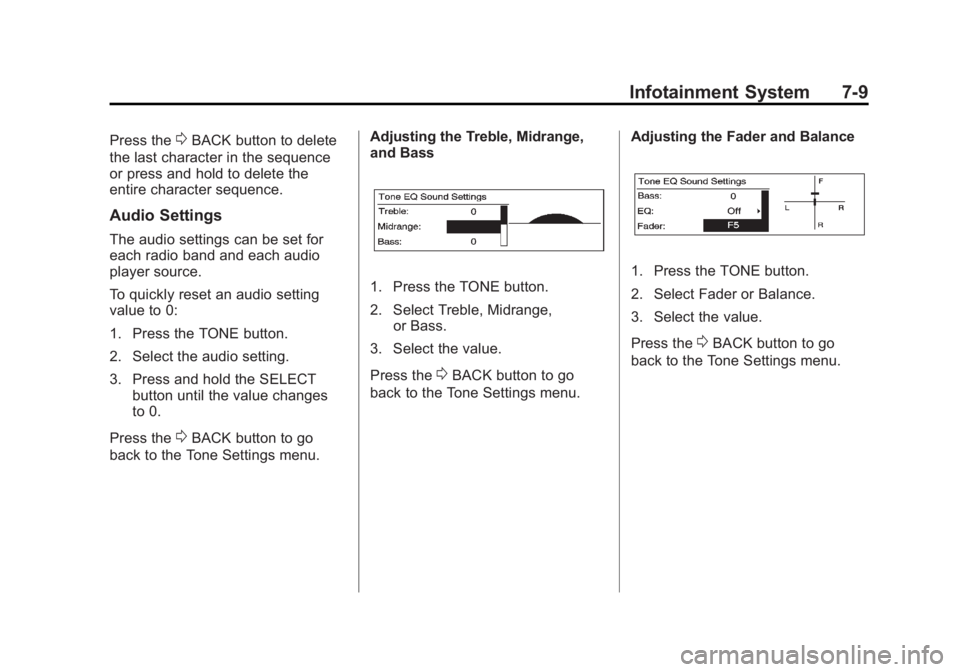
back to the Tone Settings menu. Adjusting the Treble, Midrange,
and Bass
1. Press the TONE button.
2. Select Treble, Midrange,
or Bass.
3. Select the value.
Press the
0BACK button to go
back to the Tone Settings menu. Adjusting the Fader and Balance
1. Press the TONE button.
2. Select Fader or Balance.
3. Select the value.
Press the
0BACK button to go
back to the Tone Settings menu.
Page 190 of 462
Black plate (10,1)Buick LaCrosse Owner Manual - 2011
7-10 Infotainment System
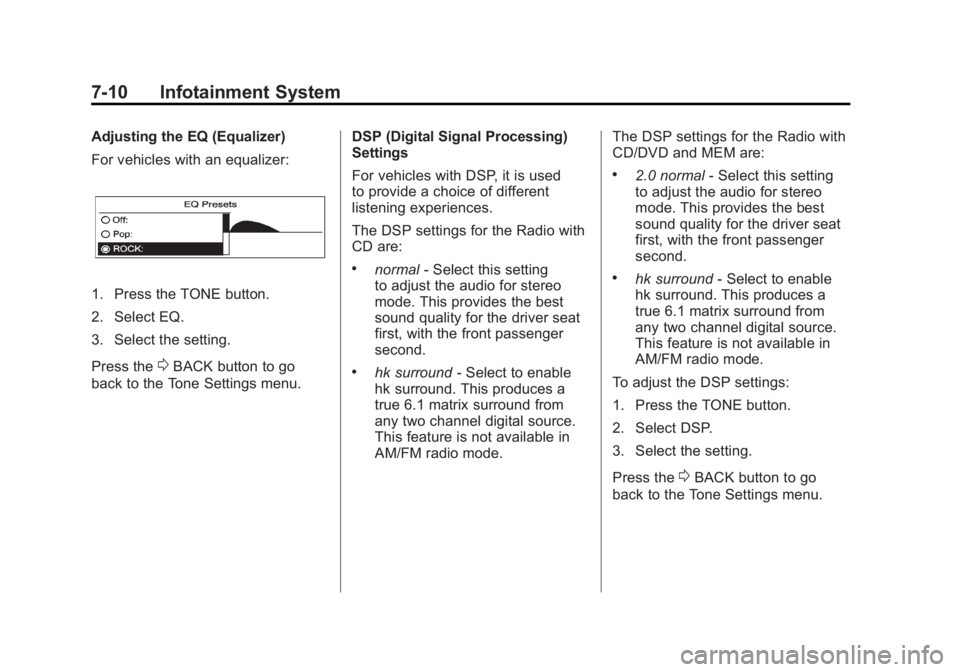
Adjusting the EQ (Equalizer)
For vehicles with an equalizer:
1. Press the TONE button.
2. Select EQ.
3. Select the setting.
Press the
0BACK button to go
back to the Tone Settings menu. DSP (Digital Signal Processing)
Settings
For vehicles with DSP, it is used
to provide a choice of different
listening experiences.
The DSP settings for the Radio with
CD are:
.normal
‐Select this setting
to adjust the audio for stereo
mode. This provides the best
sound quality for the driver seat
first, with the front passenger
second.
.hk surround ‐Select to enable
hk surround. This produces a
true 6.1 matrix surround from
any two channel digital source.
This feature is not available in
AM/FM radio mode. The DSP settings for the Radio with
CD/DVD and MEM are:
.2.0 normal
‐Select this setting
to adjust the audio for stereo
mode. This provides the best
sound quality for the driver seat
first, with the front passenger
second.
.hk surround ‐Select to enable
hk surround. This produces a
true 6.1 matrix surround from
any two channel digital source.
This feature is not available in
AM/FM radio mode.
To adjust the DSP settings:
1. Press the TONE button.
2. Select DSP.
3. Select the setting.
Press the
0BACK button to go
back to the Tone Settings menu.
Page 197 of 462
Black plate (17,1)Buick LaCrosse Owner Manual - 2011
Infotainment System 7-17
Time Shifting (Radio with
CD/DVD and MEM)
The radio with MEM time shift
feature can rewind 20 minutes of
XM content. While listening to the
radio, the content from the current
channel is always being buffered.
Press
kto pause the radio.
The radio displays the time shift
status bar. The status bar shows
the amount of content stored in the
buffer and the current pause point.
To resume playback from the
current pause point, press
kagain.
The radio is no longer live, but
played from the time shift buffer.
A status bar displays below the
channel number.
Press and hold
lorgto fast
forward or rewind through the time
shift buffer. Hold
luntil the end
of the recorded buffer resumes
live playback. Press and release
lorgto go to
the next or previous song in the time
shift buffer.
When the channel is changed, the
buffer is cleared and automatically
restarted for the current channel.
Content from a previously tuned
station is no longer available.
The time shift feature is not
available while recording or
with other sources of playback.
Pausing XM with the Vehicle
Turned Off
If XM is paused when the vehicle is
turned off, the radio continues to
buffer the current radio station for
up to 20 minutes. If the vehicle is
turned back on within 20 minutes,
the radio resumes playback from
the paused point.XM Messages
XL (Explicit Language
Channels): These channels, or any
others, can be blocked by request,
by calling 1-800-929-2100 in the
U.S. and 1-877-438-9677 in
Canada.
XM Updating: The encryption code
in the receiver is being updated.
No action is required. This process
should take no longer than
30 seconds.
Loading XM: The audio system is
acquiring and processing audio and
text data. No action is needed. This
message should disappear shortly.
Channel Off Air: This channel is
not currently in service. Tune in to
another channel.
Page 200 of 462
Black plate (20,1)Buick LaCrosse Owner Manual - 2011
7-20 Infotainment System
If a cellular telephone antenna
needs to be attached to the glass,
make sure that the grid lines for the
AM-FM antenna are not damaged.
There is enough space between
the grid lines to attach a cellular
telephone antenna without
interfering with radio reception.
Notice:Using a razor blade or
sharp object to clear the inside
rear window can damage the rear
window antenna and/or the rear
window defogger. Repairs would
not be covered by the vehicle
warranty. Do not clear the inside
rear window with sharp objects. Notice:
Do not apply aftermarket
glass tinting with metallic film.
The metallic film in some tinting
materials will interfere with
or distort the incoming radio
reception. Any damage caused
to your backglass antenna due
to metallic tinting materials will
not be covered by the vehicle
warranty.
Satellite Radio Antenna
For vehicles with XM satellite radio
service, the antenna is located on
the roof of the vehicle. Keep the
antenna clear of obstructions for
clear radio reception.
Audio Players
CD Player
The CD player can play audio CDs
and MP3 CDs.
The CD player will not play
8 cm (3 in) CDs.
Care of CDs
Sound quality can be reduced due
to disc quality, recording method,
quality of the music recorded, and
how the disc has been handled.
Handle discs carefully and store
them in their original cases or other
protective cases away from direct
sunlight and dust. If the bottom
surface of a disc is damaged, the
disc may not play properly or at all.