center console BUICK LACROSSE 2011 User Guide
[x] Cancel search | Manufacturer: BUICK, Model Year: 2011, Model line: LACROSSE, Model: BUICK LACROSSE 2011Pages: 462, PDF Size: 5.73 MB
Page 211 of 462
Black plate (31,1)Buick LaCrosse Owner Manual - 2011
Infotainment System 7-31
Auxiliary Devices
(Radio with CD)
The optional AUX input allows
portable devices to connect to the
vehicle using the 3.5 mm (1/8 in)
input jack or the USB port.
Portable devices are controlled by
using the menu system described
inOperation on page 7‑7.
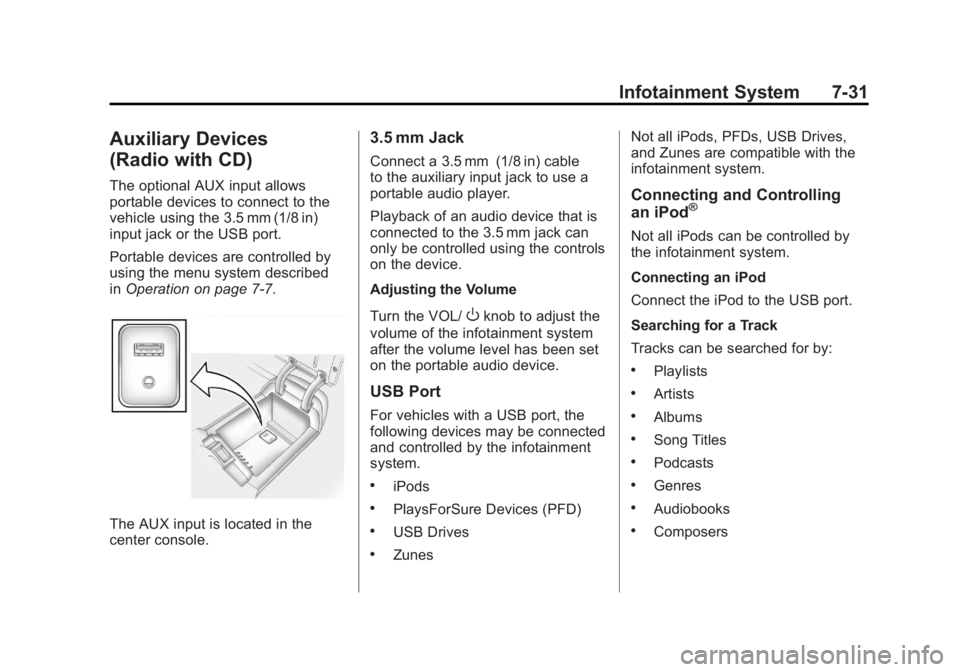
The AUX input is located in the
center console.
3.5 mm Jack
Connect a 3.5 mm (1/8 in) cable
to the auxiliary input jack to use a
portable audio player.
Playback of an audio device that is
connected to the 3.5 mm jack can
only be controlled using the controls
on the device.
Adjusting the Volume
Turn the VOL/
Oknob to adjust the
volume of the infotainment system
after the volume level has been set
on the portable audio device.
USB Port
For vehicles with a USB port, the
following devices may be connected
and controlled by the infotainment
system.
.iPods
.PlaysForSure Devices (PFD)
.USB Drives
.Zunes Not all iPods, PFDs, USB Drives,
and Zunes are compatible with the
infotainment system.
Connecting and Controlling
an iPod®
Not all iPods can be controlled by
the infotainment system.
Connecting an iPod
Connect the iPod to the USB port.
Searching for a Track
Tracks can be searched for by:
.Playlists
.Artists
.Albums
.Song Titles
.Podcasts
.Genres
.Audiobooks
.Composers
Page 214 of 462
Black plate (34,1)Buick LaCrosse Owner Manual - 2011
7-34 Infotainment System
Shuffle Functionality
Turn the Menu knob and set Shuffle
Songs (Random) to On or Off.
On:Plays current tracks in random
order.
Off: Plays current tracks in
sequential order.
Repeat Functionality
Turn the Menu knob and set Repeat
to On or Off.
Repeat On: Repeats the current
track.
Repeat Off: Playback starts from
the beginning of the current track
after the last track finishes.Auxiliary Devices (Radio
with CD/DVD and MEM)
The optional AUX input allows
portable devices to be connected
using the 3.5 mm (1/8 in) input jack
or the USB port.
Portable devices are controlled by
using the menu system described in
Operation on page 7‑7.
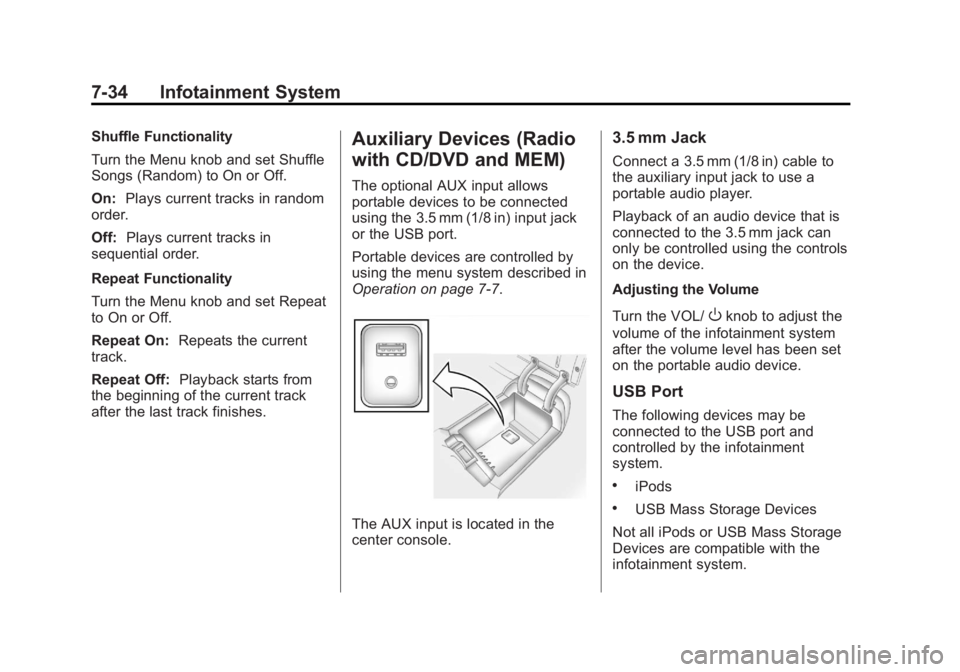
The AUX input is located in the
center console.
3.5 mm Jack
Connect a 3.5 mm (1/8 in) cable to
the auxiliary input jack to use a
portable audio player.
Playback of an audio device that is
connected to the 3.5 mm jack can
only be controlled using the controls
on the device.
Adjusting the Volume
Turn the VOL/
Oknob to adjust the
volume of the infotainment system
after the volume level has been set
on the portable audio device.
USB Port
The following devices may be
connected to the USB port and
controlled by the infotainment
system.
.iPods
.USB Mass Storage Devices
Not all iPods or USB Mass Storage
Devices are compatible with the
infotainment system.
Page 283 of 462
Black plate (33,1)Buick LaCrosse Owner Manual - 2011
Driving and Operating 9-33
Using ABS
Do not pump the brakes. Just hold
the brake pedal down firmly and let
ABS work. You might hear the ABS
pump or motor operating and feel
the brake pedal pulsate, but this is
normal.
Braking in Emergencies
ABS allows the driver to steer and
brake at the same time. In many
emergencies, steering can help
more than even the very best
braking.
Parking Brake
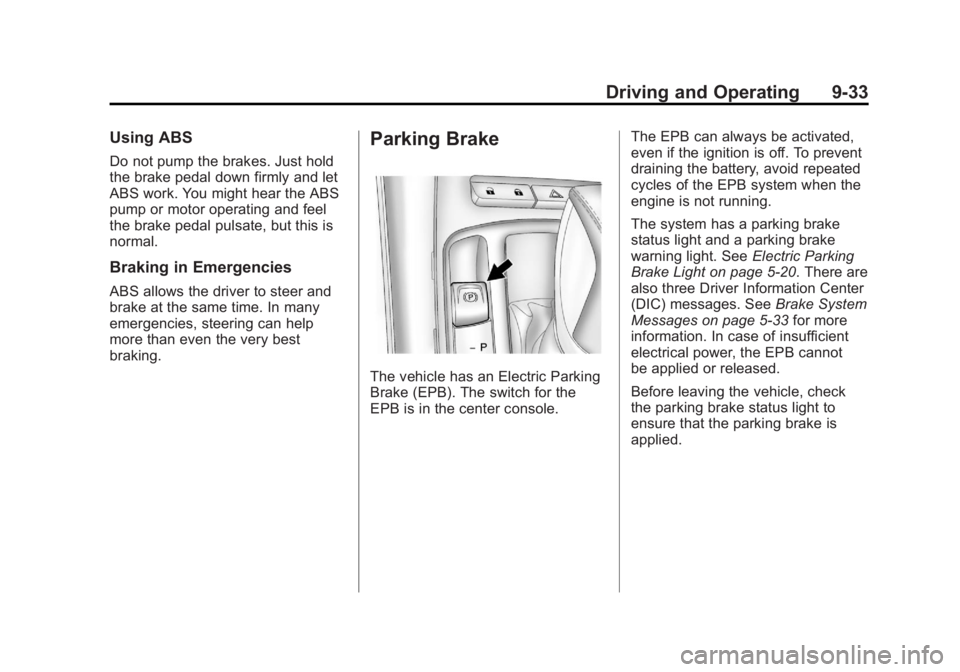
The vehicle has an Electric Parking
Brake (EPB). The switch for the
EPB is in the center console.The EPB can always be activated,
even if the ignition is off. To prevent
draining the battery, avoid repeated
cycles of the EPB system when the
engine is not running.
The system has a parking brake
status light and a parking brake
warning light. See
Electric Parking
Brake Light on page 5‑20. There are
also three Driver Information Center
(DIC) messages. See Brake System
Messages on page 5‑33 for more
information. In case of insufficient
electrical power, the EPB cannot
be applied or released.
Before leaving the vehicle, check
the parking brake status light to
ensure that the parking brake is
applied.
Page 451 of 462
Black plate (3,1)Buick LaCrosse Owner Manual - 2011
INDEX i-3
CD Player . . . . . . . . . . . . . . . . . . . . . 7-20
CD/DVD Player . . . . . . . . . . . . . . . . 7-23
Center Console Storage . . . . . . . . 4-1
Chains, Tire . . . . . . . . . . . . . . . . . . 10-69
ChargingSystem Light . . . . . . . . . . . . . . . . . 5-16
Check
Engine Light . . . . . . . . . . . . . . . . . . 5-17
IgnitionTransmission Lock . . . . . . . . 10-28
Child Restraints
Infants and YoungChildren . . . . . . . . . . . . . . . . . . . . . 3-46
Lower Anchors and Tethers for Children . . . . . . . . . 3-52
Older Children . . . . . . . . . . . . . . . . 3-44
Securing . . . . . . . . . . . . . . . . 3-61, 3-63
Systems . . . . . . . . . . . . . . . . . . . . . . 3-49
Circuit Breakers . . . . . . . . . . . . . . 10-39 Cleaning
Exterior Care . . . . . . . . . . . . . . . 10-92
Interior Care . . . . . . . . . . . . . . . . 10-97
Climate Control Systems Automatic . . . . . . . . . . . . . . . . . . . . . . 8-1
Dual Automatic . . . . . . . . . . . . . . . . 8-4
Clock . . . . . . . . . . . . . . . . . . . . . . . 5-5, 5-6
Cluster, Instrument . . . . . . . . . . . . 5-10
Collision Damage Repair . . . . . 13-13
Compact Spare Tire . . . . . . . . . . 10-85
Compass . . . . . . . . . . . . . . . . . . . . . . . 5-5
Messages . . . . . . . . . . . . . . . . . . . . 5-34
Compressor Kit, Tire Sealant . . . . . . . . . . . . . . . . . . . . . . 10-72
Control of a Vehicle . . . . . . . . . . . . . 9-3
Convenience Net . . . . . . . . . . . . . . . 4-2
Coolant Engine . . . . . . . . . . . . . . . . . . . . . . 10-18
Engine TemperatureGauge . . . . . . . . . . . . . . . . . . . . . . 5-13 Cooling System . . . . . . . . . . . . . . . 10-17
Engine Messages . . . . . . . . . . . . 5-35
Courtesy Transportation Program . . . . . . . . . . . . . . . . . . . . . 13-11
Cruise Control . . . . . . . . . . . . . . . . . 9-39 Light . . . . . . . . . . . . . . . . . . . . . . . . . . 5-25
Messages . . . . . . . . . . . . . . . . . . . . 5-34
Cupholders . . . . . . . . . . . . . . . . . . . . . 4-1
Customer Assistance . . . . . . . . . . 13-6 Offices . . . . . . . . . . . . . . . . . . 13-5, 13-6
Text Telephone (TTY)Users . . . . . . . . . . . . . . . . . . . . . . . 13-6
Customer Information Service PublicationsOrdering Information . . . . . . 13-15
Customer Satisfaction
Procedure . . . . . . . . . . . . . . 13-1, 13-3
Page 460 of 462
Black plate (12,1)Buick LaCrosse Owner Manual - 2011
i-12 INDEX
ServiceAccessories and
Modifications . . . . . . . . . . . . . . . . 10-3
Doing Your Own Work . . . . . . . . 10-4
Engine Soon Light . . . . . . . . . . . . 5-17
Maintenance Records . . . . . . .11-10
Maintenance, General Information . . . . . . . . . . . . . . . . . . 11-1
Parts Identification Label . . . . . 12-1
Publications Ordering Information . . . . . . . . . . . . . . . . 13-15
Scheduling Appointments . . . .13-11
Servicing the Airbag . . . . . . . . . . . 3-41
Shift Lock Control Function Check, Automatic
Transmission . . . . . . . . . . . . . . . . 10-28
Shifting Into Park . . . . . . . . . . . . . . . . . . . . . . 9-25
Out of Park . . . . . . . . . . . . . . . . . . . 9-26 Side Blind Zone Alert . . . . . . . . . . 9-44
Signals, Turn and
Lane-Change . . . . . . . . . . . . . . . . . 6-4
Spare Tire Compact . . . . . . . . . . . . . . . . . . . . 10-85
Specifications and Capacities . . . . . . . . . . . . . . . . . . . . 12-2
Speedometer . . . . . . . . . . . . . . . . . . 5-11
Start Assist, Hills . . . . . . . . . . . . . . 9-35
Start Vehicle, Remote . . . . . . . . . . 2-8
Starter Switch Check . . . . . . . . . 10-27
Starting the Engine . . . . . . . . . . . . 9-20
Steering . . . . . . . . . . . . . . . . . . . . . . . . 9-4 Fluid, Power . . . . . . . . . . . . . . . . 10-23
Heated Wheel . . . . . . . . . . . . . . . . . 5-3
Wheel Adjustment . . . . . . . . . . . . . 5-2
Wheel Controls . . . . . . . . . . . . . . . . 5-2
Stoplamps and Back-Up Lamps Bulb Replacement . . . . . . . . . . 10-35 Storage
Mass Media (MEM) . . . . . . . . . . . 7-27
Storage Areas Center Console . . . . . . . . . . . . . . . . 4-1
Convenience Net . . . . . . . . . . . . . . 4-2
Front . . . . . . . . . . . . . . . . . . . . . . . . . . 4-1
Glove Box . . . . . . . . . . . . . . . . . . . . . 4-1
Storing the Tire Sealant and Compressor Kit . . . . . . . . . 10-79
Stuck Vehicle . . . . . . . . . . . . . . . . . . 9-11
Sun Visor Lamps . . . . . . . . . . . . . . . 6-5
Sun Visors . . . . . . . . . . . . . . . . . . . . . 2-20
Sunroof . . . . . . . . . . . . . . . . . . . . . . . . 2-21
Symbols . . . . . . . . . . . . . . . . . . . . . . . . . . .v
System Infotainment . . . . . . . . . . . . . . . . . . . 7-1