CD player BUICK LACROSSE 2011 Owner's Guide
[x] Cancel search | Manufacturer: BUICK, Model Year: 2011, Model line: LACROSSE, Model: BUICK LACROSSE 2011Pages: 462, PDF Size: 5.73 MB
Page 221 of 462
Black plate (41,1)Buick LaCrosse Owner Manual - 2011
Infotainment System 7-41
Video Screen Input Jack
Each video screen is equipped
with a video input jack to allow
video cables to be connected
from an auxiliary device such as
a camcorder or a video game
system. This signal will override
any video provided by the RSE
system; either the DVD or auxiliary
A/V jack source. The RSE system
must be on for this input to operate.
Remote Control
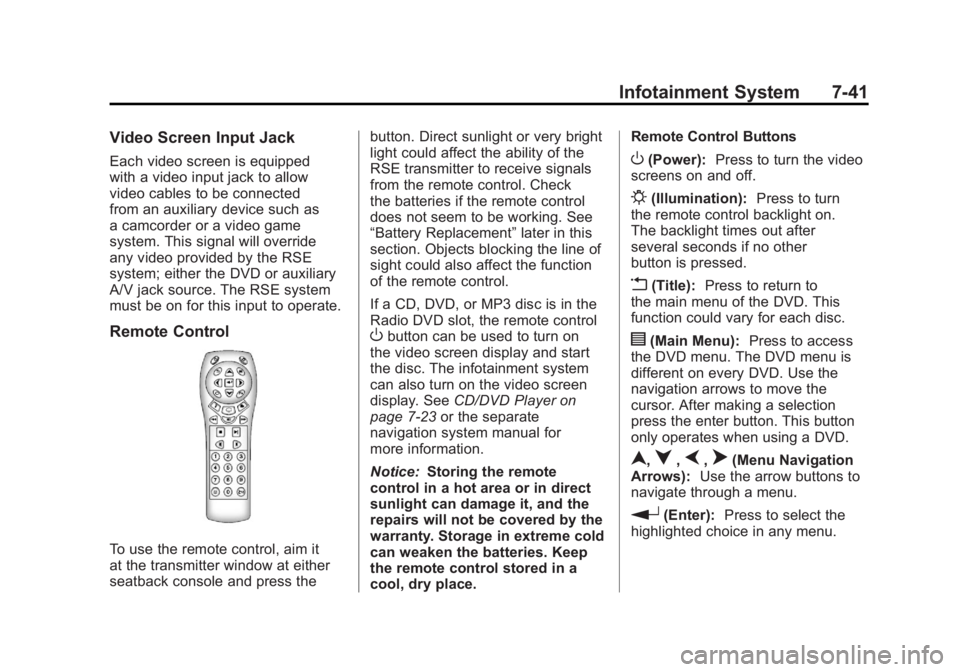
To use the remote control, aim it
at the transmitter window at either
seatback console and press thebutton. Direct sunlight or very bright
light could affect the ability of the
RSE transmitter to receive signals
from the remote control. Check
the batteries if the remote control
does not seem to be working. See
“Battery Replacement”
later in this
section. Objects blocking the line of
sight could also affect the function
of the remote control.
If a CD, DVD, or MP3 disc is in the
Radio DVD slot, the remote control
Obutton can be used to turn on
the video screen display and start
the disc. The infotainment system
can also turn on the video screen
display. See CD/DVD Player on
page 7‑23 or the separate
navigation system manual for
more information.
Notice: Storing the remote
control in a hot area or in direct
sunlight can damage it, and the
repairs will not be covered by the
warranty. Storage in extreme cold
can weaken the batteries. Keep
the remote control stored in a
cool, dry place. Remote Control Buttons
O(Power):
Press to turn the video
screens on and off.
P(Illumination): Press to turn
the remote control backlight on.
The backlight times out after
several seconds if no other
button is pressed.
v(Title): Press to return to
the main menu of the DVD. This
function could vary for each disc.
y(Main Menu): Press to access
the DVD menu. The DVD menu is
different on every DVD. Use the
navigation arrows to move the
cursor. After making a selection
press the enter button. This button
only operates when using a DVD.
n,q,p,o(Menu Navigation
Arrows): Use the arrow buttons to
navigate through a menu.
r(Enter): Press to select the
highlighted choice in any menu.
Page 222 of 462
Black plate (42,1)Buick LaCrosse Owner Manual - 2011
7-42 Infotainment System
z(Display Menu):Press to
adjust the brightness and screen
display mode, and display the
language menu.
q(Return): Press to exit the
current active menu and return to
the previous menu. This button
operates only when the display
menu or a DVD menu is active.
c(Stop): Press to stop playing,
rewinding, or fast forwarding a
DVD. Press twice to return to
the beginning of the DVD.
s(Play/Pause): Press to start
playing a DVD. Press to pause a
DVD while it is playing. Press again
to continue playing.
Depending on the infotainment
system in the vehicle, DVD
playback may be slowed down
by pressing
sthen[. Reverse
slow play by pressing
sthenr.
Press
sagain to cancel slow play.
t(Previous Track/Chapter):
Press to go to the start of the
current track or chapter. Press
again to go to the previous track
or chapter. This button may not
work when the DVD is playing
the copyright information or the
previews.
u(Next Track/Chapter): Press
to go to the beginning of the next
chapter or track. This button might
not work when the DVD is playing
the copyright information or the
previews.
r(Fast Reverse): Press to
quickly reverse the DVD or CD.
To stop fast reversing a DVD video,
press
s. To stop fast reversing
a DVD audio or CD, release
r.
This button might not work when
the DVD is playing the copyright
information or the previews.
[(Fast Forward): Press to fast
forward the DVD or CD. To stop fast
forwarding a DVD video, press
s.
To stop fast forwarding a DVD audio
or CD, release
[. This button might
not work when the DVD is playing
the copyright information or the
previews.
e(Audio): Press to change audio
tracks on DVDs that have this
feature when the DVD is playing.
{(Subtitles): Press to turn
ON/OFF subtitles and to move
through subtitle options when a
DVD is playing.
AUX (Auxiliary): Press to switch
the video display between the DVD
player and an auxiliary source.
Page 224 of 462
Black plate (44,1)Buick LaCrosse Owner Manual - 2011
7-44 Infotainment System
Tips and Troubleshooting Chart
ProblemRecommended Action
No power. The ignition might not be turned to ON/RUN or
ACC/ACCESSORY.
The picture does not fill the screen. There are black
borders on the top and bottom or on both sides or it
looks stretched out. Check the display mode settings in the setup menu by
pressing the display menu button on the remote control.
In auxiliary mode, the picture moves or scrolls. Check the auxiliary input connections at both devices.
The remote control does not work. Check to make sure there is no obstruction between
the remote control and the transmitter window.
Check the batteries to make sure they are not dead or
installed incorrectly.
After stopping the player, I push Play but sometimes
the DVD starts where I left off and sometimes at the
beginning. If the Stop button was pressed one time, the DVD player
resumes playing where the DVD was stopped. If the
stop button was pressed two times the DVD player
begins to play from the beginning of the DVD.
Page 225 of 462
Black plate (45,1)Buick LaCrosse Owner Manual - 2011
Infotainment System 7-45
Tips and Troubleshooting Chart (cont.)
ProblemRecommended Action
The auxiliary source is running but there is no picture or
sound. Check that the RSE video screen is in the auxiliary
source mode by pressing the AUX button on the remote
control.
Check the auxiliary input connections at both devices.
Sometimes the wireless headphone audio cuts out or
buzzes. Check for obstructions, low batteries, reception range,
and interference from cellular telephone towers or by
using a cellular telephone in the vehicle.
Check that the headphones are on correctly using
the L (left) and R (right) on the headphones.
Check that the headphones are positioned properly with
the headband across the top of the head.
I lost the remote and/or the headphones. See your dealer for assistance.
The DVD is playing, but there is no picture or sound. Check that the RSE video screen is sourced to the DVD player by pressing the AUX button on the remote
control.
Page 226 of 462
Black plate (46,1)Buick LaCrosse Owner Manual - 2011
7-46 Infotainment System
DVD Display Error Messages
The DVD display error message
depends on which radio the vehicle
has. The video screen may display
one of the following:
Disc Load/Eject Error or
Mechanical Error:There are
disc load or eject problems.
Disc Format Error or Unknown
Format: The disc is inserted with
the disc label wrong side up, or the
disc is damaged.
Disc Region Error or Disc Error:
The disc is not from a correct
region.
No Disc Inserted: No disc is
present when the
XEJECT or
MEM/DVD/AUX button is pressed
on the radio.
DVD Distortion
Video distortion can occur when
operating cellular phones, scanners,
CB radios, Global Position Systems
(GPS)*, two-way radios, mobile fax,
or walkie talkies.
It might be necessary to turn off the
DVD player when operating one of
these devices in or near the vehicle.
*Excludes the OnStar
®System.
Cleaning the RSE Seatback
Console
Use only a clean cloth dampened
with clean water to clean the RSE
seatback console surface.
Cleaning the Video Screen
Use only a clean cloth dampened
with clean water. Use care when
touching or cleaning the screen
as damage could result.
Phone
Bluetooth (Overview)
For vehicles equipped with
Bluetooth capability, the system
can interact with many cell phones,
allowing:
.Placement and receipt of calls in
a hands-free mode.
.Sharing of the cell phone’s
address book or contact list
with the vehicle.
To minimize driver distraction,
before driving, and with the vehicle
parked:
.Become familiar with the
features of the cell phone.
Organize the phone book and
contact lists clearly and delete
duplicate or rarely used entries.
If possible, program speed dial
or other shortcuts.
.Review the controls and
operation of the infotainment
system.
Page 449 of 462
Black plate (1,1)Buick LaCrosse Owner Manual - 2011
INDEX i-1
A
Accessories andModifications . . . . . . . . . . . . . . . . . 10-3
Accessory Power . . . . . . . . . . . . . . 9-24
Adaptive Forward Lighting (AFL) . . . . . . . . . . . . . . . . . 6-4
Add-On Electrical
Equipment . . . . . . . . . . . . . . . . . . . 9-62
Adjustments Lumbar, Front Seats . . . . . . . . . . . 3-7
Air Cleaner/Filter, Engine . . . . . 10-15
Air Conditioning . . . . . . . . . . . . . . . . 8-1
Air Filter, Passenger
Compartment . . . . . . . . . . . . . . . . . 8-8
Air Intake . . . . . . . . . . . . . . . . . . . . . . . 8-8
Air Vents . . . . . . . . . . . . . . . . . . . . . . . 8-8
Airbag System Check . . . . . . . . . . . . . . . . . . . . . . . . 3-43
How Does an AirbagRestrain? . . . . . . . . . . . . . . . . . . . 3-34
Passenger Sensing System . . . . . . . . . . . . . . . . . . . . . . 3-37
What Makes an Airbag Inflate? . . . . . . . . . . . . . . . . . . . . . . 3-34 Airbag System (cont.)
What Will You See After
an Airbag Inflates? . . . . . . . . . . 3-35
When Should an Airbag
Inflate? . . . . . . . . . . . . . . . . . . . . . . 3-32
Where Are the Airbags? . . . . . . 3-31
Airbags Adding Equipment to theVehicle . . . . . . . . . . . . . . . . . . . . . . 3-42
Passenger Status Indicator . . . 5-15
Readiness Light . . . . . . . . . . . . . . 5-14
Servicing Airbag-Equipped Vehicles . . . . . . . . . . . . . . . . . . . . . 3-41
System Check . . . . . . . . . . . . . . . . 3-29
Alarm System Anti-Theft . . . . . . . . . . . . . . . . . . . . . 2-14
All-Wheel Drive . . . . . . . . . . . . . . . . 9-31
AM-FM Radio . . . . . . . . . . . . . . . . . . 7-12
Antenna Satellite Radio . . . . . . . . . . . . . . . . 7-20
Anti-Theft Alarm System . . . . . . . . . . . . . . . . 2-14
Alarm System Messages . . . . . 5-38 Antilock Brake
System (ABS) . . . . . . . . . . . . . . . . 9-32
Warning Light . . . . . . . . . . . . . . . . . 5-21
Appearance Care Exterior . . . . . . . . . . . . . . . . . . . . . 10-92
Interior . . . . . . . . . . . . . . . . . . . . . . 10-97
Assistance Program,
Roadside . . . . . . . . . . . . . . 13-8, 13-10
Audio Players . . . . . . . . . . . . . . . . . 7-20 CD . . . . . . . . . . . . . . . . . . . . . . . . . . . 7-20
CD/DVD . . . . . . . . . . . . . . . . . . . . . . 7-23
Audio System Backglass Antenna . . . . . . . . . . . 7-19
Radio Reception . . . . . . . . . . . . . . 7-19
Theft-Deterrent Feature . . . . . . . . 7-2
Automatic
Climate Control System . . . . . . . . 8-1
Headlamp System . . . . . . . . . . . . . 6-3
Automatic Transmission . . . . . . . 9-28 Fluid . . . . . . . . . . . . . . . . . . . . . . . . 10-15
Manual Mode . . . . . . . . . . . . . . . . . 9-30
Shift Lock ControlFunction Check . . . . . . . . . . . 10-28
Auxiliary Devices . . . . . . . . 7-31, 7-34
Page 451 of 462
Black plate (3,1)Buick LaCrosse Owner Manual - 2011
INDEX i-3
CD Player . . . . . . . . . . . . . . . . . . . . . 7-20
CD/DVD Player . . . . . . . . . . . . . . . . 7-23
Center Console Storage . . . . . . . . 4-1
Chains, Tire . . . . . . . . . . . . . . . . . . 10-69
ChargingSystem Light . . . . . . . . . . . . . . . . . 5-16
Check
Engine Light . . . . . . . . . . . . . . . . . . 5-17
IgnitionTransmission Lock . . . . . . . . 10-28
Child Restraints
Infants and YoungChildren . . . . . . . . . . . . . . . . . . . . . 3-46
Lower Anchors and Tethers for Children . . . . . . . . . 3-52
Older Children . . . . . . . . . . . . . . . . 3-44
Securing . . . . . . . . . . . . . . . . 3-61, 3-63
Systems . . . . . . . . . . . . . . . . . . . . . . 3-49
Circuit Breakers . . . . . . . . . . . . . . 10-39 Cleaning
Exterior Care . . . . . . . . . . . . . . . 10-92
Interior Care . . . . . . . . . . . . . . . . 10-97
Climate Control Systems Automatic . . . . . . . . . . . . . . . . . . . . . . 8-1
Dual Automatic . . . . . . . . . . . . . . . . 8-4
Clock . . . . . . . . . . . . . . . . . . . . . . . 5-5, 5-6
Cluster, Instrument . . . . . . . . . . . . 5-10
Collision Damage Repair . . . . . 13-13
Compact Spare Tire . . . . . . . . . . 10-85
Compass . . . . . . . . . . . . . . . . . . . . . . . 5-5
Messages . . . . . . . . . . . . . . . . . . . . 5-34
Compressor Kit, Tire Sealant . . . . . . . . . . . . . . . . . . . . . . 10-72
Control of a Vehicle . . . . . . . . . . . . . 9-3
Convenience Net . . . . . . . . . . . . . . . 4-2
Coolant Engine . . . . . . . . . . . . . . . . . . . . . . 10-18
Engine TemperatureGauge . . . . . . . . . . . . . . . . . . . . . . 5-13 Cooling System . . . . . . . . . . . . . . . 10-17
Engine Messages . . . . . . . . . . . . 5-35
Courtesy Transportation Program . . . . . . . . . . . . . . . . . . . . . 13-11
Cruise Control . . . . . . . . . . . . . . . . . 9-39 Light . . . . . . . . . . . . . . . . . . . . . . . . . . 5-25
Messages . . . . . . . . . . . . . . . . . . . . 5-34
Cupholders . . . . . . . . . . . . . . . . . . . . . 4-1
Customer Assistance . . . . . . . . . . 13-6 Offices . . . . . . . . . . . . . . . . . . 13-5, 13-6
Text Telephone (TTY)Users . . . . . . . . . . . . . . . . . . . . . . . 13-6
Customer Information Service PublicationsOrdering Information . . . . . . 13-15
Customer Satisfaction
Procedure . . . . . . . . . . . . . . 13-1, 13-3
Page 452 of 462
Black plate (4,1)Buick LaCrosse Owner Manual - 2011
i-4 INDEX
D
Damage Repair, Collision . . . . . 13-13
Danger, Warnings, andCautions . . . . . . . . . . . . . . . . . . . . . . . . .v
Data Recorders, Event . . . . . . . 13-18
Daytime Running Lamps (DRL) . . . . . . . . . . . . . . . . . . 6-3
Defensive Driving . . . . . . . . . . . . . . . 9-2
Delayed Locking . . . . . . . . . . . . . . . 2-12
Devices, Auxiliary . . . . . . . 7-31, 7-34
Differential, Limited-Slip . . . . . . . 9-38
Displays . . . . . . . . . . . . . . . . . . . . . . . 5-29
Dome Lamps . . . . . . . . . . . . . . . . . . . 6-5
Door Ajar Messages . . . . . . . . . . . . . . . 5-34
Delayed Locking . . . . . . . . . . . . . . 2-12
Locks . . . . . . . . . . . . . . . . . . . . . . . . . 2-10
Power Locks . . . . . . . . . . . . . . . . . . 2-11
Rear Seat Pass-Through . . . . . 3-13
Drive Systems
All-Wheel Drive . . . . . . . . . . . . . . . 9-31
Driver Information Center (DIC) . . . . . . . . . . . . . . . . . 5-25 Driving
Characteristics and
Towing Tips . . . . . . . . . . . . . . . . . 9-56
Defensive . . . . . . . . . . . . . . . . . . . . . . 9-2
Drunk . . . . . . . . . . . . . . . . . . . . . . . . . . 9-2
Highway Hypnosis . . . . . . . . . . . . . 9-8
Hill and Mountain Roads . . . . . . . 9-8
If the Vehicle is Stuck . . . . . . . . . 9-11
Loss of Control . . . . . . . . . . . . . . . . 9-6
Off-Road Recovery . . . . . . . . . . . . 9-6
Vehicle Load Limits . . . . . . . . . . . 9-12
Wet Roads . . . . . . . . . . . . . . . . . . . . 9-7
Winter . . . . . . . . . . . . . . . . . . . . . . . . . 9-9
Driving for Better Fuel Economy . . . . . . . . . . . . . . . . . . . . . 1-23
Dual Automatic Climate
Control System . . . . . . . . . . . . . . . . 8-4
DVD Rear Seat EntertainmentSystem . . . . . . . . . . . . . . . . . . . . . . 7-36
DVD/CD Player . . . . . . . . . . . . . . . . 7-23
E
Electric Parking Brake Light . . . 5-20
Electrical Equipment,
Add-On . . . . . . . . . . . . . . . . . . . . . . 9-62
Electrical System Engine CompartmentFuse Block . . . . . . . . . . . . . . . . 10-39
Fuses and Circuit Breakers . . . . . . . . . . . . . . . . . . 10-39
Instrument Panel Fuse Block . . . . . . . . . . . . . . . . . . . . . . 10-42
Overload . . . . . . . . . . . . . . . . . . . 10-38
Rear Compartment Fuse Block . . . . . . . . . . . . . . . . . . . . . . 10-44
Electronic Stability Control . . . . . 9-37
Electronic Stability Control (ESC)/Traction Control
System (TCS) Indicator
Warning Light . . . . . . . . . . . . . . . . 5-22
Page 458 of 462
Black plate (10,1)Buick LaCrosse Owner Manual - 2011
i-10 INDEX
PowerDoor Locks . . . . . . . . . . . . . . . . . . . 2-11
Mirrors . . . . . . . . . . . . . . . . . . . . . . . . 2-16
Outlets . . . . . . . . . . . . . . . . . . . . . . . . 5-7
Protection, Battery . . . . . . . . . . . . . 6-7
Retained Accessory (RAP) . . . 9-24
Seat Adjustment . . . . . . . . . . . . . . . 3-5
Steering Fluid . . . . . . . . . . . . . . . 10-23
Windows . . . . . . . . . . . . . . . . . . . . . 2-19
Pregnancy, Using Safety Belts . . . . . . . . . . . . . . . . . . . . . . . . . 3-27
Privacy Radio FrequencyIdentification (RFID) . . . . . . . 13-19
Program Courtesy Transportation . . . . .13-11
Proposition 65 Warning, California . . . . . . . . . . . . . . . . . . . . . 10-3R
Radio FrequencyIdentification (RFID) . . . . . . . . 13-19
Statement . . . . . . . . . . . . . . . . . . 13-20
Radios AM-FM Radio . . . . . . . . . . . . . . . . . 7-12
CD/DVD Player . . . . . . . . . . . . . . . 7-23
Reception . . . . . . . . . . . . . . . . . . . . 7-19
Satellite . . . . . . . . . . . . . . . . . . . . . . . 7-15
Reading Lamps . . . . . . . . . . . . . . . . . 6-5
Rear Seat Entertainment System . . . . . . . . . . . . . . . . . . . . . . . 7-36
Rear Seat Pass-Through Door . . . . . . . . . . 3-13
Rear Seats . . . . . . . . . . . . . . . . . . . . 3-11
Rear Vision Camera (RVC) . . . . 9-46
Rearview Mirrors . . . . . . . . . . . . . . 2-18
Reclining Seatbacks . . . . . . . . . . . . 3-8 Recommended Fluids and
Lubricants . . . . . . . . . . . . . . . . . . . . 11-7
Recommended Fuel . . . . . . . . . . . 9-50
Records Maintenance . . . . . . . . . . . . . . . . .11-10
Recreational Vehicle Towing . . . . . . . . . . . . . . . . . . . . . . 10-89
Reimbursement Program, GM Mobility . . . . . . . . . . . . . . . . . . 13-8
Remote Keyless Entry (RKE) System . . . . . . . . . . . . . 2-3, 2-4
Remote Vehicle Start . . . . . . . . . . . 2-8
Replacement Bulbs . . . . . . . . . . . 10-37
Replacement Parts Airbags . . . . . . . . . . . . . . . . . . . . . . . 3-43
Maintenance . . . . . . . . . . . . . . . . . . 11-9
Replacing Airbag System . . . . . . 3-43
Replacing LATCH System Parts After a Crash . . . . . . . . . . . 3-61