steering wheel BUICK LACROSSE 2011 Owner's Guide
[x] Cancel search | Manufacturer: BUICK, Model Year: 2011, Model line: LACROSSE, Model: BUICK LACROSSE 2011Pages: 462, PDF Size: 5.73 MB
Page 177 of 462
Black plate (5,1)Buick LaCrosse Owner Manual - 2011
Lighting 6-5
Fog Lamps
For vehicles with fog lamps, the
button is located on the exterior
lamp control, on the outboard side
of the steering wheel.
To turn on the fog lamps, the ignition
and the headlamps or parking lamps
must be on.
If the fog lamps are turned on while
the exterior lamp switch is in the
AUTO position, the headlamps
come on automatically.
#:Press to turn on or off. An
indicator light on the instrument
panel cluster comes on when the
fog lamps are on.
Some localities have laws that
require the headlamps to be on
along with the fog lamps.
Interior Lighting
Instrument Panel
Illumination Control
The brightness of the instrument
panel lighting and steering
wheel controls can be adjusted.
Use the thumbwheel located next
to the exterior lamps control on the
outboard side of the steering wheel.
D: Move the thumbwheel up or
down to brighten or dim the lights.
Dome Lamps
The interior lamps control located in
the overhead console controls both
the front and rear interior lamps.
To operate, press the following
buttons:
((Off): Turns the lamps off.
HDoor: Turns the lamps on
when any door is opened.
'ON: Keeps the lamps on all
the time.
Reading Lamps
There are front and rear reading
lamps.
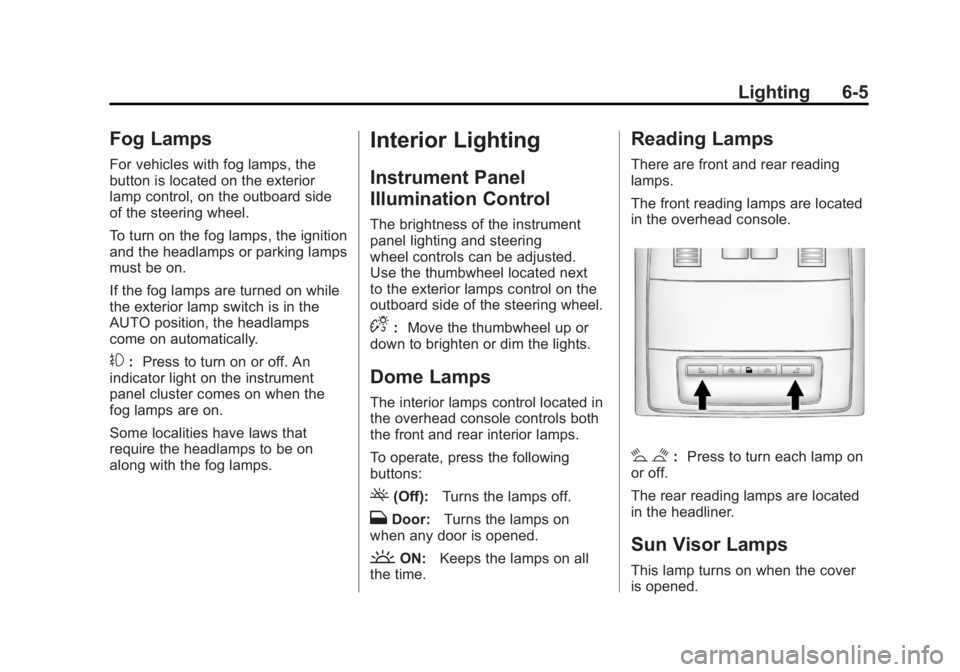
The front reading lamps are located
in the overhead console.
# $: Press to turn each lamp on
or off.
The rear reading lamps are located
in the headliner.
Sun Visor Lamps
This lamp turns on when the cover
is opened.
Page 187 of 462
Black plate (7,1)Buick LaCrosse Owner Manual - 2011
Infotainment System 7-7
R.5
.Opens the Phone
main menu.
.Mutes the audio system.
S. MEM/DVD/AUX
.Selects MEM, CD/DVD,
USB, or a connected front
or rear auxiliary audio
source.
Operation
Controls
The infotainment system is
operated by using the pushbuttons,
multifunction knobs, menus shown
on the display, and steering wheel
controls, if equipped.
Turning the System On or Off
VOL/O(Volume/Power): Press to
turn the system on and off.
Automatic Switch‐Off
If the infotainment system has
been turned on after the ignition is
turned off, the system will turn off
automatically after 10 minutes.
Volume Control
VOL/O(Volume/Power): Turn to
adjust the volume.
5(Phone/Mute): For vehicles with
OnStar®, press and hold5to mute
the infotainment system. Press and
hold
5again, or turn the VOL/O
knob to cancel mute.
For vehicles without OnStar
®,
press
5to mute the infotainment
system. Press
5again, or turn
the VOL/
Oknob to cancel mute.
Menu System
Controls
The Menu knob, SELECT button,
and
0BACK button are used to
navigate the menu system.
Menu Knob: Turn to:
.Enter the menu system.
.Highlight a menu option.
.Select a value.
SELECT: Press to:
.Select or activate the highlighted
menu option.
.Confirm a set value.
.Turn a system setting on or off.
0BACK:Press to:
.Exit a menu.
.Return from a submenu screen
to the previous menu screen.
.Delete the last character in a
sequence.
Page 217 of 462
Black plate (37,1)Buick LaCrosse Owner Manual - 2011
Infotainment System 7-37
Before Driving
The RSE is for rear seat
passengers only. The driver
cannot safely view the video
screen while driving.
In severe or extreme weather
conditions, the RSE system may
not work until the temperature
is within the operating range.
The operating range is above
−20°C (−4°F) and below
60°C (140°F). If the temperature
is outside of this range, heat
or cool the vehicle until it is
within the operating range.
Global Off
Depending on the infotainment
system, the RSE system may
have a Global Off feature.
The Global Off feature disables
all RSE system features. Press
and hold the radio power button formore than three seconds for Global
Off to disable the RSE features.
On some infotainment systems, the
Global Off feature can be turned off
by performing one of the following:
.Press and hold the radio
power button for more than
three seconds.
.Insert or eject any disc.
.Insert a DVD video disc.
.Press the remote control power
button.
.Press the MEM/DVD/AUX button
or
kwhen a DVD video disc is
in the player.
.Press the SRC button on the
steering wheel when a DVD
video disc is in the player.
.Cycle the ignition.
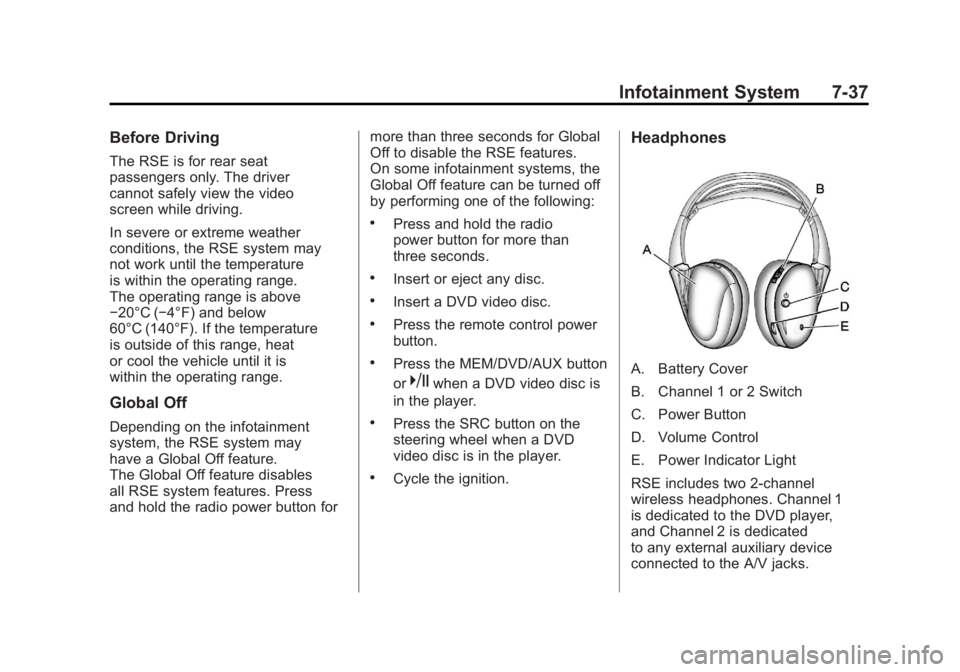
Headphones
A. Battery Cover
B. Channel 1 or 2 Switch
C. Power Button
D. Volume Control
E. Power Indicator Light
RSE includes two 2-channel
wireless headphones. Channel 1
is dedicated to the DVD player,
and Channel 2 is dedicated
to any external auxiliary device
connected to the A/V jacks.
Page 227 of 462
Black plate (47,1)Buick LaCrosse Owner Manual - 2011
Infotainment System 7-47
.Pair cell phone(s) to the vehicle.
The system may not work with
all cell phones. See“Pairing a
Phone” in this section for more
information.
.If the cell phone has voice
dialing capability, learn to
use that feature to access the
address book or contact list.
See “Voice Pass-Thru” in this
section for more information.
.See “Storing and Deleting Phone
Numbers” in this section for
more information.
{WARNING
When using a cell phone,
it can be distracting to look too
long or too often at the screen
of the phone or the infotainment
(navigation) system. Taking
your eyes off the road too long
or too often could cause a crash
resulting in injury or death. Focus
your attention on driving. Vehicles with a Bluetooth system
can use a Bluetooth‐capable cell
phone with a Hands‐Free Profile
to make and receive phone calls.
The infotainment system and voice
recognition are used to control the
system. The system can be used
while the ignition is in ON/RUN or
ACC/ACCESSORY. The range of
the Bluetooth system can be up
to 9.1 m (30 ft). Not all phones
support all functions and not all
phones work with the Bluetooth
system. See www.gm.com/bluetooth
for more information about
compatible phones.
Bluetooth Controls
Use the buttons located on the
infotainment system and the
steering wheel to operate the
Bluetooth system.
Steering Wheel Controls
b/g(Push To Talk):
Press to
answer incoming calls, to confirm
system information, and to start
voice recognition.
$/i(Mute/End Call): Press to
end a call, reject a call, or cancel an
operation.
Infotainment System Controls
For information about how to
navigate the menu system using
the infotainment controls, see
Operation on page 7‑7.
5(Phone): Press to enter the
Phone main menu.
Page 233 of 462
Black plate (53,1)Buick LaCrosse Owner Manual - 2011
Infotainment System 7-53
Ending a Call
Turn the Menu knob and select
Hang Up.
Muting a Call
To Mute a Call
Turn the Menu knob and select
Mute Call.
To Cancel Mute
Turn the Menu knob and select
Mute Call.
Dual Tone Multi-Frequency
(DTMF) Tones
The in‐vehicle Bluetooth system can
send numbers during a call. This is
used when calling a menu‐driven
phone system.
1. Turn the Menu knob and selectEnter Number.
2. Enter the character sequence. See “Entering a Character
Sequence” inOperation on
page 7‑7 for more information.
Bluetooth (Voice
Recognition)
Using Voice Recognition
To use voice recognition, pressbg
located on the steering wheel.
The system responds differently
depending on what kind of
infotainment system the vehicle
has installed.
For vehicles without a navigation
system, the system responds
“Ready,” followed by a tone.
After the tone, say a command.
For vehicles with a navigation
system, the system responds with
a tone. After the tone say “Hands
Free” to use the Bluetooth voice
recognition system. The system
then responds with “Ready,”
followed by a tone. After the
tone, say a command.
For additional information say
“Help” while you are in a voice
recognition menu.
Pairing
A Bluetooth cell phone must be
paired to the Bluetooth system
and then connected to the vehicle
before it can be used. See your cell
phone manufacturer's user guide for
Bluetooth functions before pairing
the cell phone. If a Bluetooth phone
is not connected, calls will be made
using OnStar Hands‐Free Calling,
if available. Refer to the OnStar
owner's guide for more information.
Pairing Information
.Up to five cell phones can be
paired to the Bluetooth system.
.The pairing process is disabled
when the vehicle is moving.
.Pairing only needs to be
completed once, unless the
pairing information on the cell
phone changes or the cell phone
is deleted from the system.
Page 244 of 462
Black plate (4,1)Buick LaCrosse Owner Manual - 2011
8-4 Climate Controls
Sensor
The solar sensor, located on top
of the instrument panel near the
windshield, monitors the solar heat.
The climate control system uses
the sensor information to adjust
the temperature, fan speed,
recirculation, and air delivery
mode for best comfort.
Do not cover the sensor or the
automatic climate control system
may not work properly.
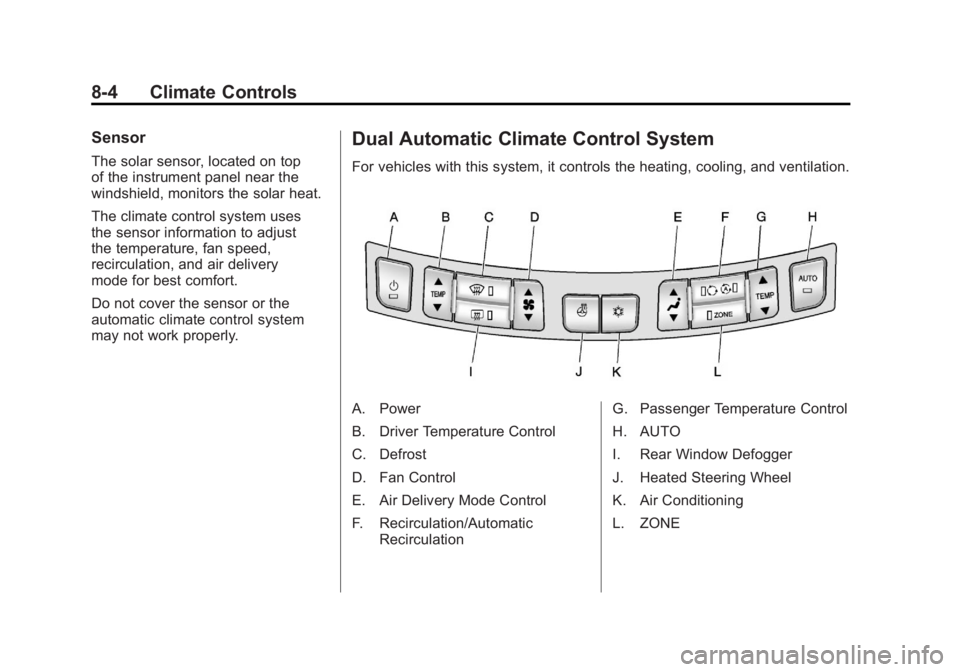
Dual Automatic Climate Control System
For vehicles with this system, it controls the heating, cooling, and ventilation.
A. Power
B. Driver Temperature Control
C. Defrost
D. Fan Control
E. Air Delivery Mode Control
F. Recirculation/AutomaticRecirculation G. Passenger Temperature Control
H. AUTO
I. Rear Window Defogger
J. Heated Steering Wheel
K. Air Conditioning
L. ZONE
Page 247 of 462
Black plate (7,1)Buick LaCrosse Owner Manual - 2011
Climate Controls 8-7
Rear Window Defogger
=(Rear Window Defogger):
Press to turn the rear window
defogger on or off.
The rear window defogger
turns off automatically after
about 10 minutes. If turned on
again it runs for about five minutes
before turning off. The defogger
can also be turned off by turning
the ignition to ACC/ACCESSORY
or LOCK/OFF.
The rear window defogger can
be set to automatic operation.
See “Climate and Air Quality”
under Vehicle Personalization on
page 5‑39. When auto rear defog is
selected, the rear window defogger
turns on automatically when the
interior temperature is cold and
the outside temperature is about
4°C (40°F) and below. The auto
rear defogger turns off automatically after about 10 minutes, or after
five minutes if the outside
temperature is not as cold.
For vehicles with heated outside
rearview mirrors, they turn on when
the rear window defogger button
is on and help to clear fog or frost
from the surface of the mirror.
See
Heated Mirrors on page 2‑17.
Notice: Do not try to clear frost
or other material from the inside
of the front windshield and rear
window with a razor blade or
anything else that is sharp. This
may damage the rear window
defogger grid and affect your
radio's ability to pick up stations
clearly. The repairs wouldn't be
covered by your warranty.
((Heated Steering Wheel): For
vehicles with this feature, press to
turn on or off. See Heated Steering
Wheel on page 5‑3. Remote Start Climate Control
Operation:
For vehicles with
the remote vehicle start feature,
the climate control system may
run when the vehicle is started
remotely. The system uses the
driver's previous settings to heat
or cool the inside of the vehicle.
See Remote Vehicle Start on
page 2‑8.
The rear window defogger turns on
if it is cold outside.
Sensor
The solar sensor, located on top
of the instrument panel near the
windshield, monitors the solar heat.
The climate control system
uses the sensor information to
adjust the temperature, fan speed,
recirculation, and air delivery mode
for best comfort.
Do not cover the sensor or the
automatic climate control system
may not work properly.
Page 251 of 462
Black plate (1,1)Buick LaCrosse Owner Manual - 2011
Driving and Operating 9-1
Driving and
Operating
Driving Information
Defensive Driving . . . . . . . . . . . . . 9-2
Drunk Driving . . . . . . . . . . . . . . . . . 9-2
Control of a Vehicle . . . . . . . . . . . 9-3
Braking . . . . . . . . . . . . . . . . . . . . . . . 9-3
Steering . . . . . . . . . . . . . . . . . . . . . . . 9-4
Off-Road Recovery . . . . . . . . . . . . 9-6
Loss of Control . . . . . . . . . . . . . . . . 9-6
Driving on Wet Roads . . . . . . . . . 9-7
Highway Hypnosis . . . . . . . . . . . . 9-8
Hill and Mountain Roads . . . . . . 9-8
Winter Driving . . . . . . . . . . . . . . . . . 9-9
If the Vehicle is Stuck . . . . . . . . 9-11
Vehicle Load Limits . . . . . . . . . . 9-12
Starting and Operating
New Vehicle Break-In . . . . . . . . 9-16
Ignition Positions(Key Access) . . . . . . . . . . . . . . . 9-17
Ignition Positions (Keyless Access) . . . . . . . . . . . 9-19
Starting the Engine . . . . . . . . . . 9-20
Engine Heater . . . . . . . . . . . . . . . 9-23
Retained Accessory Power (RAP) . . . . . . . . . . . . . . . 9-24
Shifting Into Park . . . . . . . . . . . . 9-25
Shifting Out of Park . . . . . . . . . . 9-26
Parking Over Things That Burn . . . . . . . . . . . . . . . . . . 9-27
Engine Exhaust
Engine Exhaust . . . . . . . . . . . . . . 9-27
Running the Vehicle WhileParked . . . . . . . . . . . . . . . . . . . . . 9-28
Automatic Transmission
Automatic Transmission . . . . . 9-28
Manual Mode . . . . . . . . . . . . . . . . 9-30
Drive Systems
All-Wheel Drive . . . . . . . . . . . . . . 9-31
Brakes
Antilock BrakeSystem (ABS) . . . . . . . . . . . . . . 9-32
Parking Brake . . . . . . . . . . . . . . . 9-33
Brake Assist . . . . . . . . . . . . . . . . . 9-35
Hill Start Assist (HSA) . . . . . . . 9-35
Ride Control Systems
Traction Control System (TCS) . . . . . . . . . . . . . . 9-36
Electronic Stability Control (ESC) . . . . . . . . . . . . . . 9-37
Limited-Slip Differential . . . . . . 9-38
Selective Ride Control . . . . . . . 9-38
Cruise Control
Cruise Control . . . . . . . . . . . . . . . 9-39
Object Detection Systems
Ultrasonic Parking Assist . . . . 9-42
Side Blind Zone Alert (SBZA) . . . . . . . . . . . . . . . 9-44
Rear Vision Camera (RVC) . . . . . . . . . . . . . 9-46
Page 255 of 462
Black plate (5,1)Buick LaCrosse Owner Manual - 2011
Driving and Operating 9-5
Steering Tips
It is important to take curves at a
reasonable speed.
Traction in a curve depends on
the condition of the tires and the
road surface, the angle at which the
curve is banked, and vehicle speed.
While in a curve, speed is the one
factor that can be controlled.
If there is a need to reduce speed,
do it before entering the curve, while
the front wheels are straight.
Try to adjust the speed so you can
drive through the curve. Maintain a
reasonable, steady speed. Wait to
accelerate until out of the curve,
and then accelerate gently into
the straightaway.
Steering in Emergencies
There are times when steering
can be more effective than braking.
For example, you come over a hill
and find a truck stopped in your
lane, or a car suddenly pulls out
from nowhere, or a child darts out
from between parked cars and stops
right in front of you. These problems
can be avoided by braking—if you
can stop in time. But sometimes you
cannot stop in time because there
is no room. That is the time for
evasive action —steering around
the problem.
The vehicle can perform very
well in emergencies like these.
First apply the brakes. See Braking
on page 9‑3. It is better to remove
as much speed as possible from
a collision. Then steer around
the problem, to the left or right
depending on the space available.
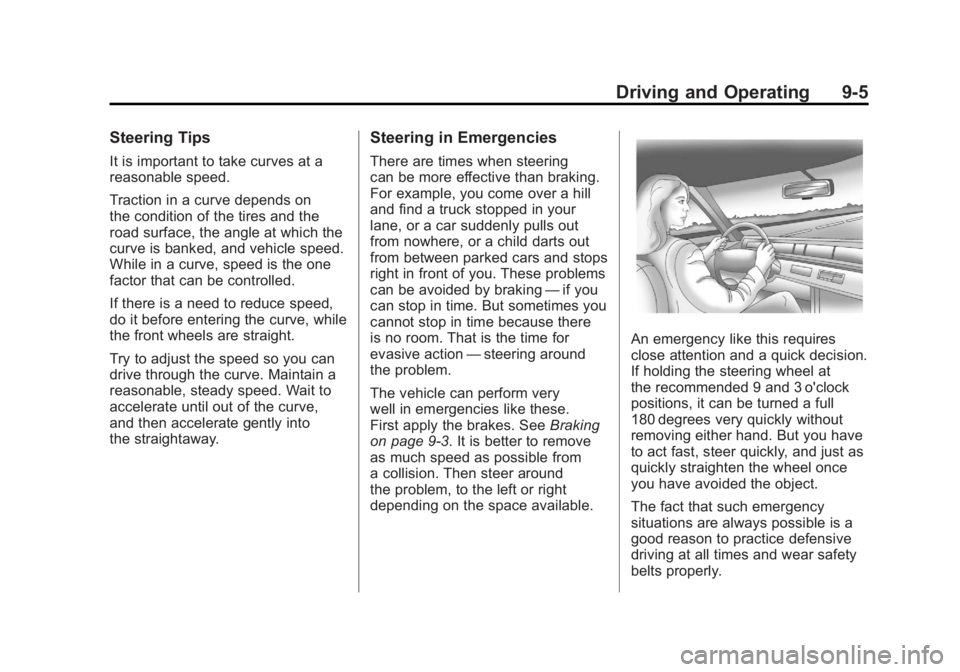
An emergency like this requires
close attention and a quick decision.
If holding the steering wheel at
the recommended 9 and 3 o'clock
positions, it can be turned a full
180 degrees very quickly without
removing either hand. But you have
to act fast, steer quickly, and just as
quickly straighten the wheel once
you have avoided the object.
The fact that such emergency
situations are always possible is a
good reason to practice defensive
driving at all times and wear safety
belts properly.
Page 256 of 462
Black plate (6,1)Buick LaCrosse Owner Manual - 2011
9-6 Driving and Operating
Off-Road Recovery
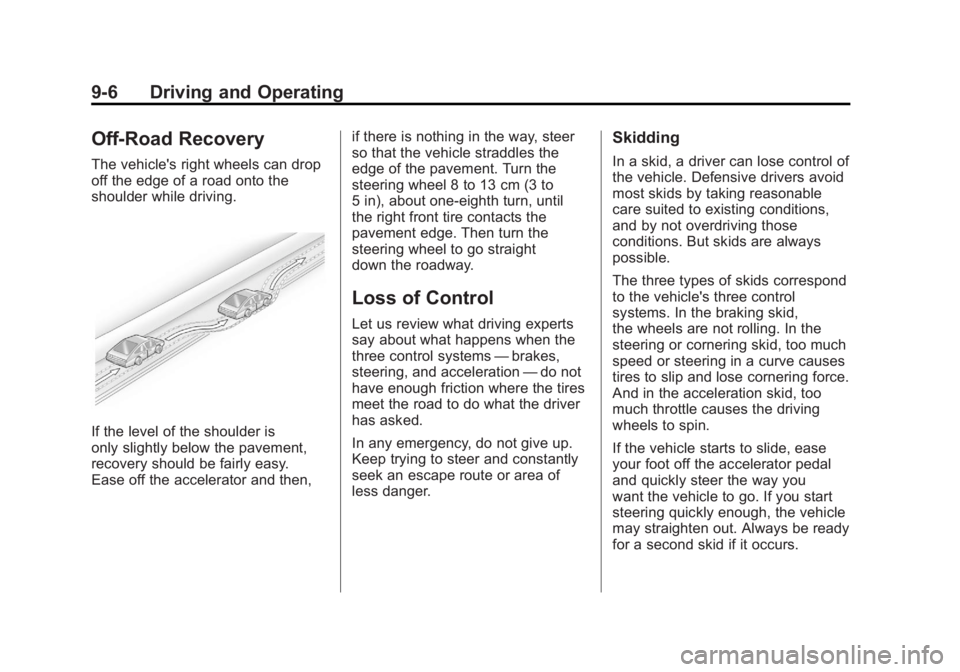
The vehicle's right wheels can drop
off the edge of a road onto the
shoulder while driving.
If the level of the shoulder is
only slightly below the pavement,
recovery should be fairly easy.
Ease off the accelerator and then,if there is nothing in the way, steer
so that the vehicle straddles the
edge of the pavement. Turn the
steering wheel 8 to 13 cm (3 to
5 in), about one-eighth turn, until
the right front tire contacts the
pavement edge. Then turn the
steering wheel to go straight
down the roadway.
Loss of Control
Let us review what driving experts
say about what happens when the
three control systems
—brakes,
steering, and acceleration —do not
have enough friction where the tires
meet the road to do what the driver
has asked.
In any emergency, do not give up.
Keep trying to steer and constantly
seek an escape route or area of
less danger.
Skidding
In a skid, a driver can lose control of
the vehicle. Defensive drivers avoid
most skids by taking reasonable
care suited to existing conditions,
and by not overdriving those
conditions. But skids are always
possible.
The three types of skids correspond
to the vehicle's three control
systems. In the braking skid,
the wheels are not rolling. In the
steering or cornering skid, too much
speed or steering in a curve causes
tires to slip and lose cornering force.
And in the acceleration skid, too
much throttle causes the driving
wheels to spin.
If the vehicle starts to slide, ease
your foot off the accelerator pedal
and quickly steer the way you
want the vehicle to go. If you start
steering quickly enough, the vehicle
may straighten out. Always be ready
for a second skid if it occurs.