cd player BUICK LACROSSE 2012 User Guide
[x] Cancel search | Manufacturer: BUICK, Model Year: 2012, Model line: LACROSSE, Model: BUICK LACROSSE 2012Pages: 512, PDF Size: 6.21 MB
Page 195 of 512
Black plate (15,1)Buick LaCrosse Owner Manual - 2012
Infotainment System 7-15
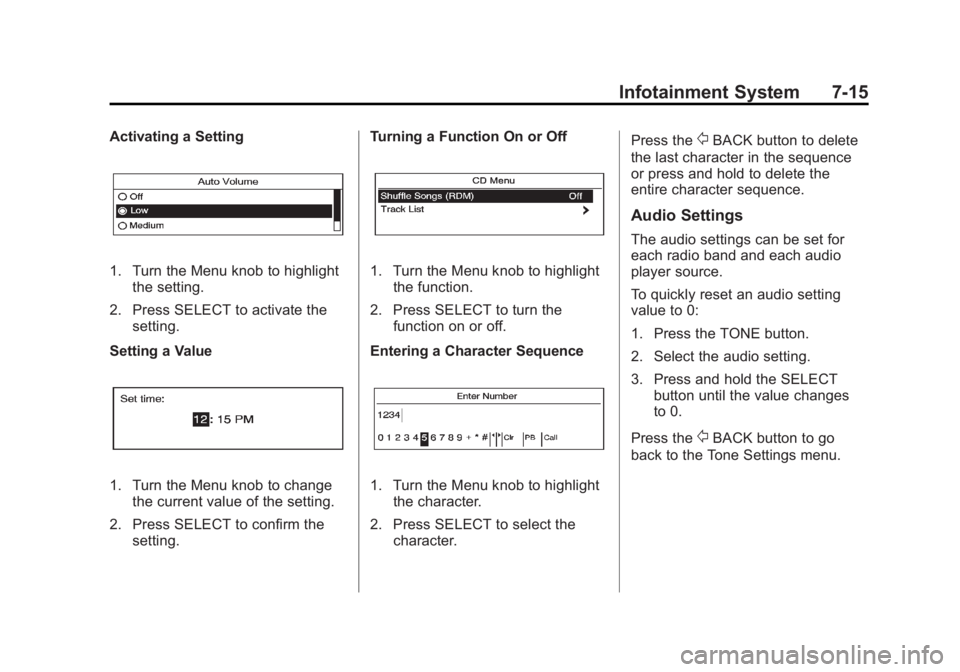
Activating a Setting
1. Turn the Menu knob to highlightthe setting.
2. Press SELECT to activate the setting.
Setting a Value
1. Turn the Menu knob to change the current value of the setting.
2. Press SELECT to confirm the setting. Turning a Function On or Off
1. Turn the Menu knob to highlight
the function.
2. Press SELECT to turn the function on or off.
Entering a Character Sequence
1. Turn the Menu knob to highlight the character.
2. Press SELECT to select the character. Press the
/BACK button to delete
the last character in the sequence
or press and hold to delete the
entire character sequence.
Audio Settings
The audio settings can be set for
each radio band and each audio
player source.
To quickly reset an audio setting
value to 0:
1. Press the TONE button.
2. Select the audio setting.
3. Press and hold the SELECT button until the value changes
to 0.
Press the
/BACK button to go
back to the Tone Settings menu.
Page 208 of 512
Black plate (28,1)Buick LaCrosse Owner Manual - 2012
7-28 Infotainment System
Audio Players
CD Player
For vehicles equipped with the
MyLink or IntelliLink infotainment
system, see the separate MyLink/
IntelliLink Features and Functions
Guide for more information.
The player can be used for CD
and MP3s.
With the ignition on, insert a CD into
the slot, label side up. The player
pulls it in and begins playing.
The vehicle must be in P (Park) for
video to display.
The system is capable of playing:
.Most audio CDs
.CD-R
.CD-RW
.MP3 or unprotected WMA
formatsWhen playing any compatible
recordable disc, the sound quality
can be reduced due to disc quality,
the method of recording, the quality
of the music or video that has been
recorded, or the way the disc has
been handled.
To avoid damage to the CD player:
.Do not use scratched or
damaged discs
.Do not apply labels to discs. The
labels could get caught in the
player.
.Insert only one disc at a time.
.Keep the loading slot free of
foreign materials, liquids and
debris.
If a description label is needed, try
labeling the top of the disc using a
marking pen.
Loading and Ejecting Discs
To load a disc:
1. Turn the ignition on.
2. Insert a disc into the slot. The player pulls it in the rest of the
way. If the disc is damaged or
improperly loaded, there is an
error and the disc ejects.
The disc automatically plays once
loaded.
Press
Xto eject a disc from the
CD player.
Playing a CD
A disc must be loaded to select the
source.
When a disc is loaded, the disc icon
displays.
There are two ways to play a CD:
.Insert the disc and playback
starts automatically.
.Press CD/AUX, MEM/DVD/AUX,
or SOURCE repeatedly to select
the disc source.
Page 209 of 512
Black plate (29,1)Buick LaCrosse Owner Manual - 2012
Infotainment System 7-29
Playing an Audio CD
1. Press the CD screen button onthe Home Page or select CD
from the source pop-up to
display the CD main page.
2. From the CD screen, press the Menu screen button to display
the menu options.
3. Press to select the desired option.
On the CD main page a track
number displays at the beginning of
each track. Song, Artist, and Album
information displays when available.
Use the following controls to play
the disc:
w/j(Play/Pause): Use to start,
pause, or resume play.
g(Seek Down):
.Press to seek to the beginning of
the current or previous track.
If the track has been playing for
less than five seconds, it seeks
to the previous track. If longer
than five seconds, the current
track starts from the beginning.
.Press and hold to fast reverse
through a track. Release the
button to return to playing
speed. Elapsed time displays.
l(Seek Up):
.Press to seek to the next track.
.Press and hold to fast forward
through a track. Release the
button to return to playing
speed. Elapsed time displays.
SELECT: Turn to the right or left to
select the next or previous track.
Press this knob to select the menu.
If a track is selected from the list,
the system plays the track and
returns to the CD screen.
Error Messages
If Disc Read Error displays and/or
the disc comes out, it could be for
one of the following reasons:
.The disc has an invalid or
unknown format.
.The disc is not from a correct
region.
.The disc is very hot. Try the disc
again when the temperature
returns to normal.
.The road is very rough. Try the
disc again when the road is
smoother.
.The disc is dirty, scratched, wet,
or upside down.
.The air is very humid. Try the
disc again later.
.There was a problem while
burning the disc.
.The label is caught in the CD
player.
Page 210 of 512
Black plate (30,1)Buick LaCrosse Owner Manual - 2012
7-30 Infotainment System
If the CD is not playing correctly, for
any other reason, try a known
good CD.
If any error continues, contact your
dealer.
CD/DVD Player
The CD/DVD player can play CDs,
DVD‐As, MP3/WMA CDs, MP3/
WMA DVDs, and DVD‐Vs.
The CD/DVD player will not play
8 cm (3 in) discs.
Care of CDs and DVDs
Sound quality can be reduced due
to disc quality, recording method,
quality of the music recorded, and
how the disc has been handled.
Handle discs carefully and store
them in their original cases or other
protective cases away from direct
sunlight and dust. If the bottom
surface of a disc is damaged, the
disc may not play properly or at all.Do not touch the bottom surface of
a disc while handling it; this could
damage the surface. Pick up discs
by grasping the outer edges or the
edge of the hole and the outer edge.
If the bottom surface of a disc is
dirty, take a soft, lint‐free cloth,
or dampen a clean, soft cloth in a
mild neutral detergent solution
mixed with water, and clean it. Wipe
the disc from the center to the
outer edge.
Care of the CD/DVD Player
Do not add a label to a disc, as it
could get caught in the CD/DVD
player. If a label is needed, label the
top of the recorded disc with a
marking pen.
Do not use disc lens cleaners
because they could contaminate the
lens of the disc optics and damage
the CD/DVD player.
Notice:
If a label is added to a
CD, more than one CD is inserted
into the slot at a time, or an
attempt is made to play scratched
or damaged CDs, the CD player
could be damaged. While using
the CD player, use only CDs in
good condition without any label,
load one CD at a time, and keep
the CD player and the loading slot
free of foreign materials, liquids,
and debris.
Control Buttons
The buttons used to control the CD/
DVD player are:
MEM/DVD/AUX: Press to choose
between the MEM, CD/DVD,
and AUX.
l/g: Press to select tracks or
to fast forward or rewind within a
track.
INFO: Press to display additional
information about the disc that may
be available.
Page 211 of 512
Black plate (31,1)Buick LaCrosse Owner Manual - 2012
Infotainment System 7-31
TUNE:Turn to select tracks.
Menu Knob: Turn to enter
the menu.
SELECT: Press to select an item.
X(Eject):Press to eject the disc.
k:Press to pause a CD, DVD‐A,
or DVD‐V; press again to resume
playback. Press and hold to stop a
DVD‐V disc.
Inserting a CD or DVD
With the printed side facing up,
insert a disc into the slot until it is
drawn in.
Removing a CD or DVD
PressX.
The disc is pushed out of the CD/
DVD slot.
If the disc is not removed after it is
ejected, it is pulled back in after a
few seconds.
Playing a CD or DVD‐A Disc
Press the MEM/DVD/AUX button if
there is a disc in the player.
It begins playing.
Information about the disc and
current track is shown on the
display depending on the data
stored.
Selecting CD or DVD‐A Tracks
Using the control buttons:
.Pressgorlto select the
previous or next track.
.Turn the TUNE knob.
Using the menu:
1. Turn the Menu knob.
2. Select Tracks List.
3. Select the track. Pausing a CD or DVD‐A Track
Press
kto pause a CD or DVD‐A
track. Press
kagain to continue
playing the track.
Playing CD or DVD‐A Tracks in
Random Order
Turn the Menu knob and set Shuffle
Songs to On.
Fast Forward and Rewind
Press and hold
lorgto fast
forward or rewind within the current
track.
Playing an MP3 CD or DVD
Files that are not stored in folders
are displayed in the root
directory (disc).
The search rate increases if the
Menu knob is continuously turned
while searching in a list.
Page 214 of 512

Black plate (34,1)Buick LaCrosse Owner Manual - 2012
7-34 Infotainment System
.Maximum number of folders is
255 with a maximum hierarchy
of eight folders.
.Maximum of 1024 files on a disc.
.Recorded on a CD-R or CD-RW
with a maximum capacity of
700 MB.
.The Artist/Album/Song Titles/
Genre information requires a CD
to be fully scanned before the
music navigator works with
these menus. Disc scanning
does not occur when the disc is
being played.
When an MP3 is loaded in the
player, MP3 displays.
If a disc is already loaded, but you
are currently on a map screen or
listening to a different audio source,
press SOURCE to switch to the disc
source. A track number appears on
the display when each track starts
to play. To play a disc:
TUNE/
k(Play/Pause):
Use to
start, pause, or resume play of a
loaded disc.
l(Next/Forward): Press to seek
to the next track. Press again to
continue moving forward through
the disc.
Press and hold to advance quickly
through playback. Release the
button to return to playing speed.
Elapsed time displays.
g(Previous/Reverse): Press to
seek to the beginning of the current
or previous track. If the track has
played for less than five seconds, it
goes to the previous track. If longer
than five seconds, the current track
restarts. Press again to continue
moving back through the disc. Press and hold this button to
reverse quickly through playback.
Release the button to return to
playing speed. Elapsed time
displays.
Menu Knob:
Turn to:
.Enter the menu system.
.Highlight a menu option.
.Select a value.
SELECT:
Press to:
.Select or activate the highlighted
menu option.
.Confirm a set value.
.Turn a system setting on or off.
Page 215 of 512
Black plate (35,1)Buick LaCrosse Owner Manual - 2012
Infotainment System 7-35
Disc Music Menu
Press the SELECT knob to access
the Disc music menu.
Turn the SELECT knob to scroll,
then press it to select any of the
following category buttons on the
MP3 music menu to display the
corresponding category screen:
.Folders/Playlists
Select to view the folders stored
on the disc. Select a folder to
view the list of all the songs in
that folder. There might be a
delay before the list displays.
Select the song from the list and
it begins to play.
.Track List (All Songs)
Select to view a list of all songs
on the disc. There might be a
delay before the list displays.
Select a song from the list and it
begins to play. Songs are
displayed based on the CD
burning application folder and
file structure used.
.Artists
Select to view the list of artists
that have been stored on the
disc. Select an artist name to
view a list of all songs by the
artist. There might be a delay
before the list displays. Select
the desired song from the list
and it begins to play.
.Albums
Select to view the albums on the
disc. Select the album to view a
list of all songs on the album.
There might be a delay before
the list displays. Select a song
from the list and it begins to play.
.Genres
Select to view the genres on the
disc. Select a genre to view a list
of all songs of that genre. There
might be a delay before the list
displays. Select a song from the
list and it begins to play.
.Song Titles
Select to display a list of all
songs on the disc. There might
be a delay before the list
displays. Select a song from the
list and it begins to play. Songs
are displayed in alphabetical
order based on the Song Title
ID3 tag, if available.
Root Directory
The root directory is treated as a
folder. All files contained directly
under the root directory are
accessed prior to any root directory
folders.
Empty Directory or Folder
If a root directory or folder is empty
or contains only folders, the player
advances to the next folder in the
file structure that contains a
compressed audio file. The empty
folder(s) are not displayed or
numbered.
Page 216 of 512
Black plate (36,1)Buick LaCrosse Owner Manual - 2012
7-36 Infotainment System
No Folder
When the CD only contains
compressed audio files without any
folders or playlists, all files are
located under the root folder.
File System and Naming
The displayed song title is taken
from the file's ID3 tag. If a song title
is not present in the ID3 tag, the
radio displays the file name as the
track name.
Mass Storage
Media (MEM)
Infotainment systems with MEM
storage are able to record up to
1.1 GB (gigabyte) of music from
audio CDs, MP3/WMA/AAC discs,
and USB storage devices. The MEM
player can also time shift audio from
AM, FM, and XM radio.
Music or content stored in MEM that
you did not create, or have the right
to distribute, must be deleted before
the sale or end of lease of the
vehicle.
Control Buttons
The buttons used to control the
MEM player are:
MEM/DVD/AUX:Press to select
the MEM player.
gorl: Press to select tracks or
to rewind or fast forward within a
track.
INFO: Press to display additional
information about the MEM track
that may be available.
TUNE/
k: Press to pause the
track currently playing; press again
to resume playback. Turn to select
tracks.
REC
O: Press to record music
from a CD or USB drive.
DEL: Press to delete the current
track from MEM.
FAV (Favorites): Press to display
MEM favorites.
1 to 6: Press to select a track or
playlist stored in that numeric
position.
Recording from Audio CDs
The infotainment system can record
the current song playing or all songs
from an audio CD to MEM. A status
bar appears on the top of the
display when the recording process
starts and disappears when the
process has ended. Copy protected
CDs cannot be recorded to MEM.
Recording to MEM
Press REC
O, then select Record
Current Song or Record All Songs
on Disc. If the track has started
playing, the system will restart the
track and begin recording from the
beginning of the track. When the
song recording is completed, the
message Song Recorded to MEM
displays, and there may be a slight
pause.
Songs recorded to MEM are stored
as the current date, disc, and track
number.
Page 219 of 512
Black plate (39,1)Buick LaCrosse Owner Manual - 2012
Infotainment System 7-39
Album:Saves the album
associated with the currently playing
track in the indicated favorites
position.
Genre: Saves the genre associated
with the currently playing track in
the indicated favorites position.
Creating Playlists
To create a playlist using tracks
stored in MEM:
1. Select Playlist from the MEM
favorites.
2. Select the track to be stored in the playlist.
3. Press and hold one of the 1 to 6 buttons until the track can be
heard again to store the track.
4. Repeat Steps 1 through 3 to store additional tracks in the
playlist.Auxiliary Devices (Radio
with CD and
Touchscreen)
For vehicles equipped with the
MyLink or IntelliLink infotainment
system, see the separate MyLink/
IntelliLink Features and Functions
Guide for more information.
The optional AUX input allows
portable devices to connect to the
vehicle using the 3.5 mm (1/8 in)
input jack or the USB port.
Portable devices are controlled by
using the menu system described in
Overview (Radio with CD) on
page 7‑3 orOverview (Radio with
CD/DVD and MEM) on page 7‑5 or
Overview (Radio with CD and
Touchscreen) on page 7‑7 and
Operation on page 7‑13.
This jack is not an audio output. Do
not plug headphones into the
auxiliary input jack. Drivers are
encouraged to set up any auxiliary
device while the vehicle is in
P (Park). Possible auxiliary audio sources
include:
.Laptop computer
.MP3 player
.Tape player
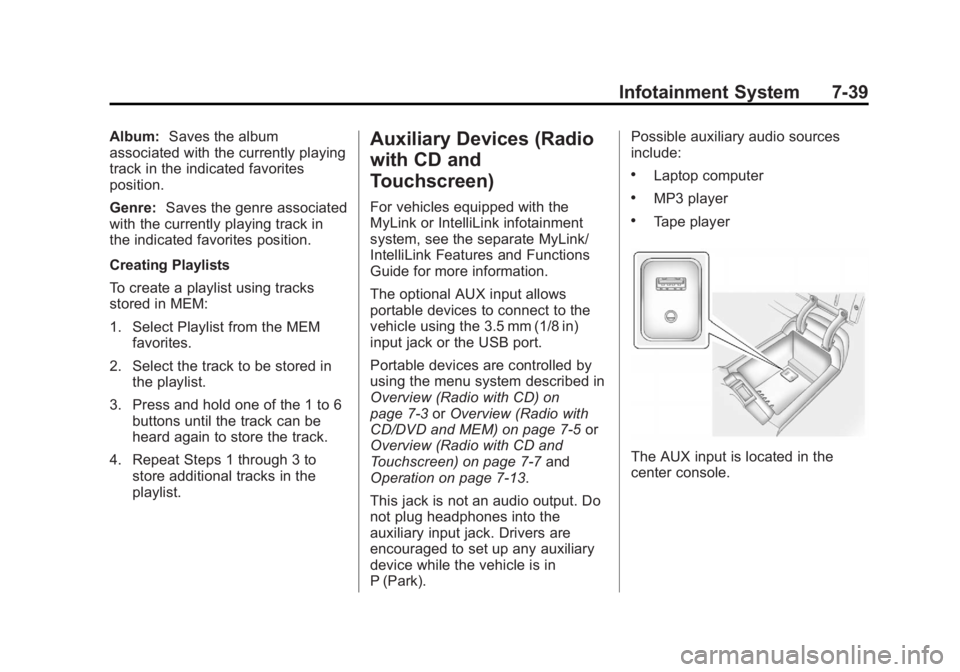
The AUX input is located in the
center console.
Page 220 of 512
Black plate (40,1)Buick LaCrosse Owner Manual - 2012
7-40 Infotainment System
3.5 mm Jack
Connect a 3.5 mm (1/8 in) cable to
the auxiliary input jack to use a
portable audio player.
Playback of an audio device that is
connected to the 3.5 mm jack can
only be controlled using the controls
on the device.
If an auxiliary device has already
been connected on vehicles with a
touchscreen, but a different source
is currently active, press the Now
Playing screen button on the Home
Page, then press Source repeatedly
to cycle through all of the available
audio source screens, until the AUX
source screen is selected.
Adjusting the Volume
Turn the VOL/
Oknob to adjust the
volume of the infotainment system
after the volume level has been set
on the portable audio device.
USB Port
For vehicles with a USB port, the
following devices may be connected
and controlled by the infotainment
system.
.iPods
.PlaysForSure Devices (PFDs)
.USB Drives
.Zunes™
.USB mass storage device
.Microsoft Transfer
Protocal (MTP)
Not all iPods, PFDs, USB Drives,
and Zunes are compatible with the
infotainment system.
Connecting and Controlling an
iPod®(Radio with CD and
Radio with CD/DVD/MEM)
Not all iPods can be controlled by
the infotainment system.
Connecting an iPod
Connect the iPod to the USB port.
Selecting a Track
Using the control buttons:
.Pressgorlto select the
previous or next track.
.Turn the TUNE knob to select a
track in the current submenu.
The track will start to play.