Windows BUICK LACROSSE 2012 Owner's Guide
[x] Cancel search | Manufacturer: BUICK, Model Year: 2012, Model line: LACROSSE, Model: BUICK LACROSSE 2012Pages: 512, PDF Size: 6.21 MB
Page 192 of 512
Black plate (12,1)Buick LaCrosse Owner Manual - 2012
7-12 Infotainment System
Set Time Format:Press the
12 Hours screen button for standard
time; press the 24 Hours screen
button for military time.
Set Date Format: Depending on
the region, the following date
formats may be available: MM/DD/
YYYY, DD.MM.YYYY, or YYYY/
MM/DD.
Display Digital Clock: Press
Display to turn the display of the
clock on the screen On or Off.
Radio Settings
Press the Config button on the
Home Page or the CONFIG button
on the faceplate to enter the menu
options. Turn the MENU knob or
touch-tap the scroll bar to scroll
through the available options. Press
the MENU knob or press Radio
Settings to display the radio settings
menu. Press this feature to make
changes for radio information
displayed, preset pages, Auto
Volume Control, and XM Categories Restore. See
Satellite Radio on
page 7‑24 (if equipped), for more
information about XM Categories.
The Radio Settings are:
Speed Dependent Volume: Select
OFF, Low, Medium, or High
sensitivity to automatically adjust
the volume to minimize the effects
of unwanted background noise that
can result from changing road
surfaces, driving speeds, or open
windows. This feature works best at
lower volume settings where
background noise is typically louder
than the sound system volume.
Startup Volume: Press to set the
maximum volume level for startup
that will be used even if a higher
volume had been set when the radio
was turned off.
Radio Favorites: Press to select
the number of FAV pages to be
used in the system. Add/Remove XM Categories:
Press to customize which available
XM Categories are used and
displayed in the system.
See
AM-FM Radio (Radio with CD/
DVD/MEM) on page 7‑18 orAM-FM
Radio (Radio with CD and
Touchscreen) on page 7‑21 for
more information.
Phone Settings
See Bluetooth (Overview) on
page 7‑57 orBluetooth
(Infotainment Controls) on
page 7‑59 orBluetooth (Voice
Recognition) on page 7‑63 or
Bluetooth (UHP Mexico Only) on
page 7‑69 in the“Phone” section for
more information on phone settings.
Vehicle Settings
See Vehicle Personalization on
page 5‑43 for more information.
Page 224 of 512
Black plate (44,1)Buick LaCrosse Owner Manual - 2012
7-44 Infotainment System
.The following restrictions apply
for the data stored on a USB
MP3 player or USB device:
‐Maximum folder structure
depth: 11 levels.
‐ Maximum number of MP3/
WMA files that can be
displayed: 1,000
.WMA with Digital Rights
Management (DRM) from online
music shops cannot be played.
WMA files can only be played
back safely if they were created
with Windows Media Player
version 8 or later.
‐Applicable playlist extensions
are: .m3u, .pls.
‐ Playlist entries must be in the
form of relative paths.
‐ The system attribute for
folders/files that contain audio
data must not be set. To play a USB device, do one of the
following:
.Connect the USB and it begins
to play.
.Press the Now Playing screen
button on the Home Page, then
press the SOURCE button on
the faceplate repeatedly to cycle
through all of the available audio
source screens, until the USB
source screen is selected.
While the USB source is active, use
the following to operate USB
function:
TUNE/
k(Play/Pause): Press to
start, pause, or resume play of the
current media source.
g(Seek Down):
1. Press to seek to the beginning of the current or previous track.
If the track has been playing for
less than five seconds, the
previous track plays. If playing
longer than five seconds, the
current track restarts.
2. Press and hold to reverse quickly through playback.
3. Release to return to playing speed. Elapsed time displays.
l(Seek Up):
1. Press to seek to the next track.
2. Press and hold to advance quickly through playback.
Release to return to playing
speed. Elapsed time displays.
Page 265 of 512
Black plate (3,1)Buick LaCrosse Owner Manual - 2012
Climate Controls 8-3
-(Defog):Clears the windows of
fog or moisture. Air is directed to the
windshield and floor outlets.
0(Defrost): Clears the
windshield of fog or frost more
quickly. Air is directed to the
windshield. Selecting defrost will
disable automatic control.
For best results, clear all snow and
ice from the windshield before
defrosting.
#(Air Conditioning): Press to
turn the air conditioning system on
or off. If the fan is turned off or the
outside temperature falls below
freezing, the air conditioning system
will not run.
Pressing this button cancels
automatic air conditioning and turns
off the air conditioner. Press AUTO
to return to automatic operation
and the air conditioner runs automatically as needed. When the
indicator light is on, the air
conditioner runs automatically to
cool the air inside the vehicle or to
dry the air needed to defog the
windshield faster.
>(Recirculation):
Press to
alternate between recirculating air
inside the vehicle or pulling in
outside air. When the indicator light
is on, air is being recirculated inside
the vehicle. This helps to quickly
cool the air inside the vehicle or
prevent outside air and odors from
entering.
Pressing this button cancels
automatic recirculation. Press AUTO
to return to automatic operation and
recirculation runs automatically as
needed.
Rear Window Defogger
=(Rear Window Defogger):
Press to turn the rear window
defogger on or off.
The rear window defogger turns
off automatically after about
10 minutes. If turned on again it
runs for about five minutes before
turning off. The defogger can also
be turned off by turning the ignition
to ACC/ACCESSORY or
LOCK/OFF.
The rear window defogger can be
set to automatic operation. See
“Climate and Air Quality” under
Vehicle Personalization on
page 5‑43. When auto rear defog is
selected, the rear window defogger
turns on automatically when the
interior temperature is cold and the
outside temperature is about 4°C
(40°F) and below. The auto rear
defogger turns off automatically
after about 10 minutes, or after
five minutes if the outside
temperature is not as cold.
Page 269 of 512
Black plate (7,1)Buick LaCrosse Owner Manual - 2012
Climate Controls 8-7
.Select a temperature setting that
is higher in hot weather and
lower in cold weather.
.Turn off the air conditioning
when it is not needed.
.Only use defrost to clear the
windows.
Automatic Operation
The system automatically controls
the fan speed, air delivery, air
conditioning, and recirculation in
order to heat or cool the vehicle to
the desired temperature.
When the AUTO indicator light is
on, the system is in full automatic
operation. If the air delivery mode,
fan speed, recirculation, or air
conditioning setting is adjusted, the
AUTO indicator turns off and the
selected settings will appear on the
display. To place the system in automatic
mode do the following:
1. Press AUTO.
2. Set the temperature. Allow the
system time to stabilize. Adjust
the temperature as needed for
best comfort.
To improve fuel efficiency and to
cool the vehicle faster, recirculation
may be automatically selected in
warm weather. The recirculation
light will not come on. Press
>to
select recirculation; press it again to
select outside air.
QTEMPR(Driver and Passenger
Temperature Control): The
temperature can be adjusted
separately for the driver and the
passenger. Press to increase or
decrease the temperature.
ZONE: Press to link all climate
zone settings to the driver settings.
The ZONE indicator light will turn
off. When the passenger settings
are adjusted, the ZONE indicator
light is on. Manual Operation
O(Power):
Press to turn the fan off
or on.
Q A R(Fan Control): Press to
increase or decrease the fan speed.
The fan speed setting appears on
the main display. Pressing either
button cancels automatic fan control
and the fan is controlled manually.
Press AUTO to return to automatic
operation.
Q N R(Air Delivery Mode
Control): Press to change the
direction of the airflow. The current
mode appears in the display screen.
Pressing either button cancels
automatic air delivery control and
the direction of the airflow is
controlled manually. Press AUTO to
return to automatic operation.
Page 270 of 512
Black plate (8,1)Buick LaCrosse Owner Manual - 2012
8-8 Climate Controls
To change the current mode, select
one of the following:
Y(Vent):Air is directed to the
instrument panel outlets.
\(Bi-Level): Air is divided
between the instrument panel
outlets and the floor outlets.
C(Tri‐Level): Air is divided
between the windshield, instrument
panel, and floor outlets.
[(Floor): Air is directed to the
floor outlets.
-(Defog): Clears the windows of
fog or moisture. Air is directed to the
windshield and floor outlets.
0(Defrost): Clears the
windshield of fog or frost more
quickly. Air is directed to the
windshield.
For best results, clear all snow and
ice from the windshield before
defrosting. For eAssist vehicles that have the
auto defog feature, auto stops can
occur in defrost mode. In this mode,
the auto stops are shorter and less
frequent than other air delivery
modes to prevent instant fogging.
#(Comfort Air Conditioning):
Press to turn the air conditioning
system on or off. If the climate
control system is turned off or the
outside temperature falls below
freezing, the air conditioner will
not run.
Pressing this button cancels
automatic air conditioning and turns
off the air conditioner. Press AUTO
to return to automatic operation and
the air conditioner runs
automatically as needed. When the
indicator light is on, the air
conditioner runs automatically to
cool the air inside the vehicle or to
dry the air needed to defog the
windshield faster. For eAssist vehicles, an auto stop
may occur if the climate control
system determines the a/c
compressor can be shut off and still
maintain comfort levels with minimal
windshield fogging.
Eco#(Eco Air Conditioning, If
Equipped): This setting balances
fuel economy and air conditioning
comfort. In warm weather
conditions, auto stops may occur
more frequently and the vehicle
interior may be warmer as
compared to the comfort air
conditioning. The eco a/c setting
allows higher humidity inside the
vehicle and window fogging before
the engine restarts.
Pressing the
0button during an
auto stop will restart the engine to
prevent window fogging. To reach
comfort levels quickly during an
auto stop, the engine will restart if
the air conditioner is off and the
Page 301 of 512
Black plate (27,1)Buick LaCrosse Owner Manual - 2012
Driving and Operating 9-27
{WARNING
Plugging the cord into an
ungrounded outlet could cause an
electrical shock. Also, the wrong
kind of extension cord could
overheat and cause a fire. You
could be seriously injured. Plug
the cord into a properly grounded
three-prong 110-volt AC outlet.
If the cord will not reach, use a
heavy-duty three-prong extension
cord rated for at least 15 amps.
4. Before starting the engine, be sure to unplug and store the
cord as it was before to keep it
away from moving engine parts.
The length of time the heater should
remain plugged in depends on
several factors. Ask a dealer in the
area where you will be parking the
vehicle for the best advice on this.
Retained Accessory
Power (RAP)
These vehicle accessories can be
used for up to 10 minutes after the
engine is turned off:
.Audio System
.Power Windows
.Sunroof (If Equipped)
.Auxiliary Power Outlet
Power to the audio system will
continue to operate for up to
10 minutes or until the driver door is
opened.
Power to the power windows and
sunroof will continue to operate for
up to 10 minutes or until any door is
opened.
All of these features will work when
the ignition is in ON/RUN or ACC/
ACCESSORY.
Shifting Into Park
{WARNING
It can be dangerous to get out of
the vehicle if the shift lever is not
fully in P (Park) with the parking
brake firmly set. The vehicle can
roll. If you have left the engine
running, the vehicle can move
suddenly. You or others could be
injured. To be sure the vehicle will
not move, even when you are on
fairly level ground, use the steps
that follow.
1. Hold the brake pedal down and set the parking brake.
See Parking Brake on page 9‑36
for more information.
2. Move the shift lever into P (Park) by pushing the lever all the way
toward the front of the vehicle.
3. Turn the ignition off.
Page 304 of 512
Black plate (30,1)Buick LaCrosse Owner Manual - 2012
9-30 Driving and Operating
Engine Exhaust
{WARNING
Engine exhaust contains carbon
monoxide (CO) which cannot be
seen or smelled. Exposure to CO
can cause unconsciousness and
even death.
Exhaust may enter the vehicle if:
.The vehicle idles in areas
with poor ventilation (parking
garages, tunnels, deep snow
that may block underbody
airflow or tail pipes).
.The exhaust smells or
sounds strange or different.
.The exhaust system leaks
due to corrosion or damage.
.The vehicle exhaust system
has been modified, damaged
or improperly repaired.(Continued)
WARNING (Continued)
.There are holes or openings
in the vehicle body from
damage or aftermarket
modifications that are not
completely sealed.
If unusual fumes are detected or
if it is suspected that exhaust is
coming into the vehicle:
.Drive it only with the windows
completely down.
.Have the vehicle repaired
immediately.
Never park the vehicle with the
engine running in an enclosed
area such as a garage or a
building that has no fresh air
ventilation.
Running the Vehicle
While Parked
It is better not to park with the
engine running. But if you ever have
to, here are some things to know.
{WARNING
Idling a vehicle in an enclosed
area with poor ventilation is
dangerous. Engine exhaust may
enter the vehicle. Engine exhaust
contains Carbon Monoxide (CO)
which cannot be seen or smelled.
It can cause unconsciousness
and even death. Never run the
engine in an enclosed area that
has no fresh air ventilation. For
more information, see Engine
Exhaust on page 9‑30.
Page 358 of 512
Black plate (20,1)Buick LaCrosse Owner Manual - 2012
10-20 Vehicle Care
If Steam Is Coming from the
Engine Compartment
SeeOverheated Engine Protection
Operating Mode on page 10‑21 for
information on driving to a safe
place in an emergency.
If No Steam Is Coming from
the Engine Compartment
If an engine overheat warning is
displayed but no steam can be seen
or heard, the problem might not be
too serious. Sometimes the engine
can get a little too hot when the
vehicle:
.Climbs a long hill on a hot day.
.Stops after high-speed driving.
.Idles for long periods in traffic.
.Tows a trailer. If the overheat warning displays with
no sign of steam:
1. Turn the air conditioning off.
2. Turn the heater on to the highest
temperature and to the highest
fan speed. Open the windows as
necessary.
3. In heavy traffic, let the engine idle in N (Neutral) while stopped.
If it is safe to do so, pull off the
road, shift to P (Park) or
N (Neutral), and let the
engine idle.
2.4L L4 Engine
If the engine coolant temperature
warning light no longer displays, the
vehicle can be driven. Continue to
drive the vehicle slowly for about
10 minutes. Keep a safe vehicle
distance from the vehicle in front.
If the warning does not come back
on, continue to drive normally. 3.6L V6 Engine
If the temperature overheat gauge is
no longer in the overheat zone or an
engine coolant temperature warning
light no longer displays, the vehicle
can be driven. Continue to drive the
vehicle slowly for about 10 minutes.
Keep a safe vehicle distance from
the vehicle in front. If the warning
does not come back on, continue to
drive normally.
If the warning continues, pull over,
stop, and park the vehicle
right away.
If there is no sign of steam, idle the
engine for three minutes while
parked. If the warning is still
displayed, turn off the engine until it
cools down. Also, see
Overheated
Engine Protection Operating Mode
on page 10‑21.
Page 377 of 512
Black plate (39,1)Buick LaCrosse Owner Manual - 2012
Vehicle Care 10-39
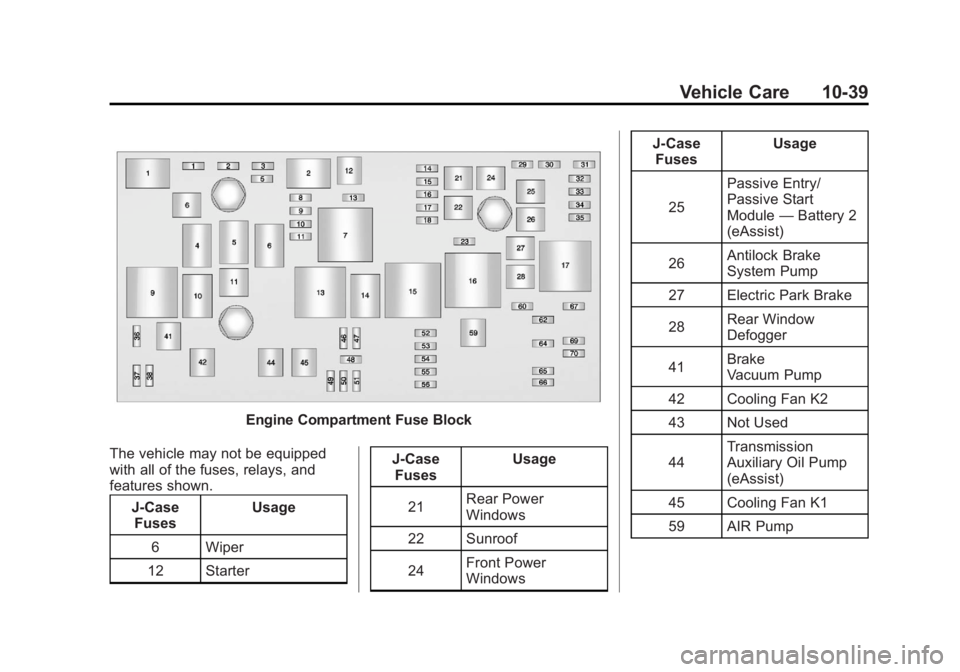
Engine Compartment Fuse Block
The vehicle may not be equipped
with all of the fuses, relays, and
features shown. J-CaseFuses Usage
6 Wiper
12 Starter J-Case
Fuses Usage
21 Rear Power
Windows
22 Sunroof
24 Front Power
Windows J-Case
Fuses Usage
25 Passive Entry/
Passive Start
Module
—Battery 2
(eAssist)
26 Antilock Brake
System Pump
27 Electric Park Brake
28 Rear Window
Defogger
41 Brake
Vacuum Pump
42 Cooling Fan K2
43 Not Used
44 Transmission
Auxiliary Oil Pump
(eAssist)
45 Cooling Fan K1
59 AIR Pump
Page 389 of 512
Black plate (51,1)Buick LaCrosse Owner Manual - 2012
Vehicle Care 10-51
Tire Designations
Tire Size
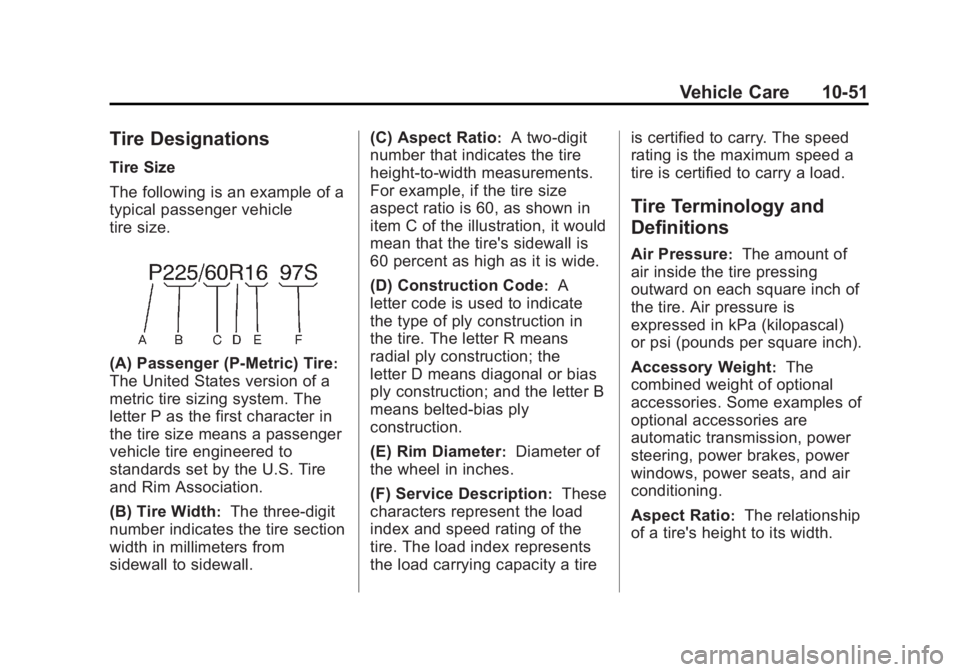
The following is an example of a
typical passenger vehicle
tire size.
(A) Passenger (P‐Metric) Tire:
The United States version of a
metric tire sizing system. The
letter P as the first character in
the tire size means a passenger
vehicle tire engineered to
standards set by the U.S. Tire
and Rim Association.
(B) Tire Width
:The three‐digit
number indicates the tire section
width in millimeters from
sidewall to sidewall. (C) Aspect Ratio
:A two‐digit
number that indicates the tire
height‐to‐width measurements.
For example, if the tire size
aspect ratio is 60, as shown in
item C of the illustration, it would
mean that the tire's sidewall is
60 percent as high as it is wide.
(D) Construction Code
:A
letter code is used to indicate
the type of ply construction in
the tire. The letter R means
radial ply construction; the
letter D means diagonal or bias
ply construction; and the letter B
means belted‐bias ply
construction.
(E) Rim Diameter
:Diameter of
the wheel in inches.
(F) Service Description
:These
characters represent the load
index and speed rating of the
tire. The load index represents
the load carrying capacity a tire is certified to carry. The speed
rating is the maximum speed a
tire is certified to carry a load.
Tire Terminology and
Definitions
Air Pressure:The amount of
air inside the tire pressing
outward on each square inch of
the tire. Air pressure is
expressed in kPa (kilopascal)
or psi (pounds per square inch).
Accessory Weight
:The
combined weight of optional
accessories. Some examples of
optional accessories are
automatic transmission, power
steering, power brakes, power
windows, power seats, and air
conditioning.
Aspect Ratio
:The relationship
of a tire's height to its width.