steering BUICK LACROSSE 2012 Owner's Guide
[x] Cancel search | Manufacturer: BUICK, Model Year: 2012, Model line: LACROSSE, Model: BUICK LACROSSE 2012Pages: 512, PDF Size: 6.21 MB
Page 254 of 512
Black plate (74,1)Buick LaCrosse Owner Manual - 2012
7-74 Infotainment System
3. Select the numbers to be dialed.For vehicles with a navigation
system, touch the numbers on
the infotainment screen. For
vehicles without a navigation
system, see “Entering a
Character Sequence” in for more
information.
4. Select Call to start dialing the number.
Accepting or Declining a Call
When an incoming call is received,
the infotainment system mutes and
a ring tone is heard in the vehicle.
To accept the incoming call, turn the
Menu knob to “Answer”and press
SELECT, or press the
b/gbutton
on the steering wheel controls.
To decline the incoming call, turn
the Menu knob to “decline”and
press SELECT, or press the
b/gbutton on the steering wheel
controls. Call Waiting
Call waiting must be supported on
the mobile phone and enabled by
the wireless service carrier to work.
To accept the incoming call, turn the
Menu knob to
“Answer”and press
SELECT, or press the
b/gbutton
on the steering wheel controls.
To decline the incoming call, turn
the Menu knob to “Decline”and
press SELECT, or press the
$/ibutton on the steering
wheel controls.
1. Press the PHONE button.
2. Select Switch Call from the menu.
Conference Calling
Conference calling and three way
calling must be supported on the
mobile phone and enabled by the
wireless service carrier to work. To start a conference calling while in
a call:
1. Press SELECT and select Enter
Number.
2. Enter the character sequence then select call.
3. After the call has been placed, press SELECT and choose
Merge Calls.
4. To add more callers to the conference call, repeat steps 1
through 3. The number of callers
that can be added are limited by
your wireless service carrier.
To disconnect from one caller while
in a conference call, select Detach
Number from the menu and select
the number to hang up on.
Page 255 of 512
Black plate (75,1)Buick LaCrosse Owner Manual - 2012
Infotainment System 7-75
Ending a Call
Press SELECT and select Hang Up,
or press the
$/ibutton on the
steering wheel controls.
To Mute a Call
Press SELECT and select
Mute Call.
To Cancel Mute
Press SELECT and select
Mute Call.
Dual Tone Multi-Frequency (DTMF)
Tones
The UHP system can send numbers
during a call. This is used when
calling a menu driven phone
system.
To access this system:
1. Press SELECT and select Enter Number.
2. Enter the character sequence.
Operating UHP Using Voice
Control
The voice control of the UHP
system enables you to operate
several functions of the mobile
phone using your voice. The UHP
system uses voice commands to
control the system and dial phone
numbers. After input of the
command the infotainment system
guides you through the dialogue
with appropriate questions and
feedback to achieve the desired
action. The commands and
numbers can be spoken without a
pause between the individual words.
In addition you can save telephone
numbers under a name tag that is
selectable by you. The telephone
connection can be set up with
this name.
In the event of incorrect operation or
incorrect codes, the voice control
gives you voice feedback and
requests you to re-enter the desired
command. Apart from this, the voice control acknowledges important
commands and will ask if
necessary.
In order that calls are made inside
the vehicle do not lead to
unintentional triggering of the mobile
phone, the voice control does not
start until it has been activated.
Activating the Voice Control
For vehicles without a navigation
system, press the
b/gbutton on
the steering wheel to activate the
voice control of the UHP system.
For vehicles with a navigation
system, press the
b/gbutton on
the steering wheel to activate the
voice control of the UHP system
The system responds with a tone.
After the tone, say ”Phone.“
For the duration of the dialogue any
audio source that is active is muted
and any traffic news fade-in is
cancelled.
Page 256 of 512
Black plate (76,1)Buick LaCrosse Owner Manual - 2012
7-76 Infotainment System
Adjusting the Volume for Voice
Output
Turn the volume knob of the
Infotainment system or press
the + / - buttons on the steering
wheel.
Canceling Dialogue
There are various possibilities of
deactivating the voice control and
cancelling the dialogue:
.Press the$/ibutton on the
steering wheel controls.
.Enter the command “Cancel.”
.Do not enter a command for
some time.
.The command is unrecognized
after three tries. Main Menu Commands
The UHP system has a set of main
menu commands that are available
when voice control is first started.
After the voice control is activated, a
short tone indicates that the voice
control system is waiting for a
command.
Available commands:
.“Dial”
.“Call”
.“Re-dial”
.“Save”
.“Delete”
.“Directory”
.“Pair”
.“Select device”
.“Voice feedback”
.“Help”
.“Cancel”Frequently Used Commands
Here is a list of frequently used
commands:
.“Help”: the dialogue is
terminated and all commands
available in the current context
are enumerated.
.“Cancel”: the voice control is
deactivated.
.“Yes”: a suitable action is
triggered depending on the
context.
.“No”: a suitable action is
triggered depending on the
context.
Voice Feedback
Each voice input is answered or
commented on by the infotainment
system by way of a voice output
that is adapted to the situation.
To switch the voice output on or off,
enter “Voice feedback” or press the
b/gbutton.
Page 267 of 512
Black plate (5,1)Buick LaCrosse Owner Manual - 2012
Climate Controls 8-5
Dual Automatic Climate Control System
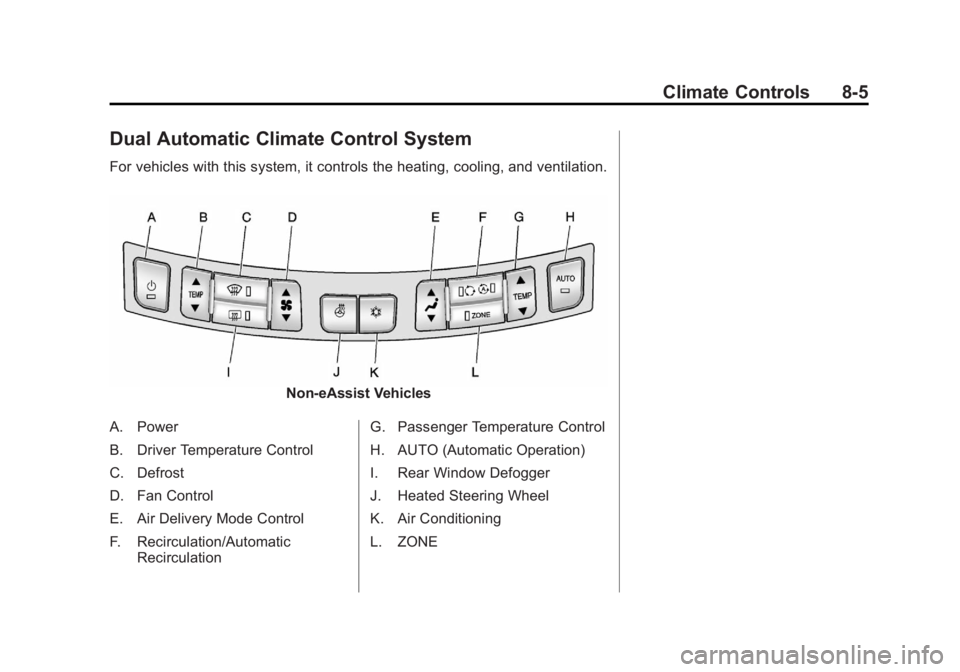
For vehicles with this system, it controls the heating, cooling, and ventilation.
Non-eAssist Vehicles
A. Power
B. Driver Temperature Control
C. Defrost
D. Fan Control
E. Air Delivery Mode Control
F. Recirculation/Automatic Recirculation G. Passenger Temperature Control
H. AUTO (Automatic Operation)
I. Rear Window Defogger
J. Heated Steering Wheel
K. Air Conditioning
L. ZONE
Page 272 of 512
Black plate (10,1)Buick LaCrosse Owner Manual - 2012
8-10 Climate Controls
For vehicles with heated outside
rearview mirrors, they turn on when
the rear window defogger button is
on and help to clear fog or frost from
the surface of the mirror. See
Heated Mirrors on page 2‑18.
Notice:Do not try to clear frost
or other material from the inside
of the front windshield and rear
window with a razor blade or
anything else that is sharp. This
may damage the rear window
defogger grid and affect your
radio's ability to pick up stations
clearly. The repairs would not be
covered by your warranty.
((Heated Steering Wheel): For
vehicles with this feature, press to
turn on or off. See Heated Steering
Wheel on page 5‑3.
Remote Start Climate Control
Operation (If Equipped): When
the vehicle is started remotely, the
climate control system will use the
last setting before the vehicle shut
off. If automatic operation was set,
the fan speed will adjust to maximize heating or cooling.
If manual operation was set, the fan
speed will be limited to the last
setting. In extreme temperatures,
the system may not be able to heat
or cool the vehicle to the preset
temperature during the remote start
run time.
The rear window defogger turns on
if it is cold outside.
Sensor
The solar sensor, located on top of
the instrument panel near the
windshield, monitors the solar heat.
The climate control system uses the
sensor information to adjust the
temperature, fan speed,
recirculation, and air delivery mode
for best comfort.
Do not cover the sensor; otherwise
the automatic climate control system
may not work properly.
Air Vents
Use the louvers located on the air
vents to change the direction of the
airflow.
To open the vent, move the
thumbwheel to
t. To close the vent,
move the thumbwheel to
l.
For vehicles with eAssist, there is a
battery cooling air vent located on
the shelf behind the rear passenger
seats below the rear window. Keep
this air inlet clear from items that
may block air flow. Proper airflow is
required to keep the eAssist battery
and control system cool.
Page 275 of 512
Black plate (1,1)Buick LaCrosse Owner Manual - 2012
Driving and Operating 9-1
Driving and
Operating
Driving Information
Distracted Driving . . . . . . . . . . . . . 9-2
Defensive Driving . . . . . . . . . . . . . 9-3
Drunk Driving . . . . . . . . . . . . . . . . . 9-3
Control of a Vehicle . . . . . . . . . . . 9-4
Braking . . . . . . . . . . . . . . . . . . . . . . . 9-4
Steering . . . . . . . . . . . . . . . . . . . . . . . 9-4
Off-Road Recovery . . . . . . . . . . . . 9-6
Loss of Control . . . . . . . . . . . . . . . . 9-6
Driving on Wet Roads . . . . . . . . . 9-7
Highway Hypnosis . . . . . . . . . . . . 9-8
Hill and Mountain Roads . . . . . . 9-8
Winter Driving . . . . . . . . . . . . . . . . . 9-9
If the Vehicle Is Stuck . . . . . . . . 9-11
Vehicle Load Limits . . . . . . . . . . 9-12
Starting and Operating
New Vehicle Break-In . . . . . . . . 9-17
Ignition Positions (KeyAccess) . . . . . . . . . . . . . . . . . . . . 9-18
Ignition Positions (Keyless Access) . . . . . . . . . . . . . . . . . . . . 9-20 Starting the Engine . . . . . . . . . . 9-22
Engine Heater . . . . . . . . . . . . . . . 9-26
Retained Accessory
Power (RAP) . . . . . . . . . . . . . . . 9-27
Shifting Into Park . . . . . . . . . . . . 9-27
Shifting out of Park . . . . . . . . . . 9-29
Parking over Things
That Burn . . . . . . . . . . . . . . . . . . 9-29
Engine Exhaust
Engine Exhaust . . . . . . . . . . . . . . 9-30
Running the Vehicle WhileParked . . . . . . . . . . . . . . . . . . . . . 9-30
Automatic Transmission
Automatic Transmission . . . . . 9-31
Manual Mode . . . . . . . . . . . . . . . . 9-33
Drive Systems
All-Wheel Drive . . . . . . . . . . . . . . 9-34
Brakes
Antilock BrakeSystem (ABS) . . . . . . . . . . . . . . 9-35
Parking Brake . . . . . . . . . . . . . . . 9-36
Brake Assist . . . . . . . . . . . . . . . . . 9-38
Hill Start Assist (HSA) . . . . . . . 9-38
Ride Control Systems
Traction Control System (TCS) . . . . . . . . . . . . . . 9-38
StabiliTrak
®System . . . . . . . . . 9-40
Limited-Slip Differential . . . . . . 9-41
Selective Ride Control . . . . . . . 9-41
Cruise Control
Cruise Control . . . . . . . . . . . . . . . 9-42
Object Detection Systems
Ultrasonic Parking Assist . . . . 9-44
Side Blind Zone Alert (SBZA) . . . . . . . . . . . . . . . 9-46
Rear Vision Camera (RVC) . . . . . . . . . . . . . 9-49
Fuel
Fuel . . . . . . . . . . . . . . . . . . . . . . . . . 9-52
Recommended Fuel . . . . . . . . . 9-53
Gasoline Specifications (U.S.and Canada Only) . . . . . . . . . . 9-53
California Fuel Requirements . . . . . . . . . . . . . . 9-53
Fuels in Foreign Countries . . . 9-53
Fuel Additives . . . . . . . . . . . . . . . 9-53
Filling the Tank . . . . . . . . . . . . . . 9-55
Filling a Portable Fuel Container . . . . . . . . . . . . . . . . . . . 9-56
Page 278 of 512
Black plate (4,1)Buick LaCrosse Owner Manual - 2012
9-4 Driving and Operating
Control of a Vehicle
Braking, steering, and accelerating
are important factors in helping to
control a vehicle while driving.
Braking
Braking action involves perception
time and reaction time. Deciding to
push the brake pedal is perception
time. Actually doing it is
reaction time.
Average driver reaction time is
about three‐fourths of a second. In
that time, a vehicle moving at
100 km/h (60 mph) travels 20 m
(66 ft), which could be a lot of
distance in an emergency.Helpful braking tips to keep in mind
include:
.Keep enough distance between
you and the vehicle in front
of you.
.Avoid needless heavy braking.
.Keep pace with traffic.
If the engine ever stops while the
vehicle is being driven, brake
normally but do not pump the
brakes. Doing so could make the
pedal harder to push down. If the
engine stops, there will be some
power brake assist but it will be
used when the brake is applied.
Once the power assist is used up, it
can take longer to stop and the
brake pedal will be harder to push.
Steering
Electric Power Steering
If your vehicle has electric power
steering it does not have power
steering fluid. Regular maintenance
is not required.
If power steering assist is lost due
to a system malfunction, the vehicle
can be steered, but may require
increased effort.
If the steering wheel is turned in
either direction several times until it
stops, or it is held until it is stopped
for an extended time, power
steering assist should return shortly
after a few normal steering
movements.
See specific vehicle steering
messages under Vehicle Messages
on page 5‑35.
See your dealer if there is a
problem.
Page 279 of 512
Black plate (5,1)Buick LaCrosse Owner Manual - 2012
Driving and Operating 9-5
Variable Effort Steering
Some vehicles have a steering
system that varies the amount of
effort required to steer the vehicle in
relation to the speed of the vehicle.
The amount of steering effort
required is less at slower speeds
to make the vehicle more
maneuverable and easier to park. At
faster speeds, the steering effort
increases to provide a sport-like feel
to the steering. This provides
maximum control and stability.
If the vehicle seems harder to steer
than normal when parking or driving
slowly, there may be a problem with
the system. You will still have power
steering, but steering will be stiffer
than normal at slow speeds. See
your dealer for service.
Hydraulic Power Steering
If your vehicle has hydraulic power
steering, it may require
maintenance. SeePower Steering
Fluid (2.4L L4 Engine) on
page 10‑21 orPower Steering Fluid
(3.6L V6 Engine) on page 10‑21.
If power steering assist is lost
because the engine stops or the
power steering system is not
functioning, the vehicle can be
steered but may require increased
effort. See your dealer if there is a
problem.
Curve Tips
.Take curves at a reasonable
speed.
.Reduce speed before entering a
curve.
.Maintain a reasonable steady
speed through the curve
.Wait until the vehicle is out of
the curve before accelerating
gently into the straightaway.
Steering in Emergencies
.There are some situations when
steering around a problem may
be more effective than braking.
.Holding both sides of the
steering wheel allows you to turn
180 degrees without removing
a hand.
.Antilock Brake System (ABS)
allows steering while braking.
Page 280 of 512
Black plate (6,1)Buick LaCrosse Owner Manual - 2012
9-6 Driving and Operating
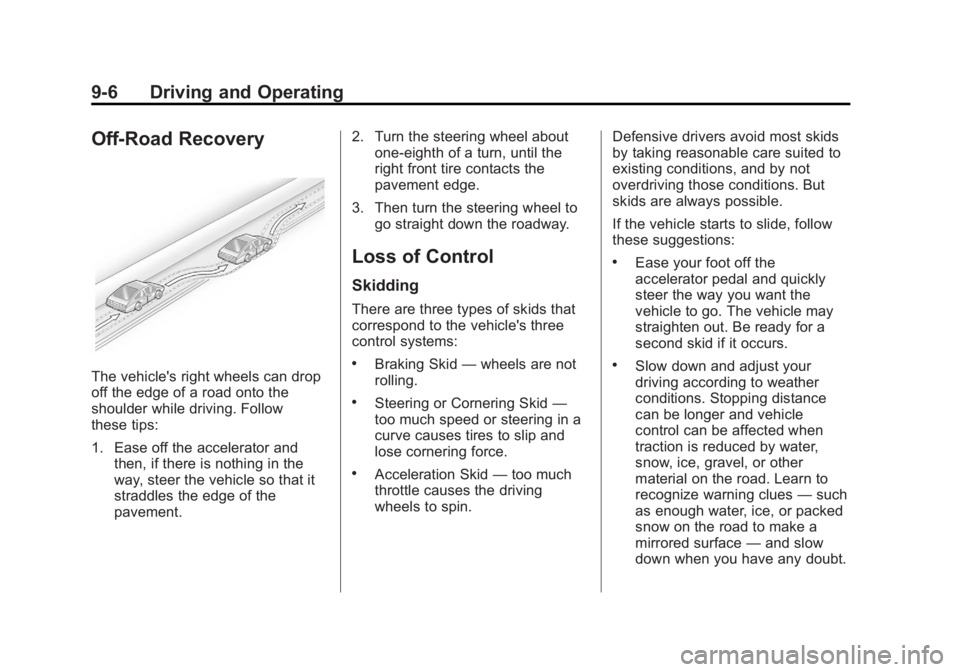
Off-Road Recovery
The vehicle's right wheels can drop
off the edge of a road onto the
shoulder while driving. Follow
these tips:
1. Ease off the accelerator andthen, if there is nothing in the
way, steer the vehicle so that it
straddles the edge of the
pavement. 2. Turn the steering wheel about
one-eighth of a turn, until the
right front tire contacts the
pavement edge.
3. Then turn the steering wheel to go straight down the roadway.
Loss of Control
Skidding
There are three types of skids that
correspond to the vehicle's three
control systems:
.Braking Skid —wheels are not
rolling.
.Steering or Cornering Skid —
too much speed or steering in a
curve causes tires to slip and
lose cornering force.
.Acceleration Skid —too much
throttle causes the driving
wheels to spin. Defensive drivers avoid most skids
by taking reasonable care suited to
existing conditions, and by not
overdriving those conditions. But
skids are always possible.
If the vehicle starts to slide, follow
these suggestions:
.Ease your foot off the
accelerator pedal and quickly
steer the way you want the
vehicle to go. The vehicle may
straighten out. Be ready for a
second skid if it occurs.
.Slow down and adjust your
driving according to weather
conditions. Stopping distance
can be longer and vehicle
control can be affected when
traction is reduced by water,
snow, ice, gravel, or other
material on the road. Learn to
recognize warning clues
—such
as enough water, ice, or packed
snow on the road to make a
mirrored surface —and slow
down when you have any doubt.
Page 281 of 512
Black plate (7,1)Buick LaCrosse Owner Manual - 2012
Driving and Operating 9-7
.Try to avoid sudden steering,
acceleration, or braking,
including reducing vehicle speed
by shifting to a lower gear. Any
sudden changes could cause
the tires to slide.
Remember: Antilock brakes help
avoid only the braking skid.
Driving on Wet Roads
Rain and wet roads can reduce
vehicle traction and affect your
ability to stop and accelerate.
Always drive slower in these types
of driving conditions and avoid
driving through large puddles and
deep‐standing or flowing water.
{WARNING
Wet brakes can cause crashes.
They might not work as well in a
quick stop and could cause
pulling to one side. You could
lose control of the vehicle.
After driving through a large
puddle of water or a car/vehicle
wash, lightly apply the brake
pedal until the brakes work
normally.
Flowing or rushing water creates
strong forces. Driving through
flowing water could cause the
vehicle to be carried away. If this
happens, you and other vehicle
occupants could drown. Do not
ignore police warnings and be
very cautious about trying to drive
through flowing water.
Hydroplaning
Hydroplaning is dangerous. Water
can build up under the vehicle's
tires so they actually ride on the
water. This can happen if the road is
wet enough and you are going fast
enough. When the vehicle is
hydroplaning, it has little or no
contact with the road.
There is no hard and fast rule about
hydroplaning. The best advice is to
slow down when the road is wet.