key BUICK LACROSSE 2012 Service Manual
[x] Cancel search | Manufacturer: BUICK, Model Year: 2012, Model line: LACROSSE, Model: BUICK LACROSSE 2012Pages: 512, PDF Size: 6.21 MB
Page 166 of 512
Black plate (48,1)Buick LaCrosse Owner Manual - 2012
5-48 Instruments and Controls
Locking Feedback
This allows selection of what type of
feedback is given when locking the
vehicle with the RKE transmitter.
Press SELECT when Locking
Feedback is highlighted. Turn the
Menu knob to select Lights and
Horn, Lights Only, Horn Only, or Off.
Press SELECT to confirm the
selection. Press
/BACK to move to
the last menu.
Door Unlock Options
This allows selection of which doors
will unlock when pressing
Kon the
RKE transmitter.
Press SELECT when Door Unlock
Options is highlighted. Turn the
Menu knob to select All Doors or
Driver Door Only. When set to
Driver Door Only, the driver door will
unlock the first time the unlock
button is pressed and all doors will
unlock when the button is pressed a
second time. When set to All Doors,
all of the doors will unlock at the first press of
K. Press SELECT to
confirm the selection. Press
/BACK to move to the last menu.
Remote Recall
When on, this feature will recall the
current driver's last seat and outside
mirror positions upon unlocking the
driver door with the RKE, and
opening that door. The current driver
is identified when the RKE is used
to unlock the driver door. If keyless
access equipped, the recall will
occur upon opening the driver door.
See “Memory Remote Recall” under
Power Seat Adjustment on page 3‑5
for more information.
This allows the Remote Recall
feature to be turned on or off.
Remote Recall is when the
memorized settings will be recalled
as you unlock and enter the vehicle.
Press SELECT when Remote Recall
is highlighted. Turn the Menu knob
to select On or Off. Press SELECT
to confirm the selection. Press
/BACK to move to the last menu. Passive Entry
This allows the Passive Entry
feature to be turned on or off.
Press SELECT when Passive Entry
is highlighted. Turn the Menu knob
to select On or Off. Press SELECT
to confirm the selection. Press
/BACK to move to the last menu.
Remote Left In Vehicle
This allows the Remote Left In
Vehicle reminder feature to be
turned on or off. If on, the horn will
chirp if a remote is left in the
vehicle.
Press SELECT when Remote Left In
Vehicle is highlighted. Turn the
Menu knob to select On or Off.
Press SELECT to confirm the
selection. Press
/BACK to move to
the last menu.
Page 179 of 512
Black plate (7,1)Buick LaCrosse Owner Manual - 2012
Lighting 6-7
Lighting Features
Entry Lighting
The headlamps, taillamps, license
plate lamps, back‐up lamps, dome
lamps, and most of the interior lights
turn on briefly when the Remote
Keyless Entry (RKE)
Kbutton is
pressed, or when the door handle is
pulled on a keyless access vehicle.
See Ignition Positions (Key Access)
on page 9‑18 orIgnition Positions
(Keyless Access) on page 9‑20.
After about 30 seconds the exterior
lamps turn off, then the dome lamps
and remaining interior lights dim to
off. Entry lighting can be disabled
manually by changing the ignition
out of the OFF position, or by
pressing the RKE
Qbutton.
This feature can be changed. See
Vehicle Personalization on
page 5‑43.
Exit Lighting
The headlamps, taillamps, parking
lamps, back‐up lamps, and license
plate lamps come on at night, or in
areas with limited lighting, when the
key is removed from the ignition.
The dome lamps also come on
when the key is removed from the
ignition. The exterior lights and
dome lamps remain on after the
door is closed for a set amount of
time, then automatically turn off.
For vehicles with keyless access,
the exterior lights and dome lamps
automatically turn on when a door is
opened after the ignition is turned
off. See Ignition Positions (Key
Access) on page 9‑18 orIgnition
Positions (Keyless Access) on
page 9‑20.
The exterior lights turn off
immediately by turning the exterior
lamps control off.
This feature can be changed. See
Vehicle Personalization on
page 5‑43.
Battery Load
Management
The vehicle has Electric Power
Management (EPM) that estimates
the battery's temperature and state
of charge. It then adjusts the voltage
for best performance and extended
life of the battery.
When the battery's state of charge
is low, the voltage is raised slightly
to quickly bring the charge back up.
When the state of charge is high,
the voltage is lowered slightly to
prevent overcharging. If the vehicle
has a voltmeter gauge or a voltage
display on the Driver Information
Center (DIC), you may see the
voltage move up or down. This is
normal. If there is a problem, an
alert will be displayed.
Page 234 of 512
Black plate (54,1)Buick LaCrosse Owner Manual - 2012
7-54 Infotainment System
The AUX button also controls the
source display between the left and
right video screens as described in
the table below:Aux
Button
Press Left
Screen Right
Screen
Default
State (No
Press) DVD
Media DVD
Media
First
Press Aux Video
Source Aux Video
Source
Second Press DVD
Media Aux Video
Source
Third
Press Aux Video
Source DVD
Media
Fourth Press Return to
DefaultState Return to
DefaultState2(Camera): Press to change the
camera angle on DVDs that have
this feature when the DVD is
playing.
\(Clear) (If Available): Press this
button within three seconds after
inputting a numeric selection, to
clear all numeric inputs.
}10 (Double Digit Entries)
(If Available): Press this button to
select chapter or track numbers
greater than 9. Press this button
before inputting the number.
1 through 0 (Numeric Keypad):
The numbered keypad provides the
capability of direct chapter or track
number selection. Replacing the Remote Control
If the remote control becomes lost
or damaged, a new universal
remote control can be purchased.
Use a Toshiba
®code set for
replacement universal remote
controls.
Battery Replacement
To change the remote control
batteries:
1. Slide back the rear cover on the remote control.
2. Replace the two batteries in the compartment.
3. Replace the battery cover.
Remove the batteries from the
remote control if unused for an
extended period of time.
Page 275 of 512
Black plate (1,1)Buick LaCrosse Owner Manual - 2012
Driving and Operating 9-1
Driving and
Operating
Driving Information
Distracted Driving . . . . . . . . . . . . . 9-2
Defensive Driving . . . . . . . . . . . . . 9-3
Drunk Driving . . . . . . . . . . . . . . . . . 9-3
Control of a Vehicle . . . . . . . . . . . 9-4
Braking . . . . . . . . . . . . . . . . . . . . . . . 9-4
Steering . . . . . . . . . . . . . . . . . . . . . . . 9-4
Off-Road Recovery . . . . . . . . . . . . 9-6
Loss of Control . . . . . . . . . . . . . . . . 9-6
Driving on Wet Roads . . . . . . . . . 9-7
Highway Hypnosis . . . . . . . . . . . . 9-8
Hill and Mountain Roads . . . . . . 9-8
Winter Driving . . . . . . . . . . . . . . . . . 9-9
If the Vehicle Is Stuck . . . . . . . . 9-11
Vehicle Load Limits . . . . . . . . . . 9-12
Starting and Operating
New Vehicle Break-In . . . . . . . . 9-17
Ignition Positions (KeyAccess) . . . . . . . . . . . . . . . . . . . . 9-18
Ignition Positions (Keyless Access) . . . . . . . . . . . . . . . . . . . . 9-20 Starting the Engine . . . . . . . . . . 9-22
Engine Heater . . . . . . . . . . . . . . . 9-26
Retained Accessory
Power (RAP) . . . . . . . . . . . . . . . 9-27
Shifting Into Park . . . . . . . . . . . . 9-27
Shifting out of Park . . . . . . . . . . 9-29
Parking over Things
That Burn . . . . . . . . . . . . . . . . . . 9-29
Engine Exhaust
Engine Exhaust . . . . . . . . . . . . . . 9-30
Running the Vehicle WhileParked . . . . . . . . . . . . . . . . . . . . . 9-30
Automatic Transmission
Automatic Transmission . . . . . 9-31
Manual Mode . . . . . . . . . . . . . . . . 9-33
Drive Systems
All-Wheel Drive . . . . . . . . . . . . . . 9-34
Brakes
Antilock BrakeSystem (ABS) . . . . . . . . . . . . . . 9-35
Parking Brake . . . . . . . . . . . . . . . 9-36
Brake Assist . . . . . . . . . . . . . . . . . 9-38
Hill Start Assist (HSA) . . . . . . . 9-38
Ride Control Systems
Traction Control System (TCS) . . . . . . . . . . . . . . 9-38
StabiliTrak
®System . . . . . . . . . 9-40
Limited-Slip Differential . . . . . . 9-41
Selective Ride Control . . . . . . . 9-41
Cruise Control
Cruise Control . . . . . . . . . . . . . . . 9-42
Object Detection Systems
Ultrasonic Parking Assist . . . . 9-44
Side Blind Zone Alert (SBZA) . . . . . . . . . . . . . . . 9-46
Rear Vision Camera (RVC) . . . . . . . . . . . . . 9-49
Fuel
Fuel . . . . . . . . . . . . . . . . . . . . . . . . . 9-52
Recommended Fuel . . . . . . . . . 9-53
Gasoline Specifications (U.S.and Canada Only) . . . . . . . . . . 9-53
California Fuel Requirements . . . . . . . . . . . . . . 9-53
Fuels in Foreign Countries . . . 9-53
Fuel Additives . . . . . . . . . . . . . . . 9-53
Filling the Tank . . . . . . . . . . . . . . 9-55
Filling a Portable Fuel Container . . . . . . . . . . . . . . . . . . . 9-56
Page 292 of 512
Black plate (18,1)Buick LaCrosse Owner Manual - 2012
9-18 Driving and Operating
Ignition Positions
(Key Access)
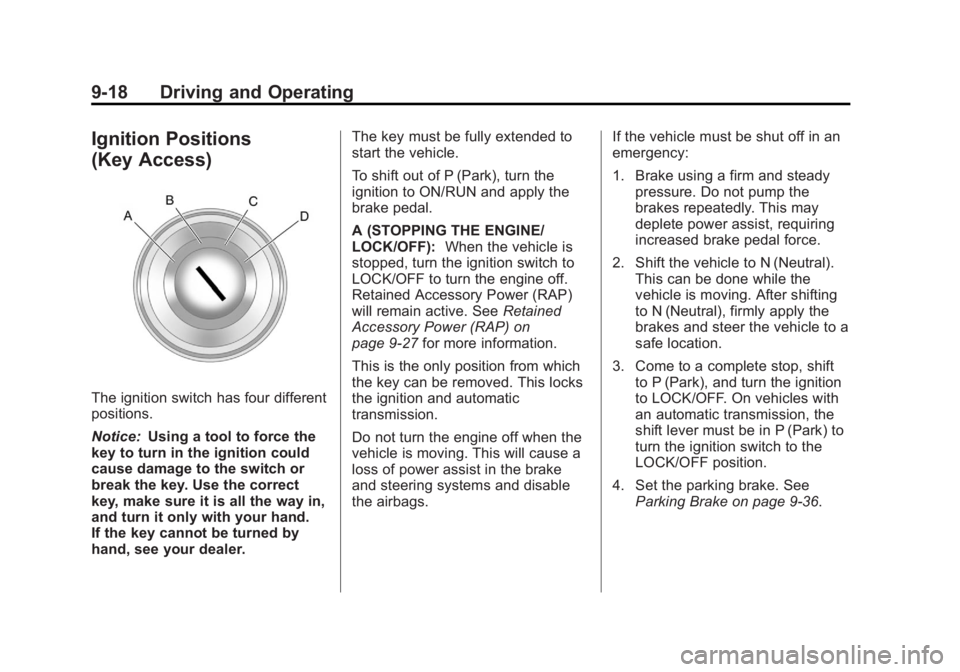
The ignition switch has four different
positions.
Notice:Using a tool to force the
key to turn in the ignition could
cause damage to the switch or
break the key. Use the correct
key, make sure it is all the way in,
and turn it only with your hand.
If the key cannot be turned by
hand, see your dealer. The key must be fully extended to
start the vehicle.
To shift out of P (Park), turn the
ignition to ON/RUN and apply the
brake pedal.
A (STOPPING THE ENGINE/
LOCK/OFF):
When the vehicle is
stopped, turn the ignition switch to
LOCK/OFF to turn the engine off.
Retained Accessory Power (RAP)
will remain active. See Retained
Accessory Power (RAP) on
page 9‑27 for more information.
This is the only position from which
the key can be removed. This locks
the ignition and automatic
transmission.
Do not turn the engine off when the
vehicle is moving. This will cause a
loss of power assist in the brake
and steering systems and disable
the airbags. If the vehicle must be shut off in an
emergency:
1. Brake using a firm and steady
pressure. Do not pump the
brakes repeatedly. This may
deplete power assist, requiring
increased brake pedal force.
2. Shift the vehicle to N (Neutral). This can be done while the
vehicle is moving. After shifting
to N (Neutral), firmly apply the
brakes and steer the vehicle to a
safe location.
3. Come to a complete stop, shift to P (Park), and turn the ignition
to LOCK/OFF. On vehicles with
an automatic transmission, the
shift lever must be in P (Park) to
turn the ignition switch to the
LOCK/OFF position.
4. Set the parking brake. See Parking Brake on page 9‑36.
Page 293 of 512
Black plate (19,1)Buick LaCrosse Owner Manual - 2012
Driving and Operating 9-19
{WARNING
Turning off the vehicle while
moving may cause loss of power
assist in the brake and steering
systems and disable the airbags.
While driving, only shut the
vehicle off in an emergency.
If the vehicle cannot be pulled over,
and must be shut off while driving,
turn the ignition to ACC/
ACCESSORY.
The ignition switch can bind in the
LOCK/OFF position with the wheels
turned off center. If this happens,
move the steering wheel from right
to left while turning the key to ACC/
ACCESSORY. If this does not work,
then the vehicle needs service. B (ACC/ACCESSORY):
This
position provides power to some of
the electrical accessories. It unlocks
the ignition. To move the key from
ACC/ACCESSORY to LOCK/OFF,
the shift lever must be in P (Park).
C (ON/RUN): The ignition switch
stays in this position when the
engine is running. This position can
be used to operate the electrical
accessories, including the
ventilation fan and 12‐volt power
outlet, as well as to display some
warning and indicator lights. This
position can also be used for
service and diagnostics, and to
verify the proper operation of the
malfunction indicator lamp as may
be required for emission inspection
purposes. The transmission is also
unlocked in this position. The battery could be drained if the
key is left in the ACC/ACCESSORY
or ON/RUN position with the engine
off. The vehicle might not restart if
the battery is allowed to drain for an
extended period of time.
D (START):
This position starts the
engine. When the engine starts,
release the key. The ignition switch
will return to ON/RUN for normal
driving.
A warning tone sounds when the
driver door is opened when the
ignition is still in ACC/ACCESSORY
and the key is in the ignition.
Page 294 of 512
Black plate (20,1)Buick LaCrosse Owner Manual - 2012
9-20 Driving and Operating
Ignition Positions
(Keyless Access)
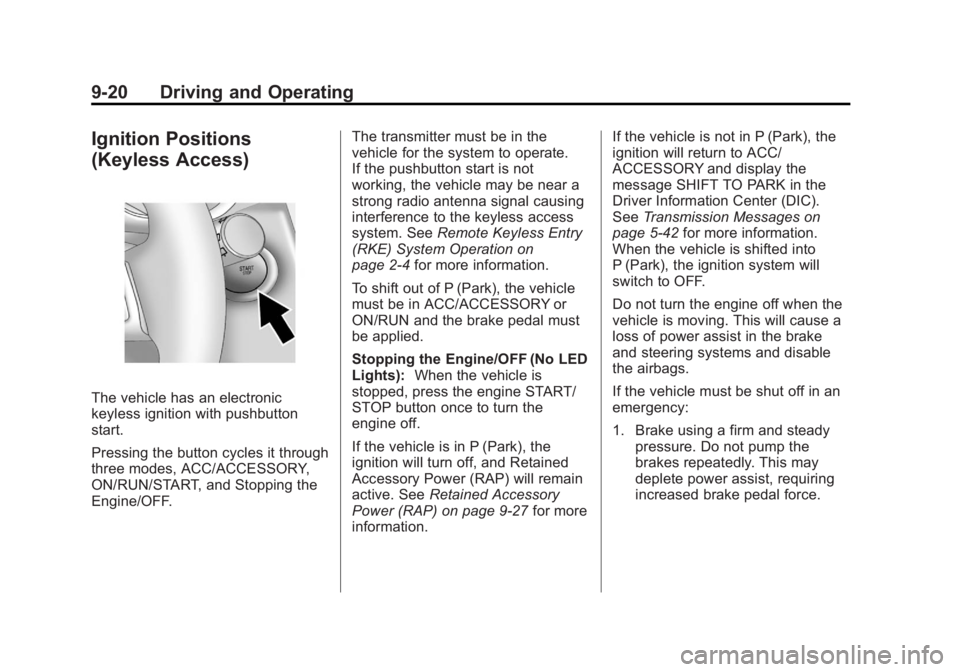
The vehicle has an electronic
keyless ignition with pushbutton
start.
Pressing the button cycles it through
three modes, ACC/ACCESSORY,
ON/RUN/START, and Stopping the
Engine/OFF.The transmitter must be in the
vehicle for the system to operate.
If the pushbutton start is not
working, the vehicle may be near a
strong radio antenna signal causing
interference to the keyless access
system. See
Remote Keyless Entry
(RKE) System Operation on
page 2‑4 for more information.
To shift out of P (Park), the vehicle
must be in ACC/ACCESSORY or
ON/RUN and the brake pedal must
be applied.
Stopping the Engine/OFF (No LED
Lights): When the vehicle is
stopped, press the engine START/
STOP button once to turn the
engine off.
If the vehicle is in P (Park), the
ignition will turn off, and Retained
Accessory Power (RAP) will remain
active. See Retained Accessory
Power (RAP) on page 9‑27 for more
information. If the vehicle is not in P (Park), the
ignition will return to ACC/
ACCESSORY and display the
message SHIFT TO PARK in the
Driver Information Center (DIC).
See
Transmission Messages on
page 5‑42 for more information.
When the vehicle is shifted into
P (Park), the ignition system will
switch to OFF.
Do not turn the engine off when the
vehicle is moving. This will cause a
loss of power assist in the brake
and steering systems and disable
the airbags.
If the vehicle must be shut off in an
emergency:
1. Brake using a firm and steady pressure. Do not pump the
brakes repeatedly. This may
deplete power assist, requiring
increased brake pedal force.
Page 296 of 512
Black plate (22,1)Buick LaCrosse Owner Manual - 2012
9-22 Driving and Operating
Starting the Engine
Move the shift lever to P (Park) or
N (Neutral). The engine will not start
in any other position. To restart the
engine when the vehicle is already
moving, use N (Neutral) only.
Notice:Do not try to shift to
P (Park) if the vehicle is moving.
If you do, you could damage the
transmission. Shift to P (Park)
only when the vehicle is stopped.
Notice: The engine is designed to
work with the electronics in the
vehicle. If you add electrical parts
or accessories, you could change
the way the engine operates.
Before adding electrical
equipment, check with your
dealer. If you do not, the engine
might not perform properly. Any
resulting damage would not be
covered by the vehicle warranty. Starting Procedure (Key Access)
1. With your foot off the accelerator
pedal, turn the ignition key to
START. When the engine starts,
let go of the ignition.
The idle speed will go down as
your engine gets warm. Do not
race the engine immediately
after starting it. Operate the
engine and transmission gently
to allow the oil to warm up and
lubricate all moving parts.
The vehicle has a
Computer-Controlled Cranking
System. This feature assists in
starting the engine and protects
components. If the ignition key is
turned to the START position,
and then released when the
engine begins cranking, the
engine will continue cranking for
a few seconds or until the
vehicle starts. If the engine does
not start and the key is held in
START for many seconds,
cranking will be stopped after
15 seconds to prevent cranking motor damage. To prevent gear
damage, this system also
prevents cranking if the engine
is already running. Engine
cranking can be stopped by
turning the ignition switch to
ACC/ACCESSORY or
LOCK/OFF.
Notice: Cranking the engine for
long periods of time, by returning
the key to the START position
immediately after cranking has
ended, can overheat and damage
the cranking motor, and drain the
battery. Wait at least 15 seconds
between each try, to let the
cranking motor cool down.
2. If the engine does not start after five to 10 seconds, especially in
very cold weather (below −18°C
or 0°F), it could be flooded with
too much gasoline. Try pushing
the accelerator pedal all the way
to the floor and holding it there
as you hold the key in START,
or press the START button, for
up to a maximum of 15 seconds.
Wait at least 15 seconds
Page 297 of 512
Black plate (23,1)Buick LaCrosse Owner Manual - 2012
Driving and Operating 9-23
between each try, to allow the
cranking motor to cool down.
When the engine starts, let go of
the key or button, and the
accelerator. If the vehicle starts
briefly but then stops again, do
the same thing. This clears the
extra gasoline from the engine.
Do not race the engine
immediately after starting it.
Operate the engine and
transmission gently until the oil
warms up and lubricates all
moving parts.
Starting Procedure (Keyless
Access)
1. If the vehicle has the keyless access system, the transmitter
must be in the vehicle. Put your
foot on the brake pedal and
push the START button. When
the engine begins cranking, let
go of the button.
The idle speed will go down as
your engine gets warm. Do not
race the engine immediately
after starting it. Operate the engine and transmission gently
to allow the oil to warm up and
lubricate all moving parts.
If the transmitter is not in the
vehicle or something is
interfering with the transmitter,
the Driver Information Center
(DIC) will display a message.
See
Key and Lock Messages on
page 5‑39 for more information.
If the battery in the Remote
Keyless Entry (RKE) transmitter
needs replacing, the DIC will
display a message. The vehicle
can still be driven. See “Starting
the Vehicle with a Low
Transmitter Battery” inRemote
Keyless Entry (RKE) System
Operation on page 2‑4 for more
information.
The vehicle has a
Computer-Controlled Cranking
System. This feature assists in
starting the engine and protects
components. If the START
button is pressed, and then
released when the engine begins cranking, the engine
will continue cranking for a
few seconds or until the vehicle
starts. If the engine does not
start and the button is pressed
for many seconds, cranking will
be stopped after 15 seconds to
prevent cranking motor damage.
To prevent gear damage, this
system also prevents cranking if
the engine is already running.
Engine cranking can be stopped
by pressing the START button a
second time.
Notice: Cranking the engine for
long periods of time, by returning
the key to the START position
immediately after cranking has
ended, can overheat and damage
the cranking motor, and drain the
battery. Wait at least 15 seconds
between each try, to let the
cranking motor cool down.
Page 298 of 512
Black plate (24,1)Buick LaCrosse Owner Manual - 2012
9-24 Driving and Operating
2. If the engine does not start afterfive to 10 seconds, especially in
very cold weather (below −18°C
or 0°F), it could be flooded with
too much gasoline. Try pushing
the accelerator pedal all the way
to the floor and holding it there
as you hold the key in START,
or press the START button, for
up to a maximum of 15 seconds.
Wait at least 15 seconds
between each try, to allow the
cranking motor to cool down.
When the engine starts, let go of
the key or button, and the
accelerator. If the vehicle starts
briefly but then stops again, do
the same thing. This clears the
extra gasoline from the engine.
Do not race the engine
immediately after starting it.
Operate the engine and
transmission gently until the oil
warms up and lubricates all
moving parts.eAssist Automatic Engine
Start/Stop
{WARNING
Exiting the vehicle, without first
shifting into P (Park), may cause
the vehicle to move, you or others
may be injured. Because the
vehicle has the automatic engine
start/stop feature, the vehicle's
engine might seem to be shut off;
however, once the brake pedal is
released, the engine will start up
again.
Shift to P (Park) and turn the
ignition to LOCK/OFF, before
exiting the vehicle.
Vehicles with eAssist have an
automatic engine start/stop feature.
After the engine is started and has
reached operating temperature, the
auto stop feature may cause the
engine to turn off when the brakes
are applied and the vehicle comes
to a complete stop. The vehicle may remain in auto stop for up to
two minutes. When the brake is
released or the accelerator pedal
applied, the engine will start. The
engine will continue to run until the
next auto stop.
AUTO STOP on the tachometer
signifies that the engine is in auto
stop mode. See
Tachometer on
page 5‑12 for more information.
When the vehicle is turned off, the
tachometer will move to OFF. If the
driver door is opened while in auto
stop mode, a chime will sound.
To restart the engine during auto
stop, release the brake pedal or
press the accelerator pedal. The
engine starts immediately. The
vehicle continues to run until the
next stop.
There are several conditions which
may prevent an auto stop or cause
an auto start.