seats BUICK LACROSSE 2012 Owner's Manual
[x] Cancel search | Manufacturer: BUICK, Model Year: 2012, Model line: LACROSSE, Model: BUICK LACROSSE 2012Pages: 512, PDF Size: 6.21 MB
Page 1 of 512
Black plate (1,1)Buick LaCrosse Owner Manual - 2012
2012 Buick LaCrosse Owner ManualM
In Brief. . . . . . . . . . . . . . . . . . . . . . . . 1-1
Instrument Panel . . . . . . . . . . . . . . 1-2
Initial Drive Information . . . . . . . . 1-4
Vehicle Features . . . . . . . . . . . . . 1-17
eAssist Features . . . . . . . . . . . . . 1-22
Performance and
Maintenance . . . . . . . . . . . . . . . . 1-25
Keys, Doors, and Windows . . . . . . . . . . . . . . . . . . . . 2-1
Keys and Locks . . . . . . . . . . . . . . . 2-2
Doors . . . . . . . . . . . . . . . . . . . . . . . . 2-13
Vehicle Security . . . . . . . . . . . . . . 2-14
Exterior Mirrors . . . . . . . . . . . . . . . 2-17
Interior Mirrors . . . . . . . . . . . . . . . . 2-18
Windows . . . . . . . . . . . . . . . . . . . . . 2-19
Roof . . . . . . . . . . . . . . . . . . . . . . . . . . 2-22
Seats and Restraints . . . . . . . . . 3-1
Head Restraints . . . . . . . . . . . . . . . 3-2
Front Seats . . . . . . . . . . . . . . . . . . . . 3-4
Rear Seats . . . . . . . . . . . . . . . . . . . 3-11
Safety Belts . . . . . . . . . . . . . . . . . . 3-13
Airbag System . . . . . . . . . . . . . . . . 3-22
Child Restraints . . . . . . . . . . . . . . 3-36 Storage
. . . . . . . . . . . . . . . . . . . . . . . 4-1
Storage Compartments . . . . . . . . 4-1
Additional Storage Features . . . 4-2
Instruments and Controls . . . . 5-1
Controls . . . . . . . . . . . . . . . . . . . . . . . 5-2
Warning Lights, Gauges, and
Indicators . . . . . . . . . . . . . . . . . . . . 5-9
Information Displays . . . . . . . . . . 5-27
Vehicle Messages . . . . . . . . . . . . 5-35
Vehicle Personalization . . . . . . . 5-43
Universal Remote System . . . . 5-49
Lighting . . . . . . . . . . . . . . . . . . . . . . . 6-1
Exterior Lighting . . . . . . . . . . . . . . . 6-1
Interior Lighting . . . . . . . . . . . . . . . . 6-5
Lighting Features . . . . . . . . . . . . . . 6-7
Infotainment System . . . . . . . . . 7-1
Introduction . . . . . . . . . . . . . . . . . . . . 7-1
Radio . . . . . . . . . . . . . . . . . . . . . . . . . 7-18
Audio Players . . . . . . . . . . . . . . . . 7-28
Rear Seat Infotainment . . . . . . . 7-47
Phone . . . . . . . . . . . . . . . . . . . . . . . . 7-57
Trademarks and License Agreements . . . . . . . . . . . . . . . . . 7-80 Climate Controls
. . . . . . . . . . . . . 8-1
Climate Control Systems . . . . . . 8-1
Air Vents . . . . . . . . . . . . . . . . . . . . . 8-10
Maintenance . . . . . . . . . . . . . . . . . . 8-11
Driving and Operating . . . . . . . . 9-1
Driving Information . . . . . . . . . . . . . 9-2
Starting and Operating . . . . . . . 9-17
Engine Exhaust . . . . . . . . . . . . . . 9-30
Automatic Transmission . . . . . . 9-31
Drive Systems . . . . . . . . . . . . . . . . 9-34
Brakes . . . . . . . . . . . . . . . . . . . . . . . 9-35
Ride Control Systems . . . . . . . . 9-38
Cruise Control . . . . . . . . . . . . . . . . 9-42
Object Detection Systems . . . . 9-44
Fuel . . . . . . . . . . . . . . . . . . . . . . . . . . 9-52
Towing . . . . . . . . . . . . . . . . . . . . . . . 9-57
Conversions and Add-Ons . . . 9-63
Vehicle Care . . . . . . . . . . . . . . . . . 10-1
General Information . . . . . . . . . . 10-2
Vehicle Checks . . . . . . . . . . . . . . . 10-4
Headlamp Aiming . . . . . . . . . . . 10-30
Bulb Replacement . . . . . . . . . . 10-33
Electrical System . . . . . . . . . . . . 10-37
Wheels and Tires . . . . . . . . . . . 10-47
Page 7 of 512
Black plate (1,1)Buick LaCrosse Owner Manual - 2012
In Brief 1-1
In Brief
Instrument Panel
Instrument Panel . . . . . . . . . . . . . . 1-2
Initial Drive Information
Initial Drive Information . . . . . . . . 1-4
Remote Keyless Entry (RKE)System . . . . . . . . . . . . . . . . . . . . . . 1-4
Remote Vehicle Start . . . . . . . . . 1-4
Door Locks . . . . . . . . . . . . . . . . . . . 1-5
Trunk Release . . . . . . . . . . . . . . . . 1-6
Windows . . . . . . . . . . . . . . . . . . . . . . 1-6
Seat Adjustment . . . . . . . . . . . . . . 1-6
Memory Features . . . . . . . . . . . . . 1-8
Heated and Ventilated Seats . . . . . . . . . . . . . . . . . . . . . . . . 1-9
Head Restraint Adjustment . . . . 1-9
Safety Belts . . . . . . . . . . . . . . . . . . . 1-9
Passenger Sensing System . . . . . . . . . . . . . . . . . . . . . 1-10
Mirror Adjustment . . . . . . . . . . . . 1-10 Steering Wheel
Adjustment . . . . . . . . . . . . . . . . . 1-11
Interior Lighting . . . . . . . . . . . . . . 1-11
Exterior Lighting . . . . . . . . . . . . . 1-12
Windshield Wiper/Washer . . . . 1-13
Climate Controls . . . . . . . . . . . . . 1-14
Transmission . . . . . . . . . . . . . . . . 1-16Vehicle Features
Radio(s) . . . . . . . . . . . . . . . . . . . . . 1-17
Satellite Radio . . . . . . . . . . . . . . . 1-17
Portable Audio Devices . . . . . . 1-18
Bluetooth
®. . . . . . . . . . . . . . . . . . . 1-18
Steering Wheel Controls . . . . . 1-18
Cruise Control . . . . . . . . . . . . . . . 1-19
Navigation System . . . . . . . . . . . 1-19
Driver Information Center (DIC) . . . . . . . . . . . . . . . 1-20
Vehicle Personalization . . . . . . 1-20
Ultrasonic Parking Assist . . . . 1-20
Power Outlets . . . . . . . . . . . . . . . 1-21
Universal Remote System . . . 1-21
Sunroof . . . . . . . . . . . . . . . . . . . . . . 1-21
eAssist Features
eAssist®Overview . . . . . . . . . . . 1-22
High Voltage Safety Information . . . . . . . . . . . . . . . . . 1-23
Driver Efficiency Gauge . . . . . . 1-23
Automatic Engine Start/Stop Feature . . . . . . . . . . . . . . . . . . . . . 1-24
Regenerative Braking . . . . . . . . 1-24
Battery . . . . . . . . . . . . . . . . . . . . . . . 1-24
Service . . . . . . . . . . . . . . . . . . . . . . 1-25
Performance and Maintenance
Traction Control System (TCS) . . . . . . . . . . . . . . 1-25
StabiliTrak
®System . . . . . . . . . 1-25
Tire Pressure Monitor . . . . . . . . 1-26
Tire Sealant and Compressor Kit . . . . . . . . . . . . . 1-26
Engine Oil Life System . . . . . . 1-27
Driving for Better Fuel Economy . . . . . . . . . . . . . . . . . . . 1-27
Roadside Assistance Program . . . . . . . . . . . . . . . . . . . . 1-27
OnStar
®. . . . . . . . . . . . . . . . . . . . . 1-28
Page 9 of 512
Black plate (3,1)Buick LaCrosse Owner Manual - 2012
In Brief 1-3
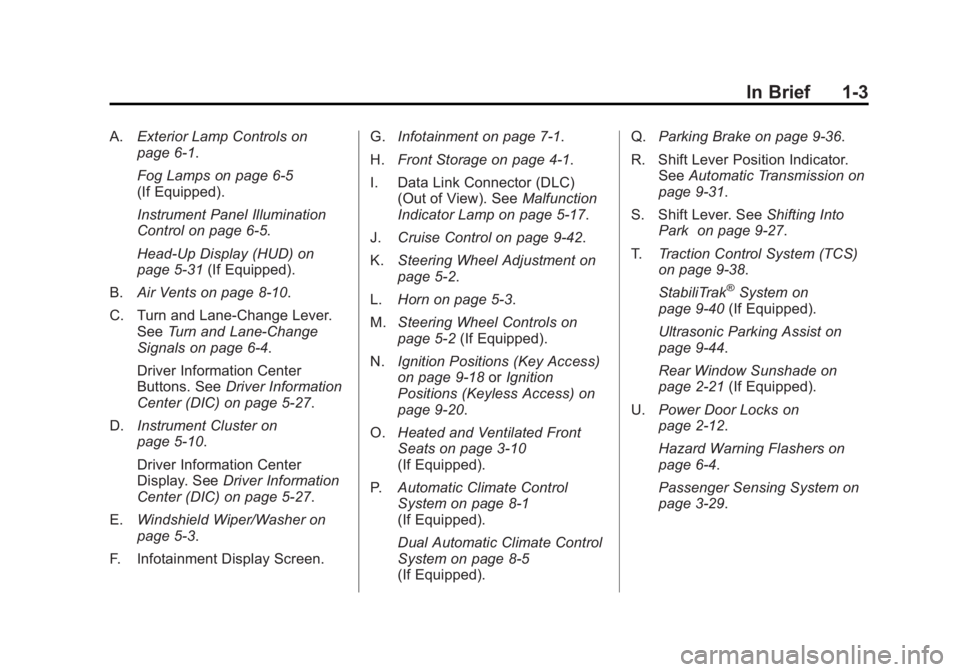
A.Exterior Lamp Controls on
page 6‑1.
Fog Lamps on page 6‑5
(If Equipped).
Instrument Panel Illumination
Control on page 6‑5.
Head-Up Display (HUD) on
page 5‑31 (If Equipped).
B. Air Vents on page 8‑10.
C. Turn and Lane‐Change Lever. See Turn and Lane-Change
Signals on page 6‑4.
Driver Information Center
Buttons. See Driver Information
Center (DIC) on page 5‑27.
D. Instrument Cluster on
page 5‑10.
Driver Information Center
Display. See Driver Information
Center (DIC) on page 5‑27.
E. Windshield Wiper/Washer on
page 5‑3.
F. Infotainment Display Screen. G.
Infotainment on page 7‑1.
H. Front Storage on page 4‑1.
I. Data Link Connector (DLC) (Out of View). See Malfunction
Indicator Lamp on page 5‑17.
J. Cruise Control on page 9‑42.
K. Steering Wheel Adjustment on
page 5‑2.
L. Horn on page 5‑3.
M. Steering Wheel Controls on
page 5‑2 (If Equipped).
N. Ignition Positions (Key Access)
on page 9‑18 orIgnition
Positions (Keyless Access) on
page 9‑20.
O. Heated and Ventilated Front
Seats on page 3‑10
(If Equipped).
P. Automatic Climate Control
System on page 8‑1
(If Equipped).
Dual Automatic Climate Control
System on page 8‑5
(If Equipped). Q.
Parking Brake on page 9‑36.
R. Shift Lever Position Indicator. See Automatic Transmission on
page 9‑31.
S. Shift Lever. See Shifting Into
Park on page 9‑27.
T. Traction Control System (TCS)
on page 9‑38.
StabiliTrak
®System on
page 9‑40 (If Equipped).
Ultrasonic Parking Assist on
page 9‑44.
Rear Window Sunshade on
page 2‑21 (If Equipped).
U. Power Door Locks on
page 2‑12.
Hazard Warning Flashers on
page 6‑4.
Passenger Sensing System on
page 3‑29.
Page 12 of 512
Black plate (6,1)Buick LaCrosse Owner Manual - 2012
1-6 In Brief
Trunk Release
The trunk may be opened by
pressing
Von the Remote
Keyless Entry (RKE) transmitter or
the touch pad located on the rear of
the trunk above the license plate.
See Trunk on page 2‑13 for more
information.
Windows
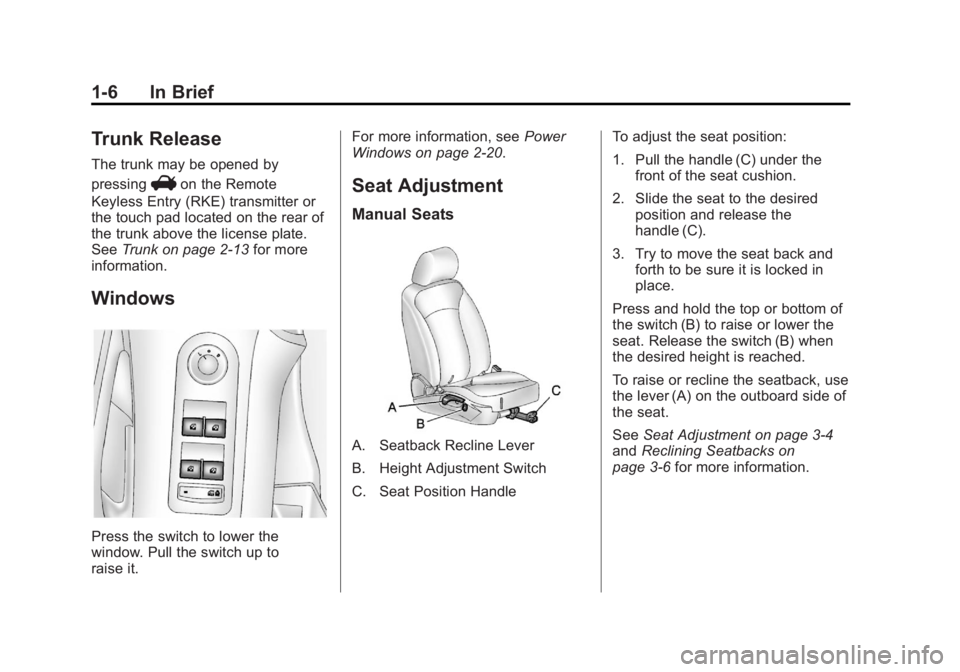
Press the switch to lower the
window. Pull the switch up to
raise it. For more information, see
Power
Windows on page 2‑20.
Seat Adjustment
Manual Seats
A. Seatback Recline Lever
B. Height Adjustment Switch
C. Seat Position Handle To adjust the seat position:
1. Pull the handle (C) under the
front of the seat cushion.
2. Slide the seat to the desired position and release the
handle (C).
3. Try to move the seat back and forth to be sure it is locked in
place.
Press and hold the top or bottom of
the switch (B) to raise or lower the
seat. Release the switch (B) when
the desired height is reached.
To raise or recline the seatback, use
the lever (A) on the outboard side of
the seat.
See Seat Adjustment on page 3‑4
and Reclining Seatbacks on
page 3‑6 for more information.
Page 13 of 512
Black plate (7,1)Buick LaCrosse Owner Manual - 2012
In Brief 1-7
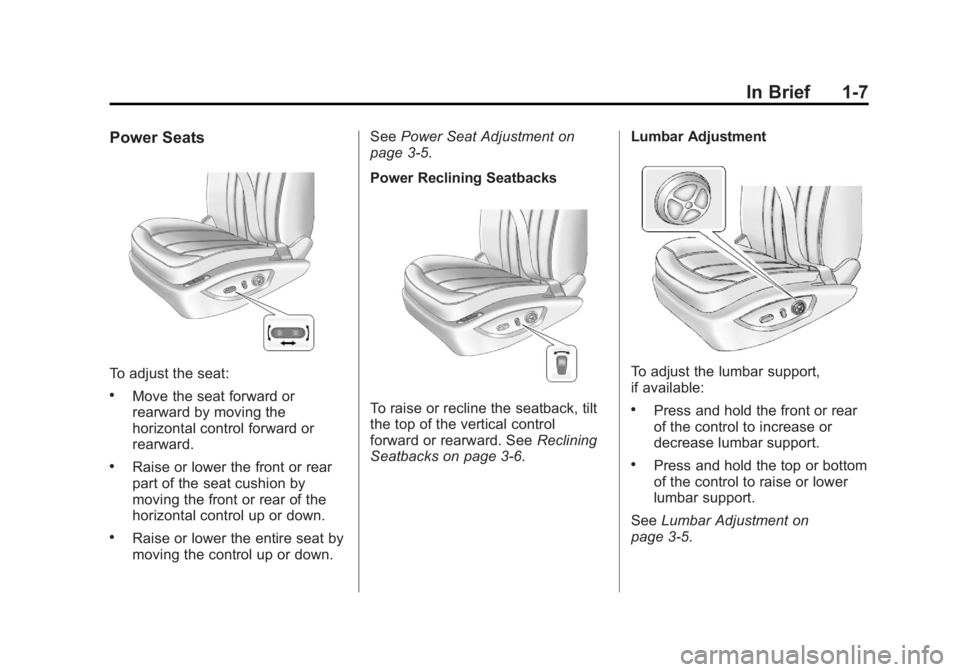
Power Seats
To adjust the seat:
.Move the seat forward or
rearward by moving the
horizontal control forward or
rearward.
.Raise or lower the front or rear
part of the seat cushion by
moving the front or rear of the
horizontal control up or down.
.Raise or lower the entire seat by
moving the control up or down.See
Power Seat Adjustment on
page 3‑5.
Power Reclining Seatbacks
To raise or recline the seatback, tilt
the top of the vertical control
forward or rearward. See Reclining
Seatbacks on page 3‑6. Lumbar Adjustment
To adjust the lumbar support,
if available:
.Press and hold the front or rear
of the control to increase or
decrease lumbar support.
.Press and hold the top or bottom
of the control to raise or lower
lumbar support.
See Lumbar Adjustment on
page 3‑5.
Page 14 of 512
Black plate (8,1)Buick LaCrosse Owner Manual - 2012
1-8 In Brief
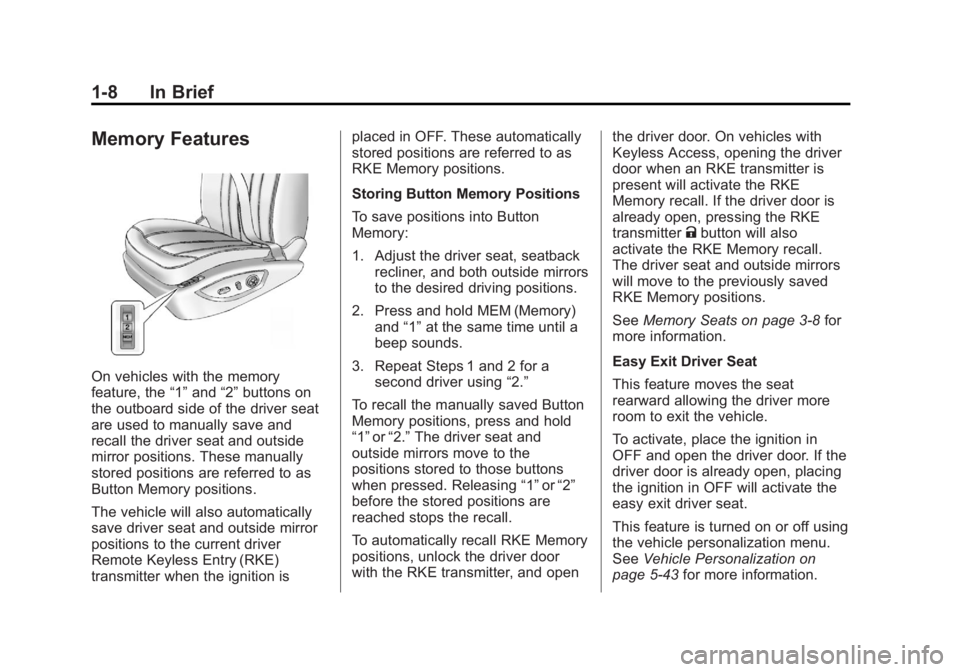
Memory Features
On vehicles with the memory
feature, the“1”and “2”buttons on
the outboard side of the driver seat
are used to manually save and
recall the driver seat and outside
mirror positions. These manually
stored positions are referred to as
Button Memory positions.
The vehicle will also automatically
save driver seat and outside mirror
positions to the current driver
Remote Keyless Entry (RKE)
transmitter when the ignition is placed in OFF. These automatically
stored positions are referred to as
RKE Memory positions.
Storing Button Memory Positions
To save positions into Button
Memory:
1. Adjust the driver seat, seatback
recliner, and both outside mirrors
to the desired driving positions.
2. Press and hold MEM (Memory) and “1”at the same time until a
beep sounds.
3. Repeat Steps 1 and 2 for a second driver using “2.”
To recall the manually saved Button
Memory positions, press and hold
“1” or“2.” The driver seat and
outside mirrors move to the
positions stored to those buttons
when pressed. Releasing “1”or“2”
before the stored positions are
reached stops the recall.
To automatically recall RKE Memory
positions, unlock the driver door
with the RKE transmitter, and open the driver door. On vehicles with
Keyless Access, opening the driver
door when an RKE transmitter is
present will activate the RKE
Memory recall. If the driver door is
already open, pressing the RKE
transmitter
Kbutton will also
activate the RKE Memory recall.
The driver seat and outside mirrors
will move to the previously saved
RKE Memory positions.
See Memory Seats on page 3‑8 for
more information.
Easy Exit Driver Seat
This feature moves the seat
rearward allowing the driver more
room to exit the vehicle.
To activate, place the ignition in
OFF and open the driver door. If the
driver door is already open, placing
the ignition in OFF will activate the
easy exit driver seat.
This feature is turned on or off using
the vehicle personalization menu.
See Vehicle Personalization on
page 5‑43 for more information.
Page 15 of 512
Black plate (9,1)Buick LaCrosse Owner Manual - 2012
In Brief 1-9
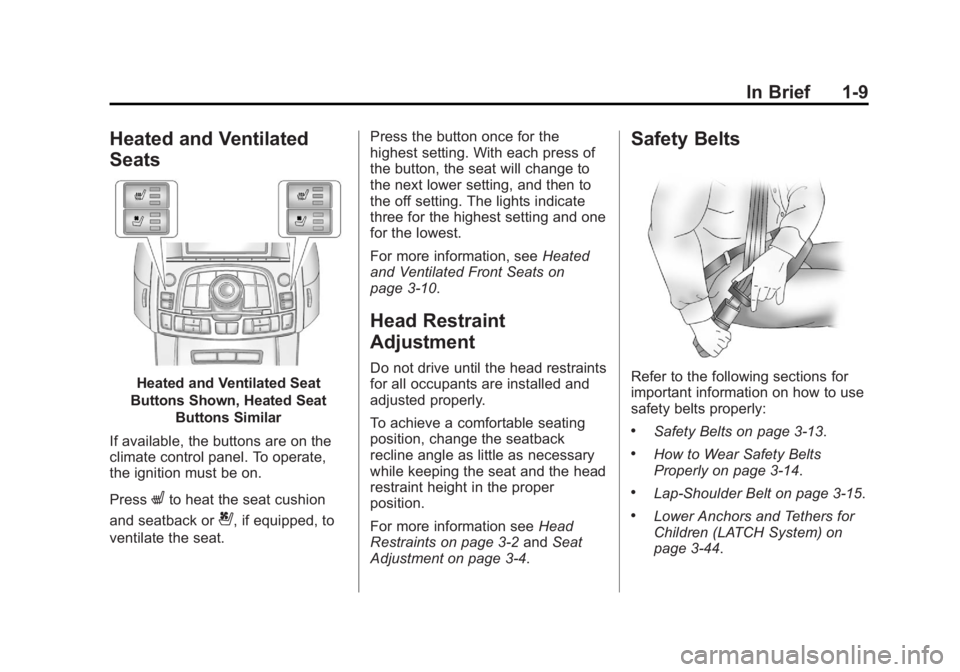
Heated and Ventilated
Seats
Heated and Ventilated Seat
Buttons Shown, Heated Seat Buttons Similar
If available, the buttons are on the
climate control panel. To operate,
the ignition must be on.
Press
Lto heat the seat cushion
and seatback or
{, if equipped, to
ventilate the seat. Press the button once for the
highest setting. With each press of
the button, the seat will change to
the next lower setting, and then to
the off setting. The lights indicate
three for the highest setting and one
for the lowest.
For more information, see
Heated
and Ventilated Front Seats on
page 3‑10.
Head Restraint
Adjustment
Do not drive until the head restraints
for all occupants are installed and
adjusted properly.
To achieve a comfortable seating
position, change the seatback
recline angle as little as necessary
while keeping the seat and the head
restraint height in the proper
position.
For more information see Head
Restraints on page 3‑2 andSeat
Adjustment on page 3‑4.
Safety Belts
Refer to the following sections for
important information on how to use
safety belts properly:
.Safety Belts on page 3‑13.
.How to Wear Safety Belts
Properly on page 3‑14.
.Lap-Shoulder Belt on page 3‑15.
.Lower Anchors and Tethers for
Children (LATCH System) on
page 3‑44.
Page 16 of 512
Black plate (10,1)Buick LaCrosse Owner Manual - 2012
1-10 In Brief
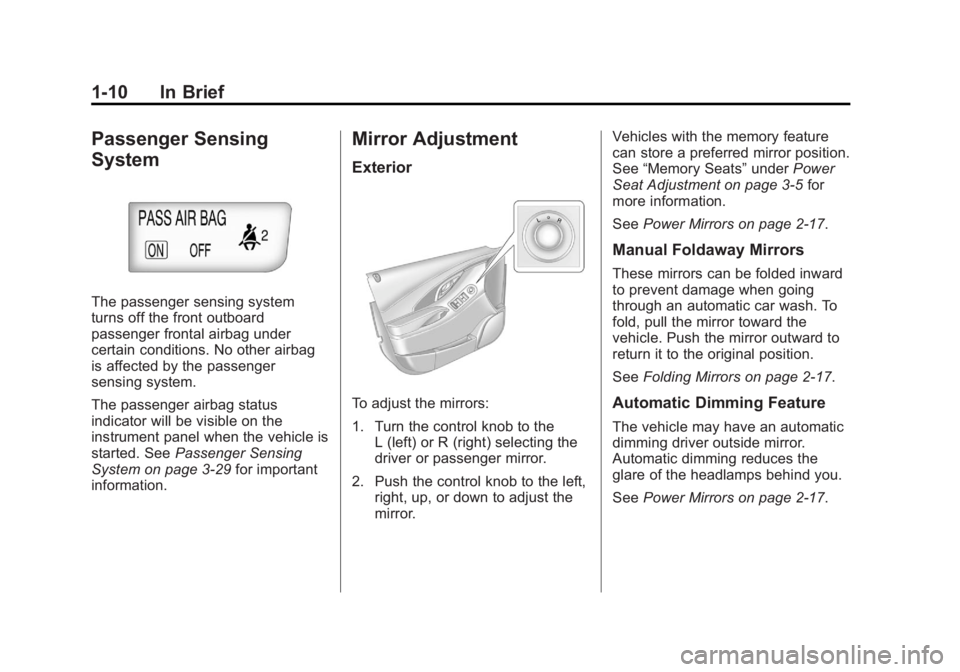
Passenger Sensing
System
The passenger sensing system
turns off the front outboard
passenger frontal airbag under
certain conditions. No other airbag
is affected by the passenger
sensing system.
The passenger airbag status
indicator will be visible on the
instrument panel when the vehicle is
started. SeePassenger Sensing
System on page 3‑29 for important
information.
Mirror Adjustment
Exterior
To adjust the mirrors:
1. Turn the control knob to the L (left) or R (right) selecting the
driver or passenger mirror.
2. Push the control knob to the left, right, up, or down to adjust the
mirror. Vehicles with the memory feature
can store a preferred mirror position.
See
“Memory Seats” underPower
Seat Adjustment on page 3‑5 for
more information.
See Power Mirrors on page 2‑17.
Manual Foldaway Mirrors
These mirrors can be folded inward
to prevent damage when going
through an automatic car wash. To
fold, pull the mirror toward the
vehicle. Push the mirror outward to
return it to the original position.
SeeFolding Mirrors on page 2‑17.
Automatic Dimming Feature
The vehicle may have an automatic
dimming driver outside mirror.
Automatic dimming reduces the
glare of the headlamps behind you.
SeePower Mirrors on page 2‑17.
Page 38 of 512
Black plate (4,1)Buick LaCrosse Owner Manual - 2012
2-4 Keys, Doors, and Windows
Remote Keyless Entry
(RKE) System Operation
The transmitter functions will work
up to 20 m (65 ft) away from the
vehicle. On vehicles with remote
start the distance will be greater.
Keep in mind that other conditions,
such as those previously stated, can
impact the performance of the
transmitter.
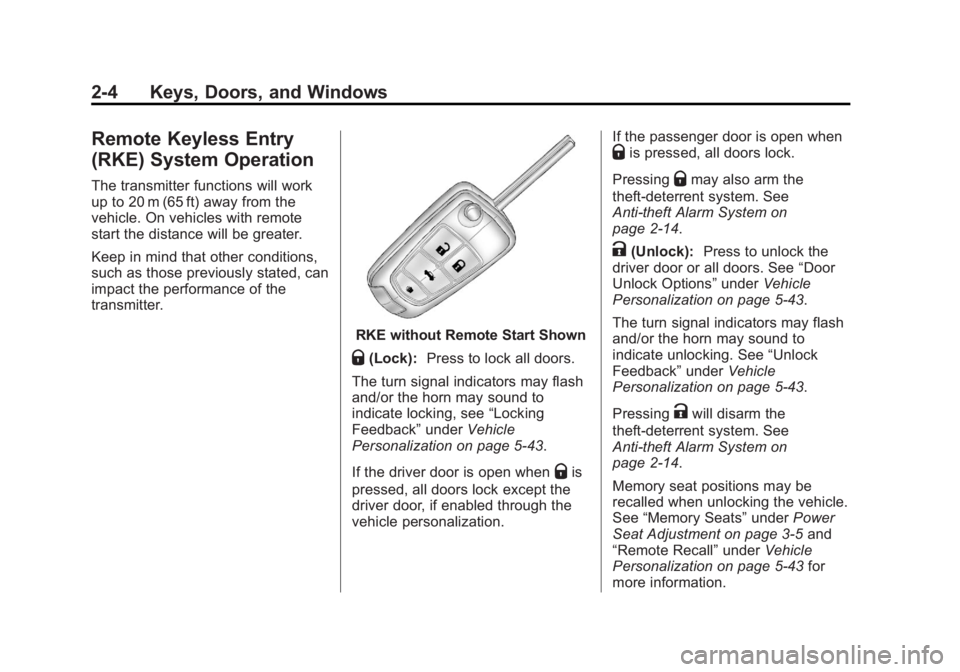
RKE without Remote Start Shown
Q(Lock):Press to lock all doors.
The turn signal indicators may flash
and/or the horn may sound to
indicate locking, see “Locking
Feedback” underVehicle
Personalization on page 5‑43.
If the driver door is open when
Qis
pressed, all doors lock except the
driver door, if enabled through the
vehicle personalization. If the passenger door is open when
Qis pressed, all doors lock.
Pressing
Qmay also arm the
theft-deterrent system. See
Anti-theft Alarm System on
page 2‑14.
K(Unlock): Press to unlock the
driver door or all doors. See “Door
Unlock Options” underVehicle
Personalization on page 5‑43.
The turn signal indicators may flash
and/or the horn may sound to
indicate unlocking. See “Unlock
Feedback” underVehicle
Personalization on page 5‑43.
Pressing
Kwill disarm the
theft-deterrent system. See
Anti-theft Alarm System on
page 2‑14.
Memory seat positions may be
recalled when unlocking the vehicle.
See “Memory Seats” underPower
Seat Adjustment on page 3‑5 and
“Remote Recall” underVehicle
Personalization on page 5‑43 for
more information.
Page 44 of 512
Black plate (10,1)Buick LaCrosse Owner Manual - 2012
2-10 Keys, Doors, and Windows
When the vehicle is started
remotely, the climate control remote
start. system will use the last setting
before the vehicle was shut off. See
“Remote Start Climate Control
Operation”inAutomatic Climate
Control System on page 8‑1 orDual
Automatic Climate Control System
on page 8‑5. Vehicles with heated
or heated and ventilated front seats
can have this feature turn on
automatically during a remote start.
See “Remote Start Heated Seats”
and “Remote Start Cooled Seats”
under Vehicle Personalization on
page 5‑43 for more information.
Extending Engine Run Time
The engine will continue to run for
10 minutes. Repeat the steps for a
10-minute time extension. Remote
start can only be extended once.
When remote start is extended, the
second 10 minutes will start
immediately. For example, if the vehicle has been
running for five minutes, and
10 minutes are added, the engine
will run for a total of 15 minutes.
A maximum of two remote starts or
remote start attempts are allowed
between ignition cycles.
The vehicle's ignition must be
turned on and then back off before
the remote start procedure can be
used again.
Canceling a Remote Start
To cancel a remote start, do any of
the following:
.Aim the RKE transmitter at the
vehicle and press and hold
/
until the parking lamps turn off.
.Turn on the hazard warning
flashers.
.Turn the vehicle on and then off.
Conditions in Which Remote Start
Will Not Work
The remote start will not operate if:
.The key is in the ignition (key
access) or the ignition is in any
position other than OFF (keyless
access).
.The transmitter is in the vehicle
(keyless access).
.The hood is not closed.
.The hazard warning flashers
are on.
.There is an emission control
system malfunction.
.The engine coolant temperature
is too high.
.The oil pressure is low.
.Two remote vehicle starts have
already been used.
.The vehicle is not in P (Park).