infotainment BUICK LACROSSE 2013 User Guide
[x] Cancel search | Manufacturer: BUICK, Model Year: 2013, Model line: LACROSSE, Model: BUICK LACROSSE 2013Pages: 422, PDF Size: 5.74 MB
Page 164 of 422
Black plate (2,1)Buick LaCrosse Owner Manual - 2013 - crc - 9/7/12
7-2 Infotainment System
To minimize taking your eyes off the
road while driving, do the following
while the vehicle is parked:
.Become familiar with the
operation and controls of the
audio system.
.Set up the tone, speaker
adjustments, and preset radio
stations.
For more information, see Defensive
Driving on page 9‑3.
Notice: Contact your dealer
before adding any equipment.
Adding audio or communication
equipment could interfere with
the operation of the engine, radio,
or other systems, and could
damage them. Follow federal
rules covering mobile radio and
telephone equipment.
The vehicle has Retained
Accessory Power (RAP). With RAP,
the audio system can be played
even after the ignition is turned off.
See Retained Accessory Power
(RAP) on page 9‑24. The vehicle may have a base radio
that is included in this manual. See
the separate infotainment manual
for information on the connective
radio and the navigation system,
audio players, phone, and voice
recognition. There is also
information on settings and
downloadable applications
(if equipped).
Theft-Deterrent Feature
The theft-deterrent feature works by
learning a portion of the Vehicle
Identification Number (VIN) to the
infotainment system. The
infotainment system does not
operate if it is stolen or moved to a
different vehicle.
Page 165 of 422
Black plate (3,1)Buick LaCrosse Owner Manual - 2013 - crc - 9/7/12
Infotainment System 7-3
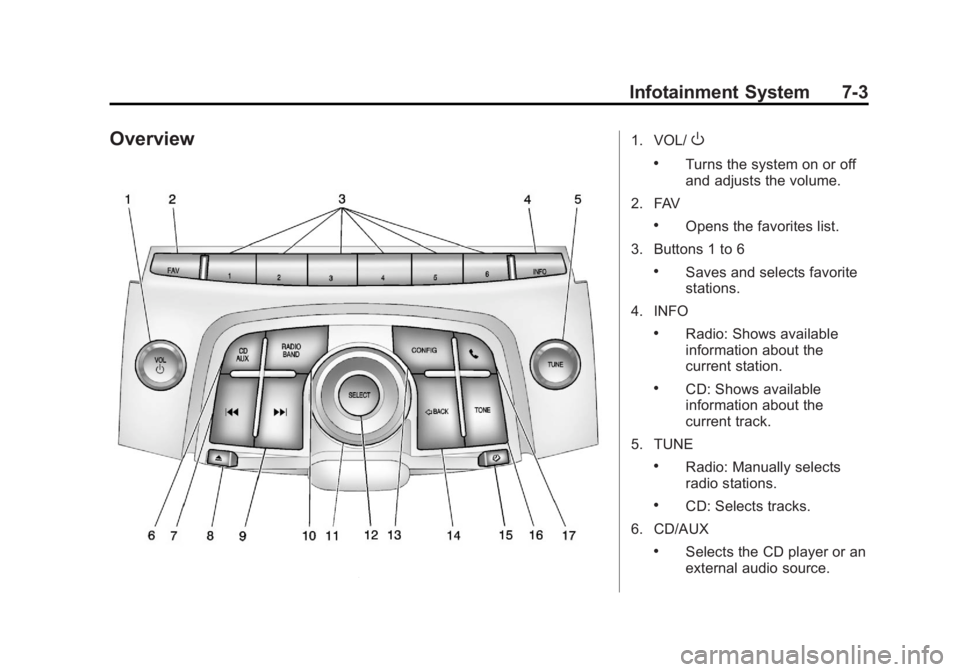
Overview1. VOL/O
.Turns the system on or off
and adjusts the volume.
2. FAV
.Opens the favorites list.
3. Buttons 1 to 6
.Saves and selects favorite
stations.
4. INFO
.Radio: Shows available
information about the
current station.
.CD: Shows available
information about the
current track.
5. TUNE
.Radio: Manually selects
radio stations.
.CD: Selects tracks.
6. CD/AUX
.Selects the CD player or an
external audio source.
Page 166 of 422
Black plate (4,1)Buick LaCrosse Owner Manual - 2013 - crc - 9/7/12
7-4 Infotainment System
7.g
.Radio: Seeks the previous
station.
.CD: Select the previous
track or rewinds within a
track.
8.
X
.Removes a disc from the
CD slot.
9.
l
.Radio: Seeks the next
station.
.CD: Select the next track or
fast forwards within a track.
10. RADIO/BAND
.Changes the band while
listening to the radio.
.Selects the radio when
listening to a different
audio source. 11. Multifunction Knob
.Opens menus, highlights
menu items, or sets
numeric values while in
a menu.
12. SELECT
.Selects menu items.
13. CONFIG
.Opens the Settings menu.
14.
/BACK
.Menu: Moves one
level back.
.Character Input: Deletes
the last character.
15.
H
.Opens the Clock menu.
16. TONE
.Opens the Tone menu. 17.
5
.Opens the Phone
main menu.
.Mutes the audio system.
Operation
Controls
The infotainment system is operated
by using the pushbuttons,
multifunction knobs, menus shown
on the display, and steering wheel
controls, if equipped.
Turning the System On or Off
VOL/O(Volume/Power):
Press to
turn the system on and off.
Automatic Switch-Off
If the infotainment system has been
turned on after the ignition is turned
off, the system will turn off
automatically after 10 minutes.
Page 167 of 422
Black plate (5,1)Buick LaCrosse Owner Manual - 2013 - crc - 9/7/12
Infotainment System 7-5
Volume Control
VOL/O(Volume/Power):Turn to
adjust the volume.
5(Phone/Mute): For vehicles with
OnStar®, press and hold5to mute
the infotainment system. Press and
hold
5again, or turn the VOL/O
knob to cancel mute.
For vehicles without OnStar
®, press5to mute the infotainment system.
Press
5again, or turn the VOL/O
knob to cancel mute.
Menu System
Controls
The Multifunction knob, SELECT
button, and
/BACK button are
used to navigate the menu system.
Multifunction Knob:
Turn to:
.Enter the menu system.
.Highlight a menu option.
.Select a value. SELECT:
Press to:
.Select or activate the highlighted
menu option.
.Confirm a set value.
.Turn a system setting on or off.
/BACK:
Press to:
.Exit a menu.
.Return from a submenu screen
to the previous menu screen.
.Delete the last character in a
sequence.
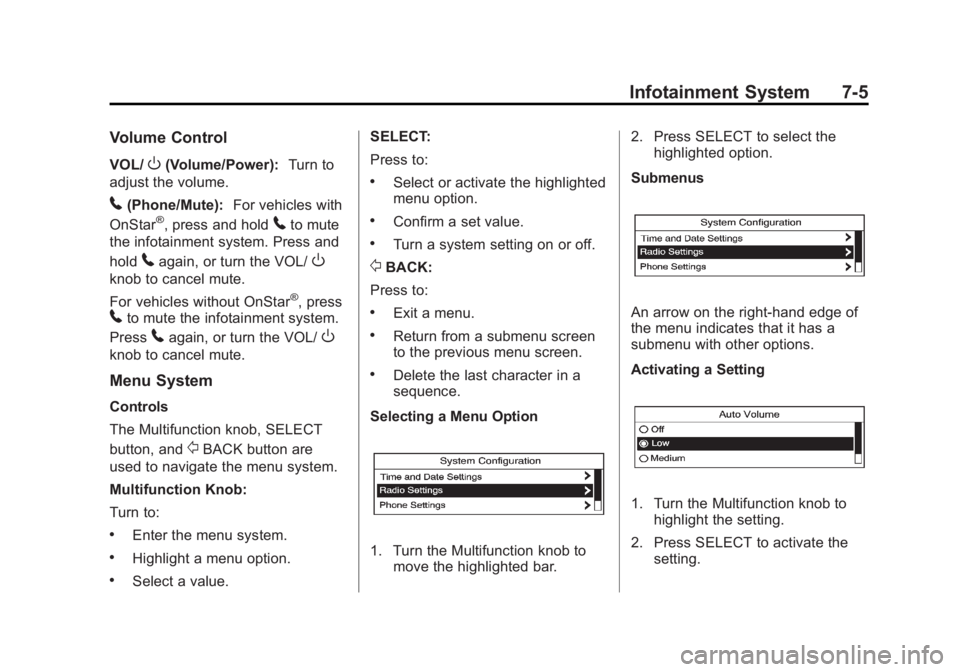
Selecting a Menu Option
1. Turn the Multifunction knob to move the highlighted bar. 2. Press SELECT to select the
highlighted option.
Submenus
An arrow on the right-hand edge of
the menu indicates that it has a
submenu with other options.
Activating a Setting
1. Turn the Multifunction knob to highlight the setting.
2. Press SELECT to activate the setting.
Page 168 of 422
Black plate (6,1)Buick LaCrosse Owner Manual - 2013 - crc - 9/7/12
7-6 Infotainment System
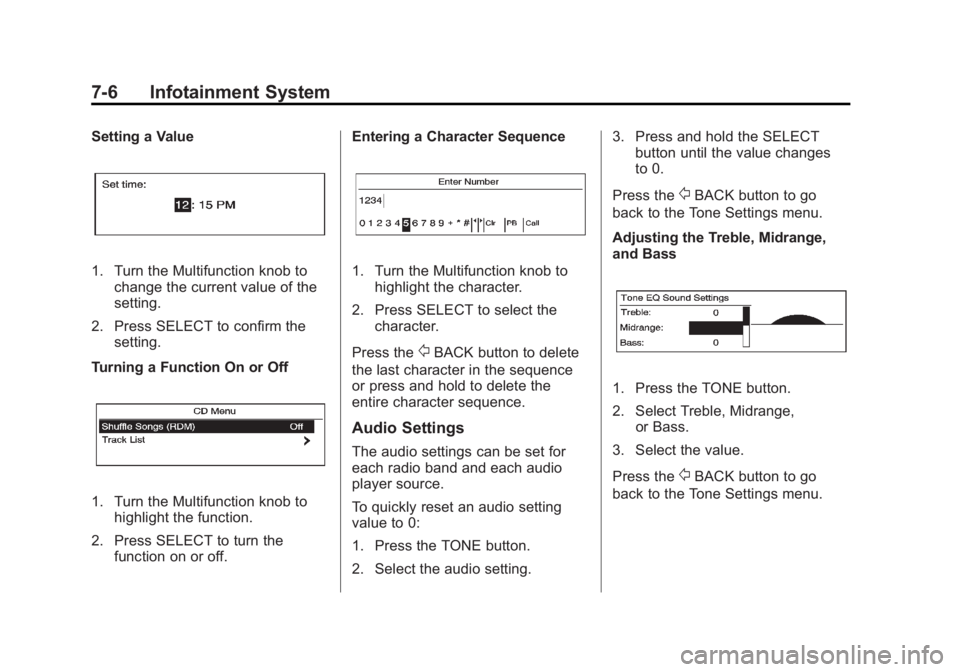
Setting a Value
1. Turn the Multifunction knob tochange the current value of the
setting.
2. Press SELECT to confirm the setting.
Turning a Function On or Off
1. Turn the Multifunction knob to highlight the function.
2. Press SELECT to turn the function on or off. Entering a Character Sequence
1. Turn the Multifunction knob to
highlight the character.
2. Press SELECT to select the character.
Press the
/BACK button to delete
the last character in the sequence
or press and hold to delete the
entire character sequence.
Audio Settings
The audio settings can be set for
each radio band and each audio
player source.
To quickly reset an audio setting
value to 0:
1. Press the TONE button.
2. Select the audio setting. 3. Press and hold the SELECT
button until the value changes
to 0.
Press the
/BACK button to go
back to the Tone Settings menu.
Adjusting the Treble, Midrange,
and Bass
1. Press the TONE button.
2. Select Treble, Midrange, or Bass.
3. Select the value.
Press the
/BACK button to go
back to the Tone Settings menu.
Page 169 of 422
Black plate (7,1)Buick LaCrosse Owner Manual - 2013 - crc - 9/7/12
Infotainment System 7-7
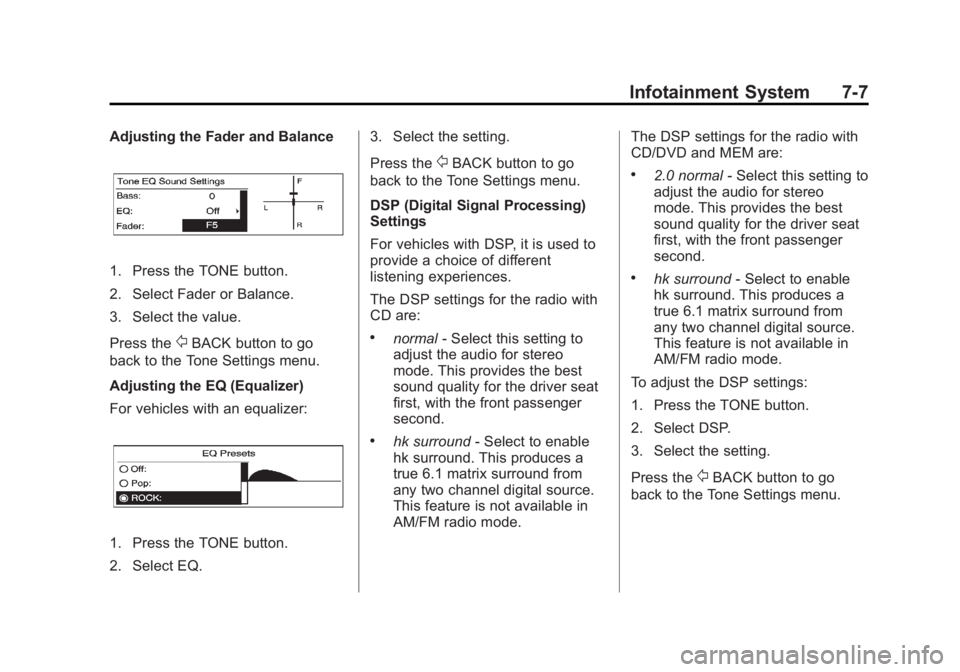
Adjusting the Fader and Balance
1. Press the TONE button.
2. Select Fader or Balance.
3. Select the value.
Press the
/BACK button to go
back to the Tone Settings menu.
Adjusting the EQ (Equalizer)
For vehicles with an equalizer:
1. Press the TONE button.
2. Select EQ. 3. Select the setting.
Press the
/BACK button to go
back to the Tone Settings menu.
DSP (Digital Signal Processing)
Settings
For vehicles with DSP, it is used to
provide a choice of different
listening experiences.
The DSP settings for the radio with
CD are:
.normal - Select this setting to
adjust the audio for stereo
mode. This provides the best
sound quality for the driver seat
first, with the front passenger
second.
.hk surround - Select to enable
hk surround. This produces a
true 6.1 matrix surround from
any two channel digital source.
This feature is not available in
AM/FM radio mode. The DSP settings for the radio with
CD/DVD and MEM are:
.2.0 normal
- Select this setting to
adjust the audio for stereo
mode. This provides the best
sound quality for the driver seat
first, with the front passenger
second.
.hk surround - Select to enable
hk surround. This produces a
true 6.1 matrix surround from
any two channel digital source.
This feature is not available in
AM/FM radio mode.
To adjust the DSP settings:
1. Press the TONE button.
2. Select DSP.
3. Select the setting.
Press the
/BACK button to go
back to the Tone Settings menu.
Page 170 of 422
Black plate (8,1)Buick LaCrosse Owner Manual - 2013 - crc - 9/7/12
7-8 Infotainment System
System Settings
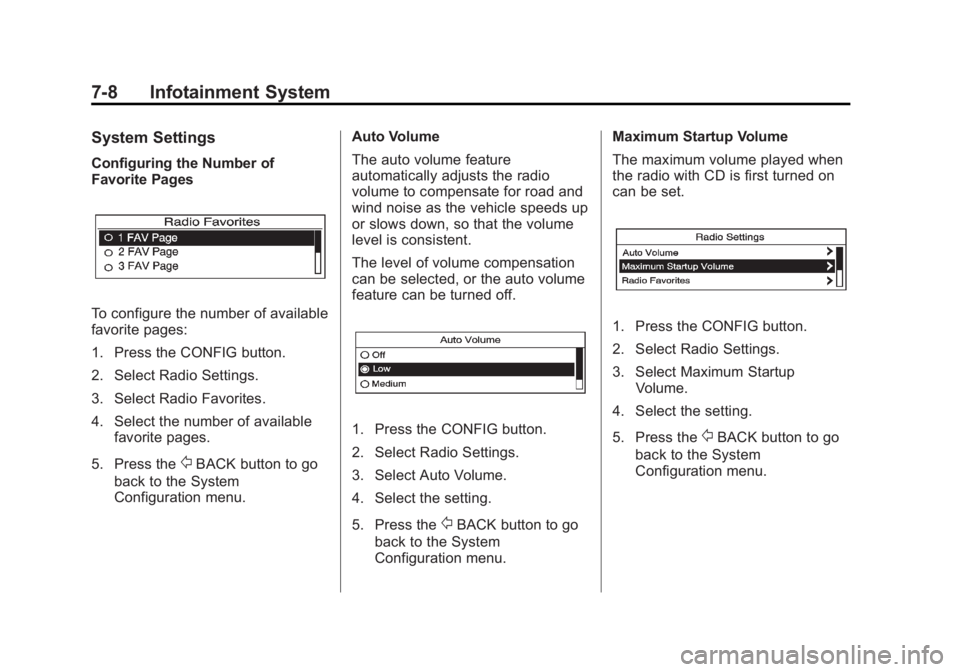
Configuring the Number of
Favorite Pages
To configure the number of available
favorite pages:
1. Press the CONFIG button.
2. Select Radio Settings.
3. Select Radio Favorites.
4. Select the number of availablefavorite pages.
5. Press the
/BACK button to go
back to the System
Configuration menu. Auto Volume
The auto volume feature
automatically adjusts the radio
volume to compensate for road and
wind noise as the vehicle speeds up
or slows down, so that the volume
level is consistent.
The level of volume compensation
can be selected, or the auto volume
feature can be turned off.
1. Press the CONFIG button.
2. Select Radio Settings.
3. Select Auto Volume.
4. Select the setting.
5. Press the
/BACK button to go
back to the System
Configuration menu. Maximum Startup Volume
The maximum volume played when
the radio with CD is first turned on
can be set.
1. Press the CONFIG button.
2. Select Radio Settings.
3. Select Maximum Startup
Volume.
4. Select the setting.
5. Press the
/BACK button to go
back to the System
Configuration menu.
Page 171 of 422
Black plate (9,1)Buick LaCrosse Owner Manual - 2013 - crc - 9/7/12
Infotainment System 7-9
Radio
AM-FM Radio
Playing the Radio
Audio Source
VOL/
O(Volume/Power):
1. Press to turn the radio on or off.
2. Turn to increase or decrease the volume.
The steering wheel controls can
also be used to adjust the volume.
See Steering Wheel Controls on
page 5‑2.
RADIO/BAND:
1. Press to change the band while listening to the radio.
2. Select the radio while listening to another audio source.
Infotainment System Menus
Tone Settings
To access the tone settings, press
the TONE button on the faceplate. Use the tone settings to adjust the
following features:
.Setting the tone
.Adjusting the speakers
Setting the Tone
To adjust the tone:
.Treble: Press Treble and then
press + or −to change the level.
.Middle (Midrange): Press Middle
and then press + or −to change
the level.
.Bass: Press Bass and then
press + or −to change the level.
Adjusting the Speakers
To adjust the speaker balance:
.Press the left arrow on the
bottom for more sound from the
left speakers or the right arrow
on the bottom for more sound
from the right speakers. The
middle position balances the
sound between the left and right
speakers. To adjust the speaker fade:
.Press the upper arrow for more
sound from the front speakers
and the lower arrow for more
sound from the rear speakers.
The middle position balances
the sound between the front and
rear speakers.
EQ Settings
The EQ settings are selected
through the tone menu. Press the
left or right arrows to cycle through
the EQ options. The available
choices are Talk and Manual.
Finding a Station
To select the band, see “Audio
Source” earlier in this section.
Turn the Multifunction knob to find a
radio station. To select a preset
station, choose a preset button.
Seeking a Station
Press
gorlto search for a
station.
Page 172 of 422
Black plate (10,1)Buick LaCrosse Owner Manual - 2013 - crc - 9/7/12
7-10 Infotainment System
Changing the Sources
Press the RADIO/BAND button on
the faceplate to change (AM, FM,
SiriusXM
®, CD, or AUX) audio
sources.
Storing Radio Station Presets
There are a few ways to store
presets.
Up to 36 preset stations can be
stored. AM, FM, and SiriusXM,
if equipped, can be mixed.
1. From the AM, FM, or SiriusXM main page, press and hold one
of the preset screen buttons at
the bottom of the screen. After a
few seconds, a beep will be
heard and the new preset
information will display on that
screen button.
2. Touch and hold a preset button to store the currently active
station. After a few seconds, a
beep will be heard and the new
preset information will display on
a small pop-up display at the
bottom of the screen. 3. Repeat the steps for each
preset.
To change the number of preset
pages, see “Mixed-Band Presets”
following.
Recalling a Preset Station
To recall a preset station, do the
following:
.Press the FAV button on the
faceplate to display the FAV
pop-up. Select the desired
preset from the pop-up.
.Press the FAV screen button at
the top bar to display the preset
pop-up that appears at the
bottom of the page. Press one of
the preset screen buttons to go
to the selected preset station.
.In the AM, FM, or SiriusXM (if
equipped) main page, press one
of the preset screen buttons to
go to the selected preset station.
Mixed-Band Presets
Each page can store six preset
stations. The presets within a page
can be from different radio bands.
To scroll through the pages, press
the FAV button on the faceplate or
the FAV screen button on the top
bar. The current page number
displays above the preset buttons.
The stored stations for each FAV
page display on the preset buttons
at the bottom of the screen. The
number of FAV pages displayed can
be changed in the Radio Settings in
the Configuration Menu.
Satellite Radio
SiriusXM®Satellite Radio
Service
Vehicles with an SiriusXM satellite
radio tuner and an SiriusXM satellite
radio subscription can receive
SiriusXM programming.
SiriusXM is a satellite radio service
based in the 48 contiguous United
States and 10 Canadian provinces.
Page 173 of 422
Black plate (11,1)Buick LaCrosse Owner Manual - 2013 - crc - 9/7/12
Infotainment System 7-11
SiriusXM satellite radio has a wide
variety of programming and
commercial-free music, coast to
coast, and in digital-quality sound.
A service fee is required to receive
the SiriusXM service. For more
information, see www.siriusxm.com
or call 1-866-635-2349 (U.S) and
www.xmradio.ca or call
1-877-209-0079 (Canada).
When SiriusXM is active, the
channel name and number,
category name, song title, and artist
display on the screen.
SiriusXM Categories (Radio
with CD)
SiriusXM stations are organized in
categories.
Removing or Adding Categories
1. Press the CONFIG button. Turnthe Multifunction knob until
Radio displays. Press SELECT
or press Radio to display the
radio settings menu.
2. Select the Show/Hide XM Categories screen button. 3. Press the category buttons on
the screen to show or hide the
category.
SiriusXM Categories (Radio
with CD and Touchscreen)
Adding or Removing Categories
1. From the Home Page press the
Config screen button or the
CONFIG button on the
infotainment system.
2. Select Radio Settings from the Config Menu list.
3. Select Add/Remove XM Categories.
4. From the Add/Remove XM Categories screen, select or
deselect any category to be
used in XM mode. A checkmark
will indicate that the category is
selected. Turning SiriusXM Album Art On
or Off
1. From the Home Page press the
Config screen button or the
CONFIG button on the
infotainment system.
2. Select Radio Settings from the Config Menu list.
3. Select XM Album Art to turn on or off.
SiriusXM Messages
XL (Explicit Language
Channels): These channels, or any
others, can be blocked by request,
by calling 1-800-929-2100 in the
U.S., and 1-877-438-9677 in
Canada.
XM Updating: The encryption code
in the receiver is being updated. No
action is required. This process
should take no longer than
30 seconds.